Standardize AI coding rules across repositories
AI coding agents are only as consistent as the rules they follow. When those rules live in Port forms, scattered markdown files, or tribal knowledge, teams lose version control, reviewability, and proof that standards are actually applied.
This guide walks through one end-to-end loop:
- Author rules as files in a dedicated source-of-truth git repository (PR-reviewed, versioned).
- Provision those rules to every subscribed repository as
AGENTS.md,.cursor/rules, and.github/instructionsfiles via a Port workflow and coding agent. - Ingest and score the files Port's GitHub integration pulls back from each repo, then grade compliance with a scorecard.
The centerpiece is the demo at the end: merge a rules change, watch rollout PRs land, and see the compliance dashboard climb.
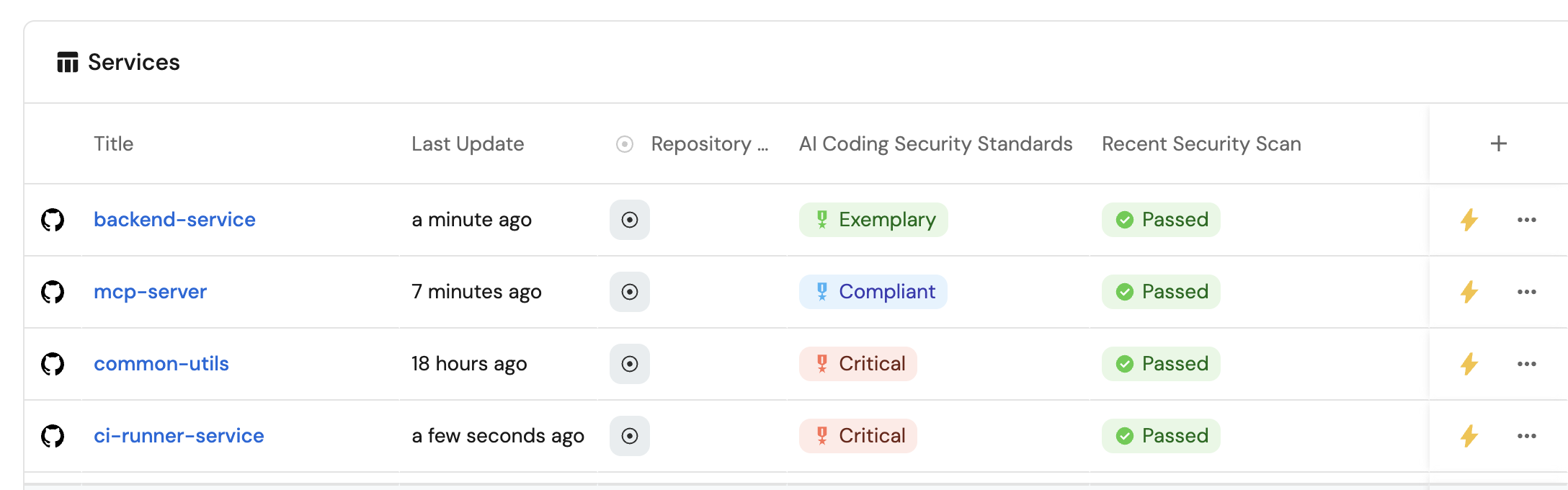
Common use cases
- Author once, distribute everywhere so platform and security teams maintain a single PR-reviewed rules repo.
- Prove adoption by scoring whether each repository actually has the required rule files.
- Handle exceptions with an explicit per-repo exemption so non-compliant outliers stay visible and intentional.
- Demo the full loop by editing the rules repo and watching scorecard levels move from Critical toward Elite.
Prerequisites
This guide assumes the following:
- You have a Port account and have completed the onboarding process.
- Port's GitHub Ocean integration is installed in your account.
- You completed the GitHub backend setup for your preferred coding agent from the Trigger AI coding assistants from Port guide. You only need the backend workflow and secrets from that guide, not the self-service actions:
- Claude Code - deploy
claude-backend.yamlin your dedicated workflows repository. - GitHub Copilot - store
GITHUB_TOKENas a Port secret and keep thecreate_github_issueaction available. - Google Gemini - deploy
gemini-backend.yamlin your dedicated workflows repository.
- Claude Code - deploy
- Your repository entities are already synced into Port (this guide uses the
githubRepositoryblueprint identifier; replace it if yours differs).
How the loop works
| Stage | Where it happens | What Port does |
|---|---|---|
| Author | Dedicated ai-coding-rules git repo | Ingests rule files into ai_coding_rule entities. |
| Provision | Port workflow + coding agent | On rule changes, opens PRs that write the rule files into subscribed repos. |
| Ingest and score | GitHub integration + scorecard | Pulls the same file paths back from each repo and grades compliance. |
Git stays the source of truth for rule content. Port is the control plane for distribution, subscription, exemptions, and compliance visibility.
Set up the data model
Create the AI coding rule blueprint
Each rule file in the source repo becomes one catalog entity. The path property is the path the provision step writes into target repositories.
-
Go to the Data model page in Port.
-
Click on
+ Blueprint. -
Click on the
{...} Edit JSON. -
Add this JSON schema:
AI coding rule blueprint (click to expand)
{"identifier": "ai_coding_rule","description": "A single AI coding rule file authored in the source-of-truth git repository","title": "AI Coding Rule","icon": "Cursor","schema": {"properties": {"content": {"type": "string","title": "Content","description": "Full markdown content of the rule file","format": "markdown"},"path": {"type": "string","title": "Target path","description": "Path to write in subscribed repositories (for example AGENTS.md or .cursor/rules/security/authentication.md)"},"status": {"type": "string","title": "Status","enum": ["active","draft","deprecated"],"enumColors": {"active": "green","draft": "yellow","deprecated": "red"},"default": "active"},"category": {"type": "string","title": "Category","enum": ["agents_md","cursor_security","copilot_instructions"],"enumColors": {"agents_md": "purple","cursor_security": "orange","copilot_instructions": "turquoise"}}},"required": ["content","path"]},"mirrorProperties": {},"calculationProperties": {},"aggregationProperties": {},"relations": {"source_repository": {"title": "Source repository","target": "githubRepository","required": false,"many": false}}} -
Click
Saveto create the blueprint.
Update the repository blueprint
Add subscription and compliance properties to the repository blueprint. The compliance properties are filled by the GitHub integration from each target repo. The subscription flags control which repos receive provisioned PRs.
-
Go to the Data model page in Port.
-
Find and select your existing repository blueprint (for example
githubRepository). -
Click on the
...button, then chooseEdit JSON. -
Add the following properties to the
propertiessection:Repository AI rules properties (click to expand)
"ai_rules_subscribed": {"type": "boolean","title": "AI rules subscribed","description": "When true, Port provisions centralized AI coding rules into this repository","default": false},"ai_rules_exempt": {"title": "AI rules exempt","description": "When true, this repository is intentionally excluded from AI rules rollout and scorecard enforcement","type": "boolean"},"agents_md": {"type": "string","title": "AGENTS.md","format": "markdown","description": "Ingested AGENTS.md content from the repository root"},"cursor_authentication_rules": {"type": "string","title": "Authentication rules","format": "markdown","description": "Authentication and authorization security rules"},"cursor_command_injection_rules": {"type": "string","title": "Command injection rules","format": "markdown","description": "Command injection protection rules"},"cursor_database_rules": {"type": "string","title": "Database security rules","format": "markdown","description": "Database security and SQL injection prevention rules"},"cursor_file_upload_rules": {"type": "string","title": "File upload security rules","format": "markdown","description": "File upload validation and security rules"},"cursor_input_validation_rules": {"type": "string","title": "Input validation rules","format": "markdown","description": "Input validation and XSS prevention rules"},"cursor_owasp_rules": {"type": "string","title": "OWASP Top 10 rules","format": "markdown","description": "OWASP Top 10 security vulnerability prevention rules"},"cursor_logging_rules": {"type": "string","title": "Security logging rules","format": "markdown","description": "Security logging and error handling rules"},"copilot_documentation_instructions": {"type": "string","title": "Documentation instructions","format": "markdown","description": "GitHub Copilot documentation writing guidelines"},"copilot_general_coding_instructions": {"type": "string","title": "General coding instructions","format": "markdown","description": "GitHub Copilot general coding standards"},"copilot_language_specific_instructions": {"type": "string","title": "Language-specific instructions","format": "markdown","description": "GitHub Copilot language-specific coding standards"} -
Click
Saveto update the blueprint.
Author rules in git
Create a dedicated repository (for example ai-coding-rules) that owns the canonical rule files. Engineers review changes through normal pull requests. Port never becomes the place where rule text is authored.
Recommended file structure
Use this layout so authoring, provision, ingest, and scorecard all share the same paths:
ai-coding-rules/
├── AGENTS.md
├── .cursor/
│   └── rules/
│       └── security/
│           ├── authentication.md
│           ├── command-injection.md
│           ├── database.md
│           ├── file-upload.md
│           ├── input-validation.md
│           ├── owasp-10.md
│           └── logging.md
└── .github/
    └── instructions/
        ├── documentation.instructions.md
        ├── general-coding.instructions.md
        └── language-specific.instructions.md
Example AGENTS.md (click to expand)
# AI agent rules

## Secure coding baseline

- Always validate and sanitize external input.
- Never log secrets, credentials, or tokens.
- Use parameterized queries for all database access.

## Contribution guidelines

- Prefer small, reviewable pull requests.
- Match existing project conventions before introducing new patterns.
- Reference `.cursor/rules/security/` for security-specific constraints.
Example Cursor security rule (click to expand)
---
description: Authentication and authorization rules for AI-assisted code
globs:
alwaysApply: true
---

# Authentication rules

- Never weaken authentication or authorization flows.
- Do not make MFA optional unless an explicit security review approves it.
- Prefer short-lived tokens and rotate secrets through approved tooling.
- Reject code that hardcodes credentials or bypasses auth middleware.
Map the rules repo into Port
Configure the GitHub Ocean integration so files from the source repo become ai_coding_rule entities, and so target repos ingest the same paths for scoring.
-
Go to the data sources page in Port.
-
Find your GitHub integration and click on it.
-
Go to the
Mappingtab. -
Update the mapping configuration:
GitHub Ocean mapping configuration (click to expand)
Replace
my-organdai-coding-ruleswith your organization and rules repository name. ReplacegithubRepositoryif your blueprint identifier differs.deleteDependentEntities: falsecreateMissingRelatedEntities: trueenableMergeEntity: trueresources:- kind: repositoryselector:query: trueincludedFiles:- README.md- AGENTS.md- .cursor/rules/security/authentication.md- .cursor/rules/security/command-injection.md- .cursor/rules/security/database.md- .cursor/rules/security/file-upload.md- .cursor/rules/security/input-validation.md- .cursor/rules/security/owasp-10.md- .cursor/rules/security/logging.md- .github/instructions/documentation.instructions.md- .github/instructions/general-coding.instructions.md- .github/instructions/language-specific.instructions.mdport:entity:mappings:identifier: .full_nametitle: .nameblueprint: '"githubRepository"'properties:readme: .__includedFiles["README.md"]agents_md: .__includedFiles["AGENTS.md"]cursor_authentication_rules: .__includedFiles[".cursor/rules/security/authentication.md"]cursor_command_injection_rules: .__includedFiles[".cursor/rules/security/command-injection.md"]cursor_database_rules: .__includedFiles[".cursor/rules/security/database.md"]cursor_file_upload_rules: .__includedFiles[".cursor/rules/security/file-upload.md"]cursor_input_validation_rules: .__includedFiles[".cursor/rules/security/input-validation.md"]cursor_owasp_rules: .__includedFiles[".cursor/rules/security/owasp-10.md"]cursor_logging_rules: .__includedFiles[".cursor/rules/security/logging.md"]copilot_documentation_instructions: .__includedFiles[".github/instructions/documentation.instructions.md"]copilot_general_coding_instructions: .__includedFiles[".github/instructions/general-coding.instructions.md"]copilot_language_specific_instructions: .__includedFiles[".github/instructions/language-specific.instructions.md"]url: .html_urldefaultBranch: .default_branch- kind: fileselector:query: 'true'files:- path: AGENTS.mdskipParsing: trueorganization: my-orgrepos:- name: ai-coding-rulesbranch: main- path: .cursor/rules/security/*.mdskipParsing: trueorganization: my-orgrepos:- name: ai-coding-rulesbranch: main- path: .github/instructions/*.instructions.mdskipParsing: trueorganization: my-orgrepos:- name: ai-coding-rulesbranch: mainport:entity:mappings:identifier: .path | gsub("/"; "__") | gsub("\\."; "_")title: .nameblueprint: '"ai_coding_rule"'properties:content: .contentpath: .pathstatus: '"active"'category: >-if (.path | startswith("AGENTS")) then "agents_md"elif (.path | startswith(".cursor/rules/security")) then "cursor_security"else "copilot_instructions"endrelations:source_repository: .repository.full_name -
Click
Save, then clickResync. -
Confirm
AI Coding Ruleentities appear in the catalog with the expectedpathandcontentvalues.
The integration looks for the exact paths listed above. Keep the source repo and every subscribed repo on the same file layout so provision and scoring stay aligned.
Subscribe repositories
In Port, set ai_rules_subscribed to true on every repository that should receive the centralized rules. Leave the rules source repo itself unsubscribed (or exempt) so the workflow does not open a PR against the source of truth.
For intentional exceptions, set ai_rules_exempt to true. Exempt repos are skipped during provision and treated as an explicit exception in the scorecard.
Configure the provision agent
The agent collects every active rule, finds subscribed repositories, and asks your coding agent backend to open a PR that writes the full rule set.
-
Go to the AI agents page in Port.
-
Click on
+ AI Agent. -
Click on the
{...} Edit JSONbutton. -
Copy and paste the following JSON configuration:
AI rules sync manager configuration (click to expand)
{"identifier": "ai_rules_sync_manager","title": "AI Rules Sync Manager","icon": "Details","team": [],"properties": {"description": "Fetches active AI coding rules from Port and opens PRs that sync them into subscribed repositories","status": "active","prompt": "You are an AI agent responsible for provisioning centralized AI coding rules into subscribed GitHub repositories.\n\nYou may receive a changed rule identifier as input. Always treat the full active rule set as the source of truth.\n\nYour responsibilities:\n\n1. Fetch ALL `ai_coding_rule` entities where status is \"active\".\n2. Build a deterministic file map of path -> content from those rules. If two rules share a path, keep the most recently updated one.\n3. Fetch ALL `githubRepository` entities where:\n - properties.ai_rules_subscribed == true\n - properties.ai_rules_exempt != true\n - the repository is NOT the rules source repository related by ai_coding_rule.source_repository\n4. For EACH subscribed repository, create a GitHub issue using the day-2 `create_github_issue` action with:\n - title: \"Sync centralized AI coding rules from Port\"\n - labels: [\"ai-instructions\", \"port-sync\", \"auto_assign\"]\n - body using this template:\n\n---\n## Task for Copilot\n\nUpdate this repository so it matches the centralized AI coding rules package.\n\nFor each file below:\n- Create or replace the file at the exact path shown.\n- Use the Markdown content exactly as provided.\n- Do not edit unrelated files.\n\nCommit on a new branch and open a pull request with:\n- Title: \"chore: sync AI coding rules from Port\"\n- Description: \"This PR syncs AGENTS.md, Cursor security rules, and GitHub Copilot instructions from the centralized ai-coding-rules repository via Port.\"\n\n## Files to sync\n\nFILE START path=<path>\n<file markdown>\nFILE END\n\n(repeat FILE START/END for every active rule)\n---\n\nDo not ask for clarification.\nAlways assume the generated file set is final.\nSkip repositories that are exempt or not subscribed.\n","execution_mode": "Automatic","tools": ["^(list|get|search|track|trigger|describe)_.*","^trigger_create_github_issue$"]},"relations": {}} -
Click
Createto save the agent.
The agent prompt above assumes the Copilot issue flow. For Claude Code or Gemini, use the matching tab below.
Build the provision workflow
This workflow listens for changes to ai_coding_rule entities (which update when the rules repo merges) and invokes the sync manager.
- GitHub Copilot
- Claude Code
- Google Gemini
This path uses the ai_rules_sync_manager agent and the create_github_issue action so Copilot opens the sync PR.
Build the workflow
-
Go to the Workflows page in Port.
-
Click
+ Workflow. -
Fill out the Create new workflow form, then click Confirm.
-
Copy and paste the following workflow JSON into the editor:
Sync AI rules workflow JSON for Copilot (click to expand)
{"identifier": "sync_ai_rules_to_repos","title": "Sync AI rules to repositories","icon": "AI","description": "When centralized AI coding rules change, provision them into subscribed repositories","allowAnyoneToViewRuns": true,"nodes": [{"identifier": "trigger","title": "On AI coding rule change","config": {"type": "EVENT_TRIGGER","event": {"type": "ANY_ENTITY_CHANGE","blueprintIdentifier": "ai_coding_rule"},"condition": {"type": "JQ","expressions": [".diff.before.properties.content != .diff.after.properties.content",".diff.before.properties.path != .diff.after.properties.path",".diff.before.properties.status != .diff.after.properties.status"],"combinator": "or"},"published": true}},{"identifier": "regenerate_and_sync","title": "Provision rules to subscribed repos","config": {"type": "AI_AGENT","agentIdentifier": "ai_rules_sync_manager","userPrompt": "An AI coding rule changed in Port after a git sync from the source-of-truth repository. Re-provision the full active rule set to every subscribed, non-exempt repository. Changed rule identifier: {{ .outputs.trigger.diff.after.identifier }}"}}],"connections": [{"sourceIdentifier": "trigger","targetIdentifier": "regenerate_and_sync"}]} -
Click Apply changes.
Copy the Run Claude Code workflow from the trigger guide if you have not already. Then update ai_rules_sync_manager so its tools list can trigger that workflow (for example replace ^trigger_create_github_issue$ with ^trigger_run_claude_code$).
Build the workflow
-
Go to the Workflows page in Port.
-
Click
+ Workflow. -
Fill out the Create new workflow form, then click Confirm.
-
Copy and paste the following workflow JSON into the editor:
Sync AI rules workflow JSON for Claude Code (click to expand)
{"identifier": "sync_ai_rules_to_repos","title": "Sync AI rules to repositories","icon": "AI","description": "When centralized AI coding rules change, provision them into subscribed repositories","allowAnyoneToViewRuns": true,"nodes": [{"identifier": "trigger","title": "On AI coding rule change","config": {"type": "EVENT_TRIGGER","event": {"type": "ANY_ENTITY_CHANGE","blueprintIdentifier": "ai_coding_rule"},"condition": {"type": "JQ","expressions": [".diff.before.properties.content != .diff.after.properties.content",".diff.before.properties.path != .diff.after.properties.path",".diff.before.properties.status != .diff.after.properties.status"],"combinator": "or"},"published": true}},{"identifier": "regenerate_and_sync","title": "Provision rules to subscribed repos","config": {"type": "AI_AGENT","agentIdentifier": "ai_rules_sync_manager","userPrompt": "An AI coding rule changed in Port after a git sync from the source-of-truth repository. Re-provision the full active rule set to every subscribed, non-exempt repository using Claude Code. Changed rule identifier: {{ .outputs.trigger.diff.after.identifier }}"}}],"connections": [{"sourceIdentifier": "trigger","targetIdentifier": "regenerate_and_sync"}]} -
Click Apply changes.
Copy the Trigger Gemini Assistant workflow from the trigger guide if you have not already. Then update ai_rules_sync_manager so its tools list can trigger that workflow (for example replace ^trigger_create_github_issue$ with ^trigger_trigger_gemini_assistant$).
Build the workflow
-
Go to the Workflows page in Port.
-
Click
+ Workflow. -
Fill out the Create new workflow form, then click Confirm.
-
Copy and paste the following workflow JSON into the editor:
Sync AI rules workflow JSON for Gemini (click to expand)
{"identifier": "sync_ai_rules_to_repos","title": "Sync AI rules to repositories","icon": "AI","description": "When centralized AI coding rules change, provision them into subscribed repositories","allowAnyoneToViewRuns": true,"nodes": [{"identifier": "trigger","title": "On AI coding rule change","config": {"type": "EVENT_TRIGGER","event": {"type": "ANY_ENTITY_CHANGE","blueprintIdentifier": "ai_coding_rule"},"condition": {"type": "JQ","expressions": [".diff.before.properties.content != .diff.after.properties.content",".diff.before.properties.path != .diff.after.properties.path",".diff.before.properties.status != .diff.after.properties.status"],"combinator": "or"},"published": true}},{"identifier": "regenerate_and_sync","title": "Provision rules to subscribed repos","config": {"type": "AI_AGENT","agentIdentifier": "ai_rules_sync_manager","userPrompt": "An AI coding rule changed in Port after a git sync from the source-of-truth repository. Re-provision the full active rule set to every subscribed, non-exempt repository using Gemini Assistant. Changed rule identifier: {{ .outputs.trigger.diff.after.identifier }}"}}],"connections": [{"sourceIdentifier": "trigger","targetIdentifier": "regenerate_and_sync"}]} -
Click Apply changes.
Configure the compliance scorecard
After rule files land in subscribed repos, Port ingests them through the repository mapping above. This scorecard grades whether the required files are present. Exempt repositories are treated as an explicit exception rather than a failure.
-
Go to your Data model page in Port.
-
Search for the repository blueprint and select it.
-
Click on the
Scorecardstab. -
Click on
+ New Scorecard. -
Add this JSON configuration:
AI coding rules compliance scorecard (click to expand)
{"identifier": "ai_coding_rules_compliance","title": "AI coding rules compliance","levels": [{"color": "red","title": "Critical","description": "Missing essential AI coding rules - immediate attention required"},{"color": "orange","title": "High Risk","description": "Missing critical security rules - high priority remediation needed"},{"color": "yellow","title": "Medium Risk","description": "Some rules present but gaps remain"},{"color": "blue","title": "Compliant","description": "Required Copilot instructions and core rules are present"},{"color": "green","title": "Elite","description": "Full AGENTS.md, Cursor security rules, and Copilot instructions are present"}],"rules": [{"identifier": "agents_md_present","title": "AGENTS.md present","level": "Elite","query": {"combinator": "and","conditions": [{"operator": "isNotEmpty","property": "agents_md"}]}},{"identifier": "auth_rules","title": "Authentication and authorization rules","level": "Elite","query": {"combinator": "and","conditions": [{"operator": "isNotEmpty","property": "cursor_authentication_rules"}]}},{"identifier": "cmd_injection","title": "Command injection protection","level": "Elite","query": {"combinator": "and","conditions": [{"operator": "isNotEmpty","property": "cursor_command_injection_rules"}]}},{"identifier": "db_security","title": "Database security rules","level": "Elite","query": {"combinator": "and","conditions": [{"operator": "isNotEmpty","property": "cursor_database_rules"}]}},{"identifier": "file_upload","title": "File upload security","level": "Elite","query": {"combinator": "and","conditions": [{"operator": "isNotEmpty","property": "cursor_file_upload_rules"}]}},{"identifier": "input_validation","title": "Input validation and XSS prevention","level": "Elite","query": {"combinator": "and","conditions": [{"operator": "isNotEmpty","property": "cursor_input_validation_rules"}]}},{"identifier": "owasp_compliance","title": "OWASP Top 10 compliance","level": "Elite","query": {"combinator": "and","conditions": [{"operator": "isNotEmpty","property": "cursor_owasp_rules"}]}},{"identifier": "security_logging","title": "Security logging and error handling","level": "Elite","query": {"combinator": "and","conditions": [{"operator": "isNotEmpty","property": "cursor_logging_rules"}]}},{"identifier": "copilot_docs","title": "GitHub Copilot documentation standards","level": "Compliant","query": {"combinator": "and","conditions": [{"operator": "isNotEmpty","property": "copilot_documentation_instructions"}]}},{"identifier": "copilot_coding","title": "GitHub Copilot coding standards","level": "Compliant","query": {"combinator": "and","conditions": [{"operator": "isNotEmpty","property": "copilot_general_coding_instructions"}]}},{"identifier": "lang_standards","title": "Language-specific coding standards","level": "Compliant","query": {"combinator": "and","conditions": [{"operator": "isNotEmpty","property": "copilot_language_specific_instructions"}]}}]} -
Click
Saveto create the scorecard.
Create the compliance dashboard
- Go to your Catalog page in Port.
- In the left sidebar, click +, then select New dashboard.
- Name your dashboard AI coding rules compliance.
- Add these widgets:
Compliance distribution (click to expand)
- Click
+ Widgetand select Pie chart. - Title:
Compliance distribution(add thePieicon). - Choose your repository blueprint.
- Under
Breakdown by property, select AI coding rules compliance. - Click Save.
Repositories missing rules (click to expand)
- Click
+ Widgetand select Table. - Title the widget Repositories missing AI coding rules.
- Choose your repository blueprint.
- Add a filter where
AI coding rules complianceequalsCritical. - Optionally add another filter where
ai_rules_exemptis nottrue, so intentional exceptions stay out of the remediation queue. - Click Save.
- Click the
...button on the table and select Customize table. - Add useful columns such as repository name, URL,
ai_rules_subscribed, andai_rules_exempt. - Save the customized table.
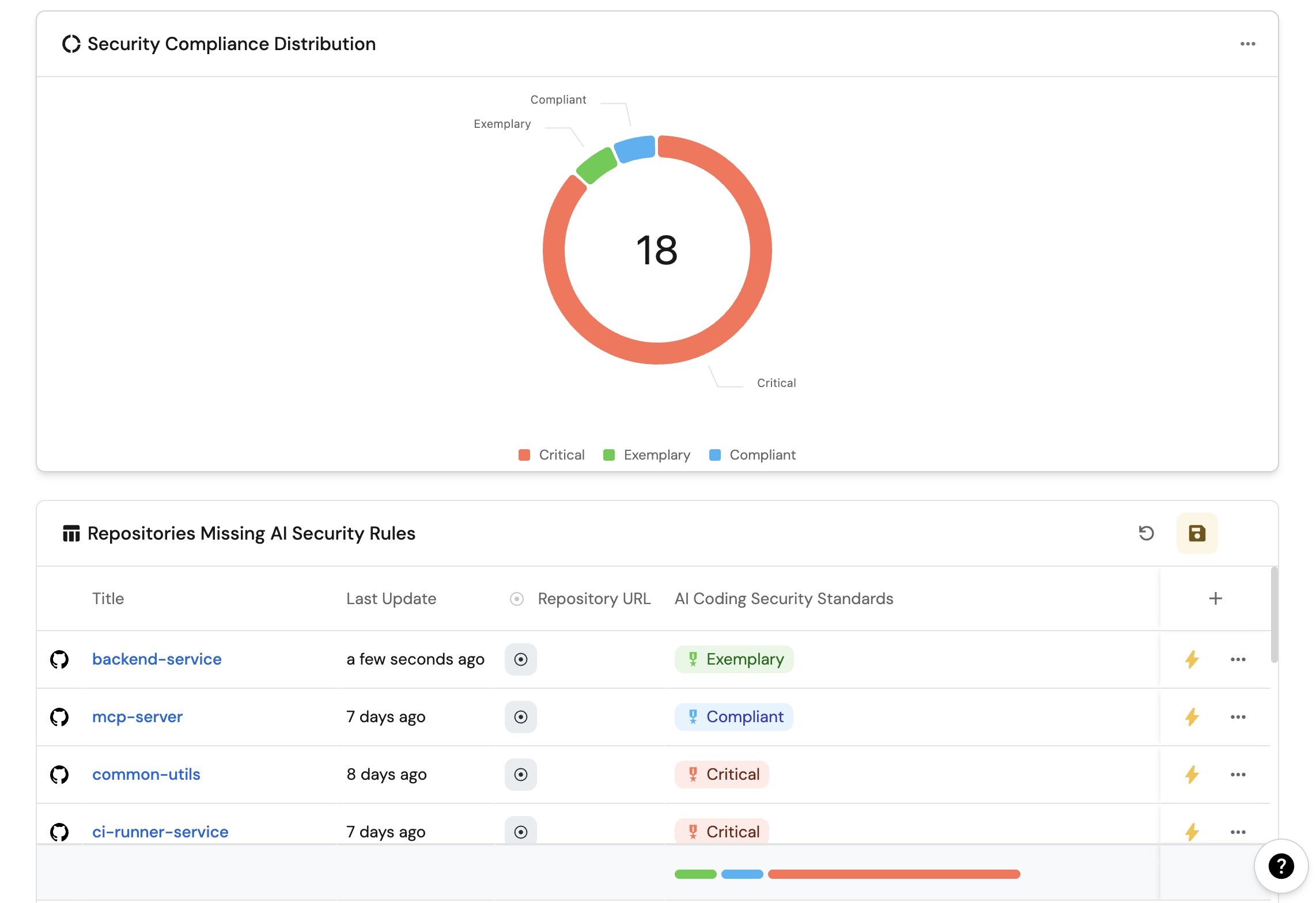
End-to-end demo
This is the flow you want to show in a demo or dogfood in your own org.
1. Start from a visible gap
- Open the AI coding rules compliance dashboard.
- Confirm one or more subscribed repositories are at Critical or High Risk because the rule files are missing.
- Keep that dashboard open in a second tab.
2. Update the source of truth
- In the
ai-coding-rulesrepository, edit a rule file (for example strengthenAGENTS.mdor add a missing security rule). - Open a pull request, get review, and merge to the default branch.
3. Watch Port ingest and provision
- After the GitHub sync, confirm the matching
ai_coding_ruleentity updated in Port. - Go to the Workflows page and click
run history. - Confirm
Sync AI rules to repositoriesran. - Check subscribed repositories for new issues or pull requests that sync the rule files.
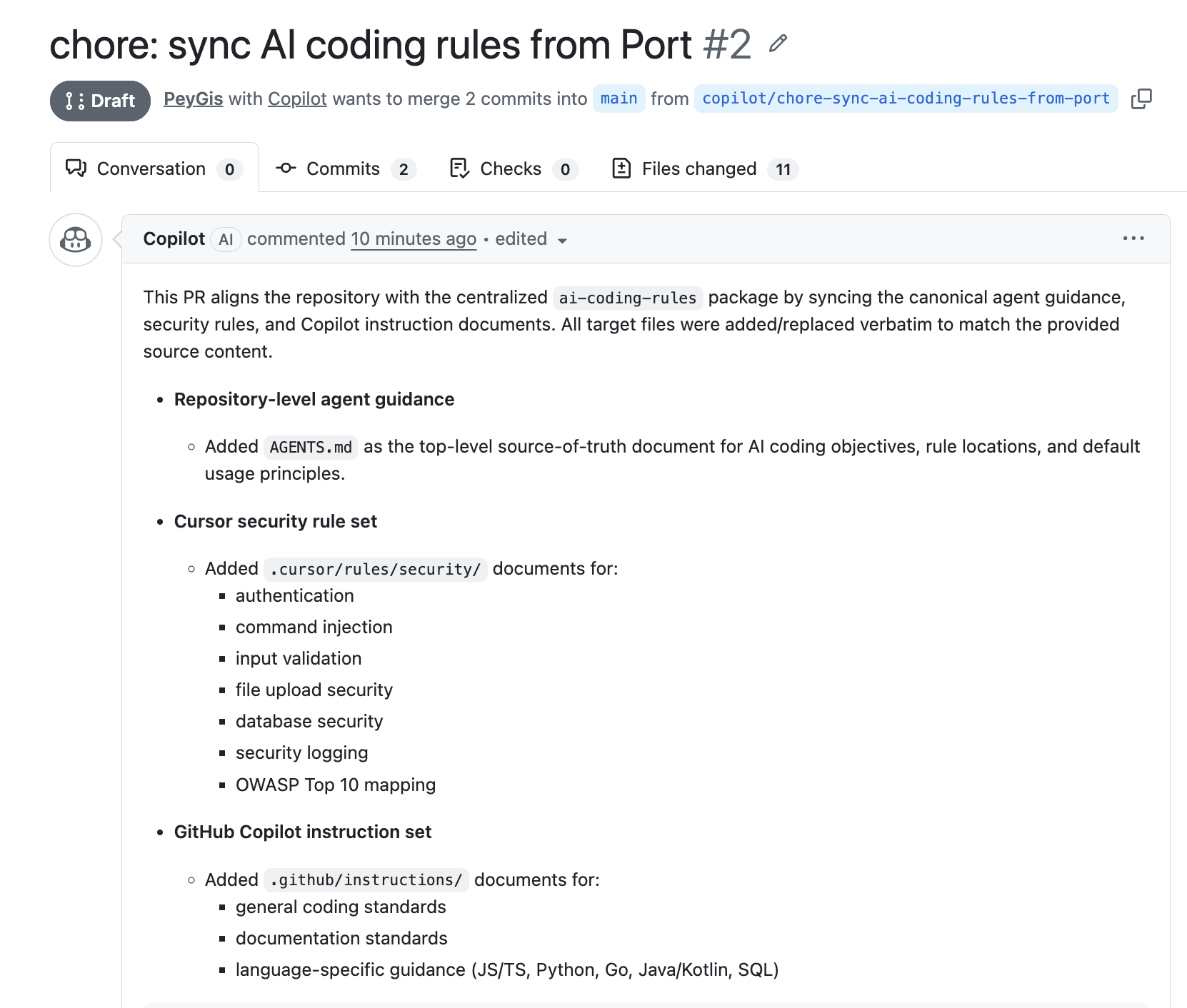
4. Merge rollout PRs and watch the scorecard climb
- Review and merge the provision PRs in a few subscribed repositories.
- Wait for the GitHub integration to re-ingest those repos (or trigger a resync).
- Refresh the compliance dashboard.
- Confirm those repositories move from Critical toward Compliant or Elite as the required files appear.
That single loop - edit rules repo, merge, provision, score - is the coherent story that replaces the older split across authoring-only and audit-only guides.
Related guides
- Trigger AI coding assistants from Port - set up the Copilot, Claude Code, or Gemini backends this provision step uses.
- Ingest prompts and skills from GitHub using GitOps - similar git-as-source-of-truth pattern for prompts and skills.
- Auto-fix services when scorecards degrade - detect scorecard failures and delegate fixes to a coding agent.
- Route scorecard failures to Jira issues with AI - turn failing compliance rules into tracked work items.