Auto-heal unhealthy Kubernetes pods with Port workflows
Kubernetes pods can become unhealthy due to various issues like resource constraints, configuration problems, or application failures. Manual intervention to diagnose and fix unhealthy pods creates operational overhead and delays in service recovery.
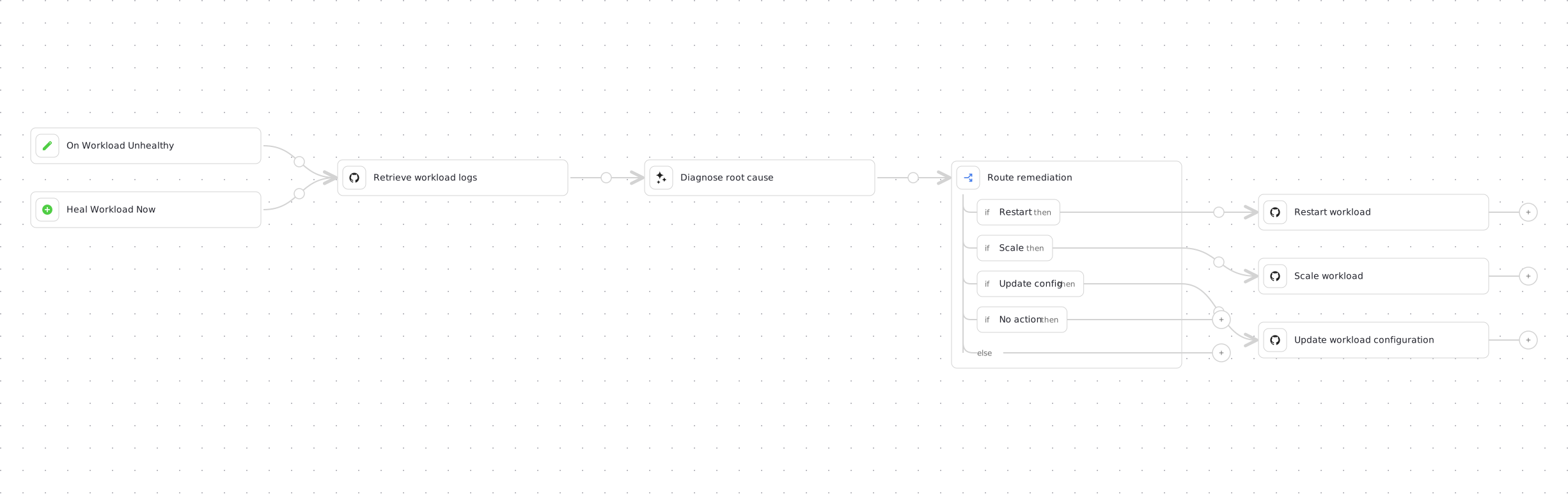
This guide demonstrates how to build a self-healing system as a single Port workflow. The workflow detects when a workload becomes unhealthy, fetches its logs from the cluster, diagnoses the root cause with Port AI, and routes the run to the targeted fix: a restart, a scale-up, or a resource configuration update.
Because the whole flow lives in one workflow, every healing run shows the full story on a single canvas: what the logs said, what the AI decided, and which fix was applied. The AI never executes anything itself, it only returns a structured decision, and the workflow's branching controls all execution.
How it works
The workflow chains these nodes:
- Two triggers share the same downstream flow: an event trigger that fires when a
k8s_workloadentity transitions fromHealthytoUnhealthy, and a self-service trigger that lets you run the same healing flow on demand for any workload. - A GitHub integration action node dispatches a GitHub Actions workflow that fetches the workload's recent logs and reports them back into the workflow run.
- An AI node analyzes the logs together with catalog context and returns a structured remediation decision: restart, scale, update configuration, or take no action.
- A condition node routes the run to the branch chosen by the AI, and the matching GitHub Actions workflow applies the fix.
Common use cases
- Automatically restart workloads that are in CrashLoopBackOff state due to application errors.
- Scale up replicas when workloads are failing due to load.
- Fix resource configuration when containers are OOMKilled or CPU throttled.
- Keep a human entry point so developers can trigger the same diagnosis flow on demand.
Prerequisites
This guide assumes the following:
- You have a Port account and have completed the onboarding process.
- Port's Kubernetes integration is configured in your account.
- You have a Kubernetes cluster with workloads that can be monitored and managed. GitHub Actions must be able to reach that cluster. The workflows in this guide decode a base64
KUBECONFIGsecret. A private cluster needs a reachable API endpoint, or a self-hosted runner inside the network, before the first dispatch. - GitHub Ocean is installed.
Workflows dispatch GitHub Actions using integration action nodes, which only support GitHub today. If your cluster's remediation pipelines live in GitLab, Bitbucket, or Azure DevOps, trigger them from a webhook node instead, and note that org secrets (not the installed integration) will need to carry the pipeline credentials.
Set up GitHub workflows
We will create four GitHub Actions workflows: one that fetches workload logs, and three that apply fixes. The Port workflow dispatches them through the GitHub Ocean integration.
We recommend creating a dedicated repository for the workflows that are used by Port actions.
Add GitHub secrets
In your GitHub repository, go to Settings > Secrets and add the following secrets:
PORT_CLIENT_ID- Your Portclient idHow to get the credentials.PORT_CLIENT_SECRET- Your Portclient secretHow to get the credentials.KUBECONFIG- Your kubeconfig file encoded in base64.
Each GitHub Actions workflow below fetches the full Port entity with port-labs/port-github-action@v1 (operation: GET), using only the entity identifier passed in from the workflow node. Pass/fail status is reported automatically because every dispatch node sets reportWorkflowStatus: true, so Port watches the GitHub Actions run and updates the node's result when it finishes.
The Get Kubernetes Workload Logs workflow is the exception: it needs to return the actual log text to the AI node that runs next, not just a pass/fail result. To do that, it calls Port's node run API directly, using the node_run_id passed in from the workflow node, to attach the retrieved logs as that node run's output.
Get Kubernetes workload logs GitHub workflow
-
Create the file
.github/workflows/get-workload-logs.yamlin the.github/workflowsfolder of your repository. -
Copy and paste the following content:
Get Kubernetes workload logs GitHub workflow (click to expand)
name: Get Kubernetes Workload Logson:workflow_dispatch:inputs:workload_identifier:required: truetype: stringdescription: "Port identifier of the workload entity"tail:required: falsetype: stringdefault: "200"node_run_id:required: truetype: stringdescription: "Identifier of the workflow node run to report the logs back to"jobs:workload-logs:runs-on: ubuntu-lateststeps:- name: Get workload entity from Portid: get-workloaduses: port-labs/port-github-action@v1with:clientId: ${{ secrets.PORT_CLIENT_ID }}clientSecret: ${{ secrets.PORT_CLIENT_SECRET }}baseUrl: https://api.port.iooperation: GETblueprint: k8s_workloadidentifier: ${{ inputs.workload_identifier }}- name: Setup kubectluses: azure/setup-kubectl@v3with:version: 'latest'- name: Configure kubeconfigrun: |mkdir -p ~/.kubeecho "${{ secrets.KUBECONFIG }}" | base64 -d > ~/.kube/configchmod 600 ~/.kube/configecho "📍 Current kubectl context:"kubectl config current-context || echo "No context set"- name: Fetch workload logsrun: |WORKLOAD_NAME=$(echo '${{ steps.get-workload.outputs.entity }}' | jq -r '.title')NAMESPACE=$(echo '${{ steps.get-workload.outputs.entity }}' | jq -r '.properties.namespace')WORKLOAD_TYPE=$(echo '${{ steps.get-workload.outputs.entity }}' | jq -r '.properties.kind' | tr '[:upper:]' '[:lower:]')TAIL="${{ inputs.tail }}"REF="$WORKLOAD_TYPE/$WORKLOAD_NAME"echo "🔍 Fetching logs for $REF in namespace $NAMESPACE"set +eLOG_OUTPUT=$(kubectl logs "$REF" -n "$NAMESPACE" --tail="$TAIL" --all-containers --prefix --insecure-skip-tls-verify 2>&1)LOG_STATUS=$?PREVIOUS_OUTPUT=$(kubectl logs "$REF" -n "$NAMESPACE" --tail=50 --previous --insecure-skip-tls-verify 2>/dev/null)set -eif [ $LOG_STATUS -eq 0 ]; thenecho "SUCCESS" > status.txtecho "$LOG_OUTPUT" > workload_logs.txtif [ -n "$PREVIOUS_OUTPUT" ]; then{echo ""echo "--- Logs from previously crashed container ---"echo "$PREVIOUS_OUTPUT"} >> workload_logs.txtfiecho "✅ Logs retrieved successfully"elseecho "FAILURE" > status.txtecho "Error: $LOG_OUTPUT" > workload_logs.txtecho "❌ Failed to retrieve logs (exit code: $LOG_STATUS)"fi- name: Report logs back to the workflow node runif: always()run: |ACCESS_TOKEN=$(curl -s -X POST "https://api.port.io/v1/auth/access_token" \-H "Content-Type: application/json" \-d "{\"clientId\": \"${{ secrets.PORT_CLIENT_ID }}\", \"clientSecret\": \"${{ secrets.PORT_CLIENT_SECRET }}\"}" \| jq -r '.accessToken')LOGS_CONTENT=$(head -c 8000 workload_logs.txt 2>/dev/null || echo "No logs captured")STATUS=$(cat status.txt 2>/dev/null || echo "FAILURE")curl -s -X PATCH "https://api.port.io/v1/workflows/nodes/runs/${{ inputs.node_run_id }}" \-H "Authorization: Bearer $ACCESS_TOKEN" \-H "Content-Type: application/json" \--data-raw "$(jq -n \--arg status "$STATUS" \--arg logs "$LOGS_CONTENT" \'{output: {status: $status, logs: $logs}}')" -
Commit and push the changes to your repository.
Restart Kubernetes workload GitHub workflow
-
Create the file
.github/workflows/restart-k8s-workload.yamlin the.github/workflowsfolder of your repository. -
Copy and paste the following content:
Restart Kubernetes workload GitHub workflow (click to expand)
name: Restart Kubernetes Workloadon:workflow_dispatch:inputs:workload_identifier:required: truetype: stringdescription: "Port identifier of the workload entity"reason:required: falsetype: stringjobs:restart-workload:runs-on: ubuntu-lateststeps:- uses: actions/checkout@v6- name: Get workload entity from Portid: get-workloaduses: port-labs/port-github-action@v1with:clientId: ${{ secrets.PORT_CLIENT_ID }}clientSecret: ${{ secrets.PORT_CLIENT_SECRET }}baseUrl: https://api.port.iooperation: GETblueprint: k8s_workloadidentifier: ${{ inputs.workload_identifier }}- name: Configure kubectlrun: |# NOTE: In production, this should connect to your production cluster with proper SSL verification# For this demo, we're using a local cluster through ngrok tunnel, so we skip TLS verificationecho "${{ secrets.KUBECONFIG }}" | base64 -d > kubeconfig.yamlexport KUBECONFIG=kubeconfig.yamlkubectl cluster-info --request-timeout=10s --insecure-skip-tls-verify- name: Restart Kubernetes workloadrun: |export KUBECONFIG=kubeconfig.yamlWORKLOAD_NAME=$(echo '${{ steps.get-workload.outputs.entity }}' | jq -r '.title')NAMESPACE=$(echo '${{ steps.get-workload.outputs.entity }}' | jq -r '.properties.namespace')WORKLOAD_TYPE=$(echo '${{ steps.get-workload.outputs.entity }}' | jq -r '.properties.kind')echo "Restarting $WORKLOAD_TYPE: $WORKLOAD_NAME in namespace: $NAMESPACE"echo "Reason: ${{ inputs.reason }}"case $WORKLOAD_TYPE in"Deployment")kubectl rollout restart deployment/$WORKLOAD_NAME -n $NAMESPACE --insecure-skip-tls-verifykubectl rollout status deployment/$WORKLOAD_NAME -n $NAMESPACE --timeout=300s --insecure-skip-tls-verify;;"StatefulSet")kubectl rollout restart statefulset/$WORKLOAD_NAME -n $NAMESPACE --insecure-skip-tls-verifykubectl rollout status statefulset/$WORKLOAD_NAME -n $NAMESPACE --timeout=300s --insecure-skip-tls-verify;;"DaemonSet")kubectl rollout restart daemonset/$WORKLOAD_NAME -n $NAMESPACE --insecure-skip-tls-verifykubectl rollout status daemonset/$WORKLOAD_NAME -n $NAMESPACE --timeout=300s --insecure-skip-tls-verify;;*)echo "Unsupported workload type: $WORKLOAD_TYPE"exit 1;;esac- name: Verify workload healthrun: |export KUBECONFIG=kubeconfig.yamlWORKLOAD_NAME=$(echo '${{ steps.get-workload.outputs.entity }}' | jq -r '.title')NAMESPACE=$(echo '${{ steps.get-workload.outputs.entity }}' | jq -r '.properties.namespace')WORKLOAD_TYPE=$(echo '${{ steps.get-workload.outputs.entity }}' | jq -r '.properties.kind')echo "Checking health of $WORKLOAD_TYPE: $WORKLOAD_NAME"kubectl get $WORKLOAD_TYPE $WORKLOAD_NAME -n $NAMESPACE --insecure-skip-tls-verifykubectl get pods -l app=$WORKLOAD_NAME -n $NAMESPACE --insecure-skip-tls-verify -
Commit and push the changes to your repository.
Scale up Kubernetes workload GitHub workflow
-
Create the file
.github/workflows/scale-k8s-workload.yamlin the.github/workflowsfolder of your repository. -
Copy and paste the following content:
Scale up Kubernetes workload GitHub workflow (click to expand)
name: Scale Kubernetes Workloadon:workflow_dispatch:inputs:workload_identifier:required: truetype: stringdescription: "Port identifier of the workload entity"desired_replicas:required: truetype: stringdescription: "Number of replicas to scale to"reason:required: falsetype: stringjobs:scale-workload:runs-on: ubuntu-lateststeps:- uses: actions/checkout@v6- name: Get workload entity from Portid: get-workloaduses: port-labs/port-github-action@v1with:clientId: ${{ secrets.PORT_CLIENT_ID }}clientSecret: ${{ secrets.PORT_CLIENT_SECRET }}baseUrl: https://api.port.iooperation: GETblueprint: k8s_workloadidentifier: ${{ inputs.workload_identifier }}- name: Configure kubectlrun: |# NOTE: In production, this should connect to your production cluster with proper SSL verification# For this demo, we're using a local cluster through ngrok tunnel, so we skip TLS verificationecho "${{ secrets.KUBECONFIG }}" | base64 -d > kubeconfig.yamlexport KUBECONFIG=kubeconfig.yamlkubectl cluster-info --request-timeout=10s --insecure-skip-tls-verify- name: Scale Kubernetes workloadrun: |export KUBECONFIG=kubeconfig.yamlWORKLOAD_NAME=$(echo '${{ steps.get-workload.outputs.entity }}' | jq -r '.title')NAMESPACE=$(echo '${{ steps.get-workload.outputs.entity }}' | jq -r '.properties.namespace')WORKLOAD_TYPE=$(echo '${{ steps.get-workload.outputs.entity }}' | jq -r '.properties.kind')REPLICAS="${{ inputs.desired_replicas }}"echo "Scaling $WORKLOAD_TYPE: $WORKLOAD_NAME to $REPLICAS replicas in namespace: $NAMESPACE"echo "Reason: ${{ inputs.reason }}"case $WORKLOAD_TYPE in"Deployment")kubectl --insecure-skip-tls-verify scale deployment/$WORKLOAD_NAME --replicas=$REPLICAS -n $NAMESPACEkubectl --insecure-skip-tls-verify rollout status deployment/$WORKLOAD_NAME -n $NAMESPACE --timeout=300s;;"StatefulSet")kubectl --insecure-skip-tls-verify scale statefulset/$WORKLOAD_NAME --replicas=$REPLICAS -n $NAMESPACEkubectl --insecure-skip-tls-verify rollout status statefulset/$WORKLOAD_NAME -n $NAMESPACE --timeout=300s;;"ReplicaSet")kubectl --insecure-skip-tls-verify scale replicaset/$WORKLOAD_NAME --replicas=$REPLICAS -n $NAMESPACE;;*)echo "Unsupported workload type for scaling: $WORKLOAD_TYPE"exit 1;;esac- name: Verify scalingrun: |export KUBECONFIG=kubeconfig.yamlWORKLOAD_NAME=$(echo '${{ steps.get-workload.outputs.entity }}' | jq -r '.title')NAMESPACE=$(echo '${{ steps.get-workload.outputs.entity }}' | jq -r '.properties.namespace')WORKLOAD_TYPE=$(echo '${{ steps.get-workload.outputs.entity }}' | jq -r '.properties.kind')echo "Checking scaled $WORKLOAD_TYPE: $WORKLOAD_NAME"kubectl --insecure-skip-tls-verify get $WORKLOAD_TYPE $WORKLOAD_NAME -n $NAMESPACEkubectl --insecure-skip-tls-verify get pods -l app=$WORKLOAD_NAME -n $NAMESPACE -
Commit and push the changes to your repository.
Update Kubernetes config GitHub workflow
-
Create the file
.github/workflows/update-k8s-workload-config.yamlin the.github/workflowsfolder of your repository. -
Copy and paste the following content:
Update Kubernetes config GitHub workflow (click to expand)
name: Update Kubernetes Workload Configurationon:workflow_dispatch:inputs:workload_identifier:required: truetype: stringdescription: "Port identifier of the workload entity"memory_limit:required: truetype: stringcpu_limit:required: truetype: stringmemory_request:required: truetype: stringcpu_request:required: truetype: stringreason:required: falsetype: stringjobs:update-workload-config:runs-on: ubuntu-lateststeps:- uses: actions/checkout@v6- name: Get workload entity from Portid: get-workloaduses: port-labs/port-github-action@v1with:clientId: ${{ secrets.PORT_CLIENT_ID }}clientSecret: ${{ secrets.PORT_CLIENT_SECRET }}baseUrl: https://api.port.iooperation: GETblueprint: k8s_workloadidentifier: ${{ inputs.workload_identifier }}- name: Configure kubectl for local clusterrun: |echo "${{ secrets.KUBECONFIG }}" | base64 -d > kubeconfig.yamlexport KUBECONFIG=kubeconfig.yamlkubectl config current-context- name: Update workload configurationrun: |export KUBECONFIG=kubeconfig.yamlWORKLOAD_NAME=$(echo '${{ steps.get-workload.outputs.entity }}' | jq -r '.title')NAMESPACE=$(echo '${{ steps.get-workload.outputs.entity }}' | jq -r '.properties.namespace')WORKLOAD_TYPE=$(echo '${{ steps.get-workload.outputs.entity }}' | jq -r '.properties.kind')MEMORY_LIMIT="${{ inputs.memory_limit }}"CPU_LIMIT="${{ inputs.cpu_limit }}"MEMORY_REQUEST="${{ inputs.memory_request }}"CPU_REQUEST="${{ inputs.cpu_request }}"echo "Updating $WORKLOAD_TYPE: $WORKLOAD_NAME configuration in namespace: $NAMESPACE"echo "Memory Limit: $MEMORY_LIMIT, CPU Limit: $CPU_LIMIT"echo "Memory Request: $MEMORY_REQUEST, CPU Request: $CPU_REQUEST"# Patch only resources on the existing container so image and other fields stay in place.patch_resources() {local kind="$1"local indexindex=$(kubectl get "$kind" "$WORKLOAD_NAME" -n "$NAMESPACE" -o json | jq --arg name "$WORKLOAD_NAME" '([.spec.template.spec.containers[]?.name] | index($name)) // 0')kubectl patch "$kind" "$WORKLOAD_NAME" -n "$NAMESPACE" --type=json -p "[{\"op\":\"add\",\"path\":\"/spec/template/spec/containers/${index}/resources\",\"value\":{\"limits\":{\"memory\":\"${MEMORY_LIMIT}\",\"cpu\":\"${CPU_LIMIT}\"},\"requests\":{\"memory\":\"${MEMORY_REQUEST}\",\"cpu\":\"${CPU_REQUEST}\"}}}]"}case $WORKLOAD_TYPE in"Deployment")patch_resources deploymentkubectl rollout status deployment/$WORKLOAD_NAME -n $NAMESPACE --timeout=300s;;"StatefulSet")patch_resources statefulsetkubectl rollout status statefulset/$WORKLOAD_NAME -n $NAMESPACE --timeout=300s;;"DaemonSet")patch_resources daemonsetkubectl rollout status daemonset/$WORKLOAD_NAME -n $NAMESPACE --timeout=300s;;*)echo "Unsupported workload type for configuration update: $WORKLOAD_TYPE"exit 1;;esac- name: Verify configuration updaterun: |export KUBECONFIG=kubeconfig.yamlWORKLOAD_NAME=$(echo '${{ steps.get-workload.outputs.entity }}' | jq -r '.title')NAMESPACE=$(echo '${{ steps.get-workload.outputs.entity }}' | jq -r '.properties.namespace')WORKLOAD_TYPE=$(echo '${{ steps.get-workload.outputs.entity }}' | jq -r '.properties.kind')echo "Checking updated $WORKLOAD_TYPE: $WORKLOAD_NAME"kubectl get $WORKLOAD_TYPE $WORKLOAD_NAME -n $NAMESPACEkubectl get $WORKLOAD_TYPE $WORKLOAD_NAME -n $NAMESPACE -o jsonpath='{range .spec.template.spec.containers[*]}{.name}: {.resources}{"\n"}{end}' -
Commit and push the changes to your repository.
Extend the k8s_workload blueprint
The workflow's no_action branch writes the AI diagnosis onto the workload entity. We will add a property for that field before building the workflow.
-
Go to the Data model page in Port.
-
Find and select the K8s Workload blueprint (
k8s_workload). -
Click
...and select Edit JSON. -
Add the following property to the
propertiessection:lastDiagnosis property (click to expand)
"lastDiagnosis": {"type": "string","title": "Last diagnosis","description": "Most recent AI diagnosis when the healing workflow chose not to act"} -
Click Save.
Build the healing workflow
Now we will build the single workflow that ties everything together: both triggers, the log retrieval, the AI diagnosis, and the remediation branches.
-
Go to the workflows page in Port.
-
Click + Workflow.
-
Fill out the Create new workflow form, then click Confirm.
-
Click the
{...}button to open the JSON editor and paste the workflow JSON below:Kubernetes workload healing workflow JSON (click to expand)
In each of the four integration action nodes (
get_logs,restart_workload,scale_workload,update_workload_config), replace<YOUR_GITHUB_OCEAN_INTEGRATION_ID>,<YOUR-GITHUB-ORG>, and<YOUR-GITHUB-REPO>with your GitHub Ocean integration ID and the organization and repository where the GitHub Actions workflows live. You can find the integration ID on the Connectors page in Port.{"identifier": "k8s_workload_healing","title": "Kubernetes Workload Healing","icon": "Cluster","description": "Detect an unhealthy Kubernetes workload, fetch its logs, diagnose the root cause with Port AI, and apply the targeted fix","allowAnyoneToViewRuns": true,"nodes": [{"identifier": "trigger_unhealthy","title": "On Workload Unhealthy","icon": "Cluster","description": "Fires when a k8s_workload entity's health transitions from Healthy to Unhealthy","config": {"type": "EVENT_TRIGGER","event": {"type": "ENTITY_UPDATED","blueprintIdentifier": "k8s_workload"},"condition": {"type": "JQ","expressions": [".diff.before.properties.isHealthy == \"Healthy\"",".diff.after.properties.isHealthy == \"Unhealthy\""],"combinator": "and"}},"variables": {}},{"identifier": "trigger_manual","title": "Heal Workload Now","icon": "Cluster","description": "Manually run the healing flow for a selected workload","config": {"type": "SELF_SERVE_TRIGGER","contexts": [{"on": "ENTITY","userInput": "workload"}],"userInputs": {"properties": {"workload": {"type": "string","format": "entity","blueprint": "k8s_workload","title": "Workload","description": "The Kubernetes workload to diagnose and heal."}},"required": ["workload"]}},"variables": {}},{"identifier": "get_logs","title": "Retrieve workload logs","icon": "Github","description": "Dispatch the GitHub Actions workflow that fetches recent logs from the cluster","config": {"type": "INTEGRATION_ACTION","installationId": "<YOUR_GITHUB_OCEAN_INTEGRATION_ID>","integrationProvider": "github-ocean","integrationInvocationType": "dispatch_workflow","integrationActionExecutionProperties": {"org": "<YOUR-GITHUB-ORG>","repo": "<YOUR-GITHUB-REPO>","workflow": "get-workload-logs.yaml","workflowInputs": {"workload_identifier": "{{ .outputs.trigger.workload // .outputs.trigger.diff.after.identifier }}","tail": "200","node_run_id": "{{ .workflowNodeRun.identifier }}"},"reportWorkflowStatus": true}},"variables": {}},{"identifier": "diagnose","title": "Diagnose root cause","icon": "AI","description": "Analyze the logs and catalog context, and return a structured remediation decision","config": {"type": "AI","userPrompt": "A Kubernetes workload may be unhealthy and needs a remediation decision.\n\nWorkload identifier: {{ .outputs.trigger.workload // .outputs.trigger.diff.after.identifier }}\n\nRecent logs:\n{{ .outputs.get_logs.logs // \"No logs were retrieved.\" }}\n\nFetch the workload entity from the k8s_workload blueprint to inspect its current state (kind, namespace, replicas, ready replicas), and look at related catalog entities such as recent deployments if they help explain the failure.\n\nChoose exactly one remediation:\n- restart: for crashes and transient failures (CrashLoopBackOff with an application error, deadlocks).\n- scale: when the workload is overloaded and needs more replicas. Set desired_replicas (1-20).\n- update_config: when container resource limits or requests cause the failure (OOMKilled, CPU throttling). Set memory_limit, cpu_limit, memory_request and cpu_request (e.g. 512Mi, 500m).\n- none: when no automated fix is appropriate (e.g. bad image tag, missing secret, or unclear cause).\n\nSummarize what you found in the logs and why you chose the fix in the diagnosis field.","systemPrompt": "You are a Kubernetes healing analyst. You diagnose unhealthy workloads from their logs and software catalog context and return a structured remediation decision. Be conservative: choose none when the logs do not clearly point to a fix that a restart, scale, or resource configuration change can solve. Use at most a few tool calls.","tools": ["list_blueprints","list_entities"],"outputSchema": {"type": "object","properties": {"diagnosis": {"type": "string","description": "What the logs show and why the chosen remediation fixes it"},"remediation": {"type": "string","enum": ["restart","scale","update_config","none"]},"desired_replicas": {"type": "number","description": "Target replica count. Only set when remediation is scale"},"memory_limit": {"type": "string","description": "e.g. 512Mi. Only set when remediation is update_config"},"cpu_limit": {"type": "string","description": "e.g. 500m. Only set when remediation is update_config"},"memory_request": {"type": "string","description": "e.g. 256Mi. Only set when remediation is update_config"},"cpu_request": {"type": "string","description": "e.g. 250m. Only set when remediation is update_config"}},"required": ["diagnosis","remediation"]}},"variables": {}},{"identifier": "route","title": "Route remediation","icon": "DefaultProperty","description": "Follow the branch chosen by the AI diagnosis","config": {"type": "CONDITION","outlets": [{"identifier": "do_restart","title": "Restart","expression": "(.outputs.diagnose.response | fromjson | .remediation) == \"restart\""},{"identifier": "do_scale","title": "Scale","expression": "(.outputs.diagnose.response | fromjson | .remediation) == \"scale\""},{"identifier": "do_update_config","title": "Update config","expression": "(.outputs.diagnose.response | fromjson | .remediation) == \"update_config\""},{"identifier": "no_action","title": "No action","expression": "(.outputs.diagnose.response | fromjson | .remediation) == \"none\""}]},"variables": {}},{"identifier": "restart_workload","title": "Restart workload","icon": "Github","description": "Dispatch the GitHub Actions workflow that restarts the workload","config": {"type": "INTEGRATION_ACTION","installationId": "<YOUR_GITHUB_OCEAN_INTEGRATION_ID>","integrationProvider": "github-ocean","integrationInvocationType": "dispatch_workflow","integrationActionExecutionProperties": {"org": "<YOUR-GITHUB-ORG>","repo": "<YOUR-GITHUB-REPO>","workflow": "restart-k8s-workload.yaml","workflowInputs": {"workload_identifier": "{{ .outputs.trigger.workload // .outputs.trigger.diff.after.identifier }}","reason": "{{ .outputs.diagnose.response | fromjson | .diagnosis }}"},"reportWorkflowStatus": true}},"variables": {}},{"identifier": "scale_workload","title": "Scale workload","icon": "Github","description": "Dispatch the GitHub Actions workflow that scales the workload","config": {"type": "INTEGRATION_ACTION","installationId": "<YOUR_GITHUB_OCEAN_INTEGRATION_ID>","integrationProvider": "github-ocean","integrationInvocationType": "dispatch_workflow","integrationActionExecutionProperties": {"org": "<YOUR-GITHUB-ORG>","repo": "<YOUR-GITHUB-REPO>","workflow": "scale-k8s-workload.yaml","workflowInputs": {"workload_identifier": "{{ .outputs.trigger.workload // .outputs.trigger.diff.after.identifier }}","desired_replicas": "{{ .outputs.diagnose.response | fromjson | .desired_replicas // 3 | tostring }}","reason": "{{ .outputs.diagnose.response | fromjson | .diagnosis }}"},"reportWorkflowStatus": true}},"variables": {}},{"identifier": "update_workload_config","title": "Update workload configuration","icon": "Github","description": "Dispatch the GitHub Actions workflow that patches the workload's resource configuration","config": {"type": "INTEGRATION_ACTION","installationId": "<YOUR_GITHUB_OCEAN_INTEGRATION_ID>","integrationProvider": "github-ocean","integrationInvocationType": "dispatch_workflow","integrationActionExecutionProperties": {"org": "<YOUR-GITHUB-ORG>","repo": "<YOUR-GITHUB-REPO>","workflow": "update-k8s-workload-config.yaml","workflowInputs": {"workload_identifier": "{{ .outputs.trigger.workload // .outputs.trigger.diff.after.identifier }}","memory_limit": "{{ .outputs.diagnose.response | fromjson | .memory_limit // \"512Mi\" }}","cpu_limit": "{{ .outputs.diagnose.response | fromjson | .cpu_limit // \"500m\" }}","memory_request": "{{ .outputs.diagnose.response | fromjson | .memory_request // \"256Mi\" }}","cpu_request": "{{ .outputs.diagnose.response | fromjson | .cpu_request // \"250m\" }}","reason": "{{ .outputs.diagnose.response | fromjson | .diagnosis }}"},"reportWorkflowStatus": true}},"variables": {}},{"identifier": "record_no_action","title": "Record no action","icon": "DefaultProperty","description": "Store the diagnosis on the workload and end the run without changing the cluster","config": {"type": "UPSERT_ENTITY","blueprintIdentifier": "k8s_workload","mapping": {"identifier": "{{ .outputs.trigger.workload // .outputs.trigger.diff.after.identifier }}","properties": {"lastDiagnosis": "{{ .outputs.diagnose.response | fromjson | .diagnosis }}"}}},"variables": {}}],"connections": [{"sourceIdentifier": "trigger_unhealthy","targetIdentifier": "get_logs"},{"sourceIdentifier": "trigger_manual","targetIdentifier": "get_logs"},{"sourceIdentifier": "get_logs","targetIdentifier": "diagnose"},{"sourceIdentifier": "diagnose","targetIdentifier": "route"},{"sourceIdentifier": "route","targetIdentifier": "restart_workload","sourceOutletIdentifier": "do_restart"},{"sourceIdentifier": "route","targetIdentifier": "scale_workload","sourceOutletIdentifier": "do_scale"},{"sourceIdentifier": "route","targetIdentifier": "update_workload_config","sourceOutletIdentifier": "do_update_config"},{"sourceIdentifier": "route","targetIdentifier": "record_no_action","sourceOutletIdentifier": "no_action"}]} -
Click Apply changes.
The event trigger condition assumes your k8s_workload blueprint has an isHealthy property with Healthy and Unhealthy values, as created by Port's Kubernetes exporter. If your mapping uses a different property or values, adjust the JQ expressions in the trigger_unhealthy node to match.
A few things worth noting in this workflow:
- Two triggers, one flow: both triggers connect to the same
get_logsnode..outputs.triggeralways resolves to whichever trigger fired, so the expression{{ .outputs.trigger.workload // .outputs.trigger.diff.after.identifier }}yields the workload identifier in both cases: the self-service form input, or the entity identifier from the event. See multiple triggers. - The AI only decides, the workflow executes: the
diagnosenode usesoutputSchemato force a structured JSON verdict. The condition node parses it withfromjsonand routes accordingly. If the AI cannot produce a valid structured response, the node fails and the run stops without touching the cluster. - Guardrails live in the workflow:
desired_replicasfalls back to3and resource values fall back to sane defaults if the AI omits them. Theno_actionoutlet connects torecord_no_action, which writeslastDiagnosisand ends the run without dispatching a fix.
Let's test it
Test the manual path
- Go to the Self-service page of your portal.
- Find Heal Workload Now and click on it (it is also available from the ⚡ actions menu on any
k8s_workloadentity). - Select a workload and click Execute.
- Open the run from the Workflows page and watch it progress: the
get_logsnode output should contain the retrieved log text, thediagnosenode output should contain the JSON verdict, and the run should follow the matching branch.
Test the automatic path
- Go to your Kubernetes cluster and deploy a workload with an intentionally failing configuration, for example a memory limit low enough to cause OOMKilled restarts.
- Wait for the workload to enter an unhealthy state and verify that its
k8s_workloadentity in Port flips toUnhealthy. - Verify that a new Kubernetes Workload Healing run started automatically.
- Inspect the run: the diagnosis should identify the resource issue, and the run should route to the Update config branch and dispatch the GitHub Actions workflow.
- Confirm the fix was applied in the cluster and the workload's health status returns to
Healthyin Port.
Extend the workflow
- Add a webhook node on the
no_actionbranch to notify the owning team in Slack when the AI decides not to act. - Set the
permissionsfield on thetrigger_manualnode to control who can see and execute the manual flow. See dynamic permissions. - Add more remediation branches, such as rolling back the most recent deployment.
- Tune the prompts and the
outputSchemato match the failure modes you see most often.