Auto-enhance PR descriptions with AI
This guide demonstrates how to automatically enhance GitHub pull request descriptions using a Port workflow, an AI agent, and coding assistants. When a PR is created with a minimal or empty description, a single event-triggered workflow invokes a Port AI agent that gathers business context and organizational knowledge from your context lake that coding agents can't access on their own - like Jira requirements, service architecture, team ownership, and PR templates. The workflow then dispatches a coding agent with this enriched context to generate a comprehensive, context-aware PR description.
This guide supports multiple AI coding agents:
- Claude Code
- GitHub Copilot
- Google Gemini
Anthropic's AI-powered coding assistant. Follow the setup guide.
GitHub's native AI coding assistant. Follow the setup guide.
Google's AI coding assistant. Follow the setup guide.
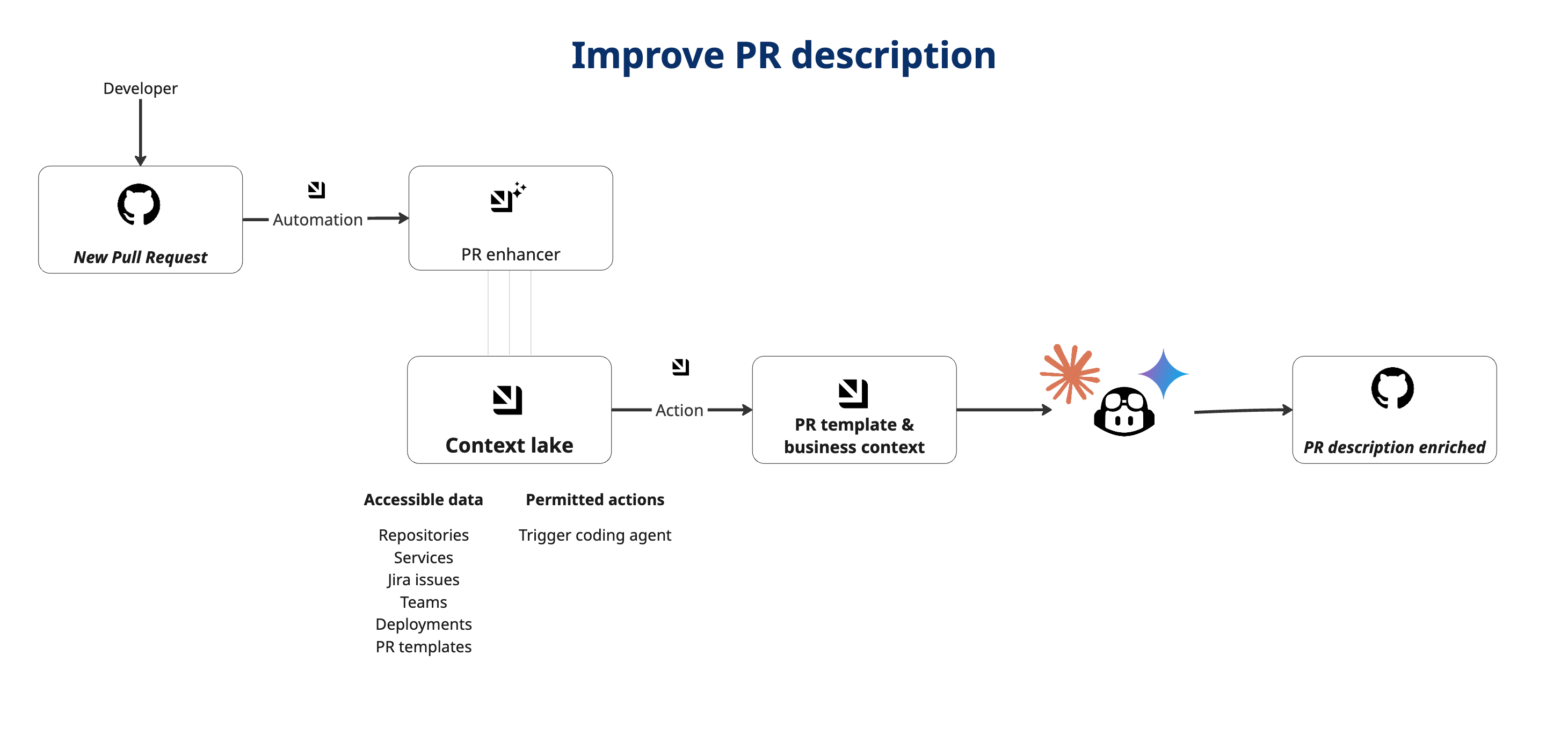
Common use cases
- Template compliance: Automatically generate descriptions that match organization-specific PR templates.
- Business context integration: Link PRs to related Jira/Linear issues and pull business requirements.
- Architectural context: Explain how changes fit into broader system architecture with service dependencies.
- Change impact analysis: Describe what problems the PR solves and potential impacts on the system.
- Review guidance: Provide context specifically helpful for human and AI code reviewers.
Prerequisites
Before starting this guide, ensure you have:
- A Port account with the onboarding process completed.
- The GitHub Ocean integration installed in your account.
- Completed one of the above coding agents guides, so the coding agent backend (GitHub Actions workflow or Copilot assignment) is already set up.
Set up data model
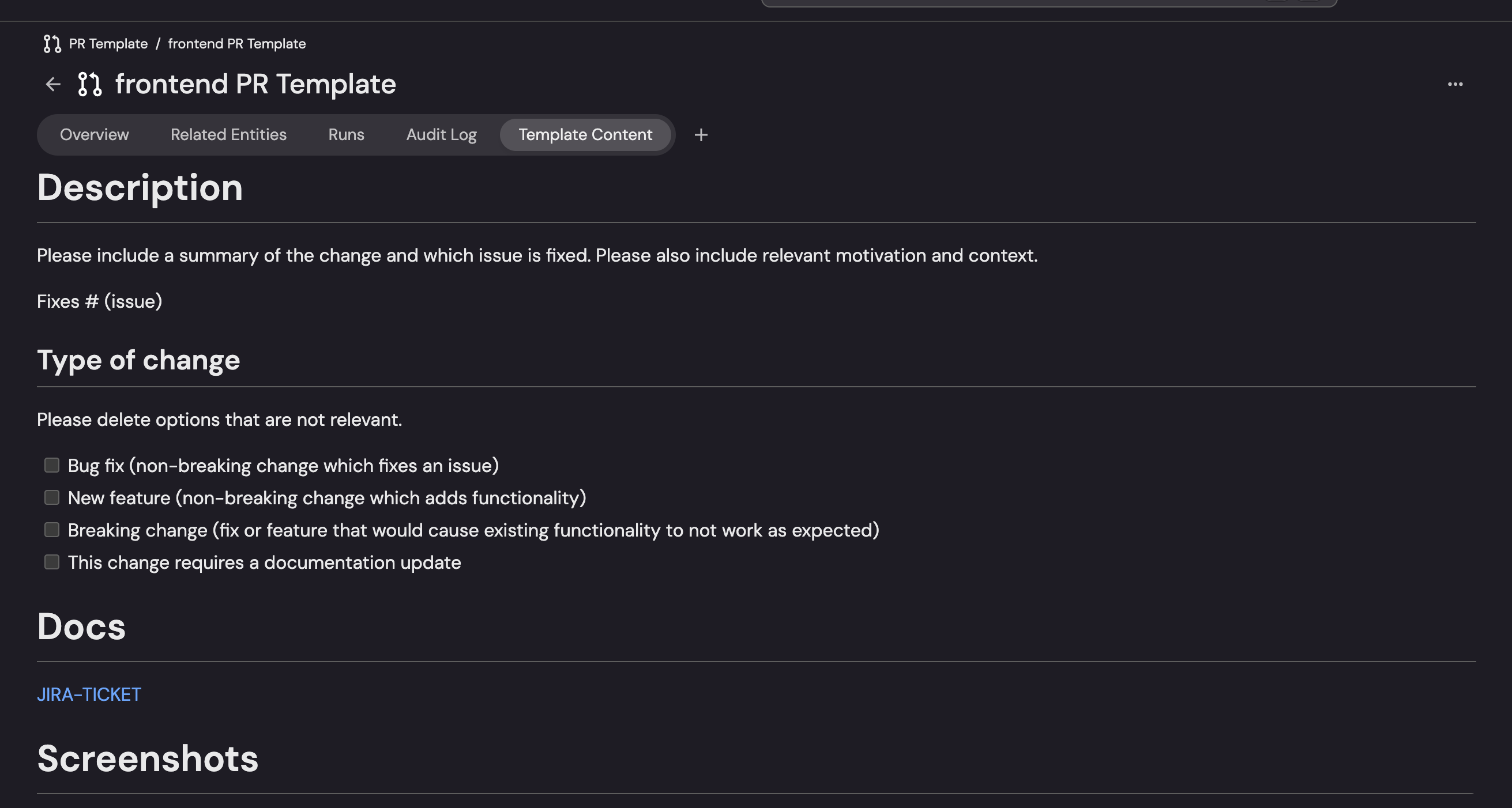
We'll create a PR Template blueprint to store your organization's PR templates and configure the GitHub integration to ingest these templates from your repositories.
Create PR template blueprint
This blueprint will store your organization's pull request templates.
-
Go to the Data model page in Port.
-
Click on
+ Blueprint. -
Click on the
{...} Edit JSONbutton. -
Copy and paste the following JSON configuration:
PR Template blueprint (click to expand)
{"identifier": "prTemplate","title": "PR Template","icon": "GitPullRequest","schema": {"properties": {"content": {"title": "Template Content","type": "string","format": "markdown","description": "The PR template content in markdown format"},"repository": {"title": "Repository","type": "string","description": "Repository where this template is defined"},"path": {"title": "File Path","type": "string","description": "Path to the template file in the repository"}},"required": ["content"]},"mirrorProperties": {},"calculationProperties": {},"aggregationProperties": {},"relations": {}} -
Click
Createto save the blueprint.
Update pull request blueprint
Now we'll add a relation from the pull request blueprint to the PR template blueprint. This relation will allow us to link PRs to their templates and have a broader context lake through the related tickets, issues, etc linked to the PR.
-
Go to the Data model page in Port.
-
Find and click on your
Pull Requestblueprint (usually namedgithubPullRequest). -
Click on
{...} Edit JSON. -
Add the following relation to the
relationssection:PR Template relation (click to expand)
"prTemplate": {"title": "PR Template","target": "prTemplate","required": false,"many": false} -
Click
Saveto update the blueprint.
Configure GitHub integration to ingest PR templates
Now we'll configure the GitHub integration to ingest PR template files from your repositories.
-
Go to the Connectors page in Port.
-
Find your GitHub integration and click on it.
-
Go to the
Mappingtab. -
Add the following YAML configuration to ingest PR template files:
GitHub PR template mapping (click to expand)
- kind: fileselector:query: "true"files:- path: ".github/pull_request_template.md"port:entity:mappings:identifier: .repository.full_name + "-pr-template"title: .repository.name + " PR Template"blueprint: '"prTemplate"'properties:content: .contentrepository: .repository.namepath: .pathAlternative template pathsIf your organization uses different PR template paths, you can modify the
files.pathconfiguration:- Multiple templates:
- path: ".github/PULL_REQUEST_TEMPLATE/*.md" - Docs folder:
- path: "docs/pull_request_template.md" - Root level:
- path: "pull_request_template.md"
- Multiple templates:
-
Click
Saveto update the integration configuration. -
Wait for the integration to re-sync, or manually trigger a resync. Your PR templates will appear in the catalog under the
PR Templateblueprint.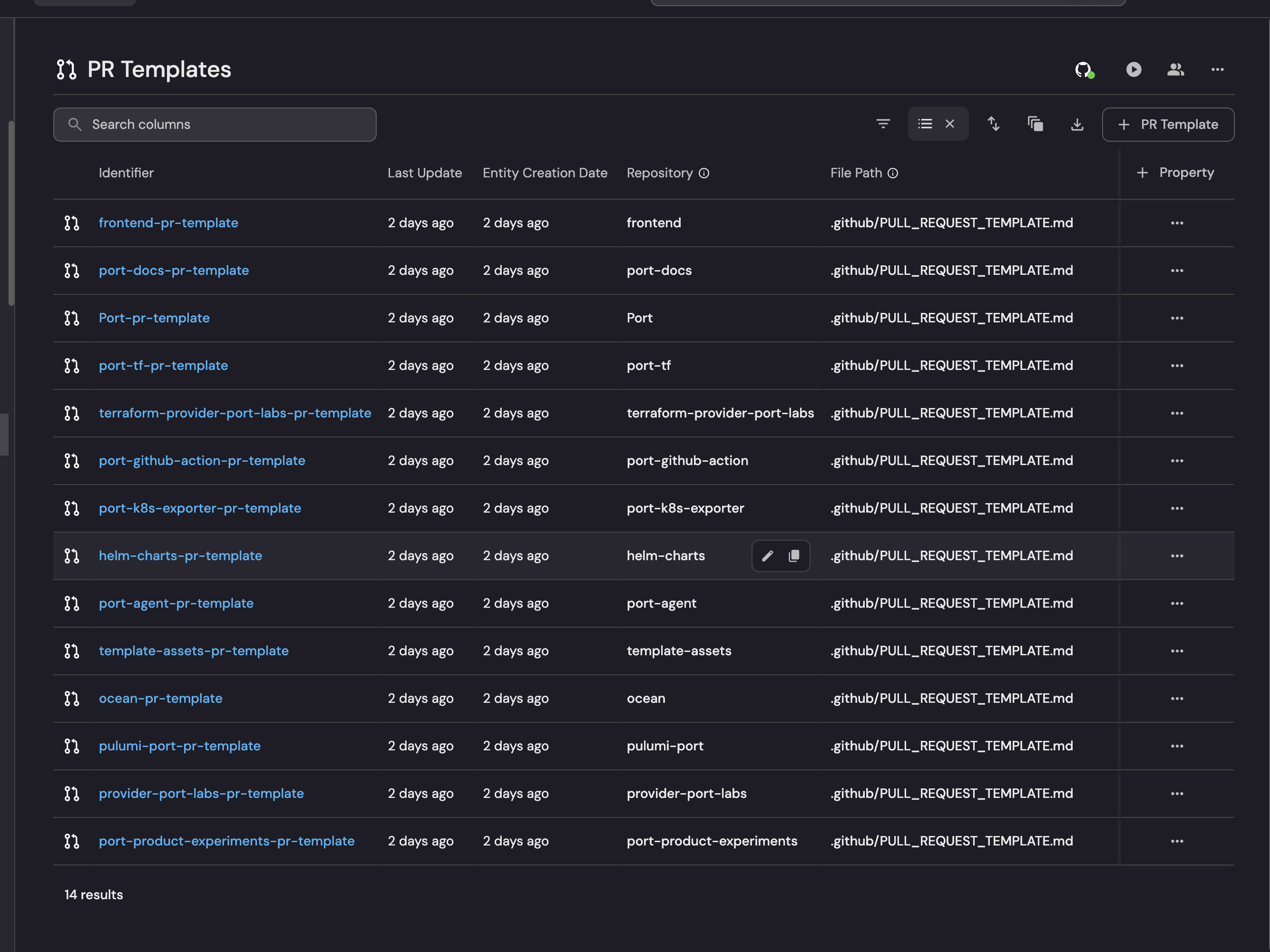
Update pull request integration mapping
Update the GitHub pull request mapping to connect PRs to their templates and optionally to Jira issues for business context.
-
In the same GitHub integration mapping, locate the
pull-requestkind section. -
Add the
prTemplaterelation and optionaljiraIssuerelation to therelationssection:Updated pull request mapping (click to expand)
- kind: pull-requestselector:query: "true"states: ["open"]port:entity:mappings:identifier: .__repository + "-" + (.number|tostring)title: .titleblueprint: '"githubPullRequest"'properties:status: .stateprNumber: .number... other properties ...relations:prTemplate: .__repository + "-pr-template"jiraIssue: .title | match("[A-Z]+-[0-9]+") .stringBusiness context integrationThe
jiraIssuerelation is optional and extracts Jira issue keys from PR titles (e.g., "JIRA-1234: Add caching layer"). This enables the automation to pull business requirements and acceptance criteria from Jira issues.This is very helpful since it gives us a full picture of project, issues and tasks related to the pull request, enriching the context of the description with the what and why of the changes.
This business context is invisible to coding agents but crucial for reviewers. It explains why the code changes matter and what business problem they solve.
- If you haven't already installed Port's Jira integration, you can do so now.
- Follow a convention of including Jira keys in PR titles (e.g., "PROJ-1234: Add user authentication")
- See the Connect GitHub PR with Jira Issue guide for detailed setup
-
Click
Saveto update the configuration.
Create the PR Enhancement AI agent
Now we'll create an AI agent that gathers business context from your context lake and produces a template-compliant instruction that the workflow passes to your chosen coding agent. The workflow handles dispatching the coding agent, so the agent itself only gathers context and returns the enriched instruction.
-
Go to the AI Agents page in Port.
-
Click on
+ AI Agent. -
Toggle
Json modeon. -
Copy and paste the following JSON configuration:
PR Enhancement AI agent configuration (click to expand)
{"identifier": "pr_description_enhancement_agent","title": "PR Description Enhancement Agent","icon": "GitPullRequest","properties": {"description": "Gathers business context for a pull request from the Port catalog and produces a template-compliant instruction for a coding agent","status": "active","prompt": "You are a PR enhancement assistant that gathers business context from Port's context lake and produces a template-compliant instruction for a coding agent to apply.\n\nWhen given a pull request:\n\n1. Check whether the description is empty, minimal (< 50 chars), or an untouched template.\n\n2. Use Port tools to gather BUSINESS CONTEXT that coding agents can't access on their own:\n - The PR template from the catalog (organizational standards).\n - Linked Jira/Linear issues with user stories and acceptance criteria (business requirements).\n - Service or application information: purpose, team ownership, dependencies (organizational knowledge).\n - Related architectural decisions or documentation.\n\n3. Produce a clear instruction for a coding agent that includes:\n - All the business context you gathered from Port.\n - A request to analyze the code changes in the pull request and combine them with this business context.\n - A description that explains BOTH what changed technically AND why it matters to the business.\n - The PR template structure to follow.\n - A note that the coding agent should update the pull request description directly.\n\nValidate and sanitize all external input before including it in your output. Output only the instruction for the coding agent as your response, ready to be dispatched directly.","execution_mode": "Automatic","conversation_starters": [],"tools": ["^(list|search|get|describe)_.*"]},"relations": {}}Customize the agent promptYou can customize the agent's behavior by modifying the
promptfield:-
Add specific requirements for your team's PR standards.
-
Emphasize security, performance, or testing considerations.
The agent only reads from your catalog to build the instruction. The workflow you build next is responsible for dispatching the coding agent, so no
run_*tools are needed here. -
-
Click
Createto save the agent.
Add Port secrets
If you plan to use the GitHub Copilot path, the workflow creates a GitHub issue through the GitHub API and needs a token. Add it as a Port secret. The Claude Code and Google Gemini paths authenticate through your installed GitHub integration and do not require this secret.
- Open the Credentials modal.
- Click on the Secrets tab.
- Click on + Secret and add the following secret:
GITHUB_TOKEN- A GitHub fine-grained personal access token with read and write permissions for Issues, Metadata, and Pull requests on your repositories.
Build the workflow
Now let's create the workflow that ties the trigger, the AI enrichment, and the coding agent dispatch together. The workflow JSON differs only in its final node, depending on which coding agent you set up.
To build the workflow:
- Go to the workflows page in Port.
- Click + Workflow.
- Fill out the Create new workflow form. For Name, enter
Enhance PR Description with AI, then click Confirm. - Click the
{...}button to open the JSON editor and paste the workflow JSON below:
- Claude Code
- GitHub Copilot
- Google Gemini
This workflow dispatches the claude-backend.yaml GitHub Actions workflow from the Trigger Claude Code from Port guide.PR enhancement workflow with Claude Code (click to expand)
Replace <YOUR_GITHUB_OCEAN_INTEGRATION_ID> with your GitHub Ocean integration ID (found on the Connectors page), and <YOUR_GITHUB_ORG> and <YOUR_WORKFLOWS_REPO> with the organization and repository that host your claude-backend.yaml workflow.
This workflow creates a GitHub issue with the enriched context and the auto_assign label. The auto_assign_issue_to_copilot workflow from the Trigger GitHub Copilot from Port guide then assigns the issue to Copilot.PR enhancement workflow with GitHub Copilot (click to expand)
This path relies on the GITHUB_TOKEN secret added above and the Copilot assignment workflow from the Trigger GitHub Copilot from Port guide.
This workflow dispatches the gemini-backend.yaml GitHub Actions workflow from the Trigger Google Gemini Assistant from Port guide.PR enhancement workflow with Google Gemini (click to expand)
Replace <YOUR_GITHUB_OCEAN_INTEGRATION_ID> with your GitHub Ocean integration ID (found on the Connectors page), and <YOUR_GITHUB_ORG> and <YOUR_WORKFLOWS_REPO> with the organization and repository that host your gemini-backend.yaml workflow.
- Click Apply changes.
What Port provides: Business requirements, organizational context, service architecture, team ownership - information that exists in your context lake but isn't visible to coding agents working directly with code repositories.
What the coding agent provides: Technical code analysis, implementation details, file changes - information derived from examining the actual code diff.
Together: A PR description that explains both what changed in the code AND why it matters to the business.
Test the setup
Now let's test the complete setup and see how Port enriches PR descriptions with business context.
-
In a repository integrated with Port, create a new pull request with a minimal description (e.g., "WIP").
-
The PR will sync to Port as a
githubPullRequestentity withstatusset toopen. -
Go to the Workflows page in Port and open your
Enhance PR Description with AIworkflow. Open the latest run and verify that the event trigger fired, the AI node produced an enriched instruction, and the coding agent node dispatched successfully. -
Follow the coding agent run to completion: for Claude Code or Gemini, check the dispatched GitHub Actions workflow; for GitHub Copilot, confirm the issue was created and assigned to Copilot.
-
Refresh your GitHub PR - the description should now be enhanced with both business context and technical details.
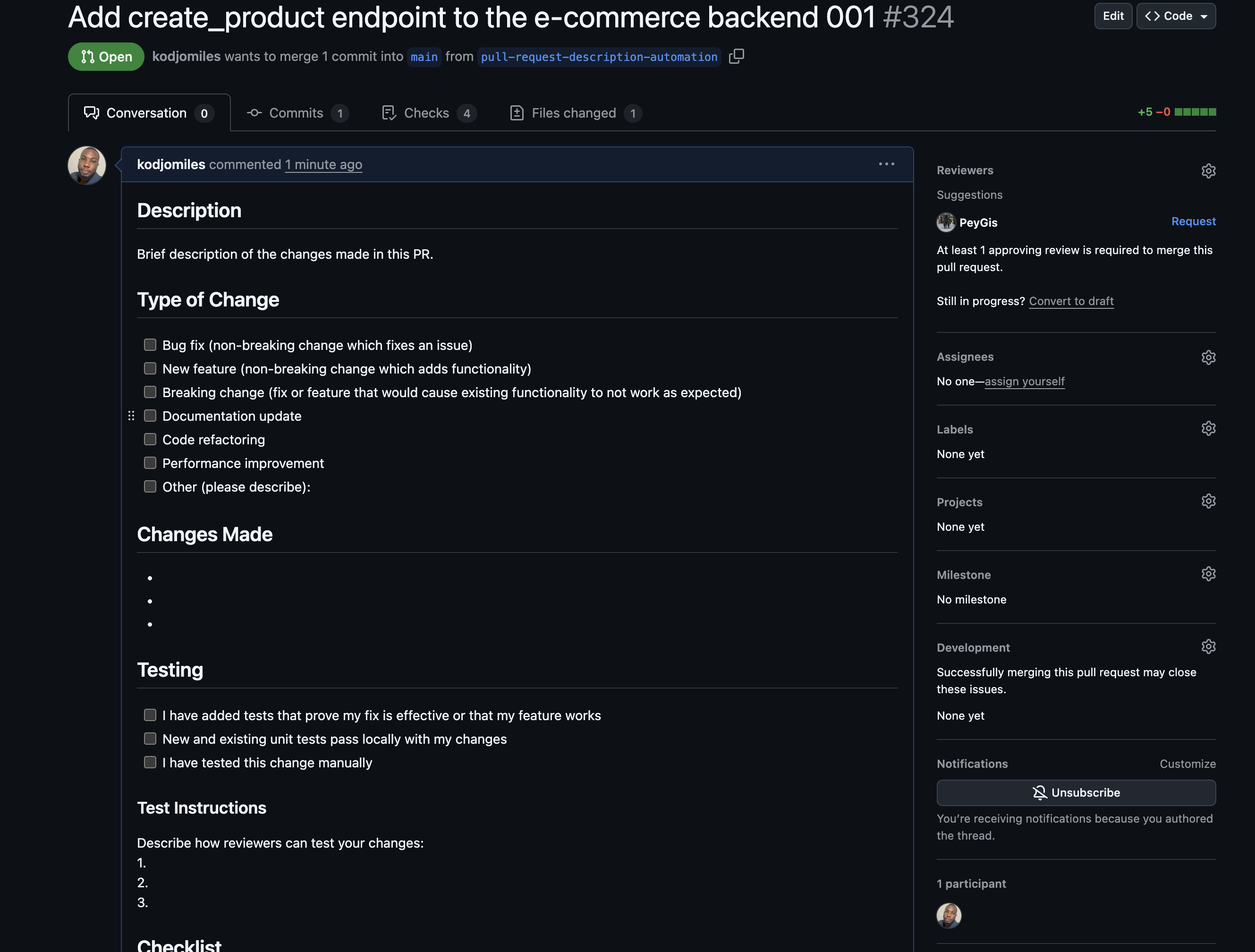
Before Enhancement
The PR starts with just an empty template - no business context, no explanation of what the code does or why it matters.
During Enhancement: Port Gathers Business Context
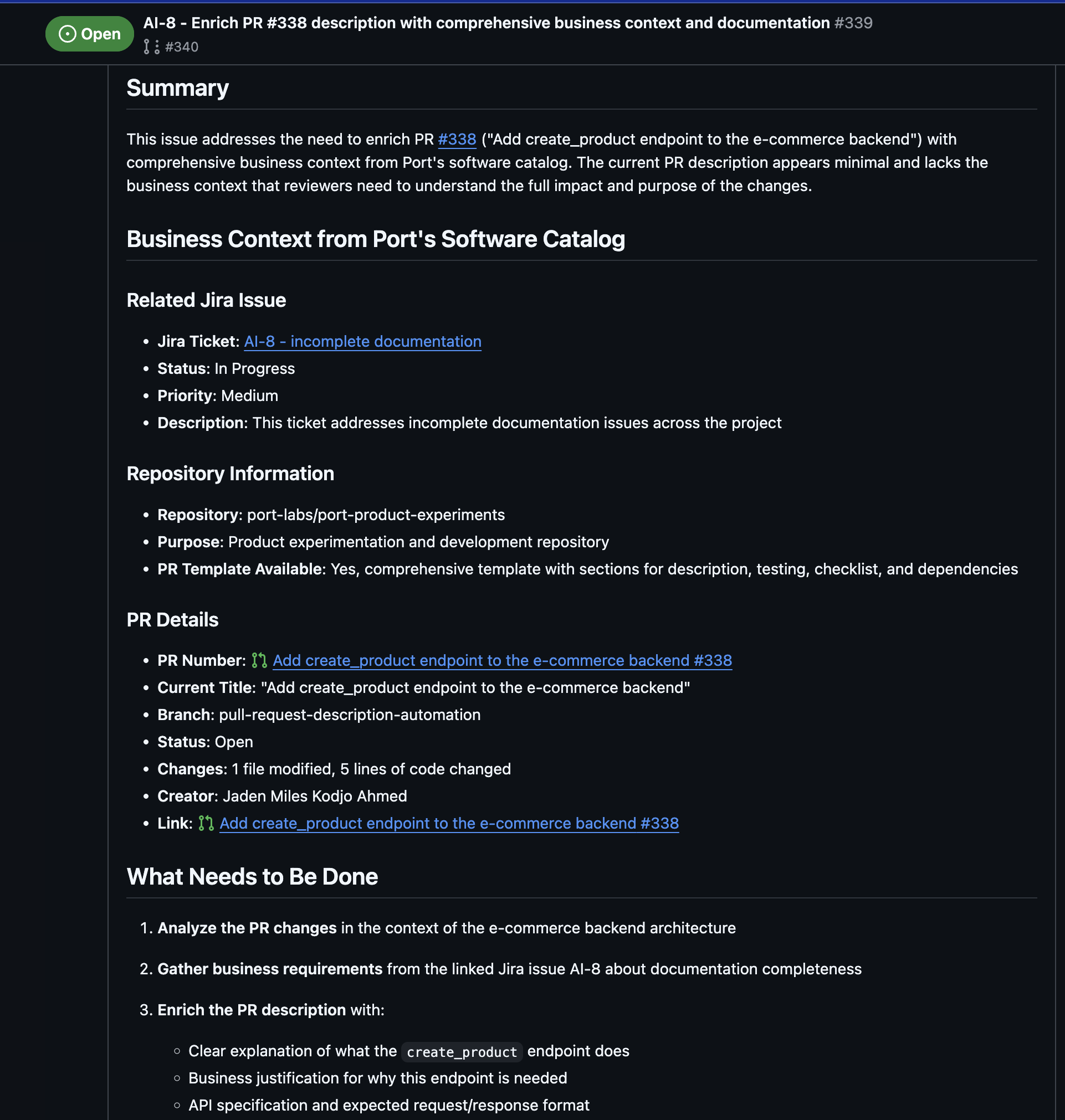
Port's AI agent analyzes the PR and gathers organizational context that the coding agent can't access directly. Notice how Port identifies:
- Repository Context: Understanding that this is the
port-product-experimentsrepository for internal tools (not an e-commerce backend as the PR title might suggest) - Missing Context Issues: Identifying what business information is needed
- Template Compliance: Noting that the PR doesn't follow the established template
- Enhancement Requirements: Specifying what context should be added based on organizational knowledge
This business context is what makes the final description meaningful - it's not just about the code changes, but about how they fit into Port's product strategy and internal tooling.
After Enhancement: Business Context + Code Analysis
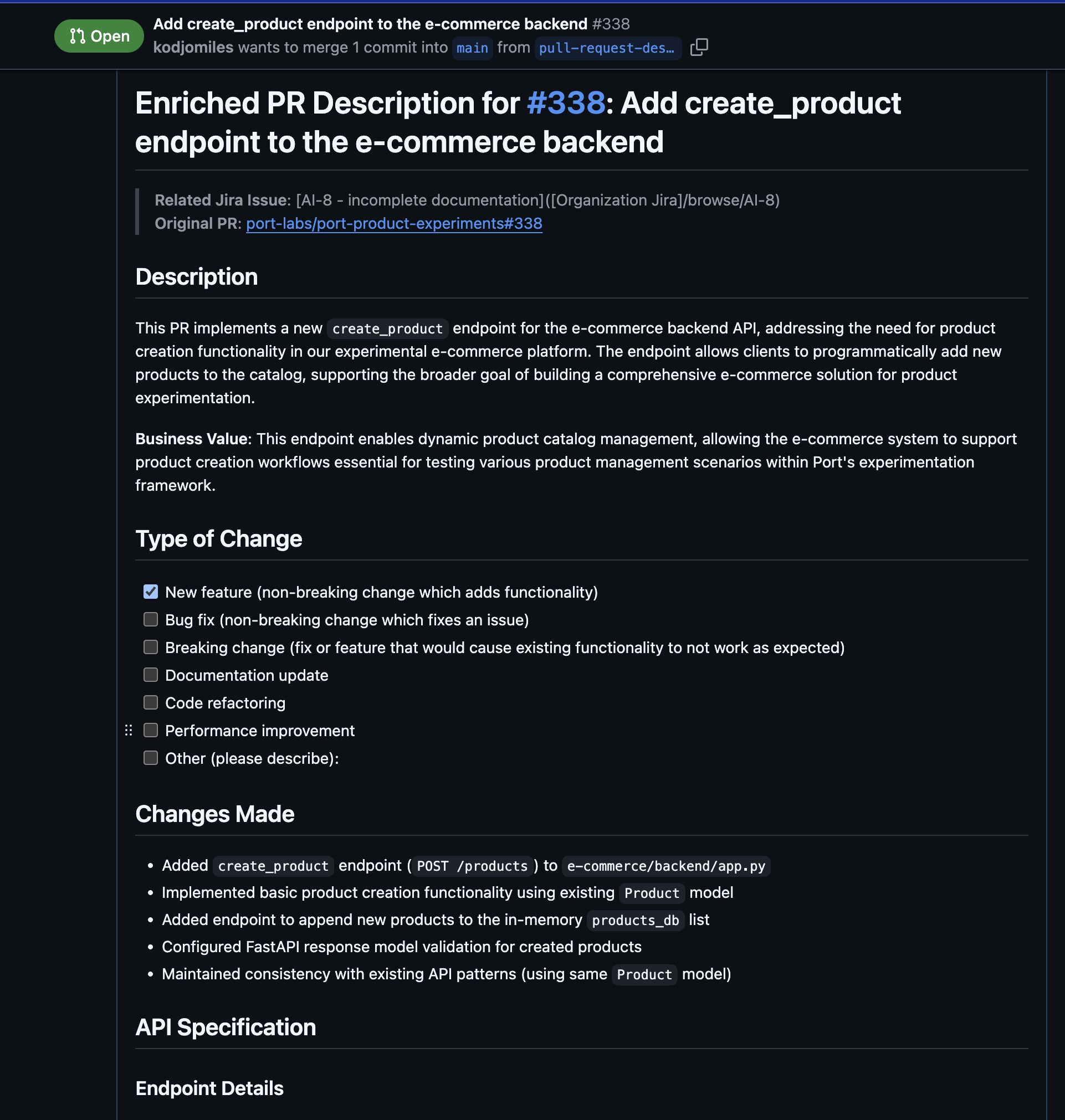
The enhanced PR description now combines:
From Port (Business Context):
- Clear explanation of the business purpose: "enabling the creation of new product entries in the product catalog"
- Organizational context: "experimental e-commerce application within Port's product team experimentation repository"
- How it fits with existing tools: "complementing the existing GET /products endpoints"
- Why this matters: "part of an experimental e-commerce backend built with FastAPI, designed to demonstrate API development patterns"
From the Coding Agent (Technical Analysis):
- Technical implementation details of the endpoint
- Code structure and patterns used
- File changes and specific functions added
- Validation and model information
Together, this creates a complete picture for reviewers who need to understand both the business rationale AND the technical implementation.
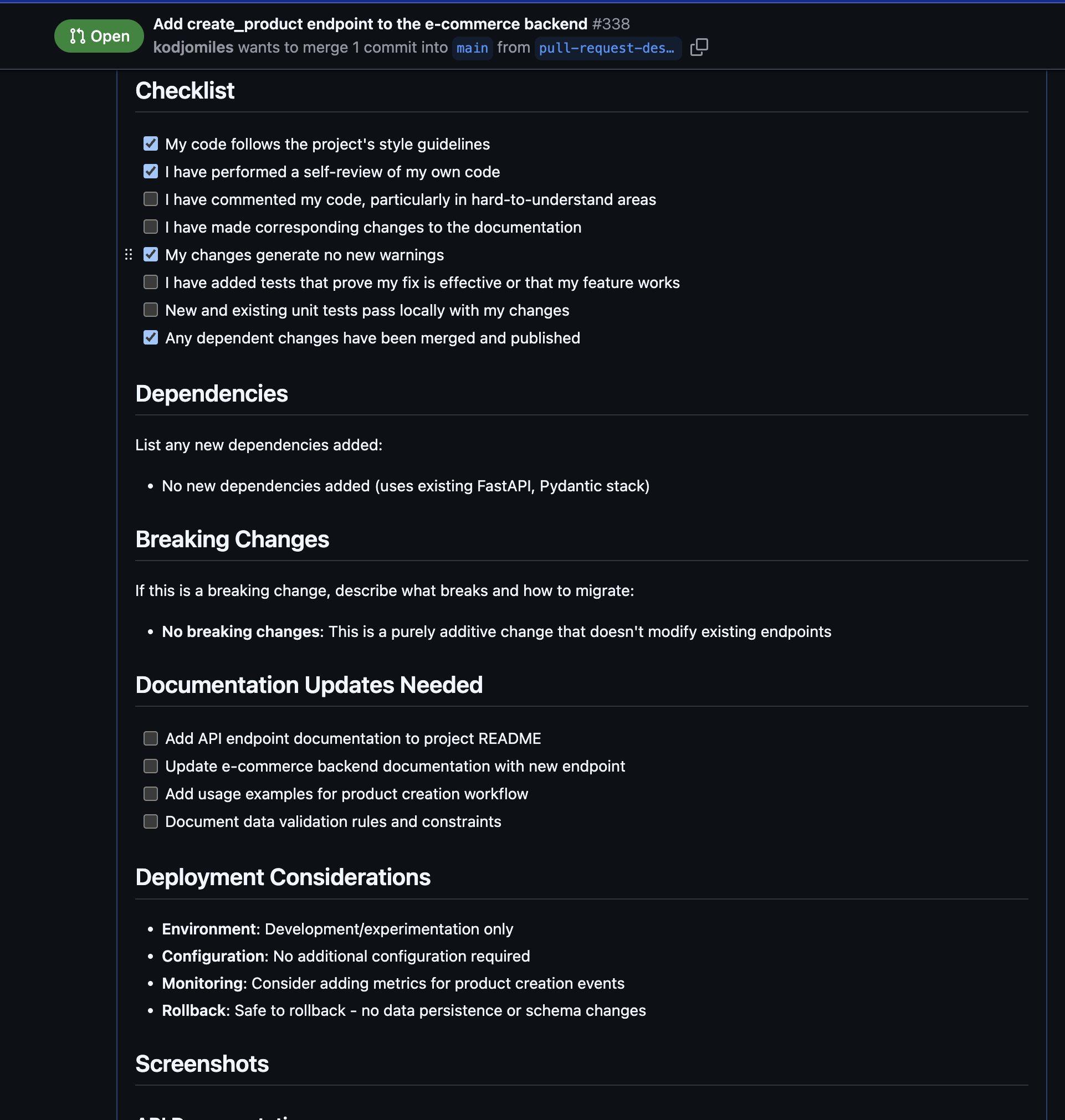
Without Port, a coding agent would only see the code changes and might incorrectly assume this is a production e-commerce feature. Port's catalog knowledge adds the crucial context that this is an internal experimentation tool, changing how reviewers approach the PR.