New Relic
Port's New Relic integration allows you to model New Relic resources in your software catalog and ingest data into them.
Overview
This integration allows you to:
- Map and organize your desired New Relic resources and their metadata in Port (see supported resources below).
- Watch for New Relic object changes (create/update/delete) in real-time, and automatically apply the changes to your entities in Port.
Supported resources
The resources that can be ingested from New Relic into Port are listed below. It is possible to reference any field that appears in the API responses linked below in the mapping configuration.
The following kinds are supported by the New Relic integration:
newRelicService- Maps New Relic services and applications (SERVICE and APPLICATION entity types).newRelicAlert- Maps New Relic issues/alerts.newRelicServiceLevel- Maps New Relic service level indicators (SLIs) and service level objectives (SLOs).entity- Maps generic New Relic entities, including cloud resources from AWS, Azure, and GCP.entities- Maps New Relic dashboards.
Setup
Choose one of the following installation methods:
Not sure which method is right for your use case? Check the available installation methods.
- Hosted by Port (Recommended)
- Self-hosted
- CI
-
Go to the NewRelic data source page in your portal.
-
Under
Select your installation method, chooseHosted by Port. -
configure the
custom settingsandadvanced configurationas you wish (see below for details).
Custom settings
Each integration has its own tool-specific configuration that you provide during setup:
Advanced configuration
In Port, you can configure the following settings for the integration:
-
Live event support:This integration supports live events, allowing real-time updates to your software catalog without waiting for the next scheduled sync.
Supported live event triggers (click to expand)
Issues:
- issue_created
- issue_updated
- issue_closed
-
Actions processing enabled:
When enabled, Port will automatically process actions for this integration. -
Create default resources:
When enabled, Port will automatically create default blueprints and mapping configurations for this integration.
Port secrets
Some integration settings require sensitive pieces of data, such as tokens. For these settings, Port secrets will be used, ensuring that your sensitive data is encrypted and secure.
When filling in such a setting, its value will be obscured (shown as ••••••••).
For each such setting, Port will automatically create a secret in your organization.
To see all secrets in your organization, follow these steps.
Port source IP addresses
When using this installation method, Port will make outbound calls to your 3rd-party applications from static IP addresses. You may need to add these addresses to your allowlist, in order to allow Port to interact with the integrated service:
- Europe (EU):
54.73.167.226,63.33.143.237,54.76.185.219 - United States (US):
3.234.37.33,54.225.172.136,3.225.234.99
Using this installation option means that the integration will be able to update Port in real time using webhooks.
Prerequisites
-
A Kubernetes cluster - the integration's container chart will be deployed to this cluster.
-
kubectlandhelmmust be installed on your machine. YourkubectlCLI must be connected to the Kubernetes cluster where you plan to install the integration.
For details about the available parameters for the installation, see the table below.
- Helm
- ArgoCD
-
Go to the NewRelic data source page in your portal.
-
Select the
Real-time and always onmethod. -
A
helmcommand will be displayed, with default values already filled out (e.g. your Port client ID, client secret, etc). Copy the command, replace the placeholders with your values, then run it in your terminal to install the integration.
BaseUrl & webhook configuration
To enable real-time updates of the data in your software catalog, you need to define the liveEvents.baseUrl parameter.
This parameter should be set to the URL of your NewRelic integration instance, which needs to have the option to setup webhooks via HTTP requests/receive HTTP requests, so ensure the network is configured accordingly.
- If NewRelic and the integration are in the same cluster/network: Use an internal URL (e.g., a Kubernetes service DNS name).
For Kubernetes deployments, create a service to expose the integration pod and use the service URL asliveEvents.baseUrl. If both the source system and integration are in the same cluster, an internal ClusterIP service is sufficient. - If NewRelic is external to the integration's network: The integration must be exposed via an ingress, load balancer, or public URL that NewRelic can reach.
If liveEvents.baseUrl is not provided, the integration will continue to function correctly. In such a configuration, to retrieve the latest information from the target system, the scheduledResyncInterval parameter has to be set, or a manual resync will need to be triggered through Port's UI.
To test webhooks or live event delivery to your local environment, expose your local pod or service to the internet using ngrok (e.g. ngrok http http://localhost:8000)
Securing Your Webhooks
The integration.secrets.webhookUsername,integration.secrets.webhookSecret parameters secure your webhooks. If not provided, the integration will process webhooks without validating the source of the events.
Scalable mode for large integrations
If you are deploying the integration at scale and want to decouple the resync process from the live events process (recommended for large or high-throughput environments), you can enable scalable mode by adding the following flags to your Helm install command:
  --set workload.kind="CronJob"  \
  --set workload.cron.resyncTimeoutMinutes=60  \
  --set scheduledResyncInterval="'*/60 * * * *'"  \
  --set liveEvents.worker.enabled=true
All Ocean integrations expose a health check endpoint at /docs.
For example, if your integration is accessible at https://your-integration-host:8000, you can access the health check at https://your-integration-host:8000/docs.
The port_region, port.baseUrl, portBaseUrl, port_base_url and OCEAN__PORT__BASE_URL parameters select which Port API instance to use:
- EU (app.port.io) →
https://api.getport.io - US (app.us.port.io) →
https://api.us.getport.io
To install the integration using ArgoCD:
- Create a
values.yamlfile inargocd/my-ocean-newrelic-integrationin your git repository with the content:
Remember to replace the placeholders for NEW_RELIC_API_KEY and NEW_RELIC_ACCOUNT_ID.
initializePortResources: true
scheduledResyncInterval: 120
integration:
  identifier: my-ocean-newrelic-integration
  type: newrelic
  eventListener:
    type: POLLING
  secrets:
    newRelicAPIKey: NEW_RELIC_API_KEY
    newRelicAccountID: NEW_RELIC_ACCOUNT_ID
If you are using New Relic's EU region, add the highlighted code (GraphQL configuration value) to the values.yaml:
initializePortResources: true
scheduledResyncInterval: 120
integration:
  identifier: my-ocean-newrelic-integration
  type: newrelic
  eventListener:
    type: POLLING
  config:
    newRelicGraphqlURL: https://api.eu.newrelic.com/graphql
  secrets:
    newRelicAPIKey: NEW_RELIC_API_KEY
    newRelicAccountID: NEW_RELIC_ACCOUNT_ID
- Install the
my-ocean-newrelic-integrationArgoCD Application by creating the followingmy-ocean-newrelic-integration.yamlmanifest:
Remember to replace the placeholders for YOUR_PORT_CLIENT_ID YOUR_PORT_CLIENT_SECRET and YOUR_GIT_REPO_URL.
Multiple sources ArgoCD documentation can be found here.
ArgoCD Application
apiVersion: argoproj.io/v1alpha1
kind: Application
metadata:
  name: my-ocean-newrelic-integration
  namespace: argocd
spec:
  destination:
    namespace: my-ocean-newrelic-integration
    server: https://kubernetes.default.svc
  project: default
  sources:
  - repoURL: 'https://port-labs.github.io/helm-charts/'
    chart: port-ocean
    targetRevision: 0.9.5
    helm:
      valueFiles:
      - $values/argocd/my-ocean-newrelic-integration/values.yaml
      parameters:
        - name: port.clientId
          value: YOUR_PORT_CLIENT_ID
        - name: port.clientSecret
          value: YOUR_PORT_CLIENT_SECRET
        - name: port.baseUrl
          value: https://api.getport.io
  - repoURL: YOUR_GIT_REPO_URL
    targetRevision: main
    ref: values
  syncPolicy:
    automated:
      prune: true
      selfHeal: true
    syncOptions:
    - CreateNamespace=true
The port_region, port.baseUrl, portBaseUrl, port_base_url and OCEAN__PORT__BASE_URL parameters select which Port API instance to use:
- EU (app.port.io) →
https://api.getport.io - US (app.us.port.io) →
https://api.us.getport.io
- Apply your application manifest with
kubectl:
kubectl apply -f my-ocean-newrelic-integration.yaml
This table summarizes the available parameters for the installation.
| Parameter | Description | Required |
|---|---|---|
port.clientId | Your port client id | ✅ |
port.clientSecret | Your port client secret | ✅ |
port.baseUrl | Your Port API URL - https://api.getport.io for EU, https://api.us.getport.io for US | ✅ |
integration.identifier | Change the identifier to describe your integration | ✅ |
integration.type | The integration type | ✅ |
integration.eventListener.type | The event listener type | ✅ |
integration.secrets.newRelicAPIKey | The New Relic API key | ✅ |
integration.secrets.newRelicAccountID | The New Relic account ID | ✅ |
scheduledResyncInterval | The number of minutes between each resync | ❌ |
initializePortResources | Default true, When set to true the integration will create default blueprints and the port App config Mapping | ❌ |
integration.secrets.webhookUsername | Webhook username used for authenticating incoming events. Learn more | ❌ |
integration.secrets.webhookSecret | Webhook secret for authenticating incoming events. Learn more | ❌ |
liveEvents.baseUrl | The base url of the instance where the New Relic integration is hosted, used for real-time updates. (e.g.https://mynewrelicoceanintegration.com) | ❌ |
For advanced configuration such as proxies or self-signed certificates, click here.
Recommended resource sizes
To ensure optimal performance and avoid out-of-memory (OOM) errors, we recommend the following resources for this integration:
- CPU Limit:
800m - CPU Request:
100m - Memory Limit:
1Gi - Memory Request:
1Gi
Set resource values
helm install my-integration port-labs/port-ocean \
# ... other parameters
--set ocean.resources.limits.cpu=800m \
--set ocean.resources.limits.memory=1Gi \
--set ocean.resources.requests.cpu=100m \
--set ocean.resources.requests.memory=1Gi
Event listener
The integration uses polling to pull the configuration from Port every minute and check it for changes. If there is a change, a resync will occur.
This workflow/pipeline will run the New Relic integration once and then exit, this is useful for scheduled ingestion of data.
- GitHub
- Jenkins
- Azure Devops
- GitLab
Make sure to configure the following Github Secrets:
| Parameter | Description | Required |
|---|---|---|
OCEAN__INTEGRATION__CONFIG__NEW_RELIC_API_KEY | The New Relic API key | ✅ |
OCEAN__INTEGRATION__CONFIG__NEW_RELIC_ACCOUNT_ID | The New Relic account ID | ✅ |
OCEAN__INITIALIZE_PORT_RESOURCES | Default true, When set to false the integration will not create default blueprints and the port App config Mapping | ❌ |
OCEAN__INTEGRATION__IDENTIFIER | Change the identifier to describe your integration, if not set will use the default one | ❌ |
OCEAN__PORT__CLIENT_ID | Your port client id | ✅ |
OCEAN__PORT__CLIENT_SECRET | Your port client secret | ✅ |
OCEAN__PORT__BASE_URL | Your Port API URL - https://api.getport.io for EU, https://api.us.getport.io for US | ✅ |
Here is an example for newrelic-integration.yml workflow file:
If you are using New Relic's EU region, add the following flag to the docker command:
-e OCEAN__INTEGRATION__CONFIG__NEW_RELIC_URL=https://api.eu.newrelic.com/graphql
name: New Relic Exporter Workflow

on:
  workflow_dispatch:
  schedule:
    - cron: '0 */1 * * *' # Determines the scheduled interval for this workflow. This example runs every hour.

jobs:
  run-integration:
    runs-on: ubuntu-latest
    timeout-minutes: 30 # Set a time limit for the job

    steps:
      - uses: port-labs/ocean-sail@v1
        with:
          type: 'newrelic'
          port_client_id: ${{ secrets.OCEAN__PORT__CLIENT_ID }}
          port_client_secret: ${{ secrets.OCEAN__PORT__CLIENT_SECRET }}
          port_base_url: https://api.getport.io
          config: |
            new_relic_api_key: ${{ secrets.OCEAN__INTEGRATION__CONFIG__NEW_RELIC_API_KEY }}
            new_relic_account_id: ${{ secrets.OCEAN__INTEGRATION__CONFIG__NEW_RELIC_ACCOUNT_ID }}
Your Jenkins agent should be able to run docker commands.
Make sure to configure the following Jenkins Credentials of Secret Text type:
| Parameter | Description | Required |
|---|---|---|
OCEAN__INTEGRATION__CONFIG__NEW_RELIC_API_KEY | The New Relic API key | ✅ |
OCEAN__INTEGRATION__CONFIG__NEW_RELIC_ACCOUNT_ID | The New Relic account ID | ✅ |
OCEAN__INITIALIZE_PORT_RESOURCES | Default true, When set to false the integration will not create default blueprints and the port App config Mapping | ❌ |
OCEAN__INTEGRATION__IDENTIFIER | Change the identifier to describe your integration, if not set will use the default one | ❌ |
OCEAN__PORT__CLIENT_ID | Your port client id | ✅ |
OCEAN__PORT__CLIENT_SECRET | Your port client secret | ✅ |
OCEAN__PORT__BASE_URL | Your Port API URL - https://api.getport.io for EU, https://api.us.getport.io for US | ✅ |
Here is an example for Jenkinsfile groovy pipeline file:
If you are using New Relic's EU region, add the following flag to the docker command:
-e OCEAN__INTEGRATION__CONFIG__NEW_RELIC_URL=https://api.eu.newrelic.com/graphql
pipeline {
    agent any

    stages {
        stage('Run New Relic Integration') {
            steps {
                script {
                    withCredentials([
                        string(credentialsId: 'OCEAN__INTEGRATION__CONFIG__NEW_RELIC_API_KEY', variable: 'OCEAN__INTEGRATION__CONFIG__NEW_RELIC_API_KEY'),
                        string(credentialsId: 'OCEAN__INTEGRATION__CONFIG__NEW_RELIC_ACCOUNT_ID', variable: 'OCEAN__INTEGRATION__CONFIG__NEW_RELIC_ACCOUNT_ID'),
                        string(credentialsId: 'OCEAN__PORT__CLIENT_ID', variable: 'OCEAN__PORT__CLIENT_ID'),
                        string(credentialsId: 'OCEAN__PORT__CLIENT_SECRET', variable: 'OCEAN__PORT__CLIENT_SECRET'),
                    ]) {
                        sh('''
                            #Set Docker image and run the container
                            integration_type="newrelic"
                            version="latest"
                            image_name="ghcr.io/port-labs/port-ocean-${integration_type}:${version}"
                            docker run -i --rm --platform=linux/amd64 \
                                -e OCEAN__EVENT_LISTENER='{"type":"ONCE"}' \
                                -e OCEAN__INITIALIZE_PORT_RESOURCES=true \
                                -e OCEAN__INTEGRATION__CONFIG__NEW_RELIC_API_KEY=$OCEAN__INTEGRATION__CONFIG__NEW_RELIC_API_KEY \
                                -e OCEAN__INTEGRATION__CONFIG__NEW_RELIC_ACCOUNT_ID=$OCEAN__INTEGRATION__CONFIG__NEW_RELIC_ACCOUNT_ID \
                                -e OCEAN__PORT__CLIENT_ID=$OCEAN__PORT__CLIENT_ID \
                                -e OCEAN__PORT__CLIENT_SECRET=$OCEAN__PORT__CLIENT_SECRET \
                                -e OCEAN__PORT__BASE_URL='https://api.getport.io' \
                                $image_name

                            exit $?
                        ''')
                    }
                }
            }
        }
    }
}
Prerequisites
- Your Azure Devops agent should be able to run docker commands. Learn more about agents here.
- You must have permissions to create and manage Azure DevOps variable groups for storing credentials.
Set up your credentials
- Create a Variable Group: Name it port-ocean-credentials.
- Store the required variables (see the table below).
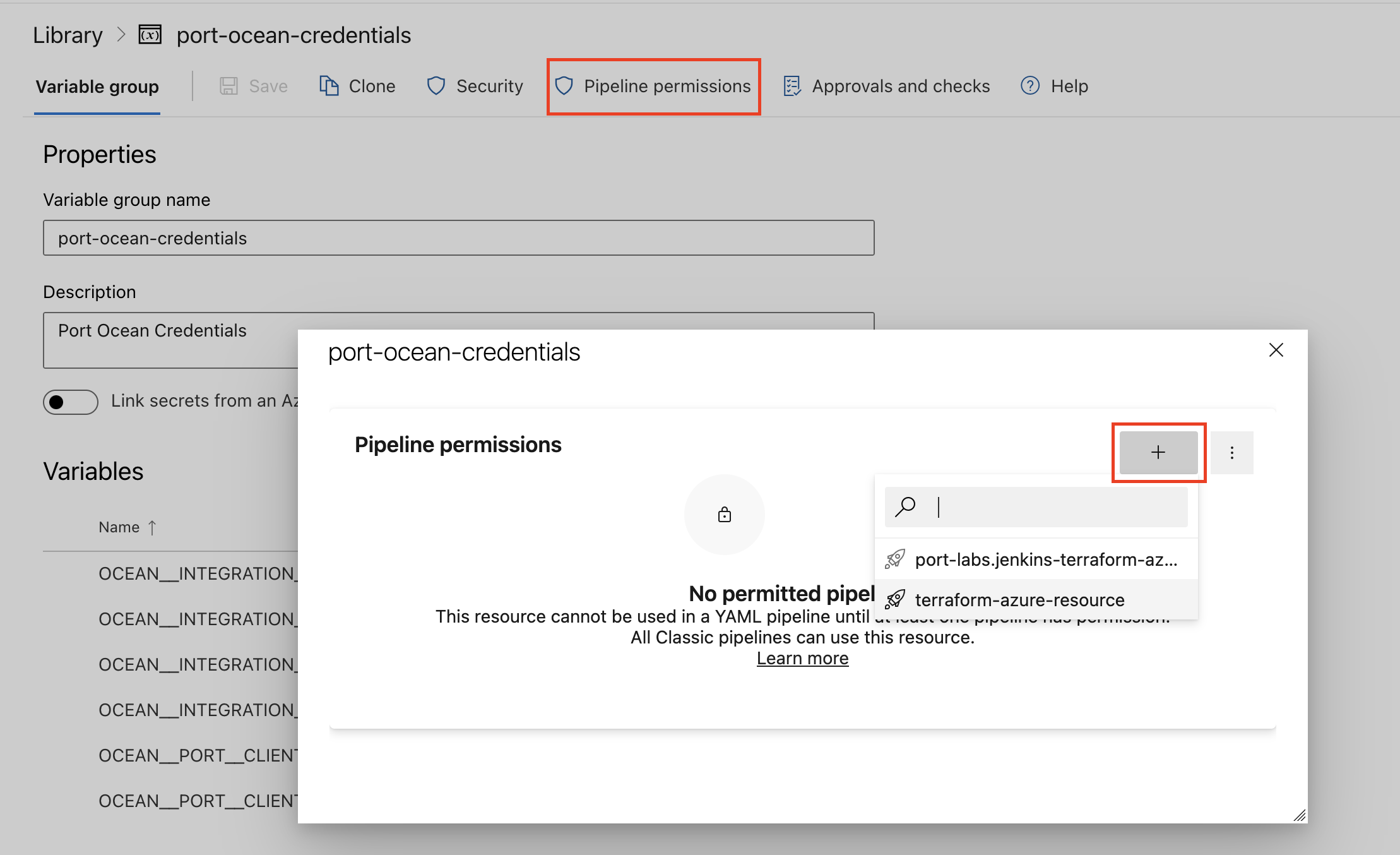
- Authorize Your Pipeline:
-
Go to "Library" -> "Variable groups."
-
Find port-ocean-credentials and click on it.
-
Select "Pipeline Permissions" and add your pipeline to the authorized list.
-
| Parameter | Description | Required |
|---|---|---|
OCEAN__INTEGRATION__CONFIG__NEW_RELIC_API_KEY | The New Relic API key | ✅ |
OCEAN__INTEGRATION__CONFIG__NEW_RELIC_ACCOUNT_ID | The New Relic account ID | ✅ |
OCEAN__INITIALIZE_PORT_RESOURCES | Default true, When set to false the integration will not create default blueprints and the port App config Mapping | ❌ |
OCEAN__INTEGRATION__IDENTIFIER | Change the identifier to describe your integration, if not set will use the default one | ❌ |
OCEAN__PORT__CLIENT_ID | Your port client id | ✅ |
OCEAN__PORT__CLIENT_SECRET | Your port client secret | ✅ |
OCEAN__PORT__BASE_URL | Your Port API URL - https://api.getport.io for EU, https://api.us.getport.io for US | ✅ |
Here is an example for newrelic-integration.yml pipeline file:
trigger:
- main

pool:
  vmImage: "ubuntu-latest"

variables:
  - group: port-ocean-credentials


steps:
- script: |
    # Set Docker image and run the container
    integration_type="newrelic"
    version="latest"

    image_name="ghcr.io/port-labs/port-ocean-$integration_type:$version"

    docker run -i --rm \
        -e OCEAN__EVENT_LISTENER='{"type":"ONCE"}' \
        -e OCEAN__INITIALIZE_PORT_RESOURCES=true \
        -e OCEAN__INTEGRATION__CONFIG__NEW_RELIC_API_KEY=$(OCEAN__INTEGRATION__CONFIG__NEW_RELIC_API_KEY) \
        -e OCEAN__INTEGRATION__CONFIG__NEW_RELIC_ACCOUNT_ID=$(OCEAN__INTEGRATION__CONFIG__NEW_RELIC_ACCOUNT_ID) \
        -e OCEAN__PORT__CLIENT_ID=$(OCEAN__PORT__CLIENT_ID) \
        -e OCEAN__PORT__CLIENT_SECRET=$(OCEAN__PORT__CLIENT_SECRET) \
        -e OCEAN__PORT__BASE_URL='https://api.getport.io' \
        $image_name

    exit $?
  displayName: 'Ingest Data into Port'
Make sure to configure the following GitLab variables:
| Parameter | Description | Required |
|---|---|---|
OCEAN__INTEGRATION__CONFIG__NEW_RELIC_API_KEY | The New Relic API key | ✅ |
OCEAN__INTEGRATION__CONFIG__NEW_RELIC_ACCOUNT_ID | The New Relic account ID | ✅ |
OCEAN__INITIALIZE_PORT_RESOURCES | Default true, When set to false the integration will not create default blueprints and the port App config Mapping | ❌ |
OCEAN__INTEGRATION__IDENTIFIER | Change the identifier to describe your integration, if not set will use the default one | ❌ |
OCEAN__PORT__CLIENT_ID | Your port client id | ✅ |
OCEAN__PORT__CLIENT_SECRET | Your port client secret | ✅ |
OCEAN__PORT__BASE_URL | Your Port API URL - https://api.getport.io for EU, https://api.us.getport.io for US | ✅ |
Here is an example for .gitlab-ci.yml pipeline file:
default:
  image: docker:24.0.5
  services:
    - docker:24.0.5-dind
  before_script:
    - docker info

variables:
  INTEGRATION_TYPE: newrelic
  VERSION: latest

stages:
  - ingest

ingest_data:
  stage: ingest
  variables:
    IMAGE_NAME: ghcr.io/port-labs/port-ocean-$INTEGRATION_TYPE:$VERSION
  script:
    - |
      docker run -i --rm --platform=linux/amd64 \
        -e OCEAN__EVENT_LISTENER='{"type":"ONCE"}' \
        -e OCEAN__INITIALIZE_PORT_RESOURCES=true \
        -e OCEAN__INTEGRATION__CONFIG__NEW_RELIC_API_KEY=$OCEAN__INTEGRATION__CONFIG__NEW_RELIC_API_KEY \
        -e OCEAN__INTEGRATION__CONFIG__NEW_RELIC_ACCOUNT_ID=$OCEAN__INTEGRATION__CONFIG__NEW_RELIC_ACCOUNT_ID \
        -e OCEAN__PORT__CLIENT_ID=$OCEAN__PORT__CLIENT_ID \
        -e OCEAN__PORT__CLIENT_SECRET=$OCEAN__PORT__CLIENT_SECRET \
        -e OCEAN__PORT__BASE_URL='https://api.getport.io' \
        $IMAGE_NAME

  rules: # Run only when changes are made to the main branch
    - if: '$CI_COMMIT_BRANCH == "main"'
For advanced configuration such as proxies or self-signed certificates, click here.
Configuration
Port integrations use a YAML mapping block to ingest data from the third-party api into Port.
The mapping makes use of the JQ JSON processor to select, modify, concatenate, transform and perform other operations on existing fields and values from the integration API.
Default mapping configuration
This is the default mapping configuration for this integration:
Default mapping configuration (Click to expand)
deleteDependentEntities: true
createMissingRelatedEntities: true
enableMergeEntity: true
resources:
- kind: newRelicService
  selector:
    query: 'true'
    newRelicTypes:
    - SERVICE
    - APPLICATION
    calculateOpenIssueCount: true
    entityQueryFilter: type in ('SERVICE','APPLICATION')
    entityExtraPropertiesQuery: |-
      ... on ApmApplicationEntityOutline {
        guid
        name
        apmSummary {
          apdexScore
          errorRate
          hostCount
          instanceCount
          responseTimeAverage
          throughput
        }
      }
  port:
    entity:
      mappings:
        identifier: .guid
        title: .name
        blueprint: '"newRelicService"'
        properties:
          has_apm: if .domain | contains("APM") then "true" else "false" end
          link: .permalink
          open_issues_count: .open_issues_count
          reporting: .reporting
          tags: .tags
          type: .type
          throughput: .apmSummary.throughput
          error_rate: .apmSummary.errorRate
          response_time_avg: .apmSummary.responseTimeAverage
          instance_count: .apmSummary.instanceCount
          apdex: .apmSummary.apdexScore
- kind: newRelicAlert
  selector:
    query: .state == "ACTIVATED" or .state == "CREATED"
    newRelicTypes:
    - ISSUE
  port:
    entity:
      mappings:
        identifier: .issueId
        title: .title[0]
        blueprint: '"newRelicAlert"'
        properties:
          priority: .priority
          state: .state
          sources: .sources
          conditionName: .conditionName
          alertPolicyNames: .policyName
          activatedAt: if .activatedAt == null then null else .activatedAt / 1000 | todate end
          link: '"https://one.newrelic.com/launcher/nrai.launcher?pane=" + ("{\"isPhoton\": true, \"id\": \"\(.issueId)\", \"nerdletId\": \"nrai.issue-redirect\"}" | @base64)'
          description: .description
        relations:
          alert_to_workload: .__APPLICATION.entity_guids + .__SERVICE.entity_guids
          cloud_resource:
            combinator: '"and"'
            rules:
            - property: '"guid"'
              operator: '"in"'
              value: .entityGuids
- kind: newRelicServiceLevel
  selector:
    query: 'true'
  port:
    entity:
      mappings:
        identifier: .serviceLevel.indicators[0].id
        title: .serviceLevel.indicators[0].name
        blueprint: '"newRelicServiceLevel"'
        properties:
          description: .serviceLevel.indicators[0].description
          targetThreshold: .serviceLevel.indicators[0].objectives[0].target
          createdAt: if .serviceLevel.indicators[0].createdAt != null then (.serviceLevel.indicators[0].createdAt | tonumber / 1000 | todate) else null end
          updatedAt: .serviceLevel.indicators[0].updatedAt
          createdBy: .serviceLevel.indicators[0].createdBy.email
          sli: .__SLI.SLI
          tags: .tags
          slo_compliance: .__SLI.SLI >= .serviceLevel.indicators[0].objectives[0].target
        relations:
          workload: .tags."nr.associatedEntityGuid"[0]
- kind: entity
  selector:
    query: 'true'
    entityQueryFilter: >-
      type IN ( 'AWSEC2INSTANCE', 'AWSS3BUCKET', 'AWSRDSDBINSTANCE', 'AWSLAMBDAFUNCTION', 'AWSELBLOADBALANCER', 'AZUREVIRTUALMACHINE', 'AZURESQLDATABASE', 'GCPCOMPUTEINSTANCE', 'GCPSTORAGEBUCKET', 'GCPSQLDATABASEINSTANCE' )
  port:
    entity:
      mappings:
        identifier: .guid
        title: .name
        blueprint: '"newRelicCloudResource"'
        properties:
          infrastructureIntegrationType: .type
          reporting: .reporting
          link: .permalink
          tags: .tags
- kind: entities
  selector:
    query: 'true'
    entityQueryFilter: type IN ( 'DASHBOARD' )
  port:
    entity:
      mappings:
        identifier: .guid
        title: .name
        blueprint: '"newRelicDashboards"'
        properties:
          dashboard_link: .permalink
- kind: newRelicService
  selector:
    query: 'true'
    newRelicTypes:
    - SERVICE
    - APPLICATION
    entityQueryFilter: type in ('SERVICE','APPLICATION')
  port:
    entity:
      mappings:
        identifier: .guid
        title: .name
        blueprint: '"workload"'
        relations:
          new_relic_workload: .guid
Additional Configuration
-
newRelicTypes - An array of Newrelic entity types that will be fetched. The default value is ['SERVICE', 'APPLICATION']. This is related to the type field in the Newrelic entity.
-
calculateOpenIssueCount:
- A boolean value that indicates if the integration should calculate the number of open issues for each entity. The default value is `false``.
- NOTE - This can cause a performance degradation as the integration will have to calculate the number of open issues for each entity, which unfortunately is not supported by the New Relic API.
-
entityQueryFilter:
- A filter that will be applied to the New Relic API query. This will be placed inside the
queryfield of theentitySearchquery in the New Relic GraphQL API. For examples of query filters click here. - Not specifying this field will cause the integration to fetch all the entities and map them to the blueprint defined in the
kind. - Rule of thumb - Most of the time the
EntityQueryFilterwill be the same as theNewRelicTypes. For example, if we want to fetch all the services and applications we will set theEntityQueryFiltertotype in ('SERVICE','APPLICATION')and theNewRelicTypesto['SERVICE', 'APPLICATION'].
- A filter that will be applied to the New Relic API query. This will be placed inside the
-
entityExtraPropertiesQuery:
- An optional property that allows defining extra properties to fetch for each Newrelic entity. This will be concatenated with the default query properties we are requesting under the
entitiessection in theentitySearchquery in the Newrelic GraphQL API. For examples of additional query properties click here.
- An optional property that allows defining extra properties to fetch for each Newrelic entity. This will be concatenated with the default query properties we are requesting under the
-
The
port,entityand themappingskeys are used to map the Newrelic object fields to Port entities. To create multiple mappings of the same kind, you can add another item in theresourcesarray;
Capabilities
Tags
Some Newrelic entities have a property named tags which contains potentially useful information such as machine information, hostname, agent name & version, and more. For example:
"tags": [
  {
    "key": "coreCount",
    "values": [
      "10"
    ]
  },
  {
    "key": "hostStatus",
    "values": [
      "running"
    ]
  },
]
Before mapping, this integration performs a transformation on each tag, after which the example above would look like this:
tags = ["coreCount":"10","hostStatus":"running"]
Monitoring and sync status
To learn more about how to monitor and check the sync status of your integration, see the relevant documentation.
Examples
Examples of blueprints and the relevant integration configurations:
Service (Entity)
Service blueprint
{
  "identifier": "newRelicService",
  "description": "This blueprint represents a New Relic service or application in our software catalog",
  "title": "New Relic Service",
  "icon": "NewRelic",
  "schema": {
    "properties": {
      "has_apm": {
        "title": "Has APM",
        "type": "boolean"
      },
      "open_issues_count": {
        "title": "Open Issues Count",
        "type": "number",
        "default": 0
      },
      "link": {
        "title": "Link",
        "type": "string",
        "format": "url"
      },
      "reporting": {
        "title": "Reporting",
        "type": "boolean"
      },
      "tags": {
        "title": "Tags",
        "type": "object"
      },
      "account_id": {
        "title": "Account ID",
        "type": "string"
      },
      "type": {
        "title": "Type",
        "type": "string"
      },
      "domain": {
        "title": "Domain",
        "type": "string"
      },
      "throughput": {
        "title": "Throughput",
        "type": "number"
      },
      "response_time_avg": {
        "title": "Response Time AVG",
        "type": "number"
      },
      "error_rate": {
        "title": "Error Rate",
        "type": "number"
      },
      "instance_count": {
        "title": "Instance Count",
        "type": "number"
      }
    },
    "required": []
  },
  "mirrorProperties": {},
  "calculationProperties": {},
  "relations": {}
}
Integration configuration
createMissingRelatedEntities: true
deleteDependentEntities: true
resources:
  - kind: newRelicService
    selector:
      query: "true"
      newRelicTypes: ["SERVICE", "APPLICATION"]
      calculateOpenIssueCount: true
      entityQueryFilter: "type in ('SERVICE','APPLICATION')"
      entityExtraPropertiesQuery: |
        ... on ApmApplicationEntity {
          guid
          name
          alertSeverity
          applicationId
          apmBrowserSummary {
            ajaxRequestThroughput
            ajaxResponseTimeAverage
            jsErrorRate
            pageLoadThroughput
            pageLoadTimeAverage
          }
          apmSummary {
            apdexScore
            errorRate
            hostCount
            instanceCount
            nonWebResponseTimeAverage
            nonWebThroughput
            responseTimeAverage
            throughput
            webResponseTimeAverage
            webThroughput
          }
        }
    port:
      entity:
        mappings:
          blueprint: '"newRelicService"'
          identifier: .guid
          title: .name
          properties:
            has_apm: 'if .domain | contains("APM") then "true" else "false" end'
            link: .permalink
            open_issues_count: .__open_issues_count
            reporting: .reporting
            tags: .tags
            domain: .domain
            type: .type
Issue
Issue blueprint
{
  "identifier": "newRelicAlert",
  "description": "This blueprint represents a New Relic alert in our software catalog",
  "title": "New Relic Alert",
  "icon": "NewRelic",
  "schema": {
    "properties": {
      "priority": {
        "type": "string",
        "title": "Priority",
        "enum": ["CRITICAL", "HIGH", "MEDIUM", "LOW"],
        "enumColors": {
          "CRITICAL": "red",
          "HIGH": "red",
          "MEDIUM": "yellow",
          "LOW": "green"
        }
      },
      "state": {
        "type": "string",
        "title": "State",
        "enum": ["ACTIVATED", "CLOSED", "CREATED"],
        "enumColors": {
          "ACTIVATED": "yellow",
          "CLOSED": "green",
          "CREATED": "lightGray"
        }
      },
      "trigger": {
        "type": "string",
        "title": "Trigger"
      },
      "sources": {
        "type": "array",
        "title": "Sources"
      },
      "alertPolicyNames": {
        "type": "array",
        "title": "Alert Policy Names"
      },
      "conditionName": {
        "type": "array",
        "title": "Condition Name"
      },
      "activatedAt": {
        "type": "string",
        "title": "Time Issue was activated"
      }
    },
    "required": []
  },
  "mirrorProperties": {},
  "calculationProperties": {},
  "relations": {
    "newRelicService": {
      "title": "New Relic Service",
      "target": "newRelicService",
      "required": false,
      "many": true
    }
  }
}
Integration configuration
createMissingRelatedEntities: true
deleteDependentEntities: true
resources:
  - kind: newRelicAlert
    selector:
      query: "true"
      newRelicTypes: ["ISSUE"]
    port:
      entity:
        mappings:
          blueprint: '"newRelicAlert"'
          identifier: .issueId
          title: .title[0]
          properties:
            priority: .priority
            state: .state
            sources: .sources
            conditionName: .conditionName
            alertPolicyNames: .policyName
            activatedAt: .activatedAt
          relations:
            newRelicService: .__APPLICATION.entity_guids + .__SERVICE.entity_guids
Service Level
Service Level blueprint
{
    "identifier": "newRelicServiceLevel",
    "description": "This blueprint represents a New Relic Service Level",
    "title": "New Relic Service Level",
    "icon": "NewRelic",
    "schema": {
      "properties": {
        "description": {
          "title": "Description",
          "type": "string"
        },
        "targetThreshold": {
          "icon": "DefaultProperty",
          "title": "Target Threshold",
          "type": "number"
        },
        "createdAt": {
          "title": "Created At",
          "type": "string",
          "format": "date-time"
        },
        "updatedAt": {
          "title": "Updated At",
          "type": "string",
          "format": "date-time"
        },
        "createdBy": {
          "title": "Creator",
          "type": "string",
          "format": "user"
        },
        "sli": {
          "type": "number",
          "title": "SLI"
        },
        "tags": {
          "type": "object",
          "title": "Tags"
        }
      },
      "required": []
    },
    "mirrorProperties": {},
    "calculationProperties": {},
    "aggregationProperties": {},
    "relations": {
      "newRelicService": {
        "title": "New Relic service",
        "target": "newRelicService",
        "required": false,
        "many": false
      }
    }
  }
Integration configuration
createMissingRelatedEntities: true
deleteDependentEntities: true
resources:
  - kind: newRelicServiceLevel
    selector:
      query: 'true'
    port:
      entity:
        mappings:
          blueprint: '"newRelicServiceLevel"'
          identifier: .serviceLevel.indicators[0].id
          title: .serviceLevel.indicators[0].name
          properties:
            description: .serviceLevel.indicators[0].description
            targetThreshold: .serviceLevel.indicators[0].objectives[0].target
            createdAt: if .serviceLevel.indicators[0].createdAt != null then (.serviceLevel.indicators[0].createdAt | tonumber / 1000 | todate) else null end
            updatedAt: .serviceLevel.indicators[0].updatedAt
            createdBy: .serviceLevel.indicators[0].createdBy.email
            sli: .__SLI.SLI
            tags: .tags
          relations:
            newRelicService: .serviceLevel.indicators[0].guid
Let's Test It
This section includes a sample response data from New Relic. In addition, it includes the entity created from the resync event based on the Ocean configuration provided in the previous section.
Payload
Here is an example of the payload structure from New Relic:
Service (Entity) response data (Click to expand)
{
  "accountId": 4444532,
  "alertSeverity": "NOT_CONFIGURED",
  "domain": "INFRA",
  "entityType": "INFRASTRUCTURE_HOST_ENTITY",
  "guid": "MTIzNDU2Nzg5fElORlJBfE5BfDY1MjQwNDc0NjE4MzUyMDkwOTU=",
  "lastReportingChangeAt": 1715351571254,
  "name": "UserMacbook",
  "permalink": "https://one.eu.newrelic.com/redirect/entity/MTIzNDU2Nzg5fElORlJBfE5BfDY1MjQwNDc0NjE4MzUyMDkwOTU=",
  "reporting": true,
  "tags": [
    {
      "key": "account",
      "values": [
        "Account 4444831"
      ]
    },
    {
      "key": "accountId",
      "values": [
        "4444831"
      ]
    },
    {
      "key": "agentName",
      "values": [
        "Infrastructure"
      ]
    },
    {
      "key": "agentVersion",
      "values": [
        "1.50.0"
      ]
    },
    {
      "key": "coreCount",
      "values": [
        "8"
      ]
    },
    {
      "key": "fullHostname",
      "values": [
        "usermacbook"
      ]
    },
    {
      "key": "hostStatus",
      "values": [
        "running"
      ]
    },
    {
      "key": "hostname",
      "values": [
        "Usermacbook"
      ]
    },
    {
      "key": "instanceType",
      "values": [
        "MacBook Air MacBookAir10,1"
      ]
    },
    {
      "key": "kernelVersion",
      "values": [
        "23.2.0"
      ]
    },
    {
      "key": "linuxDistribution",
      "values": [
        "macOS 14.2.1"
      ]
    },
    {
      "key": "operatingSystem",
      "values": [
        "macOS"
      ]
    },
    {
      "key": "processorCount",
      "values": [
        "8"
      ]
    },
    {
      "key": "systemMemoryBytes",
      "values": [
        "17179869184"
      ]
    },
    {
      "key": "trustedAccountId",
      "values": [
        "4444532"
      ]
    }
  ],
  "type": "HOST"
}
Issue response data (Click to expand)
{
  "issueId": "MjQwNzIwN3xBUE18QVBQTElDQVRJT058MjIwMzEwNzV8MTA0NzYwNzA5",
  "title": "My Issue",
  "priority": "CRITICAL",
  "state": "ACTIVATED",
  "sources": ["My Source"],
  "conditionName": ["My Condition"],
  "policyName": ["My Policy"],
  "activatedAt": "2022-01-01T00:00:00Z"
}
Service Level response data (Click to expand)
{
  "serviceLevel": {
    "indicators": [
      {
        "createdAt": 1721030560937,
        "createdBy": {
          "email": "user@domain.com"
        },
        "description": "Proportion of requests that are served faster than a threshold.",
        "guid": "NDM2OTY4MHxFWFR8U0VSVklDRV9MRVZFTHw1OTk0MzQ",
        "id": "599434",
        "name": "Service Level Name - Metric",
        "objectives": [
          {
            "description": null,
            "name": null,
            "target": 95,
            "timeWindow": {
              "rolling": {
                "count": 7,
                "unit": "DAY"
              }
            }
          }
        ],
        "resultQueries": {
          "indicator": {
            "nrql": "SELECT clamp_max(sum(newrelic.sli.good) / sum(newrelic.sli.valid) * 100, 100) AS 'SLI' FROM Metric WHERE entity.guid = 'NDM2OTY4MHxFWFR8U0VSVklDRV9MRVZFTHw1OTk0MzQ' UNTIL 2 minutes AGO"
          }
        },
        "updatedAt": null,
        "updatedBy": null
      }
    ]
  },
  "tags": {
    "account": [
      "Account [REDACTED]"
    ],
    "accountId": [
      "[REDACTED]"
    ],
    "category": [
      "latency"
    ],
    "nr.associatedEntityGuid": [
      "NDM2OTY4MHxBUE18QVBQTElDQVRJT058NTkxMTYyMjE0"
    ],
    "nr.associatedEntityName": [
      "Service Name 01"
    ],
    "nr.associatedEntityType": [
      "APM_APPLICATION"
    ],
    "nr.sliComplianceCategory": [
      "Non-compliant"
    ],
    "nr.sloPeriod": [
      "7d"
    ],
    "nr.sloTarget": [
      "95.0%"
    ],
    "trustedAccountId": [
      "[REDACTED]"
    ]
  },
  "__SLI": {
    "SLI": 87.56
  }
}
Mapping Result
The combination of the sample payload and the Ocean configuration generates the following Port entity:
Service (Entity) entity in Port (Click to expand)
{
  "identifier": "MTIzNDU2Nzg5fElORlJBfE5BfDY1MjQwNDc0NjE4MzUyMDkwOTU=",
  "title": "UserMacbook",
  "blueprint": "newRelicAlert",
  "team": [],
  "icon": "NewRelic",
  "properties": {
    "has_apm": false,
    "link": "https://one.eu.newrelic.com/redirect/entity/MTIzNDU2Nzg5fElORlJBfE5BfDY1MjQwNDc0NjE4MzUyMDkwOTU=",
    "open_issues_count": null,
    "reporting": true,
    "tags": [
      {
        "key": "account",
        "values": [
          "Account 4444831"
        ]
      },
      {
        "key": "accountId",
        "values": [
          "4444831"
        ]
      },
      {
        "key": "agentName",
        "values": [
          "Infrastructure"
        ]
      },
      {
        "key": "agentVersion",
        "values": [
          "1.50.0"
        ]
      },
      {
        "key": "coreCount",
        "values": [
          "8"
        ]
      },
      {
        "key": "fullHostname",
        "values": [
          "usermacbook"
        ]
      },
      {
        "key": "hostStatus",
        "values": [
          "running"
        ]
      },
      {
        "key": "hostname",
        "values": [
          "Usermacbook"
        ]
      },
      {
        "key": "instanceType",
        "values": [
          "MacBook Air MacBookAir10,1"
        ]
      },
      {
        "key": "kernelVersion",
        "values": [
          "23.2.0"
        ]
      },
      {
        "key": "linuxDistribution",
        "values": [
          "macOS 14.2.1"
        ]
      },
      {
        "key": "operatingSystem",
        "values": [
          "macOS"
        ]
      },
      {
        "key": "processorCount",
        "values": [
          "8"
        ]
      },
      {
        "key": "systemMemoryBytes",
        "values": [
          "17179869184"
        ]
      },
      {
        "key": "trustedAccountId",
        "values": [
          "4444532"
        ]
      }
    ],
    "domain": "INFRA",
    "type": "HOST"
  },
  "relations": {},
  "createdAt": "2024-2-6T09:30:57.924Z",
  "createdBy": "hBx3VFZjqgLPEoQLp7POx5XaoB0cgsxW",
  "updatedAt": "2024-2-6T11:49:20.881Z",
  "updatedBy": "hBx3VFZjqgLPEoQLp7POx5XaoB0cgsxW"
}
Issue entity in Port (Click to expand)
{
  "identifier": "My Issue",
  "title": "My Issue",
  "blueprint": "newRelicAlert",
  "team": [],
  "icon": "NewRelic",
  "properties": {
    "priority": "CRITICAL",
    "state": "ACTIVATED",
    "sources": ["My Source"],
    "conditionName": ["My Condition"],
    "alertPolicyNames": ["My Policy"],
    "activatedAt": "2022-01-01T00:00:00Z"
  },
  "relations": {
    "newRelicService": "My Service"
  },
  "createdAt": "2024-2-6T09:30:57.924Z",
  "createdBy": "hBx3VFZjqgLPEoQLp7POx5XaoB0cgsxW",
  "updatedAt": "2024-2-6T11:49:20.881Z",
  "updatedBy": "hBx3VFZjqgLPEoQLp7POx5XaoB0cgsxW"
}
Service Level entity in Port (Click to expand)
{
    "blueprint": "newRelicServiceLevel",
    "identifier": "599434",
    "title": "Service Level Name - Metric",
    "icon": "NewRelic",
    "properties": {
      "description": "Proportion of requests that are served faster than a threshold.",
      "targetThreshold": 95,
      "createdAt": "2024-07-15T08:02:40Z",
      "updatedAt": null,
      "createdBy": "user@domain.com",
      "serviceLevelIndicator": 87.56,
      "tags": {
        "account": [
          "Account [REDACTED]"
        ],
        "accountId": [
          "[REDACTED]"
        ],
        "category": [
          "latency"
        ],
        "nr.associatedEntityGuid": [
          "NDM2OTY4MHxBUE18QVBQTElDQVRJT058NTkxMTYyMjE0"
        ],
        "nr.associatedEntityName": [
          "Service Name 01"
        ],
        "nr.associatedEntityType": [
          "APM_APPLICATION"
        ],
        "nr.sliComplianceCategory": [
          "Non-compliant"
        ],
        "nr.sloPeriod": [
          "7d"
        ],
        "nr.sloTarget": [
          "95.0%"
        ],
        "trustedAccountId": [
          "[REDACTED]"
        ]
      }
    },
    "relations": {
      "newRelicService": "NDM2OTY4MHxFWFR8U0VSVklDRV9MRVZFTHw1OTk0MzQ"
    },
  "createdAt": "2024-08-06T09:30:57.924Z",
  "createdBy": "hBx3VFZjqgLPEoQLp7POx5XaoB0cgsxW",
  "updatedAt": "2024-08-06T09:49:20.881Z",
  "updatedBy": "hBx3VFZjqgLPEoQLp7POx5XaoB0cgsxW"
  }