Self-healing incidents
Most teams already have alerting. Something fires when a metric crosses a threshold or a check fails. The hard part is what comes next.
Too many alerts can point at the same problem, or no single signal is enough to tell a real incident from noise. A person still has to work out what changed, decide what to do, and fix it. Then they write up what happened so it does not happen the same way again. Most of that work is manual.
What this costs you
Delayed resolution. Responders lose time assembling context from dashboards, chat, and tickets before they can act.
Time on low-severity noise. Pages and tickets pile up for alerts that never needed a full incident response.
Thin incident records. Ownership, diagnosis, and remediation live in Slack threads instead of a structured record the next responder can use.
Inconsistent response quality. The same failure gets a different investigation path depending on who is on call and what they remember under pressure.
The five stages
Port breaks incident response into five stages. Most incidents move through them in order, and each stage has its own page with diagrams and implementation detail:
- Detect - build confidence that something is actually wrong, not just noisy.
- Diagnose - work out what changed and how bad it is.
- Recommend - weigh a few options, not just the first idea.
- Act - carry out the response inside limits set in advance.
- Learn - turn the outcome into a change to those limits.
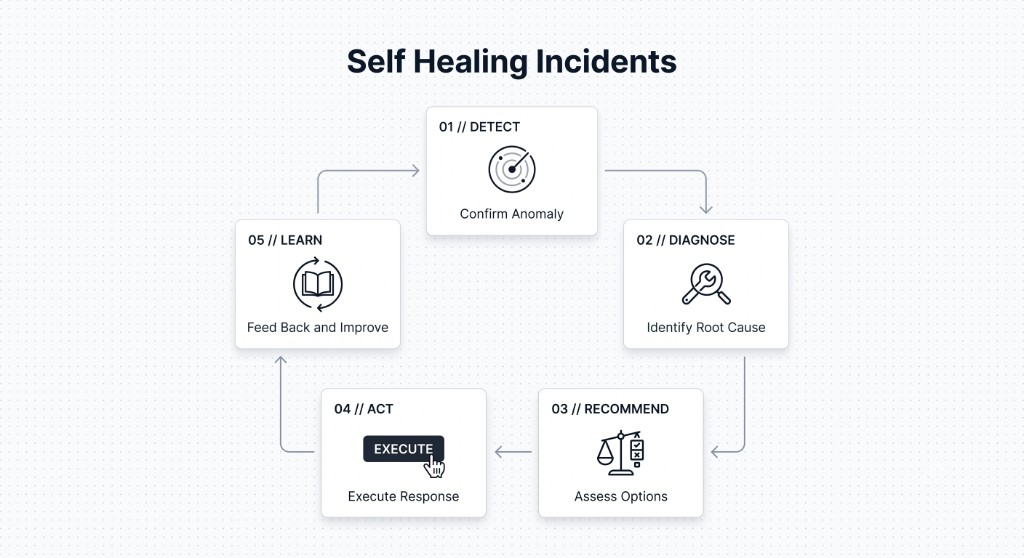
These stages are not a fixed sequence. New evidence during Diagnose can send you back to Detect. An action that fails in Act can trigger another pass through Recommend.
Maturity levels
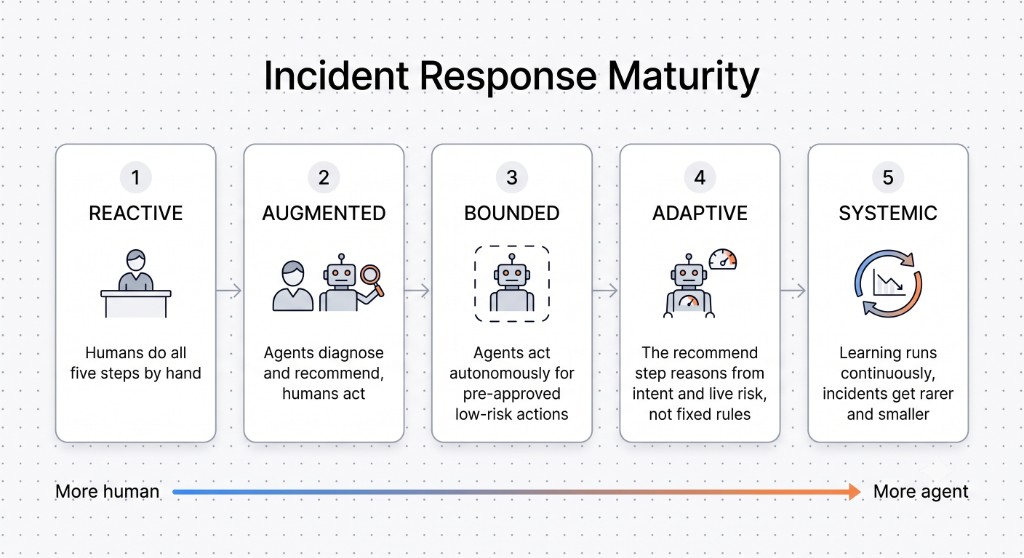
The five stages stay the same as you mature. What changes is how much of each stage an agent handles instead of a person:
- Reactive - humans do all five steps by hand.
- Augmented - agents diagnose and recommend, humans act. Most teams doing this today sit here.
- Bounded - agents act on their own for a pre-approved set of low-risk, reversible actions.
- Adaptive - eligibility and ranking update with live confidence and impact, not only that fixed pre-approved set.
- Systemic - the Learn stage runs often enough that incidents get rarer, smaller, and more instructive over time.
Readiness work is how teams move up that ladder: a clear catalog, ownership, scorecards, SLOs, and on-call visibility. See ensure production readiness for the checks that harden services between incidents.
See it in Port
The self-healing incidents pattern moves defined parts of incident response to agents, inside boundaries your team sets. Your team decides which steps an agent handles alone and which need a person to sign off.
On the incident record, Port:
- Scores confidence from converging signals before an incident is declared.
- Ranks eligible responses and explains the tradeoffs behind each option.
- Runs workflows inside the approval gates you defined, and escalates when verification fails.
- Records outcomes and proposes changes to thresholds and gates for human review.
This walkthrough of the incidents agentic workflow shows how that moves a team along the maturity ladder:
Related guides
These guides help you implement parts of the model in Port today. More stage-specific guides will follow.
Start here
- Implement the incident blueprint pattern - dedicated
incidentblueprint, separate from origin alerts. - AI-powered incident management - triage, orchestration, updates, RCA, and postmortems with AI.
- Set up the Incident Manager AI agent - an agent that helps track and manage incidents in Port.
Detect
- Respond to New Relic alerts - create a PagerDuty incident or Jira issue from an alert.
- Create a Jira issue from a Datadog alert - turn a monitor alert into tracked work.
Diagnose
- Triage incidents using external MCP tools - live errors and code context for root-cause summaries.
- Calculate blast radius with AI - assess impact from service dependencies before you act.
Act
- Manage incident lifecycle - acknowledge, escalate, and resolve from Port.
- Interact with PagerDuty incidents - governed actions against PagerDuty while keeping context in sync.
- Create a Slack channel for a reported incident - spin up response coordination from the incident.
Readiness
- Ensure production readiness - scorecards and checks that harden services between incidents.
- Track SLOs and SLIs for services - reliability posture agents and responders can use during diagnosis and verification.
- Manage PagerDuty on-call schedules - keep on-call visible and easy to update before the next page.
Communicate
- Create and update Statuspage incidents - keep customers informed through status page updates.
- Update ServiceNow incidents - keep ITSM records in sync from Port.
- Generate incident updates with AI - draft stakeholder updates with AI and send them to Slack.
- Summarize Zendesk tickets with AI - turn support tickets into incident context.
- Orchestrate incident response with AI - coordinate Slack, Zoom, and Jira from one workflow.