Port and AI gateways: why you need both
Every agent your organization runs eventually calls a model. Many organizations route those calls through an AI gateway, such as LiteLLM, Vercel AI Gateway or Bifrost. A common question is whether Port replaces the gateway, or the other way around. It does neither. They solve different problems at different layers, and they are stronger together.
What an AI gateway gives you
Agents multiply model calls. One task can fan out into dozens of calls, and one agent given more autonomy can spend a month's budget in a day. An AI gateway gives you one place to route, cap and guard that traffic, instead of trusting every agent to do it on its own:
- One API for many providers - switch models through configuration instead of rewriting code for each provider's SDK.
- Spend control - track usage per key, team or project, and cap spend before it happens, not after the bill arrives.
- Reliability - fail over between providers and regions, balance load and retry automatically.
- Security guardrails - centralize authentication, mask sensitive data, detect prompt injection and keep an audit log of model calls.
- Observability - logs, traces, latency and cost data for every request.
Why you need Port on top of your gateway
Today, the gateway sees traffic, not your organization. It knows which key made a call, but not which team owns it or which agent and service it belongs to. Budgets and guardrails live in its configuration, and its dashboards show problems without a way to act on them.
With Port on top of the gateway, every key and budget is connected to the agent, team and service behind it in the Context Lake. Developers request gateway access through self-service workflows, and scorecards turn gateway standards into checks that run on every agent.
| Pain point | Without Port | With Port |
|---|---|---|
| Spend nobody owns | Orphaned keys keep spending after their agent is retired, and "which team drives this month's spend" takes a manual reconciliation. | Every key belongs to an agent and a team, so spend is attributed automatically and orphaned keys are flagged. |
| Configuration without a workflow | Developers wait on tickets to get a key or a budget change, or work around the guardrails to keep moving. | Developers request keys, budgets and model access through a Port workflow, with your team's limits and approvals applied. |
| Visibility without enforcement | Dashboards show agents without guardrails, but nothing makes teams fix them. | Scorecards check every agent, key and guardrail, and golden paths configure the gateway for every new agent. |
Two layers
- The AI gateway is the runtime traffic layer. Every model call passes through it. It decides where a request goes, enforces spend limits and rate limits, and records what happened.
- Port is the organizational management layer. It knows which team owns each agent, which skills and MCP servers it uses, what it is certified for, and how it should be configured. Port sends configuration down to the gateway, and the gateway sends usage and cost data back up.
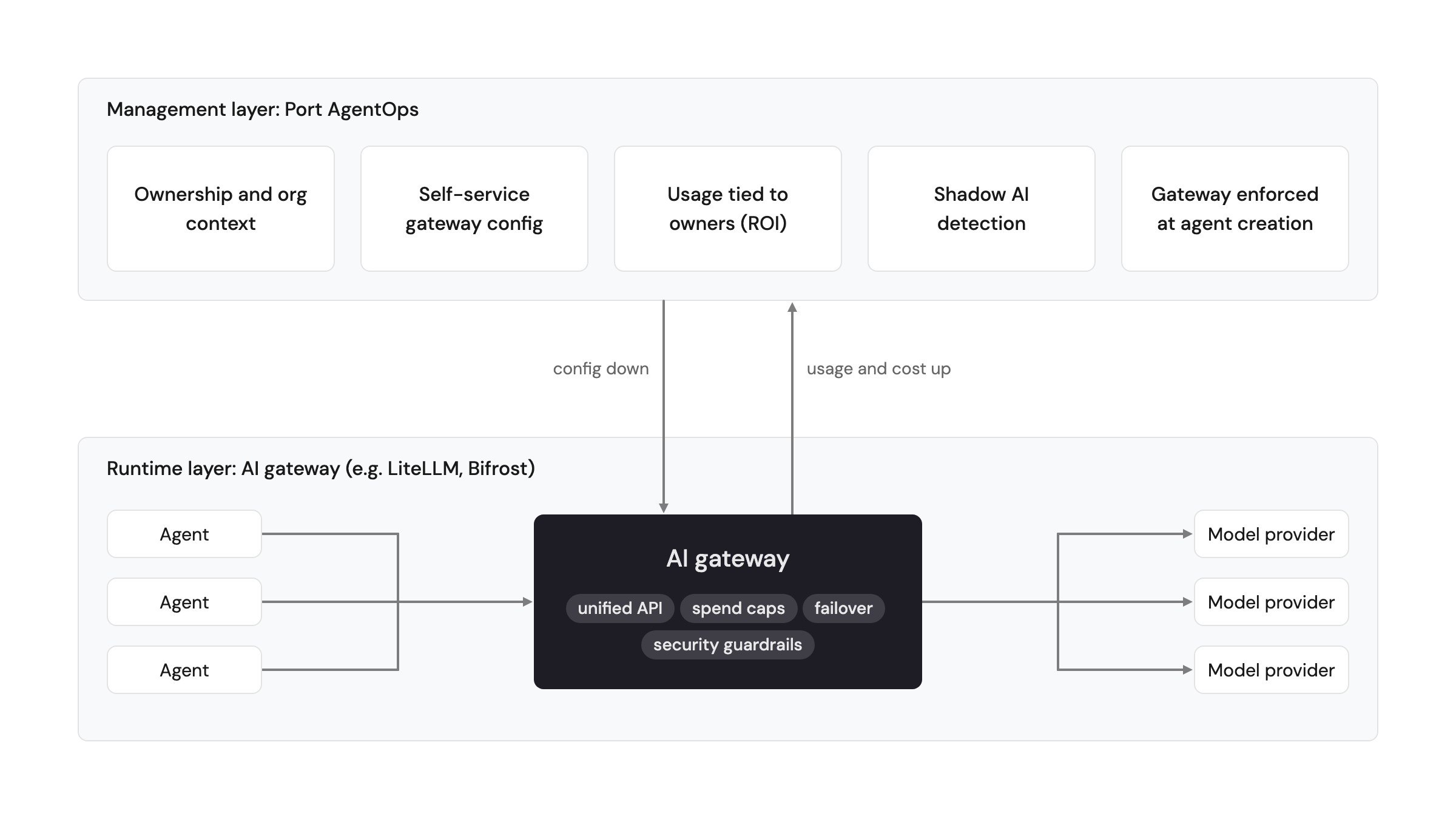
How teams use an AI gateway with Port
- Request a key or budget through self-service - a developer requests gateway access from Port, a workflow applies the right limits for their team, and the key is recorded on the agent that uses it.
- Enforce the gateway at agent creation - every new agent created through a golden path is configured to use the gateway, and promotion gates block agents that are not.
- Measure ROI per agent - gateway cost data feeds ROI measurement, so every token is attributed to an agent, a skill and a team.
- Apply dynamic policies - decide budgets, model access and tool access at runtime based on who is asking and what for, with dynamic permissions, instead of a static rule that either blocks legitimate work or lets risky work through.
- Trace incidents to their source - each key is linked to its agent and to the repository and service it comes from, so when an agent misbehaves you go straight to its owner and code instead of cross-referencing systems by hand.
- Detect shadow AI - compare the keys and callers the gateway sees with the agents in your registry, and flag anything that isn't registered.
- Govern internal tools too - agents also call your own workflows through the Port MCP server, with the same permissions and approvals, so governance doesn't stop at the gateway.
- Optimize continuously - use gateway latency, error and cost data in self-improvement routines to tune routing and model choice per agent.
The gateway routes the traffic. Port governs what runs through it.
Related docs
- Agentic registry - register the agents, skills and MCP servers behind every gateway key.
- LLM providers management - connect Port AI to your own LLM provider or gateway.