Create and update agentic assets through golden paths
Platform teams already use golden paths to scaffold services and provision cloud resources. A golden path is the approved, supported way to do something, built so that it is also the easiest way. As an AgentOps certification method, golden paths apply the same idea to agentic assets, so every new agent, skill or MCP server is created certified from the start.
Why use golden paths for agentic assets
Today, there is no standard way to create an agent, publish a skill or connect an MCP server. Each request is either a ticket in the platform team's queue or something a developer sets up alone.
With golden paths, every common change to an agentic asset is a Port workflow. Developers answer only the questions they should decide, standards are applied automatically, risky requests are routed for approval, and the result is written back to the agentic registry.
| Pain point | Without Port | With Port |
|---|---|---|
| Too slow | Developers wait days for work that should take minutes, and the platform team becomes the bottleneck for AI adoption. | Low-risk requests complete in minutes without a ticket, and the platform team reviews only what's risky. |
| Too loose | Shortcuts leave tokens in .env files, unrecorded access, agents that bypass the AI gateway and assets without owners, so security risks hide and the platform team is left explaining exploding AI costs nobody can attribute. | Identities, credentials, gateway configuration and ownership are applied for the developer, and every asset is registered automatically, so the easy way is also the compliant, cost-controlled way. |
| No record of decisions | Requests arrive through Slack messages, tickets and direct setups, so incident reviews and audits stall because nobody knows who requested or approved an asset. | The same workflow runs whether a request comes from the portal, Slack, an IDE through Port MCP or the API, so every request, approval and change is recorded and you can answer "who approved this?" instantly. |
Example: scaffold an agent
Here is an example of a golden path flow. An agent golden path lets a developer request a new agent by describing what it should do, not how to configure it.
The developer answers questions they can actually answer:
- What should the agent do?
- Which systems does it need, and which actions in each?
- Which skills from the registry should it load?
- What data will it read, and how sensitive is it?
- Which platform should it run on?
- Which team owns it?
The developer does not choose IAM roles, network settings, model IDs or token scopes. The platform team encodes those decisions in the workflow, which then:
- Checks the request against a risk condition, for example confidential data or production write access. Risky requests wait for approval.
- Creates a scoped service account for each system the agent needs, and stores the credentials in a vault.
- Applies the organization's approved agent harness and AI gateway configuration.
- Provisions the agent on the chosen platform with only the requested tools and skills.
- Registers the agent in Port with its owner, accounts, tools and skills, in the development lifecycle stage.
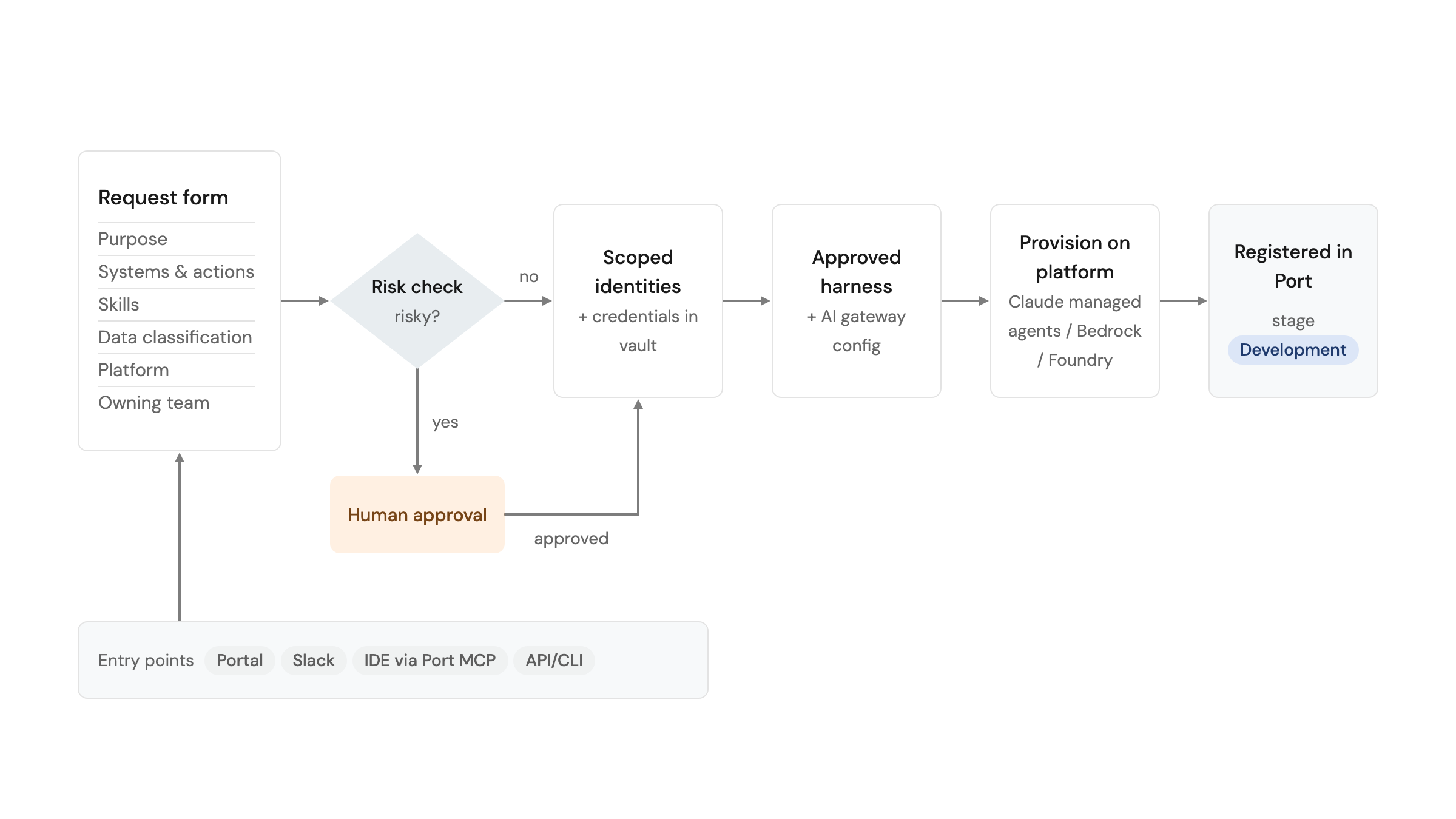
From there, the agent moves toward production through promotion gates.
Explore the Scaffold a new AI agent workflow in Port's public demo.
Update agentic assets the approved way
Creation is only the first change an asset goes through. Golden paths apply to every change after that:
- Publish a new version of a skill.
- Request extra permissions or tools for an agent.
- Add a skill to an existing agent.
- Expose another tool on an MCP server.
- Change an asset's owner.
- Deprecate or retire an asset.
Each change runs through the same checks, approvals and audit trail as creation. This keeps the registry accurate over time and prevents assets from drifting outside their certified boundaries.
Measure and tune your golden paths
A golden path only works if people use it. Track it like any other product:
- Requests per week - is adoption growing?
- Approval queue time - are approvals becoming a bottleneck?
- Assets created outside the golden path - are teams going around it?
Then tune the path based on what you see:
- If approval queue time grows, narrow the risk condition or move approval later in the flow.
- If agents hold access they never use, remove those options from the form.
- If one skill is added to almost every agent, load it by default.
Related guides and docs
- Ship new skills through one golden path - the publish-skill workflow.
- Manage an MCP server registry - request and review workflows for MCP servers.
- MCP registry - govern which MCP servers are approved for use.