Build an MCP registry
Every MCP server an agent connects to is a new way into your systems. An MCP registry is the catalog of servers your organization allows: platform teams decide which are approved, developers find what is available, and new servers enter through a governed request instead of an ad hoc install.
Why you need an MCP registry
Today, developers find MCP servers online and add them to their editor's configuration. Nobody knows which servers are in use, who approved them or which tools they expose.
With an MCP registry in Port, every server has an entity with its approval status, owner and exposed tools. Developers request new servers through a self-service workflow, and the platform team reviews, approves and connects them from one place.
| Pain point | Without Port | With Port |
|---|---|---|
| Unvetted servers | Developers install any MCP server they find, so agents reach your systems through code nobody reviewed. | Every new server is reviewed before it is connected, and only approved servers are exposed, with only the tools you choose. |
| No visibility | Nobody can say which MCP servers are in use or who owns them, so a vulnerable server can't be found and removed quickly. | Every server has an owner and a status in the Context Lake, so you can find who uses it and act in minutes. |
| Duplicated setup | Teams set up and maintain their own copies of the same server, each with its own configuration. | Teams discover approved servers and how to connect to them in one place, and reuse what already exists. |
How the registry works
- A developer requests a new MCP server through a self-service workflow, with its name, URL and business justification. The request is recorded with a requested status.
- The platform team reviews the request in a review workflow and approves or rejects it, with a reason.
- An admin connects each approved server as an MCP connector and chooses which of its tools to expose. Port registers it as an
_mcp_serverentity with its allowed tools. - Developers find approved servers on a registry dashboard, or ask an MCP registry assistant skill which servers are available, how to connect and where their request stands.
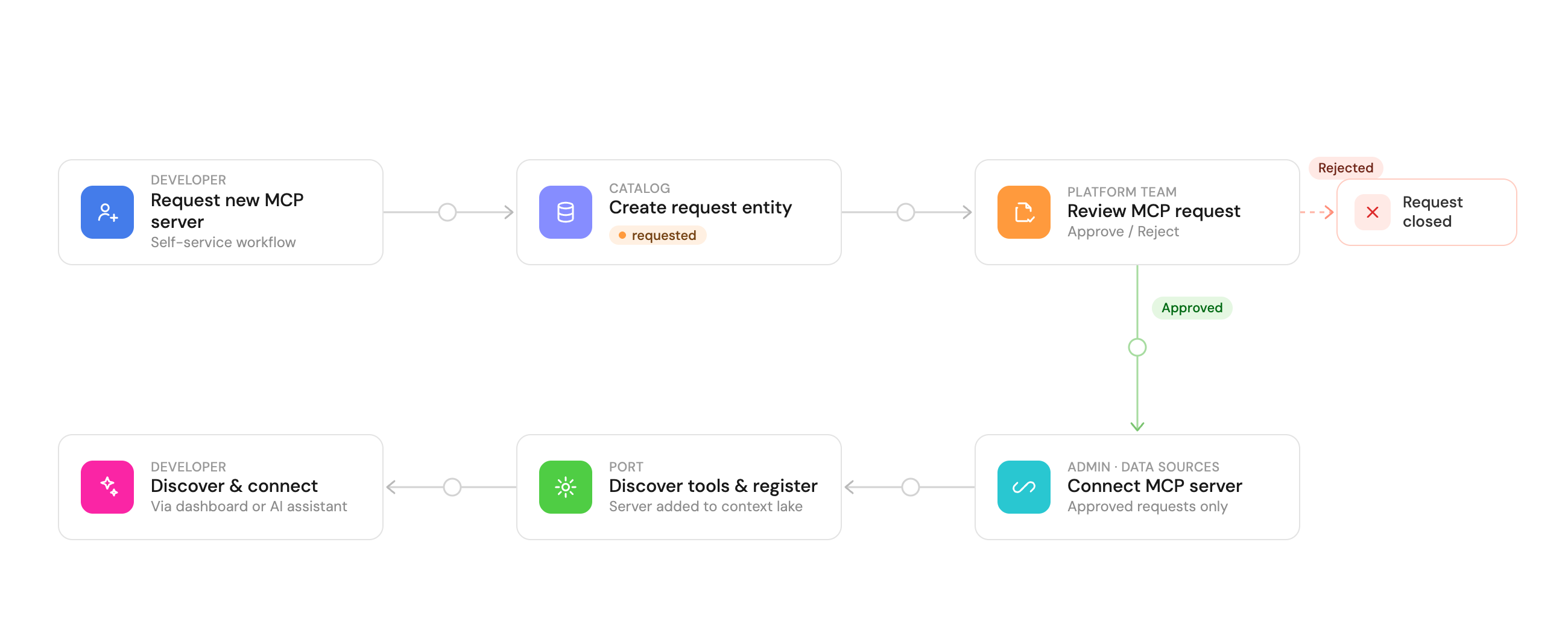
The manage MCP server registry guide builds the request blueprint, both workflows, the dashboard and the assistant skill.
MCP registry and MCP connectors
The two work together:
- MCP connectors are the platform capability. A connector links an MCP server to Port and limits it to the tools you choose to expose.
- The MCP registry is the process around them: how servers are requested, reviewed, approved, connected and discovered, with an owner and a status for each one.
Related guides and docs
- Manage MCP server registry - the request and review workflows, dashboard and assistant skill.
- MCP connectors - connect external MCP servers to Port and choose which tools to expose.
- Port MCP server - connect IDEs and agents to your Context Lake.