Build an agent registry
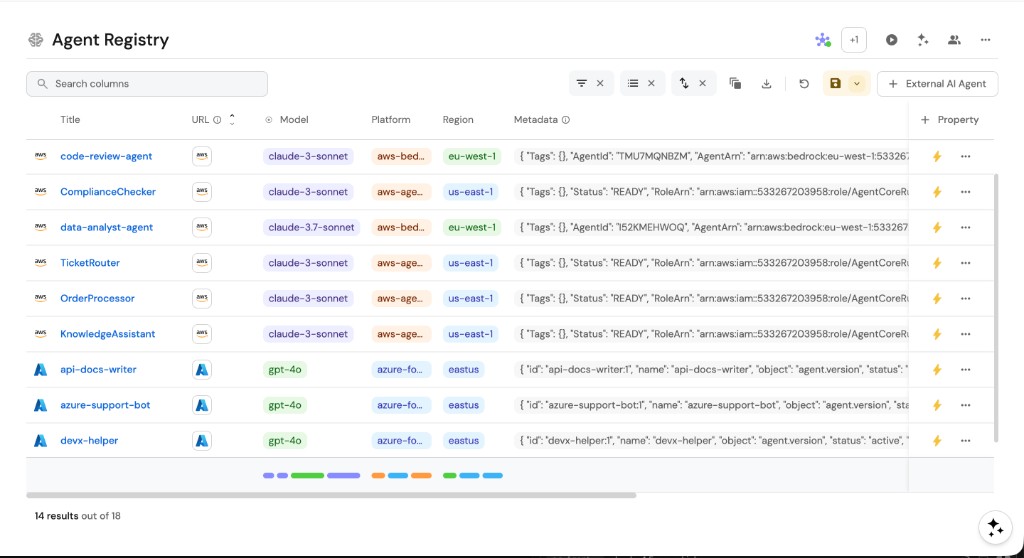
Agents run in more places than any one team can see: cloud agent platforms, CI pipelines, SDK-based services and Port itself. An agent registry brings all of them into the Context Lake as one inventory, so you know which agents exist, where they run, who owns them and what they use.
Why you need an agent registry
Today, each agent platform has its own console and its own list. To answer "which agents do we run?", someone checks every console by hand, and agents built in code don't appear in any list at all.
With an agent registry in Port, agents from every platform are ingested into one catalog and kept in sync. Each agent is connected to its owner, its model and the skills and MCP servers it uses.
| Pain point | Without Port | With Port |
|---|---|---|
| No cross-platform view | Every question about your agents means checking each vendor console by hand, so answers are slow, partial and out of date. | Agents from every platform appear in one catalog, so you can answer what runs where, and who owns it, with one query. |
| Duplicate agents | Teams build agents that already exist elsewhere in the organization, doubling the cost of building and running them. | Developers search the registry before building, and reuse or extend an existing agent. |
| Unknown models, regions and status | Audits and policy reviews stall, because nobody can say which models and regions each agent uses or whether it is still active. | Each agent records its platform, model, region and status, ready for audits and policy checks. |
Connect your agent platforms
Choose how each platform reaches the registry:
| Approach | Best for |
|---|---|
| Native connector | Platforms with a dedicated Port integration that syncs agents, sessions and related resources automatically, such as Claude managed agents and Cursor cloud agents. |
| Custom registry integration | Platforms without a native connector, such as AWS Bedrock and Azure AI Foundry. The build an AI agent registry guide ingests them through a custom Ocean integration into an aiAgent blueprint. |
Port AI agents are registered automatically in the built-in _ai_agent blueprint.
From inventory to governance
Once agents are in the registry, the rest of AgentOps builds on it:
- Scorecards check that each agent has an owner, a scoped identity and certified dependencies.
- Promotion gates move agents through their lifecycle stages.
- Access and accountability keeps each agent within its certified boundaries.
Related guides and docs
- Build an AI agent registry - blueprint, integration mapping and setup for AWS Bedrock and Azure AI Foundry.
- External agents - connect agents that run outside Port and trigger them from workflows.
- Port custom agents - build and run agents natively in Port.