Build your agentic registry
You can't govern what you can't see. Before you certify, enforce or optimize anything, you need to know which agentic assets exist, where they run, who owns them and how they depend on each other.
The agentic registry is the Inventory practice of AgentOps. Every other practice reads from it: certification scores registered assets, enforcement acts on them, and ROI is calculated per asset.
Why you need an agentic registry
Today, agentic assets are spread across tools that don't know about each other. Agents run on different cloud agent platforms and in CI pipelines, skills live in repositories, and MCP servers are configured in each developer's editor. Each tool keeps its own list, if it keeps one at all, and any central list is maintained by hand.
With an agentic registry in Port, every agent, skill, MCP server and plugin is discovered automatically from where it lives. Each one is registered in the Context Lake as part of one dependency graph, connected to its owner and to the systems it can reach.
| Pain point | Without Port | With Port |
|---|---|---|
| Shadow agents | Agents run with access nobody approved and spend nobody tracks, and any manual list is out of date, so you carry security, compliance and cost risk you can't see or report. | Auto discovery syncs every platform and repository into one registry as assets change, so shadow agents surface, their cost is attributed, and you can prove what runs in your organization. |
| No view of dependencies | Routine changes to a skill or MCP server break agents nobody knew depended on them, and an agent's blast radius is unknown. | You see every agent a change affects before you make it, and can analyze an agent's blast radius in minutes. |
| A software factory you can't build on or debug | Every new factory flow, such as ticket resolution or incident response, starts from scratch, and when one underperforms, nobody can tell which agent, skill or tool is the cause. | New flows reuse registered agents, skills and MCP servers, and when a flow underperforms, the dependency graph shows which asset to investigate. |
Registries by asset type
Each asset type has its own registry, and all of them share one Context Lake:
- Skills registry - every skill and plugin in your organization, with owners and groups. Set it up first, then expand it with publishing, certification, duplicate detection, plugins and ROI.
- Agent registry - every agent across cloud agent platforms, CI and Port, with its platform, model, owner and status.
- MCP registry - the MCP servers your organization approves, with a governed request flow for new ones.
Discover your agentic assets automatically
Port ingests each asset type from the place it already lives, and keeps it in sync as it changes. Nobody needs to fill in a form. For example, a skill appears in the registry as soon as its SKILL.md is merged to the default branch.
| Asset | What it is | Where it lives | How Port discovers it |
|---|---|---|---|
| Agent | An AI actor with its own identity, credentials and runtime. | Cloud agent platforms and runtimes, as well as Port AI agents. | Native connectors and custom integrations. See the agent registry. |
| Skill | Reusable instructions that tell an agent how to do a task your way, as a SKILL.md file or a folder. | Any repository platform. | Ingested from Git and kept in sync. See the skills registry. |
| MCP server | A server that exposes tools an agent can call, such as reading a file or creating a ticket. | Vendor-hosted or internal. | MCP connectors and self-service requests. See the MCP registry. |
| Plugin | A bundle of skills and MCP servers that is installed together. | Any repository platform. | Synced from your repositories, like skills. See the skills registry. |
Around these core assets, the registry also tracks what an agent depends on: the models it calls, its memory, its system prompts, the tools its MCP servers expose, and the workflows that trigger it.
The dependency graph
Port's Context Lake does not store your assets as separate, unrelated lists. Relations connect them into a dependency graph, and that graph is what makes the registry useful, not just complete:
- Impact analysis - before you deprecate a skill or change an MCP server, see every agent that depends on it.
- Blast radius analysis - analyze what an agent could affect if it misbehaves, by tracing everything it can reach through its skills, tools and permissions.
- Uncertified dependencies - find production agents that load a skill or call an MCP server that was never certified.
- Reuse - find an existing skill or MCP server before building a new one.
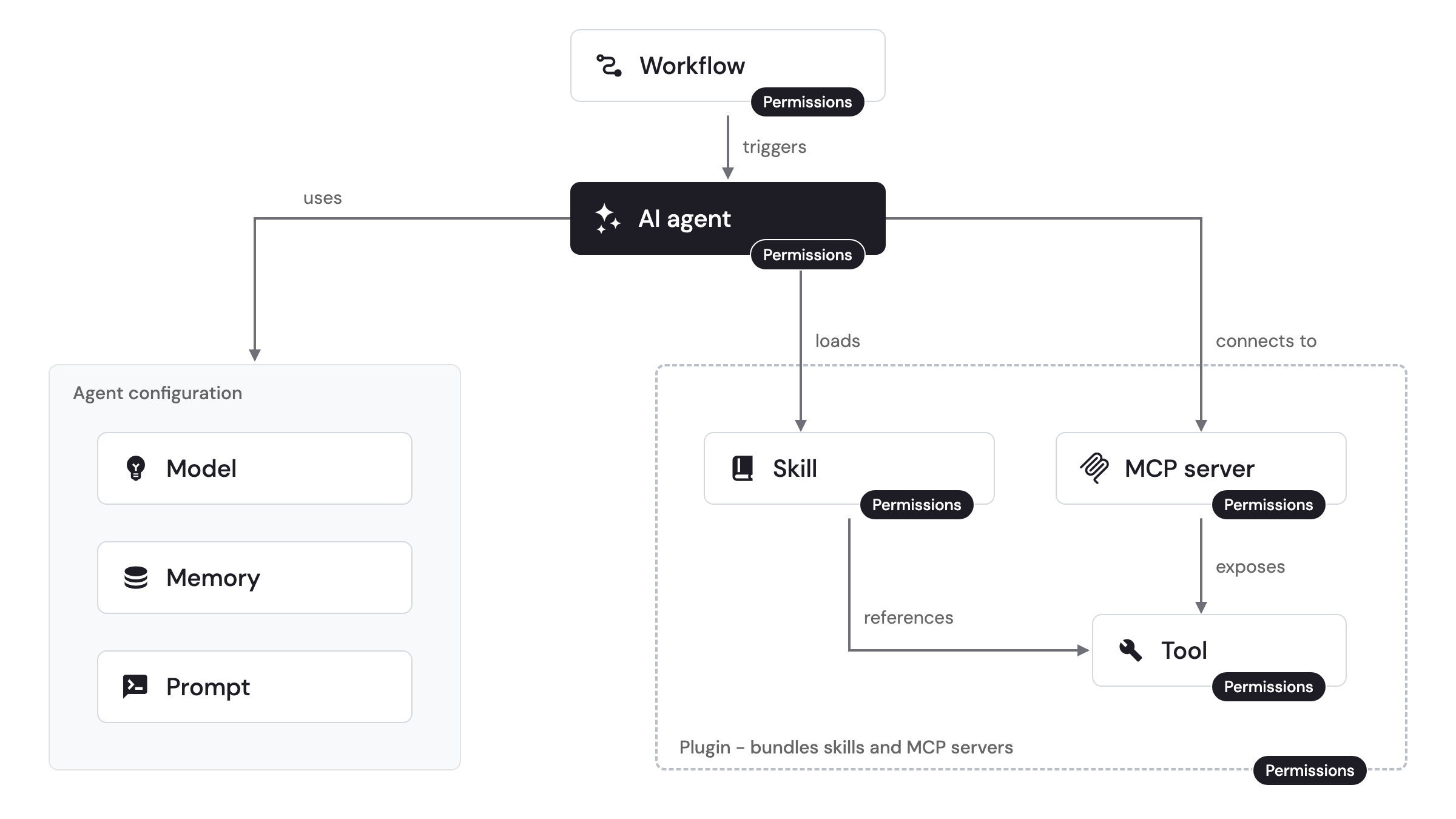
The graph captures these relations:
- A workflow triggers an agent.
- An agent uses its configuration: a model, directly or through an AI gateway, its memory and its prompts.
- An agent loads skills and connects to MCP servers.
- An MCP server exposes tools, and a skill can reference those tools in its instructions.
- A plugin bundles skills and MCP servers so they are installed together.
- Permissions apply to every executable asset: workflows, agents, skills, MCP servers, tools and plugins.
What to track on every asset
Beyond its relations, each asset needs a small set of properties to support governance:
- Owner - the team or person accountable for the asset.
- Lifecycle stage - for example, development, evaluation, pilot, production or deprecated.
- Last updated - when the asset last changed, so stale assets are easy to spot.
- Identity and permissions - the accounts the asset runs under and what they can access.
- Available to - which teams or users may use or trigger the asset.
- Certification status - whether the asset passed your standards.
- Usage and cost - how often the asset runs, and what it costs.
Related docs
- Agent management - the platform capabilities for skills, MCP connectors, external agents and prompts.
- External agents - connect and govern agents that run outside Port.
- MCP connectors - connect MCP servers through Port and choose which tools to expose.