Install a native integration
Port is designed to be flexible. It can be integrated with any tool, and can be used to build a software catalog that reflects your exact data model.
Port comes with a wide variety of available integrations for popular tools and platforms, modeled and configured by us to provide you with a plug & play experience.
Once installed, you can customize and extend these integrations to fit your exact needs.
Don't see the tool you wish to integrate with Port in the available integrations below?
Port provides you with the required tools to model your data and ingest it with ease, see Create a custom integration.
Integration process
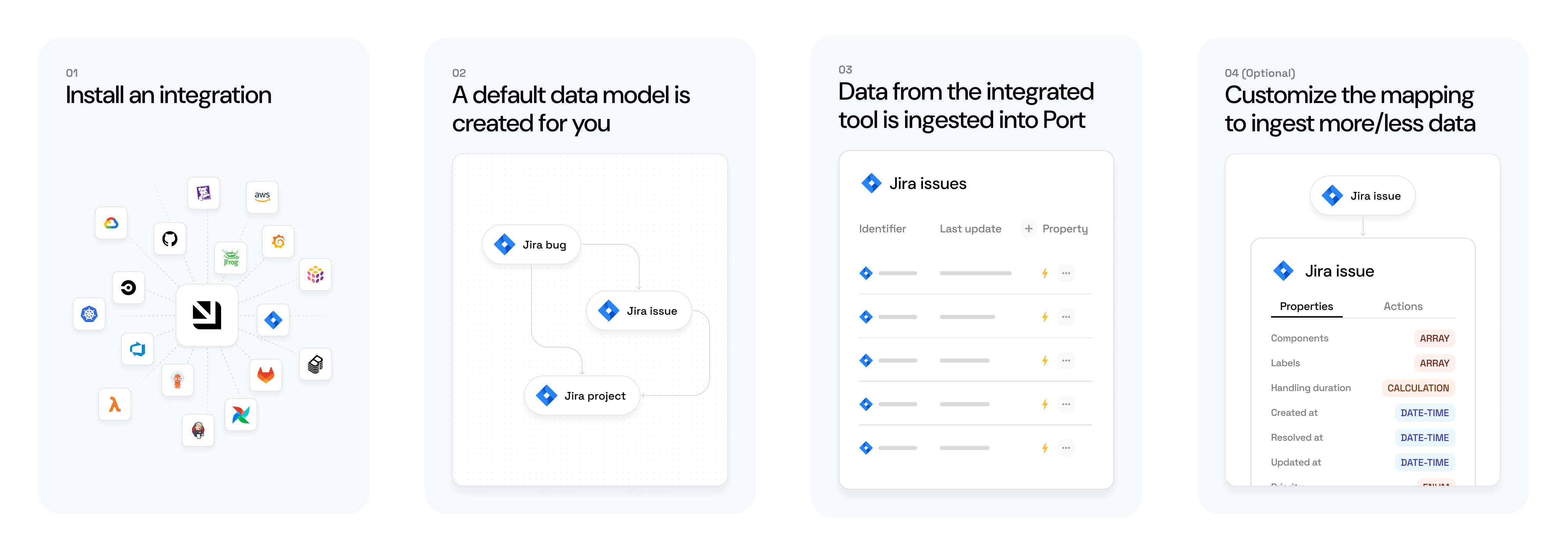
Generally, installing an available integration results in the following:
-
The integration's default data model is created for you:
- Default blueprints will be created in the Data model page in Port.
- Default mapping will be defined in the integration's data source page.
-
Data from the integrated tool is ingested into Port.
The sync mechanism and frequency depend on the installation method.
After the installation, you can customize the blueprints and/or mapping to ingest more/less data (see below).
Available plug & play integrations


GitHub (Ocean)
GitHub (sunset)

GitLab v2
GitLab (deprecated)

BitBucket
BitBucket server

AzureDevops

Jenkins

Octopus Deploy

ArgoCD

Komodor

Kubernetes

Istio

FluxCD

Knative

Kyverno

OpenShift

Trivy

Jira
Jira server (self-hosted)


Linear


AWS Legacy
AWS

Azure

GCP

Terraform


Datadog

New Relic


Sentry

Prometheus

Dynatrace
Azure Monitor

Snyk

Wiz

Mend.io

SonarQube

Aikido

Checkmarx

Armorcode

BrowserStack


Launchdarkly

PagerDuty

StatusPage

FireHydrant

OpsGenie

ServiceNow

Rootly

Incident.io
Jira Service Management

Kubecost

Opencost


Kafka


Okta
Microsoft Entra ID

Amplication


Backstage

Slack

Zapier

n8n

Ocean custom


Github Copilot

Claude AI


Cursor


OpenAI
Most of Port's integrations were developed using the Ocean framework.
Ocean is an open-source framework that simplifies the development of integrations with external tools, providing many out-of-the-box functionalities.
Want to contribute an integration? Check out the Ocean documentation to get started, and reach out to us if you have any questions 🌟
Integrations vs. MCP connectors
Integrations are not the only way to connect external tools to Port. Port also supports MCP connectors, which give Port AI real-time access to a tool without syncing data into the catalog.
Use an integration when you need persistent data in Port - for ownership, relations between resources, scorecards, or workflow automation.
Use an MCP connector when you want Port AI to query a tool on demand without modeling its data. MCP connectors require minimal configuration and are a good starting point before committing to a full catalog integration.
For many tools, you'll end up using both: the integration models the data you care about governing, while the MCP connector gives AI access to the tool's full surface area.
Learn more: Integrations vs. MCP connectors →
Installation methods
Below is a breakdown of the supported installation methods for Port integrations.
| Installation type | Security | Ease of installation | Periodic sync | Live sync (Webhook) | Infrastructure & maintenance responsibility | Use case fit |
|---|---|---|---|---|---|---|
| Hosted by Port (OAuth) | Port stores OAuth tokens securely. | 🟩🟩🟩🟩 | ✅ (user-selectable interval) | ✅ (Integration-dependent) | Port handles scaling, uptime, and updates. | Ideal for a quick setup with minimal effort. Mainly useful for getting started with an integration. |
| Hosted by Port (Custom settings) | Port stores API credentials securely. Setup requires more details (e.g., token, host) and allows access control flexibility. | 🟩🟩🟩⬜ | ✅ (user-selectable interval) | ✅ (Integration-dependent) | Port handles scaling, uptime, and updates. | Best for quick setup without granting OAuth permissions. |
| Self-hosted | Managed entirely in your infrastructure. | 🟩⬜⬜⬜ | ✅ (custom interval) | ✅ (Integration-dependent) | You provision, monitor, and maintain the integration. | Best for high-security or custom networking needs. |
| CI | Managed in your CI/CD environment. | 🟩🟩⬜⬜ | ✅ (custom interval) | ❌ | Minimal infrastructure. You manage the CI/CD environment and triggers. | Best when real-time isn't needed and you want full sync control. |
Sync mechanisms
Once an integration is installed, Port keeps its data up to date using one or more of the following sync mechanisms:
- Full resync - Fetches all data from the third-party source on a schedule or on demand, maps it according to your configuration, and ingests it into Port. Includes reconciliation to delete stale entities and reingest dependents.
- Incremental sync - Fetches only created or updated records since the last run, on a shorter interval than a typical full resync. Complements live events and reduces load on the data source.
- Live events - Processes source changes as they happen through webhooks or source-specific watch APIs, so mapped catalog entities update between scheduled resyncs.
Customize your integrations
Now that you've installed an integration, let's see how you can customize it:
-
Configure your data model - Update the integration's data model in Port to ingest additional data that is not included by default.
-
Configure your data mapping - Update the integration's data mapping in Port to match the data model and fetch your desired data from the tool.
Manage integrations via API
While integrations are installed using one of the methods above, you can manage existing integrations programmatically using Port's API. Available endpoints include:
- Get all integrations : List all integrations in your organization.
- Get an integration : Fetch details of a specific integration.
- Update an integration : Modify an integration's mapping, trigger a resync, or change its configuration.
- Delete an integration : Remove an integration from your organization.
For more granular management, see also the endpoints for integration config, event logs, metrics and sync status, and sync metadata.