Implement the work item blueprint pattern
This guide demonstrates the recommended pattern for managing development workflows in Port using a dedicated work_item blueprint that is separate from origin entities like Jira issues or GitHub issues.
This pattern is part of our Autonomous ticket resolution solution implementation, make sure you read the pattern overview page before you dive in.
The workflow blueprint pattern
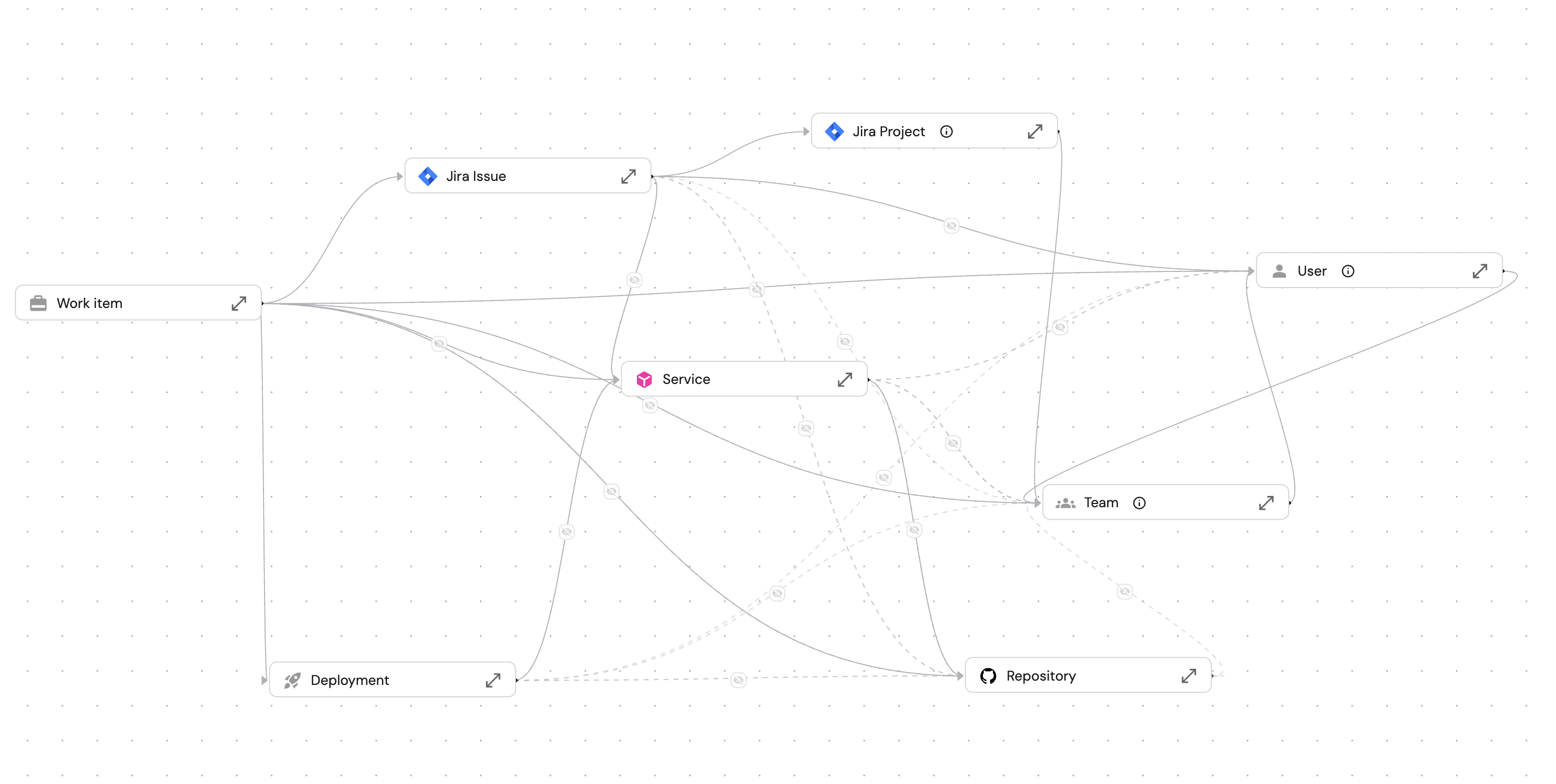
The image above shows how the work_item blueprint connects to entities across your software catalog like Jira issue, the service being modified, the team and owner responsible, the repository and PR where code changes happen, and the deployment record.
The workflow entity (work_item) maintains a relation to the origin entity while tracking its own execution state, provides rich context lake and enables flexible AI integrations.
These relations matter because AI agents need context to make good decisions. When a planning agent suggests priority, it can check the service tier. When a deploy agent assesses risk, it can look at the service's dependencies and recent incidents.
Also the work item doesn't store this data, it gets access to it through mirror properties, so everything stays in sync.
The five-stage workflow
The work_item blueprint uses a scorecard to manage progression through the following five stages:
Draft → Plan → Develop → Deploy → Completed
Each stage represents a distinct phase with specific requirements and AI integration points.
These stages map to the natural flow of software delivery life cycle:
- Draft: Work enters your system (from Jira, customer feedback, incidents)
- Plan: Team triages and AI prepares context
- Develop: Implementation happens (human or AI-led)
- Deploy: Safe production rollout with risk assessment
- Completed: Metrics capture and cycle time analysis
Your team might need different stages. Some teams split Develop into "Coding" and "Review." Others add a "Testing" stage. The pattern adapts to your workflow.
- Draft
- Plan
- Develop
- Deploy
- Completed
Purpose: Capture new work that needs attention.
Work items enter this stage when created from a Jira ticket or other source. They contain minimal information and await triage.
Requirements: None (starting state).
AI integration: AI can suggest initial categorization based on the ticket description.
Purpose: Triage and prepare work for development.
During this stage, the team assigns ownership, sets priority, and determines the AI augmentation level.
Requirements to enter:
- Owner assigned.
- Priority set.
- AI augmentation level defined.
AI integration: AI can analyze the ticket, suggest priority based on service tier and historical patterns, and draft a technical plan.
Purpose: Execute the implementation work.
Code changes happen during this stage. AI coding agents can generate PRs, and human developers review and refine the work.
Requirements to enter:
- Plan approved by a human.
- Pull request created.
AI integration: Coding agents (Claude Code, Devin, Codex) generate implementation. AI can also nudge reviewers and summarize PR changes.
Purpose: Promote changes to production safely.
After the PR merges, the work item enters the deploy stage. Teams can review blast radius and approve production deployment.
Requirements to enter:
- PR merged.
AI integration: AI can assess deployment risk based on service dependencies and suggest deployment timing.
Purpose: Mark work as done and capture metrics.
The final stage records completion time and enables cycle time analysis.
Requirements to enter:
- Deployment successful in production.
Blueprint implementation
This section shows an example implementation of the work_item blueprint. Your organization can adapt these properties and relations to fit your workflow.
Blueprint JSON (click to expand)
{
  "identifier": "work_item",
  "title": "Work Item",
  "icon": "Microservice",
  "schema": {
    "properties": {
      "priority": {
        "title": "Priority",
        "type": "string",
        "enum": ["critical", "high", "medium", "low"]
      },
      "work_type": {
        "title": "Work Type",
        "type": "string",
        "enum": ["feature", "bug", "incident", "task"]
      },
      "ai_augmentation_level": {
        "title": "AI Augmentation Level",
        "type": "string",
        "enum": ["Human", "AI Assisted", "AI Led", "Autonomous"]
      },
      "routing_decision": {
        "title": "Routing Decision",
        "type": "string",
        "enum": ["AI READY", "NEEDS HUMAN"],
        "enumColors": { "AI READY": "green", "NEEDS HUMAN": "orange" }
      },
      "routing_reason": {
        "title": "Routing Reason",
        "type": "string"
      },
      "blast_radius_score": {
        "title": "Blast Radius",
        "type": "string",
        "enum": ["Low", "Medium", "High", "Unknown"],
        "enumColors": { "Low": "green", "Medium": "orange", "High": "red", "Unknown": "darkGray" }
      },
      "plan_approved": {
        "title": "Plan Approved",
        "type": "boolean"
      },
      "description": {
        "title": "Description",
        "type": "string",
        "format": "markdown"
      },
      "triaged_at": {
        "title": "Triaged At",
        "type": "string",
        "format": "date-time"
      },
      "completed_at": {
        "title": "Completed At",
        "type": "string",
        "format": "date-time"
      }
    }
  },
  "mirrorProperties": {
    "pr_status": { "path": "pull_request.status" },
    "jira_status": { "path": "jira_ticket.status" },
    "service_tier": { "path": "service.tier" },
    "service_active_incident": { "path": "service.active_incident" },
    "deployment_status": { "path": "deployment.deploymentStatus" },
    "deployment_environment": { "path": "deployment.environment" }
  },
  "relations": {
    "jira_ticket": { "target": "jiraIssue", "required": false },
    "owner": { "target": "_user", "required": false },
    "team": { "target": "_team", "required": false },
    "service": { "target": "service", "required": false },
    "repository": { "target": "githubRepository", "required": false },
    "pull_request": { "target": "githubPullRequest", "required": false },
    "deployment": { "target": "deployment", "required": false }
  }
}
Properties explained
Properties explained (click to expand)
| Property | Type | Description |
|---|---|---|
priority | Enum | Critical, High, Medium, Low. |
work_type | Enum | Feature, Bug, Security, Ops. |
ai_augmentation_level | Enum | Human, AI Assisted, AI Led, Autonomous. |
routing_decision | Enum | AI READY or NEEDS HUMAN - set by the AI agent after routing evaluation. |
routing_reason | String | Narrative explanation of the routing decision, generated by the AI agent. |
blast_radius_score | Enum | Low, Medium, High, Unknown - evaluated during the Plan stage. |
plan_approved | Boolean | Gates transition from Plan to Develop. |
description | Markdown | Technical plan and context. |
triaged_at | Datetime | When triage was completed. |
completed_at | Datetime | When work item was completed. |
Relations explained
Relations explained (click to expand)
| Relation | Target | Description |
|---|---|---|
jira_ticket | Jira Issue | Source ticket (origin entity) |
owner | User | Individual assigned to this work item |
team | Team | Team responsible for delivery |
service | Service | The service being modified |
repository | GitHub Repository | Where code changes are made |
pull_request | GitHub PR | The PR implementing this work item |
deployment | Deployment | Deployment record once promoted |
coding_agent_run | Coding Agent Run | AI coding session working on this item |
Mirror properties explained
Mirror properties explained (click to expand)
| Mirror | Source | Purpose |
|---|---|---|
pr_status | pull_request.status | Evaluate if PR is merged for scorecard. |
jira_status | jira_ticket.status | Show source ticket status. |
service_tier | service.tier | Routing decision rule: blocks delegation for T1 services. |
service_active_incident | service.active_incident | Routing decision rule: blocks delegation when the service has an active incident. |
deployment_status | deployment.deploymentStatus | Whether deployment succeeded. |
deployment_environment | deployment.environment | Where it was deployed. |
Scorecard configuration
The work_item blueprint uses two scorecards: one to track stage progression through the development lifecycle, and one to determine whether a work item is eligible for AI agent delegation.
Stage progression scorecard
The work_item_stage scorecard evaluates work item properties and relations to determine the current stage. Rules at each level act as gates between stages.
Stage progression scorecard JSON (click to expand)
{
  "identifier": "work_item_stage",
  "title": "Work Item Stage",
  "levels": [
    { "title": "Draft", "color": "lightGray" },
    { "title": "Plan", "color": "bronze" },
    { "title": "Develop", "color": "silver" },
    { "title": "Deploy", "color": "gold" },
    { "title": "Completed", "color": "green" }
  ],
  "rules": [
    {
      "identifier": "has_owner",
      "title": "Has Owner",
      "level": "Plan",
      "query": { "combinator": "and", "conditions": [{ "property": "$relation.owner", "operator": "isNotEmpty" }] }
    },
    {
      "identifier": "has_priority",
      "title": "Has Priority",
      "level": "Plan",
      "query": { "combinator": "and", "conditions": [{ "property": "priority", "operator": "isNotEmpty" }] }
    },
    {
      "identifier": "has_ai_level",
      "title": "Has AI Augmentation Level",
      "level": "Plan",
      "query": { "combinator": "and", "conditions": [{ "property": "ai_augmentation_level", "operator": "isNotEmpty" }] }
    },
    {
      "identifier": "plan_approved",
      "title": "Plan Approved",
      "level": "Develop",
      "query": { "combinator": "and", "conditions": [{ "property": "plan_approved", "operator": "=", "value": true }] }
    },
    {
      "identifier": "has_pr",
      "title": "Has PR",
      "level": "Develop",
      "query": { "combinator": "and", "conditions": [{ "property": "$relation.pull_request", "operator": "isNotEmpty" }] }
    },
    {
      "identifier": "pr_merged",
      "title": "PR Merged",
      "level": "Deploy",
      "query": { "combinator": "and", "conditions": [{ "property": "$mirror.pr_status", "operator": "=", "value": "merged" }] }
    },
    {
      "identifier": "deployed_to_production",
      "title": "Deployed to Production",
      "level": "Completed",
      "query": {
        "combinator": "and",
        "conditions": [
          { "property": "$mirror.deployment_status", "operator": "=", "value": "Success" },
          { "property": "$mirror.deployment_environment", "operator": "=", "value": "Production" }
        ]
      }
    }
  ]
}
Rules by stage
- Draft → Plan
- Plan → Develop
- Develop → Deploy
- Deploy → Completed
- Has owner (relation not empty).
- Has priority (property not empty).
- Has AI augmentation level (property not empty).
- All Plan requirements met.
- Plan approved (
plan_approved= true). - Has PR (relation not empty).
- All Develop requirements met.
- PR merged (
pr_status= "merged").
- All Deploy requirements met.
- Deployment successful (
deployment_status= "Success"). - Deployed to production (
deployment_environment= "Production").
Routing decision scorecard
The routing_eligibility scorecard determines whether a work item is safe to delegate to an AI coding agent. It runs independently of stage progression and evaluates four objective criteria. A work item starts at Human Required and advances to Agent Suitable only when all four rules pass.
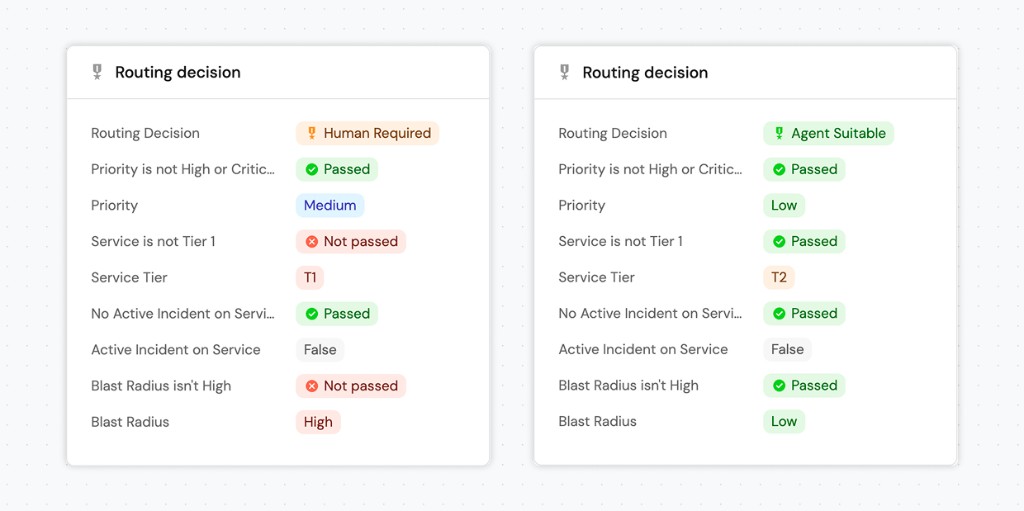
Routing decision scorecard JSON (click to expand)
{
  "identifier": "routing_eligibility",
  "title": "Routing Decision",
  "levels": [
    { "title": "Human Required", "color": "orange" },
    { "title": "Agent Suitable", "color": "green" }
  ],
  "rules": [
    {
      "identifier": "service_not_tier1",
      "title": "Service is not Tier 1",
      "level": "Agent Suitable",
      "query": {
        "combinator": "and",
        "conditions": [
          { "property": "service_tier", "operator": "!=", "value": "T1" }
        ]
      }
    },
    {
      "identifier": "blast_radius_not_unknown",
      "title": "Blast radius isn't high",
      "level": "Agent Suitable",
      "query": {
        "combinator": "and",
        "conditions": [
          { "property": "blast_radius_score", "operator": "!=", "value": "Unknown" },
          { "property": "blast_radius_score", "operator": "!=", "value": "High" }
        ]
      }
    },
    {
      "identifier": "priority_not_high",
      "title": "Priority is not high or critical",
      "level": "Agent Suitable",
      "query": {
        "combinator": "and",
        "conditions": [
          { "property": "priority", "operator": "!=", "value": "High" },
          { "property": "priority", "operator": "!=", "value": "Critical" }
        ]
      }
    },
    {
      "identifier": "no_active_incident",
      "title": "No active incident on service",
      "level": "Agent Suitable",
      "query": {
        "combinator": "and",
        "conditions": [
          { "property": "service_active_incident", "operator": "!=", "value": true }
        ]
      }
    }
  ]
}
Rules explained
| Rule | Checks | Why it matters |
|---|---|---|
| Service is not Tier 1 | service_tier (mirror) is not T1. | T1 services have the highest production impact and require human oversight. |
| Blast radius isn't high | blast_radius_score is not High or Unknown. | High or unknown blast radius means unquantified risk that an agent should not take on. |
| Priority is not high or critical | priority is not High or Critical. | High-priority work requires engineering judgment and faster feedback loops. |
| No active incident on service | service_active_incident (mirror) is not true. | An active incident signals that the service is already under stress, blocking further delegation. |
The scorecard evaluates objective, rule-based criteria. During the Plan stage, Port AI also generates a written routing_reason that explains the decision in plain language. Engineers get both a clear result and the context behind it.
Properties required by this scorecard
The routing decision scorecard depends on two properties set during the Plan stage and two mirror properties sourced from the related service:
blast_radius_score- set by an AI agent or automation that analyzes the service's dependencies.priority- set during triage.service_tier(mirror fromservice.tier) - sourced automatically from the related service.service_active_incident(mirror fromservice.active_incident) - sourced automatically from the related service.
Self-service actions
Self-service actions (SSAs) enable stage transitions and AI agent triggers. Each action operates at a specific stage.
- Triage work item
- Approve plan
- Trigger coding agent
- Promote to environment
Stage: Draft → Plan
Updates the work item with triage decisions:
- Assigns owner and team.
- Sets priority and work type.
- Defines AI augmentation level.
- Records
triaged_attimestamp.
Stage: Plan → Develop
Human approval gate for the technical plan:
- Sets
plan_approvedto true. - Optionally captures reviewer comments.
This action ensures a human reviews the AI-generated plan before development begins. It's a governance checkpoint.
Stage: Develop
Initiates an AI coding session:
- Creates a
codingAgentRunentity. - Links to the selected coding agent (Claude Code, Devin, etc.).
- Passes the prompt/instructions.
- Automation links the run back to the work item.
Related guides:
Stage: Deploy
Creates a deployment record:
- Specifies target environment (Staging, Production).
- Captures release notes.
- Sets deployment strategy.
- Automation links the deployment back to the work item.
Related guides:
How to ingest data into this blueprint
You can populate work items manually or set up catalog auto discovery. We highly recommend setting up catalog auto discovery so work items are created whenever origin entities are ingested. This also sets up the relations to the relevant entities in your software catalog.
The example below shows how to automatically create a work_item entity whenever a Jira issue is ingested.
Add this resource to your Jira integration mapping in the data sources page:
Work item mapping configuration (click to expand)
  - kind: issue
    selector:
      query: "true"
    port:
      entity:
        mappings:
          identifier: '"wi-" + .key'
          title: .fields.summary
          blueprint: '"work_item"'
          properties:
            work_type: |
              if .fields.issuetype.name == "Bug" then "bug"
              elif .fields.issuetype.name == "Story" then "feature"
              elif .fields.issuetype.name == "Task" then "task"
              else "task"
              end
            priority: |
              if .fields.priority.name == "Highest" then "critical"
              elif .fields.priority.name == "High" then "high"
              elif .fields.priority.name == "Medium" then "medium"
              else "low"
              end
          relations:
            jira_ticket: .key
This mapping will create a work_item entity whenever a Jira issue is ingested and assigns the jira_ticket relation to the work item entity that corresponds to the Jira issue.
Make it your own
Port's demo uses a five-stage workflow optimized for autonomous development. Adapt it to fit your process.
Stage names
Rename stages to match your terminology, "Plan" becomes "Refinement," "Develop" becomes "In Progress," "Deploy" becomes "Release."
Progression rules
Change what gates each transition. Require code review approval before Deploy. Add a "Testing" stage between Develop and Deploy. Remove Plan approval for low-priority items.
Relations
Connect to entities relevant to your workflow like design documents, testing environments, feature flags, etc.
AI levels
Define what each level means for your team:
- Human: No AI involvement.
- AI-assisted: AI suggests, human implements.
- AI-led: AI implements, human reviews.
- Autonomous: AI implements and deploys with monitoring.
Conclusion
The workflow blueprint pattern separates execution state from origin entities:
- Origin entity stays clean. Requirements live in origin entity. Workflow state lives in Port.
- Relations enable context. Work items connect to services, repos, PRs, and deployments to provide rich context lake.
- Scorecards drive progression. Rules enforce prerequisites without external system changes.
- AI agents integrate cleanly. Each stage has specific AI responsibilities with focused context.
- Teams can customize. Stages, rules, and SSAs adapt to your development process.
This pattern forms the foundation for automated and AI-assisted flows from ticket to deploy. With the workflow blueprint in place, you can add AI-powered self-service actions that automate triage, coding, review, and deploy.
Next steps
- Explore the Autonomous Ticket Resolution demo to see this pattern in action.