Trigger a Spacelift stack
Send this guide to your coding agent.
Prerequisite: Install Port MCP
Open plan mode if your tool supports it; otherwise present the plan below filled in and wait for my approval. Implement this Port guide in my org via MCP:

https://docs.port.io/guides/all/trigger-spacelift-stack

Read the raw markdown version at https://docs.port.io/guides/all/trigger-spacelift-stack.md - it contains every tab and code block without page markup.

Goal: get the guide's core flow working end-to-end in my org; adapting it to fit my existing setup takes priority over matching the guide 1:1.

Plan:
1. Confirm MCP is connected, in the right org, with sufficient permissions.
2. If the guide offers alternative implementation paths (tabs), pick the one matching my installed integrations and tools, confirm it with me, and implement only that path.
3. Diff the guide's data model (blueprints, properties, relations, workflows, actions, agents, automations, integrations, webhook data sources, secrets) against mine.
4. Propose adaptations for gaps, reusing existing blueprints/relations over guide-named duplicates.
5. Flag what needs a UI click, credential, or secret from me, testing MCP capability empirically before ruling anything out. If the guide has a "Set up via API" section, use it for anything MCP can't do before treating a step as UI-only.
6. Stop on any blocker and give me options. Approving this plan authorizes the writes it lists; pause only for writes beyond what's listed.

Build:
- Extend blueprint schema additively when upserting; don't remove or overwrite existing properties, and treat type conflicts as a blocker, not an auto-fix.
- Never print secret values into the chat or logs; ask me to set them in Port, or write them via the secrets API without echoing them back.
- List any mock data in the plan, minimal and labeled mock; once approved, seed it without re-asking, and tell me what you seeded.
- For anything the guide writes downstream (e.g. a webhook target), use a real entity, not a mock.
- For pages/widgets, use the real page identifier from the app URL, not a guessed slug.
- When you hit a UI step confirmed (not assumed) unsupported via MCP and not covered by the guide's API sections, pause, give exact clicks, then resume via MCP.
- Validate and give links after each meaningful step (only a tool-returned URL, no guessed paths); don't proceed if the last run wasn't a success.

Done:
- Run the guide's "Let's test it" steps where possible (e.g. execute a workflow test run) and confirm the expected output exists in Port.
- Summarize adaptations, seeded data, what was mocked or skipped, remaining UI steps, and how to verify.
This guide demonstrates how to implement a Port workflow that allows you to trigger a Spacelift stack directly from Port and automate your infrastructure deployment workflows seamlessly.
Use cases
- Empower engineering teams to deploy infrastructure on demand without needing direct access to Spacelift.
- Automate provisioning or destruction of environments (e.g., staging, preview, QA) via a single click in Port.
Prerequisites
- Complete the onboarding process.
- Access to your Spacelift organization with permissions to manage stacks.
Set up data model
You will need to manually create a blueprint in Port to represent your Spacelift stacks.
Create the Spacelift stack blueprint
-
Go to your Builder page.
-
Click on
+ Blueprint. -
Click on the
{...}button in the top right corner, and chooseEdit JSON. -
Add this JSON schema:
Spacelift Stack Blueprint (Click to expand)
{"identifier": "space_lift_stack","title": "SpaceLift Stack","icon": "IaC","schema": {"properties": {"space": {"type": "string","title": "Space"},"label": {"items": {"type": "string"},"type": "array","title": "Label"},"description": {"type": "string","title": "Description"},"repository": {"type": "string","title": "Repository"},"link": {"icon": "DefaultProperty","type": "string","title": "Link","format": "url"},"state": {"type": "string","title": "State"},"git_provider": {"type": "string","title": "Git Provider"},"branch": {"type": "string","title": "Branch"}},"required": []},"mirrorProperties": {},"calculationProperties": {},"aggregationProperties": {},"relations": {}} -
Click
Saveto create the blueprint.
Set up the workflow
You can trigger a Spacelift stack by leveraging a Port workflow with a webhook node and secrets to directly interact with Spacelift's API.
Add Port secrets
To add these secrets to Port:
-
Open the Credentials modal.
-
Click on the
Secretstab. -
Click on
+ Secretand add the following secrets:-
SPACELIFT_API_KEY_ID: Your Spacelift API key ID. How to generate it. -
SPACELIFT_API_SECRET: The secret from the file downloaded when the API key was created. -
SPACELIFT_TOKEN: A JWT token generated using the API key and secret. Use the curl command below:Curl command to generate jwt token
curl --location 'https://<your-account>.app.spacelift.io/graphql' \--header 'Content-Type: application/json' \--data '{"query":"mutation GetSpaceliftToken($id: ID!, $secret: String!) {\n apiKeyUser(id: $id, secret: $secret) {\n jwt\n }\n}\n","variables":{"id":"<YOUR_SPACELIFT_API_KEY_ID>","secret":"<YOUR_SPACELIFT_API_SECRET>"}}'
-
Create the workflow
To create the workflow that will trigger the Spacelift stack:
-
Go to the Workflows page of your portal.
-
Click on the
+ Workflowbutton in the top-right corner. -
In the Name field, enter
Trigger Spacelift Stack, then click Confirm. -
On the editor page, click the see workflow JSON button (the code icon) to open the JSON editor.
-
Copy and paste the following JSON configuration to replace the example workflow.
Trigger Spacelift Stack workflow (Click to expand)
Replace your credentialsReplace
<YOUR_SPACELIFT_API_URL>with your actual Spacelift GraphQL API URL. The url follows this pattern:https://<your_org_id>.app.spacelift.io/graphql{"identifier": "trigger_spacelift_stack","title": "Trigger Spacelift Stack","icon": "Git","description": "A workflow to trigger a Spacelift stack","nodes": [{"identifier": "trigger","title": "Trigger Spacelift Stack","config": {"type": "SELF_SERVE_TRIGGER","userInputs": {"properties": {"stack": {"title": "Stack","icon": "DefaultProperty","type": "string","blueprint": "space_lift_stack","sort": {"property": "$title","order": "ASC"},"format": "entity"}},"required": ["stack"],"order": ["stack"]}}},{"identifier": "trigger_stack","title": "Trigger stack run in Spacelift","config": {"type": "WEBHOOK","url": "<YOUR_SPACELIFT_API_URL>","method": "POST","synchronized": true,"headers": {"Authorization": "Bearer {{ .secrets[\"SPACELIFT_TOKEN\"] }}","Content-Type": "application/json"},"body": {"query": "mutation ($stackId: ID!) { runTrigger(stack: $stackId) { id title type state createdAt updatedAt branch triggeredBy driftDetection } }","variables": {"stackId": "{{ .outputs.trigger.stack }}"}}}}],"connections": [{"sourceIdentifier": "trigger","targetIdentifier": "trigger_stack"}]} -
Click
Save.
Now you should see the Trigger Spacelift Stack workflow in the self-service page. 🎉
Ingest existing stacks from Spacelift
When you attempt to trigger a Spacelift stack, you might notice the entity dropdown is empty. This is because no Spacelift Stacks have been ingested into Port yet.
Use the Python script below to pull in your Spacelift stacks and sync them to Port.
Python script to ingest Spaclift stack
- Install dependencies:
pip install loguru httpx
- Export the required environment variables:
export SPACELIFT_API_KEY_ENDPOINT=https://your-account.app.spacelift.io/graphql
export SPACELIFT_API_KEY_ID=Your Spacelift API key ID
export SPACELIFT_API_KEY_SECRET=Your Spacelift API secret
export PORT_CLIENT_ID=Your Port client ID
export PORT_CLIENT_SECRET=Your Port client secret
- Save the script to a .py file and run it.
import os
import httpx
from loguru import logger
# Spacelift API credentials from environment variables
SPACELIFT_API_ENDPOINT = os.environ.get("SPACELIFT_API_KEY_ENDPOINT")
SPACELIFT_API_KEY_ID = os.environ.get("SPACELIFT_API_KEY_ID")
SPACELIFT_API_KEY_SECRET = os.environ.get("SPACELIFT_API_KEY_SECRET")
# Port API credentials
PORT_CLIENT_ID = os.environ.get("PORT_CLIENT_ID", "your id")
PORT_CLIENT_SECRET = os.environ.get("PORT_CLIENT_SECRET", "your secret")
PORT_API_URL = "https://api.port.io/v1"
PORT_BLUEPRINT_ID = "space_lift_stack"
# === GraphQL Token Mutation ===
TOKEN_MUTATION = """
mutation GetSpaceliftToken($apiKeyId: ID!, $apiKeySecret: String!) {
apiKeyUser(id: $apiKeyId, secret: $apiKeySecret) {
jwt
}
}
"""
TOKEN_MUTATION_VARIABLES = {
"apiKeyId": SPACELIFT_API_KEY_ID,
"apiKeySecret": SPACELIFT_API_KEY_SECRET
}
# === Default Stack Query ===
LIST_STACK_QUERY = """
{
stacks {
id
name
space
administrative
state
description
repository
repositoryURL
provider
labels
branch
namespace
entityCount
}
}
"""
async def get_spacelift_jwt_token():
async with httpx.AsyncClient() as client:
response = await client.post(
SPACELIFT_API_ENDPOINT,
json={"query": TOKEN_MUTATION, "variables": TOKEN_MUTATION_VARIABLES},
)
response.raise_for_status()
jwt = response.json()["data"]["apiKeyUser"]["jwt"]
logger.success("Successfully fetched Spacelift JWT token")
return jwt
async def get_spacelift_stacks(jwt_token: str):
headers = {"Authorization": f"Bearer {jwt_token}"}
async with httpx.AsyncClient() as client:
response = await client.post(
SPACELIFT_API_ENDPOINT,
json={"query": LIST_STACK_QUERY},
headers=headers,
)
response.raise_for_status()
logger.success("Successfully fetched stacks data from Spacelift")
return response.json()["data"]["stacks"]
async def get_port_access_token():
credentials = {"clientId": PORT_CLIENT_ID, "clientSecret": PORT_CLIENT_SECRET}
async with httpx.AsyncClient() as client:
response = await client.post(f"{PORT_API_URL}/auth/access_token", json=credentials)
response.raise_for_status()
token = response.json()["accessToken"]
logger.success("Successfully fetched Port access token")
return token
async def create_port_entity(access_token: str, stack: dict):
headers = {"Authorization": f"Bearer {access_token}"}
entity = {
"identifier": stack["id"],
"title": stack["name"],
"properties": {
"space": stack.get("space", ""),
"label": stack.get("labels", []),
"description": stack.get("description", ""),
"repository": stack.get("repository", ""),
"state": stack.get("state", ""),
"git_provider": stack.get("provider", ""),
"branch": stack.get("branch", "")
},
"relations": {}
}
async with httpx.AsyncClient() as client:
response = await client.post(
f"{PORT_API_URL}/blueprints/{PORT_BLUEPRINT_ID}/entities?upsert=true",
json=entity,
headers=headers
)
response.raise_for_status()
logger.info(f"Upserted entity to Port: {stack['id']}")
return response.json()
async def main():
try:
jwt_token = await get_spacelift_jwt_token()
stacks = await get_spacelift_stacks(jwt_token)
access_token = await get_port_access_token()
for stack in stacks:
await create_port_entity(access_token, stack)
logger.success("Finished syncing all stacks to Port")
except Exception as e:
logger.error(f"Failed: {e}")
if __name__ == "__main__":
import asyncio
asyncio.run(main())
Let's test it!
-
Head to the self-service page in Port.
-
Choose the
Trigger Spacelift Stackworkflow. -
Select a stack entity.
-
Click on
Execute. -
You're done! Your stack will be triggered in Spacelift. 🎉
Refreshing your Spacelift token
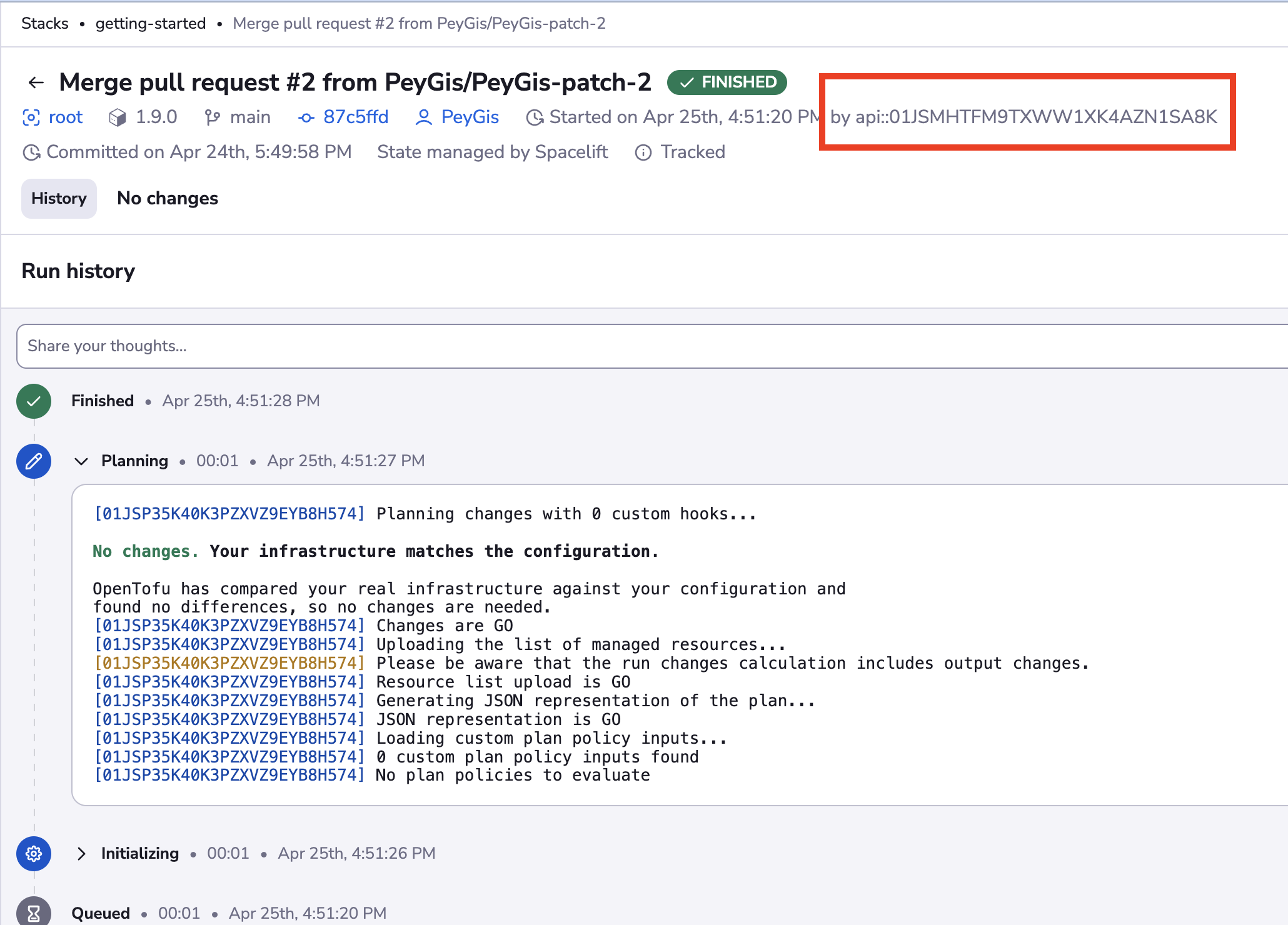
According to Spacelift's documentation, JWT tokens expire after 10 hours. If your workflow fails with a 401 Unauthorized error, you need to refresh the token.
The workflow below handles this in a single run: it generates a fresh JWT from your Spacelift API key and secret, then chains a second node that updates the SPACELIFT_TOKEN secret in Port with the new value.
To create the workflow:
-
Go to the Workflows page of your portal.
-
Click on the
+ Workflowbutton in the top-right corner. -
In the Name field, enter
Refresh Spacelift Token, then click Confirm. -
On the editor page, click the see workflow JSON button (the code icon) to open the JSON editor.
-
Copy and paste the following JSON configuration to replace the example workflow.
Refresh Spacelift Token workflow (Click to expand)
Replace your credentialsReplace
<YOUR_SPACELIFT_API_URL>with your actual Spacelift GraphQL API URL. The url follows this pattern:https://<your_org_id>.app.spacelift.io/graphql{"identifier": "refresh_spacelift_token","title": "Refresh Spacelift Token","icon": "Git","description": "A workflow to refresh the Spacelift token and update the Port secret","nodes": [{"identifier": "trigger","title": "Refresh Spacelift Token","config": {"type": "SELF_SERVE_TRIGGER","userInputs": {"properties": {},"required": [],"order": []}}},{"identifier": "generate_token","title": "Generate new Spacelift token","config": {"type": "WEBHOOK","url": "<YOUR_SPACELIFT_API_URL>","method": "POST","synchronized": true,"headers": {"Content-Type": "application/json"},"body": {"query": "mutation GetSpaceliftToken($id: ID!, $secret: String!) { apiKeyUser(id: $id, secret: $secret) { jwt } }","variables": {"id": "{{ .secrets[\"SPACELIFT_API_KEY_ID\"] }}","secret": "{{ .secrets[\"SPACELIFT_API_SECRET\"] }}"}}}},{"identifier": "update_secret","title": "Update Port secret","config": {"type": "WEBHOOK","url": "https://api.port.io/v1/organization/secrets/SPACELIFT_TOKEN","method": "PATCH","synchronized": true,"body": {"secretValue": "{{ .outputs.generate_token.response.data.data.apiKeyUser.jwt }}","description": "Refreshed Spacelift API token"}}}],"connections": [{"sourceIdentifier": "trigger","targetIdentifier": "generate_token"},{"sourceIdentifier": "generate_token","targetIdentifier": "update_secret"}]} -
Click
Save.
Now, every time you run the Refresh Spacelift Token workflow, it generates a new token and its second node automatically updates the SPACELIFT_TOKEN secret in Port. 🎉
To rotate the token without manual intervention, you can swap the SELF_SERVE_TRIGGER node for a scheduled event trigger so the workflow runs on a recurring interval.
Ingest stacks via webhook
In this example we will create a webhook integration between Spacelift and Port, which will ingest stack entities in real time.
Port configuration
Create the following blueprint definition:
Spacelift stack blueprint
{
    "identifier": "space_lift_stack",
    "title": "SpaceLift Stack",
    "icon": "IaC",
    "schema": {
        "properties": {
            "space": {
                "type": "string",
                "title": "Space"
            },
            "label": {
                "items": {
                    "type": "string"
                },
                "type": "array",
                "title": "Label"
            },
            "description": {
                "type": "string",
                "title": "Description"
            },
            "repository": {
                "type": "string",
                "title": "Repository"
            },
            "link": {
                "icon": "DefaultProperty",
                "type": "string",
                "title": "Link",
                "format": "url"
            },
            "state": {
                "type": "string",
                "title": "State"
            },
            "git_provider": {
                "type": "string",
                "title": "Git Provider"
            },
            "branch": {
                "type": "string",
                "title": "Branch"
            }
        },
        "required": []
    },
    "mirrorProperties": {},
    "calculationProperties": {},
    "aggregationProperties": {},
    "relations": {}
}
Create the following webhook configuration using Port's UI
Stack webhook configuration
-
Basic details tab - fill the following details:
- Title :
Spacelift Stack Mapper. - Identifier :
spacelift_stack_mapper. - Description :
A webhook configuration to map Spacelift stacks to Port. - Icon :
Git.
- Title :
-
Integration configuration tab - fill the following JQ mapping:
[{"blueprint": "space_lift_stack","operation": "create","filter": "true","entity": {"identifier": ".body.stack.id | tostring","title": ".body.stack.name | tostring","properties": {"label": ".body.stack.labels","description": ".body.stack.description","link": ".body.stack.url","git_provider": ".body.stack.vcs","repository": ".body.stack.repository","branch": ".body.run.branch","state": ".body.state"}}}] -
Click Save at the bottom of the page.
Create a webhook in Spacelift
To send webhook events from Spacelift to an external system like Port, we must first create a webhook and then link it to a notification policy. Follow the steps below to complete the setup:
- Go to Webhooks in your Spacelift account.
- Click Create webhook.
- Input the following details:
Name- use a meaningful name such as Port Webhook.Endpoint URL- enter the value of theurlkey you received after creating the webhook configuration.Space- select the space that should have access to the webhook.
- Enable the Webhook toggle.
- Click Create to create the webhook.
Sending notifications
Webhook events in Spacelift are triggered through notification policies. To set this up, we need the webhook ID that Spacelift assigns when you create a webhook.
How to find your webhook ID
-
In your Spacelift account, go to Webhooks.
-
Locate the webhook you created.
-
Click the three dots (...) next to the webhook.
-
Select Copy webhook ID to copy the webhook's unique identifier.
We’ll use this ID when configuring the notification policy.
Creating a notification policy
-
Go to Policies in Spacelift.
-
Click Create policy.
-
Input the following details:
Name- use a meaningful name such as Port Webhook Notification.Type- selectNotification policyfrom the list.Space- select the space that should have access to the policy.Description- add a detailed description.
-
Click Continue to open the YAML editor where you can bind the notification to the webhook.
-
Add one of the following configurations:
Notification policy configuration (click to expand)
Webhook identifier replacementBe sure to replace
<YOUR-WEBHOOK-ID>with the ID you copied from the Spacelift webhook you created# Option 1: Trigger on tracked runs finishingwebhook[{"endpoint_id": "<YOUR-WEBHOOK-ID>"}] {input.run_updated.run.type == "TRACKED"input.run_updated.run.state == "FINISHED"}# Option 2: Trigger on any run updatewebhook[{"endpoint_id": "<YOUR-WEBHOOK-ID>"}] {input.run_updated != null} -
Click Create policy.
Done! any change that happens to your stacks in Spacelift will trigger a webhook event to the webhook URL provided by Port. Port will parse the events according to the mapping and update the catalog entities accordingly.
Let's Test It
This section includes a sample response data from Spacelift. In addition, it includes the entity created from the event based on the configuration provided in the previous section.
Payload
Here is an example of the payload structure from Spacelift:
Webhook response data (Click to expand)
{
  "body": {
    "account": "peygis",
    "state": "FINISHED",
    "stateVersion": 5,
    "timestamp": 1745599888,
    "timestamp_millis": 1745599888383,
    "run": {
      "id": "01JSPXRQR2F3Y06HD85YYXRSZ7",
      "branch": "main",
      "commit": {
        "authorLogin": "PeyGis",
        "authorName": "PagesCoffy",
        "hash": "87c5ffdcf063445657c7082a447cb6a7d60f2c9d",
        "message": "Merge pull request #2 from PeyGis/PeyGis-patch-2",
        "timestamp": 1745516998,
        "url": "https://github.com/PeyGis/argocd-app/commit/87c5ffdcf063445657c7082a447cb6a7d60f2c9d"
      },
      "createdAt": 1745599880,
      "delta": {
        "added": 0,
        "changed": 0,
        "deleted": 0,
        "resources": 0
      },
      "driftDetection": false,
      "triggeredBy": "api::01JSMHTFM9TXWW1XK4AZN1SA8K",
      "type": "TRACKED",
      "url": "https://peygis.app.spacelift.io/stack/ai-agent/run/01JSPXRQR2F3Y06HD85YYXRSZ7"
    },
    "stack": {
      "id": "ai-agent",
      "name": "ai-agent",
      "description": "here is the node",
      "labels": [
        "node"
      ],
      "repository": "PeyGis/argocd-app",
      "url": "https://peygis.app.spacelift.io/stack/ai-agent",
      "vcs": "GITHUB"
    },
    "workerPool": {
      "public": true,
      "labels": [],
      "id": "",
      "name": ""
    },
    "event_source": "spacelift",
    "event_type": "run_state_changed_event"
  },
  "headers": {
    "Host": "ingest.port.io",
    "User-Agent": "Go-http-client/2.0",
    "Content-Length": "1063",
    "Accept-Encoding": "gzip",
    "Content-Type": "application/json",
    "Traceparent": "00-000000000000000045dc17949932896c-7363f5faf7992244-01",
    "Tracestate": "dd=s:1;p:3705f90ce0614b5d",
    "X-Datadog-Parent-Id": "3964848880668986205",
    "X-Datadog-Sampling-Priority": "1",
    "X-Datadog-Trace-Id": "5033924410486196588",
    "X-Forwarded-Host": "ingest.port.io",
    "X-Forwarded-Server": "public-traefik-5649595896-pgqbw",
    "X-Real-Ip": "10.0.30.189",
    "X-Replaced-Path": "/xI35fItWHlrYpVQE",
    "X-Signature": "sha1=dd9dc0209c2791f029ccd0cfce0a2548a3e448df",
    "X-Signature-256": "sha256=52a747571c1e7f464424cb4211331f195105bd6dba39aa9a2f4b7124fe747d36",
    "host": "ingest.port.io",
    "user-agent": "Go-http-client/2.0",
    "content-length": "1063",
    "accept-encoding": "gzip",
    "content-type": "application/json",
    "traceparent": "00-000000000000000045dc17949932896c-7363f5faf7992244-01",
    "tracestate": "dd=s:1;p:3705f90ce0614b5d",
    "x-datadog-parent-id": "3964848880668986205",
    "x-datadog-sampling-priority": "1",
    "x-datadog-trace-id": "5033924410486196588",
    "x-forwarded-host": "ingest.port.io",
    "x-forwarded-server": "public-traefik-5649595896-pgqbw",
    "x-real-ip": "10.0.30.189",
    "x-replaced-path": "/xI35fItWHlrYpVQE",
    "x-signature": "sha1=dd9dc0209c2791f029ccd0cfce0a2548a3e448df",
    "x-signature-256": "sha256=52a747571c1e7f464424cb4211331f195105bd6dba39aa9a2f4b7124fe747d36"
  },
  "queryParams": {}
}
Mapping Result
The combination of the sample payload and the webhook configuration generates the following Port entity:
Stack entity in Port (Click to expand)
{
  "blueprint": "space_lift_stack",
  "identifier": "ai-agent",
  "createdAt": "2025-04-24T17:57:01.014Z",
  "updatedBy": "space_lift_stack_mapper",
  "createdBy": "space_lift_stack_mapper",
  "team": [],
  "title": "ai-agent",
  "relations": {},
  "properties": {
    "link": "https://peygis.app.spacelift.io/stack/ai-agent",
    "description": "AI agent stack",
    "git_provider": "GITHUB",
    "label": [
      "ai",
      "llm"
    ],
    "state": "FINISHED",
    "repository": "PeyGis/codecov-example",
    "branch": "main",
    "space": null
  },
  "updatedAt": "2025-04-25T13:36:08.155Z"
}