Enforce code maturity with GitLab file search
Code maturity standards help teams to consistently follow engineering best practices like testing, linting, documentation, and CI. By tracking these signals with Port scorecards via GitLab file search, teams can monitor compliance, guide maturity, and reduce production risk.
This guide demonstrates how to set up a GitLab integration that uses file search to detect the presence of key configuration files (like .gitlab-ci.yml, README.md, or package.json), and then visualize and score these practices in Port.
Common use cases
- Encourage consistency: Ensure all services have testing and deployment pipelines in place.
- Track adoption of practices: Identify which services still lack key maturity signals (e.g., no README, no linter config).
- Gate production deployments: Require a certain maturity level before deploying new services.
Prerequisites
- You have a Port account and have completed the onboarding process.
- You have enabled GitLab advanced search API in your GitLab environment.
- You have installed Port's GitLab-v2 integration.
Set up data model
Follow the steps below to update the Service blueprint:
-
Navigate to the
Serviceblueprint on the Data model page in Port. -
Hover over it, click on the
...button on the right, and selectEdit JSON. -
Add the following boolean properties to capture repository maturity signals:
Repository file check properties (click to expand)
"hasCI": {"type": "boolean","title": "Has CI"},"hasLicense": {"type": "boolean","title": "Has License"},"usingFastapiPackage": {"type": "boolean","title": "Uses FastAPI"},"usingOldLoggingPackage": {"type": "boolean","title": "Use Old Logging"},"hasTests": {"type": "boolean","title": "Has Test"},"hasContributingGuide": {"type": "boolean","title": "Has Contributing Guide"},"hasLinter": {"type": "boolean","title": "Has Linter"},"hasPoetryLock": {"type": "boolean","title": "Has Poetry Lock"},"hasPythonVersionInPoetry": {"type": "boolean","title": "Has Python Version in Poetry"},"hasTestInCi": {"type": "boolean","title": "Has Test in CI"},"hasReadme": {"type": "boolean","title": "Has Readme"} -
Click
Saveto update the blueprint.
Update GitLab integration configuration
-
Go to your Data Source page.
-
Select the GitLab integration.
-
Add the following YAML block into the
Mappingeditor to detect file presence:GitLab Code Maturity Check Configuration (click to expand)
- kind: projectselector:query: 'true'searchQueries:- name: hasLicensescope: blobsquery: 'filename:"LICENSE"'- name: usingFastapiPackagescope: blobsquery: 'fastapi filename:pyproject.toml'- name: hasCIscope: blobsquery: 'filename:.gitlab-ci.yml'- name: usingOldLoggingPackagescope: blobsquery: 'logging extension:py'- name: hasTestsscope: blobsquery: 'filename:test_* extension:py'- name: hasContributingGuidescope: blobsquery: 'filename:CONTRIBUTING.md'- name: hasLinterscope: blobsquery: 'flake8 | black filename:pyproject.toml'- name: hasPoetryLockscope: blobsquery: 'filename:poetry.lock'- name: hasPythonVersionInPoetryscope: blobsquery: '"python =" filename:pyproject.toml'- name: hasTestInCiscope: blobsquery: 'pytest | python -m unittest filename:.gitlab-ci.yml'- name: hasReadmescope: blobsquery: 'filename:README.md'port:entity:mappings:identifier: .path_with_namespace | gsub(" "; "")title: .nameblueprint: '"gitlabRepository"'properties:url: .web_urldescription: .descriptionlanguage: .__languages | to_entries | max_by(.value) | .keynamespace: .namespace.namefullPath: .namespace.full_pathdefaultBranch: .default_branchhasLicense: .__searchQueries["hasLicense"]usingFastapiPackage: .__searchQueries["usingFastapiPackage"]hasCI: .__searchQueries["hasCI"]usingOldLoggingPackage: .__searchQueries["usingOldLoggingPackage"]hasTests: .__searchQueries["hasTests"]hasContributingGuide: .__searchQueries["hasContributingGuide"]hasLinter: .__searchQueries["hasLinter"]hasPoetryLock: .__searchQueries["hasPoetryLock"]hasPythonVersionInPoetry: .__searchQueries["hasPythonVersionInPoetry"]hasTestInCi: .__searchQueries["hasTestInCi"]hasReadme: .__searchQueries["hasReadme"] -
Click
Save & Resyncto apply the mapping.
Set up scorecard
Let's create a scorecard to assess code maturity based on the files present in each repo:
-
Go to the Data model page in Port.
-
Search for the Service blueprint and select it.
-
Click on the
Scorecardstab. -
Click on
+ New Scorecardto create a new scorecard. -
Add this JSON configuration:
Code Maturity Scorecard (click to expand)
{"identifier": "code_maturity","title": "Code Maturity","levels": [{"color": "paleBlue","title": "Basic"},{"color": "darkGray","title": "Low"},{"color": "orange","title": "Medium"},{"color": "red","title": "High"}],"rules": [{"identifier": "has_ci","title": "CI/CD Configuration","description": "Ensures that CI pipelines exist to automate testing and deployments.","level": "High","query": {"combinator": "and","conditions": [{"operator": "=","property": "hasCI","value": true}]}},{"identifier": "has_license","title": "License File","description": "Project contains a LICENSE file. Indicates the project's usage and distribution rights.","level": "Low","query": {"combinator": "and","conditions": [{"operator": "=","property": "hasLicense","value": true}]}},{"identifier": "has_readme","title": "Has README","description": "Project contains a README file to describe the purpose, usage, and setup instructions. Encouraged for onboarding and documentation clarity.","level": "Medium","query": {"combinator": "and","conditions": [{"operator": "=","property": "hasReadme","value": true}]}},{"identifier": "has_tests","title": "Has Tests","description": "Project contains test files. This is a basic engineering quality requirement.","level": "High","query": {"combinator": "and","conditions": [{"operator": "=","property": "hasTests","value": true}]}},{"identifier": "has_tests_in_ci","title": "Tests Run in CI","description": "Ensures tests are executed in the CI pipeline, validating builds before deployment.","level": "Medium","query": {"combinator": "and","conditions": [{"operator": "=","property": "hasTestInCi","value": true}]}},{"identifier": "has_contrib_guide","title": "Contributing Guide","description": "Presence of a CONTRIBUTING.md file helps standardize external and internal collaboration.","level": "Low","query": {"combinator": "and","conditions": [{"operator": "=","property": "hasContributingGuide","value": true}]}},{"identifier": "has_linter","title": "Code Linter Configured","description": "Project includes standard linting configurations to enforce code quality and consistency.","level": "Medium","query": {"combinator": "and","conditions": [{"operator": "=","property": "hasLinter","value": true}]}},{"identifier": "uses_fastapi","title": "Uses FastAPI","description": "Project uses FastAPI, a modern Python web framework ideal for high-performance APIs.","level": "Low","query": {"combinator": "and","conditions": [{"operator": "=","property": "usingFastapiPackage","value": true}]}},{"identifier": "uses_old_logging","title": "Uses Old Logging","description": "Project uses the standard `logging` module. Consider structured logging or better alternatives like Loguru.","level": "Low","query": {"combinator": "and","conditions": [{"operator": "=","property": "usingOldLoggingPackage","value": true}]}},{"identifier": "has_poetry_lock","title": "Poetry Lock File Present","description": "Presence of `poetry.lock` indicates project uses Poetry for dependency management.","level": "High","query": {"combinator": "and","conditions": [{"operator": "=","property": "hasPoetryLock","value": true}]}},{"identifier": "has_python_version","title": "Python Version Defined in Poetry","description": "Specifying Python version in `pyproject.toml` improves reproducibility and environment stability.","level": "Medium","query": {"combinator": "and","conditions": [{"operator": "=","property": "hasPythonVersionInPoetry","value": true}]}}]} -
Click on
Saveto create the scorecard.
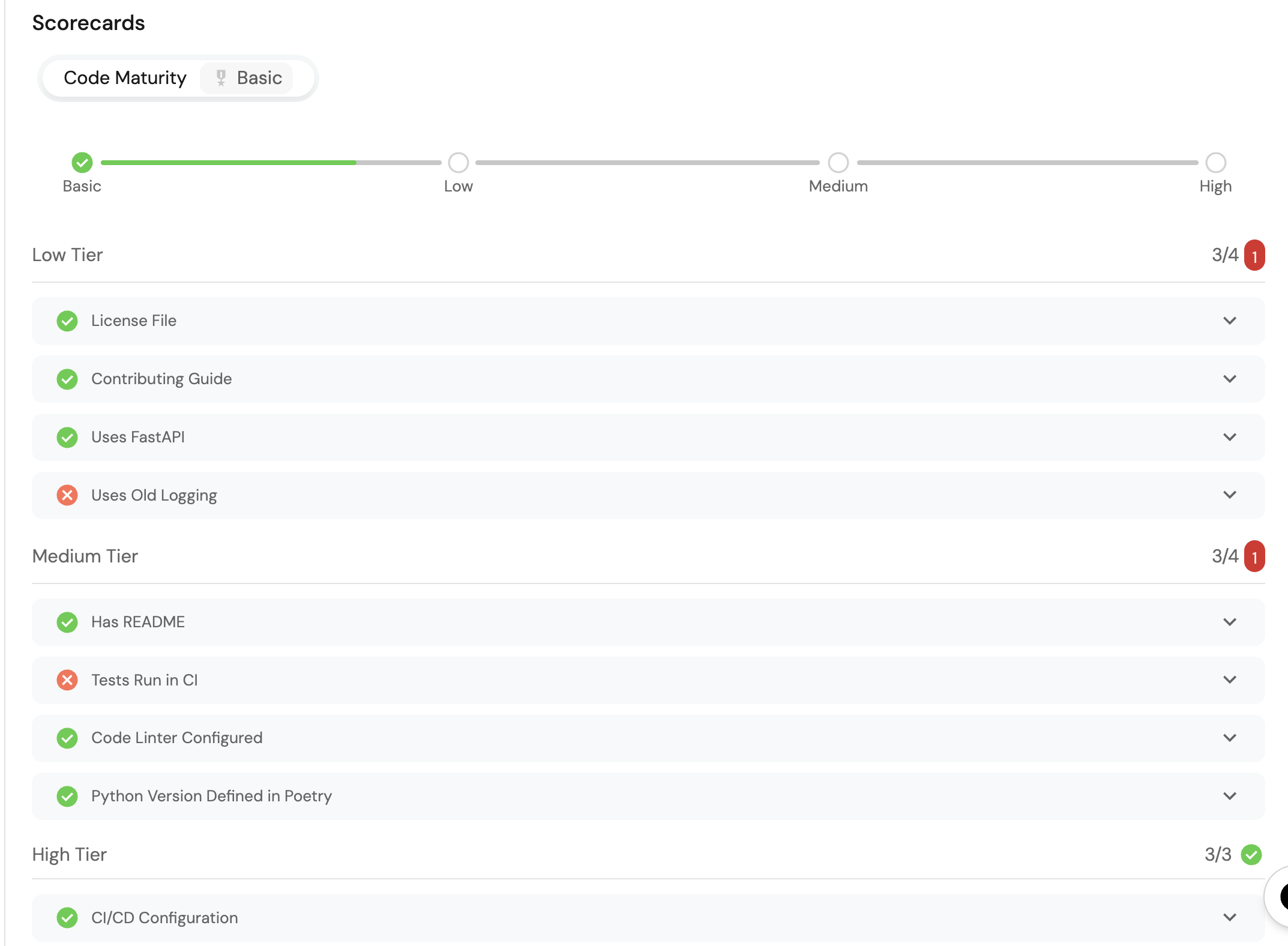
After setting up the scorecard metrics on a service, it should look like this: