Sync Port properties to GitHub custom properties
Platform teams often manage important repository context in Port, such as business criticality, ownership, or governance signals. However, developers and platform engineers still spend a lot of time in GitHub, where they search, triage, and make day-to-day decisions. Without a sync mechanism, that context stays locked in Port and is not easily visible where work actually happens.
In this guide, you will learn how to sync Port property values to GitHub repository custom properties. We will start with a simple example using business_criticality, then show how the same pattern can later be extended to scorecard outcomes such as production_readiness.
Common use cases
- Keep GitHub repository metadata aligned with your software catalog context.
- Expose Port governance signals, such as scorecard outcomes, directly in GitHub.
- Search repositories in GitHub by business or operational context.
- Use GitHub custom properties together with rulesets to enforce repository policies, such as requiring 2 approving reviews for repositories where
business_criticalityishigh.
Prerequisites
This guide assumes the following:
- You have a Port account and completed the onboarding process.
- You installed Port's GitHub Ocean integration.
- You have permissions to manage custom properties in your GitHub organization.
- You have a dedicated repository for workflow backends used by Port automations.
Set up data model in Port
We will begin by adding a business_criticality property to the githubRepository blueprint in Port.
This property will be the source of truth in Port, and later we will sync its value to GitHub as a repository custom property.
-
Go to the Builder page in your portal.
-
Select the
GitHub Repositoryblueprint. -
Click
{...}and chooseEdit JSON. -
Add the following property under
schema.properties:business_criticality property (Click to expand)
"business_criticality": {"title": "Business Criticality","type": "string","enum": ["critical","high","medium","low"],"enumColors": {"critical": "red","high": "orange","medium": "yellow","low": "lightGray"}} -
Click
Save.
Configure custom properties in GitHub
Next, create a matching custom property in GitHub.
For this sync to work reliably, the property name and allowed values in GitHub should match the values defined in Port.
- Follow GitHub's official guide for adding custom properties.
- In your GitHub organization settings, create a property named
business_criticality. - Configure it as:
- Type: Single select.
- Allowed values:
low,medium,high,critical. - Allow repository actors to set this property: enabled.
- Require this property for all repositories: enabled.
- Default value:
low.
At this point, both Port and GitHub now share the same property model.
Update GitHub App permissions
To update repository custom property values through GitHub’s API, the GitHub App used by the Port integration must have the correct permissions.
GitHub requires custom properties permissions at both the repository and organization level for this API. See GitHub’s API reference: Create or update custom property values for organization repositories.
- Open your organization, go to Settings, then navigate to GitHub Apps .
- Select your Port app (usually named
Port - <GITHUB_ORG> - <OCEAN_INTEGRATION_IDENTIFIER>). - Click Configure, then click App settings.
- Open Permissions and events.
- Set the following permissions:
- Repository permissions → Custom properties → Read and write
- Organization permissions → Custom properties for organizations → Read and write
- Ensure an organization administrator approves the updated permissions.
Once this is done, the GitHub App can authenticate and update custom property values on repositories in the organization.
Create the GitHub workflow backend
Now that the data model and permissions are ready, the next step is to create a GitHub Actions workflow that Port can trigger whenever the property changes.
We recommend creating a dedicated repository for the workflows that are used by Port actions.
Add repository secrets
In your dedicated workflow repository, add the following secrets:
PORT_CLIENT_ID- Your Port client ID.PORT_CLIENT_SECRET- Your Port client secret.PORT_GITHUB_APP_PEM- The private key of your GitHub App in PEM format.PORT_GITHUB_APP_ID- The App ID of your GitHub App.PORT_GITHUB_APP_INSTALLATION_ID- The installation ID of your GitHub App in the organization.
How to find these values
-
In Port, open your GitHub Ocean integration data source and go to the Settings tab to copy:
- the App ID
- the Installation ID
-
In GitHub, open your organization, go to Settings, then navigate to GitHub Apps → Installed GitHub Apps. Select the Port app installation, open App settings, and generate a private key under Private keys. Store the full PEM content in the
PORT_GITHUB_APP_PEMsecret.
Add workflow file
-
Create
.github/workflows/sync-repo-custom-properties.yamlin your dedicated workflows repository. -
Copy and paste the following workflow:
Sync repository custom properties workflow (Click to expand)
name: Sync GitHub Repository Custom Propertieson:workflow_dispatch:inputs:org_name:required: truetype: stringrepo_name:required: truetype: stringport_context:required: truetype: stringcustom_properties_with_values:required: truetype: stringjobs:sync-custom-properties:runs-on: ubuntu-lateststeps:- name: Inform sync starteduses: port-labs/port-github-action@v1with:clientId: ${{ secrets.PORT_CLIENT_ID }}clientSecret: ${{ secrets.PORT_CLIENT_SECRET }}baseUrl: https://api.port.iooperation: PATCH_RUNrunId: ${{ fromJson(inputs.port_context).runId }}logMessage: |Syncing GitHub repository custom properties from Port scorecards... 🔄- name: Set up Pythonuses: actions/setup-python@v4with:python-version: "3.x"- name: Install Python dependenciesrun: |pip install PyJWT requests cryptography- name: Update GitHub repository custom properties using GitHub Appid: sync_propsenv:PEM: ${{ secrets.PORT_GITHUB_APP_PEM }}APP_ID: ${{ secrets.PORT_GITHUB_APP_ID }}INSTALLATION_ID: ${{ secrets.PORT_GITHUB_APP_INSTALLATION_ID }}ORG_NAME: ${{ inputs.org_name }}REPO_NAME: ${{ inputs.repo_name }}CUSTOM_PROPERTIES: ${{ inputs.custom_properties_with_values }}run: |python - <<'EOF'import osimport timeimport jsonimport jwtimport requestsimport syspem = os.environ["PEM"]app_id = os.environ["APP_ID"]installation_id = os.environ["INSTALLATION_ID"]org_name = os.environ["ORG_NAME"]repo_name = os.environ["REPO_NAME"]custom_properties = json.loads(os.environ["CUSTOM_PROPERTIES"])# Create JWT (valid for 10 minutes max)now = int(time.time())payload = {"iat": now - 60,"exp": now + (10 * 60),"iss": app_id}jwt_token = jwt.encode(payload, pem, algorithm="RS256")# Exchange JWT for installation access tokentoken_url = f"https://api.github.com/app/installations/{installation_id}/access_tokens"token_headers = {"Authorization": f"Bearer {jwt_token}","Accept": "application/vnd.github+json","X-GitHub-Api-Version": "2022-11-28"}token_resp = requests.post(token_url, headers=token_headers)token_resp.raise_for_status()installation_token = token_resp.json()["token"]# Build request payloadbody = {"repository_names": [repo_name],"properties": custom_properties}# Call GitHub custom properties endpointupdate_url = f"https://api.github.com/orgs/{org_name}/properties/values"update_headers = {"Authorization": f"Bearer {installation_token}","Accept": "application/vnd.github+json","X-GitHub-Api-Version": "2022-11-28","Content-Type": "application/json"}resp = requests.patch(update_url, headers=update_headers, json=body)print(f"HTTP Status: {resp.status_code}")try:print(resp.json())except Exception:print(resp.text)if resp.status_code not in [200, 204]:sys.exit(1)EOF- name: Inform sync completedif: ${{ success() }}uses: port-labs/port-github-action@v1with:clientId: ${{ secrets.PORT_CLIENT_ID }}clientSecret: ${{ secrets.PORT_CLIENT_SECRET }}baseUrl: https://api.port.iooperation: PATCH_RUNrunId: ${{ fromJson(inputs.port_context).runId }}logMessage: |Repository custom properties synced to GitHub successfully! ✅- name: Inform sync failedif: ${{ failure() }}uses: port-labs/port-github-action@v1with:clientId: ${{ secrets.PORT_CLIENT_ID }}clientSecret: ${{ secrets.PORT_CLIENT_SECRET }}baseUrl: https://api.port.iooperation: PATCH_RUNrunId: ${{ fromJson(inputs.port_context).runId }}logMessage: |Failed to sync repository custom properties to GitHub. ❌
Create the Port automation
With the GitHub workflow in place, the final step is to configure a Port automation that triggers whenever business_criticality changes on a githubRepository entity.
-
Go to the Automations page in your portal.
-
Click
+ Automation. -
Click
{...} Edit JSON. -
Copy and paste the configuration below:
Sync custom properties automation (Click to expand)
Remember to replace these placeholders:
<OCEAN_INTEGRATION_IDENTIFIER>- The ocean integration identifier<GITHUB_ORG>- Your Github organization<GITHUB_REPO>- Your Github repository
{"identifier": "sync_github_custom_properties_on_business_criticality_change","title": "Sync GitHub Custom Properties on Business Criticality Change","description": "Automatically triggers the GitHub custom properties sync workflow whenever the business_criticality property changes in Port.","icon": "Github","trigger": {"type": "automation","event": {"type": "ENTITY_UPDATED","blueprintIdentifier": "githubRepository"},"condition": {"type": "JQ","expressions": [".diff.after.properties.business_criticality != .diff.before.properties.business_criticality"],"combinator": "or"}},"invocationMethod": {"type": "INTEGRATION_ACTION","installationId": "<OCEAN_INTEGRATION_IDENTIFIER>","integrationActionType": "dispatch_workflow","integrationActionExecutionProperties": {"org": "<GITHUB_ORG>","repo": "<GITHUB_REPO>","workflow": "sync-repo-custom-properties.yaml","workflowInputs": {"port_context": {"runId": "{{ .run.id }}"},"org_name": "{{.event.diff.after.relations.organization}}","repo_name": "{{.event.diff.after.identifier}}","custom_properties_with_values": "[{\"property_name\":\"business_criticality\",\"value\":\"{{ .event.diff.after.properties.business_criticality }}\"}]"},"reportWorkflowStatus": true}},"publish": true,"allowAnyoneToViewRuns": true}
Search repositories in GitHub
- In Port, update
business_criticalityon one repository entity. - Open the automation run and confirm the workflow completed successfully.
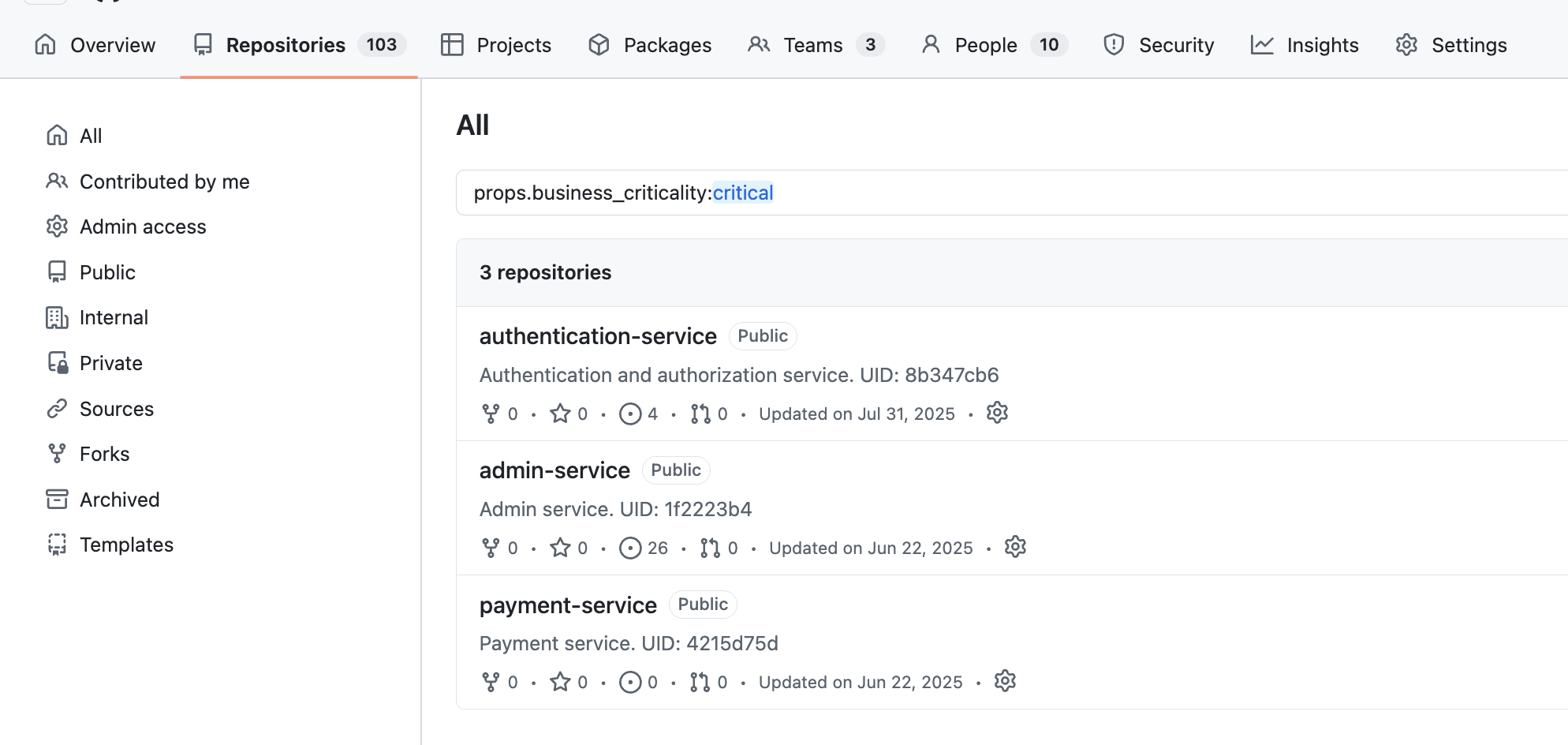
- In GitHub repository search, query:
prop:business_criticality:critical.prop:business_criticality:high.
This makes it easy to answer questions like:
-
Which repositories are business critical?
-
Which repositories are high priority?
Extend the pattern to scorecards
Once business_criticality is working, you can use the same architecture to sync scorecard outcomes into GitHub custom properties.
For example, you can define GitHub custom properties such as:
production_readinessdocumentationsecurity_posture
Each property can use a single-select model such as:
bronzesilvergold
Then, instead of triggering the automation when a Port property changes, you can trigger it when scorecard values change.
After syncing scorecard values, users can search for repositories like:
prop:production_readiness:goldprop:security_posture:bronze
This allows GitHub to reflect not just repository metadata, but also governance and quality signals calculated in Port.