Smart PR reviewer assignment using AI
This guide includes steps that require integration with GitHub:
- GitHub (Ocean) - uses the Ocean framework. We strongly recommend this integration for new and migrated setups.
- GitHub (Sunset) - uses a GitHub app that is in sunset and will be fully deprecated on September 15, 2026.
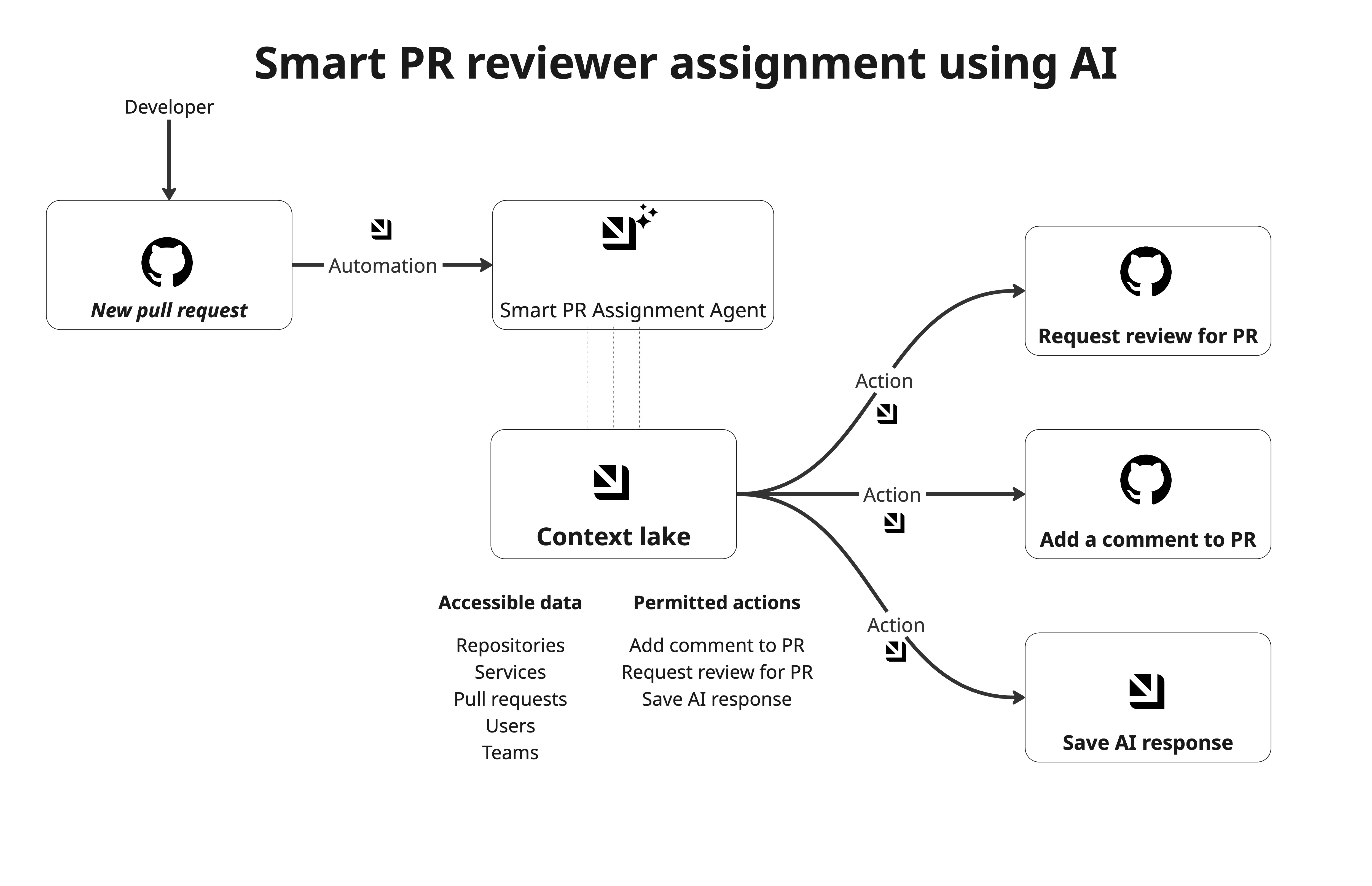
As AI agents and developers generate more pull requests, finding the right reviewers becomes a bottleneck. Manual reviewer selection wastes time, creates bottlenecks, and often assigns reviews to people already overloaded.
This guide shows how to use Port to automatically assign PR reviewers based on your CODEOWNERS file, code expertise, ownership data, and capacity constraints. You reduce manual triage and route reviews to the most qualified available reviewers.
Common use cases
- Reduce PR merge time by routing new PRs to reviewers without manual assignment.
- Improve code quality by assigning reviewers who own or know the changed areas.
- Avoid review bottlenecks by considering current review load and capacity when assigning.
Prerequisites
This guide assumes the following:
- You have a Port account and have completed the onboarding process.
- Port's GitHub Ocean integration is installed and syncing repositories and pull requests.
- You have service and team entities in your catalog (optional but recommended for ownership-based assignment).
- You can create and configure AI agents in Port.
Set up data model
You will add properties and relations to the repository and pull request blueprints that the automation and AI agent rely on. The steps below assume you are extending the data model created by Port's GitHub integration.
Add CODEOWNERS property to the repository blueprint
-
Go to the Builder page of your portal.
-
Find and click on your Repository blueprint (usually named
githubRepo). -
Click on
{...} Edit JSONbutton. -
Add the following property to the
propertiessection:Code Owners File property (Click to expand)
"code_owners_file": {"type": "string","title": "Code Owners File","format": "markdown"} -
Click
Saveto update the blueprint.
The CODEOWNERS file will be ingested from .github/CODEOWNERS in each repository when you update the integration mapping below.
Update the GitHub pull request blueprint
Add properties and relations so the AI agent can store assignment reasoning and link PRs to reviewers.
-
Go to the Builder page of your portal.
-
Find and click on your Pull Request blueprint (usually named
githubPullRequest). -
Click on
{...} Edit JSONbutton. -
Add the following properties to the
propertiessection:AI assignment properties (Click to expand)
"ai_assignment_reasoning": {"type": "string","title": "AI Assignment Reasoning"},"ai_discovered_reviewers": {"title": "AI Discovered Reviewers","type": "array","items": {"type": "string"}} -
Add the following relations to the
relationssection:PR reviewer relations (Click to expand)
"github_reviewers": {"title": "GitHub Reviewers","target": "githubUser","required": false,"many": true},"repository": {"title": "Repository","target": "githubRepository","required": false,"many": false},"github_creator": {"title": "GitHub Creator","target": "githubUser","required": false,"many": false} -
Click
Saveto update the blueprint.
Update the integration mapping
Configure the GitHub integration to sync the CODEOWNERS file for repositories and to map PR relations (reviewers, repository, creator).
-
Go to the data sources page of your portal.
-
Select the GitHub integration.
-
Add or merge the following YAML into the integration configuration:
- GitHub (Ocean)
- GitHub (Sunset)
GitHub Ocean integration mapping (click to expand)
deleteDependentEntities: falsecreateMissingRelatedEntities: trueenableMergeEntity: trueresources:- kind: repositoryselector:query: 'true'include: ["teams"]includedFiles:- README.md- .github/CODEOWNERSport:entity:mappings:identifier: .full_nametitle: .nameblueprint: '"githubRepository"'properties:readme: .__includedFiles["README.md"]code_owners_file: .__includedFiles[".github/CODEOWNERS"]url: .html_urldefaultBranch: .default_branch- kind: userselector:query: 'true'port:entity:mappings:identifier: .logintitle: .loginblueprint: '"githubUser"'- kind: pull-requestselector:query: 'true'states: ["open"]port:entity:mappings:identifier: .__repository + "-" + (.number|tostring)title: .titleblueprint: '"githubPullRequest"'properties:status: .stateclosedAt: .closed_atupdatedAt: .updated_atmergedAt: .merged_atcreatedAt: .created_atprNumber: .numberlink: .html_urlleadTimeHours: >-(.created_at as $createdAt | .merged_at as $mergedAt | ($createdAt| sub("\\..*Z$"; "Z") | strptime("%Y-%m-%dT%H:%M:%SZ") | mktime)as $createdTimestamp | ($mergedAt | if . == null then null elsesub("\\..*Z$"; "Z") | strptime("%Y-%m-%dT%H:%M:%SZ") | mktime end)as $mergedTimestamp | if $mergedTimestamp == null then null else(((($mergedTimestamp - $createdTimestamp) / 3600) * 100 | floor) /100) end)relations:github_reviewers: '[.requested_reviewers[].login]'repository: .__repositorygithub_creator: .user.loginGitHub integration mapping (click to expand)
deleteDependentEntities: falsecreateMissingRelatedEntities: trueenableMergeEntity: trueresources:- kind: repositoryselector:query: 'true'teams: trueport:entity:mappings:identifier: .full_nametitle: .nameblueprint: '"githubRepository"'properties:readme: file://README.mdcode_owners_file: file://.github/CODEOWNERSurl: .html_urldefaultBranch: .default_branch- kind: userselector:query: 'true'port:entity:mappings:identifier: .logintitle: .loginblueprint: '"githubUser"'- kind: pull-requestselector:query: 'true'port:entity:mappings:identifier: .id|tostringtitle: .titleblueprint: '"githubPullRequest"'properties:status: .statusclosedAt: .closed_atupdatedAt: .updated_atmergedAt: .merged_atcreatedAt: .created_atprNumber: .numberlink: .html_urlleadTimeHours: >-(.created_at as $createdAt | .merged_at as $mergedAt | ($createdAt| sub("\\..*Z$"; "Z") | strptime("%Y-%m-%dT%H:%M:%SZ") | mktime)as $createdTimestamp | ($mergedAt | if . == null then null elsesub("\\..*Z$"; "Z") | strptime("%Y-%m-%dT%H:%M:%SZ") | mktime end)as $mergedTimestamp | if $mergedTimestamp == null then null else(((($mergedTimestamp - $createdTimestamp) / 3600) * 100 | floor) /100) end)relations:github_reviewers: '[.requested_reviewers[].login]'repository: .head.repo.namegithub_creator: .user.login
Add Port secrets
To add secrets to your portal:
-
In your Port application, click on your profile picture
 .
. -
Choose Credentials.
-
Go the Secrets tab.
-
Click + Secret and add the following secret:
GITHUB_TOKEN— A GitHub fine-grained personal access token with read and write permissions for Issues, Metadata, and Pull requests.
Create self-service actions
You will create the self-service actions that the AI agent uses as tools to update pull request data: in GitHub (e.g. requesting reviewers, adding comments) and in Port (e.g. saving discovered reviewers and reasoning on the PR entity). The diagram above shows how the agent calls these actions after analyzing the PR.
Add comments to PR
This action posts a comment on a GitHub pull request (e.g. to explain assignment reasoning).
-
Go to the self-service page of your portal.
-
Click + New Action.
-
Click
{...} Edit JSONbutton. -
Paste the JSON configuration below:
Add comments to PR action (click to expand)
{"identifier": "add_comments_to_pr","title": "Add Comments to PR","icon": "Github","description": "Adds comments to a pull request in Github","trigger": {"type": "self-service","operation": "DAY-2","userInputs": {"properties": {"comment": {"type": "string","title": "Comment Content","description": "The contents of the comment"},"repository": {"icon": "DefaultProperty","type": "string","title": "Repository","description": "The repository name in the format of OWNER/REPO"},"pr_number": {"type": "number","title": "PR Number","description": "Pull request or issue number"}},"required": ["comment","repository","pr_number"],"order": ["comment","repository","pr_number"]},"blueprintIdentifier": "githubPullRequest"},"invocationMethod": {"type": "WEBHOOK","url": "https://api.github.com/repos/{{ .inputs.repository }}/issues/{{ .inputs.pr_number}}/comments","agent": false,"synchronized": true,"method": "POST","headers": {"Accept": "application/vnd.github+json","Authorization": "Bearer {{ .secrets.GITHUB_TOKEN}}","X-GitHub-Api-Version": "2022-11-28","Content-Type": "application/json"},"body": {"body": "{{ .inputs.comment }}"}},"requiredApproval": false} -
Click Save.
Request reviewers for a PR
This action requests reviewers on GitHub for a pull request.
-
Go to the self-service page of your portal.
-
Click + New Action.
-
Click
{...} Edit JSONbutton. -
Paste the JSON configuration below:
Request reviewers for PR action (click to expand)
{"identifier": "request_reviewers_for_pr","title": "Request Reviewers for a PR","icon": "Github","description": "Request reviewers for a pull request in Github","trigger": {"type": "self-service","operation": "DAY-2","userInputs": {"properties": {"reviewers": {"items": {"type": "string"},"icon": "DefaultProperty","type": "array","title": "Reviewers","description": "Github username to add as reviewers, following format: [\"user1\",\"user2\"]"},"repository": {"icon": "DefaultProperty","type": "string","title": "Repository","description": "The repository name in the format of OWNER/REPO"},"pr_number": {"icon": "DefaultProperty","type": "number","title": "PR Number","description": "Pull request or issue number"}},"required": ["reviewers","repository","pr_number"],"order": ["reviewers","repository","pr_number"]},"blueprintIdentifier": "githubPullRequest"},"invocationMethod": {"type": "WEBHOOK","url": "https://api.github.com/repos/{{ .inputs.repository }}/pulls/{{ .inputs.pr_number }}/requested_reviewers","agent": false,"synchronized": true,"method": "POST","headers": {"Accept": "application/vnd.github+json","Authorization": "Bearer {{ .secrets.GITHUB_TOKEN }}","X-GitHub-Api-Version": "2022-11-28","Content-Type": "application/json"},"body": {"reviewers": "{{ .inputs.reviewers }}"}},"requiredApproval": false} -
Click Save.
Link PR to reviewers (save AI output)
This action saves the AI-discovered reviewers and reasoning on the PR entity in Port.
-
Go to the self-service page of your portal.
-
Click + New Action.
-
Click
{...} Edit JSON. -
Paste the JSON configuration below:
Link PR to reviewers action (click to expand)
{"identifier": "link_pr_to_reviewers","title": "Link PR to Reviewers","icon": "GitPullRequest","description": "AI-powered action to assign reviewers to pull request","trigger": {"type": "self-service","operation": "DAY-2","userInputs": {"properties": {"ai_discovered_reviewers": {"items": {"type": "string"},"icon": "DefaultProperty","type": "array","title": "Reviewers Identifiers","description": "AI discovered reviewers (GitHub usernames)"},"ai_assignment_reasoning": {"icon": "DefaultProperty","type": "string","title": "AI Assignment Reasoning"}},"required": ["ai_discovered_reviewers","ai_assignment_reasoning"],"order": ["ai_discovered_reviewers","ai_assignment_reasoning"],"titles": {}},"blueprintIdentifier": "githubPullRequest"},"invocationMethod": {"type": "UPSERT_ENTITY","blueprintIdentifier": "githubPullRequest","mapping": {"identifier": "{{ .entity.identifier }}","properties": {"ai_assignment_reasoning": "{{.inputs.ai_assignment_reasoning}}","ai_discovered_reviewers": "{{ .inputs.ai_discovered_reviewers }}"}}},"requiredApproval": false} -
Click Save.
Create AI agent
The AI agent uses MCP tools to query your catalog and run the actions above.
-
Go to the AI Agents page of your portal.
-
Click + AI Agent.
-
Toggle JSON Mode on.
-
Paste the JSON configuration below:
Smart PR reviewer assignment agent (click to expand)
{"identifier": "smart_pr_reviewer_assignment","title": "Smart Pull Request Reviewer Assignment","icon": "GitPullRequest","team": [],"properties": {"description": "AI agent that assigns qualified and available reviewers to pull requests based on expertise, ownership, and capacity.","status": "active","prompt": "Your task is to assign the most appropriate reviewers to a Pull Request ingested into Port.\n\nUse MCP to query catalog data (services, githubrepo, teams, github users, PR history). Prefer deterministic data over inference. Do NOT guess. Note that you are limited to 15 tool calls so use it carefully to avoid rate limit and incomplete work.\n\n### Constraints\n- Assign at most 3 reviewers\n- Never assign PR author\n- Never assign reviewer with ≥3 active reviews\n- Do not override manual assignments\n\n### Selection Logic\n\n1) CODEOWNERS (Highest)\n-Query repository entity for `code_owners_file` property.\n- Match changed files (infer from the title) to ownership\n- Extract owner identifiers (GitHub usernames or team names)\n - Assign CODEOWNERS-matched reviewers\n\n2) Service Ownership\nIf CODEOWNERS unavailable:\n- Check repo service ownership:\n - Direct team ownership (service.owning team) → team members\n - Individual service owners → _user entities\n- Prefer owners with recent contirbution to this repository\n\n3) Historical Reviewers\nIf no ownership:\n- Query last 25 merged PRs from this repo\n- Similar module or task (from title)\n- Extract reviewers from PR relations\n\n### Output (STRICT JSON ONLY)\n\n{\n \"reviewer_ids\": [\"string\"],\n \"confidence\": number,\n \"reasoning\": \"2–4 sentences explaining expertise, ownership, and capacity signals\"\n}\n\n### Actions\nYou may run the following self-service actions:\n- link_pr_to_reviewers → when ≥1 reviewer selected\n- request_reviewers_for_pr -> when ≥1 reviewer selected\n- add_comments_to_pr → explain decision\n- run_send_slack_notification → only if no qualified reviewer\n\n{\"actionIdentifier\":\"link_pr_to_reviewers\",\"entityIdentifier\":\"id\",\"properties\":{\"ai_discovered_reviewers\":[\"user1\",\"user2\"],\"ai_assignment_reasoning\":\"\"}}\n{\"actionIdentifier\":\"request_reviewers_for_pr\",\"entityIdentifier\":\"id\",\"properties\":{\"pr_number\":num, \"reviewers\":[\"user1\", \"user2\"],\"repository\":\"OWNER/REPO\"}}\n{\"actionIdentifier\":\"add_comments_to_pr\",\"entityIdentifier\":\"id\",\"properties\":{\"pr_number\":num,\"comment\":\"\",\"repository\":\"OWNER/REPO\"}}\n","execution_mode": "Automatic","tools": ["^(list|search|describe|track)_.*","run_link_pr_to_reviewers","run_add_comments_to_pr","run_request_reviewers_for_pr"],"model": "gpt-5.1"},"relations": {}} -
Click Register.
Set up automation
This automation triggers the smart PR reviewer agent when a new pull request is updated and has no reviewers assigned yet (manual or AI).
-
Go to the automations page of your portal.
-
Click + Automation.
-
Click
{...} Edit JSON. -
Paste the JSON configuration below:
Trigger smart PR review agent automation (click to expand)
{"identifier": "trigger_smart_pr_review_agent","title": "Trigger Smart PR Review Agent","description": "Automatically triggers the smart PR reviewer assignment agent when a new PR is updated","icon": "GitPullRequest","trigger": {"type": "automation","event": {"type": "ENTITY_UPDATED","blueprintIdentifier": "githubPullRequest"},"condition": {"type": "JQ","expressions": [".diff.before.relations.github_reviewers == []",".diff.after.relations.github_reviewers == []",".diff.after.properties.status == \"open\"",".diff.before.properties.ai_discovered_reviewers == []",".diff.after.properties.ai_discovered_reviewers == []"],"combinator": "and"}},"invocationMethod": {"type": "WEBHOOK","url": "https://api.port.io/v1/agent/smart_pr_reviewer_assignment/invoke","agent": false,"synchronized": true,"method": "POST","headers": {"RUN_ID": "{{ .run.id }}","Content-Type": "application/json"},"body": {"prompt": "Analyze and auto-assign reviewers to PR #{{ .event.diff.after.properties.prNumber }} in repository {{ .event.diff.after.properties.link | split(\"/\") | .[3] + \"/\" + .[4] }}. PR Identifier: {{ .event.diff.after.identifier }}. PR Title: '{{ .event.diff.after.title }}'. Only assign if no reviewers exist yet (manual or AI) to avoid cyclic updates. Be deterministic, conservative, and explainable.","labels": {"source": "automation","pr_number": "{{ .event.diff.after.properties.prNumber | tostring }}","repository": "{{ .event.diff.after.properties.link | split(\"/\") | .[3] + \"/\" + .[4] }}"}}},"publish": true,"allowAnyoneToViewRuns": true} -
Click Create.
Condition explainedThe condition ensures the agent runs only when the PR is open and has no existing reviewers and no prior AI assignment, so manual assignments are not overridden and the automation does not loop.
Test the workflow
-
Ensure at least one repository has a
.github/CODEOWNERSfile and that the GitHub integration has synced it (check the repository entity's Code Owners File property in Port). -
Create a pull request in that repository and do not add any reviewers manually.
-
Wait for the PR to sync to Port. The automation runs when an entity update matches the condition.
-
Check the AI agent's execution logs in the AI Invocation page and verify the agent ran and executed the expected actions (
link_pr_to_reviewers,request_reviewers_for_pr, and optionallyadd_comments_to_pr). -
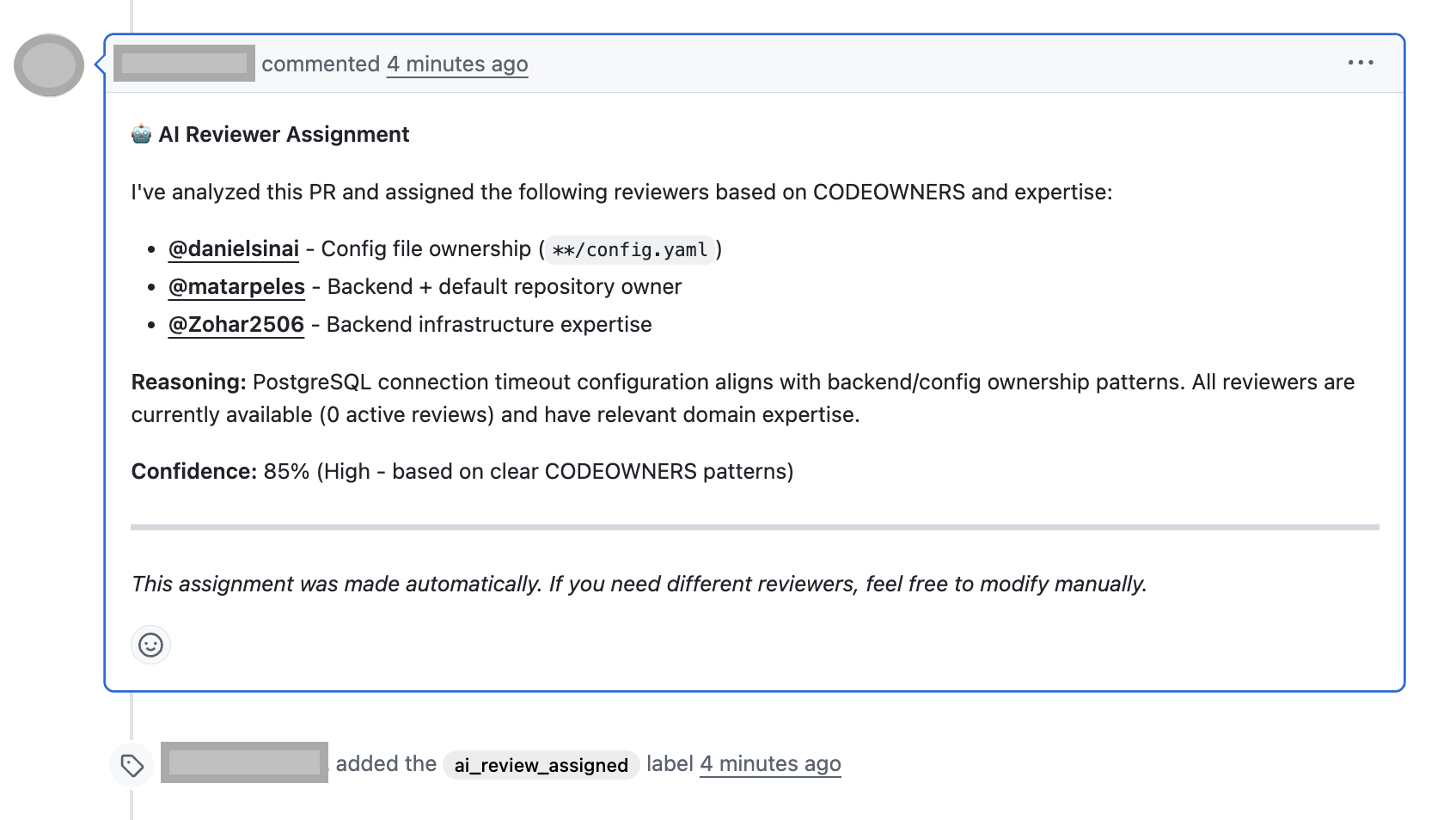
On GitHub, confirm the PR has requested reviewers and, if configured, a comment explaining the assignment.
-
In the Port catalog, open the pull request entity and verify AI Discovered Reviewers and AI Assignment Reasoning are set.