Auto-fix services when scorecards degrade
Scorecards in Port help you evaluate the maturity, production readiness, and engineering quality of entities in your software catalog. However, when scorecard statistics degrade, manual intervention is often required to identify and fix the issues.
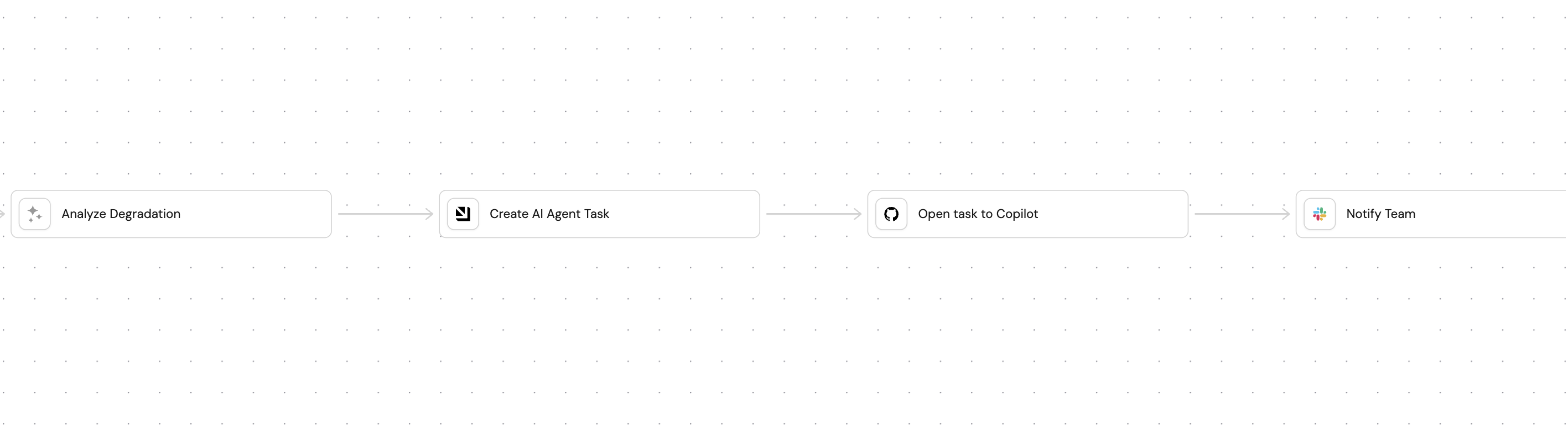
This guide demonstrates how to create an AI-powered system that automatically detects service scorecard degradation and trigger Github Copilot for automated code fixes.
Common use cases
- Automatically maintain engineering standards by detecting and fixing missing license files, code owners, or deployment configurations
- Automatically improve code quality by fixing missing linters, tests, or security scanning
- Constantly enhance compliance by automatically reacting to degraded security scores and monitoring regulatory requirements, security protocols, and data protection measures
Prerequisites
This guide assumes the following:
- You have a Port account and have completed the onboarding process.
- Port's GitHub Ocean integration is installed in your account.
- You have completed the setup in the Trigger GitHub Copilot from Port guide, ensuring that Copilot will be automatically assigned to any GitHub issues created through this guide.
- You have completed the setup in the Track AI-driven pull requests guide, ensuring that AI-driven pull requests are tracked and can be assigned to Copilot.
While this guide describes GitHub Copilot, you can replace it with any other coding agent you have that can be triggered via an API.
Set up data model
We will create and configure blueprints to support our AI-powered self-healing scorecard workflow. This includes creating new blueprints for tracking AI agent tasks and updating the GitHub integration mapping.
Create AI agent tasks blueprint
This blueprint will track tasks created by the AI agent for scorecard remediation:
-
Go to the builder page of your portal.
-
Click on
+ Blueprint. -
Click on the
{...} Edit JSONbutton. -
Copy and paste the following JSON configuration:
AI agent tasks blueprint (Click to expand)
{"identifier": "aiAgentTask","title": "AI Agent Task","icon": "AI","schema": {"properties": {"title": {"title": "Title","type": "string"},"description": {"title": "Description","type": "string","format": "markdown"},"labels": {"title": "Labels","type": "array"},"source": {"title": "Source","type": "string"}},"required": []},"mirrorProperties": {"pr_status": {"title": "PR Status","path": "pull_request.status"},"pr_link": {"title": "PR Link","path": "pull_request.link"},"coding_agent_status": {"title": "Coding agent status","path": "pull_request.workStatus"}},"calculationProperties": {},"aggregationProperties": {},"relations": {"pull_request": {"title": "Pull Request","target": "githubPullRequest","required": false,"many": false},"service": {"target": "service","required": true,"many": false}}} -
Click
Createto save the blueprint.
Update GitHub integration mapping
Update the GitHub integration configuration to link pull requests to AI agent tasks for visibility and tracking:
-
Go to the data sources page of your portal.
-
Find your GitHub integration and click on it.
-
Go to the
Mappingtab. -
Add the following YAML block to map pull requests to AI agent tasks:
Updated GitHub integration configuration (Click to expand)
JQ Pattern ExplanationWe search for the "task-r" pattern because it is used when saving an AI task. The agent is programmed to include the task identifier in the pull request description. This allows us to map pull requests to their corresponding tasks when fetching them.
resources:- kind: pull-requestselector:query: (.body // "") | test("task-r_[a-zA-Z0-9]{16}")port:entity:mappings:identifier: (.body // "") | match("task-r_[a-zA-Z0-9]{16}").string | tostringblueprint: '"aiAgentTask"'properties: {}relations:pull_request: .id|tostring -
Click
Saveto update the integration configuration.
Set up scorecards
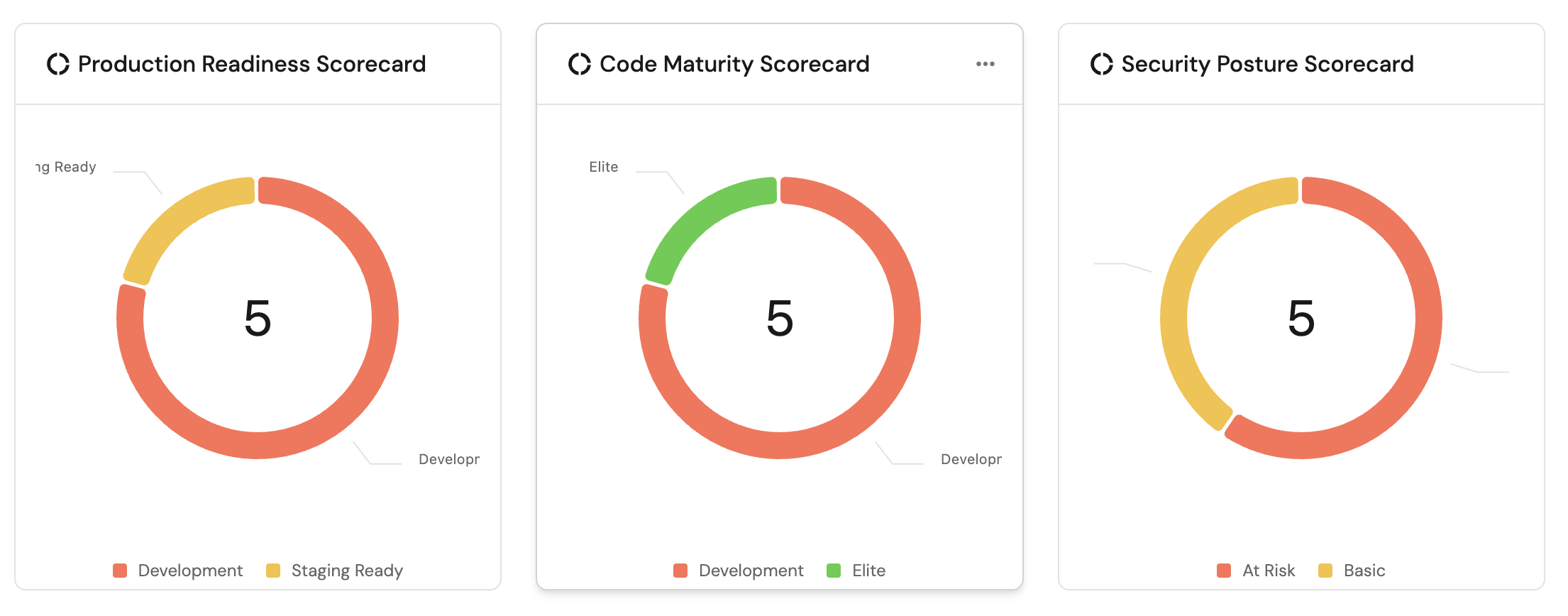
To track the production readiness and code maturity of each GitHub repository, you can set up scorecards that focus on rules GitHub Copilot can fix. Instead of detailing the setup process here, please refer to the following guides to configure your scorecards:
When configuring your scorecards, consider selecting rules that GitHub Copilot can generate code to fix, such as:
- Missing README.md files
- Missing CONTRIBUTING.md files
- Missing LICENSE files
- Missing CI/CD configurations
- Missing linter configurations
- Missing test setups
Create AI agent
Next, we will create an AI agent that analyzes scorecard degradation and creates comprehensive remediation workflows.
Configure the self-healing scorecard AI agent
-
Go to the AI Agents page of your portal.
-
Click on
+ AI Agent. -
Toggle
Json modeon. -
Copy and paste the following JSON schema:
Self-healing scorecard AI agent configuration (Click to expand)
{"identifier": "self_healing_scorecard","title": "Self Healing Scorecard","icon": "AI","properties": {"description": "Analyzes scorecard rule failures and creates Jira tickets and GitHub issues for remediation","status": "active","prompt": "You are a **Self-Healing Scorecards AI Agent**. Your role is to **analyze scorecard degradation** and create **comprehensive remediation workflows**.\n\n## Context\n\nWhen a scorecard's statistics decrease (indicating degraded performance), you need to:\n\n1. Analyze which specific rule(s) failed and caused the degradation\n2. Create a task that will be used to generate a GitHub issue for remediation\n\n⚠️ IMPORTANT:\nYou must only address rules that have changed from SUCCESS to FAILURE in the current diff.\nDo not include or attempt to fix any unrelated or previously failing rules. This avoids unnecessary scope expansion and ensures Copilot-generated PRs remain focused and minimal.\n\n## 🔍 Analysis Process\n\n### ✅ Step 1: Identify Failed Rules\n\n* Examine the scorecard rule results to identify which rule(s) transitioned from **SUCCESS → FAILURE**\n* Compare the current state with the previous state to determine the diff and understand what changed\n* Only include rules that newly failed in this diff\n\n### 🧠 Step 2: Root Cause Analysis\n\nFor each newly failed rule:\n\n* Determine what specific condition is not being met\n* Identify what entity properties or relationships are missing or incorrect\n* Specify what actions would resolve the issue\n\n### 📝 Step 3: Create Task for Remediation\n\nGenerate a task entity by calling the \"create_ai_agent_task\" self service action with:\n\n* **Title**:\n `\"Fix Scorecard Degradation: [What Specific Rule Changed]\"`\n\n* **Description** (include):\n * Identify the failed rule with specific failure reasons\n * Impact assessment\n * Specific code or configuration changes needed\n * Files that need to be modified\n * Examples of correct implementations\n * Links to relevant entities and scorecards\n\n* **Labels**:\nAdd relevant labels (e.g., bug, enhancement, infra, docs) including a MANDATORY \"auto_assign\" label in all creations. This will be used to track issues created by Port's AI agent.\n\n## 📏 Guidelines\n\n* Be **specific** about what needs to be fixed\n* Provide **actionable**, implementable steps\n* Include **relevant links and context**\n* Prioritize issues based on **impact**\n* Ensure each task contain **sufficient detail** for human or AI resolution\n* Use **markdown formatting** for better readability\n* Only generate tasks for rules that degraded in this specific diff","execution_mode": "Automatic","tools": ["^(list|search|track|describe)_.*","^run_create_ai_agent_task$"]},"relations": {}}MCP Enhanced CapabilitiesThe AI agent uses MCP (Model Context Protocol) enhanced capabilities to automatically discover important and relevant blueprint entities via its tools. The
^(list|search|track|describe)_.*pattern allows the agent to access and analyze related entities in your software catalog, providing richer context for scorecard analysis. Additionally, we allow the corresponding self-service action in the agent's Allowed Actions input (or include^run_create_ai_agent_task$in thetoolslist in Advanced mode (regex)), which instructs the AI agent to call this specific action to create remediation tasks for scorecard degradation. -
Click
Createto save the agent.
Setup
There are two ways to set up the self-healing scorecard workflow:
- Workflows (recommended)
- Actions
We will build a workflow that ties everything together. The workflow will use an event trigger to monitor scorecard degradation and trigger the AI agent to analyze the degradation and create a remediation task.
-
Go to the Workflows page of your portal.
-
Click on the
+ Workflowbutton in the top-right corner. -
Click on the
Skip to editorbutton. -
Copy and paste the workflow JSON below into the editor to replace the example workflow:
Self-healing scorecard workflow JSON (click to expand)
{"identifier": "self_heal_scorecard","title": "Self-Heal Scorecard","icon": "Score","description": "Detect scorecard degradation, analyze root causes with AI, create AI agent task, and create GitHub issues for remediation","allowAnyoneToViewRuns": true,"nodes": [{"identifier": "analyze_degradation","title": "Analyze Degradation","icon": "AI","description": "Use AI agent to analyze which scorecard rules failed and create remediation recommendations","config": {"type": "AI_AGENT","userPrompt": "Scorecard degradation detected for entity: {{ .outputs[\"trigger\"].diff.after.title }}\nEntity identifier: {{ .outputs[\"trigger\"].diff.after.identifier }}\nPrevious scorecard statistics: {{ .outputs[\"trigger\"].diff.before.scorecardsStats }}\nCurrent scorecard statistics: {{ .outputs[\"trigger\"].diff.after.scorecardsStats }}\nPrevious Entity properties: {{ .outputs[\"trigger\"].diff.before.properties }}\nCurrent Entity properties: {{ .outputs[\"trigger\"].diff.after.properties }}\nPrevious Entity relations: {{ .outputs[\"trigger\"].diff.before.relations }}\nCurrent Entity relations: {{ .outputs[\"trigger\"].diff.after.relations }}\nPrevious Scorecard Details: {{ .outputs[\"trigger\"].diff.before.scorecards }}\nCurrent Scorecard Details: {{ .outputs[\"trigger\"].diff.after.scorecards }}\n\nAnalyze the scorecard degradation and provide:\n1. A concise title for the remediation task (one line)\n2. Which specific scorecard rules failed\n3. Root cause analysis of why they failed\n4. Step-by-step remediation instructions\n5. Priority level (Critical/High/Medium/Low)\n\nFormat your response EXACTLY as:\nTITLE: [one line title]\n\nDESCRIPTION:\n[detailed analysis and remediation steps]","agentIdentifier": "self_healing_scorecard"},"variables": {"response": "{{ .response }}","task_title": "{{ .response | capture(\"TITLE: (?<title>[^\\n]+)\") | .title // \"Scorecard Remediation Task\" }}","task_description": "{{ .response | capture(\"DESCRIPTION:\\n(?<desc>[\\s\\S]+)\") | .desc // .response }}"}},{"identifier": "create_ai_agent_task","title": "Create AI Agent Task","icon": "Port","description": "Create an aiAgentTask entity in Port (replicates the create_ai_agent_task action)","config": {"type": "UPSERT_ENTITY","blueprintIdentifier": "aiAgentTask","mapping": {"identifier": "{{ \"task-\" + (.run.id | tostring) }}","title": "{{ .outputs[\"analyze_degradation\"].task_title }}","properties": {"title": "{{ .outputs[\"analyze_degradation\"].task_title }}","labels": "[\"scorecard-fix\", \"auto_assign\"]","source": "ai_agent","description": "{{ .outputs[\"analyze_degradation\"].task_description }}"},"relations": {"repository": "{{ .outputs[\"trigger\"].diff.after.identifier }}"}},"onFailure": "continue"},"variables": {"task_id": "{{ .response.identifier }}","entity_identifier": "{{ .response.identifier }}"}},{"identifier": "open_task_to_copilot","title": "Open task to Copilot","icon": "Github","description": "Create a GitHub issue with remediation instructions for Copilot","config": {"type": "WEBHOOK","url": "https://api.github.com/repos/YOUR_GITHUB_ORGANIZATION/{{ .outputs[\"trigger\"].diff.after.identifier }}/issues","agent": false,"synchronized": true,"method": "POST","headers": {"Accept": "application/vnd.github.v3+json","Content-Type": "application/json","Authorization": "Bearer {{ .secrets.GITHUB_TOKEN }}"},"body": {"body": "{{ .outputs[\"analyze_degradation\"].task_description }}\n\n---\n\n*Port Task Identifier: {{ .outputs[\"create_ai_agent_task\"].task_id }}*\n\n**IMPORTANT NOTE FOR COPILOT**: When creating a pull request to fix this issue, you MUST include the Port Task Identifier above in the PR description for tracking purposes.","title": "{{ .outputs[\"analyze_degradation\"].task_title }}","labels": ["auto_assign","scorecard-fix"]},"onTimeout": "fail","onFailure": "continue"},"variables": {"issue_url": "{{ .response.html_url }}","issue_number": "{{ .response.number }}"}},{"identifier": "notify_team","title": "Notify Team","icon": "Slack","description": "Send Slack notification about scorecard degradation and created issue","config": {"type": "WEBHOOK","url": "https://hooks.slack.com/YOUR_SLACK_WEBHOOK_URL","agent": false,"synchronized": true,"method": "POST","headers": {"Content-Type": "application/json"},"body": {"text": "🚨 *Scorecard Degradation Alert*\n\n*Service:* {{ .outputs[\"trigger\"].diff.after.title }}\n*Status:* Remediation in progress\n\nAI Agent Task: {{ .outputs[\"create_ai_agent_task\"].task_id }}\nGitHub Issue: {{ .outputs[\"open_task_to_copilot\"].issue_url }}\n\n*View Service:* https://app.us.port.io/serviceEntity?identifier={{ .outputs[\"trigger\"].diff.after.identifier }}"},"onTimeout": "fail","onFailure": "continue"},"variables": {}},{"identifier": "trigger","title": "Scorecard Degraded","icon": "Score","description": "Fires when a service scorecard statistics decrease","config": {"type": "EVENT_TRIGGER","event": {"type": "ENTITY_UPDATED","blueprintIdentifier": "service"},"condition": {"type": "JQ","expressions": [".diff.after.scorecardsStats < .diff.before.scorecardsStats"],"combinator": "and"}},"variables": {}}],"connections": [{"description": null,"sourceIdentifier": "trigger","targetIdentifier": "analyze_degradation"},{"description": null,"sourceIdentifier": "analyze_degradation","targetIdentifier": "create_ai_agent_task"},{"description": null,"sourceIdentifier": "create_ai_agent_task","targetIdentifier": "open_task_to_copilot"},{"description": null,"sourceIdentifier": "open_task_to_copilot","targetIdentifier": "notify_team"}]} -
Click
Publishto save the workflow.
Configure the workflow
After you build the workflow, replace placeholder values in the workflow nodes.
Add secrets to Port
-
Go to your portal's Settings page.
-
Navigate to Credentials and add the following secrets:
GITHUB_TOKEN-- A GitHub Personal Access Token withreposcope for creating issues.PORT_CLIENT_SECRET-- Your Port API token (if not already present).
Configure the GitHub issue node
In the open_task_to_copilot node, replace <GitHub Organization> with your actual GitHub organization name. Ensure the repository path matches how your service identifiers map to GitHub repositories.
Configure the Slack webhook
Update the webhook URL in the notify_team node with your actual Slack incoming webhook URL.
Debugging your workflow
When you build and test this workflow, use these techniques to identify and resolve issues quickly.
Inspect the AI agent output
The AI agent node's output is available at .outputs.analyze_degradation.analysis. If the GitHub issue contains unexpected content, check the raw output of the analyze_degradation node in the workflow run details.
Capture webhook responses with variables
The open_task_to_copilot node uses variables to extract the issue URL and number from the GitHub API response. You can reference these in subsequent nodes:
"variables": {
  "issue_url": "{{ .response.data.html_url }}",
  "issue_number": "{{ .response.data.number }}"
}
Subsequent nodes reference these as {{ .outputs.open_task_to_copilot.issue_url }}. See the data flow docs for more details.
When you define variables on a node, the default outputs (like response.data) are replaced entirely. If you need both custom variables and the raw response, include the response explicitly in your variables.
Use the workflow runs audit log
Every workflow execution is tracked in the Workflow runs tab. When a run fails:
- Open the failed run from the Runs tab.
- Look for nodes with a
FAILEDstatus in the node runs list. - Expand the node to see its output and logs, including HTTP status codes and error messages from external APIs.
Every time this workflow is triggered you can see the run in the Run history table. You can also open a specific run directly by its run ID, which appears in the runs table and in the workflow run URL.
Focus on the first node in the chain that shows a FAILED status. Downstream failures are often caused by the first failing node passing unexpected data.
We will create a self-service action and automations that the AI agent can use for scorecard remediation.
Create AI agent task action
-
Go back to the self-service page of your portal.
-
Click on
+ New Action. -
Click on the
{...} Edit JSONbutton. -
Copy and paste the following JSON configuration:
Create AI agent task action (Click to expand)
{"identifier": "create_ai_agent_task","title": "Create an AI agent task","icon": "Alert","description": "Create a new task for scorecard remediation","trigger": {"type": "self-service","operation": "DAY-2","userInputs": {"properties": {"title": {"icon": "DefaultProperty","type": "string","title": "Task Title","description": "A short description for the task"},"labels": {"items": {"type": "string"},"icon": "DefaultProperty","type": "array","title": "Task Labels","description": "Labels to add to the task, following format: [\"label1\",\"label2\"]"},"description": {"title": "Task Description","icon": "DefaultProperty","type": "string","description": "Detailed description of the scorecard degradation and remediation requirements","format": "markdown"}},"required": ["title","description"],"order": ["title","description","labels"]},"blueprintIdentifier": "service"},"invocationMethod": {"type": "WEBHOOK","url": "https://api.port.io/v1/blueprints/aiAgentTask/entities","agent": false,"synchronized": true,"method": "POST","headers": {"Content-Type": "application/json"},"body": {"identifier": "task-{{ .run.id }}","title": "{{ .inputs.title }}","properties": {"title": "{{ .inputs.title }}","description": "{{ .inputs.description }}","labels": "{{ .inputs.labels }}","source": "ai_agent"},"relations": {"service": "{{ .entity.identifier }}"}}},"requiredApproval": false} -
Click
Saveto create the action.
Set up automations
We will create several automations to orchestrate the AI-powered scorecard self-healing workflow:
- Monitor scorecard statistics and trigger the AI agent when degradation is detected
- Create GitHub issues from AI agent tasks
Automation to monitor scorecard degradation
This automation continuously monitors scorecard statistics and triggers the AI agent when degradation is detected. It ensures that scorecard issues are caught early and remediation tasks are created automatically, preventing technical debt from accumulating.
-
Go to the automations page of your portal.
-
Click on
+ Automation. -
Copy and paste the following JSON schema:
Scorecard degradation monitoring automation (Click to expand)
{"identifier": "service_scorecard_update","title": "Service Scorecard Update","description": "Trigger this automation when the scorecard associated with a service is degraded","icon": "Service","trigger": {"type": "automation","event": {"type": "ENTITY_UPDATED","blueprintIdentifier": "service"},"condition": {"type": "JQ","expressions": [".diff.after.scorecardsStats < .diff.before.scorecardsStats"],"combinator": "and"}},"invocationMethod": {"type": "WEBHOOK","url": "https://api.port.io/v1/agent/self_healing_scorecard/invoke","agent": false,"synchronized": true,"method": "POST","headers": {"RUN_ID": "{{ .run.id }}","Content-Type": "application/json"},"body": {"prompt": "Scorecard degradation detected for entity: {{ .event.diff.after.title }}\nEntity identifier: {{ .event.diff.after.identifier }}\nPrevious scorecard statistics: {{ .diff.before.scorecardsStats }}\nCurrent scorecard statistics: {{ .diff.after.scorecardsStats }}\nPrevious Entity properties: {{ .event.diff.before.properties }}\nCurrent Entity properties: {{ .event.diff.after.properties }}\nPrevious Entity relations: {{ .event.diff.before.relations }}\nCurrent Entity relations: {{ .event.diff.after.relations }}\nPrevious Scorecard Details: {{ .event.diff.before.scorecards }}\nCurrent Scorecard Details: {{ .event.diff.after.scorecards }}\n\nAnalyze the scorecard degradation and create a task for remediation. NEVER FORGET TO CALL the *create_ai_agent_task* self service action","labels": {"source": "scorecard_degradation_automation","entity_id": "{{ .event.diff.after.identifier }}","scorecard_change": "degradation"}}},"publish": true} -
Click
Createto save the automation.
Automation to create GitHub issues from AI agent tasks
This automation bridges the gap between Port's AI agent analysis and GitHub's development workflow. It automatically creates detailed GitHub issues with remediation instructions, ensuring that scorecard degradation issues are properly tracked and actionable for development teams.
-
Go back to the automations page of your portal.
-
Click on
+ Automation. -
Copy and paste the following JSON schema:
Create GitHub issue from AI agent task automation (Click to expand)
{"identifier": "create_git_hub_issue_from_scorecard","title": "Create GitHub Issue from Scorecard","description": "Automation to create a GitHub issue with remediation on how to fix a scorecard degradation.","icon": "Github","trigger": {"type": "automation","event": {"type": "RUN_UPDATED","actionIdentifier": "create_ai_agent_task"},"condition": {"type": "JQ","expressions": [".diff.after.status == \"SUCCESS\""],"combinator": "and"}},"invocationMethod": {"type": "WEBHOOK","url": "https://api.port.io/v1/actions/open_task_to_copilot/runs","agent": false,"synchronized": true,"method": "POST","headers": {"RUN_ID": "{{ .run.id }}","Content-Type": "application/json"},"body": {"properties": {"title": "{{ .event.diff.after.response.entity.properties.title }}","body": "{{.event.diff.after.response.entity.properties.description}} *IMPORTANT NOTE FOR COPILOT*: When creating a pull request to fix this issue, you MUST ALWAYS include the Port Task Identifier in the PR description or body for tracking purposes. Here is the Port Task Identifier for this issue: {{ .event.diff.after.response.entity.identifier }}","labels": "{{.event.diff.after.response.entity.properties.labels}}"},"entity": "{{ .event.diff.after.response.entity.relations.service.repository }}"}},"publish": true} -
Click
Createto save the automation.
Test the workflow
Now let us test the complete workflow to ensure everything works correctly.
Trigger a test scorecard degradation
- Go to your GitHub repository and manually modify a property that affects a scorecard rule (e.g., remove a README.md file or disable CI/CD).
- Wait for the scorecard statistics to update in Port.
Verify the AI agent task creation
- Go to the Catalog page of your portal.
- Navigate to the
AI Agent Taskentities. - Check the list to see the generated task.
Check the GitHub issue creation
- Go to your GitHub repository.
- Verify that a new issue was created with the appropriate title, description, and labels.
- Check that the issue has the "auto_assign" label.
Verify Copilot assignment
- Check the GitHub issue to see if it was assigned to Copilot.
- Verify that the GitHub workflow was triggered successfully.
- See Copilot created a new PR.
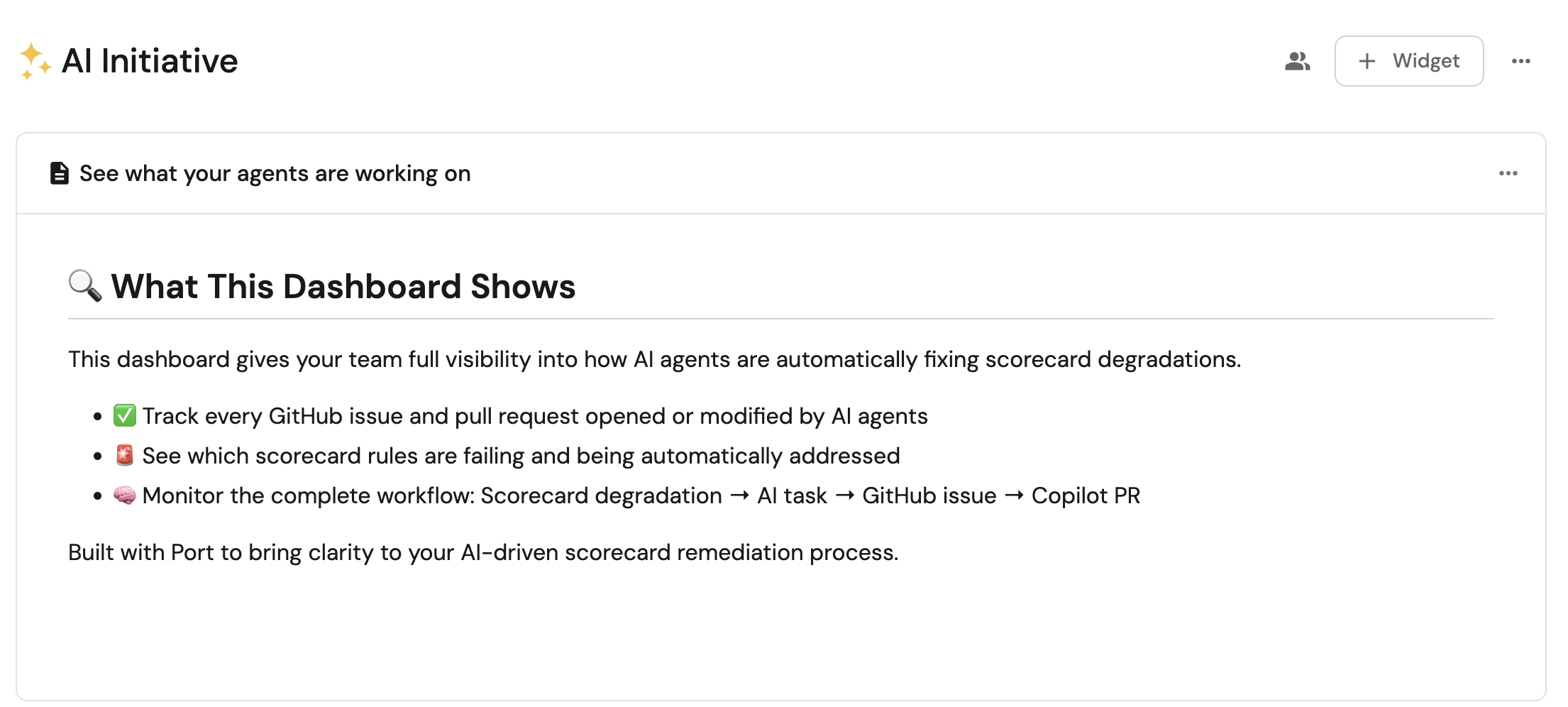
Monitor the remediation process
- Watch as GitHub Copilot generates code to fix the scorecard issues.
- Check that pull requests are created and linked back to the AI agent tasks.
- Verify that the scorecard statistics improve after the fixes are merged.
Related guides
- Automatically resolve tickets with coding agents - the full workflow from Jira ticket to coding agent PR, using the same scorecard-driven delegation pattern.
- Route scorecard failures to Jira issues with AI - convert failing scorecard rules into tracked, routed Jira work items instead of triggering a coding agent directly.
- Calculate blast radius with AI - assess risk before the coding agent opens a PR for a scorecard fix.
- Set up the Task Manager AI agent - a general-purpose task tracking agent that complements this workflow.