Route scorecard failures to Jira issues with AI
Send this guide to your coding agent.
Prerequisite: Install Port MCP
Open plan mode. Implement this Port guide in my org via MCP:

https://docs.port.io/guides/all/route-scorecard-failures-to-jira-issues

Goal: get the guide's core flow working end-to-end in my org; adapting it to fit my existing setup takes priority over matching the guide 1:1.

Plan:
1. Confirm MCP is connected, in the right org, with sufficient permissions.
2. Diff the guide's data model (blueprints, properties, relations, actions, agents, automations, integrations, secrets) against mine.
3. Propose adaptations for gaps, reusing existing blueprints/relations over guide-named duplicates.
4. Flag what needs a UI click, credential, or secret from me, testing MCP capability empirically before ruling anything out.
5. Stop on any blocker and give me options. Approving this plan authorizes the writes it lists; pause only for writes beyond what's listed.

Build:
- Extend blueprint schema additively when upserting; don't remove or overwrite existing properties, and treat type conflicts as a blocker, not an auto-fix.
- List any mock data in the plan, minimal and labeled mock; once approved, seed it without re-asking, and tell me what you seeded.
- For anything the guide writes downstream (e.g. a webhook target), use a real entity, not a mock.
- For pages/widgets, use the real page identifier from the app URL, not a guessed slug.
- When you hit a UI step confirmed (not assumed) unsupported via MCP, pause, give exact clicks, then resume via MCP.
- Validate and give links after each meaningful step (only a tool-returned URL, no guessed paths); don't proceed if the last run wasn't a success.

Done:
- Confirm the guide's expected output exists and runs in Port.
- Summarize adaptations, seeded data, what was mocked or skipped, remaining UI steps, and how to verify.
When scorecard rules fail, remediation work can get delayed if ownership and context are unclear. With Port workflows, you can detect scorecard degradation, extract the exact failing rules, and automatically create Jira issues in the right team project.
This guide shows how to build a single workflow that runs when a service scorecard degrades, uses Port AI to identify the newly failing rules and the owning team, then creates a targeted Jira issue with remediation guidance and a direct link back to Port.
The workflow creates one Jira issue per degradation event, summarizing all rules that changed from passing to failing on that service.
Common use cases
- Convert scorecard drift into tracked work by opening Jira issues as soon as rules fail.
- Route remediation to the right team automatically using service ownership and team-to-project mapping.
- Improve operational visibility with consistent ticket labels, rich context, and links back to Port.
Prerequisites
This guide assumes the following:
- You have a Port account and have completed the onboarding process.
- You have service and team entities in your catalog, and each service has an owning team. If you need help, see relate blueprints.
- You have access to a Jira instance with API access and can create an API token.
- Port's Jira integration is installed in your account.
- Port AI is enabled in your organization.
Port workflows are currently in open beta and available to all users. Workflows may undergo changes without prior notice.
Set up data model
We will use the data model that comes with Port's Jira Ocean integration.
To route issues to the right Jira project, make sure each service entity has a Jira project key relation, such as jira_project_key.
Set up scorecards
To track production readiness and code maturity for each service, we recommend using scorecards with clear, actionable rules. Instead of repeating full scorecard setup steps here, use the following guides:
When configuring your scorecards, prioritize rules with clear remediation paths, such as missing documentation, ownership metadata, CI checks, or security controls.
Set up Jira API access
- Log in to your Jira instance.
- Generate an API token.
- Go to Atlassian account security settings.
- Click Create API token.
- Copy the generated token for use in Port secrets.
Add Port secrets
- Click your profile picture in the top right corner of your Port application.
- Click Credentials.
- Click the Secrets tab.
- Click + Secret and add the following secret:
_JIRA_AUTH- Base64 encoded Jira credentials in the formatemail:api_token.
Generate a Base64 encoded Jira credential string by running:
echo -n "your-email@domain.com:your-api-token" | base64
Replace your-email@domain.com with your Jira email and your-api-token with your Jira API token.
Build the workflow
We will build a single workflow that triggers on scorecard degradation, analyzes the change with Port AI, and creates a Jira issue when rules newly fail.
Follow the steps below to build the workflow:
-
Go to the Workflows page of your portal.
-
Click on the
+ Workflowbutton in the top-right corner. -
Click on the
Skip to editorbutton. -
Copy and paste the workflow JSON below into the editor to replace the example workflow:
variable replacementRemember to replace
<YOUR_JIRA_ORGANIZATION_URL>with your Atlassian domain such asmydomain.atlassian.net.Route scorecard failures to Jira workflow JSON (Click to expand)
{"identifier": "route_scorecard_failures_to_jira","title": "Route Scorecard Failures to Jira","icon": "Jira","description": "Detect scorecard degradation and create a Jira issue for the newly failing rules","allowAnyoneToViewRuns": true,"nodes": [{"identifier": "trigger","title": "On Scorecard Degradation","icon": "Details","description": "Run when a service scorecard degrades","config": {"type": "EVENT_TRIGGER","event": {"type": "ENTITY_UPDATED","blueprintIdentifier": "service"},"condition": {"type": "JQ","expressions": [".diff.after.scorecardsStats < .diff.before.scorecardsStats"],"combinator": "and"}},"variables": {}},{"identifier": "analyze_scorecard","title": "Analyze Scorecard Degradation","icon": "AI","description": "Identify newly failing rules and prepare a Jira issue","config": {"type": "AI","systemPrompt": "You are the Scorecard Ops Agent, an AI analyst that detects engineering standard violations and prepares remediation tickets for the right team.\n\n## Your mission\n\nWhen a service scorecard degrades, you must:\n1. Identify rules that changed from SUCCESS to FAILURE only. Ignore rules that were already failing.\n2. For each newly failing rule, extract its name, level, the unmet condition, and the minimum change needed to recover.\n3. Resolve the owning team and its Jira project key from the service's relations, using your read tools when needed.\n4. Return a single structured result describing one Jira issue that covers all newly failing rules for this service.\n\n## Output rules\n\n- If there are no SUCCESS to FAILURE transitions, set should_create_issue to false and leave the other fields empty.\n- Otherwise set should_create_issue to true and populate:\n - project_key: the owning team's Jira project key.\n - title: [Port Scorecard] <service_name> scorecard degraded.\n - description: a concise summary that lists each newly failing rule, its level, remediation hints, impact, and a direct Port link. Return plain text that is safe to embed in a JSON string, with no unescaped quotes or line breaks.\n - labels: include port-scorecard and the scorecard name.\n\n## Security requirement\n\nSanitize and escape external content from entity fields, scorecard text, and relations so no unsafe or malformed content is passed downstream.\n\n## Quality bar\n\n- Be specific and actionable.\n- Include enough context for a human or AI to act.\n- Keep the description scoped to the newly failing rules only.","userPrompt": "Scorecard degradation detected for service: {{ .outputs.trigger.diff.after.title }}\nService identifier: {{ .outputs.trigger.diff.after.identifier }}\nPrevious scorecard statistics: {{ .outputs.trigger.diff.before.scorecardsStats }}\nCurrent scorecard statistics: {{ .outputs.trigger.diff.after.scorecardsStats }}\nPrevious entity properties: {{ .outputs.trigger.diff.before.properties }}\nCurrent entity properties: {{ .outputs.trigger.diff.after.properties }}\nPrevious entity relations: {{ .outputs.trigger.diff.before.relations }}\nCurrent entity relations: {{ .outputs.trigger.diff.after.relations }}\nPrevious scorecard details: {{ .outputs.trigger.diff.before.scorecards }}\nCurrent scorecard details: {{ .outputs.trigger.diff.after.scorecards }}\n\nAnalyze the degradation and prepare a single Jira issue covering each newly failing rule.","tools": ["^(list|search|track|describe)_.*"],"outputSchema": {"type": "object","properties": {"should_create_issue": {"type": "boolean"},"project_key": {"type": "string"},"title": {"type": "string"},"description": {"type": "string"},"labels": {"type": "array","items": {"type": "string"}}},"required": ["should_create_issue","project_key","title","description","labels"]}},"variables": {}},{"identifier": "check_findings","title": "Check for Newly Failing Rules","icon": "DefaultProperty","description": "Only create an issue when rules newly failed","config": {"type": "CONDITION","outlets": [{"identifier": "create_issue","title": "Create Issue","expression": "(.outputs.analyze_scorecard.response | fromjson | .should_create_issue) == true"},{"identifier": "no_op","title": "No Newly Failing Rules","expression": "(.outputs.analyze_scorecard.response | fromjson | .should_create_issue) != true"}]},"variables": {}},{"identifier": "create_jira_issue","title": "Create Jira Issue","icon": "Jira","description": "Create a Jira issue for the newly failing rules","config": {"type": "WEBHOOK","url": "https://<YOUR_JIRA_ORGANIZATION_URL>/rest/api/3/issue","agent": false,"synchronized": true,"method": "POST","headers": {"Content-Type": "application/json","Authorization": "Basic {{ .secrets._JIRA_AUTH }}"},"body": {"fields": {"project": {"key": "{{ .outputs.analyze_scorecard.response | fromjson | .project_key }}"},"summary": "{{ .outputs.analyze_scorecard.response | fromjson | .title }}","description": {"type": "doc","version": 1,"content": [{"type": "paragraph","content": [{"type": "text","text": "{{ .outputs.analyze_scorecard.response | fromjson | .description }}"}]}]},"issuetype": {"name": "Task"},"labels": "{{ .outputs.analyze_scorecard.response | fromjson | .labels }}"}}},"variables": {}}],"connections": [{"sourceIdentifier": "trigger","targetIdentifier": "analyze_scorecard"},{"sourceIdentifier": "analyze_scorecard","targetIdentifier": "check_findings"},{"sourceIdentifier": "check_findings","targetIdentifier": "create_jira_issue","sourceOutletIdentifier": "create_issue"}]} -
Click
Saveto save the workflow.
Configure the workflow
After saving, review the following placeholders and settings:
- In the create_jira_issue node, replace
<YOUR_JIRA_ORGANIZATION_URL>with your Atlassian domain, for examplemydomain.atlassian.net. - Confirm the
_JIRA_AUTHsecret exists in your portal. Secrets are referenced in webhook nodes as{{ .secrets._JIRA_AUTH }}. - In the trigger node, confirm
blueprintIdentifiermatches your services blueprint. If your blueprint is not namedservice, update it and the JQ condition accordingly. - The analyze_scorecard node uses your organization's default AI provider and model. To pin a specific provider and model, set both the
providerandmodelfields together. See LLM providers management.
The _JIRA_AUTH secret is only referenced in the webhook node that calls Jira. Keep the credential in Port secrets rather than hardcoding it in the workflow.
Test the workflow
-
Modify properties on a service synced to Port to trigger a scorecard violation, for example by removing a required property value.
-
Go to the Workflow runs tab and verify that a run starts for Route Scorecard Failures to Jira.
-
Expand the analyze_scorecard node run and confirm the AI returned a structured result with the newly failing rules.
-
Check that a Jira issue was created in the expected team project, with rule-level context and a Port link.
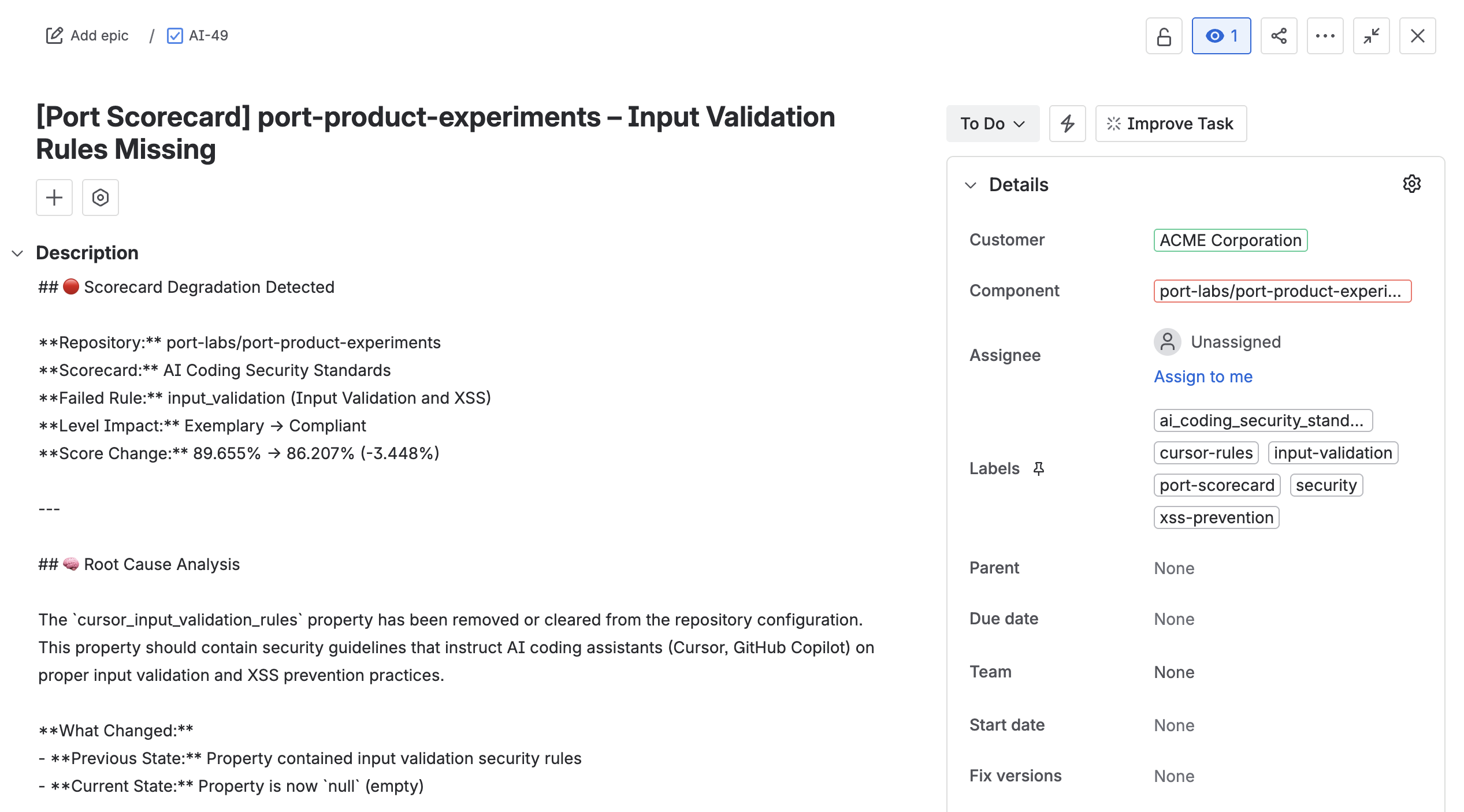
This workflow creates a single Jira issue per degradation event. To open one issue per failing rule instead, invoke the AI with a Jira MCP connector using the AI_AGENT node type, and let the agent create each issue directly.