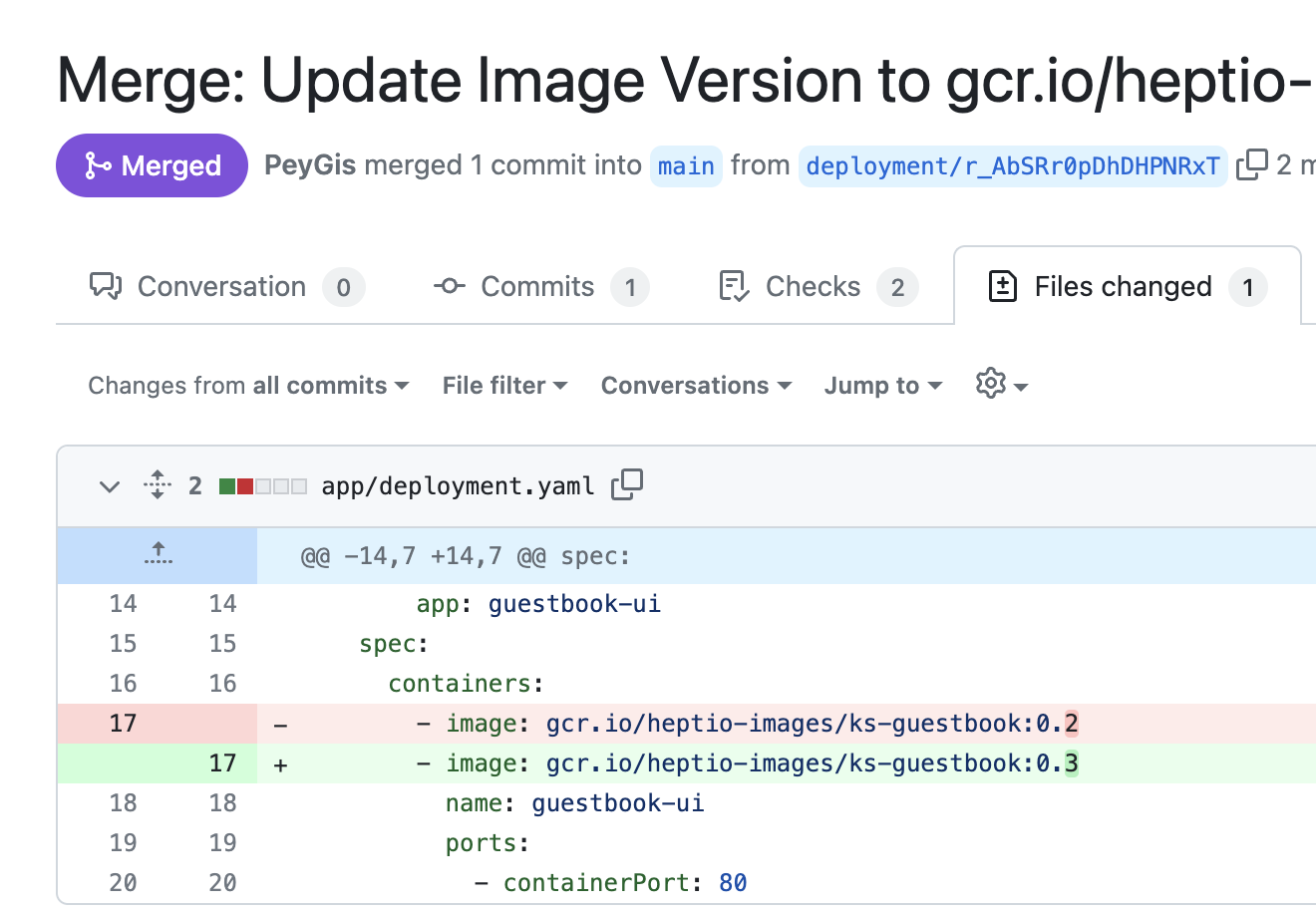
Roll back an ArgoCD deployment via GitHub Actions
In this guide, we will create a Port workflow that dispatches a GitHub Actions workflow to perform either a deployment or rollback operation using ArgoCD.
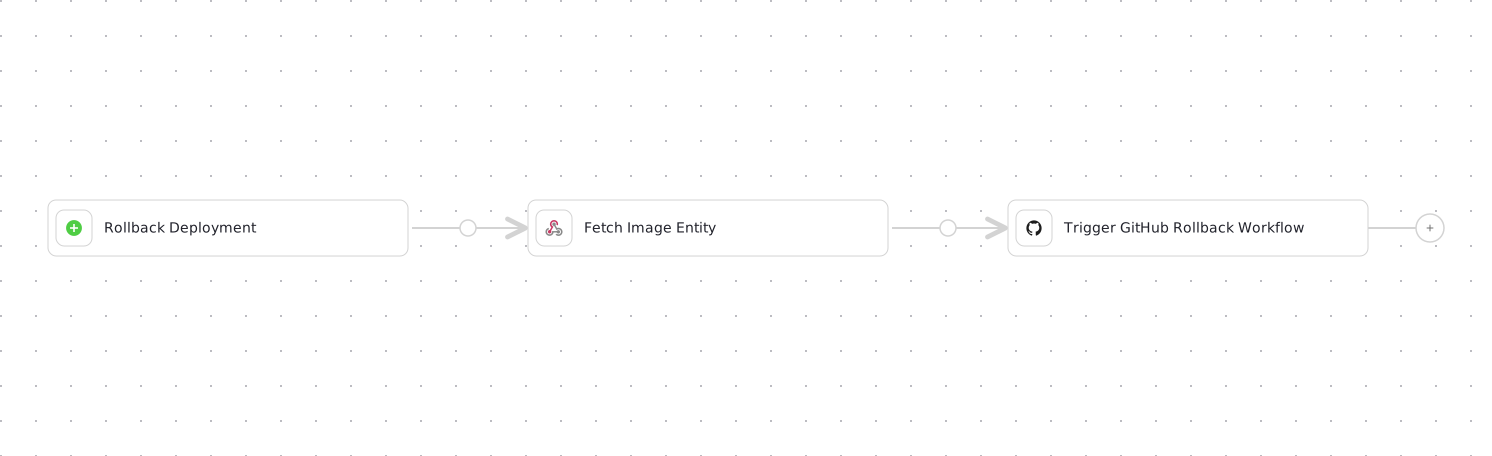
It's important to note that Deployment and Rollback operations essentially perform the same operation, with the difference being that Rollback occurs in the production environment and requires manual approval.
Both operations involve updating the deployment manifest with a new container image and creating a GitHub pull request (PR) for it. The workflow can optionally merge the PR when enabled.
Prerequisites
- Port's GitHub Ocean integration is installed.
- This guide assumes the presence of a
ServiceandImageblueprint representing your repository where ArgoCD lives and your container image. - A repository to contain your ArgoCD deployment manifest and workflow resources i.e. the GitHub Actions workflow file.
Below you can find the JSON for the Service and Image blueprints required for the guide:
Service blueprint (click to expand)
{
  "identifier": "service",
  "title": "Service",
  "icon": "Github",
  "schema": {
    "properties": {
      "readme": {
        "title": "README",
        "type": "string",
        "format": "markdown",
        "icon": "Book"
      },
      "url": {
        "title": "URL",
        "format": "url",
        "type": "string",
        "icon": "Link"
      },
      "language": {
        "icon": "Git",
        "type": "string",
        "title": "Language",
        "enum": [
          "GO",
          "Python",
          "Node",
          "React"
        ],
        "enumColors": {
          "GO": "red",
          "Python": "green",
          "Node": "blue",
          "React": "yellow"
        }
      },
      "slack": {
        "icon": "Slack",
        "type": "string",
        "title": "Slack",
        "format": "url"
      },
      "code_owners": {
        "title": "Code owners",
        "description": "This service's code owners",
        "type": "string",
        "icon": "TwoUsers"
      },
      "type": {
        "title": "Type",
        "description": "This service's type",
        "type": "string",
        "enum": [
          "Backend",
          "Frontend",
          "Library"
        ],
        "enumColors": {
          "Backend": "purple",
          "Frontend": "pink",
          "Library": "green"
        },
        "icon": "DefaultProperty"
      },
      "lifecycle": {
        "title": "Lifecycle",
        "type": "string",
        "enum": [
          "Production",
          "Experimental",
          "Deprecated"
        ],
        "enumColors": {
          "Production": "green",
          "Experimental": "yellow",
          "Deprecated": "red"
        },
        "icon": "DefaultProperty"
      },
      "locked_in_prod": {
        "icon": "DefaultProperty",
        "title": "Locked in Prod",
        "type": "boolean",
        "default": false
      },
      "locked_reason_prod": {
        "icon": "DefaultProperty",
        "title": "Locked Reason Prod",
        "type": "string"
      }
    },
    "required": []
  },
  "mirrorProperties": {},
  "calculationProperties": {},
  "aggregationProperties": {},
  "relations": {}
}
Image blueprint (click to expand)
{
  "identifier": "image",
  "description": "This blueprint represents an image",
  "title": "Image",
  "icon": "AWS",
  "schema": {
    "properties": {
      "registryId": {
        "type": "string",
        "title": "Registry ID",
        "description": "The ID of the registry",
        "icon": "DefaultProperty"
      },
      "digest": {
        "type": "string",
        "title": "Image Digest",
        "description": "SHA256 digest of image manifest",
        "icon": "DefaultProperty"
      },
      "tags": {
        "type": "array",
        "title": "Image Tags",
        "description": "List of tags for the image",
        "icon": "DefaultProperty"
      },
      "pushedAt": {
        "type": "string",
        "title": "Pushed At",
        "description": "Date and time the image was pushed to the repository",
        "format": "date-time",
        "icon": "DefaultProperty"
      },
      "lastRecordedPullTime": {
        "type": "string",
        "title": "Last Recorded Pull Time",
        "description": "Date and time the image was last pulled",
        "format": "date-time",
        "icon": "DefaultProperty"
      },
      "triggeredBy": {
        "type": "string",
        "icon": "TwoUsers",
        "title": "Triggered By",
        "description": "The user who triggered the run"
      },
      "commitHash": {
        "type": "string",
        "title": "Commit Hash",
        "icon": "DefaultProperty"
      },
      "pullRequestId": {
        "type": "string",
        "icon": "Git",
        "title": "Pull Request ID"
      },
      "workflowId": {
        "type": "string",
        "title": "Workflow ID",
        "icon": "DefaultProperty"
      },
      "image_branch": {
        "title": "Image branch",
        "type": "string",
        "description": "The git branch associated with the repository used to build the Image"
      }
    },
    "required": []
  },
  "mirrorProperties": {},
  "calculationProperties": {},
  "aggregationProperties": {},
  "relations": {}
}
If you do not have the images ingested already, we recommend using our AWS ECR script, Google Container Registry script, JFrog build script or GitHub packages script to sync data to your catalog
Create the GitHub workflow backend
Follow these steps to get started:
- Create the following GitHub Action secret:
MY_GITHUB_TOKEN- a Classic Personal Access Token with thereposcope and the following permissions:pull_requests:write(to create PR) andcontents:write(to merge PR)
- Create a workflow file under
.github/workflows/rollback.yamlwith the following content:
GitHub workflow script (click to expand)
<DEPLOYMENT-MANIFEST-PATH>- Path to the ArgoCD deployment manifest such asapp/deployment.yaml.<IMAGE-PROPERTY-PATH>- Path to where the deployment image is specified in the deployment manifest such asspec.template.spec.containers[0].image.
name: Rollback ArgoCD Deployment Image

on:
  workflow_dispatch:
    inputs:
      image:
        description: The new image to use for the rollback
        required: true
        type: string
      auto_merge:
        description: Whether the created PR should be merged automatically
        required: true
        type: boolean

jobs:
  rollback-deployment:
    runs-on: ubuntu-latest
    steps:
      - uses: actions/checkout@v6
      - name: Create PR
        id: create-pr
        uses: fjogeleit/yaml-update-action@main
        with:
          valueFile: "<DEPLOYMENT-MANIFEST-PATH>" ## replace value
          propertyPath: "<IMAGE-PROPERTY-PATH>" ## replace value
          value: "${{ github.event.inputs.image }}"
          commitChange: true
          token: ${{ secrets.MY_GITHUB_TOKEN }}
          targetBranch: main
          masterBranchName: main
          createPR: true
          branch: deployment/${{ github.run_id }}
          message: "Update deployment image to ${{ github.event.inputs.image }}"

      - name: Merge Pull Request
        if: ${{ github.event.inputs.auto_merge == 'true' && steps.create-pr.outcome == 'success' }}
        env:
          GH_TOKEN: ${{ secrets.MY_GITHUB_TOKEN }}
          PR_URL: ${{ fromJson(steps.create-pr.outputs.pull_request).url }}
        run: |
          HTTP_STATUS=$(curl -s -o /dev/null -w "%{http_code}" \
            -X PUT \
            -H "Accept: application/vnd.github+json" \
            -H "Authorization: Bearer $GH_TOKEN" \
            "$PR_URL/merge")

          echo "HTTP Status: $HTTP_STATUS"

          if [ $HTTP_STATUS -eq 200 ]; then
            echo "Pull request merged successfully."
          else
            echo "Failed to merge PR. HTTP Status: $HTTP_STATUS"
            exit 1
          fi
The Port workflow dispatches this file with reportWorkflowStatus: true, so the node's success or failure is reflected on the workflow run automatically. No port-labs/port-github-action status steps or PORT_CLIENT_ID/PORT_CLIENT_SECRET secrets are needed inside this backend.
If your GitHub Ocean integration is self-hosted (Helm or Docker), actions processing and reportWorkflowStatus require extra setup. See Enable actions processing (self-hosted).
Build the workflow
Follow these steps to get started:
-
Go to the Workflows page in Port.
-
Click on the
+ Workflowbutton in the top-right corner. -
Click on the
{...}button in the top right corner. -
Copy and paste the workflow JSON below into the editor to replace the example workflow:
Port Workflow: Rollback Deployment (click to expand)
<YOUR_GITHUB_OCEAN_INTEGRATION_ID>- your GitHub Ocean integration installation ID.<GITHUB-ORG>- your GitHub organization or user name.<GITHUB-REPO-NAME>- your GitHub repository name.
{
  "identifier": "rollback_argocd_deployment",
  "title": "Rollback ArgoCD Deployment",
  "icon": "Argo",
  "description": "Roll back an ArgoCD-managed service by updating its deployment manifest image and opening a pull request",
  "allowAnyoneToViewRuns": true,
  "nodes": [
    {
      "identifier": "trigger",
      "title": "Rollback Deployment",
      "config": {
        "type": "SELF_SERVE_TRIGGER",
        "contexts": [
          {
            "on": "ENTITY",
            "userInput": "service"
          }
        ],
        "userInputs": {
          "properties": {
            "service": {
              "type": "string",
              "format": "entity",
              "blueprint": "service",
              "title": "Service"
            },
            "image": {
              "type": "string",
              "format": "entity",
              "blueprint": "image",
              "title": "Image",
              "description": "The image to roll back to"
            },
            "auto_merge": {
              "type": "boolean",
              "title": "Auto Merge",
              "default": false,
              "description": "Automatically merge the PR after the workflow completes"
            }
          },
          "required": [
            "service",
            "image"
          ],
          "order": [
            "service",
            "image",
            "auto_merge"
          ]
        }
      }
    },
    {
      "identifier": "fetch_image",
      "title": "Fetch Image Entity",
      "config": {
        "type": "WEBHOOK",
        "url": "https://api.port.io/v1/blueprints/image/entities/search",
        "method": "POST",
        "headers": {
          "Content-Type": "application/json"
        },
        "body": {
          "query": {
            "combinator": "and",
            "rules": [
              {
                "property": "$identifier",
                "operator": "=",
                "value": "{{ .outputs.trigger.image }}"
              }
            ]
          }
        }
      },
      "variables": {
        "entity": "{{ .result.response.data.entities[0] }}"
      }
    },
    {
      "identifier": "trigger_rollback",
      "title": "Trigger GitHub Rollback Workflow",
      "config": {
        "type": "INTEGRATION_ACTION",
        "installationId": "<YOUR_GITHUB_OCEAN_INTEGRATION_ID>",
        "integrationProvider": "github-ocean",
        "integrationInvocationType": "dispatch_workflow",
        "integrationActionExecutionProperties": {
          "org": "<GITHUB-ORG>",
          "repo": "<GITHUB-REPO-NAME>",
          "workflow": "rollback.yaml",
          "workflowInputs": {
            "auto_merge": "{{ .outputs.trigger.auto_merge | tostring }}",
            "image": "{{ .outputs.fetch_image.entity.title }}"
          },
          "reportWorkflowStatus": true
        }
      }
    }
  ],
  "connections": [
    {
      "sourceIdentifier": "trigger",
      "targetIdentifier": "fetch_image"
    },
    {
      "sourceIdentifier": "fetch_image",
      "targetIdentifier": "trigger_rollback"
    }
  ]
}
- Click
Saveto save the workflow.
The service input's ENTITY context assumes your GitHub Ocean setup exposes a service blueprint on repository entities. If your default relation key differs (for example repository or github_repository), verify it against your own blueprints before publishing the workflow.
- Trigger the workflow from the bolt (⚡) menu of a
Serviceentity, or from the self-service page of your Port application.
You should now be able to see a Github pull request created and merged for the argocd deployment.