Promote to production workflow
This guide demonstrates how to build a Promote to production workflow that developers can trigger to safely deploy services to production, with built-in health checks, deployment tracking, and team notifications.
The primary path uses Port Workflows and Port AI. The alternative GitHub Actions path shows how to promote a staging image to production by opening a GitOps pull request from a self-service action.
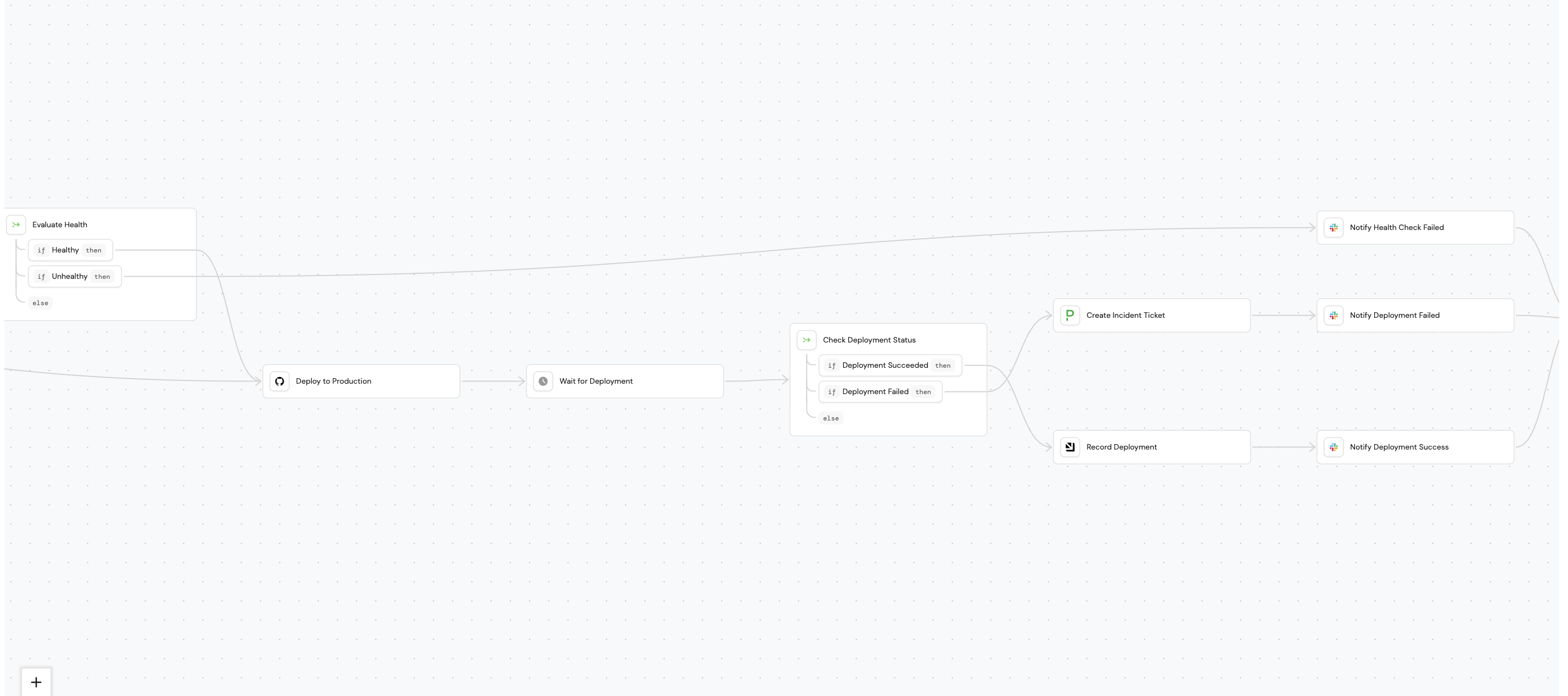
The workflow validates service health, deploys to production via GitHub Actions, monitors the deployment status, and notifies the owner team via Slack. It also creates a PagerDuty incident if deployment fails, or blocks deployment if health checks fail.
Prerequisites
This guide assumes the following:
-
GitHub Ocean integration is installed and the
githubRepositoryblueprint exists. -
The
dora_deploymentblueprint exists in your catalog (see DORA metrics guide). -
Port's PagerDuty integration is installed and the
pagerdutyIncidentblueprint exists. -
A PagerDuty Events API v2 integration key (routing key) for the service where incidents should be created.
-
A Slack incoming webhook URL for sending notifications.
Build the workflow
We will build the workflow using Port's AI assistant. Follow the steps below to build the workflow:
-
Go to the workflows page in Port.
-
Click + Workflow.
-
Fill out the Create new workflow form, then click Confirm.
-
Click the
{...}button to open the JSON editor and paste the workflow JSON below:Promote to production workflow JSON (click to expand)
{"identifier": "promote_to_production","title": "Promote to Production","icon": "Deployment","description": "Deploy a service to production with health checks and notifications","allowAnyoneToViewRuns": true,"nodes": [{"identifier": "check_deployment_status","title": "Check Deployment Status","icon": "DefaultProperty","description": "Evaluate deployment outcome","config": {"type": "CONDITION","outlets": [{"identifier": "deployment_success","title": "Deployment Success","expression": "(.outputs[\"deploy_to_production\"].workflowStatus // \"unknown\") == \"success\""},{"identifier": "deployment_failed","title": "Deployment Failed","expression": "(.outputs[\"deploy_to_production\"].workflowStatus // \"unknown\") != \"success\""}]},"variables": {}},{"identifier": "check_skip_health","title": "Check Skip Health","icon": "Health","description": "Determine if health check should run","config": {"type": "CONDITION","outlets": [{"identifier": "run_health_check","title": "Run Health Check","expression": ".inputs.skip_health_check == false"},{"identifier": "skip_health_check","title": "Skip Health Check","expression": ".inputs.skip_health_check == true"}]},"variables": {}},{"identifier": "create_incident","title": "Create PagerDuty Incident","icon": "pagerduty","description": "Create incident for failed deployment","config": {"type": "WEBHOOK","url": "https://api.pagerduty.com/incidents","agent": false,"synchronized": false,"method": "POST","headers": {"Content-Type": "application/json","Authorization": "Token token=YOUR_PAGERDUTY_TOKEN"},"body": {"incident": {"body": {"type": "incident_body","details": "Deployment of {{ .inputs.service }} version {{ .inputs.version }} to production failed."},"type": "incident","title": "Production Deployment Failed: {{ .inputs.service }}","service": {"id": "YOUR_SERVICE_ID","type": "service_reference"}}},"onTimeout": "fail","onFailure": "continue"},"variables": {}},{"identifier": "deploy_to_production","title": "Deploy to Production","icon": "GitHub","description": "Trigger GitHub Actions deployment workflow","config": {"type": "INTEGRATION_ACTION","installationId": "YOUR_GITHUB_OCEAN_INSTALLATION_ID","integrationProvider": "github-ocean","integrationInvocationType": "dispatch_workflow","integrationActionExecutionProperties": {"org": "YOUR_GITHUB_ORGANIZATION","repo": "{{ .inputs.service }}","workflow": "deploy.yml","workflowInputs": {"version": "{{ .inputs.version }}","environment": "production"},"reportWorkflowStatus": true},"onFailure": "continue"},"variables": {}},{"identifier": "evaluate_health","title": "Evaluate Health","icon": "DefaultProperty","description": "Check if health check passed","config": {"type": "CONDITION","outlets": [{"identifier": "health_passed","title": "Health Passed","expression": "(.outputs.health_check.status // 0) == 200"},{"identifier": "health_failed","title": "Health Failed","expression": "(.outputs.health_check.status // 0) != 200"}]},"variables": {}},{"identifier": "health_check","title": "Health Check","icon": "Health","description": "Verify service health before deployment","config": {"type": "WEBHOOK","url": "https://api.example.com/health/{{ .inputs.service }}","agent": false,"synchronized": true,"method": "GET","onTimeout": "continue","onFailure": "continue"},"variables": {}},{"identifier": "notify_failure","title": "Notify Failure","icon": "Slack","description": "Send failure notification to Slack","config": {"type": "WEBHOOK","url": "https://hooks.slack.com/services/YOUR/WEBHOOK/URL","agent": false,"synchronized": false,"method": "POST","body": {"text": "❌ *Production Deployment Failed*\n\n*Service:* {{ .inputs.service }}\n*Version:* {{ .inputs.version }}\n*Deployed by:* {{ .trigger.by.user.email }}\n*Time:* {{ .trigger.at }}\n\nA PagerDuty incident has been created."},"onTimeout": "fail","onFailure": "continue"},"variables": {}},{"identifier": "notify_health_failed","title": "Notify Health Check Failed","icon": "Slack","description": "Notify that deployment was blocked due to health check failure","config": {"type": "WEBHOOK","url": "https://hooks.slack.com/services/YOUR/WEBHOOK/URL","agent": false,"synchronized": false,"method": "POST","body": {"text": "⚠️ *Production Deployment Blocked*\n\n*Service:* {{ .inputs.service }}\n*Version:* {{ .inputs.version }}\n*Reason:* Health check failed\n*Deployed by:* {{ .trigger.by.user.email }}\n*Time:* {{ .trigger.at }}\n\nPlease verify service health before deploying."},"onTimeout": "fail","onFailure": "continue"},"variables": {}},{"identifier": "notify_success","title": "Notify Success","icon": "Slack","description": "Send success notification to Slack","config": {"type": "WEBHOOK","url": "https://hooks.slack.com/services/YOUR/WEBHOOK/URL","agent": false,"synchronized": false,"method": "POST","body": {"text": "✅ *Production Deployment Successful*\n\n*Service:* {{ .inputs.service }}\n*Version:* {{ .inputs.version }}\n*Deployed by:* {{ .trigger.by.user.email }}\n*Time:* {{ .trigger.at }}"},"onTimeout": "fail","onFailure": "continue"},"variables": {}},{"identifier": "trigger","title": "Promote to Production","icon": "Rocket","description": "Deploy a service to production environment","config": {"type": "SELF_SERVE_TRIGGER","userInputs": {"properties": {"service": {"title": "Service","description": "Select the service to deploy","type": "string","format": "entity","blueprint": "githubRepo"},"version": {"title": "Version","description": "Version to deploy (e.g., v1.2.3)","type": "string"},"skip_health_check": {"title": "Skip Health Check","description": "Skip the pre-deployment health check","type": "boolean","default": false}},"required": ["service","version"]},"published": true},"variables": {}}],"connections": [{"description": null,"sourceIdentifier": "trigger","targetIdentifier": "check_skip_health"},{"description": null,"sourceIdentifier": "check_skip_health","targetIdentifier": "health_check","sourceOutletIdentifier": "run_health_check"},{"description": null,"sourceIdentifier": "check_skip_health","targetIdentifier": "deploy_to_production","sourceOutletIdentifier": "skip_health_check"},{"description": null,"sourceIdentifier": "health_check","targetIdentifier": "evaluate_health"},{"description": null,"sourceIdentifier": "evaluate_health","targetIdentifier": "deploy_to_production","sourceOutletIdentifier": "health_passed"},{"description": null,"sourceIdentifier": "evaluate_health","targetIdentifier": "notify_health_failed","sourceOutletIdentifier": "health_failed"},{"description": null,"sourceIdentifier": "deploy_to_production","targetIdentifier": "check_deployment_status"},{"description": null,"sourceIdentifier": "check_deployment_status","targetIdentifier": "notify_success","sourceOutletIdentifier": "deployment_success"},{"description": null,"sourceIdentifier": "check_deployment_status","targetIdentifier": "create_incident","sourceOutletIdentifier": "deployment_failed"},{"description": null,"sourceIdentifier": "create_incident","targetIdentifier": "notify_failure"}]} -
Click Apply changes.
Configure the workflow
After publishing, you need to replace placeholder values in the workflow nodes.
Add secrets to Port
-
Go to Port's Settings page.
-
Navigate to Credentials and add the following secrets:
GITHUB_TOKEN-- A GitHub Personal Access Token withrepoandworkflowscopes, used for polling deployment status.PAGERDUTY_ROUTING_KEY-- Your PagerDuty Events API v2 integration key (routing key) for incident creation.PORT_CLIENT_SECRET-- Your Port API token (if not already present).
Configure the GitHub integration action
In the deploy_to_production node, set the installationId to your GitHub Ocean integration's installation ID. You can find this in the Data sources page in Port. Update the org field in integrationActionExecutionProperties to your GitHub organization name.
Configure Slack webhooks
Update the webhook URL in each of the three Slack notification nodes (notify_health_failed, notify_failure, notify_success) with your actual Slack incoming webhook URL.
Workflow reference
Below is the corrected workflow JSON with the GitHub integration action and PagerDuty Events API. Use this as a reference to verify your AI-generated workflow has the correct node configurations.
Create the GitHub workflow
Your repositories need a GitHub Actions workflow file that this Port workflow will trigger. Create the following file in each repository that will use this workflow:
deploy-production.yml template (click to expand)
name: Deploy to Production

on:
  workflow_dispatch:
    inputs:
      version:
        description: "Version/tag to deploy"
        required: true
        type: string
      service:
        description: "Service name"
        required: true
        type: string
      triggered_by:
        description: "User who triggered deployment"
        required: true
        type: string
      port_run_id:
        description: "Port workflow run ID"
        required: true
        type: string

jobs:
  deploy:
    runs-on: ubuntu-latest
    environment: production

    steps:
      - name: Checkout code
        uses: actions/checkout@v6
        with:
          ref: ${{ inputs.version }}

      - name: Deploy to production
        run: |
          echo "Deploying ${{ inputs.service }} version ${{ inputs.version }}"
          echo "Triggered by: ${{ inputs.triggered_by }}"
          echo "Port Run ID: ${{ inputs.port_run_id }}"

          # Replace with your actual deployment commands:
          # kubectl apply -f k8s/
          # helm upgrade --install ...
          # aws ecs update-service ...

      - name: Verify deployment
        run: |
          echo "Verifying deployment..."
          # Add health check or smoke test commands here
Customize the deployment steps for your infrastructure (Kubernetes, AWS ECS, Helm, Terraform, etc.).
Let's test it!
Before using this in production, run through these test scenarios:
Test 1: successful deployment
- Go to the Self-service page in Port.
- Find Promote to Production and click on it.
- Select a service, enter a valid version/tag, and check Skip Health Check.
- Click Execute.
- Verify that:
- The GitHub Actions workflow runs and succeeds.
- A
dora_deploymententity is created in your catalog. - A success notification is sent to your Slack channel.
Test 2: failed deployment
- Trigger the workflow with an invalid version (e.g.,
nonexistent-tag). - Verify that:
- The GitHub Actions workflow fails.
- A real PagerDuty incident is created with critical severity.
- The PagerDuty integration syncs the incident back to Port as a
pagerdutyIncidententity. - A failure notification is sent to your Slack channel.
Test 3: health check failure
- Trigger the workflow with Skip Health Check unchecked.
- If your health check endpoint returns an unhealthy status, verify that:
- The workflow stops before deployment.
- A Slack notification is sent about the health check failure.
Deploy with GitHub Actions
Use this path when you want a self-service action to promote an existing staging image by opening a GitOps pull request against your production manifests.
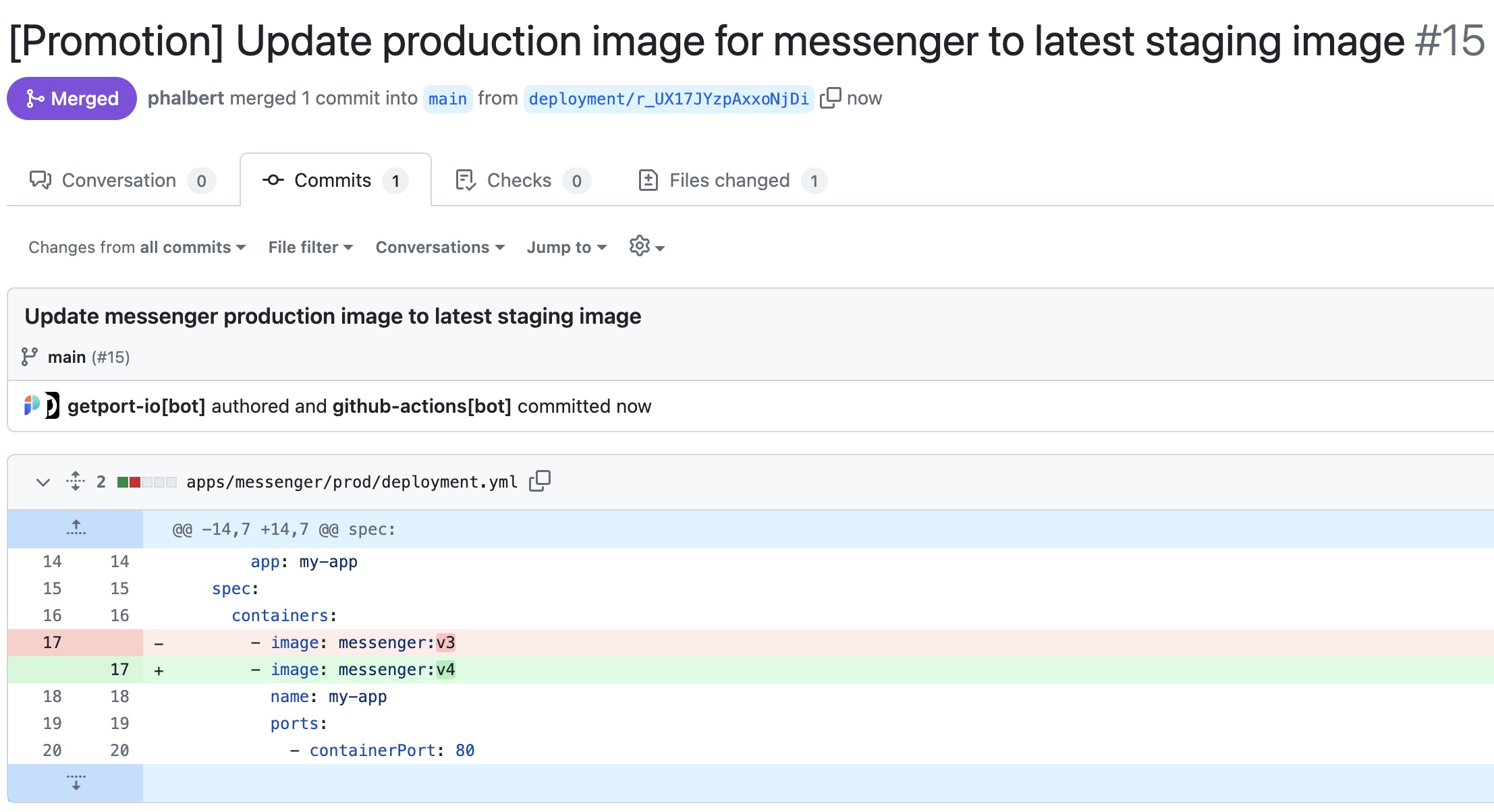
This approach updates the selected production running_service entity in Port, edits the production manifest in Git, opens a pull request, and optionally merges it.
Prepare the GitOps repository
Use a dedicated repository for your ArgoCD deployment manifests and the workflow file. The repository should contain the manifests for the applications in each environment.
Add the following GitHub Actions secrets to the repository:
PORT_CLIENT_ID- Your Port client ID. See Port API credentials.PORT_CLIENT_SECRET- Your Port client secret. See Port API credentials.GH_TOKEN- A classic personal access token with thereposcope and permissions to create, update, and merge pull requests.
Set up data model for GitOps promotion
This flow uses the existing service blueprint, plus two supporting blueprints:
image- Tracks container images available for promotion.running_service- Represents a deployed service instance in a specific environment.
If you do not already ingest images into Port, use one of the image ingestion examples before testing this flow:
- AWS ECR image ingestion.
- Google Container Registry image ingestion.
- JFrog webhook mapping.
- GitHub Packages image ingestion.
Add the following properties to your existing service blueprint if you want to lock production deployment for specific services:
Service production lock properties (click to expand)
"locked_in_prod": {
  "icon": "DefaultProperty",
  "title": "Locked in Prod",
  "type": "boolean",
  "default": false
},
"locked_reason_prod": {
  "icon": "DefaultProperty",
  "title": "Locked Reason Prod",
  "type": "string"
}
Create the image and running_service blueprints from the JSON below.
-
Go to the Data model page in Port.
-
Click + Blueprint.
-
Click Edit JSON.
-
Copy and paste the relevant JSON configuration into the editor.
Image blueprint (click to expand)
{"identifier": "image","description": "This blueprint represents an image","title": "Image","icon": "AWS","schema": {"properties": {"registryId": {"type": "string","title": "Registry ID","description": "The ID of the registry","icon": "DefaultProperty"},"digest": {"type": "string","title": "Image Digest","description": "SHA256 digest of image manifest","icon": "DefaultProperty"},"tags": {"type": "array","title": "Image Tags","description": "List of tags for the image","icon": "DefaultProperty"},"pushedAt": {"type": "string","title": "Pushed At","description": "Date and time the image was pushed to the repository","format": "date-time","icon": "DefaultProperty"},"lastRecordedPullTime": {"type": "string","title": "Last Recorded Pull Time","description": "Date and time the image was last pulled","format": "date-time","icon": "DefaultProperty"},"triggeredBy": {"type": "string","icon": "TwoUsers","title": "Triggered By","description": "The user who triggered the run"},"commitHash": {"type": "string","title": "Commit Hash","icon": "DefaultProperty"},"pullRequestId": {"type": "string","icon": "Git","title": "Pull Request ID"},"workflowId": {"type": "string","title": "Workflow ID","icon": "DefaultProperty"},"image_branch": {"title": "Image branch","type": "string","description": "The git branch associated with the repository used to build the image"}},"required": []},"mirrorProperties": {},"calculationProperties": {},"aggregationProperties": {},"relations": {}}Running service blueprint (click to expand)
{"identifier": "running_service","description": "This blueprint represents an ArgoCD application","title": "Running Service","icon": "Argo","schema": {"properties": {"pullRequest": {"type": "string","format": "url","title": "Merged PR","icon": "Github","default": "https://github.com"},"locked": {"type": "boolean","title": "Locked","description": "Indicates if deployment is allowed for this service in this environment","default": false},"gitPath": {"type": "string","title": "Path","description": "The path within the Git repository where the application manifests are located"},"destinationServer": {"type": "string","title": "Destination Server","format": "url"},"syncStatus": {"type": "string","title": "Sync Status","enum": ["Synced","OutOfSync","Unknown"],"enumColors": {"Synced": "green","OutOfSync": "red","Unknown": "lightGray"},"description": "The sync status of the application"},"healthStatus": {"type": "string","title": "Health Status","enum": ["Healthy","Missing","Suspended","Degraded","Progressing","Unknown"],"enumColors": {"Healthy": "green","Missing": "yellow","Suspended": "purple","Degraded": "red","Progressing": "blue","Unknown": "lightGray"},"description": "The health status of the application"},"createdAt": {"title": "Created At","type": "string","format": "date-time"},"grafana_link": {"title": "Grafana Link","icon": "Grafana","type": "string","format": "url"}},"required": []},"mirrorProperties": {"service_name": {"path": "service.$title"}},"calculationProperties": {},"aggregationProperties": {},"relations": {"image": {"title": "Image Deployed","target": "image","required": false,"many": false},"service": {"title": "Service","target": "service","required": false,"many": false}}} -
Click Save to create each blueprint.
The gitPath property should point to the deployment manifest the workflow edits. For example, if the service is messenger, the production running service is messenger_prod, and the manifest file is deployment.yml, a valid gitPath might be apps/messenger/prod/deployment.yml.
Set up self-service action
Follow the steps below to create a self-service action that triggers the GitHub workflow.
-
Go to the Self-service page in Port.
-
Click on the
+ New Actionbutton. -
Click on the
{...} Edit JSONbutton. -
Copy and paste the following JSON configuration into the editor:
Promote image action (click to expand)
Replace the variables<GITHUB_ORG>- Your GitHub organization or user name.<GITHUB_REPO>- The repository where the workflow file is stored.<YOUR_GITHUB_OCEAN_INTEGRATION_ID>- Your GitHub Ocean integration installation ID.
{"identifier": "promote_image","title": "Promote image","icon": "DefaultProperty","description": "Promote an image to another running service","trigger": {"type": "self-service","operation": "DAY-2","userInputs": {"properties": {"production_runtime": {"type": "string","title": "Production runtime","blueprint": "running_service","description": "The production runtime","format": "entity"},"auto_merge_pr": {"type": "boolean","title": "Auto merge PR","description": "Automatically merge the created PR","default": false}},"required": ["production_runtime","auto_merge_pr"],"order": ["production_runtime","auto_merge_pr"]},"blueprintIdentifier": "running_service"},"invocationMethod": {"type": "INTEGRATION_ACTION","installationId": "<YOUR_GITHUB_OCEAN_INTEGRATION_ID>","integrationActionType": "dispatch_workflow","integrationActionExecutionProperties": {"org": "<GITHUB_ORG>","repo": "<GITHUB_REPO>","workflow": "promote-production.yml","workflowInputs": {"production_runtime": "{{ .inputs.production_runtime }}","auto_merge_pr": "{{ .inputs.auto_merge_pr }}","entity": "{{ .entity }}","port_payload": {"trigger": "{{ .trigger }}","runId": "{{ .run.id }}","blueprint": "{{ .action.blueprint }}"}},"reportWorkflowStatus": true}},"requiredApproval": false} -
Click Save to create the action.
Create the promotion workflow
Create .github/workflows/promote-production.yml in your GitOps repository.
The workflow assumes a standard image path of .spec.template.spec.containers[0].image for Kubernetes manifests. If your image path differs, update the IMAGE_PROPERTY_PATH environment variable in the workflow.
Promotion workflow (click to expand)
name: Promote Production

on:
  workflow_dispatch:
    inputs:
      entity:
        description: "The running service entity"
        required: true
        default: "service"
      production_runtime:
        description: "The production running service entity"
        required: true
      auto_merge_pr:
        description: "Auto merge the pull request"
        required: false
        default: "false"
      port_payload:
        required: true
        description: >-
          Port's payload, including who triggered the action and general
          context such as blueprint and run ID.

env:
  auto_merge: ${{ inputs.auto_merge_pr }}

jobs:
  promote-deployment:
    runs-on: ubuntu-latest
    steps:
      - name: Inform execution of request to promote deployment image
        uses: port-labs/port-github-action@v1
        with:
          clientId: ${{ secrets.PORT_CLIENT_ID }}
          clientSecret: ${{ secrets.PORT_CLIENT_SECRET }}
          baseUrl: https://api.port.io
          operation: PATCH_RUN
          runId: ${{ fromJson(inputs.port_payload).runId }}
          logMessage: "About to promote deployment image from staging to production..."

      - name: Get the staging image
        id: get-staging-image
        uses: port-labs/port-github-action@v1
        with:
          clientId: ${{ secrets.PORT_CLIENT_ID }}
          clientSecret: ${{ secrets.PORT_CLIENT_SECRET }}
          baseUrl: https://api.port.io
          operation: GET
          blueprint: image
          identifier: ${{ fromJson(inputs.entity).relations.image }}
          runId: ${{ fromJson(inputs.port_payload).runId }}
          logMessage: "Getting the current staging image..."

      - name: Set the production running service image version
        id: set-production
        uses: port-labs/port-github-action@v1
        with:
          clientId: ${{ secrets.PORT_CLIENT_ID }}
          clientSecret: ${{ secrets.PORT_CLIENT_SECRET }}
          baseUrl: https://api.port.io
          operation: UPSERT
          identifier: ${{ fromJson(inputs.production_runtime).identifier }}
          blueprint: running_service
          runId: ${{ fromJson(inputs.port_payload).runId }}
          logMessage: "Updating the production image..."
          relations: |
            {
              "image": "${{ fromJson(inputs.entity).relations.image }}"
            }

      - name: Inform Port about pull request creation
        if: steps.set-production.outcome == 'success'
        uses: port-labs/port-github-action@v1
        with:
          clientId: ${{ secrets.PORT_CLIENT_ID }}
          clientSecret: ${{ secrets.PORT_CLIENT_SECRET }}
          baseUrl: https://api.port.io
          operation: PATCH_RUN
          runId: ${{ fromJson(inputs.port_payload).runId }}
          logMessage: "Opening a pull request to update the production image."

      - uses: actions/checkout@v6

      - name: Change the production image in the manifest file
        if: steps.set-production.outcome == 'success'
        id: make-changes
        env:
          IMAGE_PROPERTY_PATH: ".spec.template.spec.containers[0].image"
        run: |
          manifest_file=${{ fromJson(inputs.production_runtime).properties.gitPath }}
          yq -i eval '${{ env.IMAGE_PROPERTY_PATH }} = "${{ fromJson(steps.get-staging-image.outputs.entity).title }}"' $manifest_file

      - name: Create pull request
        id: create-pr
        uses: peter-evans/create-pull-request@v6
        with:
          token: ${{ secrets.GH_TOKEN }}
          commit-message: Update ${{ fromJson(inputs.port_payload).payload.entity.title }} production image to latest staging image
          committer: github-actions[bot] <41898282+github-actions[bot]@users.noreply.github.com>
          author: ${{ github.actor }} <${{ github.actor_id }}+${{ github.actor }}@users.noreply.github.com>
          signoff: false
          branch: deployment/${{ fromJson(inputs.port_payload).runId }}
          title: "[Promotion] Update production image for ${{ fromJson(inputs.entity).relations.service }} to latest staging image"
          body: |
            Update report:
            - Service: ${{ fromJson(inputs.entity).relations.service }}
            - Production runtime: ${{ fromJson(inputs.production_runtime).title }}
            - Staging image used: ${{ fromJson(inputs.entity).relations.image }}
            - Manifest file path: ${{ fromJson(inputs.production_runtime).properties.gitPath }}
            - Auto-generated by Port.
          labels: |
            deployment
            automated-pr

      - name: Inform Port about pull request creation success
        if: steps.create-pr.outputs.pull-request-url != ''
        uses: port-labs/port-github-action@v1
        with:
          clientId: ${{ secrets.PORT_CLIENT_ID }}
          clientSecret: ${{ secrets.PORT_CLIENT_SECRET }}
          baseUrl: https://api.port.io
          operation: PATCH_RUN
          runId: ${{ fromJson(inputs.port_payload).runId }}
          logMessage: |
            A pull request has been opened to update the production image:
            ${{ steps.create-pr.outputs.pull-request-url }}

      - name: Merge pull request
        if: ${{ env.auto_merge == 'true' && steps.create-pr.outcome == 'success' }}
        env:
          GH_TOKEN: ${{ secrets.GH_TOKEN }}
          pr_number: ${{ steps.create-pr.outputs.pull-request-number }}
        run: |
          HTTP_STATUS=$(curl -s -o /dev/null -w "%{http_code}" \
            -X PUT \
            -H "Accept: application/vnd.github.v3+json" \
            -H "Authorization: Bearer $GH_TOKEN" \
            "https://api.github.com/repos/${{ github.repository }}/pulls/$pr_number/merge")

          if [ "$HTTP_STATUS" -eq 200 ]; then
            echo "merge_status=successful" >> $GITHUB_ENV
          else
            echo "merge_status=unsuccessful" >> $GITHUB_ENV
          fi

      - name: Inform Port about merge status
        if: ${{ env.auto_merge == 'true' }}
        uses: port-labs/port-github-action@v1
        with:
          clientId: ${{ secrets.PORT_CLIENT_ID }}
          clientSecret: ${{ secrets.PORT_CLIENT_SECRET }}
          baseUrl: https://api.port.io
          operation: PATCH_RUN
          runId: ${{ fromJson(inputs.port_payload).runId }}
          logMessage: "Pull request merge was ${{ env.merge_status }}"

      - name: Inform Port about pull request creation failure
        if: steps.create-pr.outputs.pull-request-url == ''
        uses: port-labs/port-github-action@v1
        with:
          clientId: ${{ secrets.PORT_CLIENT_ID }}
          clientSecret: ${{ secrets.PORT_CLIENT_SECRET }}
          baseUrl: https://api.port.io
          operation: PATCH_RUN
          status: FAILURE
          runId: ${{ fromJson(inputs.port_payload).runId }}
          logMessage: "The promotion of the image to production failed."

      - name: Inform Port about action completion
        uses: port-labs/port-github-action@v1
        with:
          clientId: ${{ secrets.PORT_CLIENT_ID }}
          clientSecret: ${{ secrets.PORT_CLIENT_SECRET }}
          baseUrl: https://api.port.io
          operation: PATCH_RUN
          status: SUCCESS
          runId: ${{ fromJson(inputs.port_payload).runId }}
          logMessage: "Completed promotion of deployment image from staging to production."
Test the GitHub Actions path
-
Go to the Self-service page in Port.
-
Select the Promote image action.
-
Select the production runtime and choose whether to auto-merge the pull request.
-
Click Execute.
-
Verify that:
- The production
running_serviceentity in Port points to the promoted image. - The production deployment manifest is updated in GitHub.
- A pull request is created with the manifest change.
- The pull request is merged automatically when
auto_merge_pris set totrue.
- The production
Debugging your workflow
When building and testing workflows, understanding how to inspect execution data will help you identify and resolve issues quickly.
Capture webhook responses with variables
By default, webhook node outputs include the full response at .outputs["node_id"].response.data. To extract and persist specific fields from a webhook response, define variables on the node. Variables are evaluated using .response.data within the same node:
{
  "identifier": "create_incident",
  "config": {
    "type": "WEBHOOK",
    "url": "https://events.pagerduty.com/v2/enqueue",
    "method": "POST",
    "body": { ... }
  },
  "variables": {
    "dedup_key": "{{ .response.data.dedup_key }}",
    "status": "{{ .response.data.status }}"
  }
}
Subsequent nodes can then reference these values as {{ .outputs["create_incident"].dedup_key }}. See the data flow docs for more details.
When you define variables on a node, the default outputs (like response.data) are replaced entirely. If you need both custom variables and the raw response, include the response explicitly in your variables.
Use the workflow runs audit log
Every workflow execution is tracked in the Workflow runs tab. When a run fails:
- Open the failed runID from the Runs table.
- Look for nodes with a
FAILEDbadge in the node runs list. - Expand the node to see its output,variables and logs.
Verify node inputs and outputs
When a node produces unexpected results, check:
- Outputs: Each node run shows the output data it produced. Verify that the response contains the fields you expect.
- Expressions: If a condition node routes incorrectly, check that the expression references the correct output path (e.g.,
.outputs["wait_for_deployment"].workflow_conclusionvs.outputs["wait_for_deployment"].response.data.workflow_runs[0].conclusion). - Variables: If you defined variables, verify they correctly extract the fields you need. Remember that variables use
.response.data(the current node's raw response), while subsequent nodes use.outputs["node_id"].
Extend the workflow
- Customize the Slack notification messages to match your team's communication style.
- Add an approval step before production deployments for additional safety.
- Create a dashboard to visualize deployment frequency, success rates, and incident trends.
- Explore more workflow examples for inspiration.