Promote to production workflow
This guide includes steps that require integration with GitHub:
- GitHub (Ocean) - uses the Ocean framework. We strongly recommend this integration for new and migrated setups.
- GitHub (Sunset) - uses a GitHub app that is in sunset and will be fully deprecated on September 15, 2026.
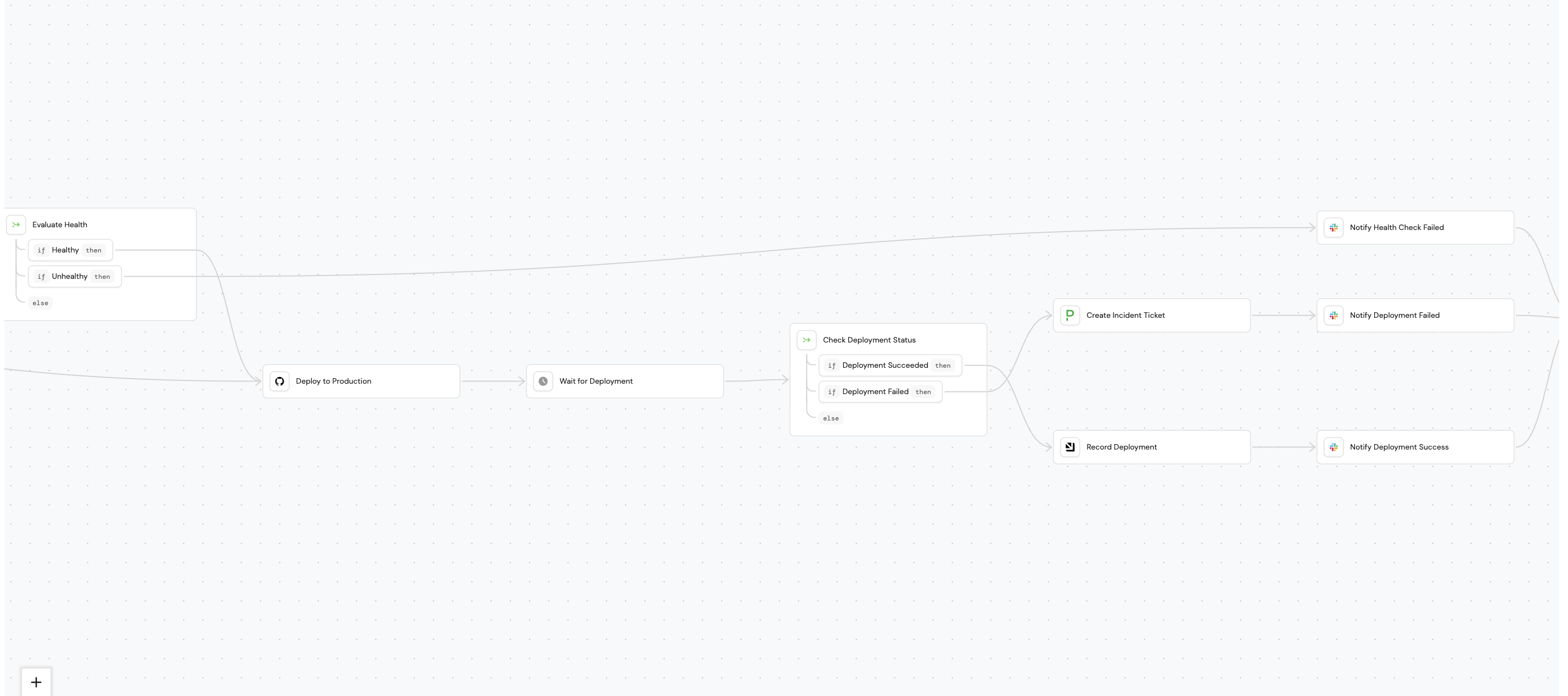
This guide walks you through using Port's AI assistant to build a Promote to Production workflow. By the end, you will have a self-service workflow that developers can trigger to safely deploy services to production, with built-in health checks, deployment tracking, and team notifications.
The workflow validates service health (optional), deploys to production via GitHub Actions, monitors the deployment status, and notifies the owner team via slack, additionally it creates a PagerDuty incident if the deployment fails or blocks deployment if health checks fail.
Prerequisites
This guide assumes the following:
- A Port account with access to the workflows beta feature.
- GitHub (Ocean)
- GitHub (Sunset)
- GitHub Ocean integration is installed and the
githubRepositoryblueprint exists.
- Port's GitHub app is installed in your GitHub organization and the
githubRepositoryblueprint exists.
- The
dora_deploymentblueprint exists in your catalog (see DORA metrics guide). - Port's PagerDuty integration is installed and the
pagerdutyIncidentblueprint exists. - A PagerDuty Events API v2 integration key (routing key) for the service where incidents should be created.
- A Slack incoming webhook URL for sending notifications.
Port workflows are currently in open beta and available to all users. Workflows may undergo changes without prior notice.
Build the workflow
We will build the workflow using Port's AI assistant. Follow the steps below to build the workflow:
-
Go to the Workflows page of your portal.
-
Click on the
+ Workflowbutton in the top-right corner. -
Click on the
Skip to editorbutton. -
Copy and paste the workflow JSON below into the editor to replace the example workflow:
- GitHub (Ocean)
- GitHub (Sunset)
Promote to production workflow JSON (click to expand)
{"identifier": "promote_to_production","title": "Promote to Production","icon": "Deployment","description": "Deploy a service to production with health checks and notifications","allowAnyoneToViewRuns": true,"nodes": [{"identifier": "check_deployment_status","title": "Check Deployment Status","icon": "DefaultProperty","description": "Evaluate deployment outcome","config": {"type": "CONDITION","options": [{"identifier": "deployment_success","title": "Deployment Success","expression": "(.outputs[\"deploy_to_production\"].workflowStatus // \"unknown\") == \"success\""},{"identifier": "deployment_failed","title": "Deployment Failed","expression": "(.outputs[\"deploy_to_production\"].workflowStatus // \"unknown\") != \"success\""}]},"variables": {}},{"identifier": "check_skip_health","title": "Check Skip Health","icon": "Health","description": "Determine if health check should run","config": {"type": "CONDITION","options": [{"identifier": "run_health_check","title": "Run Health Check","expression": ".inputs.skip_health_check == false"},{"identifier": "skip_health_check","title": "Skip Health Check","expression": ".inputs.skip_health_check == true"}]},"variables": {}},{"identifier": "create_incident","title": "Create PagerDuty Incident","icon": "pagerduty","description": "Create incident for failed deployment","config": {"type": "WEBHOOK","url": "https://api.pagerduty.com/incidents","agent": false,"synchronized": false,"method": "POST","headers": {"Content-Type": "application/json","Authorization": "Token token=YOUR_PAGERDUTY_TOKEN"},"body": {"incident": {"body": {"type": "incident_body","details": "Deployment of {{ .inputs.service }} version {{ .inputs.version }} to production failed."},"type": "incident","title": "Production Deployment Failed: {{ .inputs.service }}","service": {"id": "YOUR_SERVICE_ID","type": "service_reference"}}},"onTimeout": "fail","onFailure": "continue"},"variables": {}},{"identifier": "deploy_to_production","title": "Deploy to Production","icon": "GitHub","description": "Trigger GitHub Actions deployment workflow","config": {"type": "INTEGRATION_ACTION","installationId": "YOUR_GITHUB_OCEAN_INSTALLATION_ID","integrationProvider": "github-ocean","integrationInvocationType": "dispatch_workflow","integrationActionExecutionProperties": {"org": "YOUR_GITHUB_ORGANIZATION","repo": "{{ .inputs.service }}","workflow": "deploy.yml","workflowInputs": {"version": "{{ .inputs.version }}","environment": "production"},"reportWorkflowStatus": true},"onFailure": "continue"},"variables": {}},{"identifier": "evaluate_health","title": "Evaluate Health","icon": "DefaultProperty","description": "Check if health check passed","config": {"type": "CONDITION","options": [{"identifier": "health_passed","title": "Health Passed","expression": "(.outputs.health_check.status // 0) == 200"},{"identifier": "health_failed","title": "Health Failed","expression": "(.outputs.health_check.status // 0) != 200"}]},"variables": {}},{"identifier": "health_check","title": "Health Check","icon": "Health","description": "Verify service health before deployment","config": {"type": "WEBHOOK","url": "https://api.example.com/health/{{ .inputs.service }}","agent": false,"synchronized": true,"method": "GET","onTimeout": "continue","onFailure": "continue"},"variables": {}},{"identifier": "notify_failure","title": "Notify Failure","icon": "Slack","description": "Send failure notification to Slack","config": {"type": "WEBHOOK","url": "https://hooks.slack.com/services/YOUR/WEBHOOK/URL","agent": false,"synchronized": false,"method": "POST","body": {"text": "❌ *Production Deployment Failed*\n\n*Service:* {{ .inputs.service }}\n*Version:* {{ .inputs.version }}\n*Deployed by:* {{ .trigger.by.user.email }}\n*Time:* {{ .trigger.at }}\n\nA PagerDuty incident has been created."},"onTimeout": "fail","onFailure": "continue"},"variables": {}},{"identifier": "notify_health_failed","title": "Notify Health Check Failed","icon": "Slack","description": "Notify that deployment was blocked due to health check failure","config": {"type": "WEBHOOK","url": "https://hooks.slack.com/services/YOUR/WEBHOOK/URL","agent": false,"synchronized": false,"method": "POST","body": {"text": "⚠️ *Production Deployment Blocked*\n\n*Service:* {{ .inputs.service }}\n*Version:* {{ .inputs.version }}\n*Reason:* Health check failed\n*Deployed by:* {{ .trigger.by.user.email }}\n*Time:* {{ .trigger.at }}\n\nPlease verify service health before deploying."},"onTimeout": "fail","onFailure": "continue"},"variables": {}},{"identifier": "notify_success","title": "Notify Success","icon": "Slack","description": "Send success notification to Slack","config": {"type": "WEBHOOK","url": "https://hooks.slack.com/services/YOUR/WEBHOOK/URL","agent": false,"synchronized": false,"method": "POST","body": {"text": "✅ *Production Deployment Successful*\n\n*Service:* {{ .inputs.service }}\n*Version:* {{ .inputs.version }}\n*Deployed by:* {{ .trigger.by.user.email }}\n*Time:* {{ .trigger.at }}"},"onTimeout": "fail","onFailure": "continue"},"variables": {}},{"identifier": "trigger","title": "Promote to Production","icon": "Rocket","description": "Deploy a service to production environment","config": {"type": "SELF_SERVE_TRIGGER","userInputs": {"properties": {"service": {"title": "Service","description": "Select the service to deploy","type": "string","format": "entity","blueprint": "githubRepo"},"version": {"title": "Version","description": "Version to deploy (e.g., v1.2.3)","type": "string"},"skip_health_check": {"title": "Skip Health Check","description": "Skip the pre-deployment health check","type": "boolean","default": false}},"required": ["service","version"]},"published": true},"variables": {}}],"connections": [{"description": null,"sourceIdentifier": "trigger","targetIdentifier": "check_skip_health"},{"description": null,"sourceIdentifier": "check_skip_health","targetIdentifier": "health_check","sourceOptionIdentifier": "run_health_check"},{"description": null,"sourceIdentifier": "check_skip_health","targetIdentifier": "deploy_to_production","sourceOptionIdentifier": "skip_health_check"},{"description": null,"sourceIdentifier": "health_check","targetIdentifier": "evaluate_health"},{"description": null,"sourceIdentifier": "evaluate_health","targetIdentifier": "deploy_to_production","sourceOptionIdentifier": "health_passed"},{"description": null,"sourceIdentifier": "evaluate_health","targetIdentifier": "notify_health_failed","sourceOptionIdentifier": "health_failed"},{"description": null,"sourceIdentifier": "deploy_to_production","targetIdentifier": "check_deployment_status"},{"description": null,"sourceIdentifier": "check_deployment_status","targetIdentifier": "notify_success","sourceOptionIdentifier": "deployment_success"},{"description": null,"sourceIdentifier": "check_deployment_status","targetIdentifier": "create_incident","sourceOptionIdentifier": "deployment_failed"},{"description": null,"sourceIdentifier": "create_incident","targetIdentifier": "notify_failure"}]}Promote to production workflow JSON (click to expand)
{"identifier": "promote_to_production","title": "Promote to Production","icon": "Deployment","description": "Deploy a service to production with health checks and notifications","allowAnyoneToViewRuns": true,"nodes": [{"identifier": "check_deployment_status","title": "Check Deployment Status","icon": "DefaultProperty","description": "Evaluate deployment outcome","config": {"type": "CONDITION","options": [{"identifier": "deployment_success","title": "Deployment Success","expression": "(.outputs[\"deploy_to_production\"].workflowStatus // \"unknown\") == \"success\""},{"identifier": "deployment_failed","title": "Deployment Failed","expression": "(.outputs[\"deploy_to_production\"].workflowStatus // \"unknown\") != \"success\""}]},"variables": {}},{"identifier": "check_skip_health","title": "Check Skip Health","icon": "Health","description": "Determine if health check should run","config": {"type": "CONDITION","options": [{"identifier": "run_health_check","title": "Run Health Check","expression": ".inputs.skip_health_check == false"},{"identifier": "skip_health_check","title": "Skip Health Check","expression": ".inputs.skip_health_check == true"}]},"variables": {}},{"identifier": "create_incident","title": "Create PagerDuty Incident","icon": "pagerduty","description": "Create incident for failed deployment","config": {"type": "WEBHOOK","url": "https://api.pagerduty.com/incidents","agent": false,"synchronized": false,"method": "POST","headers": {"Content-Type": "application/json","Authorization": "Token token=YOUR_PAGERDUTY_TOKEN"},"body": {"incident": {"body": {"type": "incident_body","details": "Deployment of {{ .inputs.service }} version {{ .inputs.version }} to production failed."},"type": "incident","title": "Production Deployment Failed: {{ .inputs.service }}","service": {"id": "YOUR_SERVICE_ID","type": "service_reference"}}},"onTimeout": "fail","onFailure": "continue"},"variables": {}},{"identifier": "deploy_to_production","title": "Deploy to Production","icon": "GitHub","description": "Trigger GitHub Actions deployment workflow","config": {"type": "GITHUB","org": "YOUR_GITHUB_ORGANIZATION","repo": "{{ .inputs.service }}","workflow": "deploy.yml","workflowInputs": {"version": "{{ .inputs.version }}","environment": "production"},"reportWorkflowStatus": true,"onFailure": "continue"},"variables": {}},{"identifier": "evaluate_health","title": "Evaluate Health","icon": "DefaultProperty","description": "Check if health check passed","config": {"type": "CONDITION","options": [{"identifier": "health_passed","title": "Health Passed","expression": "(.outputs.health_check.status // 0) == 200"},{"identifier": "health_failed","title": "Health Failed","expression": "(.outputs.health_check.status // 0) != 200"}]},"variables": {}},{"identifier": "health_check","title": "Health Check","icon": "Health","description": "Verify service health before deployment","config": {"type": "WEBHOOK","url": "https://api.example.com/health/{{ .inputs.service }}","agent": false,"synchronized": true,"method": "GET","onTimeout": "continue","onFailure": "continue"},"variables": {}},{"identifier": "notify_failure","title": "Notify Failure","icon": "Slack","description": "Send failure notification to Slack","config": {"type": "WEBHOOK","url": "https://hooks.slack.com/services/YOUR/WEBHOOK/URL","agent": false,"synchronized": false,"method": "POST","body": {"text": "❌ *Production Deployment Failed*\n\n*Service:* {{ .inputs.service }}\n*Version:* {{ .inputs.version }}\n*Deployed by:* {{ .trigger.by.user.email }}\n*Time:* {{ .trigger.at }}\n\nA PagerDuty incident has been created."},"onTimeout": "fail","onFailure": "continue"},"variables": {}},{"identifier": "notify_health_failed","title": "Notify Health Check Failed","icon": "Slack","description": "Notify that deployment was blocked due to health check failure","config": {"type": "WEBHOOK","url": "https://hooks.slack.com/services/YOUR/WEBHOOK/URL","agent": false,"synchronized": false,"method": "POST","body": {"text": "⚠️ *Production Deployment Blocked*\n\n*Service:* {{ .inputs.service }}\n*Version:* {{ .inputs.version }}\n*Reason:* Health check failed\n*Deployed by:* {{ .trigger.by.user.email }}\n*Time:* {{ .trigger.at }}\n\nPlease verify service health before deploying."},"onTimeout": "fail","onFailure": "continue"},"variables": {}},{"identifier": "notify_success","title": "Notify Success","icon": "Slack","description": "Send success notification to Slack","config": {"type": "WEBHOOK","url": "https://hooks.slack.com/services/YOUR/WEBHOOK/URL","agent": false,"synchronized": false,"method": "POST","body": {"text": "✅ *Production Deployment Successful*\n\n*Service:* {{ .inputs.service }}\n*Version:* {{ .inputs.version }}\n*Deployed by:* {{ .trigger.by.user.email }}\n*Time:* {{ .trigger.at }}"},"onTimeout": "fail","onFailure": "continue"},"variables": {}},{"identifier": "trigger","title": "Promote to Production","icon": "Rocket","description": "Deploy a service to production environment","config": {"type": "SELF_SERVE_TRIGGER","userInputs": {"properties": {"service": {"title": "Service","description": "Select the service to deploy","type": "string","format": "entity","blueprint": "githubRepo"},"version": {"title": "Version","description": "Version to deploy (e.g., v1.2.3)","type": "string"},"skip_health_check": {"title": "Skip Health Check","description": "Skip the pre-deployment health check","type": "boolean","default": false}},"required": ["service","version"]},"published": true},"variables": {}}],"connections": [{"description": null,"sourceIdentifier": "trigger","targetIdentifier": "check_skip_health"},{"description": null,"sourceIdentifier": "check_skip_health","targetIdentifier": "health_check","sourceOptionIdentifier": "run_health_check"},{"description": null,"sourceIdentifier": "check_skip_health","targetIdentifier": "deploy_to_production","sourceOptionIdentifier": "skip_health_check"},{"description": null,"sourceIdentifier": "health_check","targetIdentifier": "evaluate_health"},{"description": null,"sourceIdentifier": "evaluate_health","targetIdentifier": "deploy_to_production","sourceOptionIdentifier": "health_passed"},{"description": null,"sourceIdentifier": "evaluate_health","targetIdentifier": "notify_health_failed","sourceOptionIdentifier": "health_failed"},{"description": null,"sourceIdentifier": "deploy_to_production","targetIdentifier": "check_deployment_status"},{"description": null,"sourceIdentifier": "check_deployment_status","targetIdentifier": "notify_success","sourceOptionIdentifier": "deployment_success"},{"description": null,"sourceIdentifier": "check_deployment_status","targetIdentifier": "create_incident","sourceOptionIdentifier": "deployment_failed"},{"description": null,"sourceIdentifier": "create_incident","targetIdentifier": "notify_failure"}]} -
Click
Publishto save the workflow.
Configure the workflow
After publishing, you need to replace placeholder values in the workflow nodes.
Add secrets to Port
-
Go to your portal's Settings page.
-
Navigate to Credentials and add the following secrets:
GITHUB_TOKEN-- A GitHub Personal Access Token withrepoandworkflowscopes, used for polling deployment status.PAGERDUTY_ROUTING_KEY-- Your PagerDuty Events API v2 integration key (routing key) for incident creation.PORT_CLIENT_SECRET-- Your Port API token (if not already present).
Configure the GitHub integration action
- GitHub (Ocean)
- GitHub (Sunset)
In the deploy_to_production node, set the installationId to your GitHub Ocean integration's installation ID. You can find this in the Data sources page of your portal. Update the org field in integrationActionExecutionProperties to your GitHub organization name.
In the deploy_to_production node, set the org field to your GitHub organization name. The GitHub app uses your organization's installation automatically.
Configure Slack webhooks
Update the webhook URL in each of the three Slack notification nodes (notify_health_failed, notify_failure, notify_success) with your actual Slack incoming webhook URL.
Workflow reference
Below is the corrected workflow JSON with the GitHub integration action and PagerDuty Events API. Use this as a reference to verify your AI-generated workflow has the correct node configurations.
Create the GitHub workflow
Your repositories need a GitHub Actions workflow file that this Port workflow will trigger. Create the following file in each repository that will use this workflow:
deploy-production.yml template (click to expand)
name: Deploy to Production

on:
  workflow_dispatch:
    inputs:
      version:
        description: "Version/tag to deploy"
        required: true
        type: string
      service:
        description: "Service name"
        required: true
        type: string
      triggered_by:
        description: "User who triggered deployment"
        required: true
        type: string
      port_run_id:
        description: "Port workflow run ID"
        required: true
        type: string

jobs:
  deploy:
    runs-on: ubuntu-latest
    environment: production

    steps:
      - name: Checkout code
        uses: actions/checkout@v6
        with:
          ref: ${{ inputs.version }}

      - name: Deploy to production
        run: |
          echo "Deploying ${{ inputs.service }} version ${{ inputs.version }}"
          echo "Triggered by: ${{ inputs.triggered_by }}"
          echo "Port Run ID: ${{ inputs.port_run_id }}"

          # Replace with your actual deployment commands:
          # kubectl apply -f k8s/
          # helm upgrade --install ...
          # aws ecs update-service ...

      - name: Verify deployment
        run: |
          echo "Verifying deployment..."
          # Add health check or smoke test commands here
Customize the deployment steps for your infrastructure (Kubernetes, AWS ECS, Helm, Terraform, etc.).
Let's test it !
Before using this in production, run through these test scenarios:
Test 1: successful deployment
- Go to the Self-service page of your portal.
- Find Promote to Production and click on it.
- Select a service, enter a valid version/tag, and check Skip Health Check.
- Click Execute.
- Verify that:
- The GitHub Actions workflow runs and succeeds.
- A
dora_deploymententity is created in your catalog. - A success notification is sent to your Slack channel.
Test 2: failed deployment
- Trigger the workflow with an invalid version (e.g.,
nonexistent-tag). - Verify that:
- The GitHub Actions workflow fails.
- A real PagerDuty incident is created with critical severity.
- The PagerDuty integration syncs the incident back to Port as a
pagerdutyIncidententity. - A failure notification is sent to your Slack channel.
Test 3: health check failure
- Trigger the workflow with Skip Health Check unchecked.
- If your health check endpoint returns an unhealthy status, verify that:
- The workflow stops before deployment.
- A Slack notification is sent about the health check failure.
Debugging your workflow
When building and testing workflows, understanding how to inspect execution data will help you identify and resolve issues quickly.
Capture webhook responses with variables
By default, webhook node outputs include the full response at .outputs["node_id"].response.data. To extract and persist specific fields from a webhook response, define variables on the node. Variables are evaluated using .response.data within the same node:
{
  "identifier": "create_incident",
  "config": {
    "type": "WEBHOOK",
    "url": "https://events.pagerduty.com/v2/enqueue",
    "method": "POST",
    "body": { ... }
  },
  "variables": {
    "dedup_key": "{{ .response.data.dedup_key }}",
    "status": "{{ .response.data.status }}"
  }
}
Subsequent nodes can then reference these values as {{ .outputs["create_incident"].dedup_key }}. See the data flow docs for more details.
When you define variables on a node, the default outputs (like response.data) are replaced entirely. If you need both custom variables and the raw response, include the response explicitly in your variables.
Use the workflow runs audit log
Every workflow execution is tracked in the Workflow runs tab. When a run fails:
- Open the failed runID from the Runs table.
- Look for nodes with a
FAILEDbadge in the node runs list. - Expand the node to see its output,variables and logs.
Verify node inputs and outputs
When a node produces unexpected results, check:
- Outputs: Each node run shows the output data it produced. Verify that the response contains the fields you expect.
- Expressions: If a condition node routes incorrectly, check that the expression references the correct output path (e.g.,
.outputs["wait_for_deployment"].workflow_conclusionvs.outputs["wait_for_deployment"].response.data.workflow_runs[0].conclusion). - Variables: If you defined variables, verify they correctly extract the fields you need. Remember that variables use
.response.data(the current node's raw response), while subsequent nodes use.outputs["node_id"].
Next steps
- Customize the Slack notification messages to match your team's communication style.
- Add an approval step before production deployments for additional safety.
- Create a dashboard to visualize deployment frequency, success rates, and incident trends.
- Explore more workflow examples for inspiration.