Sync Port configurations between environments using Port AI and MCP
This guide shows how to move Port configurations between environments by using GitHub as your source of truth. We will connect GitHub MCP, register a reusable skill for configuration export and import, and then use Port's AI chat widget to back up blueprints and actions into a repository from one environment and import them into a second Port environment. The entire flow runs inside Port, so no external IDE is required.
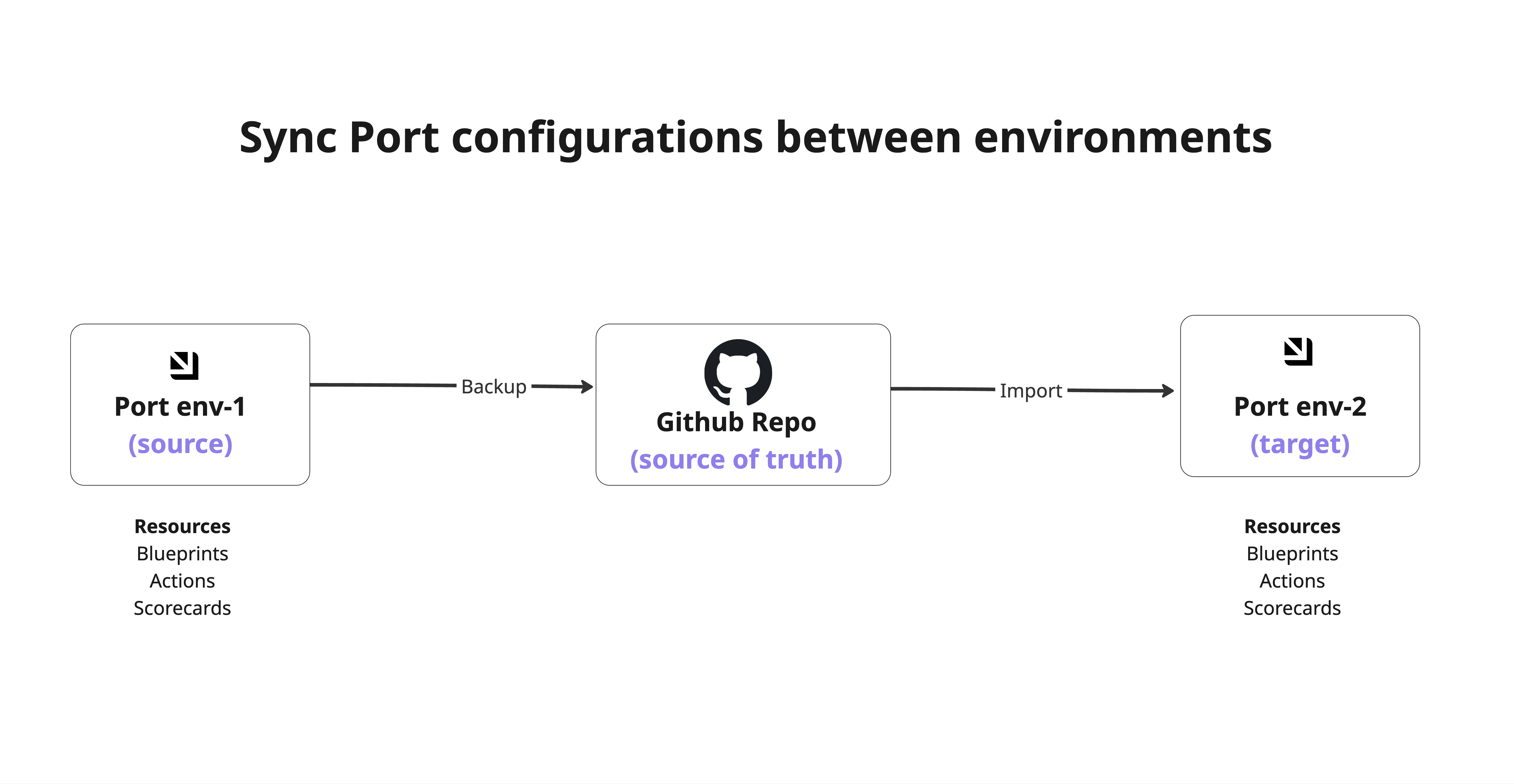
Common use cases
- Environment migration: Move data model changes from a staging environment to a production environment in a controlled flow.
- Configuration backup: Keep a versioned backup of blueprints and actions in GitHub.
- Cross-region setup: Sync configuration between separate Port organizations, such as US and EU environments.
Prerequisites
This guide assumes you have:
- Two Port environments with MCP enabled.
- Access to a GitHub repository that will store backup files, such as
port-configuration. - Cursor IDE installed and authenticated to both Port environments.
- A Skills blueprint configured in Port. You can follow Create custom skills.
Connect GitHub MCP
We want to use GitHub as the central source of truth for configuration files.
-
Go to your Developer portal.
-
Click your avatar in the top-right corner.
-
Select MCP Servers.
-
Open the MCP External tab.
-
Connect GitHub by following GitHub MCP connector.
-
Repeat the same flow in your second Port environment.
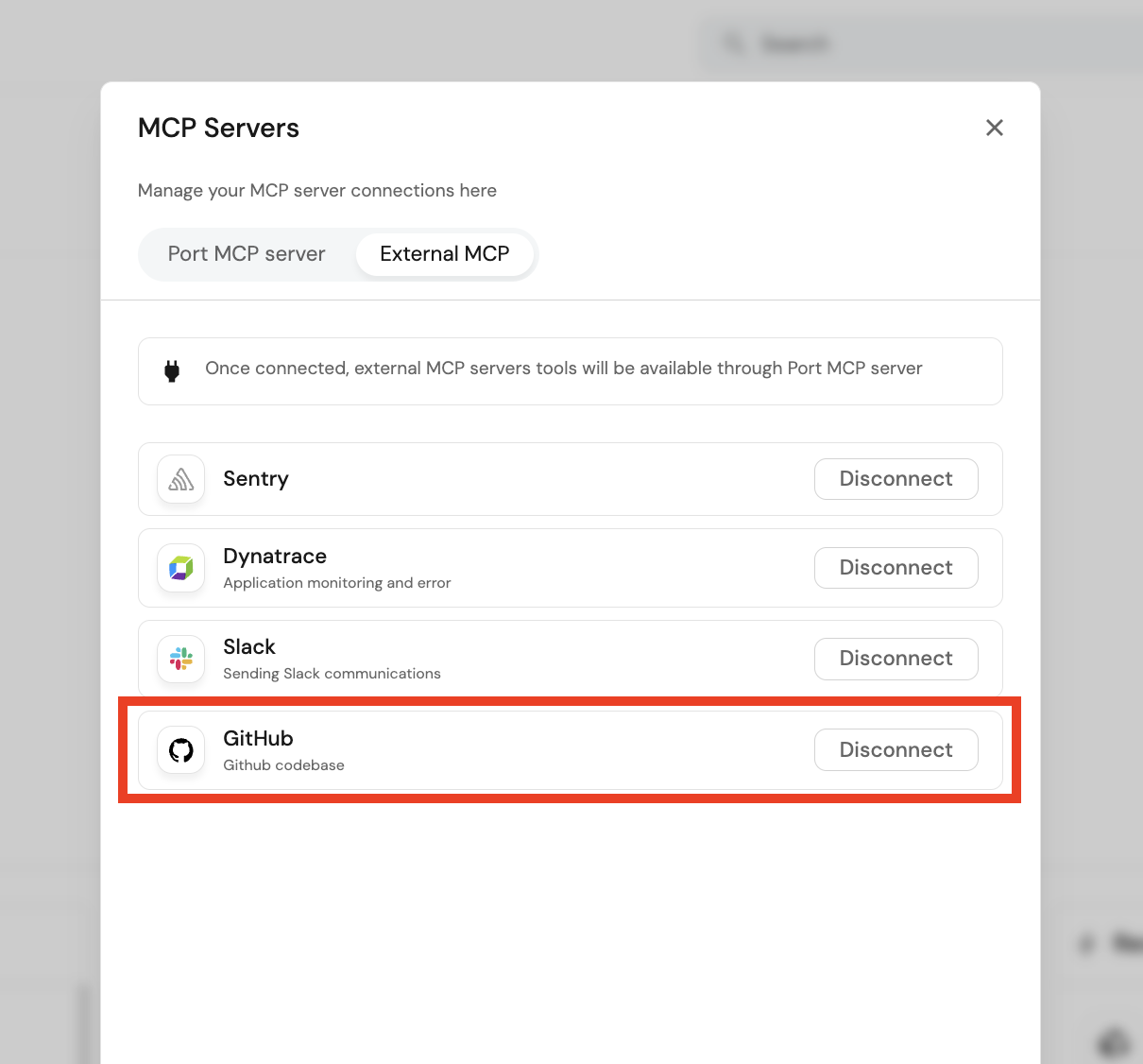
After connecting GitHub, confirm these tools are enabled in each environment:
- Repository search.
- Branch creation.
- Pull request creation.
- File create and update.
- Multi-file push.
- Pull request read and status tools.
Create the backup skill
Register this skill in both Port environments. The source environment uses it to export configuration, and the target environment uses it to import configuration.
- Go to the Skill catalog page.
- Click + Skill.
- Enable JSON Mode.
- Paste the entity below.
- Click Register.
Manage Port configuration skill entity (click to expand)
{
  "identifier": "manage_port_configuration",
  "title": "Manage Port Configuration",
  "icon": "Port",
  "properties": {
    "description": "Import, export, or diff Port configuration objects (blueprints, actions, or both) to/from a GitHub repository. Use when the user wants to sync Port config with a repo, back up blueprints/actions, restore them from source control, or check for differences (drift) between the live Port configuration and the files stored in a GitHub backup.",
    "instructions": "You are a Port configuration manager. Follow these steps based on the requested operation.\n\n## Inputs to collect\nBefore starting, ensure you have:\n- **repository**: GitHub repo in `org/repo` format\n- **config_type**: one of `blueprints`, `actions`, or `both`\n- **operation**: one of `import`, `export`, or `diff`\n\n---\n\n## EXPORT - Port -> GitHub\n\n### Branch\n- **Never push directly to `main` (or `master`).** Always create a timestamped side branch first:\n  `port/export-<config_type>-YYYYMMDD-HHMMSS`\n  Example: `port/export-actions-20260325-153000`\n- Use `github_create_branch` to create the branch from `main` before writing any files.\n\n### Blueprints (if config_type is `blueprints` or `both`)\n1. Call `list_blueprints` (no identifiers) to get all blueprint summaries.\n2. For each blueprint, call `list_blueprints` with its identifier to get the full schema.\n3. **Sanitize meta properties** - before writing, strip the following read-only fields from each blueprint object:\n   - `createdAt`, `updatedAt`, `createdBy`, `updatedBy`\n   - `id`, `organization`\n   - Any field prefixed with `_` that is not part of the user-defined schema\n4. Write the sanitized JSON to `port/blueprints/<identifier>.json` on the side branch using `github_create_or_update_file`.\n\n### Actions (if config_type is `actions` or `both`)\n1. Call `list_actions` to retrieve all actions.\n2. **Sanitize meta properties** - before writing, strip the following read-only fields from each action object:\n   - `createdAt`, `updatedAt`, `createdBy`, `updatedBy`\n   - `id`, `organization`\n   - Any field prefixed with `_` that is not part of the user-defined action definition\n3. Write the sanitized JSON to `port/actions/<identifier>.json` on the side branch using `github_create_or_update_file`.\n\n### Pull request\n- After all files are written, open a pull request from the side branch into `main` using `github_create_pull_request`.\n- PR title: `chore: export Port configuration (<config_type>) - <date>`.\n- PR body should list all exported resources (type | identifier).\n- **Return the PR URL to the user.**\n\n---\n\n## IMPORT - GitHub -> Port\n\n> **Source of truth: `main` branch only.**\n> Always read from the `main` branch, regardless of any open export PRs or side branches. Export branches are staging areas and are never considered a valid source for import.\n\n### Blueprints (if config_type is `blueprints` or `both`)\n1. Use `github_get_file_contents` to list and read all files under `port/blueprints/` in the repository, **explicitly passing `branch: main`**.\n2. Parse each JSON file as a blueprint definition.\n3. **Sanitize meta properties** - before upserting, strip any read-only meta fields:\n   - `createdAt`, `updatedAt`, `createdBy`, `updatedBy`\n   - `id`, `organization`\n   - Any field prefixed with `_` that is not part of the user-defined schema\n4. Call `upsert_blueprint` for each sanitized definition.\n\n### Actions (if config_type is `actions` or `both`)\n1. Use `github_get_file_contents` to list and read all files under `port/actions/` in the repository, **explicitly passing `branch: main`**.\n2. Parse each JSON file as an action definition.\n3. **Sanitize meta properties** - before upserting, strip any read-only meta fields:\n   - `createdAt`, `updatedAt`, `createdBy`, `updatedBy`\n   - `id`, `organization`\n   - Any field prefixed with `_` that is not part of the user-defined action definition\n4. Call `upsert_action` for each sanitized definition.\n\n### Report\n- After all upserts, output a summary table: resource type | identifier | result (created / updated / failed).\n- For any failures, include the error message.\n\n---\n\n## DIFF - Compare Port (live) vs GitHub (backup)\n\nThis operation detects drift between what is currently in Port and what is stored in the GitHub backup files. It does **not** make any changes.\n\n> **Source of truth: `main` branch only.**\n> Always read from the `main` branch, regardless of any open export PRs or side branches. A pending export PR has not been reviewed or merged and does not represent the approved backup state.\n\n### Fetch live configuration from Port\n\n**Blueprints** (if config_type is `blueprints` or `both`):\n1. Call `list_blueprints` (no identifiers) to get all blueprint summaries.\n2. For each blueprint, call `list_blueprints` with its identifier to get the full schema.\n3. Sanitize meta properties (strip `createdAt`, `updatedAt`, `createdBy`, `updatedBy`, `id`, `organization`, and any `_`-prefixed system fields).\n\n**Actions** (if config_type is `actions` or `both`):\n1. Call `list_actions` to retrieve all actions.\n2. Sanitize meta properties the same way.\n\n### Fetch backup configuration from GitHub (`main` branch)\n\n**Blueprints** (if config_type is `blueprints` or `both`):\n1. Use `github_get_file_contents` to list and read all files under `port/blueprints/` in the repository, **explicitly passing `branch: main`**.\n2. Parse each JSON file and sanitize the same meta properties.\n\n**Actions** (if config_type is `actions` or `both`):\n1. Use `github_get_file_contents` to list and read all files under `port/actions/` in the repository, **explicitly passing `branch: main`**.\n2. Parse each JSON file and sanitize the same meta properties.\n\n### Compare and report\n\nFor each resource type (blueprints and actions), produce a diff report:\n\n1. **Only in Port (not in backup)** - present in Port but no corresponding file on `main`.\n2. **Only in backup (not in Port)** - file exists on `main` but resource is missing from Port.\n3. **Present in both but different** - sanitized JSON does not match. List each differing field path with Port value vs backup value.\n4. **In sync** - sanitized JSON is identical in both.\n\n### Output format\n\n```\n## Port configuration diff report\nRepository: <org/repo>\nBranch: main\nConfig type: <blueprints | actions | both>\nDate: <current date>\n\n### Blueprints\n| Status | Identifier | Details |\n|--------|------------|---------|\n| Only in Port | my-blueprint | Not found in backup |\n| Only in backup | old-blueprint | File: port/blueprints/old-blueprint.json |\n| Differs | service | 3 field(s) changed (see below) |\n| In sync | environment | ✓ |\n\n#### Differences - service\n- `schema.properties.status.enum`: Port=[\"Active\",\"Inactive\"] vs Backup=[\"Active\",\"Deprecated\",\"Inactive\"]\n- `relations.team.required`: Port=false vs Backup=true\n\n### Actions\n...\n\n### Summary\n- X resource(s) only in Port.\n- X resource(s) only in backup.\n- X resource(s) with differences.\n- X resource(s) in sync.\n```\n\n- **Do not make any changes to Port or GitHub** during a diff operation.\n- If a backup file is malformed or unparseable, report it as an error in the diff output.\n\n---\n\n## General rules\n- **Never push directly to `main` or `master`.** All writes go to a timestamped side branch (export only).\n- **Import and diff always read from `main`.** Never read from export side branches or open PRs.\n- Never delete existing Port resources unless the user explicitly asks.\n- If a file is malformed or fails sanitization, skip it and report it as failed. Do not abort the entire operation.\n- Always confirm the final count of successfully processed resources and share the PR URL at the end (export only)."
  },
  "relations": {}
}
Manage the chat session permissions
Before you run the backup and import prompts, make sure the chat session has access to the tools the skill needs:
- Open the Port AI chat from the floating chat button.
- Enable the GitHub MCP tools you connected in the previous step.
- Enable the blueprint and action management tools, such as
list_blueprints,upsert_blueprint,list_actions, andupsert_action. - Approve the management tools when prompted, since they perform write operations on your configuration.
Repeat these steps in your second Port environment so the export and import prompts behave identically.
Back up configurations to GitHub from the source environment
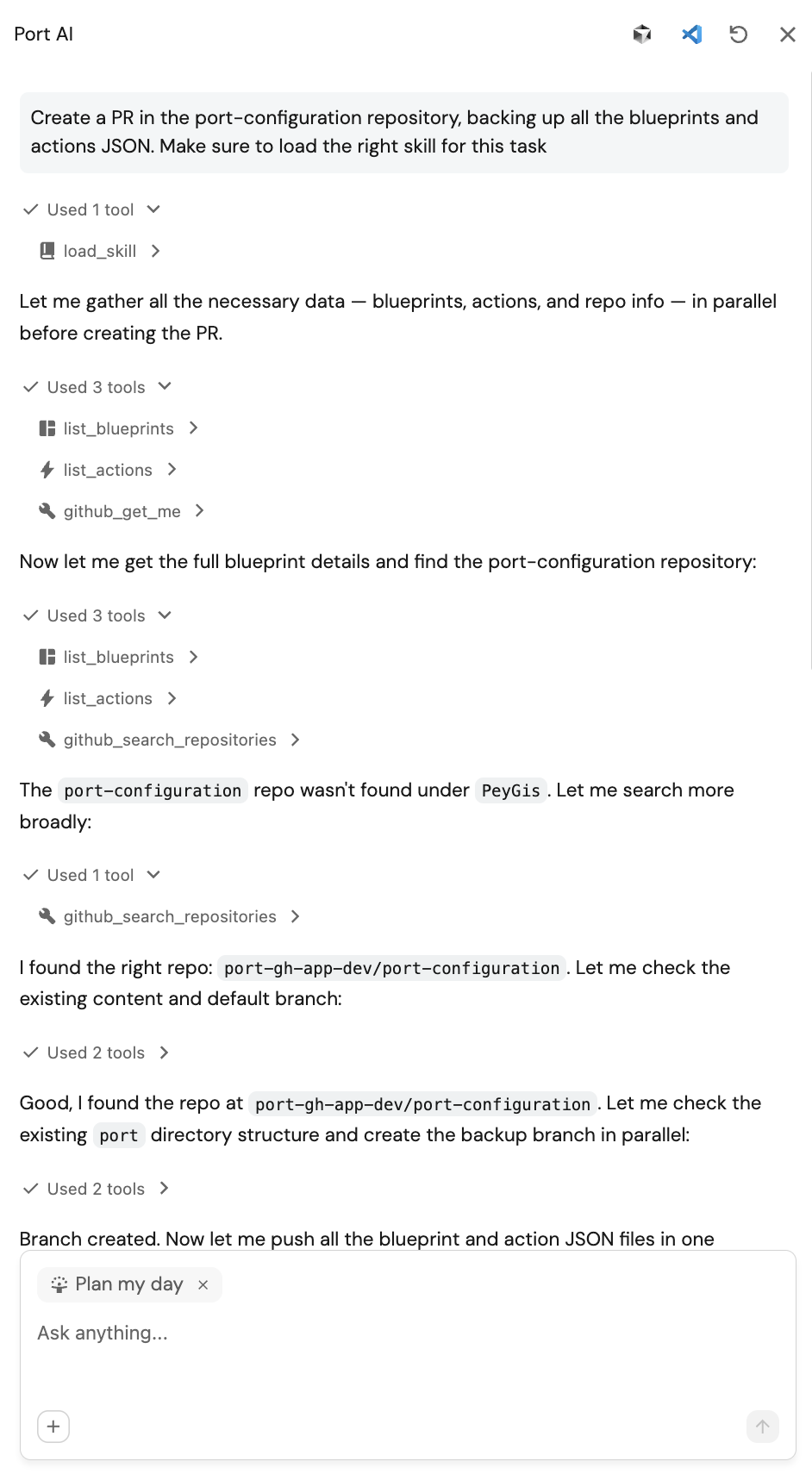
Open your source Port environment, click the floating chat button to open the Port AI chat, and send a prompt like this:
Create a PR in the <port-configuration> repository, backing up all the blueprints and actions JSON from this environment. Make sure to load the right skill for this task.
Make sure to replace <port-configuration> with your desired repository.
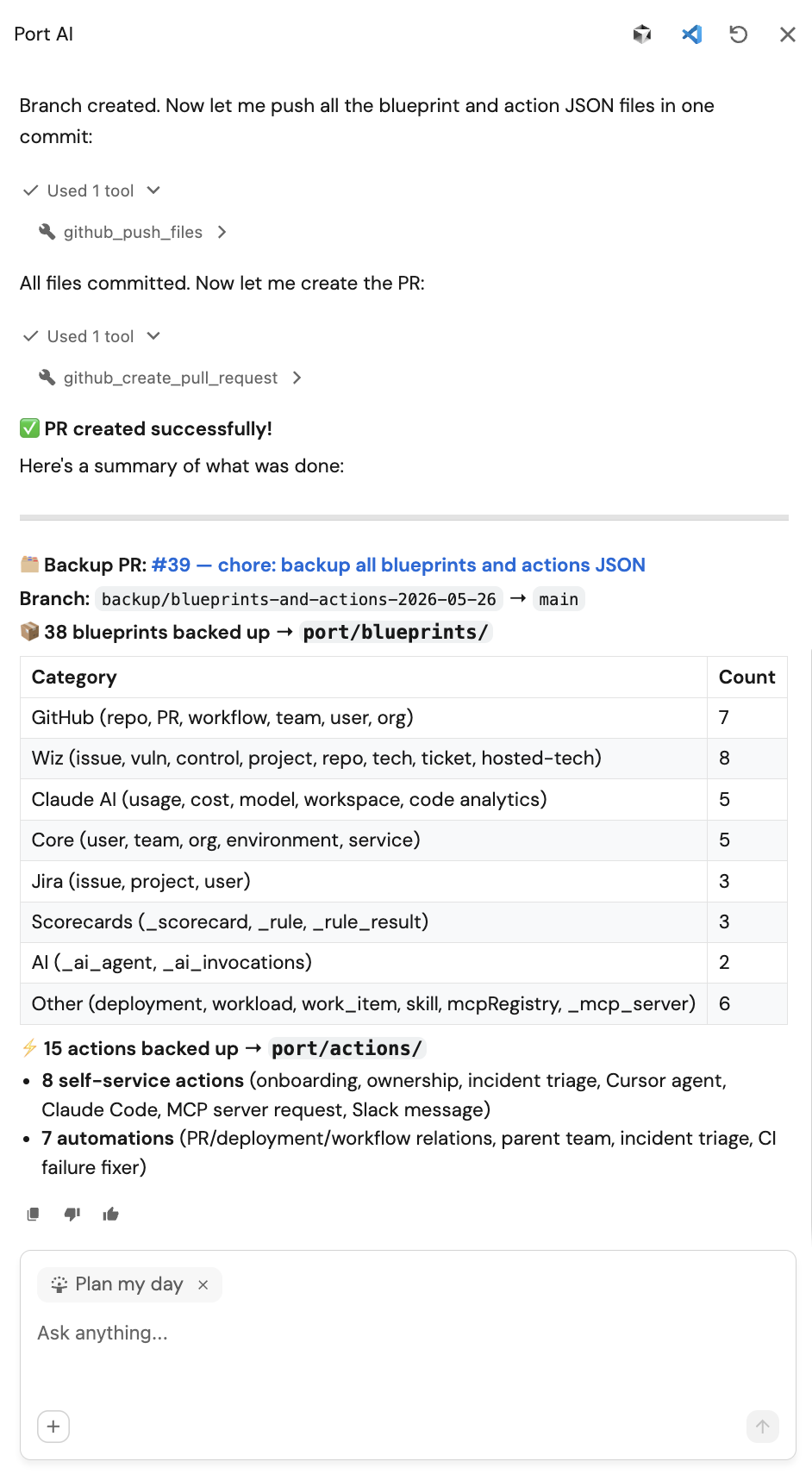
Expected result:
-
Port AI loads
manage_port_configuration. -
A branch is created in GitHub.
-
Backup files are written under
port/blueprints/and orport/actions/. -
A pull request URL is returned.
Merge the backup pull request
Open the pull request in GitHub, review the exported files, and merge it into main. The skill reads only from main for import, so this merge step is required:
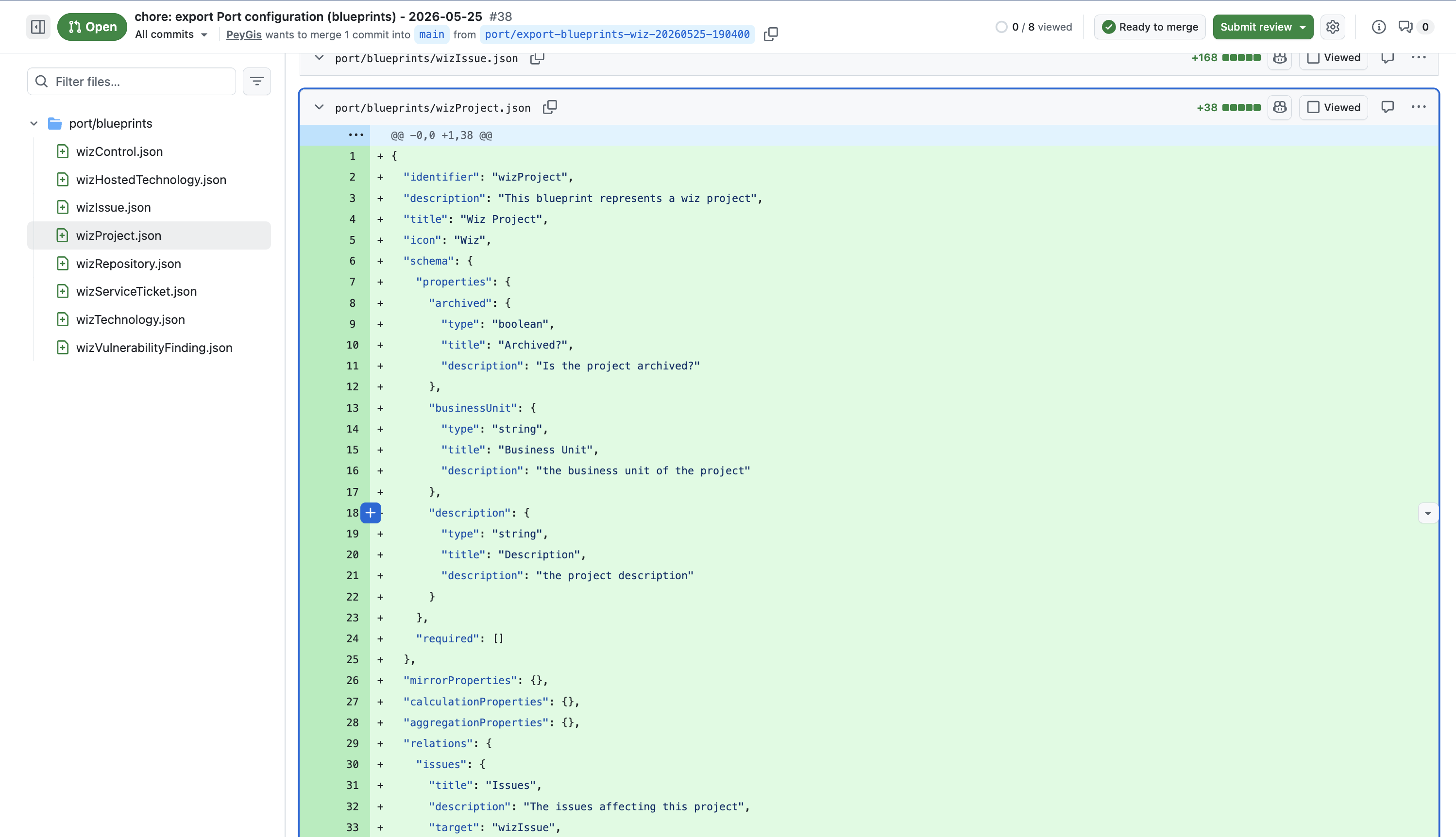
Import configurations into the target environment
Open your target Port environment, click the floating chat button to open the Port AI chat, and run an import prompt like this:
Import and create all the blueprints and actions from the main branch in <port-configuration> repo into this environment.
Expected result:
-
Port AI reads configuration files from
main. -
Port AI upserts each resource into the target environment.
-
Port AI returns a summary of created, updated, and failed resources.
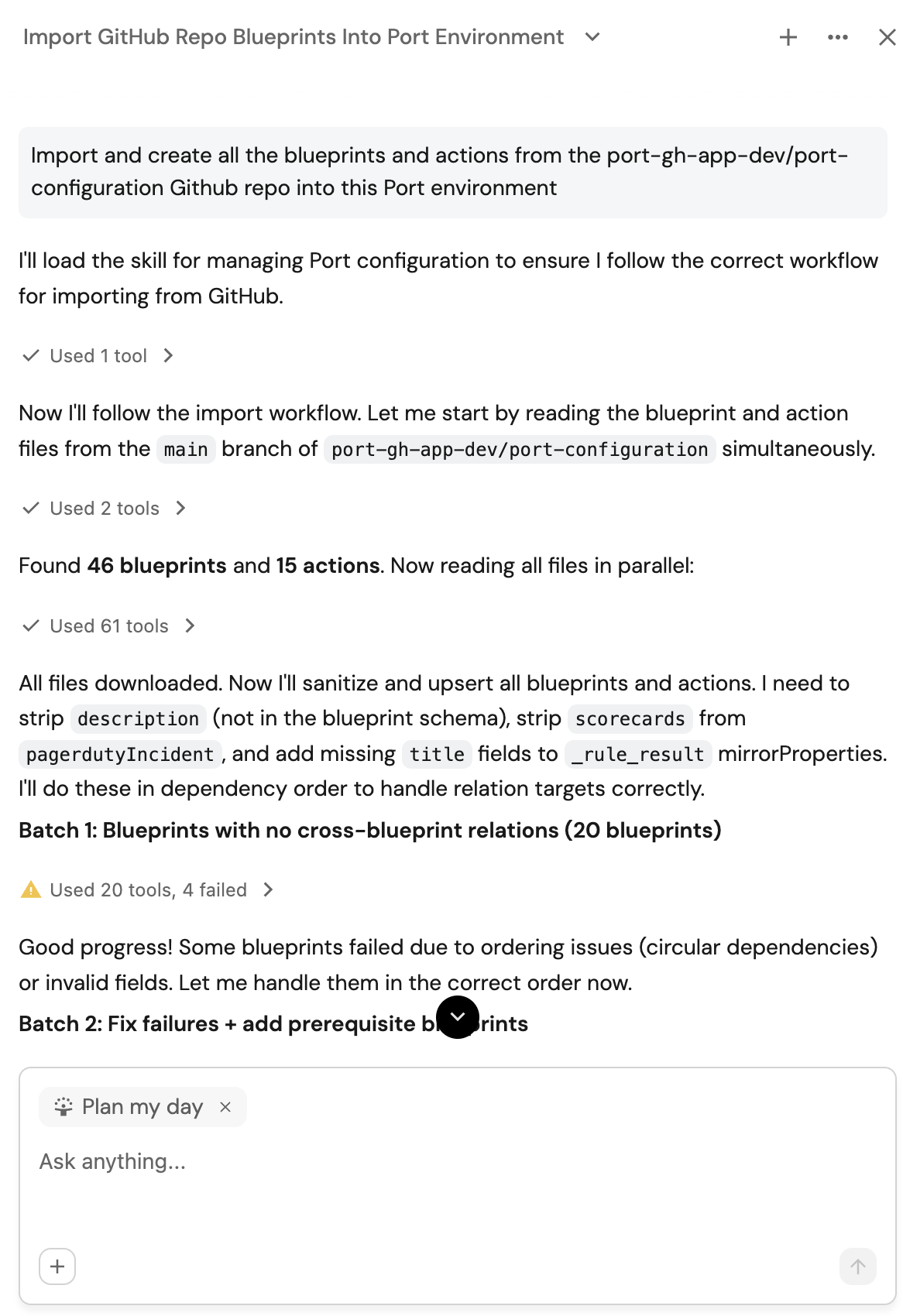
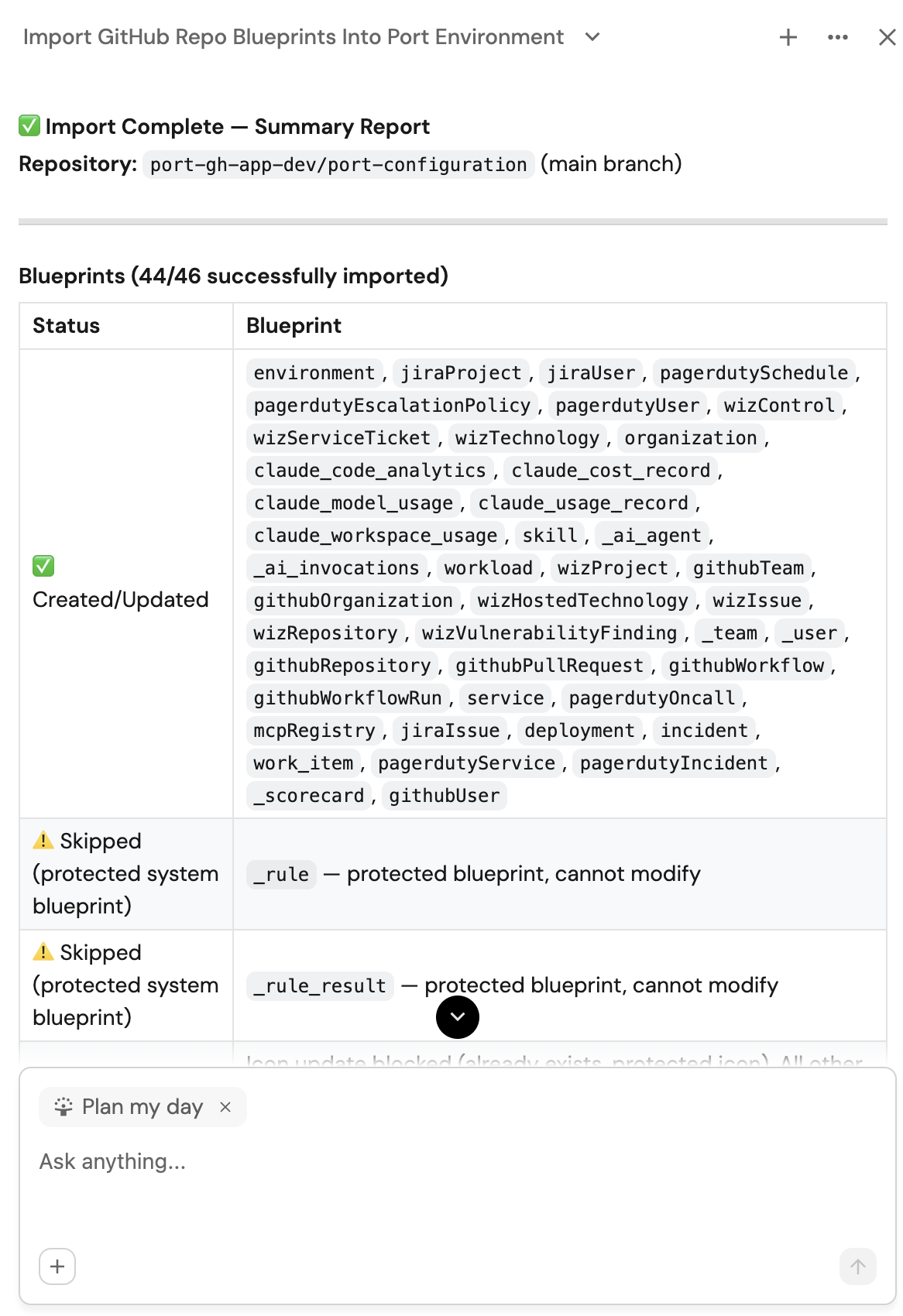
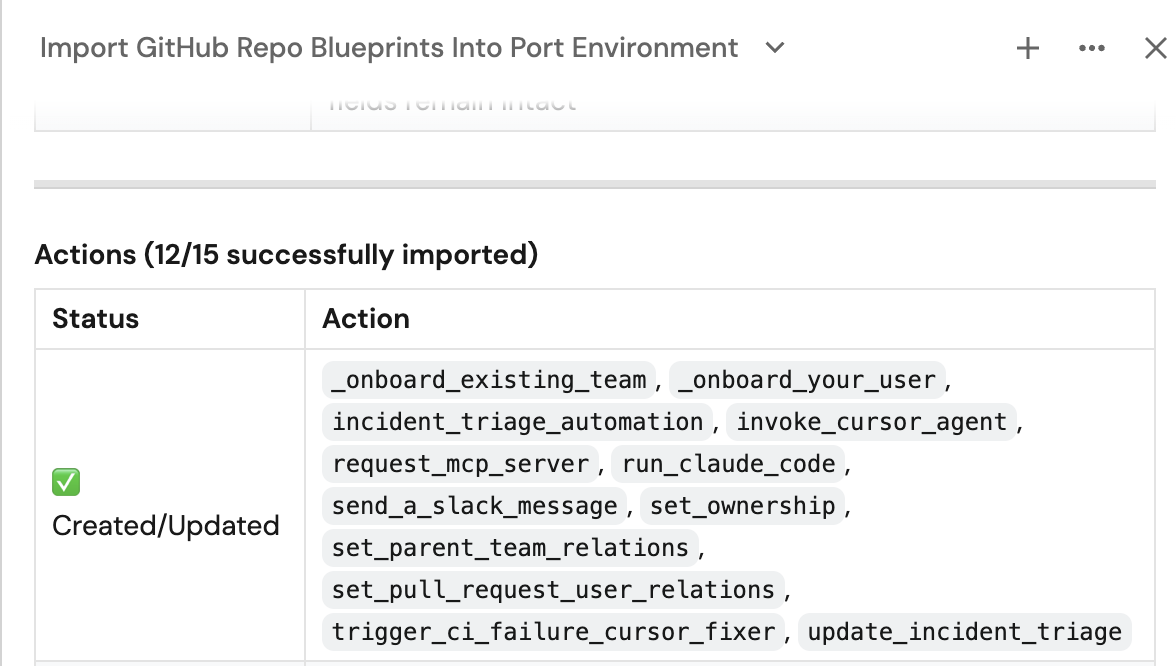
The manage_port_configuration skill must exist in the target environment for this prompt to work. If it is missing, register the same skill there using the steps in Create the backup skill.
Validate configuration sync
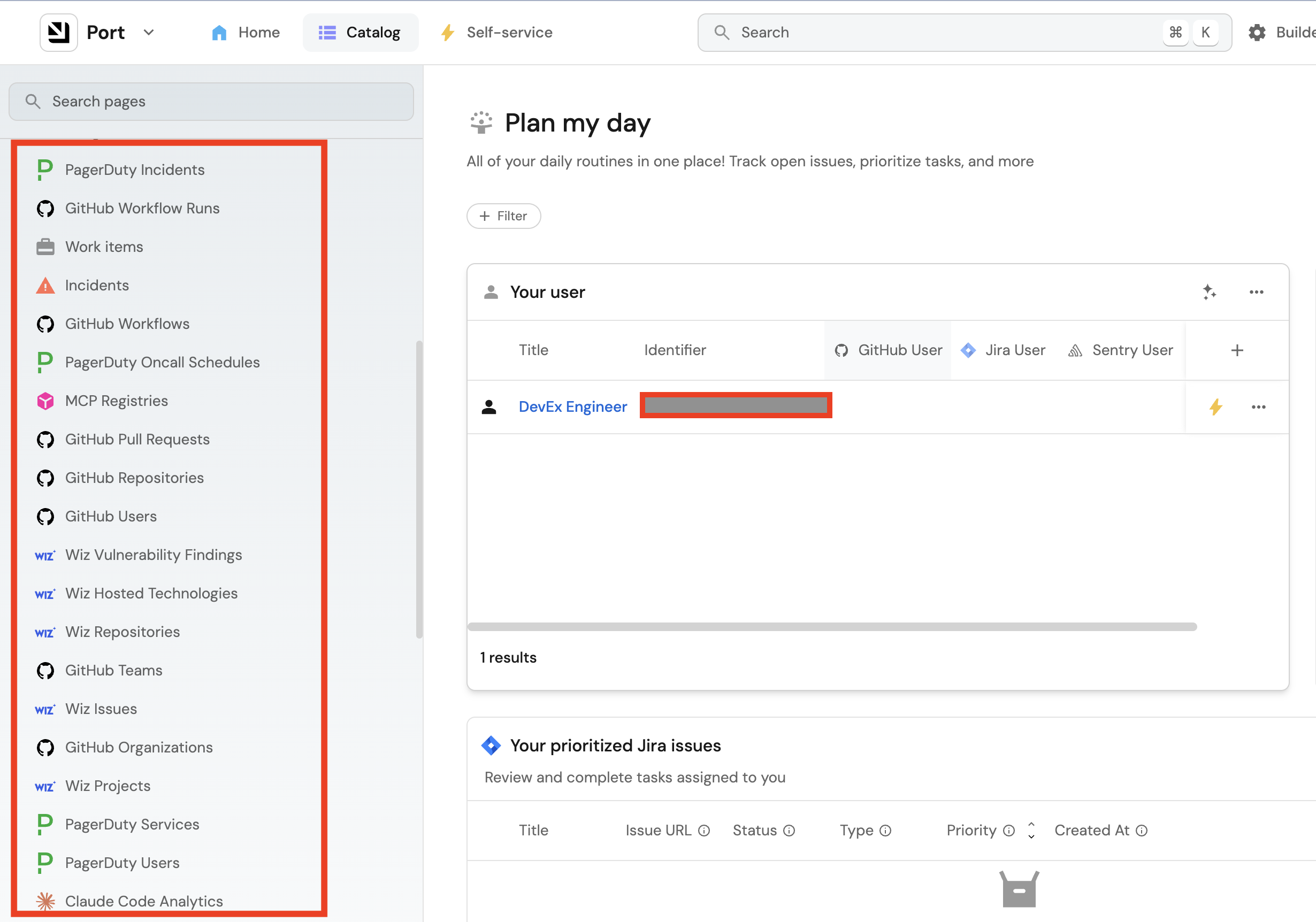
Visit your target environment in Port to confirm that the blueprints and actions have been created as expected.
By following these steps, you can confidently migrate Port configurations between environments. This approach ensures reliable versioning, easy recovery, and helps maintain consistency across your different Port instances.