Manage your Kubernetes deployments
This guide demonstrates how to bring your Kubernetes deployment management experience into Port using a Port workflow. You will learn how to:
- Ingest Kubernetes cluster, deployment, and pod data into Port's context lake using Port's Kubernetes integration.
- Build a single workflow that lets developers restart deployments, change replica counts, and delete pods directly from Port.
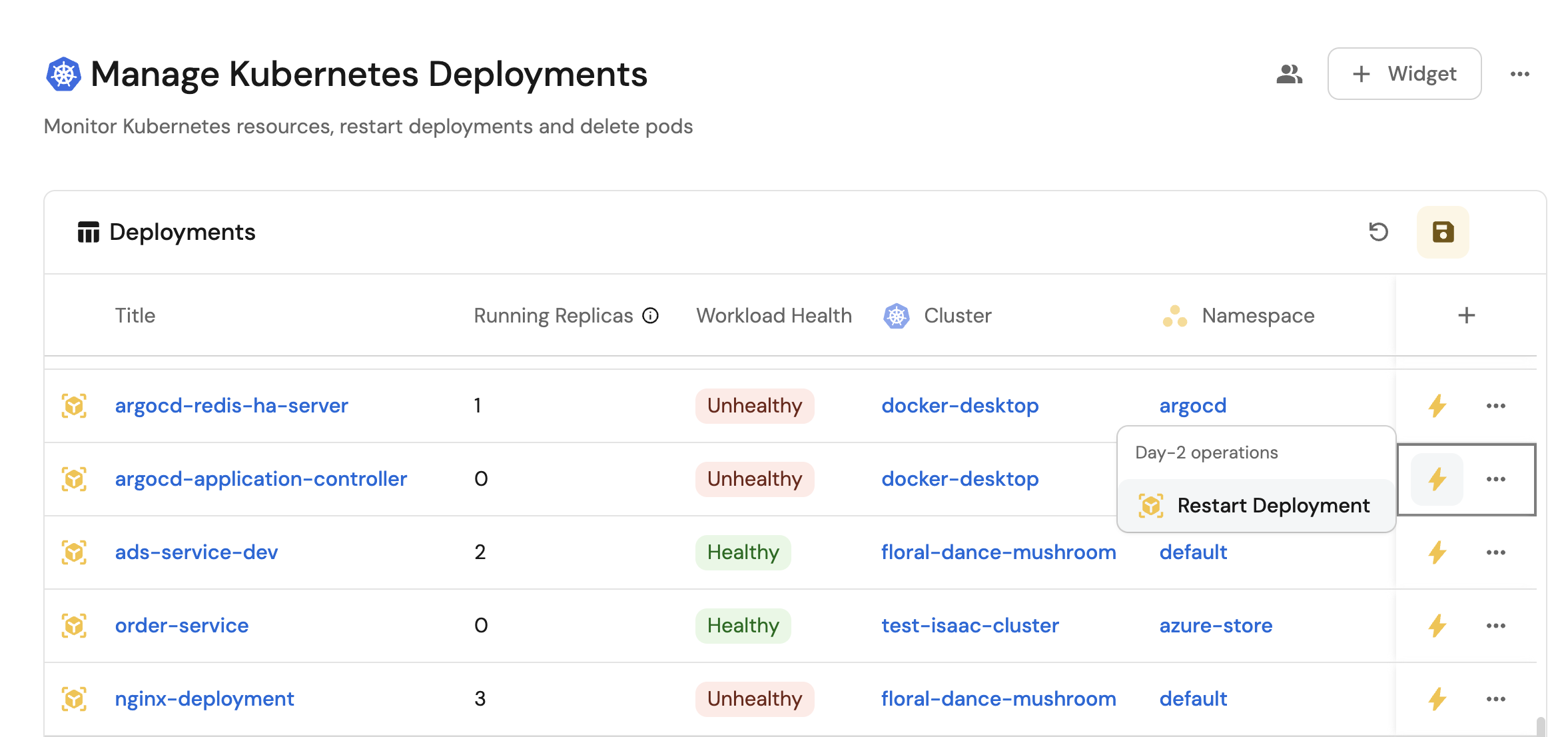
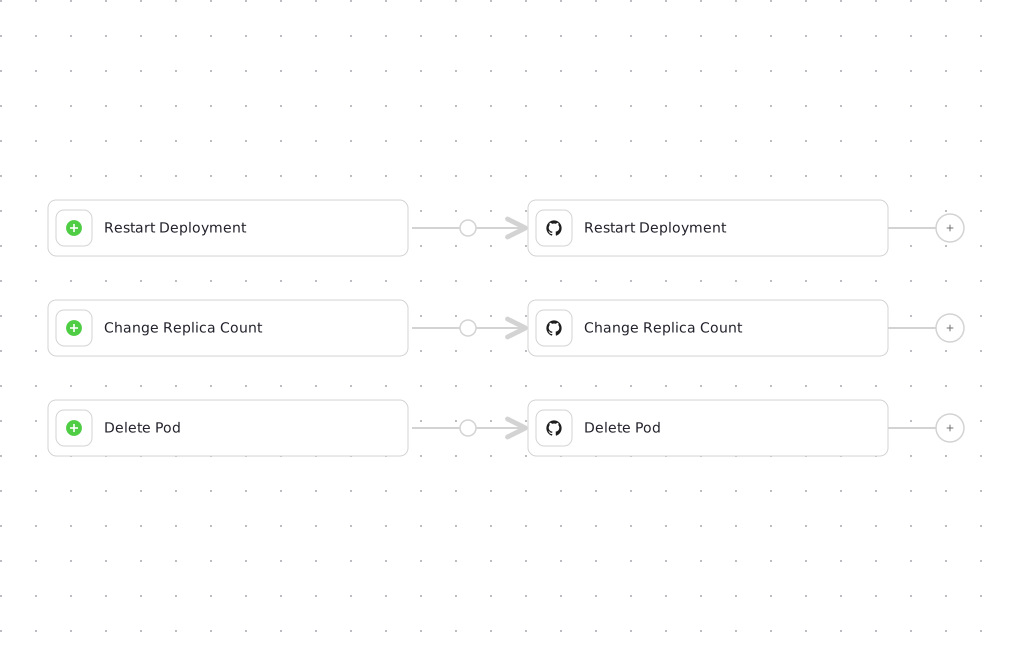
How it works
The workflow chains three independent branches. Each one starts from its own self-service trigger, reachable from the ⚡ bolt menu on the relevant entity, and dispatches a GitHub Actions workflow through a GitHub integration action node:
- Restart Deployment - triggered on a
k8s_workloadentity, restarts the underlying Deployment, StatefulSet, or DaemonSet. - Change Replica Count - triggered on a
k8s_workloadentity, collects a new replica count and opens a pull request updating the workload's deployment manifest, located using the workload's namespace and name. - Delete Pod - triggered on a
k8s_podentity, deletes the pod so it can be recreated by its owning workload.
Workflows dispatch GitHub Actions using integration action nodes, which only support GitHub today. If your Kubernetes automation pipelines live in GitLab, Bitbucket, or Azure DevOps, trigger them from a webhook node instead, and note that org secrets (not the installed integration) will need to carry the pipeline credentials.
Common use cases
- Monitor the status and health of all Kubernetes deployments and pods across clusters from a single interface.
- Give developers self-service triggers to restart deployments, change replica counts, and manage pods, without leaving Port.
Prerequisites
This guide assumes the following:
- You have a Port account and have completed the onboarding process.
- Port's Kubernetes integration is installed in your account.
- GitHub Ocean integration is installed.
Set up GitHub workflows
We will create three GitHub Actions workflows that the Port workflow dispatches through the GitHub Ocean integration:
- Restart a Kubernetes deployment.
- Change a Kubernetes deployment replica count.
- Delete a Kubernetes pod.
We recommend creating a dedicated repository for the workflows that are used by Port actions.
Add GitHub secrets
In your GitHub repository, go to Settings > Secrets and add the following secrets:
PORT_CLIENT_ID- Port Client ID learn more. Used by all three workflows to fetch the entity's properties from Port.PORT_CLIENT_SECRET- Port Client Secret learn more.MY_GITHUB_TOKEN- a classic personal access token with repository access. This is required only for the replica count workflow because it opens and optionally merges a pull request.
Every dispatch node sets reportWorkflowStatus: true, so Port watches the GitHub Actions run and updates the workflow node's result automatically when it finishes. There is no need to call Port's API to report progress or status from inside the GitHub Actions workflows below.
Configure Kubernetes authentication
Choose one of the following authentication methods based on your cluster setup:
- GKE
- EKS
- AKS
- Local (Kubeconfig)
This approach uses Google Cloud's authentication for GKE clusters.
-
Create a GCP service account in the Google Cloud Console:
- Go to IAM & Admin → Service Accounts.
- Click Create Service Account.
- Name it
github-actionsand add a description. - Grant the following roles:
- Kubernetes Engine Cluster Viewer (
roles/container.clusterViewer). - Kubernetes Engine Admin (
roles/container.admin).
- Kubernetes Engine Cluster Viewer (
-
Create a service account key:
- In the service account details, go to the Keys tab.
- Click Add Key → Create new key.
- Choose JSON format and download the key file.
-
Add to GitHub secrets:
GCP_SERVICE_ACCOUNT_KEY- The service account key JSON (minified to a single line).GCP_CLUSTER_LOCATION- The location of your cluster.
To avoid aggressive log sanitization, minify your service account JSON into a single line before storing it as a GitHub secret. You can use an online tool or the following command to minify the json:
jq -c '.' your-service-account-key.json | pbcopy
This approach uses AWS authentication for EKS clusters.
-
Create an IAM user in the AWS Console:
- Go to IAM → Users.
- Click Create user.
- Name it
github-actions-k8s. - Attach the AmazonEKSClusterPolicy managed policy.
-
Add the user to EKS Access Entries:
- Go to your EKS cluster console.
- Navigate to Access → IAM access entries.
- Click Create access entry.
- Select your IAM user and grant AmazonEKSAdminPolicy.
-
Create a cluster role binding for Kubernetes API access in your connected cluster:
Cluster role binding manifest (click to expand)
apiVersion: rbac.authorization.k8s.io/v1kind: ClusterRoleBindingmetadata:name: github-actions-admin-bindingroleRef:apiGroup: rbac.authorization.k8s.iokind: ClusterRolename: cluster-adminsubjects:- kind: Username: "arn:aws:iam::YOUR_ACCOUNT_ID:user/github-actions-k8s"apiGroup: rbac.authorization.k8s.io -
Create access keys for the IAM user:
- In the IAM user details, go to the Security credentials tab.
- Click Create access key.
- Choose Command Line Interface (CLI) and download the credentials.
-
Add to GitHub secrets:
AWS_ACCESS_KEY_ID- AWS access key ID.AWS_SECRET_ACCESS_KEY- AWS secret access key.AWS_REGION- Your AWS region.
This approach uses Azure authentication for AKS clusters.
-
Create a service principal in the Azure Portal:
- Go to Azure Active Directory → App registrations.
- Click New registration.
- Name it
github-actions-aks. - Select Accounts in this organizational directory only.
- Click Register.
-
Create a client secret:
- In the app registration, go to Manage → Certificates & secrets.
- Click New client secret.
- Add a description and set expiration.
- Copy the secret value immediately (you won't be able to see it again).
-
Assign Azure roles to the service principal:
- Go to Subscriptions → Your subscription → Access control (IAM).
- Click Add → Add role assignment.
- Select
ContributororAzure Kubernetes Service Cluster User Rolerole. - Search for and select your service principal.
- Click Save.
-
Add to GitHub secrets:
AZURE_CLIENT_ID- Azure service principal client ID.AZURE_CLIENT_SECRET- Azure service principal client secret.AZURE_TENANT_ID- Azure tenant ID.AZURE_SUBSCRIPTION_ID- Azure subscription ID.AZURE_RESOURCE_GROUP- Azure resource group.
This approach uses a local kubeconfig file for authentication with a self-hosted runner.
This approach stores sensitive credentials in GitHub secrets and should only be used for testing or development environments.
Since GitHub's hosted runners cannot access localhost clusters, you will need to set up a self-hosted runner on a machine that can access your local Kubernetes cluster. Follow the GitHub documentation to add a self-hosted runner to your repository.
-
Set up a self-hosted runner:
- Follow the GitHub documentation to add a self-hosted runner.
- Ensure the runner machine has access to your local Kubernetes cluster.
- Verify the runner is connected and ready in your repository settings.
-
Encode your kubeconfig:
cat ~/.kube/config | base64 | pbcopy
- Add to GitHub secrets:
KUBECONFIG- Your base64 encoded kubeconfig
The workflows below read the workload's namespace, kind, and cluster name (and the pod's namespace and cluster name) from properties.namespace, properties.kind, and properties.cluster on the entity Port returns. Confirm these property names match your own Kubernetes integration mapping, and adjust the jq expressions below if they differ.
Restart a Kubernetes deployment
Add GitHub workflow
Create the file .github/workflows/restart-k8s-deployment.yaml in the .github/workflows folder of your repository.
- GKE
- EKS
- AKS
- Local (Kubeconfig)
Restart GKE Deployment GitHub workflow (click to expand)
name: Restart GKE Deployment

on:
  workflow_dispatch:
    inputs:
      workload_identifier:
        required: true
        description: 'Port identifier of the workload entity'
        type: string

jobs:
  restart-deployment:
    runs-on: ubuntu-latest
    steps:
      - uses: 'actions/checkout@v6'

      - name: Get workload entity from Port
        id: get-workload
        uses: port-labs/port-github-action@v1
        with:
          clientId: ${{ secrets.PORT_CLIENT_ID }}
          clientSecret: ${{ secrets.PORT_CLIENT_SECRET }}
          baseUrl: https://api.port.io
          operation: GET
          blueprint: k8s_workload
          identifier: ${{ inputs.workload_identifier }}

      - id: 'auth'
        uses: 'google-github-actions/auth@v2'
        with:
          credentials_json: '${{ secrets.GCP_SERVICE_ACCOUNT_KEY }}'

      - id: 'get-credentials'
        uses: 'google-github-actions/get-gke-credentials@v2'
        with:
          cluster_name: ${{ fromJson(steps.get-workload.outputs.entity).properties.cluster }}
          location: '${{ secrets.GCP_CLUSTER_LOCATION }}'

      - name: Restart Kubernetes workload
        run: |
          WORKLOAD_NAME=$(echo '${{ steps.get-workload.outputs.entity }}' | jq -r '.title')
          NAMESPACE=$(echo '${{ steps.get-workload.outputs.entity }}' | jq -r '.properties.namespace')
          WORKLOAD_TYPE=$(echo '${{ steps.get-workload.outputs.entity }}' | jq -r '.properties.kind')

          case $WORKLOAD_TYPE in
            Deployment)
              kubectl rollout restart deployment/$WORKLOAD_NAME -n $NAMESPACE
              kubectl rollout status deployment/$WORKLOAD_NAME -n $NAMESPACE --timeout=300s
              ;;
            StatefulSet)
              kubectl rollout restart statefulset/$WORKLOAD_NAME -n $NAMESPACE
              kubectl rollout status statefulset/$WORKLOAD_NAME -n $NAMESPACE --timeout=300s
              ;;
            DaemonSet)
              kubectl rollout restart daemonset/$WORKLOAD_NAME -n $NAMESPACE
              kubectl rollout status daemonset/$WORKLOAD_NAME -n $NAMESPACE --timeout=300s
              ;;
            *)
              echo "Unsupported workload type: $WORKLOAD_TYPE"
              exit 1
              ;;
          esac

      - name: Verify workload health
        run: |
          WORKLOAD_NAME=$(echo '${{ steps.get-workload.outputs.entity }}' | jq -r '.title')
          NAMESPACE=$(echo '${{ steps.get-workload.outputs.entity }}' | jq -r '.properties.namespace')
          WORKLOAD_TYPE=$(echo '${{ steps.get-workload.outputs.entity }}' | jq -r '.properties.kind')

          kubectl get $WORKLOAD_TYPE $WORKLOAD_NAME -n $NAMESPACE
          kubectl get pods -l app=$WORKLOAD_NAME -n $NAMESPACE
Restart EKS Deployment GitHub workflow (click to expand)
name: Restart EKS Deployment

on:
  workflow_dispatch:
    inputs:
      workload_identifier:
        required: true
        description: 'Port identifier of the workload entity'
        type: string

jobs:
  restart-deployment:
    runs-on: ubuntu-latest
    steps:
      - uses: 'actions/checkout@v6'

      - name: Get workload entity from Port
        id: get-workload
        uses: port-labs/port-github-action@v1
        with:
          clientId: ${{ secrets.PORT_CLIENT_ID }}
          clientSecret: ${{ secrets.PORT_CLIENT_SECRET }}
          baseUrl: https://api.port.io
          operation: GET
          blueprint: k8s_workload
          identifier: ${{ inputs.workload_identifier }}

      - name: Configure AWS credentials
        uses: aws-actions/configure-aws-credentials@v4
        with:
          aws-access-key-id: ${{ secrets.AWS_ACCESS_KEY_ID }}
          aws-secret-access-key: ${{ secrets.AWS_SECRET_ACCESS_KEY }}
          aws-region: ${{ secrets.AWS_REGION }}

      - name: Update EKS Kubeconfig
        run: aws eks --region ${{ secrets.AWS_REGION }} update-kubeconfig --name ${{ fromJson(steps.get-workload.outputs.entity).properties.cluster }}

      - name: Restart Kubernetes workload
        run: |
          WORKLOAD_NAME=$(echo '${{ steps.get-workload.outputs.entity }}' | jq -r '.title')
          NAMESPACE=$(echo '${{ steps.get-workload.outputs.entity }}' | jq -r '.properties.namespace')
          WORKLOAD_TYPE=$(echo '${{ steps.get-workload.outputs.entity }}' | jq -r '.properties.kind')

          case $WORKLOAD_TYPE in
            Deployment)
              kubectl rollout restart deployment/$WORKLOAD_NAME -n $NAMESPACE
              kubectl rollout status deployment/$WORKLOAD_NAME -n $NAMESPACE --timeout=300s
              ;;
            StatefulSet)
              kubectl rollout restart statefulset/$WORKLOAD_NAME -n $NAMESPACE
              kubectl rollout status statefulset/$WORKLOAD_NAME -n $NAMESPACE --timeout=300s
              ;;
            DaemonSet)
              kubectl rollout restart daemonset/$WORKLOAD_NAME -n $NAMESPACE
              kubectl rollout status daemonset/$WORKLOAD_NAME -n $NAMESPACE --timeout=300s
              ;;
            *)
              echo "Unsupported workload type: $WORKLOAD_TYPE"
              exit 1
              ;;
          esac

      - name: Verify workload health
        run: |
          WORKLOAD_NAME=$(echo '${{ steps.get-workload.outputs.entity }}' | jq -r '.title')
          NAMESPACE=$(echo '${{ steps.get-workload.outputs.entity }}' | jq -r '.properties.namespace')
          WORKLOAD_TYPE=$(echo '${{ steps.get-workload.outputs.entity }}' | jq -r '.properties.kind')

          kubectl get $WORKLOAD_TYPE $WORKLOAD_NAME -n $NAMESPACE
          kubectl get pods -l app=$WORKLOAD_NAME -n $NAMESPACE
Restart AKS Deployment GitHub workflow (click to expand)
name: Restart AKS Deployment

on:
  workflow_dispatch:
    inputs:
      workload_identifier:
        required: true
        description: 'Port identifier of the workload entity'
        type: string

jobs:
  restart-deployment:
    runs-on: ubuntu-latest
    steps:
      - uses: 'actions/checkout@v6'

      - name: Get workload entity from Port
        id: get-workload
        uses: port-labs/port-github-action@v1
        with:
          clientId: ${{ secrets.PORT_CLIENT_ID }}
          clientSecret: ${{ secrets.PORT_CLIENT_SECRET }}
          baseUrl: https://api.port.io
          operation: GET
          blueprint: k8s_workload
          identifier: ${{ inputs.workload_identifier }}

      - name: Azure Login
        uses: azure/login@v2
        with:
          creds: '{"clientId":"${{ secrets.AZURE_CLIENT_ID }}","clientSecret":"${{ secrets.AZURE_CLIENT_SECRET }}","subscriptionId":"${{ secrets.AZURE_SUBSCRIPTION_ID }}","tenantId":"${{ secrets.AZURE_TENANT_ID }}"}'

      - uses: azure/aks-set-context@v4
        with:
           resource-group: '${{ secrets.AZURE_RESOURCE_GROUP }}'
           cluster-name: ${{ fromJson(steps.get-workload.outputs.entity).properties.cluster }}

      - name: Restart Kubernetes workload
        run: |
          WORKLOAD_NAME=$(echo '${{ steps.get-workload.outputs.entity }}' | jq -r '.title')
          NAMESPACE=$(echo '${{ steps.get-workload.outputs.entity }}' | jq -r '.properties.namespace')
          WORKLOAD_TYPE=$(echo '${{ steps.get-workload.outputs.entity }}' | jq -r '.properties.kind')

          case $WORKLOAD_TYPE in
            Deployment)
              kubectl rollout restart deployment/$WORKLOAD_NAME -n $NAMESPACE
              kubectl rollout status deployment/$WORKLOAD_NAME -n $NAMESPACE --timeout=300s
              ;;
            StatefulSet)
              kubectl rollout restart statefulset/$WORKLOAD_NAME -n $NAMESPACE
              kubectl rollout status statefulset/$WORKLOAD_NAME -n $NAMESPACE --timeout=300s
              ;;
            DaemonSet)
              kubectl rollout restart daemonset/$WORKLOAD_NAME -n $NAMESPACE
              kubectl rollout status daemonset/$WORKLOAD_NAME -n $NAMESPACE --timeout=300s
              ;;
            *)
              echo "Unsupported workload type: $WORKLOAD_TYPE"
              exit 1
              ;;
          esac

      - name: Verify workload health
        run: |
          WORKLOAD_NAME=$(echo '${{ steps.get-workload.outputs.entity }}' | jq -r '.title')
          NAMESPACE=$(echo '${{ steps.get-workload.outputs.entity }}' | jq -r '.properties.namespace')
          WORKLOAD_TYPE=$(echo '${{ steps.get-workload.outputs.entity }}' | jq -r '.properties.kind')

          kubectl get $WORKLOAD_TYPE $WORKLOAD_NAME -n $NAMESPACE
          kubectl get pods -l app=$WORKLOAD_NAME -n $NAMESPACE
Restart Local Deployment GitHub workflow (click to expand)
name: Restart Local Deployment

on:
  workflow_dispatch:
    inputs:
      workload_identifier:
        required: true
        description: 'Port identifier of the workload entity'
        type: string

jobs:
  restart-deployment:
    runs-on: self-hosted
    steps:
      - uses: 'actions/checkout@v6'

      - name: Get workload entity from Port
        id: get-workload
        uses: port-labs/port-github-action@v1
        with:
          clientId: ${{ secrets.PORT_CLIENT_ID }}
          clientSecret: ${{ secrets.PORT_CLIENT_SECRET }}
          baseUrl: https://api.port.io
          operation: GET
          blueprint: k8s_workload
          identifier: ${{ inputs.workload_identifier }}

      - name: Configure kubectl
        run: |
          echo "${{ secrets.KUBECONFIG }}" | base64 -d > kubeconfig.yaml
          echo "KUBECONFIG=$(pwd)/kubeconfig.yaml" >> "$GITHUB_ENV"

      - name: Restart Kubernetes workload
        run: |
          WORKLOAD_NAME=$(echo '${{ steps.get-workload.outputs.entity }}' | jq -r '.title')
          NAMESPACE=$(echo '${{ steps.get-workload.outputs.entity }}' | jq -r '.properties.namespace')
          WORKLOAD_TYPE=$(echo '${{ steps.get-workload.outputs.entity }}' | jq -r '.properties.kind')

          case $WORKLOAD_TYPE in
            Deployment)
              kubectl rollout restart deployment/$WORKLOAD_NAME -n $NAMESPACE
              kubectl rollout status deployment/$WORKLOAD_NAME -n $NAMESPACE --timeout=300s
              ;;
            StatefulSet)
              kubectl rollout restart statefulset/$WORKLOAD_NAME -n $NAMESPACE
              kubectl rollout status statefulset/$WORKLOAD_NAME -n $NAMESPACE --timeout=300s
              ;;
            DaemonSet)
              kubectl rollout restart daemonset/$WORKLOAD_NAME -n $NAMESPACE
              kubectl rollout status daemonset/$WORKLOAD_NAME -n $NAMESPACE --timeout=300s
              ;;
            *)
              echo "Unsupported workload type: $WORKLOAD_TYPE"
              exit 1
              ;;
          esac

      - name: Verify workload health
        run: |
          WORKLOAD_NAME=$(echo '${{ steps.get-workload.outputs.entity }}' | jq -r '.title')
          NAMESPACE=$(echo '${{ steps.get-workload.outputs.entity }}' | jq -r '.properties.namespace')
          WORKLOAD_TYPE=$(echo '${{ steps.get-workload.outputs.entity }}' | jq -r '.properties.kind')

          kubectl get $WORKLOAD_TYPE $WORKLOAD_NAME -n $NAMESPACE
          kubectl get pods -l app=$WORKLOAD_NAME -n $NAMESPACE
Change deployment replica count
This workflow updates the replica count in the selected workload's deployment manifest and opens a GitHub pull request with the change. You can also let it merge the pull request automatically.
Add GitHub workflow
Create the file .github/workflows/change-replica-count.yaml in the .github/workflows folder of your repository.
Change replica count GitHub workflow (click to expand)
<MANIFESTS-DIR>- the directory in this repository that holds your Kubernetes deployment manifests. The workflow expects the manifest for a workload at<MANIFESTS-DIR>/<namespace>/<workload-name>.yamland updates itsspec.replicasfield. Adjust theResolve manifest pathstep (and thepropertyPathin theCreate pull requeststep) if your repository uses a different layout.
name: Change Replica Count

on:
  workflow_dispatch:
    inputs:
      workload_identifier:
        required: true
        description: 'Port identifier of the workload entity'
        type: string
      replica_count:
        description: The new replica count for the deployment
        required: true
        type: string
      auto_merge:
        description: Whether the created PR should be merged automatically
        required: true
        type: boolean

jobs:
  change-replica-count:
    runs-on: ubuntu-latest
    steps:
      - uses: actions/checkout@v6

      - name: Get workload entity from Port
        id: get-workload
        uses: port-labs/port-github-action@v1
        with:
          clientId: ${{ secrets.PORT_CLIENT_ID }}
          clientSecret: ${{ secrets.PORT_CLIENT_SECRET }}
          baseUrl: https://api.port.io
          operation: GET
          blueprint: k8s_workload
          identifier: ${{ inputs.workload_identifier }}

      - name: Resolve manifest path
        id: manifest
        run: |
          WORKLOAD_NAME=$(echo '${{ steps.get-workload.outputs.entity }}' | jq -r '.title')
          NAMESPACE=$(echo '${{ steps.get-workload.outputs.entity }}' | jq -r '.properties.namespace')
          echo "workload_name=$WORKLOAD_NAME" >> "$GITHUB_OUTPUT"
          echo "path=<MANIFESTS-DIR>/$NAMESPACE/$WORKLOAD_NAME.yaml" >> "$GITHUB_OUTPUT"

      - name: Create pull request
        id: create-pr
        uses: fjogeleit/yaml-update-action@main
        with:
          valueFile: ${{ steps.manifest.outputs.path }}
          propertyPath: 'spec.replicas'
          value: "!!int '${{ github.event.inputs.replica_count }}'"
          commitChange: true
          token: ${{ secrets.MY_GITHUB_TOKEN }}
          targetBranch: main
          masterBranchName: main
          createPR: true
          branch: scale/${{ steps.manifest.outputs.workload_name }}-${{ github.run_id }}
          message: 'Scale ${{ steps.manifest.outputs.workload_name }} to ${{ github.event.inputs.replica_count }} replicas'

      - name: Merge pull request
        if: ${{ github.event.inputs.auto_merge == 'true' && steps.create-pr.outcome == 'success' }}
        env:
          GH_TOKEN: ${{ secrets.MY_GITHUB_TOKEN }}
          PR_URL: ${{ fromJson(steps.create-pr.outputs.pull_request).url }}
        run: |
          HTTP_STATUS=$(curl -s -o /dev/null -w "%{http_code}" \
            -X PUT \
            -H "Accept: application/vnd.github+json" \
            -H "Authorization: Bearer $GH_TOKEN" \
            "$PR_URL/merge")

          echo "HTTP Status: $HTTP_STATUS"

          if [ "$HTTP_STATUS" -eq 200 ]; then
            echo "Pull request merged successfully."
          else
            echo "Failed to merge PR. HTTP Status: $HTTP_STATUS"
            exit 1
          fi
Delete a Kubernetes pod
Add GitHub workflow
Create the file .github/workflows/delete-k8s-pod.yaml in the .github/workflows folder of your repository.
- GKE
- EKS
- AKS
- Local (Kubeconfig)
Delete GKE Pod GitHub workflow (click to expand)
name: Delete GKE Pod

on:
  workflow_dispatch:
    inputs:
      pod_identifier:
        required: true
        description: 'Port identifier of the pod entity'
        type: string

jobs:
  delete-pod:
    runs-on: ubuntu-latest
    steps:
      - uses: 'actions/checkout@v6'

      - name: Get pod entity from Port
        id: get-pod
        uses: port-labs/port-github-action@v1
        with:
          clientId: ${{ secrets.PORT_CLIENT_ID }}
          clientSecret: ${{ secrets.PORT_CLIENT_SECRET }}
          baseUrl: https://api.port.io
          operation: GET
          blueprint: k8s_pod
          identifier: ${{ inputs.pod_identifier }}

      - id: 'auth'
        uses: 'google-github-actions/auth@v2'
        with:
          credentials_json: '${{ secrets.GCP_SERVICE_ACCOUNT_KEY }}'

      - name: Set up Cloud SDK
        uses: google-github-actions/setup-gcloud@v2

      - id: 'get-credentials'
        uses: 'google-github-actions/get-gke-credentials@v2'
        with:
          cluster_name: ${{ fromJson(steps.get-pod.outputs.entity).properties.cluster }}
          location: '${{ secrets.GCP_CLUSTER_LOCATION }}'

      - name: Delete Kubernetes pod
        run: |
          POD_NAME=$(echo '${{ steps.get-pod.outputs.entity }}' | jq -r '.title')
          NAMESPACE=$(echo '${{ steps.get-pod.outputs.entity }}' | jq -r '.properties.namespace')
          kubectl delete pod $POD_NAME -n $NAMESPACE
Delete EKS Pod GitHub workflow (click to expand)
name: Delete EKS Pod

on:
  workflow_dispatch:
    inputs:
      pod_identifier:
        required: true
        description: 'Port identifier of the pod entity'
        type: string

jobs:
  delete-pod:
    runs-on: ubuntu-latest
    steps:
      - uses: 'actions/checkout@v6'

      - name: Get pod entity from Port
        id: get-pod
        uses: port-labs/port-github-action@v1
        with:
          clientId: ${{ secrets.PORT_CLIENT_ID }}
          clientSecret: ${{ secrets.PORT_CLIENT_SECRET }}
          baseUrl: https://api.port.io
          operation: GET
          blueprint: k8s_pod
          identifier: ${{ inputs.pod_identifier }}

      - name: Configure AWS credentials
        uses: aws-actions/configure-aws-credentials@v4
        with:
          aws-access-key-id: ${{ secrets.AWS_ACCESS_KEY_ID }}
          aws-secret-access-key: ${{ secrets.AWS_SECRET_ACCESS_KEY }}
          aws-region: ${{ secrets.AWS_REGION }}

      - name: Update EKS Kubeconfig
        run: aws eks --region ${{ secrets.AWS_REGION }} update-kubeconfig --name ${{ fromJson(steps.get-pod.outputs.entity).properties.cluster }}

      - name: Delete Kubernetes pod
        run: |
          POD_NAME=$(echo '${{ steps.get-pod.outputs.entity }}' | jq -r '.title')
          NAMESPACE=$(echo '${{ steps.get-pod.outputs.entity }}' | jq -r '.properties.namespace')
          kubectl delete pod $POD_NAME -n $NAMESPACE
Delete AKS Pod GitHub workflow (click to expand)
name: Delete AKS Pod

on:
  workflow_dispatch:
    inputs:
      pod_identifier:
        required: true
        description: 'Port identifier of the pod entity'
        type: string

jobs:
  delete-pod:
    runs-on: ubuntu-latest
    steps:
      - uses: 'actions/checkout@v6'

      - name: Get pod entity from Port
        id: get-pod
        uses: port-labs/port-github-action@v1
        with:
          clientId: ${{ secrets.PORT_CLIENT_ID }}
          clientSecret: ${{ secrets.PORT_CLIENT_SECRET }}
          baseUrl: https://api.port.io
          operation: GET
          blueprint: k8s_pod
          identifier: ${{ inputs.pod_identifier }}

      - name: Azure Login
        uses: azure/login@v2
        with:
          creds: '{"clientId":"${{ secrets.AZURE_CLIENT_ID }}","clientSecret":"${{ secrets.AZURE_CLIENT_SECRET }}","subscriptionId":"${{ secrets.AZURE_SUBSCRIPTION_ID }}","tenantId":"${{ secrets.AZURE_TENANT_ID }}"}'

      - uses: azure/aks-set-context@v4
        with:
           resource-group: '${{ secrets.AZURE_RESOURCE_GROUP }}'
           cluster-name: ${{ fromJson(steps.get-pod.outputs.entity).properties.cluster }}

      - name: Delete Kubernetes pod
        run: |
          POD_NAME=$(echo '${{ steps.get-pod.outputs.entity }}' | jq -r '.title')
          NAMESPACE=$(echo '${{ steps.get-pod.outputs.entity }}' | jq -r '.properties.namespace')
          kubectl delete pod $POD_NAME -n $NAMESPACE
Delete Local Pod GitHub workflow (click to expand)
name: Delete Local Pod

on:
  workflow_dispatch:
    inputs:
      pod_identifier:
        required: true
        description: 'Port identifier of the pod entity'
        type: string

jobs:
  delete-pod:
    runs-on: self-hosted
    steps:
      - uses: 'actions/checkout@v6'

      - name: Get pod entity from Port
        id: get-pod
        uses: port-labs/port-github-action@v1
        with:
          clientId: ${{ secrets.PORT_CLIENT_ID }}
          clientSecret: ${{ secrets.PORT_CLIENT_SECRET }}
          baseUrl: https://api.port.io
          operation: GET
          blueprint: k8s_pod
          identifier: ${{ inputs.pod_identifier }}

      - name: Configure kubectl
        run: |
          echo "${{ secrets.KUBECONFIG }}" | base64 -d > kubeconfig.yaml
          echo "KUBECONFIG=$(pwd)/kubeconfig.yaml" >> "$GITHUB_ENV"

      - name: Delete Kubernetes pod
        run: |
          POD_NAME=$(echo '${{ steps.get-pod.outputs.entity }}' | jq -r '.title')
          NAMESPACE=$(echo '${{ steps.get-pod.outputs.entity }}' | jq -r '.properties.namespace')
          kubectl delete pod $POD_NAME -n $NAMESPACE
Build the workflow
Now we will build the single workflow that ties all three triggers together.
-
Go to the workflows page in Port.
-
Click + Workflow.
-
Fill out the Create new workflow form, then click Confirm.
-
Click the
{...}button to open the JSON editor and paste the workflow JSON below:Manage Kubernetes workloads workflow JSON (click to expand)
Replace the variablesIn each of the three integration action nodes (
restart_deployment,change_replica_count,delete_pod), replace<YOUR_GITHUB_OCEAN_INTEGRATION_ID>,<GITHUB-ORG>, and<GITHUB-REPO>with your GitHub Ocean integration ID and the organization and repository where the GitHub Actions workflows live. You can find the integration ID on the Connectors page in Port.{"identifier": "manage_k8s_workloads","title": "Manage Kubernetes Workloads","icon": "Cluster","description": "Day-2 operations for Kubernetes. Use this workflow when asked to restart a workload, scale a deployment up or down, or delete a pod. Each operation has its own trigger: Restart Deployment and Change Replica Count operate on k8s_workload entities, Delete Pod operates on k8s_pod entities.","nodes": [{"identifier": "restart_trigger","title": "Restart Deployment","icon": "Cluster","description": "Perform a rolling restart of a Kubernetes workload (Deployment, StatefulSet, or DaemonSet). Use when asked to restart, recycle, or bounce a workload, or when it is stuck with stale configuration.","config": {"type": "SELF_SERVE_TRIGGER","contexts": [{"on": "ENTITY","userInput": "workload"}],"userInputs": {"properties": {"workload": {"type": "string","format": "entity","blueprint": "k8s_workload","title": "Workload","description": "The Kubernetes workload to restart. Use the entity's identifier from the k8s_workload blueprint."}},"required": ["workload"]}},"variables": {}},{"identifier": "restart_deployment","title": "Restart Deployment","icon": "Github","description": "Dispatch the GitHub Actions workflow that restarts the workload","config": {"type": "INTEGRATION_ACTION","installationId": "<YOUR_GITHUB_OCEAN_INTEGRATION_ID>","integrationProvider": "github-ocean","integrationInvocationType": "dispatch_workflow","integrationActionExecutionProperties": {"org": "<GITHUB-ORG>","repo": "<GITHUB-REPO>","workflow": "restart-k8s-deployment.yaml","workflowInputs": {"workload_identifier": "{{ .outputs.trigger.workload }}"},"reportWorkflowStatus": true}},"variables": {}},{"identifier": "replica_count_trigger","title": "Change Replica Count","icon": "Cluster","description": "Change a Kubernetes workload's replica count by opening a pull request against its deployment manifest. Use when asked to scale a workload up or down.","config": {"type": "SELF_SERVE_TRIGGER","contexts": [{"on": "ENTITY","userInput": "workload"}],"userInputs": {"properties": {"workload": {"type": "string","format": "entity","blueprint": "k8s_workload","title": "Workload","description": "The Kubernetes workload to scale. Use the entity's identifier from the k8s_workload blueprint."},"replica_count": {"icon": "DefaultProperty","title": "Number of replicas","type": "number","description": "The desired number of replicas, for example 3."},"auto_merge": {"title": "Auto merge","type": "boolean","default": false,"description": "Whether the created pull request should be merged automatically"}},"required": ["workload","replica_count"],"order": ["workload","replica_count","auto_merge"]}},"variables": {}},{"identifier": "change_replica_count","title": "Change Replica Count","icon": "Github","description": "Dispatch the GitHub Actions workflow that opens a pull request updating the selected workload's manifest","config": {"type": "INTEGRATION_ACTION","installationId": "<YOUR_GITHUB_OCEAN_INTEGRATION_ID>","integrationProvider": "github-ocean","integrationInvocationType": "dispatch_workflow","integrationActionExecutionProperties": {"org": "<GITHUB-ORG>","repo": "<GITHUB-REPO>","workflow": "change-replica-count.yaml","workflowInputs": {"workload_identifier": "{{ .outputs.trigger.workload }}","replica_count": "{{ .outputs.trigger.replica_count | tostring }}","auto_merge": "{{ .outputs.trigger.auto_merge | tostring }}"},"reportWorkflowStatus": true}},"variables": {}},{"identifier": "delete_pod_trigger","title": "Delete Pod","icon": "Cluster","description": "Delete a Kubernetes pod so its owning workload recreates it. Use for a single misbehaving pod; to restart all of a workload's pods, use the Restart Deployment trigger instead.","config": {"type": "SELF_SERVE_TRIGGER","contexts": [{"on": "ENTITY","userInput": "pod"}],"userInputs": {"properties": {"pod": {"type": "string","format": "entity","blueprint": "k8s_pod","title": "Pod","description": "The Kubernetes pod to delete. Use the entity's identifier from the k8s_pod blueprint."}},"required": ["pod"]}},"variables": {}},{"identifier": "delete_pod","title": "Delete Pod","icon": "Github","description": "Dispatch the GitHub Actions workflow that deletes the pod","config": {"type": "INTEGRATION_ACTION","installationId": "<YOUR_GITHUB_OCEAN_INTEGRATION_ID>","integrationProvider": "github-ocean","integrationInvocationType": "dispatch_workflow","integrationActionExecutionProperties": {"org": "<GITHUB-ORG>","repo": "<GITHUB-REPO>","workflow": "delete-k8s-pod.yaml","workflowInputs": {"pod_identifier": "{{ .outputs.trigger.pod }}"},"reportWorkflowStatus": true}},"variables": {}}],"connections": [{"sourceIdentifier": "restart_trigger","targetIdentifier": "restart_deployment"},{"sourceIdentifier": "replica_count_trigger","targetIdentifier": "change_replica_count"},{"sourceIdentifier": "delete_pod_trigger","targetIdentifier": "delete_pod"}]} -
Click Apply changes.
A few things worth noting in this workflow:
- Three independent branches, one workflow:
restart_trigger,replica_count_trigger, anddelete_pod_triggerdon't connect to each other. Each is its own bolt-menu entry point, and every run follows exactly one branch from trigger to dispatch. .outputs.triggeralways resolves to whichever trigger fired: this is why every dispatch node can reference{{ .outputs.trigger.workload }}(or.pod) regardless of which of the three triggers started the run. See multiple triggers.- Entity-picker inputs pass only the identifier: unlike the old self-service action, which received the full entity JSON, a
format: entityinput resolves to just the entity's identifier. That's why each GitHub Actions backend now fetches the entity itself withport-labs/port-github-action@v1(operation: GET) before reading its properties. - Descriptions double as tool definitions: the workflow, trigger, and input descriptions are written as instructions to an AI agent - what each operation does, when to use it, and how to resolve each input. This is what makes the workflow usable from agents, as described in the next section.
Trigger from AI agents
Every self-service workflow in Port is automatically exposed as an invokable tool through the Port MCP server. An AI agent connected to Port discovers the three triggers with list_self_service_triggers, reads their descriptions and input schemas, and executes them with trigger_run, so developers can manage deployments from their IDE or chat without opening Port's UI.
For example, when a developer asks their agent to "restart payment-service in the staging cluster", the agent:
- Calls
list_self_service_triggersand matches the request against the Restart Deployment trigger's description. - Resolves the workload's identifier by querying the
k8s_workloadblueprint withlist_entities. - Calls
trigger_runwith the workflow identifier,nodeIdentifier, and workload input, starting the same governed run a human would start from the bolt menu.
See expose workflows as tools for how to tune the descriptions further and restrict which agents can invoke the workflow.
Let's test it
Test the restart trigger
- Go to the Self-service page of your portal (or open the ⚡ bolt menu on a
k8s_workloadentity). - Find Restart Deployment, select a workload, and click
Execute. - Follow the run in the Workflow runs tab and confirm the deployment's pods roll over in your cluster.
Test the replica count trigger
- Go to the Self-service page of your portal.
- Find Change Replica Count, select a workload, and enter the new replica count.
- Choose whether to auto-merge the pull request, then click
Execute. - Verify that GitHub creates the pull request (and merges it, if selected) with the updated replica count.
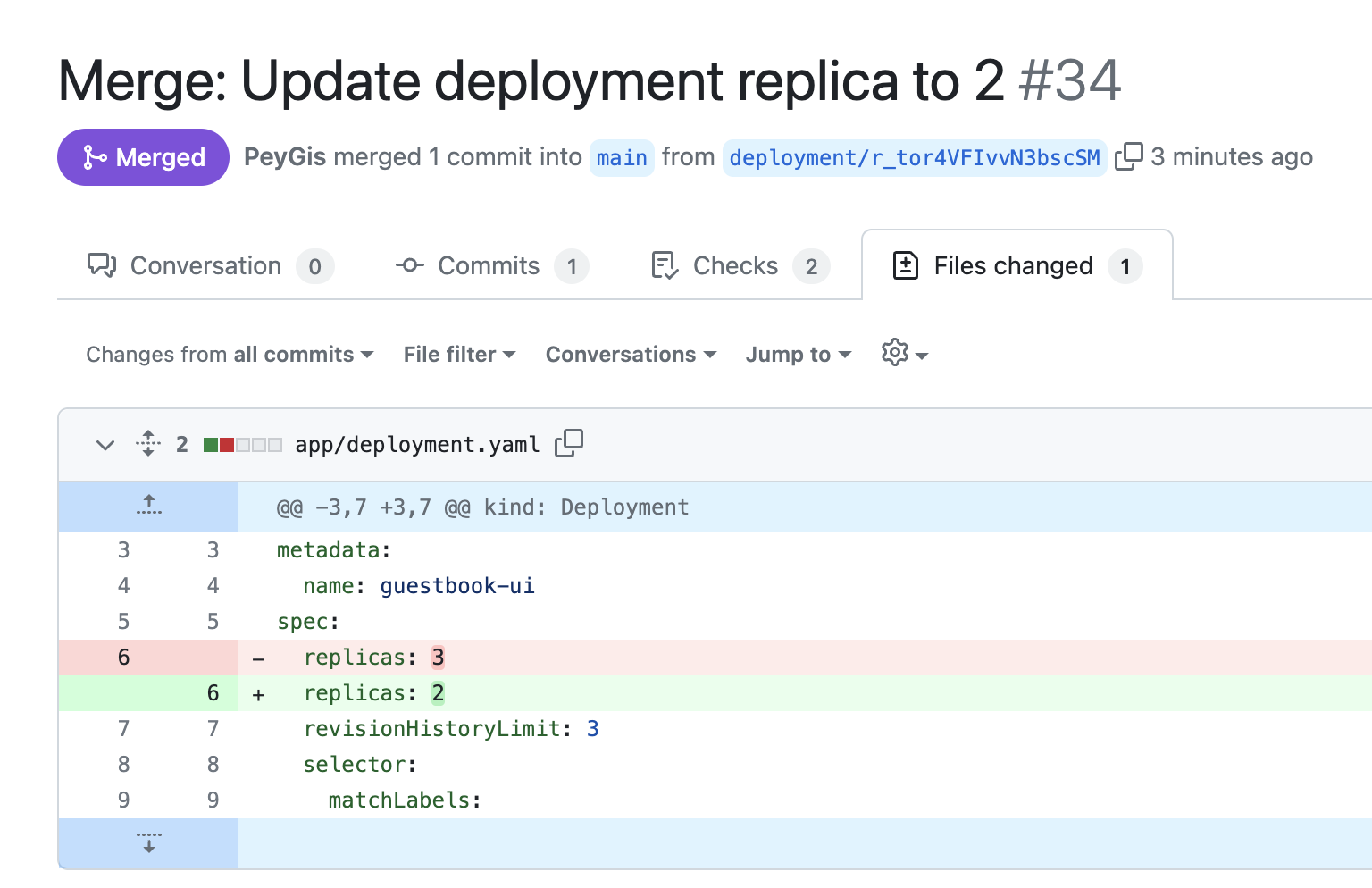
Test the delete pod trigger
- Go to the Self-service page of your portal (or open the ⚡ bolt menu on a
k8s_podentity). - Find Delete Pod, select a pod, and click
Execute. - Verify the pod is deleted from the cluster and a new one is created by its owning workload.
Related guides
- Auto-heal unhealthy Kubernetes pods - automatically diagnose and remediate unhealthy workloads with Port AI, instead of triggering fixes manually.