Manage EKS clusters
This guide demonstrates how to manage Amazon EKS clusters from Port using workflows, GitHub Actions, Terraform, and Upbound.
We will set up one EKS data model in Port, then build three workflows that cover the full cluster lifecycle: provisioning clusters with Terraform, requesting clusters through an Upbound GitOps flow, and shipping applications onto those clusters.
Common use cases
- Let developers provision EKS clusters from a single self-service trigger.
- Request clusters through an Upbound-backed GitOps flow, with Port AI triaging which requests can be approved automatically.
- Scaffold a Node.js service and deploy it to EKS in one run.
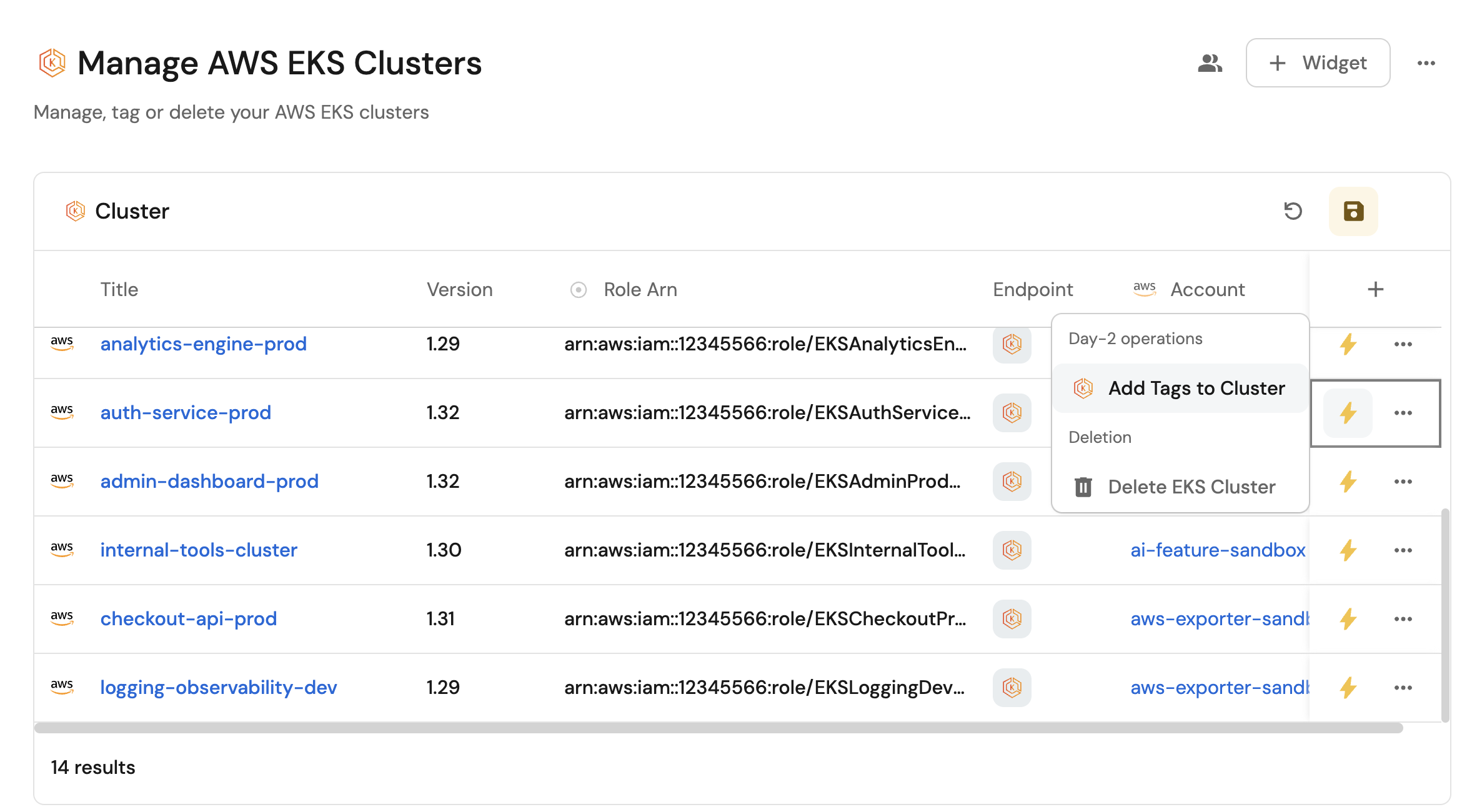
- Add tags to existing EKS clusters from Port.
- Delete EKS clusters behind an AI risk assessment that inspects the blast radius first.
Prerequisites
- Complete the Port onboarding process.
- Install Port's AWS integration.
- Install the GitHub Ocean integration and save its installation ID. You will need it when configuring the workflow nodes.
- Configure AWS credentials with permissions for the EKS operations you want to expose.
- Port AI enabled in your organization, used by the request triage and deletion risk nodes.
Workflow integration action nodes support the GitHub Ocean integration only. The older Port GitHub app has no workflow equivalent and is fully deprecated on September 15, 2026, so this guide uses GitHub Ocean throughout.
Set up the backend repository
The EKS deploy guide starter repository contains the Cookiecutter templates under app-templates and the Terraform configuration under terraform. Create your own copy from it, then add the GitHub Actions workflow files described later in this guide:
gh repo create <GITHUB_ORG>/<GITHUB_REPO> --private --clone \
  --template port-labs/eks-deploy-guide
cd <GITHUB_REPO>
mkdir -p .github/workflows .up/clusters .up/examples
Add repository secrets
Set the secrets the GitHub Actions backends need. Running these commands avoids clicking through the GitHub settings UI:
gh secret set PORT_CLIENT_ID --repo <GITHUB_ORG>/<GITHUB_REPO>
gh secret set PORT_CLIENT_SECRET --repo <GITHUB_ORG>/<GITHUB_REPO>
gh secret set AWS_ACCESS_KEY_ID --repo <GITHUB_ORG>/<GITHUB_REPO>
gh secret set AWS_SECRET_ACCESS_KEY --repo <GITHUB_ORG>/<GITHUB_REPO>
gh secret set AWS_REGION --repo <GITHUB_ORG>/<GITHUB_REPO>
gh secret set CREATOR_TOKEN --repo <GITHUB_ORG>/<GITHUB_REPO>
gh secret set UPBOUND_TOKEN --repo <GITHUB_ORG>/<GITHUB_REPO>
Each command prompts for the value, so no credential is ever written to your shell history:
PORT_CLIENT_IDandPORT_CLIENT_SECRET- See Port API credentials.AWS_ACCESS_KEY_ID,AWS_SECRET_ACCESS_KEY, andAWS_REGION- Your AWS credentials and target region, for exampleus-east-1.CREATOR_TOKEN- A GitHub fine-grained personal access token with repository administration and contents permissions.UPBOUND_TOKEN- Your Upbound API token. Only needed for the Upbound flow.
Placeholders used in this guide
Replace these values wherever they appear:
| Placeholder | Value |
|---|---|
<GITHUB_ORG> | Your GitHub organization or user name. |
<GITHUB_REPO> | The repository holding the workflow files and Terraform configuration. |
<GITHUB_OCEAN_INSTALLATION_ID> | Your GitHub Ocean integration installation ID, found on the Data sources page. |
<UPBOUND_ORG_ID> | Your Upbound organization ID. Only needed for the Upbound flow. |
Set up the data model
This guide uses four blueprints. The awsAccount blueprint is created automatically when you install the AWS integration, so only region, upbound_control_plane, eks_cluster, and eks_cluster_request need to be created.
- Create with AI
- Create manually
If you have the Port MCP server connected to your AI assistant, you can create the entire data model in one prompt instead of filling in four blueprint forms.
Paste the blueprint JSON from the Create manually tab into the prompt below, then hand it to your assistant:
Using the Port MCP server, create the following blueprints in my Port organization,
in this order so that relations resolve: region, upbound_control_plane, eks_cluster,
eks_cluster_request.

Then report back which blueprints were created and list any relation that failed to
resolve.

<paste the four blueprint JSON definitions here>
Verify the result on the Data model page before continuing.
For each blueprint below:
-
Go to the Data model page in Port.
-
Click + Blueprint.
-
Click Edit JSON.
-
Copy and paste the JSON configuration into the editor.
-
Click Save.
Create them in the order listed, so that relations resolve correctly.
Region blueprint (click to expand)
{
  "identifier": "region",
  "description": "This blueprint represents an AWS region",
  "title": "Region",
  "icon": "AWS",
  "schema": {
    "properties": {
      "link": {
        "type": "string",
        "title": "Link",
        "format": "url"
      }
    },
    "required": []
  },
  "mirrorProperties": {},
  "calculationProperties": {},
  "aggregationProperties": {},
  "relations": {}
}
Upbound control plane blueprint (click to expand)
{
  "identifier": "upbound_control_plane",
  "title": "Upbound Control Plane",
  "icon": "Cluster",
  "schema": {
    "properties": {},
    "required": []
  },
  "mirrorProperties": {},
  "calculationProperties": {},
  "relations": {}
}
EKS cluster blueprint (click to expand)
The deletion_risk_summary property stores the AI assessment produced before a cluster is deleted. Replace <GITHUB_ORG> and <GITHUB_REPO> in the claim_file_url calculation.
{
  "identifier": "eks_cluster",
  "description": "This blueprint represents an Amazon EKS cluster",
  "title": "EKS Cluster",
  "icon": "AmazonEKS",
  "schema": {
    "properties": {
      "name": {
        "type": "string",
        "title": "Name"
      },
      "version": {
        "type": "string",
        "title": "Version"
      },
      "roleArn": {
        "icon": "DefaultProperty",
        "type": "string",
        "title": "Role ARN"
      },
      "endpoint": {
        "type": "string",
        "title": "Endpoint",
        "format": "url"
      },
      "tags": {
        "items": {
          "type": "object"
        },
        "type": "array",
        "title": "Tags"
      },
      "arn": {
        "type": "string",
        "title": "ARN"
      },
      "node_count": {
        "icon": "Node",
        "title": "Node Count",
        "type": "number",
        "description": "The cluster's node count"
      },
      "node_size": {
        "icon": "Node",
        "title": "Node Size",
        "type": "string",
        "description": "The cluster's node size",
        "enum": [
          "small",
          "medium",
          "large"
        ],
        "enumColors": {
          "small": "lightGray",
          "medium": "lightGray",
          "large": "lightGray"
        }
      },
      "deletion_risk_summary": {
        "icon": "Alert",
        "title": "Deletion Risk Summary",
        "type": "string",
        "description": "The most recent AI assessment of the impact of deleting this cluster"
      }
    },
    "required": []
  },
  "mirrorProperties": {},
  "calculationProperties": {
    "claim_file_url": {
      "title": "Claim file URL",
      "icon": "Github",
      "calculation": "\"https://github.com/<GITHUB_ORG>/<GITHUB_REPO>/blob/main/.up/clusters/\" + .identifier + \".yaml\"",
      "type": "string",
      "format": "url"
    }
  },
  "aggregationProperties": {},
  "relations": {
    "account": {
      "title": "Account",
      "target": "awsAccount",
      "required": false,
      "many": false
    },
    "region": {
      "title": "Region",
      "target": "region",
      "required": false,
      "many": false
    },
    "upbound_control_plane": {
      "title": "Upbound Control Plane",
      "description": "The Upbound control plane for this cluster",
      "target": "upbound_control_plane",
      "required": false,
      "many": false
    }
  }
}
EKS cluster request blueprint (click to expand)
The triage_reasoning property stores the explanation Port AI produces when it triages an incoming request.
{
  "identifier": "eks_cluster_request",
  "title": "EKS Cluster Request",
  "icon": "Book",
  "schema": {
    "properties": {
      "request_pr_url": {
        "icon": "Github",
        "title": "Request PR URL",
        "type": "string",
        "description": "The cluster request's PR URL",
        "format": "url"
      },
      "request_pr_number": {
        "icon": "Github",
        "title": "Request PR Number",
        "type": "number",
        "minimum": 0
      },
      "node_count": {
        "icon": "Node",
        "title": "Node Count",
        "type": "number",
        "description": "Amount of nodes for this cluster"
      },
      "node_size": {
        "icon": "Node",
        "title": "Node Size",
        "type": "string",
        "description": "The node size for the cluster nodes",
        "enum": [
          "small",
          "medium",
          "large"
        ],
        "enumColors": {
          "small": "lightGray",
          "medium": "lightGray",
          "large": "lightGray"
        }
      },
      "status": {
        "icon": "BlankPage",
        "title": "Status",
        "description": "Status of the cluster request",
        "type": "string",
        "default": "Pending",
        "enum": [
          "Pending",
          "Approved",
          "Denied"
        ],
        "enumColors": {
          "Pending": "yellow",
          "Approved": "green",
          "Denied": "red"
        }
      },
      "triage_reasoning": {
        "icon": "DefaultProperty",
        "title": "Triage Reasoning",
        "type": "string",
        "description": "Why Port AI approved this request automatically or routed it for human review"
      }
    },
    "required": []
  },
  "mirrorProperties": {},
  "calculationProperties": {},
  "relations": {
    "eks_cluster": {
      "title": "EKS Cluster",
      "description": "The cluster created for this request",
      "target": "eks_cluster",
      "required": false,
      "many": false
    },
    "upbound_control_plane": {
      "title": "Upbound Control Plane",
      "description": "The control plane this cluster was requested for",
      "target": "upbound_control_plane",
      "required": false,
      "many": false
    }
  }
}
Update the AWS integration mapping
-
Go to the Data sources page in Port.
-
Select the AWS integration.
-
Add the following YAML block into the editor.
-
Click Save & Resync to apply the mapping.
AWS integration configuration (click to expand)
deleteDependentEntities: truecreateMissingRelatedEntities: trueenableMergeEntity: trueresources:- kind: AWS::Organizations::Accountselector:query: 'true'port:entity:mappings:identifier: .Idtitle: .Nameblueprint: '"awsAccount"'properties:arn: .Arnemail: .Emailstatus: .Statusjoined_method: .JoinedMethodjoined_timestamp: .JoinedTimestamp | sub(" "; "T")- kind: AWS::EKS::Clusterselector:query: 'true'useGetResourceAPI: trueport:entity:mappings:identifier: .Properties.Arntitle: .Properties.Nameblueprint: '"eks_cluster"'properties:name: .Properties.Nametags: .Properties.TagsroleArn: .Properties.RoleArnarn: .Properties.Arnversion: .Properties.Versionendpoint: .Properties.Endpointrelations:account: .__AccountId
Manage cluster lifecycle with Terraform
This workflow covers the direct AWS path. It provisions clusters with Terraform, tags existing clusters, and deletes clusters behind an AI risk assessment.
The three triggers are independent. Each one starts its own chain, and they share a single workflow so the whole cluster lifecycle lives in one place.
Build the workflow
-
Go to the workflows page in Port.
-
Click + Workflow.
-
Fill out the Create new workflow form, then click Confirm.
-
Click the
{...}button to open the JSON editor and paste the workflow JSON below:EKS cluster lifecycle workflow (click to expand)
{"identifier": "eks_cluster_lifecycle","title": "EKS cluster lifecycle","icon": "AmazonEKS","description": "Provision, tag, and delete EKS clusters managed with Terraform","category": "EKS","allowAnyoneToViewRuns": true,"nodes": [{"identifier": "trigger_create","title": "Create EKS cluster","icon": "AmazonEKS","description": "Provision a new EKS cluster using Terraform","config": {"type": "SELF_SERVE_TRIGGER","published": true,"contexts": [{"on": "CREATE_ENTITY","blueprintIdentifier": "eks_cluster"}],"userInputs": {"properties": {"cluster_name": {"title": "Cluster name","description": "The name of the EKS cluster","icon": "AmazonEKS","type": "string"},"region": {"title": "Region","type": "string","format": "entity","blueprint": "region"}},"required": ["cluster_name","region"],"order": ["cluster_name","region"]}},"variables": {}},{"identifier": "trigger_tag","title": "Add tags to cluster","icon": "AmazonEKS","description": "Add tags to an existing EKS cluster","config": {"type": "SELF_SERVE_TRIGGER","published": true,"contexts": [{"on": "ENTITY","userInput": "cluster"}],"userInputs": {"properties": {"cluster": {"title": "Cluster","type": "string","format": "entity","blueprint": "eks_cluster"},"resource_tags": {"title": "Resource tags","type": "string","description": "Tags to add, following the pattern KeyName1=string,KeyName2=string","default": "KeyName1=string,KeyName2=string"}},"required": ["cluster","resource_tags"],"order": ["cluster","resource_tags"]}},"variables": {}},{"identifier": "trigger_delete","title": "Delete EKS cluster","icon": "Alert","description": "Delete an EKS cluster after an AI risk assessment","config": {"type": "SELF_SERVE_TRIGGER","published": true,"variant": "ALERT","permissions": {"teams": ["platform-team"]},"contexts": [{"on": "ENTITY","userInput": "cluster"}],"userInputs": {"properties": {"cluster": {"title": "Cluster","type": "string","format": "entity","blueprint": "eks_cluster"},"reason": {"title": "Reason","type": "string","description": "Why this cluster is being deleted"}},"required": ["cluster","reason"],"order": ["cluster","reason"]}},"variables": {}},{"identifier": "provision_cluster","title": "Provision cluster with Terraform","icon": "Terraform","description": "Dispatch the Terraform apply workflow","config": {"type": "INTEGRATION_ACTION","installationId": "<GITHUB_OCEAN_INSTALLATION_ID>","integrationProvider": "github-ocean","integrationInvocationType": "dispatch_workflow","integrationActionExecutionProperties": {"org": "<GITHUB_ORG>","repo": "<GITHUB_REPO>","workflow": "manage-eks-cluster.yml","workflowInputs": {"cluster_name": "{{ .outputs.trigger.cluster_name }}","region": "{{ .outputs.trigger.region }}","action": "apply"},"reportWorkflowStatus": true}},"variables": {}},{"identifier": "tag_cluster","title": "Tag cluster","icon": "AmazonEKS","description": "Dispatch the tagging workflow","config": {"type": "INTEGRATION_ACTION","installationId": "<GITHUB_OCEAN_INSTALLATION_ID>","integrationProvider": "github-ocean","integrationInvocationType": "dispatch_workflow","integrationActionExecutionProperties": {"org": "<GITHUB_ORG>","repo": "<GITHUB_REPO>","workflow": "add-tags-to-eks.yaml","workflowInputs": {"cluster_arn": "{{ .outputs.trigger.cluster }}","resource_tags": "{{ .outputs.trigger.resource_tags }}"},"reportWorkflowStatus": true}},"variables": {}},{"identifier": "assess_deletion_risk","title": "Assess deletion risk","icon": "Alert","description": "Ask Port AI what depends on this cluster before deleting it","config": {"type": "AI","userPrompt": "A user requested deletion of EKS cluster {{ .outputs.trigger.cluster }}. Stated reason: {{ .outputs.trigger.reason }}.\n\nInspect the Port catalog for this cluster and anything related to it, such as running services, deployments, or repositories that reference it. Determine how disruptive deleting the cluster would be.\n\nReturn risk_level as low only when nothing depends on the cluster. Return high when workloads or services still reference it. Keep summary under 400 characters.","systemPrompt": "You are a platform engineer reviewing an EKS cluster deletion request. Be conservative: when catalog data is incomplete or ambiguous, return a risk_level of high. Call each tool at most twice and return the structured response as soon as you have enough information.","tools": ["list_blueprints","list_entities","get_entity"],"outputSchema": {"type": "object","properties": {"risk_level": {"type": "string","enum": ["low","high"]},"summary": {"type": "string"}},"required": ["risk_level","summary"]}},"variables": {}},{"identifier": "check_deletion_risk","title": "Check deletion risk","icon": "DefaultProperty","description": "Route low-risk deletions straight through","config": {"type": "CONDITION","outlets": [{"identifier": "safe_to_delete","title": "Safe to delete","expression": "(.outputs.assess_deletion_risk.response | fromjson | .risk_level) == \"low\""},{"identifier": "needs_review","title": "Needs review","expression": "(.outputs.assess_deletion_risk.response | fromjson | .risk_level) != \"low\""}]},"variables": {}},{"identifier": "delete_cluster","title": "Delete cluster","icon": "Alert","description": "Dispatch the cluster deletion workflow","config": {"type": "INTEGRATION_ACTION","installationId": "<GITHUB_OCEAN_INSTALLATION_ID>","integrationProvider": "github-ocean","integrationInvocationType": "dispatch_workflow","integrationActionExecutionProperties": {"org": "<GITHUB_ORG>","repo": "<GITHUB_REPO>","workflow": "delete-eks-cluster.yaml","workflowInputs": {"cluster_arn": "{{ .outputs.trigger.cluster }}"},"reportWorkflowStatus": true}},"variables": {}},{"identifier": "record_deletion_block","title": "Record deletion risk","icon": "Alert","description": "Write the AI assessment onto the cluster instead of deleting it","config": {"type": "UPSERT_ENTITY","blueprintIdentifier": "eks_cluster","mapping": {"identifier": "{{ .outputs.trigger.cluster }}","properties": {"deletion_risk_summary": "Deletion blocked on {{ now | todateiso8601 }}. {{ .outputs.assess_deletion_risk.response | fromjson | .summary }}"}}},"variables": {}}],"connections": [{"sourceIdentifier": "trigger_create","targetIdentifier": "provision_cluster"},{"sourceIdentifier": "trigger_tag","targetIdentifier": "tag_cluster"},{"sourceIdentifier": "trigger_delete","targetIdentifier": "assess_deletion_risk"},{"sourceIdentifier": "assess_deletion_risk","targetIdentifier": "check_deletion_risk"},{"sourceIdentifier": "check_deletion_risk","targetIdentifier": "delete_cluster","sourceOutletIdentifier": "safe_to_delete"},{"sourceIdentifier": "check_deletion_risk","targetIdentifier": "record_deletion_block","sourceOutletIdentifier": "needs_review"}]} -
Replace
<GITHUB_OCEAN_INSTALLATION_ID>,<GITHUB_ORG>, and<GITHUB_REPO>with your values. -
Update the
teamslist on thetrigger_deletenode to a team that exists in your organization, or remove thepermissionsblock to allow any member to run it. -
Click Save.
Workflows do not have a built-in approve-before-run gate. This guide replaces the legacy requiredApproval flag with two controls: the permissions block restricts who can start a deletion, and the AI risk node blocks deletions that would disrupt running workloads. For a full request-and-approve handoff, see the Upbound flow below, which models approval as catalog state.
Create the GitHub workflows
Create the following files in .github/workflows. None of them report run status back to Port through the API: the reportWorkflowStatus flag on each integration action node handles that for you.
manage-eks-cluster.yml (click to expand)
name: Manage EKS Cluster

on:
  workflow_dispatch:
    inputs:
      cluster_name:
        description: "Name of the EKS cluster"
        required: true
      region:
        description: "AWS region for the cluster"
        required: true
      action:
        description: "Action to perform"
        required: true
        default: "apply"

jobs:
  manage_cluster:
    runs-on: ubuntu-latest
    defaults:
      run:
        shell: bash
        working-directory: ./terraform
    env:
      AWS_ACCESS_KEY_ID: ${{ secrets.AWS_ACCESS_KEY_ID }}
      AWS_SECRET_ACCESS_KEY: ${{ secrets.AWS_SECRET_ACCESS_KEY }}
      PORT_CLIENT_ID: ${{ secrets.PORT_CLIENT_ID }}
      PORT_CLIENT_SECRET: ${{ secrets.PORT_CLIENT_SECRET }}
      TF_VAR_cluster_name: ${{ inputs.cluster_name }}
      TF_VAR_region: ${{ inputs.region }}

    steps:
      - name: Checkout code
        uses: actions/checkout@v6

      - name: Set up Terraform
        uses: hashicorp/setup-terraform@v1

      - name: Terraform init
        run: terraform init

      - name: Terraform validate
        run: terraform validate

      - name: Terraform apply
        if: ${{ inputs.action == 'apply' }}
        run: terraform apply -auto-approve

      - name: Terraform destroy
        if: ${{ inputs.action == 'destroy' }}
        run: terraform destroy -auto-approve
add-tags-to-eks.yaml (click to expand)
name: Add tags to EKS cluster

on:
  workflow_dispatch:
    inputs:
      cluster_arn:
        required: true
        description: "ARN of the cluster to tag"
        type: string
      resource_tags:
        required: true
        description: "Metadata that assists with categorization and organization"
        type: string

jobs:
  tag-eks-cluster:
    runs-on: ubuntu-latest
    steps:
      - name: Configure AWS credentials
        uses: aws-actions/configure-aws-credentials@v4
        with:
          aws-access-key-id: ${{ secrets.AWS_ACCESS_KEY_ID }}
          aws-secret-access-key: ${{ secrets.AWS_SECRET_ACCESS_KEY }}
          aws-region: ${{ secrets.AWS_REGION }}

      - name: Add tags to EKS
        run: aws eks tag-resource --resource-arn "${{ inputs.cluster_arn }}" --tags ${{ inputs.resource_tags }}
delete-eks-cluster.yaml (click to expand)
name: Delete EKS cluster

on:
  workflow_dispatch:
    inputs:
      cluster_arn:
        required: true
        description: "ARN of the cluster to delete"
        type: string

jobs:
  delete-eks-cluster:
    runs-on: ubuntu-latest
    steps:
      - name: Configure AWS credentials
        uses: aws-actions/configure-aws-credentials@v4
        with:
          aws-access-key-id: ${{ secrets.AWS_ACCESS_KEY_ID }}
          aws-secret-access-key: ${{ secrets.AWS_SECRET_ACCESS_KEY }}
          aws-region: ${{ secrets.AWS_REGION }}

      - name: Extract cluster name
        run: echo "CLUSTER_NAME=$(echo '${{ inputs.cluster_arn }}' | awk -F/ '{print $NF}')" >> $GITHUB_ENV

      - name: Delete EKS cluster
        run: aws eks delete-cluster --name "${{ env.CLUSTER_NAME }}"
Update the Terraform configuration
The starter repository already contains terraform/output.tf and terraform/terraform.tf, which need no changes. Update the other two files so the Port entity is created without an action run ID.
main.tf (click to expand)
Only the port_entity resource at the end differs from the starter repository. The rest of the file is unchanged.
provider "aws" {
  region = var.region
}

# Filter out local zones, which are not currently supported
# with managed node groups.
data "aws_availability_zones" "available" {
  filter {
    name   = "opt-in-status"
    values = ["opt-in-not-required"]
  }
}

locals {
  cluster_name = var.cluster_name == "" ? "education-eks-${random_string.suffix.result}" : var.cluster_name
}

resource "random_string" "suffix" {
  length  = 8
  special = false
}

module "vpc" {
  source  = "terraform-aws-modules/vpc/aws"
  version = "5.0.0"

  name = "education-vpc"

  cidr = "10.0.0.0/16"
  azs  = slice(data.aws_availability_zones.available.names, 0, 3)

  private_subnets = ["10.0.1.0/24", "10.0.2.0/24", "10.0.3.0/24"]
  public_subnets  = ["10.0.4.0/24", "10.0.5.0/24", "10.0.6.0/24"]

  enable_nat_gateway   = true
  single_nat_gateway   = true
  enable_dns_hostnames = true

  public_subnet_tags = {
    "kubernetes.io/cluster/${local.cluster_name}" = "shared"
    "kubernetes.io/role/elb"                      = 1
  }

  private_subnet_tags = {
    "kubernetes.io/cluster/${local.cluster_name}" = "shared"
    "kubernetes.io/role/internal-elb"             = 1
  }
}

module "eks" {
  source  = "terraform-aws-modules/eks/aws"
  version = "19.15.3"

  cluster_name    = local.cluster_name
  cluster_version = var.cluster_version

  vpc_id                         = module.vpc.vpc_id
  subnet_ids                     = module.vpc.private_subnets
  cluster_endpoint_public_access = true

  eks_managed_node_group_defaults = {
    ami_type = "AL2_x86_64"
  }

  eks_managed_node_groups = {
    one = {
      name = "node-group-1"

      instance_types = ["t3.small"]

      min_size     = 1
      max_size     = 3
      desired_size = 2
    }

    two = {
      name = "node-group-2"

      instance_types = ["t3.small"]

      min_size     = 1
      max_size     = 2
      desired_size = 1
    }
  }
}

data "aws_iam_policy" "ebs_csi_policy" {
  arn = "arn:aws:iam::aws:policy/service-role/AmazonEBSCSIDriverPolicy"
}

module "irsa-ebs-csi" {
  source  = "terraform-aws-modules/iam/aws//modules/iam-assumable-role-with-oidc"
  version = "4.7.0"

  create_role                   = true
  role_name                     = "AmazonEKSTFEBSCSIRole-${module.eks.cluster_name}"
  provider_url                  = module.eks.oidc_provider
  role_policy_arns              = [data.aws_iam_policy.ebs_csi_policy.arn]
  oidc_fully_qualified_subjects = ["system:serviceaccount:kube-system:ebs-csi-controller-sa"]
}

resource "aws_eks_addon" "ebs-csi" {
  cluster_name             = module.eks.cluster_name
  addon_name               = "aws-ebs-csi-driver"
  addon_version            = "v1.20.0-eksbuild.1"
  service_account_role_arn = module.irsa-ebs-csi.iam_role_arn
  tags = {
    "eks_addon" = "ebs-csi"
    "terraform" = "true"
  }
}

resource "port_entity" "eks_cluster" {
  identifier = module.eks.cluster_arn
  title      = module.eks.cluster_name
  blueprint  = "eks_cluster"
  properties = {
    string_props = {
      "name"     = module.eks.cluster_name,
      "version"  = module.eks.cluster_version,
      "endpoint" = module.eks.cluster_endpoint,
      "roleArn"  = module.eks.cluster_iam_role_arn,
      "arn"      = module.eks.cluster_arn
    }
  }
  relations = {
    single_relations = {
      "region" = var.region
    }
  }

  depends_on = [module.eks.cluster_name]
}
variables.tf (click to expand)
variable "region" {
  description = "AWS region"
  type        = string
  default     = "eu-west-1"
}

variable "cluster_name" {
  description = "Name of the EKS cluster"
  type        = string
}

variable "cluster_version" {
  description = "Version of the EKS cluster"
  type        = string
  default     = "1.29"
}
Test the cluster lifecycle workflow
Provision a cluster
-
Go to the Self-service page in Port.
-
Click the Create EKS cluster trigger.
-
Enter a cluster name, select a region, and click Execute.
-
Confirm that GitHub Actions runs Terraform and that a new
eks_clusterentity appears in your catalog.
Tag a cluster
-
Open an
eks_clusterentity and click the bolt (⚡) menu. -
Select Add tags to cluster, enter tags in the
KeyName1=string,KeyName2=stringformat, and click Execute. -
Confirm the tags appear in AWS and in Port after the next resync.
Delete a cluster
-
Open an
eks_clusterentity and select Delete EKS cluster from the bolt menu. -
Enter a reason and click Execute.
-
Open the run from the Workflow runs tab and inspect the Assess deletion risk node output.
-
Confirm that a low-risk cluster is deleted, and that a high-risk cluster is left in place with its Deletion Risk Summary property populated instead.
Request clusters with Upbound
This workflow models the Upbound GitOps flow, where a request opens a pull request containing a cluster claim file and approval merges it.
Port AI triages each incoming request. Requests that match your policy are approved automatically, and everything else waits for a human. This replaces the separate "create cluster directly" action from the Actions-based version of this guide: instead of asking the requester to choose whether to bypass approval, policy decides.
Set up the Upbound backend
-
Create an Upbound organization.
-
Set up an EKSaaS configuration in Upbound.
-
Deploy at least one Upbound control plane and save its identifier.
-
Create the cluster claim template at
.up/examples/cluster.yaml:cluster.yaml (click to expand)
.up/examples/cluster.yamlapiVersion: k8s.starter.org/v1alpha1kind: KubernetesClustermetadata:name: my-clusternamespace: defaultspec:id: my-clusterparameters:nodes:count: 3size: smallservices:operators:prometheus:version: "34.5.1"writeConnectionSecretToRef:name: my-cluster-kubeconfig -
Create one
upbound_control_planeentity for each Upbound control plane. Instead of adding them through the catalog UI, create them in a single call:curl -X POST "https://api.port.io/v1/blueprints/upbound_control_plane/entities" \-H "Authorization: Bearer $PORT_ACCESS_TOKEN" \-H "Content-Type: application/json" \-d '{"identifier": "<UPBOUND_CONTROL_PLANE_ID>", "title": "<UPBOUND_CONTROL_PLANE_ID>"}'
Build the workflow
Follow the same steps as before to create a new workflow, and paste the JSON below.
Both approval paths converge on the same nodes. The fetch_request node uses the JQ alternative operator (//) to resolve the request identifier from whichever trigger fired, so the approval logic is written once.
Upbound cluster requests workflow (click to expand)
{
  "identifier": "upbound_cluster_requests",
  "title": "Upbound cluster requests",
  "icon": "Cluster",
  "description": "Request, triage, approve, and deny Upbound-managed EKS clusters",
  "category": "EKS",
  "allowAnyoneToViewRuns": true,
  "nodes": [
    {
      "identifier": "trigger_request",
      "title": "Request new cluster",
      "icon": "Cluster",
      "description": "Request an Upbound-managed EKS cluster",
      "config": {
        "type": "SELF_SERVE_TRIGGER",
        "published": true,
        "contexts": [
          {
            "on": "CREATE_ENTITY",
            "blueprintIdentifier": "eks_cluster_request"
          }
        ],
        "userInputs": {
          "properties": {
            "control_plane": {
              "title": "Upbound control plane",
              "type": "string",
              "format": "entity",
              "blueprint": "upbound_control_plane"
            },
            "cluster_name": {
              "title": "Cluster name",
              "type": "string"
            },
            "node_size": {
              "title": "Node size",
              "type": "string",
              "default": "small",
              "enum": [
                "small",
                "medium",
                "large"
              ],
              "enumColors": {
                "small": "lightGray",
                "medium": "lightGray",
                "large": "lightGray"
              }
            },
            "node_count": {
              "title": "Node count",
              "type": "number",
              "default": 1
            },
            "purpose": {
              "title": "Purpose",
              "type": "string",
              "description": "What this cluster will be used for. Port AI uses this when triaging the request."
            }
          },
          "required": [
            "control_plane",
            "cluster_name",
            "purpose"
          ],
          "order": [
            "control_plane",
            "cluster_name",
            "node_size",
            "node_count",
            "purpose"
          ]
        }
      },
      "variables": {}
    },
    {
      "identifier": "trigger_approve",
      "title": "Approve cluster request",
      "icon": "Cluster",
      "description": "Approve a pending EKS cluster request",
      "config": {
        "type": "SELF_SERVE_TRIGGER",
        "published": true,
        "permissions": {
          "teams": [
            "platform-team"
          ]
        },
        "contexts": [
          {
            "on": "ENTITY",
            "userInput": "request"
          }
        ],
        "userInputs": {
          "properties": {
            "request": {
              "title": "Cluster request",
              "type": "string",
              "format": "entity",
              "blueprint": "eks_cluster_request",
              "dataset": {
                "combinator": "and",
                "rules": [
                  {
                    "property": "status",
                    "operator": "=",
                    "value": "Pending"
                  }
                ]
              }
            }
          },
          "required": [
            "request"
          ]
        }
      },
      "variables": {}
    },
    {
      "identifier": "trigger_deny",
      "title": "Deny cluster request",
      "icon": "Alert",
      "description": "Deny a pending EKS cluster request",
      "config": {
        "type": "SELF_SERVE_TRIGGER",
        "published": true,
        "variant": "ALERT",
        "permissions": {
          "teams": [
            "platform-team"
          ]
        },
        "contexts": [
          {
            "on": "ENTITY",
            "userInput": "request"
          }
        ],
        "userInputs": {
          "properties": {
            "request": {
              "title": "Cluster request",
              "type": "string",
              "format": "entity",
              "blueprint": "eks_cluster_request",
              "dataset": {
                "combinator": "and",
                "rules": [
                  {
                    "property": "status",
                    "operator": "=",
                    "value": "Pending"
                  }
                ]
              }
            },
            "reason": {
              "title": "Reason",
              "type": "string",
              "description": "Why this request is being denied"
            }
          },
          "required": [
            "request",
            "reason"
          ],
          "order": [
            "request",
            "reason"
          ]
        }
      },
      "variables": {}
    },
    {
      "identifier": "trigger_delete_cluster",
      "title": "Delete Upbound cluster",
      "icon": "Alert",
      "description": "Remove an Upbound-managed cluster and its claim file",
      "config": {
        "type": "SELF_SERVE_TRIGGER",
        "published": true,
        "variant": "ALERT",
        "permissions": {
          "teams": [
            "platform-team"
          ]
        },
        "contexts": [
          {
            "on": "ENTITY",
            "userInput": "cluster"
          }
        ],
        "userInputs": {
          "properties": {
            "cluster": {
              "title": "Cluster",
              "type": "string",
              "format": "entity",
              "blueprint": "eks_cluster"
            }
          },
          "required": [
            "cluster"
          ]
        }
      },
      "variables": {}
    },
    {
      "identifier": "open_request_pr",
      "title": "Open cluster request PR",
      "icon": "Github",
      "description": "Create the claim file and open a pull request",
      "config": {
        "type": "INTEGRATION_ACTION",
        "installationId": "<GITHUB_OCEAN_INSTALLATION_ID>",
        "integrationProvider": "github-ocean",
        "integrationInvocationType": "dispatch_workflow",
        "integrationActionExecutionProperties": {
          "org": "<GITHUB_ORG>",
          "repo": "<GITHUB_REPO>",
          "workflow": "new-cluster-request.yaml",
          "workflowInputs": {
            "control_plane": "{{ .outputs.trigger.control_plane }}",
            "cluster_name": "{{ .outputs.trigger.cluster_name }}",
            "node_size": "{{ .outputs.trigger.node_size }}",
            "node_count": "{{ .outputs.trigger.node_count | tostring }}"
          },
          "reportWorkflowStatus": true
        }
      },
      "variables": {}
    },
    {
      "identifier": "triage_request",
      "title": "Triage request",
      "icon": "DefaultProperty",
      "description": "Decide whether this request can be approved automatically",
      "config": {
        "type": "AI",
        "userPrompt": "A developer requested an Upbound-managed EKS cluster.\n\nCluster name: {{ .outputs.trigger.cluster_name }}\nControl plane: {{ .outputs.trigger.control_plane }}\nNode size: {{ .outputs.trigger.node_size }}\nNode count: {{ .outputs.trigger.node_count }}\nStated purpose: {{ .outputs.trigger.purpose }}\n\nApply this policy:\n- auto_approve when the cluster is for development, testing, or experimentation AND node_size is small AND node_count is 3 or fewer.\n- needs_review for anything production-bound, anything above 3 nodes, any medium or large node size, or any request whose purpose is unclear.\n\nExplain the decision in one or two sentences.",
        "systemPrompt": "You are a platform engineer triaging cluster requests against a fixed policy. Apply the policy exactly as written and do not invent exceptions. When the stated purpose is ambiguous, choose needs_review. Do not call any tools.",
        "tools": [],
        "outputSchema": {
          "type": "object",
          "properties": {
            "decision": {
              "type": "string",
              "enum": [
                "auto_approve",
                "needs_review"
              ]
            },
            "reasoning": {
              "type": "string"
            }
          },
          "required": [
            "decision",
            "reasoning"
          ]
        }
      },
      "variables": {}
    },
    {
      "identifier": "check_triage",
      "title": "Check triage decision",
      "icon": "DefaultProperty",
      "description": "Route the request based on the triage decision",
      "config": {
        "type": "CONDITION",
        "outlets": [
          {
            "identifier": "auto_approve",
            "title": "Auto approve",
            "expression": "(.outputs.triage_request.response | fromjson | .decision) == \"auto_approve\""
          },
          {
            "identifier": "needs_review",
            "title": "Needs review",
            "expression": "(.outputs.triage_request.response | fromjson | .decision) != \"auto_approve\""
          }
        ]
      },
      "variables": {}
    },
    {
      "identifier": "mark_needs_review",
      "title": "Mark request pending",
      "icon": "Book",
      "description": "Leave the request pending and record why",
      "config": {
        "type": "UPSERT_ENTITY",
        "blueprintIdentifier": "eks_cluster_request",
        "mapping": {
          "identifier": "{{ .outputs.trigger.cluster_name }}",
          "properties": {
            "status": "Pending",
            "triage_reasoning": "{{ .outputs.triage_request.response | fromjson | .reasoning }}"
          }
        }
      },
      "variables": {}
    },
    {
      "identifier": "fetch_request",
      "title": "Fetch request details",
      "icon": "Port",
      "description": "Read the request entity to get its pull request number",
      "config": {
        "type": "WEBHOOK",
        "url": "https://api.port.io/v1/blueprints/eks_cluster_request/entities/{{ .outputs.trigger.request // .outputs.trigger.cluster_name }}",
        "method": "GET",
        "agent": false,
        "synchronized": true,
        "onTimeout": "fail",
        "onFailure": "terminate"
      },
      "variables": {}
    },
    {
      "identifier": "approve_request_pr",
      "title": "Merge cluster request PR",
      "icon": "Github",
      "description": "Merge the claim file pull request and apply it to Upbound",
      "config": {
        "type": "INTEGRATION_ACTION",
        "installationId": "<GITHUB_OCEAN_INSTALLATION_ID>",
        "integrationProvider": "github-ocean",
        "integrationInvocationType": "dispatch_workflow",
        "integrationActionExecutionProperties": {
          "org": "<GITHUB_ORG>",
          "repo": "<GITHUB_REPO>",
          "workflow": "approve-cluster-request.yaml",
          "workflowInputs": {
            "pr_number": "{{ .outputs.fetch_request.response.data.entity.properties.request_pr_number | tostring }}"
          },
          "reportWorkflowStatus": true
        }
      },
      "variables": {}
    },
    {
      "identifier": "create_cluster_entity",
      "title": "Create cluster entity",
      "icon": "AmazonEKS",
      "description": "Create the EKS cluster entity for the approved request",
      "config": {
        "type": "UPSERT_ENTITY",
        "blueprintIdentifier": "eks_cluster",
        "mapping": {
          "identifier": "{{ .outputs.fetch_request.response.data.entity.identifier }}",
          "title": "{{ .outputs.fetch_request.response.data.entity.title }}",
          "properties": {
            "name": "{{ .outputs.fetch_request.response.data.entity.identifier }}",
            "node_size": "{{ .outputs.fetch_request.response.data.entity.properties.node_size }}",
            "node_count": "{{ .outputs.fetch_request.response.data.entity.properties.node_count }}"
          },
          "relations": {
            "upbound_control_plane": "{{ .outputs.fetch_request.response.data.entity.relations.upbound_control_plane }}"
          }
        }
      },
      "variables": {}
    },
    {
      "identifier": "mark_request_approved",
      "title": "Mark request approved",
      "icon": "Book",
      "description": "Set the request status to approved and link the cluster",
      "config": {
        "type": "UPSERT_ENTITY",
        "blueprintIdentifier": "eks_cluster_request",
        "mapping": {
          "identifier": "{{ .outputs.fetch_request.response.data.entity.identifier }}",
          "properties": {
            "status": "Approved",
            "triage_reasoning": "{{ .outputs.triage_request.response // \"Approved manually.\" }}"
          },
          "relations": {
            "eks_cluster": "{{ .outputs.fetch_request.response.data.entity.identifier }}"
          }
        }
      },
      "variables": {}
    },
    {
      "identifier": "deny_request_pr",
      "title": "Close cluster request PR",
      "icon": "Github",
      "description": "Close the claim file pull request",
      "config": {
        "type": "INTEGRATION_ACTION",
        "installationId": "<GITHUB_OCEAN_INSTALLATION_ID>",
        "integrationProvider": "github-ocean",
        "integrationInvocationType": "dispatch_workflow",
        "integrationActionExecutionProperties": {
          "org": "<GITHUB_ORG>",
          "repo": "<GITHUB_REPO>",
          "workflow": "deny-cluster-request.yaml",
          "workflowInputs": {
            "request_identifier": "{{ .outputs.trigger.request }}",
            "reason": "{{ .outputs.trigger.reason }}"
          },
          "reportWorkflowStatus": true
        }
      },
      "variables": {}
    },
    {
      "identifier": "mark_request_denied",
      "title": "Mark request denied",
      "icon": "Book",
      "description": "Set the request status to denied",
      "config": {
        "type": "UPSERT_ENTITY",
        "blueprintIdentifier": "eks_cluster_request",
        "mapping": {
          "identifier": "{{ .outputs.trigger.request }}",
          "properties": {
            "status": "Denied",
            "triage_reasoning": "{{ .outputs.trigger.reason }}"
          }
        }
      },
      "variables": {}
    },
    {
      "identifier": "delete_upbound_cluster",
      "title": "Delete Upbound cluster",
      "icon": "Alert",
      "description": "Remove the claim from Upbound and the repository",
      "config": {
        "type": "INTEGRATION_ACTION",
        "installationId": "<GITHUB_OCEAN_INSTALLATION_ID>",
        "integrationProvider": "github-ocean",
        "integrationInvocationType": "dispatch_workflow",
        "integrationActionExecutionProperties": {
          "org": "<GITHUB_ORG>",
          "repo": "<GITHUB_REPO>",
          "workflow": "delete-cluster.yaml",
          "workflowInputs": {
            "cluster_identifier": "{{ .outputs.trigger.cluster }}"
          },
          "reportWorkflowStatus": true
        }
      },
      "variables": {}
    },
    {
      "identifier": "delete_cluster_entity",
      "title": "Delete cluster entity",
      "icon": "Port",
      "description": "Remove the cluster entity from the catalog",
      "config": {
        "type": "WEBHOOK",
        "url": "https://api.port.io/v1/blueprints/eks_cluster/entities/{{ .outputs.trigger.cluster }}",
        "method": "DELETE",
        "agent": false,
        "synchronized": true,
        "onTimeout": "fail",
        "onFailure": "continue"
      },
      "variables": {}
    }
  ],
  "connections": [
    {
      "sourceIdentifier": "trigger_request",
      "targetIdentifier": "open_request_pr"
    },
    {
      "sourceIdentifier": "open_request_pr",
      "targetIdentifier": "triage_request"
    },
    {
      "sourceIdentifier": "triage_request",
      "targetIdentifier": "check_triage"
    },
    {
      "sourceIdentifier": "check_triage",
      "targetIdentifier": "fetch_request",
      "sourceOutletIdentifier": "auto_approve"
    },
    {
      "sourceIdentifier": "check_triage",
      "targetIdentifier": "mark_needs_review",
      "sourceOutletIdentifier": "needs_review"
    },
    {
      "sourceIdentifier": "trigger_approve",
      "targetIdentifier": "fetch_request"
    },
    {
      "sourceIdentifier": "fetch_request",
      "targetIdentifier": "approve_request_pr"
    },
    {
      "sourceIdentifier": "approve_request_pr",
      "targetIdentifier": "create_cluster_entity"
    },
    {
      "sourceIdentifier": "create_cluster_entity",
      "targetIdentifier": "mark_request_approved"
    },
    {
      "sourceIdentifier": "trigger_deny",
      "targetIdentifier": "deny_request_pr"
    },
    {
      "sourceIdentifier": "deny_request_pr",
      "targetIdentifier": "mark_request_denied"
    },
    {
      "sourceIdentifier": "trigger_delete_cluster",
      "targetIdentifier": "delete_upbound_cluster"
    },
    {
      "sourceIdentifier": "delete_upbound_cluster",
      "targetIdentifier": "delete_cluster_entity"
    }
  ]
}
After pasting, replace the GitHub placeholders and the teams lists, then click Apply changes.
The fetch_request and delete_cluster_entity nodes call Port's own API. Webhook nodes targeting api.port.io are authenticated automatically, so no token or secret is required. See data flow for details.
Create the Upbound GitHub workflows
new-cluster-request.yaml (click to expand)
This workflow still upserts the eks_cluster_request entity, because the pull request number only exists after the pull request is created.
name: Create new cluster PR

on:
  workflow_dispatch:
    inputs:
      control_plane:
        type: string
        required: true
      cluster_name:
        type: string
        required: true
        description: The cluster name to request
      node_count:
        type: string
        required: false
        description: Number of nodes for the cluster
        default: "1"
      node_size:
        type: string
        required: false
        description: Node size
        default: small

jobs:
  create-cluster-request:
    runs-on: ubuntu-latest
    steps:
      - uses: actions/checkout@v6
        with:
          persist-credentials: true

      - name: Build the claim file
        run: |
          if [[ -f ".up/clusters/${{ inputs.control_plane }}/${{ inputs.cluster_name }}.yaml" ]]; then
            echo "This cluster already exists."
            exit 1
          fi

          mkdir -p .up/clusters/${{ inputs.control_plane }}
          cp .up/examples/cluster.yaml .up/clusters/${{ inputs.control_plane }}/${{ inputs.cluster_name }}.yaml

          CLAIM=.up/clusters/${{ inputs.control_plane }}/${{ inputs.cluster_name }}.yaml
          yq -i e '.metadata.name = "${{ inputs.cluster_name }}"' $CLAIM
          yq -i e '.spec.id = "${{ inputs.cluster_name }}"' $CLAIM
          yq -i e '.spec.parameters.nodes.count = ${{ inputs.node_count }}' $CLAIM
          yq -i e '.spec.parameters.nodes.size = "${{ inputs.node_size }}"' $CLAIM
          yq -i e '.spec.writeConnectionSecretToRef.name = "${{ inputs.cluster_name }}-kubeconfig"' $CLAIM

          echo "New cluster claim:"
          cat $CLAIM

      - name: Create pull request
        id: create-pr
        uses: peter-evans/create-pull-request@v6
        with:
          branch: "CLUSTER-REQUEST-${{ inputs.cluster_name }}"
          title: "New cluster request: ${{ inputs.cluster_name }}"
          commit-message: "Create new cluster in Upbound called ${{ inputs.cluster_name }}"

      - name: Report the cluster request to Port
        uses: port-labs/port-github-action@v1
        with:
          clientId: ${{ secrets.PORT_CLIENT_ID }}
          clientSecret: ${{ secrets.PORT_CLIENT_SECRET }}
          baseUrl: https://api.port.io
          operation: UPSERT
          identifier: ${{ inputs.cluster_name }}
          title: ${{ inputs.cluster_name }}
          blueprint: eks_cluster_request
          properties: |
            {
              "request_pr_url": "${{ steps.create-pr.outputs.pull-request-url }}",
              "request_pr_number": ${{ steps.create-pr.outputs.pull-request-number }},
              "node_size": "${{ inputs.node_size }}",
              "node_count": ${{ inputs.node_count }},
              "status": "Pending"
            }
          relations: |
            {
              "upbound_control_plane": "${{ inputs.control_plane }}"
            }
approve-cluster-request.yaml (click to expand)
This workflow now only merges the pull request and applies the claim files. The Port entity updates happen in the workflow's create_cluster_entity and mark_request_approved nodes.
name: Approve new cluster PR

on:
  workflow_dispatch:
    inputs:
      pr_number:
        required: true
        description: "The pull request number to merge"
        type: string

jobs:
  approve-cluster-request:
    runs-on: ubuntu-latest
    steps:
      - uses: actions/checkout@v6
        with:
          persist-credentials: true

      - name: Merge pull request
        uses: juliangruber/merge-pull-request-action@v1
        with:
          github-token: ${{ secrets.GITHUB_TOKEN }}
          number: ${{ inputs.pr_number }}
          method: squash

  apply-cluster-changes:
    needs: approve-cluster-request
    uses: ./.github/workflows/apply-clusters.yaml
    secrets: inherit
apply-clusters.yaml (click to expand)
This workflow declares workflow_call so that approve-cluster-request.yaml can invoke it as a reusable workflow.
name: Apply cluster changes

on:
  workflow_dispatch:
  workflow_call:

jobs:
  apply-clusters:
    runs-on: ubuntu-latest
    env:
      UPBOUND_ORG_ID: <UPBOUND_ORG_ID>
    steps:
      - uses: actions/checkout@v6
        with:
          persist-credentials: true
          ref: main

      - name: Install kubectl
        uses: azure/setup-kubectl@v3
        id: install-kubectl

      - name: Install Upbound CLI
        run: |
          curl -sL "https://cli.upbound.io" | sh
          sudo mv up /usr/local/bin/

      - name: Apply manifests to control planes
        run: |
          up login -t ${{ secrets.UPBOUND_TOKEN }}
          cd .up/clusters
          for CONTROL_PLANE in */ ; do
            CONTROL_PLANE=${CONTROL_PLANE%/}

            echo "Fetching kubeconfig for ${CONTROL_PLANE}"
            up ctp kubeconfig get -a ${{ env.UPBOUND_ORG_ID }} ${CONTROL_PLANE} -f kubeconfig.yaml --token ${{ secrets.UPBOUND_TOKEN }}

            echo "Applying manifests"
            if find "$CONTROL_PLANE" -maxdepth 1 -type f -name "*.yaml" | read -r; then
              kubectl --kubeconfig kubeconfig.yaml apply -f ./${CONTROL_PLANE}/ --recursive
            else
              echo "Control plane directory is empty"
            fi
          done
deny-cluster-request.yaml (click to expand)
name: Deny cluster request

on:
  workflow_dispatch:
    inputs:
      request_identifier:
        required: true
        description: "The cluster request identifier"
        type: string
      reason:
        required: true
        description: "Why the request was denied"
        type: string

jobs:
  deny-cluster-request:
    runs-on: ubuntu-latest
    steps:
      - uses: actions/checkout@v6
        with:
          persist-credentials: true

      - name: Find the request pull request
        id: find-pr
        env:
          GH_TOKEN: ${{ secrets.GITHUB_TOKEN }}
        run: |
          PR_NUMBER=$(gh pr list \
            --head "CLUSTER-REQUEST-${{ inputs.request_identifier }}" \
            --json number --jq '.[0].number')
          echo "pr_number=$PR_NUMBER" >> $GITHUB_OUTPUT

      - name: Close pull request
        if: steps.find-pr.outputs.pr_number != ''
        uses: peter-evans/close-pull@v3
        with:
          pull-request-number: ${{ steps.find-pr.outputs.pr_number }}
          comment: "Cluster request ${{ inputs.request_identifier }} was denied: ${{ inputs.reason }}"
          delete-branch: false
          token: ${{ secrets.GITHUB_TOKEN }}
delete-cluster.yaml (click to expand)
The Port entity is removed by the workflow's delete_cluster_entity node, so this file only handles Upbound and Git.
name: Delete cluster

on:
  workflow_dispatch:
    inputs:
      cluster_identifier:
        required: true
        description: "The cluster entity identifier"
        type: string

jobs:
  delete-cluster:
    runs-on: ubuntu-latest
    env:
      UPBOUND_ORG_ID: <UPBOUND_ORG_ID>
    steps:
      - uses: actions/checkout@v6
        with:
          persist-credentials: true
          ref: main

      - name: Install kubectl
        uses: azure/setup-kubectl@v3

      - name: Install Upbound CLI
        run: |
          curl -sL "https://cli.upbound.io" | sh
          sudo mv up /usr/local/bin/

      - name: Locate the claim file
        id: locate
        run: |
          CLAIM=$(find .up/clusters -name "${{ inputs.cluster_identifier }}.yaml" | head -n 1)
          if [ -z "$CLAIM" ]; then
            echo "No claim file found for ${{ inputs.cluster_identifier }}"
            exit 1
          fi
          echo "claim=$CLAIM" >> $GITHUB_OUTPUT
          echo "control_plane=$(basename $(dirname $CLAIM))" >> $GITHUB_OUTPUT

      - name: Delete cluster from Upbound
        run: |
          up login -t ${{ secrets.UPBOUND_TOKEN }}
          up ctp kubeconfig get -a ${{ env.UPBOUND_ORG_ID }} \
            ${{ steps.locate.outputs.control_plane }} -f kubeconfig.yaml \
            --token ${{ secrets.UPBOUND_TOKEN }}
          kubectl --kubeconfig kubeconfig.yaml delete -f ${{ steps.locate.outputs.claim }}

      - name: Remove the claim file
        run: git rm -f ${{ steps.locate.outputs.claim }}

      - name: Create pull request
        id: create-pr
        uses: peter-evans/create-pull-request@v6
        with:
          add-paths: .up/clusters
          branch: "DELETE-CLUSTER-REQUEST-${{ inputs.cluster_identifier }}"
          title: "Delete cluster request: ${{ inputs.cluster_identifier }}"
          commit-message: "Delete cluster ${{ inputs.cluster_identifier }} from Upbound"

      - name: Merge pull request
        uses: juliangruber/merge-pull-request-action@v1
        with:
          github-token: ${{ secrets.GITHUB_TOKEN }}
          number: ${{ steps.create-pr.outputs.pull-request-number }}
          method: squash
Test the Upbound workflow
Request a small development cluster
-
Go to the Self-service page and click Request new cluster.
-
Select a control plane, enter a cluster name, keep the node size at
smalland node count at1, and set the purpose to something likeDevelopment sandbox for the payments team. -
Click Execute.
-
Confirm that a pull request is opened, the Triage request node returns
auto_approve, the pull request is merged, and aneks_clusterentity is created.
Request a production cluster
-
Run the same trigger with a node count of
5and a purpose such asProduction workloads for checkout. -
Confirm that the Triage request node returns
needs_review, the request entity staysPending, and its Triage Reasoning property explains why.
Approve or deny a pending request
-
Open the pending
eks_cluster_requestentity and use the bolt menu to run Approve cluster request or Deny cluster request. -
Confirm that the pull request is merged or closed, and that the request status changes to
ApprovedorDenied.
Scaffold and ship an app to EKS
This workflow scaffolds a Node.js service and can deploy it to a cluster in the same run. The Actions-based version of this guide listed chaining these two steps as future work, since it required calling the Port API from inside a pipeline. In a workflow it is a condition node and a connection.
Build the workflow
Create a third workflow and paste the JSON below.
The triggers below reference a repository blueprint. The GitHub Ocean integration may create this blueprint as githubRepository in your organization. Check the Data model page and update the blueprint fields to match.
Scaffold and deploy workflow (click to expand)
{
  "identifier": "scaffold_and_deploy_to_eks",
  "title": "Scaffold and deploy to EKS",
  "icon": "Node",
  "description": "Scaffold a Node.js service and deploy it to an EKS cluster",
  "category": "EKS",
  "allowAnyoneToViewRuns": true,
  "nodes": [
    {
      "identifier": "trigger_scaffold",
      "title": "Scaffold Node.js app",
      "icon": "Node",
      "description": "Scaffold a Node.js app, create its repository, and optionally deploy it",
      "config": {
        "type": "SELF_SERVE_TRIGGER",
        "published": true,
        "contexts": [
          {
            "on": "CREATE_ENTITY",
            "blueprintIdentifier": "repository"
          }
        ],
        "userInputs": {
          "properties": {
            "project_name": {
              "title": "Project name",
              "description": "The name of the project",
              "type": "string"
            },
            "repo_name": {
              "title": "Repository name",
              "type": "string"
            },
            "description": {
              "title": "Description",
              "type": "string"
            },
            "template": {
              "title": "Template",
              "type": "string",
              "default": "nodejs"
            },
            "deploy_now": {
              "title": "Deploy after scaffolding",
              "type": "boolean",
              "default": false,
              "description": "Build the image and deploy it to a cluster in the same run"
            },
            "cluster": {
              "title": "Target cluster",
              "type": "string",
              "format": "entity",
              "blueprint": "eks_cluster",
              "description": "Required when deploying after scaffolding"
            }
          },
          "required": [
            "project_name",
            "repo_name"
          ],
          "order": [
            "project_name",
            "repo_name",
            "template",
            "description",
            "deploy_now",
            "cluster"
          ]
        }
      },
      "variables": {}
    },
    {
      "identifier": "trigger_deploy",
      "title": "Deploy to EKS",
      "icon": "AmazonEKS",
      "description": "Build and deploy an existing repository to a cluster",
      "config": {
        "type": "SELF_SERVE_TRIGGER",
        "published": true,
        "contexts": [
          {
            "on": "ENTITY",
            "userInput": "repository"
          }
        ],
        "userInputs": {
          "properties": {
            "repository": {
              "title": "Repository",
              "type": "string",
              "format": "entity",
              "blueprint": "repository"
            },
            "cluster": {
              "title": "Target cluster",
              "type": "string",
              "format": "entity",
              "blueprint": "eks_cluster"
            }
          },
          "required": [
            "repository",
            "cluster"
          ],
          "order": [
            "repository",
            "cluster"
          ]
        }
      },
      "variables": {}
    },
    {
      "identifier": "scaffold_app",
      "title": "Scaffold the app",
      "icon": "Github",
      "description": "Run Cookiecutter, create the ECR repository, and push the new repository",
      "config": {
        "type": "INTEGRATION_ACTION",
        "installationId": "<GITHUB_OCEAN_INSTALLATION_ID>",
        "integrationProvider": "github-ocean",
        "integrationInvocationType": "dispatch_workflow",
        "integrationActionExecutionProperties": {
          "org": "<GITHUB_ORG>",
          "repo": "<GITHUB_REPO>",
          "workflow": "scaffold-app.yml",
          "workflowInputs": {
            "project_name": "{{ .outputs.trigger.project_name }}",
            "repo_name": "{{ .outputs.trigger.repo_name }}",
            "template": "{{ .outputs.trigger.template }}",
            "description": "{{ .outputs.trigger.description }}"
          },
          "reportWorkflowStatus": true
        }
      },
      "variables": {}
    },
    {
      "identifier": "check_deploy_now",
      "title": "Check deploy request",
      "icon": "DefaultProperty",
      "description": "Deploy immediately when the requester asked for it",
      "config": {
        "type": "CONDITION",
        "outlets": [
          {
            "identifier": "deploy_now",
            "title": "Deploy now",
            "expression": ".outputs.trigger.deploy_now == true and (.outputs.trigger.cluster // \"\") != \"\""
          },
          {
            "identifier": "skip_deploy",
            "title": "Skip deploy",
            "expression": ".outputs.trigger.deploy_now != true or (.outputs.trigger.cluster // \"\") == \"\""
          }
        ]
      },
      "variables": {}
    },
    {
      "identifier": "deploy_to_cluster",
      "title": "Build and deploy",
      "icon": "AmazonEKS",
      "description": "Build the image, push it to Amazon ECR, and apply the manifests",
      "config": {
        "type": "INTEGRATION_ACTION",
        "installationId": "<GITHUB_OCEAN_INSTALLATION_ID>",
        "integrationProvider": "github-ocean",
        "integrationInvocationType": "dispatch_workflow",
        "integrationActionExecutionProperties": {
          "org": "<GITHUB_ORG>",
          "repo": "<GITHUB_REPO>",
          "workflow": "build-and-deploy.yml",
          "workflowInputs": {
            "repo_name": "{{ .outputs.trigger.repo_name // .outputs.trigger.repository }}",
            "cluster_arn": "{{ .outputs.trigger.cluster }}"
          },
          "reportWorkflowStatus": true
        }
      },
      "variables": {}
    }
  ],
  "connections": [
    {
      "sourceIdentifier": "trigger_scaffold",
      "targetIdentifier": "scaffold_app"
    },
    {
      "sourceIdentifier": "scaffold_app",
      "targetIdentifier": "check_deploy_now"
    },
    {
      "sourceIdentifier": "check_deploy_now",
      "targetIdentifier": "deploy_to_cluster",
      "sourceOutletIdentifier": "deploy_now"
    },
    {
      "sourceIdentifier": "trigger_deploy",
      "targetIdentifier": "deploy_to_cluster"
    }
  ]
}
The skip_deploy outlet has no outgoing connection, which ends the run after scaffolding.
Create the app delivery GitHub workflows
scaffold-app.yml (click to expand)
name: Scaffold Node.js App

on:
  workflow_dispatch:
    inputs:
      project_name:
        description: "Name of the app"
        required: true
      repo_name:
        description: "Slug of the app"
        required: true
      template:
        description: "Template to use for the app"
        required: false
        default: "nodejs"
      description:
        description: "Description of the app"
        required: false
        default: "A simple app"

jobs:
  scaffold_app:
    runs-on: ubuntu-latest
    steps:
      - name: Checkout code
        uses: actions/checkout@v6

      - name: Check if repository exists
        run: |
          REPO_EXISTS=$(curl -s -o /dev/null -w "%{http_code}" \
            -X GET \
            -H "Authorization: Bearer ${{ secrets.CREATOR_TOKEN }}" \
            "https://api.github.com/repos/${{ github.repository_owner }}/${{ inputs.repo_name }}")

          if [ "$REPO_EXISTS" -eq 200 ]; then
            echo "repo_exists=true" >> $GITHUB_ENV
          else
            echo "repo_exists=false" >> $GITHUB_ENV
          fi

      - name: Configure AWS credentials
        uses: aws-actions/configure-aws-credentials@v4
        with:
          aws-region: ${{ secrets.AWS_REGION }}
          aws-access-key-id: ${{ secrets.AWS_ACCESS_KEY_ID }}
          aws-secret-access-key: ${{ secrets.AWS_SECRET_ACCESS_KEY }}

      - name: Log in to Amazon ECR
        id: login-ecr
        uses: aws-actions/amazon-ecr-login@v1

      - name: Create ECR repository
        run: |
          repositoryUri=$(aws ecr create-repository --repository-name "${{ inputs.repo_name }}" --output json | jq -r '.repository.repositoryUri')
          echo "ECR_REPOSITORY_URI=$repositoryUri" >> $GITHUB_ENV

      - name: Run Cookiecutter
        uses: andrewthetechie/gha-cookiecutter@main
        with:
          template: ./app-templates/${{ inputs.template }}
          outputDir: ./tmp
          cookiecutterValues: '{
            "project_name": "${{ inputs.project_name }}",
            "directory_name": "${{ inputs.repo_name }}",
            "description": "${{ inputs.description }}",
            "author_name": "Port",
            "github_username": "${{ github.repository_owner }}",
            "image_repository": "${{ env.ECR_REPOSITORY_URI }}"
          }'

      - name: Create GitHub repository
        if: ${{ env.repo_exists == 'false' }}
        run: |
          HTTP_STATUS=$(curl -s -o /dev/null -w "%{http_code}" \
            -X POST \
            -H "Accept: application/vnd.github+json" \
            -H "Authorization: Bearer ${{ secrets.CREATOR_TOKEN }}" \
            -d '{"name": "${{ inputs.repo_name }}", "private": true, "description": "${{ inputs.description }}"}' \
            "https://api.github.com/user/repos")

          if [ "$HTTP_STATUS" -ne 201 ]; then
            echo "Failed to create repository. HTTP status: $HTTP_STATUS"
            exit 1
          fi

      - name: Commit app files
        working-directory: ./tmp/${{ inputs.repo_name }}
        run: |
          sudo chmod -R 777 .
          git init
          git config user.name "GitHub Actions Bot"
          git config user.email "github-actions[bot]@users.noreply.github.com"
          git add .
          git commit -m "Initial commit"
          git branch -M main
          git remote add origin https://${{ github.repository_owner }}:${{ secrets.CREATOR_TOKEN }}@github.com/${{ github.repository_owner }}/${{ inputs.repo_name }}.git
          git push -u origin main
build-and-deploy.yml (click to expand)
name: Build and deploy image to EKS

on:
  workflow_dispatch:
    inputs:
      repo_name:
        description: "Repository holding the app"
        required: true
        type: string
      cluster_arn:
        description: "ARN of the target EKS cluster"
        required: true
        type: string

jobs:
  build:
    runs-on: ubuntu-latest
    steps:
      - name: Checkout app repository
        uses: actions/checkout@v6
        with:
          repository: ${{ github.repository_owner }}/${{ inputs.repo_name }}
          token: ${{ secrets.CREATOR_TOKEN }}

      - name: Get commit identifiers
        run: |
          echo "COMMIT_SHORT=$(git rev-parse --short HEAD)" >> $GITHUB_ENV
          echo "COMMIT_SHA=$(git rev-parse HEAD)" >> $GITHUB_ENV

      - name: Configure AWS credentials
        uses: aws-actions/configure-aws-credentials@v4
        with:
          aws-region: ${{ secrets.AWS_REGION }}
          aws-access-key-id: ${{ secrets.AWS_ACCESS_KEY_ID }}
          aws-secret-access-key: ${{ secrets.AWS_SECRET_ACCESS_KEY }}

      - name: Log in to Amazon ECR
        id: login-ecr
        uses: aws-actions/amazon-ecr-login@v1

      - name: Build and push Docker image
        env:
          ECR_REGISTRY: ${{ steps.login-ecr.outputs.registry }}
          ECR_REPOSITORY: ${{ inputs.repo_name }}
        run: |
          docker build -t $ECR_REGISTRY/$ECR_REPOSITORY:$COMMIT_SHORT .
          docker push $ECR_REGISTRY/$ECR_REPOSITORY:$COMMIT_SHORT

          docker tag $ECR_REGISTRY/$ECR_REPOSITORY:$COMMIT_SHORT $ECR_REGISTRY/$ECR_REPOSITORY:$COMMIT_SHA
          docker push $ECR_REGISTRY/$ECR_REPOSITORY:$COMMIT_SHA

          docker tag $ECR_REGISTRY/$ECR_REPOSITORY:$COMMIT_SHORT $ECR_REGISTRY/$ECR_REPOSITORY:latest
          docker push $ECR_REGISTRY/$ECR_REPOSITORY:latest

      - name: Extract cluster name and region
        run: |
          echo "CLUSTER_NAME=$(echo '${{ inputs.cluster_arn }}' | awk -F/ '{print $NF}')" >> $GITHUB_ENV
          echo "CLUSTER_REGION=$(echo '${{ inputs.cluster_arn }}' | awk -F: '{print $4}')" >> $GITHUB_ENV

      - name: Deploy to EKS
        run: |
          aws eks update-kubeconfig --name ${{ env.CLUSTER_NAME }} --region ${{ env.CLUSTER_REGION }}
          kubectl apply -f manifests/deployment.yml
          kubectl apply -f manifests/service.yml
Test the scaffold and deploy workflow
Scaffold without deploying
-
Go to the Self-service page and click Scaffold Node.js app.
-
Enter a project name and repository name, leave Deploy after scaffolding off, and click Execute.
-
Confirm that a GitHub repository and an Amazon ECR repository are created, and that the run ends after the Check deploy request node.
Scaffold and deploy in one run
-
Run the same trigger, turn on Deploy after scaffolding, and select a target cluster.
-
Confirm that the run continues into Build and deploy and that the manifests are applied to the cluster.
Deploy an existing repository
-
Open a repository entity and select Deploy to EKS from the bolt menu.
-
Select a target cluster and click Execute.
-
Confirm the image is built, pushed to Amazon ECR, and deployed to the cluster.
Limitations
- The Terraform flow creates a sample VPC and EKS cluster. Adapt the Terraform configuration to your production networking, IAM, and tagging standards.
- The Upbound examples assume you already have an EKSaaS configuration in Upbound.
- EKS cluster deletion only deletes the control plane. The AI risk node surfaces dependent catalog entities, but it cannot see workloads that Port does not ingest. Delete load balancers and dependent infrastructure before deleting a production cluster.
- Workflows have no built-in approve-before-run gate. This guide uses trigger permissions, AI risk assessment, and request entities to model approval instead.
Extend the workflows
- Add more Cookiecutter templates to the scaffold trigger.
- Tune the triage policy in the Triage request node as your cluster sizing standards change.
- Add a dashboard to track cluster requests, triage decisions, and deployment frequency.
- Explore more workflow examples for inspiration.