Manage Kubernetes namespaces
This guide demonstrates how to create and manage Kubernetes namespaces through Port using GitLab pipelines, chained self-service actions, and automations.
Once implemented, you will have:
- Namespace creation: Create a Kubernetes namespace from a Port self-service action.
- Automated workflow orchestration: Chain multiple actions and automations for namespace management.
- Approval-based deletion: Add safety controls with manual approval before namespace deletion.
- Real-time status tracking: Monitor deletion requests through their lifecycle in Port.
- Slack integration: Send automatic notifications to administrators for approval requests.
Prerequisites
- Complete the onboarding process.
- A working Kubernetes cluster.
- A GitLab account with a project where you can create pipelines.
- A Kubernetes cluster connected to GitLab using the GitLab Agent for Kubernetes or a
KUBECONFIGCI/CD variable. - Basic understanding of Kubernetes namespaces.
- Slack workspace for approval notifications (optional).
This guide uses GitLab pipelines as the backend. While the logic can be implemented using other Git providers or CI/CD tools, the examples are specific to GitLab.
Set up data model
This workflow uses a blueprint-driven approach with two interconnected blueprints to manage namespace deletion requests.
Create the Kubernetes namespace blueprint
-
Go to the Data model page in Port.
-
Click on
+ Blueprint. -
Click on the
{...} Edit JSONbutton. -
Copy and paste the following JSON configuration:
Kubernetes namespace blueprint (click to expand)
{"identifier": "k8s_namespace","description": "This blueprint represents a k8s Namespace","title": "K8S Namespace","icon": "Cluster","schema": {"properties": {"creationTimestamp": {"type": "string","title": "Created","format": "date-time","description": "When the Namespace was created"},"labels": {"type": "object","title": "Labels","description": "Labels of the Namespace"},"project_name": {"type": "string","title": "Project name","description": "The project associated with the namespace","icon": "GitLab"},"min_cpu": {"icon": "AmazonEKS","type": "number","title": "Min CPU","description": "The minimum CPU resource guaranteed for containers within the namespace","default": 1},"max_cpu": {"type": "number","title": "Max CPU","description": "The maximum CPU resource containers can use in the namespace","icon": "AmazonEKS","default": 2},"min_memory": {"type": "number","title": "Min memory","description": "The minimum memory resource guaranteed for containers within the namespace","icon": "AmazonEKS","default": 0.5},"max_memory": {"type": "number","title": "Max memory","description": "The maximum memory containers can use in the namespace","icon": "AmazonEKS","default": 2},"min_storage": {"type": "number","title": "Min storage","description": "The minimum storage resource guaranteed for persistent volumes within the namespace","icon": "AmazonEKS","default": 0.5},"_data_source": {"type": "string","title": "Origin data source","description": "The ingestion source of the data (used for debug)"}},"required": []},"mirrorProperties": {},"calculationProperties": {},"aggregationProperties": {},"relations": {}} -
Click
Saveto create the blueprint.
Create the workflow deletion request blueprint
-
Click on
+ Blueprintagain -
Click on the
{...} Edit JSONbutton. -
Copy and paste the following JSON configuration:
Blueprint relationsNote that this blueprint has a relation to the k8s_namespace blueprint to track which namespace the deletion request is for.
Workflow delete namespace blueprint (click to expand)
{"identifier": "workflow_delete_namespace","description": "Represent all delete namespaces workflows","title": "Workflow Delete Namespace","icon": "Cluster","schema": {"properties": {"approved_by": {"icon": "LeftArrow","type": "string","title": "Approved by","format": "user"},"current_status": {"icon": "DefaultProperty","title": "Current status","type": "string","default": "Checking namespace details","enum": ["Checking namespace details","Namespace found, waiting for approval","Approved/Deleted","Namespace cannot be deleted"],"enumColors": {"Checking namespace details": "orange","Namespace found, waiting for approval": "turquoise","Approved/Deleted": "green","Namespace cannot be deleted": "red"}}},"required": []},"mirrorProperties": {},"calculationProperties": {},"aggregationProperties": {},"relations": {"namespace": {"title": "Namespace","target": "k8s_namespace","required": false,"many": false}}} -
Click
Saveto create the blueprint.
Implementation
This workflow consists of namespace creation, namespace deletion, and approval steps that work together in Port.
Set up GitLab secrets and pipelines
Add GitLab secrets
In your GitLab project, go to Settings > CI/CD > Variables and add the following variables:
PORT_CLIENT_ID- Port Client ID learn more.PORT_CLIENT_SECRET- Port Client Secret learn more.KUBE_CONTEXT- The Kubernetes context to use when runningkubectlcommands.
If you use the GitLab Agent, set KUBE_CONTEXT to the agent context in the format your-group/your-project:agent-name. If you use KUBECONFIG, set it to the context name from your kubeconfig file.
Set up GitLab pipelines
Create the following GitLab pipeline files in your repository.
Pipeline for creating namespace
Create .gitlab-ci-create-namespace.yml:
Namespace creation pipeline (click to expand)
stages:
  - prerequisites
  - deploy
  - port-update

image: alpine:latest

variables:
  PORT_CLIENT_ID: ${PORT_CLIENT_ID}
  PORT_CLIENT_SECRET: ${PORT_CLIENT_SECRET}
  KUBE_CONTEXT: ${KUBE_CONTEXT}

before_script:
  - apk update
  - apk add --upgrade curl jq -q

fetch-port-access-token:
  stage: prerequisites
  except:
    - pushes
  script:
    - |
      echo "Getting access token from Port API"
      accessToken=$(curl -X POST \
        -H 'Content-Type: application/json' \
        -d '{"clientId": "'"$PORT_CLIENT_ID"'", "clientSecret": "'"$PORT_CLIENT_SECRET"'"}' \
        -s 'https://api.port.io/v1/auth/access_token' | jq -r '.accessToken')

      echo "ACCESS_TOKEN=$accessToken" >> fetch-port-access-token-data.env
      runId=$(cat $TRIGGER_PAYLOAD | jq -r '.context.runId')

      curl -X POST \
        -H 'Content-Type: application/json' \
        -H "Authorization: Bearer $accessToken" \
        -d '{"message":"Starting action to create a Kubernetes namespace"}' \
        "https://api.port.io/v1/actions/runs/$runId/logs"

      curl -X PATCH \
        -H 'Content-Type: application/json' \
        -H "Authorization: Bearer $accessToken" \
        -d '{"link":"'"$CI_PIPELINE_URL"'"}' \
        "https://api.port.io/v1/actions/runs/$runId"
  artifacts:
    reports:
      dotenv: fetch-port-access-token-data.env

create-manifest:
  stage: deploy
  needs:
    - job: fetch-port-access-token
      artifacts: true
  except:
    - pushes
  script:
    - echo "Creating Kubernetes namespace quota manifest"
    - |
      NAMESPACE_NAME=$(cat $TRIGGER_PAYLOAD | jq -r '.payload.properties.name')
      MIN_CPU=$(cat $TRIGGER_PAYLOAD | jq -r '.payload.properties.min_cpu')
      MAX_CPU=$(cat $TRIGGER_PAYLOAD | jq -r '.payload.properties.max_cpu')
      MIN_MEMORY=$(cat $TRIGGER_PAYLOAD | jq -r '.payload.properties.min_memory')
      MAX_MEMORY=$(cat $TRIGGER_PAYLOAD | jq -r '.payload.properties.max_memory')
      MIN_STORAGE=$(cat $TRIGGER_PAYLOAD | jq -r '.payload.properties.min_storage')

      cat <<EOF > manifest.yml
      apiVersion: v1
      kind: ResourceQuota
      metadata:
        name: $NAMESPACE_NAME-quota
        namespace: $NAMESPACE_NAME
      spec:
        hard:
          requests.cpu: $MIN_CPU
          requests.memory: ${MIN_MEMORY}Gi
          requests.storage: ${MIN_STORAGE}Gi
          limits.cpu: $MAX_CPU
          limits.memory: ${MAX_MEMORY}Gi
      EOF

      cat manifest.yml
      echo "NAMESPACE_NAME=$NAMESPACE_NAME" >> create-manifest-data.env
  artifacts:
    paths:
      - manifest.yml
    reports:
      dotenv: create-manifest-data.env

log-pre-create:
  stage: deploy
  needs:
    - job: fetch-port-access-token
      artifacts: true
  except:
    - pushes
  script:
    - |
      echo "Logging pre-create action"
      runId=$(cat $TRIGGER_PAYLOAD | jq -r '.context.runId')

      curl -X POST \
        -H 'Content-Type: application/json' \
        -H "Authorization: Bearer $ACCESS_TOKEN" \
        -d '{"statusLabel":"Creating namespace","message":"Creating the namespace in Kubernetes"}' \
        "https://api.port.io/v1/actions/runs/$runId/logs"

create-k8s-namespace:
  stage: deploy
  before_script: []
  needs:
    - job: log-pre-create
    - job: create-manifest
      artifacts: true
  except:
    - pushes
  image:
    name: bitnami/kubectl:latest
    entrypoint: [""]
  script:
    - |
      echo "Creating Kubernetes namespace"
      cat manifest.yml
      kubectl config get-contexts
      kubectl config use-context $KUBE_CONTEXT
      kubectl create namespace $NAMESPACE_NAME
      kubectl apply -f manifest.yml

create-port-entity:
  stage: port-update
  needs:
    - job: fetch-port-access-token
      artifacts: true
    - job: create-k8s-namespace
      artifacts: true
    - job: create-manifest
      artifacts: true
  except:
    - pushes
  before_script:
    - apk update
    - apk add --upgrade curl jq -q
  script:
    - |
      echo "Creating Port entity to match new Kubernetes namespace"

      NAMESPACE_NAME=$(cat $TRIGGER_PAYLOAD | jq -r '.payload.properties.name')
      PROJECT_NAME=$(cat $TRIGGER_PAYLOAD | jq -r '.payload.properties.project_name')
      MIN_CPU=$(cat $TRIGGER_PAYLOAD | jq -r '.payload.properties.min_cpu')
      MAX_CPU=$(cat $TRIGGER_PAYLOAD | jq -r '.payload.properties.max_cpu')
      MIN_MEMORY=$(cat $TRIGGER_PAYLOAD | jq -r '.payload.properties.min_memory')
      MAX_MEMORY=$(cat $TRIGGER_PAYLOAD | jq -r '.payload.properties.max_memory')
      MIN_STORAGE=$(cat $TRIGGER_PAYLOAD | jq -r '.payload.properties.min_storage')
      BLUEPRINT=$(cat $TRIGGER_PAYLOAD | jq -r '.context.blueprint')
      runId=$(cat $TRIGGER_PAYLOAD | jq -r '.context.runId')

      curl -X POST \
        -H 'Content-Type: application/json' \
        -H "Authorization: Bearer $ACCESS_TOKEN" \
        -d '{"statusLabel":"Creating entity","message":"Creating the namespace entity in Port"}' \
        "https://api.port.io/v1/actions/runs/$runId/logs"

      log='{
        "identifier": "'"$NAMESPACE_NAME"'",
        "title": "'"$NAMESPACE_NAME"'",
        "blueprint": "'"$BLUEPRINT"'",
        "properties": {
          "project_name": "'"$PROJECT_NAME"'",
          "min_cpu": "'"$MIN_CPU"'",
          "max_cpu": "'"$MAX_CPU"'",
          "min_memory": "'"$MIN_MEMORY"'",
          "max_memory": "'"$MAX_MEMORY"'",
          "min_storage": "'"$MIN_STORAGE"'"
        },
        "relations": {}
      }'

      echo "$log"

      curl --location --request POST "https://api.port.io/v1/blueprints/$BLUEPRINT/entities?create_missing_related_entities=false&run_id=$runId" \
        -H "Authorization: Bearer $ACCESS_TOKEN" \
        -H "Content-Type: application/json" \
        -d "$log"

update-run-status:
  stage: port-update
  needs:
    - job: create-port-entity
      artifacts: true
    - job: fetch-port-access-token
      artifacts: true
  except:
    - pushes
  before_script:
    - apk update
    - apk add --upgrade curl jq -q
  script:
    - |
      echo "Updating Port action run status"
      runId=$(cat $TRIGGER_PAYLOAD | jq -r '.context.runId')

      curl -X POST \
        -H 'Content-Type: application/json' \
        -H "Authorization: Bearer $ACCESS_TOKEN" \
        -d '{"terminationStatus":"SUCCESS","message":"Created new Kubernetes namespace"}' \
        "https://api.port.io/v1/actions/runs/$runId/logs"
Pipeline for checking namespace details
Create .gitlab-ci-check-namespace.yml:
Namespace checking pipeline (click to expand)
stages:
- prerequisites
- check-namespace
- port-update
image:
name: hashicorp/terraform:light
entrypoint:
- '/usr/bin/env'
- 'PATH=/usr/local/sbin:/usr/local/bin:/usr/sbin:/usr/bin:/sbin:/bin'
variables:
PORT_CLIENT_ID: ${PORT_CLIENT_ID}
PORT_CLIENT_SECRET: ${PORT_CLIENT_SECRET}
PORT_API_URL: "https://api.port.io/v1/blueprints/workflow_delete_namespace/entities"
PORT_ACTIONS_URL: "https://api.port.io/v1/actions/runs"
PORT_API_URL_NAMESPACE: "https://api.port.io/v1/blueprints/k8s_namespace/entities/"
before_script:
- apk update
- apk add --upgrade curl jq -q
fetch-port-access-token:
stage: prerequisites
except:
- pushes
script:
- |
echo "Getting access token from Port API"
accessToken=$(curl -X POST \
-H 'Content-Type: application/json' \
-d '{"clientId": "'"$PORT_CLIENT_ID"'", "clientSecret": "'"$PORT_CLIENT_SECRET"'"}' \
-s 'https://api.port.io/v1/auth/access_token' | jq -r '.accessToken')
echo "ACCESS_TOKEN=$accessToken" >> data.env
cat $TRIGGER_PAYLOAD
runId=$(cat $TRIGGER_PAYLOAD | jq -r '.RUN_ID')
workflow=$(cat $TRIGGER_PAYLOAD | jq -r '.workflow')
echo "RUN_ID=$runId" >> data.env
echo "workflow=$workflow" >> data.env
curl -X POST \
-H 'Content-Type: application/json' \
-H "Authorization: Bearer $accessToken" \
-d '{"message":"🏃♂️ Checking namespace data"}' \
"https://api.port.io/v1/actions/runs/$runId/logs"
curl -X PATCH \
-H 'Content-Type: application/json' \
-H "Authorization: Bearer $accessToken" \
-d '{"link":"'"$CI_PIPELINE_URL"'"}' \
"https://api.port.io/v1/actions/runs/$runId"
artifacts:
reports:
dotenv: data.env
check-namespace:
stage: check-namespace
needs:
- job: fetch-port-access-token
artifacts: true
script:
- echo "Checking Namespace"
- sleep 1
send-data-to-port:
stage: port-update
dependencies:
- fetch-port-access-token
script:
- |
curl -X PATCH \
-H "Content-Type: application/json" \
-H "Authorization: Bearer $ACCESS_TOKEN" \
-d "{\"identifier\": \"${workflow}\", \"properties\": {\"current_status\": \"Namespace found, waiting for approval\"}}" \
"${PORT_API_URL}/${workflow}"
# For demonstration purposes, simulate success status
curl -X PATCH \
-H "Content-Type: application/json" \
-H "Authorization: Bearer $ACCESS_TOKEN" \
-d '{"status": "SUCCESS", "message": {"run_status": "Run completed successfully!"}}' \
"${PORT_ACTIONS_URL}/$RUN_ID"
Pipeline for deleting namespace
Create .gitlab-ci-delete-namespace.yml:
Namespace deletion pipeline (click to expand)
stages:
- prerequisites
- delete-namespace
- port-update
image:
name: hashicorp/terraform:light
entrypoint:
- '/usr/bin/env'
- 'PATH=/usr/local/sbin:/usr/local/bin:/usr/sbin:/usr/bin:/sbin:/bin'
variables:
PORT_CLIENT_ID: ${PORT_CLIENT_ID}
PORT_CLIENT_SECRET: ${PORT_CLIENT_SECRET}
PORT_API_URL: "https://api.port.io/v1/blueprints/k8s_namespace/entities"
PORT_API_WORKFLOW_URL: "https://api.port.io/v1/blueprints/workflow_delete_namespace/entities"
PORT_ACTIONS_URL: "https://api.port.io/v1/actions/runs"
before_script:
- apk update
- apk add --upgrade curl jq -q
fetch-port-access-token:
stage: prerequisites
except:
- pushes
script:
- |
echo "Getting access token from Port API"
accessToken=$(curl -X POST \
-H 'Content-Type: application/json' \
-d '{"clientId": "'"$PORT_CLIENT_ID"'", "clientSecret": "'"$PORT_CLIENT_SECRET"'"}' \
-s 'https://api.port.io/v1/auth/access_token' | jq -r '.accessToken')
echo "ACCESS_TOKEN=$accessToken" >> data.env
runId=$(cat $TRIGGER_PAYLOAD | jq -r '.runId')
namespace=$(cat $TRIGGER_PAYLOAD | jq -r '.namespace')
workflow=$(cat $TRIGGER_PAYLOAD | jq -r '.workflow')
approved_by=$(cat $TRIGGER_PAYLOAD | jq -r '.approved_by')
echo "runId=$runId" >> data.env
echo "namespace=$namespace" >> data.env
echo "workflow=$workflow" >> data.env
echo "approved_by=$approved_by" >> data.env
curl -X POST \
-H 'Content-Type: application/json' \
-H "Authorization: Bearer $accessToken" \
-d '{"message":"🏃♂️ Deleting namespace"}' \
"https://api.port.io/v1/actions/runs/$runId/logs"
curl -X PATCH \
-H 'Content-Type: application/json' \
-H "Authorization: Bearer $accessToken" \
-d '{"link":"'"$CI_PIPELINE_URL"'"}' \
"https://api.port.io/v1/actions/runs/$runId"
artifacts:
reports:
dotenv: data.env
delete-namespace:
stage: delete-namespace
dependencies:
- fetch-port-access-token
script:
- |
curl -X 'DELETE' \
-H 'accept: application/json' \
-H "Authorization: Bearer $ACCESS_TOKEN" \
"${PORT_API_URL}/${namespace}?delete_dependents=false"
curl -X PATCH \
-H "Content-Type: application/json" \
-H "Authorization: Bearer $ACCESS_TOKEN" \
-d "{\"identifier\": \"${workflow}\", \"properties\": {\"current_status\": \"Approved/Deleted\"},{\"approved_by\": {\"${approved_by}\""}"}}" \
"${PORT_API_WORKFLOW_URL}/${workflow}"
# For demonstration purposes, simulate success status
curl -X PATCH \
-H "Content-Type: application/json" \
-H "Authorization: Bearer $ACCESS_TOKEN" \
-d "{\"identifier\": \"${workflow}\", \"properties\": {\"current_status\": \"Approved/Deleted\", \"approved_by\": \"${approved_by}\"}}" \
"${PORT_API_WORKFLOW_URL}/${workflow}"
send-data-to-port:
stage: port-update
dependencies:
- fetch-port-access-token
script:
- |
# For demonstration purposes, simulate success status
curl -X PATCH \
-H "Content-Type: application/json" \
-H "Authorization: Bearer $ACCESS_TOKEN" \
-d '{"status": "SUCCESS", "message": {"run_status": "Run completed successfully!"}}' \
"${PORT_ACTIONS_URL}/$runId"
Set up self-service actions
Now we'll create the three self-service actions that drive the workflow.
Create namespace action
Follow the steps below to create a self-service action that triggers the GitLab pipeline.
-
Go to the Self-service page in Port.
-
Click on the
+ New Actionbutton. -
Click on the
{...} Edit JSONbutton. -
Copy and paste the following JSON configuration into the editor:
Create namespace action (click to expand)
Replace the variables<PROJECT_ID>- your GitLab project ID.<PIPELINE_TRIGGER_TOKEN>- your GitLab pipeline trigger token. See GitLab's pipeline trigger token documentation.
{"identifier": "create_k8s_namespace","title": "Create namespace","icon": "AmazonEKS","description": "Create a Kubernetes namespace","trigger": {"type": "self-service","operation": "CREATE","userInputs": {"properties": {"project_name": {"type": "string","title": "Project name"},"name": {"icon": "DefaultProperty","type": "string","title": "Name"},"min_cpu": {"type": "number","title": "Min CPU","default": 0.5},"max_cpu": {"icon": "DefaultProperty","type": "number","title": "Max CPU","description": "The maximum number of CPU cores a container can use in the namespace","default": 1.5},"min_memory": {"type": "number","title": "Min memory","default": 0.5,"description": "The minimum memory resource guaranteed for containers within the namespace"},"max_memory": {"type": "number","title": "Max memory","description": "The maximum memory containers can use in the namespace","default": 2},"min_storage": {"type": "number","title": "Min storage","description": "The minimum storage resource guaranteed for persistent volumes within the namespace","default": 0.5}},"required": ["project_name","name","min_cpu","max_cpu","min_memory","max_memory","min_storage"],"order": ["project_name","name","min_cpu","max_cpu","min_memory","max_memory","min_storage"]},"blueprintIdentifier": "k8s_namespace"},"invocationMethod": {"type": "WEBHOOK","url": "https://gitlab.com/api/v4/projects/<PROJECT_ID>/ref/main/trigger/pipeline?token=<PIPELINE_TRIGGER_TOKEN>","agent": false,"synchronized": false,"method": "POST","body": {"action": "{{ .action.identifier }}","resourceType": "run","status": "TRIGGERED","trigger": "{{ .trigger | {by, origin, at} }}","context": {"entity": "{{ .inputs.\"name\" }}","blueprint": "{{ .action.blueprint }}","runId": "{{ .run.id }}"},"payload": {"entity": "{{ (if .entity == {} then null else .entity end) }}","action": {"invocationMethod": {"type": "WEBHOOK","url": "https://gitlab.com/api/v4/projects/<PROJECT_ID>/ref/main/trigger/pipeline?token=<PIPELINE_TRIGGER_TOKEN>","agent": false,"synchronized": false,"method": "POST"},"trigger": "{{ .trigger.operation }}"},"properties": {"project_name": "{{ .inputs.\"project_name\" }}","name": "{{ .inputs.\"name\" }}","min_cpu": "{{ .inputs.\"min_cpu\" }}","max_cpu": "{{ .inputs.\"max_cpu\" }}","min_memory": "{{ .inputs.\"min_memory\" }}","max_memory": "{{ .inputs.\"max_memory\" }}","min_storage": "{{ .inputs.\"min_storage\" }}"},"censoredProperties": "{{ .action.encryptedProperties }}"}}},"requiredApproval": false} -
Click Save to create the action.
Request namespace deletion action
-
Head to the self-service page.
-
Click on the
+ New Actionbutton. -
Click on the
{...} Edit JSONbutton. -
Copy and paste the following JSON configuration into the editor.
Request deletion of a namespace action (click to expand)
{"identifier": "request_for_deleting_namespace","title": "Request deletion of a namespace","icon": "Infinity","description": "Request the deletion of a k8s namespace","trigger": {"type": "self-service","operation": "DAY-2","userInputs": {"properties": {},"required": [],"order": []},"blueprintIdentifier": "k8s_namespace"},"invocationMethod": {"type": "UPSERT_ENTITY","blueprintIdentifier": "workflow_delete_namespace","mapping": {"identifier": "{{ .entity.identifier + \"_deletion_request_workflow_\" + .trigger.at}}","title": "{{ .entity.identifier + \"_deletion_request_workflow\"}}","icon": "Cluster","properties": {},"relations": {"namespace": "{{ .entity.identifier}}"}}},"requiredApproval": false,"approvalNotification": {"type": "email"}} -
Click
Save.
Approve namespace deletion action
-
Click on the
+ New Actionbutton again. -
Click on the
{...} Edit JSONbutton. -
Copy and paste the following JSON configuration into the editor.
GitLab configuration requiredMake sure to replace the
{GITLAB_PROJECT_ID}and{GITLAB_TRIGGER_TOKEN}placeholders with your values. To learn how to obtain these values, see the GitLab backend documentation.Approve deletion of a namespace action (click to expand)
{"identifier": "delete_namespace","title": "Approve the deletion of a k8s namespace","trigger": {"type": "self-service","operation": "DAY-2","userInputs": {"properties": {},"required": [],"order": []},"condition": {"type": "SEARCH","rules": [{"operator": "=","property": "current_status","value": "Namespace found, waiting for approval"}],"combinator": "and"},"blueprintIdentifier": "workflow_delete_namespace"},"invocationMethod": {"type": "WEBHOOK","url": "https://gitlab.com/api/v4/projects/{GITLAB_PROJECT_ID}/ref/main/trigger/pipeline?token={GITLAB_TRIGGER_TOKEN}","agent": false,"synchronized": false,"method": "POST","headers": {"RUN_ID": "{{ .run.id }}"},"body": {"runId": "{{ .run.id }}","blueprint": "{{ .action.blueprint }}","entity": "{{ .entity }}","namespace": "{{ .entity.relations.namespace }}","workflow": "{{ .entity.identifier }}","approved_by": "{{.trigger.by.user.email}}"}},"requiredApproval": false} -
Click
Save.
Set up automations
Now we'll create two automations that automatically respond to changes in the workflow.
Namespace details checker automation
-
Head to the automations page.
-
Click on the
+ Automationbutton. -
Copy and paste the following JSON configuration into the editor.
GitLab configuration requiredRemember to replace the
{GITLAB_PROJECT_ID}and{GITLAB_TRIGGER_TOKEN}placeholders with your values.Check namespace details automation (click to expand)
{"identifier": "triggerNamspaceCheckerAfterRequest","title": "Check namespace details","description": "When a request is made to delete a k8s namespace, check its details.","trigger": {"type": "automation","event": {"type": "ENTITY_CREATED","blueprintIdentifier": "workflow_delete_namespace"}},"invocationMethod": {"type": "WEBHOOK","url": "https://gitlab.com/api/v4/projects/{GITLAB_PROJECT_ID}/ref/main/trigger/pipeline?token={GITLAB_TRIGGER_TOKEN}","agent": false,"synchronized": false,"method": "POST","headers": {"RUN_ID": "{{ .run.id }}"},"body": {"RUN_ID": "{{ .run.id }}","workflow": "{{ .event.context.entityIdentifier }}"}},"publish": true} -
Click
Save.
Slack approval notification automation
-
Click on the
+ Automationbutton again. -
Copy and paste the following JSON configuration into the editor.
Slack webhook setupYou'll need to replace the Slack webhook URL with your own. Learn how to create Slack webhook URLs in the Slack documentation.
Request approval via Slack notification automation (click to expand)
{"identifier": "triggerSlackNotificationAfterChecker","title": "Request approval via Slack notification","trigger": {"type": "automation","event": {"type": "ENTITY_UPDATED","blueprintIdentifier": "workflow_delete_namespace"},"condition": {"type": "JQ","expressions": [".diff.before.properties.current_status == \"Checking namespace details\"",".diff.after.properties.current_status == \"Namespace found, waiting for approval\""],"combinator": "and"}},"invocationMethod": {"type": "WEBHOOK","url": "https://hooks.slack.com/services/YOUR/SLACK/WEBHOOK","agent": false,"synchronized": true,"method": "POST","headers": {"RUN_ID": "{{ .run.id }}"},"body": {"text": "The namespace {{.event.diff.before.relations.namespace}} had been requested for deletion, here is the url for the entity https://app.port.io/workflow_delete_namespaceEntity?identifier={{.event.context.entityIdentifier}}"}},"publish": true} -
Click
Save.
Review namespace deletion workflow
Once all components are set up, the workflow operates as follows:
-
Developer initiates deletion: A user executes the "Request deletion of a namespace" action on a Kubernetes namespace entity.
-
Workflow tracking created: The action creates a
workflow_delete_namespaceentity with status "Checking namespace details". -
Automatic validation: An automation triggers when the workflow entity is created, starting a GitLab pipeline to validate the namespace.
-
Status update: The pipeline updates the workflow entity status to "Namespace found, waiting for approval".
-
Approval notification: Another automation detects the status change and sends a Slack message to administrators.
-
Administrative approval: An admin uses the "Approve the deletion of a k8s namespace" action to complete the deletion.
-
Namespace deletion: The approval action triggers another GitLab pipeline that deletes the namespace and updates the workflow status to "Approved/Deleted".
Let's test it!
Test namespace creation
-
Go to the Self-service page in Port.
-
Execute the "Create namespace" action.
-
Fill in the namespace name and quota values.
-
Confirm that the GitLab pipeline finishes successfully.
-
Verify that the namespace was created in Kubernetes and that the namespace entity appears in Port.
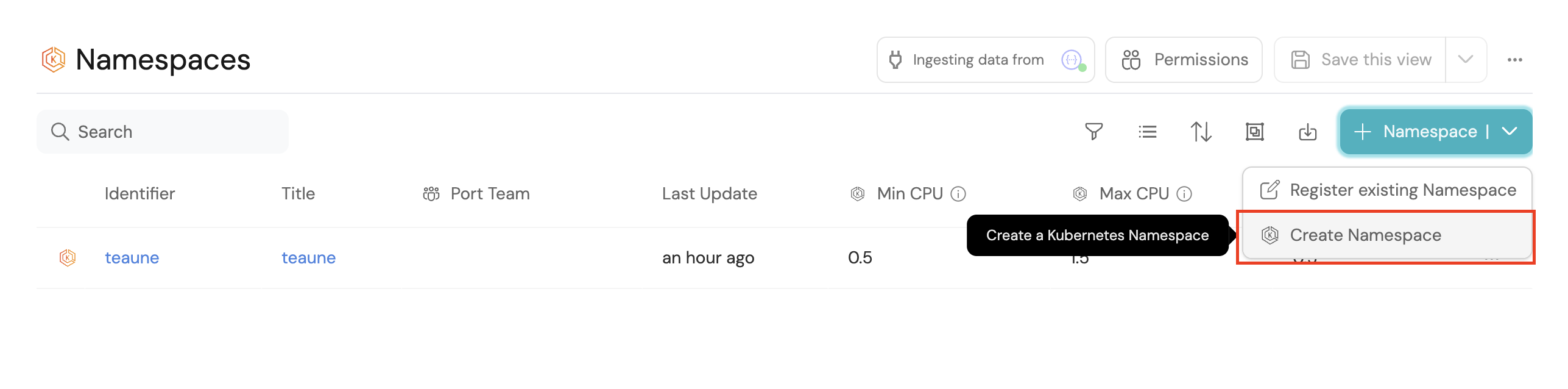
Test namespace deletion
-
Create a test namespace entity in Port under the Kubernetes namespace blueprint.
-
Request deletion:
- Go to your context lake.
- Find your test namespace entity.
- Click on it and execute the "Request deletion of a namespace" action.
-
Monitor the workflow:
- Check that a new workflow entity was created with status "Checking namespace details".
- Wait for the automation to run and update the status to "Namespace found, waiting for approval".
- Verify that a Slack notification was sent, if configured.
-
Approve the deletion:
- Go to the workflow entity in your catalog.
- Execute the "Approve the deletion of a k8s namespace" action.
- Monitor the GitLab pipeline execution.
- Verify the workflow status updates to "Approved/Deleted".
-
Verify completion:
- Check that the original namespace entity has been deleted from Port.
- Review the GitLab pipeline logs for any issues.
This workflow can be extended to include additional validation steps, different approval mechanisms, or integration with actual Kubernetes clusters for real namespace management.