Ingest vulnerability alerts from Orca Security
Send this guide to your coding agent.
Prerequisite: Install Port MCP
Open plan mode if your tool supports it; otherwise present the plan below filled in and wait for my approval. Implement this Port guide in my org via MCP:

https://docs.port.io/guides/all/ingest-vulnerability-alerts-from-orca-security-using-a-custom-webhook-integration

Read the raw markdown version at https://docs.port.io/guides/all/ingest-vulnerability-alerts-from-orca-security-using-a-custom-webhook-integration.md - it contains every tab and code block without page markup.

Goal: get the guide's core flow working end-to-end in my org; adapting it to fit my existing setup takes priority over matching the guide 1:1.

Plan:
1. Confirm MCP is connected, in the right org, with sufficient permissions.
2. If the guide offers alternative implementation paths (tabs), pick the one matching my installed integrations and tools, confirm it with me, and implement only that path.
3. Diff the guide's data model (blueprints, properties, relations, workflows, actions, agents, automations, integrations, webhook data sources, secrets) against mine.
4. Propose adaptations for gaps, reusing existing blueprints/relations over guide-named duplicates.
5. Flag what needs a UI click, credential, or secret from me, testing MCP capability empirically before ruling anything out. If the guide has a "Set up via API" section, use it for anything MCP can't do before treating a step as UI-only.
6. Stop on any blocker and give me options. Approving this plan authorizes the writes it lists; pause only for writes beyond what's listed.

Build:
- Extend blueprint schema additively when upserting; don't remove or overwrite existing properties, and treat type conflicts as a blocker, not an auto-fix.
- Never print secret values into the chat or logs; ask me to set them in Port, or write them via the secrets API without echoing them back.
- List any mock data in the plan, minimal and labeled mock; once approved, seed it without re-asking, and tell me what you seeded.
- For anything the guide writes downstream (e.g. a webhook target), use a real entity, not a mock.
- For pages/widgets, use the real page identifier from the app URL, not a guessed slug.
- When you hit a UI step confirmed (not assumed) unsupported via MCP and not covered by the guide's API sections, pause, give exact clicks, then resume via MCP.
- Validate and give links after each meaningful step (only a tool-returned URL, no guessed paths); don't proceed if the last run wasn't a success.

Done:
- Run the guide's "Let's test it" steps where possible (e.g. execute a workflow test run) and confirm the expected output exists in Port.
- Summarize adaptations, seeded data, what was mocked or skipped, remaining UI steps, and how to verify.
This guide demonstrates how to ingest both historical and realtime alerts from Orca Security into Port.
Set up data model
For either ingestion type, you will create the orcaSecurityAlert blueprint:
Orca Security Alert blueprint (Click to expand)
Take note to change the value of HOST_URL to the host URL of your Orca Security installation. See the table below for all host values:
{
  "identifier": "orcaSecurityAlert",
  "description": "A representation of an Orca Security Alert",
  "title": "Orca Security Alert",
  "icon": "Alert",
  "schema": {
    "properties": {
      "description": {
        "type": "string",
        "title": "Description",
        "description": "Description of alert"
      },
      "source": {
        "type": "string",
        "title": "Source",
        "description": "The source of the alert"
      },
      "status": {
        "type": "string",
        "title": "Status",
        "description": "Current status of the vulnerability on assets"
      },
      "recommendation": {
        "type": "string",
        "title": "Recommendation",
        "description": "Steps to take to resolve the issue"
      },
      "severity": {
        "type": "string",
        "title": "Severity",
        "description": "Severity of vulnerability on assets"
      },
      "riskLevel": {
        "type": "string",
        "title": "Risk Level",
        "description": "Level of risk exposed to by vulnerability",
        "enum": [
          "critical",
          "high",
          "medium",
          "low",
          "informational"
        ],
        "enumColors": {
          "critical": "red",
          "high": "orange",
          "medium": "yellow",
          "low": "darkGray",
          "informational": "lightGray"
        }
      },
      "category": {
        "type": "string",
        "title": "Category",
        "description": "Category of alert"
      },
      "alertLabels": {
        "type": "array",
        "title": "Alert Labels"
      },
      "createdAt": {
        "type": "string",
        "title": "Created At",
        "description": "When the alert first appeared",
        "format": "date-time"
      },
      "lastUpdated": {
        "type": "string",
        "title": "Last Updated",
        "description": "When the alert was last updated",
        "format": "date-time"
      },
      "lastSeen": {
        "type": "string",
        "title": "Last Seen",
        "description": "When the alert was last seen",
        "format": "date-time"
      },
      "assetName": {
        "type": "string",
        "title": "Asset Name",
        "description": "Name of the asset affected by the alert"
      },
      "repository": {
        "type": "string",
        "title": "Repository"
      }
    },
    "required": []
  },
  "mirrorProperties": {},
  "calculationProperties": {
    "url": {
      "title": "Alert URL",
      "icon": "Link",
      "calculation": "\"<HOST_URL>/alerts/\" + .identifier",
      "type": "string",
      "format": "url"
    }
  },
  "aggregationProperties": {},
  "relations": {}
}
Ingest realtime alerts using webhooks
-
Head over to the Data sources page
-
Click on the "+ Data source" icon at the top right corner
-
Go to the "Webhook" tab and click on "Custom integration".
-
Fill in the details of the form like so:
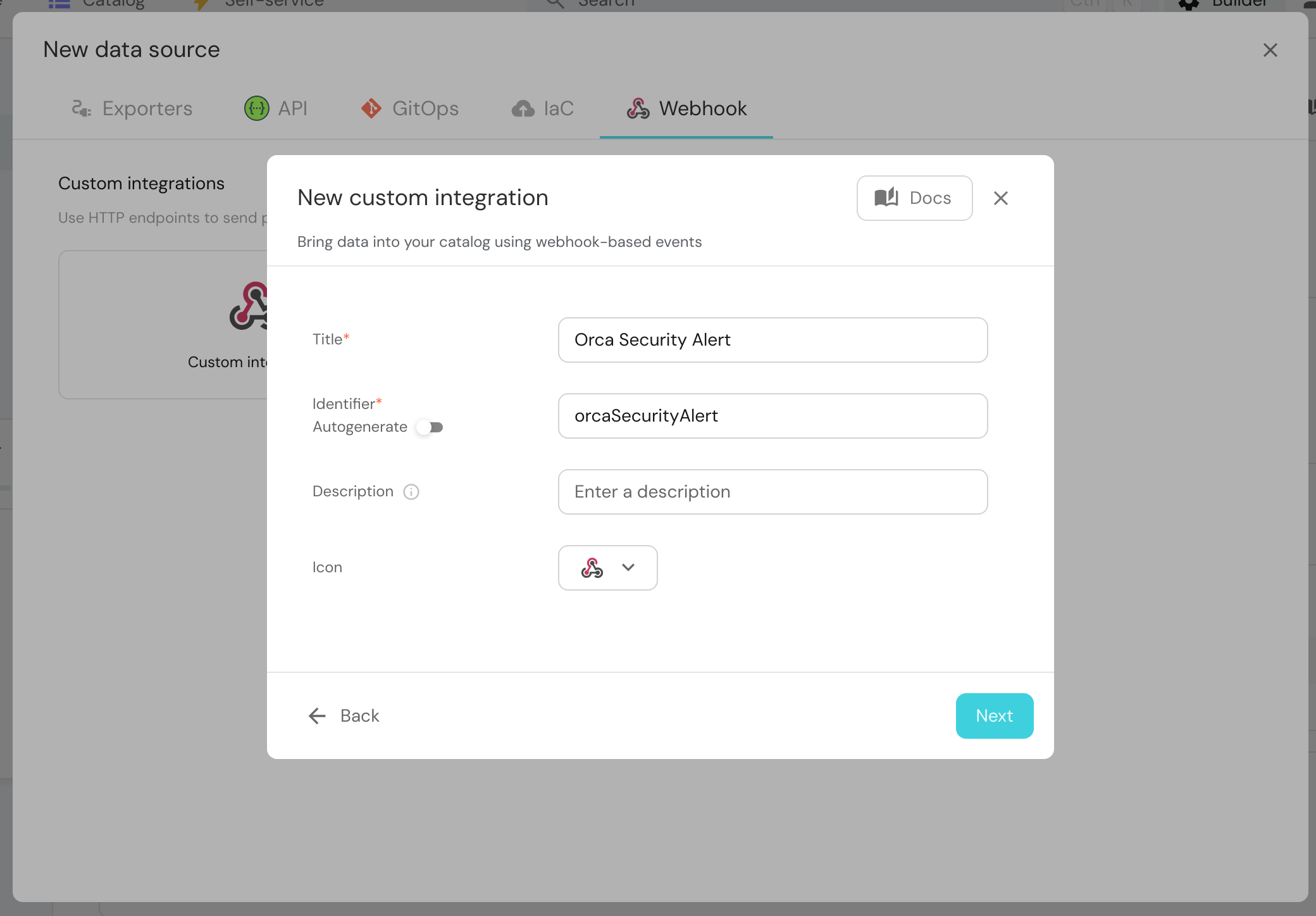
Note: Copy the webhook URL displayed by Port in the next step, you'll need it to set up webhooks on the Orca Security side.
- In the blueprint mapping section, use the following mapping configuration:
Orca Security Alert webhook blueprint (Click to expand)
[
  {
    "blueprint": "orcaSecurityAlert",
    "filter": "true",
    "entity": {
      "identifier": ".body.state.alert_id",
      "title": ".body.state.alert_id + '-' + .body.type_string",
      "properties": {
        "description": ".body.description",
        "assetName": ".body.asset_name",
        "source": ".body.source",
        "status": ".body.state.status",
        "recommendation": ".body.recommendation",
        "severity": ".body.state.severity",
        "riskLevel": ".body.state.risk_level | tostring",
        "category": ".body.category | tostring",
        "alertLabels": ".body.alert_labels",
        "createdAt": ".body.state.created_at",
        "lastUpdated": ".body.state.last_updated",
        "lastSeen": ".body.state.last_seen",
        "repository": ".body.asset_name | split(\"/\") | .[1] // .[0]"
      }
    }
  }
]
-
Click on "Save".
-
Go to your Orca Security dashboard and click on Settings at the bottom right corner. Under Connections, select Integrations then scroll to the Webhooks item in the grid.
-
Click on "Configure" -> "Create" and enter the following information:
- Name: Enter a suitable name
- Trigger URL: Enter your Port webhook URL here
Leave the API Key field blank. Click on "Save"
- Test the alert by going to the Alerts page, click on one of the alerts -> Take Action -> Notifications -> Send to webhook -> <Your created webhook>.
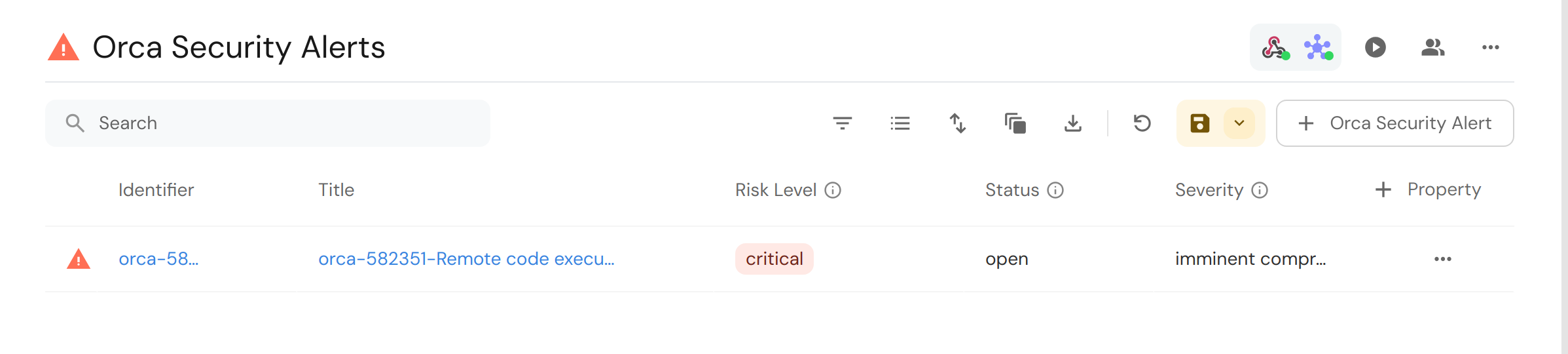
You should see the newly created alert entity in your Port catalog:
Ingest historical vulnerability alerts using Python script
In this example you are going to use the provided Python script to fetch data from the Orca Security REST API and ingest it to Port.
Prerequisites
This example utilizes the same blueprint definition from the previous section.
In addition, you require the following environment variables:
PORT_CLIENT_ID- Your Port client idPORT_CLIENT_SECRET- Your Port client secretORCA_SECURITY_API_TOKEN- Get that by following the steps below- Go to Settings -> Users & Permissions -> API -> API Tokens
- Click on Add API Token
- Fill in the details required and select Shiftleft Alert Manager for the role.
- Click on save and copy the API token
ORCA_SECURITY_API_URL- The host URL of your Orca Security dashboard. See the below table for which URL to use depending on your region:
Orca Security API URL list (Click to expand)
Find your Port credentials using this guide
Dependencies
The script assumes Python >= 3.10 and requires a few dependencies to work which can simply be installed with the command:
pip3 install loguru requests httpx
Python script
Use the following Python script to ingest historical Orca Security Vulnerability alerts into port:
Orca Security Python script for historical vulnerability alerts (Click to expand)
import asyncio
import os
from typing import Any, Generator

import httpx
import requests
from loguru import logger

ALERT_BLUEPRINT = "orcaSecurityAlert"

PORT_API_URL = "https://api.port.io/v1"
PORT_CLIENT_SECRET = os.getenv("PORT_CLIENT_SECRET")
PORT_CLIENT_ID = os.getenv("PORT_CLIENT_ID")
ORCA_SECURITY_API_TOKEN = os.getenv("ORCA_SECURITY_API_TOKEN")
ORCA_SECURITY_API_URL = os.getenv("ORCA_SECURITY_API_URL")


## Get Port Access Token
credentials = {"clientId": PORT_CLIENT_ID, "clientSecret": PORT_CLIENT_SECRET}

token_response = requests.post(f"{PORT_API_URL}/auth/access_token", json=credentials)
token_response.raise_for_status()
access_token = token_response.json()["accessToken"]

# You can now use the value in access_token when making further requests
headers = {"Authorization": f"Bearer {access_token}"}

print(headers)


async def add_entity_to_port(
    client: httpx.AsyncClient, blueprint_id: str, entity_object: dict[str, Any]
):
    """A function to create the passed entity in Port

    Params
    --------------
    client: httpx.AsyncClient
        The httpx client object

    blueprint_id: str
        The blueprint id to create the entity in Port

    entity_object: dict
        The entity to add in your Port catalog

    Returns
    --------------
    None
    """
    logger.info(f"Adding entity to Port: {entity_object}")
    response = await client.post(
        (
            f"{PORT_API_URL}/blueprints/"
            f"{blueprint_id}/entities?upsert=true&merge=true&create_missing_related_entities=true"
        ),
        json=entity_object,
        headers=headers,
    )
    if response.is_error:
        logger.info(f"Ingesting {blueprint_id} entity to port failed, skipping...")
        return
    logger.info(f"Added entity to Port: {entity_object}")


def turn_sequence_to_chunks(
    sequence: list[str], chunk_size: int
) -> Generator[list[str], None, None]:
    if chunk_size >= len(sequence):
        yield sequence
        return
    start, end = 0, chunk_size

    while start <= len(sequence) and sequence[start:end]:
        yield sequence[start:end]
        start += chunk_size
        end += chunk_size

    return


async def ingest_alert_as_entity(
    client: httpx.AsyncClient, alert: dict[str, Any]
) -> dict[str, Any]:
    logger.info(f"create alert entity: {alert['state']['alert_id']}")
    data = {
        "identifier": alert["state"]["alert_id"],
        "title": alert["state"]["alert_id"] + "-" + alert["type_string"],
        "properties": {
            "description": alert["description"],
            "assetName": alert["asset_name"],
            "source": alert["source"],
            "status": alert["state"]["status"],
            "recommendation": alert["recommendation"],
            "severity": alert["state"]["severity"],
            "riskLevel": alert["state"]["risk_level"],
            "category": alert["category"],
            "alertLabels": alert["alert_labels"],
            "createdAt": alert["state"]["created_at"],
            "lastUpdated": alert["state"]["last_updated"],
            "lastSeen": alert["state"]["last_seen"],
            "repository": alert["asset_name"].split("/")[-1]
        }
    }

    await add_entity_to_port(client, ALERT_BLUEPRINT, data)


async def retrieve_alerts(client: httpx.AsyncClient):
    authorization_header = {"Authorization": f"Token {ORCA_SECURITY_API_TOKEN}"}

    response = await client.get(
        f"{ORCA_SECURITY_API_URL}alerts", headers=authorization_header
    )

    if response.is_error:
        logger.error(
            "Something went wrong while trying to"
            " retrieve alerts from Orca Security servers"
        )
        logger.error(response.json())

    return response.json()["data"]


async def main():
    logger.info("Starting Port integration")
    async with httpx.AsyncClient(timeout=httpx.Timeout(20)) as client:
        fetched_alerts = await retrieve_alerts(client)

        grouped_alerts = turn_sequence_to_chunks(fetched_alerts, 10)

        for alerts in grouped_alerts:
            await asyncio.gather(
                *[ingest_alert_as_entity(client, alert) for alert in alerts]
            )
    logger.info("Finished Port integration")


if __name__ == "__main__":
    asyncio.run(main())
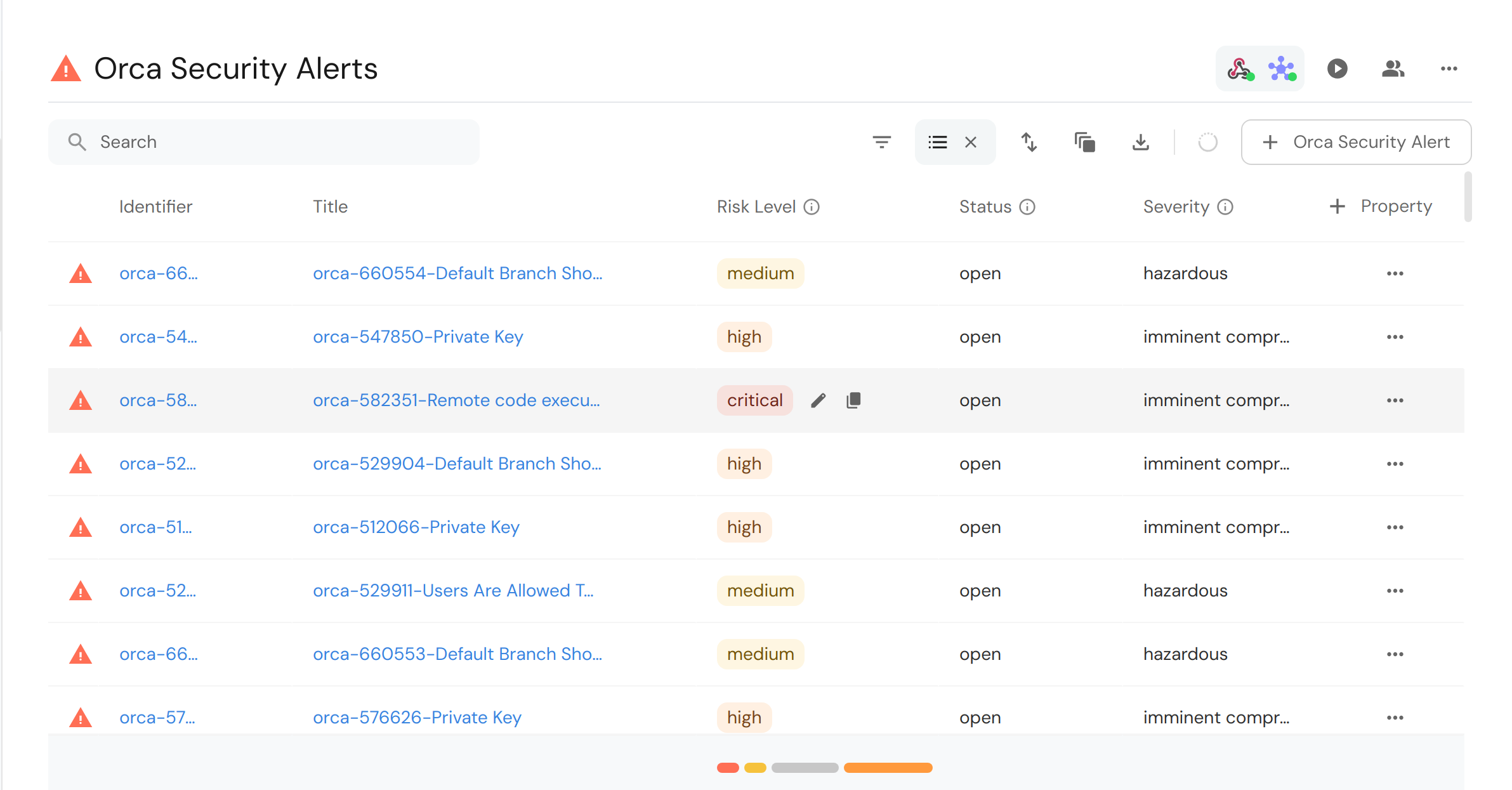
After running the script, you can see the ingested alerts in your Port dashboard:
Due to limitations of the Orca Security Alerts API and unavailable pagination, only 1,000 alerts can be ingested by the Python script
Mapping Orca Security Alerts to Services
Given the above setup, you can take things a step further by mapping orcaSecurityAlert to service. Below are specified blueprint, webhook configuration and Python script for this mapping:
Orca Security Alert blueprint with service relation (Click to expand)
Take note to change the value of HOST_URL to the host URL of your Orca Security installation. See the table below for all host values:
{
  "identifier": "orcaSecurityAlert",
  "description": "A representation of an Orca Security Alert",
  "title": "Orca Security Alert",
  "icon": "Alert",
  "schema": {
    "properties": {
      "description": {
        "type": "string",
        "title": "Description",
        "description": "Description of alert"
      },
      "source": {
        "type": "string",
        "title": "Source",
        "description": "The source of the alert"
      },
      "status": {
        "type": "string",
        "title": "Status",
        "description": "Current status of the vulnerability on assets"
      },
      "recommendation": {
        "type": "string",
        "title": "Recommendation",
        "description": "Steps to take to resolve the issue"
      },
      "severity": {
        "type": "string",
        "title": "Severity",
        "description": "Severity of vulnerability on assets"
      },
      "riskLevel": {
        "type": "string",
        "title": "Risk Level",
        "description": "Level of risk exposed to by vulnerability",
        "enum": [
          "critical",
          "high",
          "medium",
          "low",
          "informational"
        ],
        "enumColors": {
          "critical": "red",
          "high": "orange",
          "medium": "yellow",
          "low": "darkGray",
          "informational": "lightGray"
        }
      },
      "category": {
        "type": "string",
        "title": "Category",
        "description": "Category of alert"
      },
      "alertLabels": {
        "type": "array",
        "title": "Alert Labels"
      },
      "createdAt": {
        "type": "string",
        "title": "Created At",
        "description": "When the alert first appeared",
        "format": "date-time"
      },
      "lastUpdated": {
        "type": "string",
        "title": "Last Updated",
        "description": "When the alert was last updated",
        "format": "date-time"
      },
      "lastSeen": {
        "type": "string",
        "title": "Last Seen",
        "description": "When the alert was last seen",
        "format": "date-time"
      },
      "assetName": {
        "type": "string",
        "title": "Asset Name",
        "description": "Name of the asset affected by the alert"
      },
      "repository": {
        "type": "string",
        "title": "Repository"
      }
    },
    "required": []
  },
  "mirrorProperties": {},
  "calculationProperties": {
    "url": {
      "title": "Alert URL",
      "icon": "Link",
      "calculation": "\"<HOST_URL>/alerts/\" + .identifier",
      "type": "string",
      "format": "url"
    }
  },
  "aggregationProperties": {},
  "relations": {
    "service": {
      "title": "Service",
      "target": "service",
      "required": false,
      "many": false
    }
  }
}
Webhook configuration
To map orcaSecurityAlert to a service for webhooks, you can use the webhook configuration below:
Orca Security Alert mapping to service webhook blueprint (Click to expand)
[
  {
    "blueprint": "orcaSecurityAlert",
    "filter": "true",
    "entity": {
      "identifier": ".body.state.alert_id",
      "title": ".body.state.alert_id + '-' + .body.type_string",
      "properties": {
        "description": ".body.description",
        "assetName": ".body.asset_name",
        "source": ".body.source",
        "status": ".body.state.status",
        "recommendation": ".body.recommendation",
        "severity": ".body.state.severity",
        "riskLevel": ".body.state.risk_level | tostring",
        "category": ".body.category | tostring",
        "alertLabels": ".body.alert_labels",
        "createdAt": ".body.state.created_at",
        "lastUpdated": ".body.state.last_updated",
        "lastSeen": ".body.state.last_seen",
        "repository": ".body.asset_name | split(\"/\") | .[1] // .[0]"
      },
      "relations": {
        "service": ".body.asset_name | split(\"/\") | .[1] // .[0]"
      }
    }
  }
]
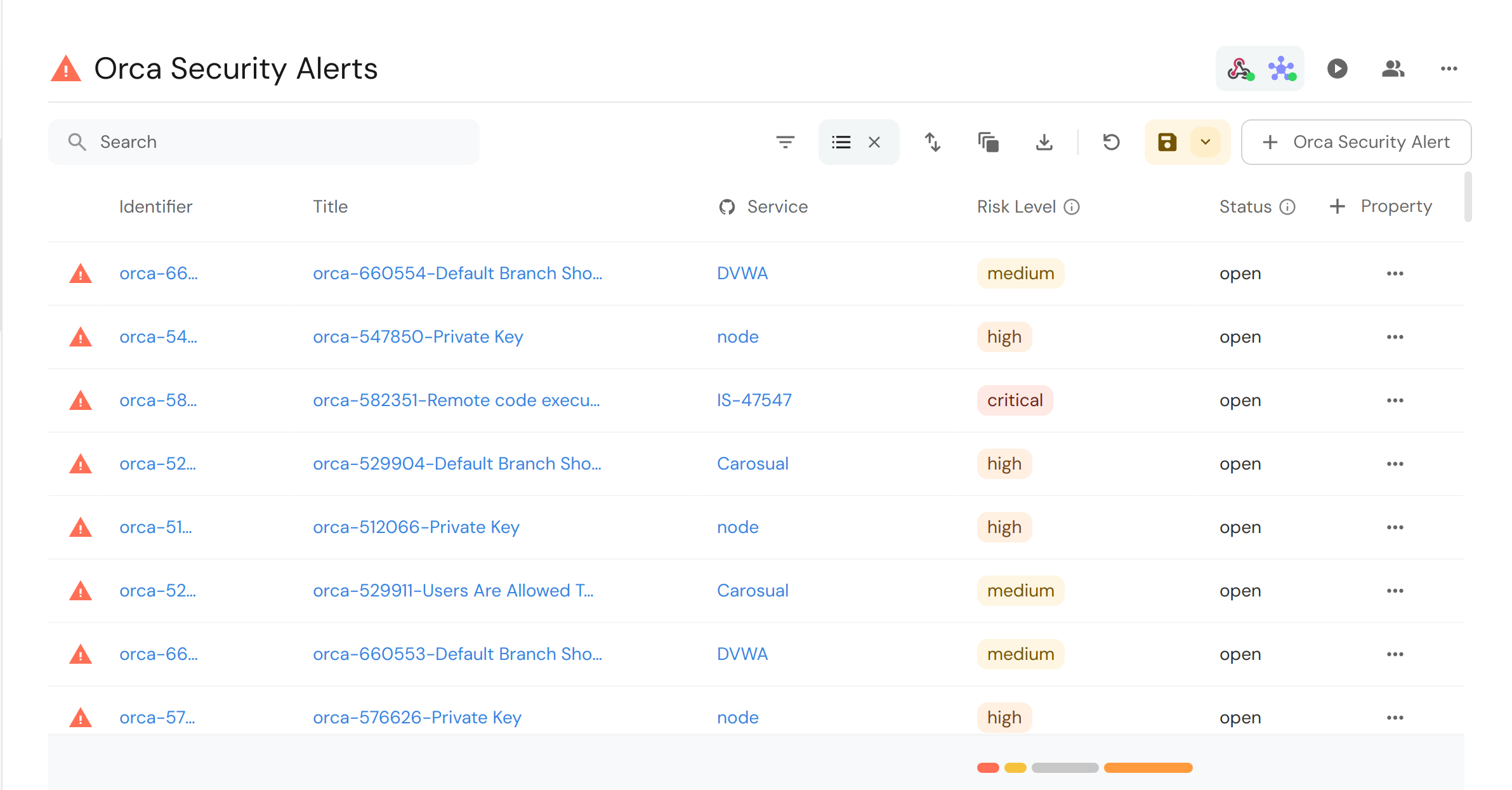
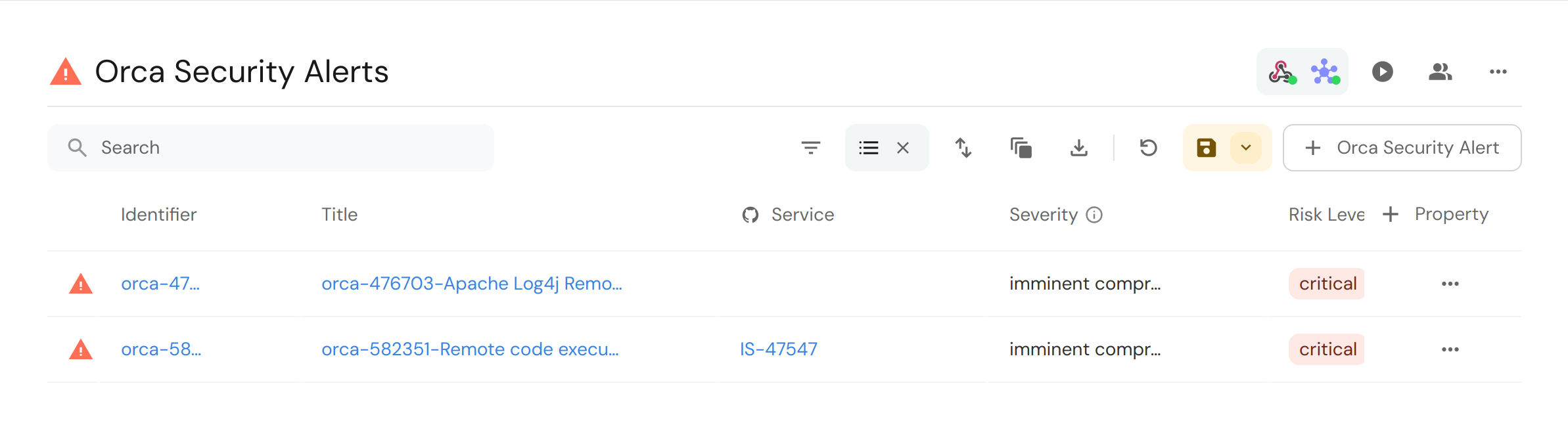
Triggering the webhook will cause alerts to be ingested with specified service like so:
Python script
Run the Python script below using the same environment variables as specified in the past section:
Orca Security Python script with service relation for historical vulnerability alerts (Click to expand)
import asyncio
import os
from typing import Any, Generator

import httpx
import requests
from loguru import logger

ALERT_BLUEPRINT = "orcaSecurityAlert"

PORT_API_URL = "https://api.port.io/v1"
PORT_CLIENT_SECRET = os.getenv("PORT_CLIENT_SECRET")
PORT_CLIENT_ID = os.getenv("PORT_CLIENT_ID")
ORCA_SECURITY_API_TOKEN = os.getenv("ORCA_SECURITY_API_TOKEN")
ORCA_SECURITY_API_URL = os.getenv("ORCA_SECURITY_API_URL")


## Get Port Access Token
credentials = {"clientId": PORT_CLIENT_ID, "clientSecret": PORT_CLIENT_SECRET}

token_response = requests.post(f"{PORT_API_URL}/auth/access_token", json=credentials)
token_response.raise_for_status()
access_token = token_response.json()["accessToken"]

# You can now use the value in access_token when making further requests
headers = {"Authorization": f"Bearer {access_token}"}

print(headers)


async def add_entity_to_port(
    client: httpx.AsyncClient, blueprint_id: str, entity_object: dict[str, Any]
):
    """A function to create the passed entity in Port

    Params
    --------------
    client: httpx.AsyncClient
        The httpx client object

    blueprint_id: str
        The blueprint id to create the entity in Port

    entity_object: dict
        The entity to add in your Port catalog

    Returns
    --------------
    None
    """
    logger.info(f"Adding entity to Port: {entity_object}")
    response = await client.post(
        (
            f"{PORT_API_URL}/blueprints/"
            f"{blueprint_id}/entities?upsert=true&merge=true&create_missing_related_entities=true"
        ),
        json=entity_object,
        headers=headers,
    )
    if response.is_error:
        logger.info(f"Ingesting {blueprint_id} entity to port failed, skipping...")
        return
    logger.info(f"Added entity to Port: {entity_object}")


def turn_sequence_to_chunks(
    sequence: list[str], chunk_size: int
) -> Generator[list[str], None, None]:
    if chunk_size >= len(sequence):
        yield sequence
        return
    start, end = 0, chunk_size

    while start <= len(sequence) and sequence[start:end]:
        yield sequence[start:end]
        start += chunk_size
        end += chunk_size

    return


async def ingest_alert_as_entity(
    client: httpx.AsyncClient, alert: dict[str, Any]
) -> dict[str, Any]:
    logger.info(f"create alert entity: {alert['state']['alert_id']}")
    data = {
        "identifier": alert["state"]["alert_id"],
        "title": alert["state"]["alert_id"] + "-" + alert["type_string"],
        "properties": {
            "description": alert["description"],
            "assetName": alert["asset_name"],
            "source": alert["source"],
            "status": alert["state"]["status"],
            "recommendation": alert["recommendation"],
            "severity": alert["state"]["severity"],
            "riskLevel": alert["state"]["risk_level"],
            "category": alert["category"],
            "alertLabels": alert["alert_labels"],
            "createdAt": alert["state"]["created_at"],
            "lastUpdated": alert["state"]["last_updated"],
            "lastSeen": alert["state"]["last_seen"],
            "repository": alert["asset_name"].split("/")[-1]
        },
        "relations": {
            "service": alert["asset_name"].split("/")[-1]
        }
    }

    await add_entity_to_port(client, ALERT_BLUEPRINT, data)


async def retrieve_alerts(client: httpx.AsyncClient):
    authorization_header = {"Authorization": f"Token {ORCA_SECURITY_API_TOKEN}"}

    response = await client.get(
        f"{ORCA_SECURITY_API_URL}alerts", headers=authorization_header
    )

    if response.is_error:
        logger.error(
            "Something went wrong while trying to"
            " retrieve alerts from Orca Security servers"
        )
        logger.error(response.json())

    return response.json()["data"]


async def main():
    logger.info("Starting Port integration")
    async with httpx.AsyncClient(timeout=httpx.Timeout(20)) as client:
        fetched_alerts = await retrieve_alerts(client)

        grouped_alerts = turn_sequence_to_chunks(fetched_alerts, 10)

        for alerts in grouped_alerts:
            await asyncio.gather(
                *[ingest_alert_as_entity(client, alert) for alert in alerts]
            )
    logger.info("Finished Port integration")


if __name__ == "__main__":
    asyncio.run(main())
After running the script, you can see the ingested alerts with a service relation in your Port dashboard: