Ingest security issues from .sarif files and relate them to services
This guide includes steps that require integration with GitHub:
- GitHub (Ocean) - uses the Ocean framework. We strongly recommend this integration for new and migrated setups.
- GitHub (Sunset) - uses a GitHub app that is in sunset and will be fully deprecated on September 15, 2026.
This guide will demonstrate how to ingest security issues from .sarif files and relate them to the corresponding service entities in Port.
Prerequisites
- Ensure you have a Port account and have completed the onboarding process.
- The
Serviceblueprint should be created during the onboarding process. - Ensure you have Port's GitHub Ocean integration, or Gitlab installed and configured in your environment.
Data model setup
Add blueprint
Add the Security Issue blueprint:
- Go to the Builder in your Port portal.
- Click on "+ Blueprint".
- Click on the
{...}button in the top right corner, and choose "Edit JSON". - Add this JSON schema:
Security Issue Blueprint (Click to expand)
{
  "identifier": "security_issue",
  "description": "A security issue parsed from SARIF format",
  "title": "Security Issue",
  "icon": "Alert",
  "schema": {
    "properties": {
      "rule_name": {
        "type": "string",
        "title": "Rule Name"
      },
      "rule_desc": {
        "type": "string",
        "title": "Rule Description"
      },
      "location": {
        "type": "string",
        "title": "Location"
      },
      "message": {
        "type": "string",
        "title": "Message"
      },
      "title": {
        "type": "string",
        "title": "Title"
      },
      "ai_summary": {
        "type": "string",
        "title": "ai_summary",
        "format": "markdown"
      }
    },
    "required": []
  },
  "mirrorProperties": {},
  "calculationProperties": {},
  "aggregationProperties": {},
  "relations": {
    "issue_service": {
      "title": "issue service",
      "description": "The service this issue was found in",
      "target": "service",
      "required": false,
      "many": false
    }
  }
}
Ingest Security Issues from .sarif files
To ingest security issues listed in .sarif files, follow these steps:
- Go to the data sources page in your Port portal, and select your GitHub/Gitlab integration.
- Modify the mapping to include the
filekind with the configuration provided below:
- GitHub (Ocean)
- GitHub (Sunset)
Port configuration (Click to expand)
- kind: file
  selector:
    query: 'true'
    files:
      - path: '**/*.sarif'
        organization: my-org  # Optional if githubOrganization is set (required if not set)
        repos:
          - name: my-repo
            branch: main
  port:
    itemsToParse: |
      .content.runs[0] as $content |
      $content.tool.driver.rules as $rules |
      [ $content.results[] ] |
      map(
        . as $result |
        {
        ruleId: .ruleId,
        error: .message.text,
        loc: .locations[0].physicalLocation.artifactLocation.uri,
        ruleName: ($rules[] | select(.id == $result.ruleId) | .name),
        ruleDesc: ($rules[] | select(.id == $result.ruleId) | .shortDescription.text)
        })
    entity:
      mappings:
        identifier: .repository.name + "_" + .item.ruleId
        title: .item.error
        blueprint: '"security_issue"'
        properties:
          rule_name: .item.ruleName
          rule_desc: .item.ruleDesc
          location: .item.loc
          message: .item.error
        relations:
          issue_service: .repository.name
GitHub (Ocean) uses .content instead of .file.content for file content. The files selector supports organization and repos (with name and branch) for scoping. Use .repository.name for the service relation (matching the service identifier).
Port configuration (Click to expand)
- kind: file
  selector:
    query: 'true'
    files:
      - path: '**/*.sarif'
  port:
    itemsToParse: |
      .file.content.runs[0] as $content |
      $content.tool.driver.rules as $rules |
      [ $content.results[] ] |
      map(
        . as $result |
        {
        ruleId: .ruleId,
        error: .message.text,
        loc: .locations[0].physicalLocation.artifactLocation.uri,
        ruleName: ($rules[] | select(.id == $result.ruleId) | .name),
        ruleDesc: ($rules[] | select(.id == $result.ruleId) | .shortDescription.text)
        })
    entity:
      mappings:
        identifier: .repo.name + "_" + .item.ruleId
        title: .item.error
        blueprint: '"security_issue"'
        properties:
          rule_name: .item.ruleName
          rule_desc: .item.ruleDesc
          location: .item.loc
          message: .item.error
        relations:
          issue_service: .repo.name
Configuration details
kind: filespecifies that the source is a file, in this case,.sariffiles.files:defines the path pattern to locate.sariffiles within your repositories.itemsToParse:processes the.sariffile content to extract security issues.identifier:constructs a unique identifier for each security issue by combining the repository name and the rule ID.properties:captures essential details like rule name, description, location, and message.relations:establishes a relation between the security issue and the corresponding service.
Example
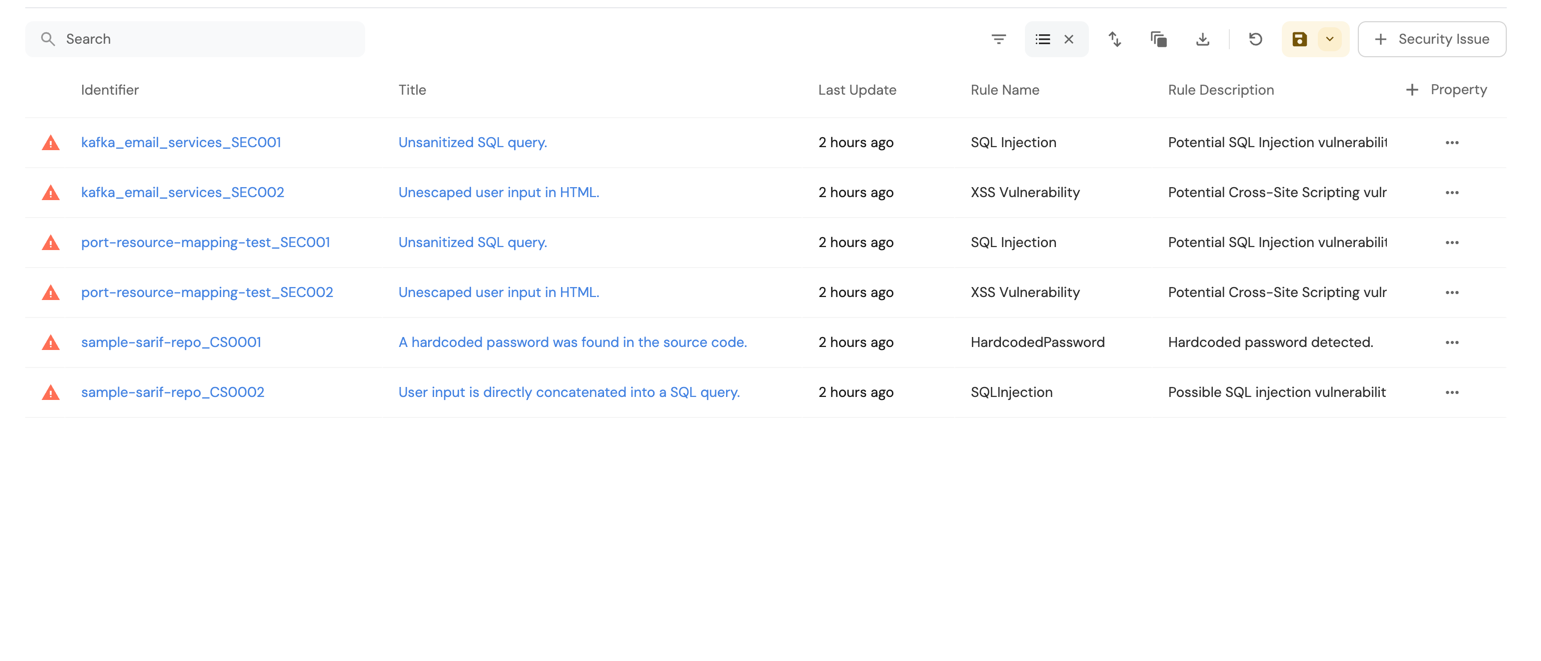
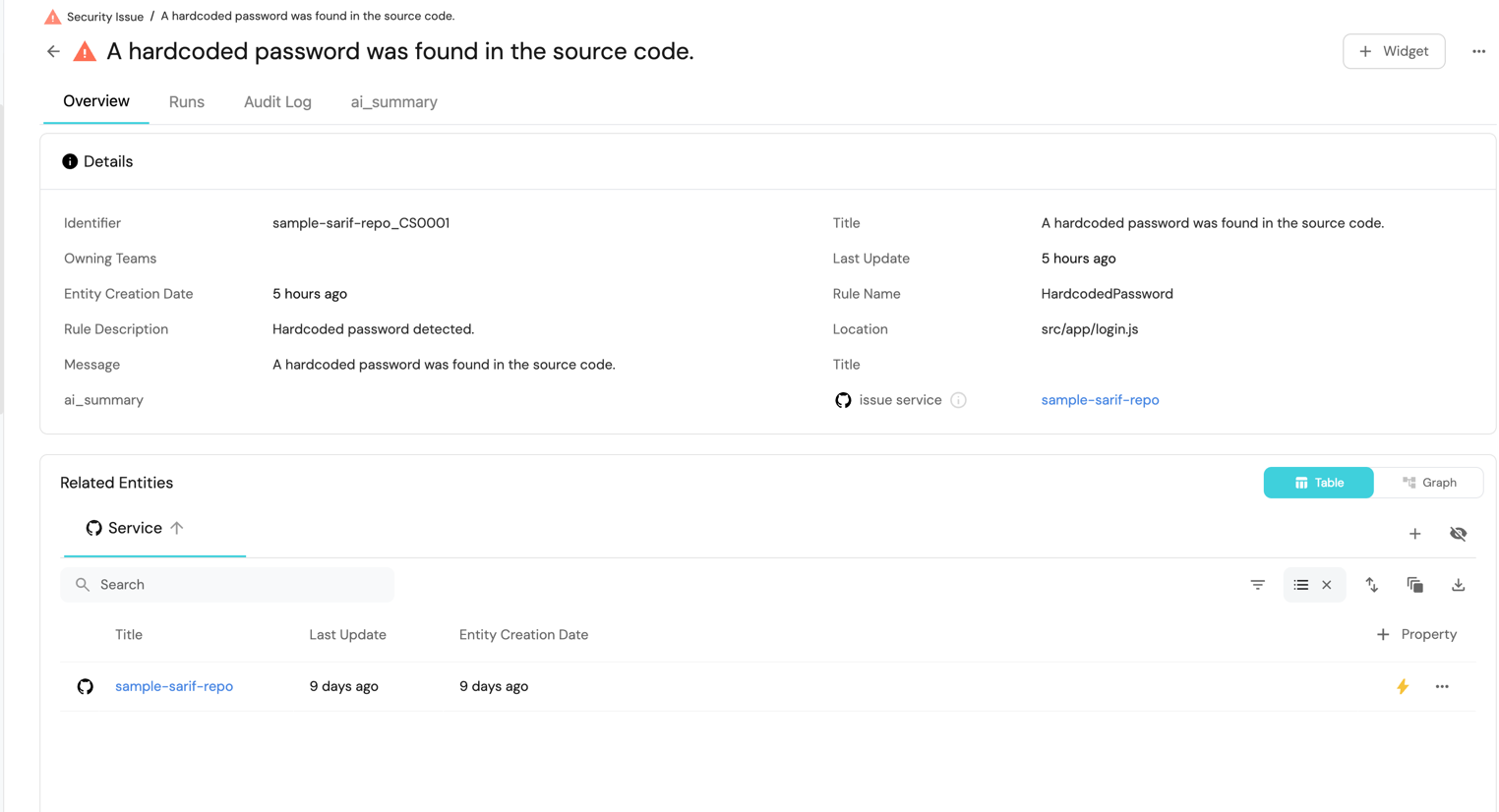
Once you have configured the data source and mappings, the extracted security issues will appear in the Port UI with properties like rule name, description, location, and message. Here’s an example SARIF file structure that you can copy and replicate for testing purposes:
Example SARIF File (Click to expand)
{
  "version": "2.1.0",
  "$schema": "https://schemastore.azurewebsites.net/schemas/json/sarif-2.1.0-rtm.5.json",
  "runs": [
    {
      "tool": {
        "driver": {
          "name": "CustomSecurityTool",
          "rules": [
            {
              "id": "CS0001",
              "name": "HardcodedPassword",
              "shortDescription": {
                "text": "Hardcoded password detected."
              }
            },
            {
              "id": "CS0002",
              "name": "SQLInjection",
              "shortDescription": {
                "text": "Possible SQL injection vulnerability."
              }
            }
          ]
        }
      },
      "results": [
        {
          "ruleId": "CS0001",
          "message": {
            "text": "A hardcoded password was found in the source code."
          },
          "locations": [
            {
              "physicalLocation": {
                "artifactLocation": {
                  "uri": "src/app/login.js"
                },
                "region": {
                  "startLine": 42,
                  "startColumn": 13
                }
              }
            }
          ]
        },
        {
          "ruleId": "CS0002",
          "message": {
            "text": "User input is directly concatenated into a SQL query."
          },
          "locations": [
            {
              "physicalLocation": {
                "artifactLocation": {
                  "uri": "src/app/database.js"
                },
                "region": {
                  "startLine": 88,
                  "startColumn": 22
                }
              }
            }
          ]
        }
      ]
    }
  ]
}
The .sarif format is a standardized structure for reporting static analysis results. This guide relies on that standard format, but additional fields can be extracted or modified.
For example:
- The
locationfield is an array in SARIF and can be treated as relations to specific components if needed. - The mapping configuration can be customized to accommodate new properties, making this approach flexible for various use cases.
By following these steps, you can effectively ingest security issues from .sarif files and relate them to the corresponding service entities in Port 🎉.