Ingest Claude Code security reviews
Security vulnerabilities are easiest to fix when they are visible early, yet security review findings often get buried or fragmented across pull request workflows. By ingesting Claude Code security review findings into Port, you gain centralized visibility, trend analytics, and actionable dashboards—all within your existing developer portal. In this guide, you will address this common challenge by creating a dedicated blueprint, setting up a Port webhook mapper, sending automated findings from a GitHub Actions workflow, and building a security insights dashboard to help your team prioritize and resolve vulnerabilities efficiently.
Common use cases
- Track Claude Code security findings as entities in Port.
- Monitor severity trends across pull requests and repositories.
- Identify recurring vulnerability categories and prioritize fixes.
Prerequisites
Make sure you have the following set up:
-
A Port account and have completed the onboarding process.
-
Install the GitHub integration relevant to you:
- GitHub (Ocean)
- GitHub (Sunset)
Install the GitHub Ocean integration.
Port's GitHub app needs to be installed in your account.
-
A GitHub repository with admin access to set up GitHub Actions.
-
Access to an Anthropic account.
Set up data model
By default, the Repository and Pull Request blueprints are created when you install the GitHub Ocean integration. In addition to these, you'll set up a custom blueprint called Claude Code Security Review to store security findings.
-
Go to the Builder page of your portal.
-
Click on
+ Blueprint. -
Click on the
{...}button in the top right corner, and chooseEdit JSON. -
Add this JSON schema:
Claude Code security review blueprint (click to expand)
{"identifier": "claude_code_security_review","description": "Security vulnerabilities identified by Claude code security scanner","title": "Claude Code Security Review","icon": "Claude","schema": {"properties": {"severity": {"type": "string","title": "Severity","enum": ["CRITICAL","HIGH","MEDIUM","LOW"],"enumColors": {"CRITICAL": "red","HIGH": "orange","MEDIUM": "yellow","LOW": "green"}},"line_of_code": {"type": "number","title": "Line of Code"},"file_path": {"type": "string","title": "File Path"},"category": {"type": "string","title": "Category"},"description": {"type": "string","title": "Description"},"exploit_scenario": {"type": "string","title": "Exploit Scenario","format": "markdown"},"recommendation": {"type": "string","title": "Recommendation"},"confidence": {"type": "number","title": "Confidence"}},"required": []},"mirrorProperties": {"pr_link": {"title": "PR Link","path": "pull_request.link"},"status": {"title": "Status","path": "pull_request.status"}},"calculationProperties": {},"aggregationProperties": {},"relations": {"pull_request": {"title": "Pull Request","target": "githubPullRequest","required": false,"many": false},"repository": {"title": "Repository","target": "githubRepository","required": false,"many": false}}} -
Click
Saveto create the blueprint.
Configure a webhook in Port
Create a webhook called Claude Security Review Mapper so Port can map incoming Claude security findings to entities.
-
Go to the Data sources page of your portal.
-
Click on the
+ Data sourcebutton in the top right corner. -
Select the
Webhooktab. -
Click on
Custom integration. -
Give your webhook a title and description, and select an icon to represent it.
-
Click
Next. -
In the
Mappingtab, you can see your new webhook URL. -
Scroll down to box number 3 and add this JSON configuration to map the data received from Claude security review to the blueprint:
Claude Code security review webhook mapping (click to expand)
[{"blueprint": "claude_code_security_review","operation": "create","filter": "true","itemsToParse": ".body.results.findings","entity": {"identifier": ".item.file + \"/\" + .item.category + \"/\" + (.item.line |tostring) | gsub(\"[^a-zA-Z0-9@_.:/=-]\"; \"-\") | tostring","title": ".item.category + \" in \" + .item.file | gsub (\"_\"; \" \")","properties": {"file_path": ".item.file","severity": ".item.severity","line_of_code": ".item.line","category": ".item.category","description": ".item.description","exploit_scenario": ".item.exploit_scenario","recommendation": ".item.recommendation","confidence": ".item.confidence"},"relations": {"pull_request": ".body.pr.id | tostring","repository": ".body.repo"}}}]
Set up GitHub Actions workflow
Now let us create a Github action to send the security findings to Port.
Add GitHub secret
In your GitHub repository, go to Settings > Secrets and add the following secrets:
PORT_WEBHOOK_URL: TheURLfrom your Port webhook configuration.ANTHROPIC_API_KEY- Your Anthropic API key.
Create GitHub Actions workflow
Create the file .github/workflows/claude-security-review.yml in your repository with the following configuration:
Claude security findings GitHub Actions workflow (click to expand)
name: Claude AI Security Review

permissions:
  pull-requests: write
  contents: read

on:
  pull_request:
    types:
      - opened
      - reopened

jobs:
  security:
    runs-on: ubuntu-latest

    steps:
      - name: Checkout code
        uses: actions/checkout@v6
        with:
          ref: ${{ github.event.pull_request.head.sha || github.sha }}
          fetch-depth: 2

      - name: Run Claude security review
        id: claude_review
        uses: anthropics/claude-code-security-review@main
        with:
          comment-pr: true
          upload-results: true
          claude-api-key: ${{ secrets.ANTHROPIC_API_KEY }}

      - name: Resolve Claude results file
        id: resolve_results
        run: |
          set -e

          CANDIDATE="${{ steps.claude_review.outputs.results-file }}"

          echo "Action-reported path: $CANDIDATE"

          if [ -f "$CANDIDATE" ]; then
            echo "results_file=$CANDIDATE" >> $GITHUB_OUTPUT
            exit 0
          fi

          echo "Reported path missing, searching workspace..."

          FOUND=$(find . -maxdepth 2 -name "claudecode-results.json" | head -n 1)

          if [ -z "$FOUND" ]; then
            echo "Could not locate Claude results file"
            ls -la
            exit 1
          fi

          echo "Found results file at: $FOUND"
          echo "results_file=$FOUND" >> $GITHUB_OUTPUT

      - name: Send results to Port webhook
        env:
          RESULTS_FILE: ${{ steps.resolve_results.outputs.results_file }}
          WEBHOOK_URL: ${{ secrets.PORT_WEBHOOK_URL }}
          PR_ID: ${{ github.event.pull_request.id }}
          PR_NUMBER: ${{ github.event.pull_request.number }}
          REPO: ${{ github.repository }}
          PR_URL: ${{ github.event.pull_request.html_url }}
        run: |
          echo "Sending Claude security results to Port..."
          echo "Resolved results file: $RESULTS_FILE"

          jq -n \
            --arg repo "$REPO" \
            --arg pr_id "$PR_ID" \
            --arg pr_number "$PR_NUMBER" \
            --arg pr_url "$PR_URL" \
            --argjson results "$(cat "$RESULTS_FILE")" \
            '{
              source: "claude-code-security-review",
              repo: $repo,
              pr: {
                id: ($pr_id | tonumber),
                number: ($pr_number | tonumber),
                url: $pr_url
              },
              results: $results
            }' | \
          curl -X POST "$WEBHOOK_URL" \
            -H "Content-Type: application/json" \
            --data-binary @-
Let's Test It
To test your integration, you can create a test commit with an insecure code or use the sample data provided below.
Payload
Webhook response data (click to expand)
{
  "body": {
    "source": "claude-code-security-review",
    "repo": "port-labs/port-product-experiments",
    "pr": {
      "id": 3204414266,
      "number": 395,
      "url": "https://github.com/port-labs/port-product-experiments/pull/395"
    },
    "results": {
      "pr_number": 395,
      "repo": "port-labs/port-product-experiments",
      "findings": [
        {
          "file": "e-commerce/Dockerfile",
          "line": 17,
          "severity": "HIGH",
          "category": "privilege_escalation",
          "description": "Container explicitly runs as root user, violating principle of least privilege",
          "exploit_scenario": "If an attacker gains code execution within the container through any vulnerability, they will have root privileges allowing them to: modify system files, install malware, access all container resources, potentially escape to the host system if other vulnerabilities exist",
          "recommendation": "Remove 'USER root' line and create a non-root user for running the application. Add 'RUN useradd -m appuser' and 'USER appuser' before the CMD instruction",
          "confidence": 0.9,
          "_filter_metadata": {
            "confidence_score": 8,
            "justification": "Container explicitly configured to run as root user which is a concrete security risk. If any vulnerability allows code execution within the container, the attacker would have root privileges enabling system modification, persistence, and potential container escape"
          }
        }
      ],
      "analysis_summary": {
        "files_reviewed": 2,
        "high_severity": 2,
        "medium_severity": 0,
        "low_severity": 0,
        "review_completed": true
      },
      "filtering_summary": {
        "total_original_findings": 2,
        "excluded_findings": 1,
        "kept_findings": 1,
        "filter_analysis": {
          "total_findings": 2,
          "kept_findings": 1,
          "excluded_findings": 1,
          "hard_excluded": 0,
          "claude_excluded": 1,
          "exclusion_breakdown": {},
          "average_confidence": 4.5,
          "runtime_seconds": 7.825608968734741,
          "directory_excluded_count": 0
        },
        "excluded_findings_details": [
          {
            "finding": {
              "file": "e-commerce/backend/requirements.txt",
              "line": 9,
              "severity": "HIGH",
              "category": "vulnerable_dependency",
              "description": "Django 1.2.1 is an extremely outdated version from 2010 with over 300 known CVEs including SQL injection, XSS, authentication bypass, and remote code execution vulnerabilities",
              "exploit_scenario": "If any code imports Django modules, attackers could exploit numerous known vulnerabilities. For example, CVE-2011-4137 allows directory traversal, CVE-2011-4138 enables information disclosure, CVE-2011-4139 permits denial of service attacks. These are just a few of hundreds of known vulnerabilities in this version.",
              "recommendation": "Remove Django from requirements.txt as the application uses FastAPI. If Django is needed, use the latest LTS version (4.2.x or 5.0.x)",
              "confidence": 0.95
            },
            "confidence_score": 1,
            "exclusion_reason": "Vulnerabilities related to outdated third-party libraries are managed separately (exclusion rule #9)",
            "justification": "This finding about Django 1.2.1 being outdated with known CVEs falls under exclusion rule #9 which explicitly states that vulnerabilities related to outdated third-party libraries are managed separately and should not be reported here",
            "filter_stage": "claude_api"
          }
        ]
      }
    }
  },
  "headers": {
    "Host": "ingest.us.port.io",
    "User-Agent": "curl/8.5.0",
    "Content-Length": "3602",
    "Accept": "*/*",
    "Content-Type": "application/json",
    "Traceparent": "00-0212c24e9a295ea9102459fbabf2e1d6-03759d9804958a0a-01",
    "X-Forwarded-Host": "ingest.us.port.io",
    "X-Forwarded-Server": "public-traefik-5b7fbd4b69-f2mwz",
    "X-Real-Ip": "10.0.4.61",
    "X-Replaced-Path": "/VDQEsgsEHe4IoShf",
    "Accept-Encoding": "gzip",
    "host": "ingest.us.port.io",
    "user-agent": "curl/8.5.0",
    "content-length": "3602",
    "accept": "*/*",
    "content-type": "application/json",
    "traceparent": "00-0212c24e9a295ea9102459fbabf2e1d6-03759d9804958a0a-01",
    "x-forwarded-host": "ingest.us.port.io",
    "x-forwarded-server": "public-traefik-5b7fbd4b69-f2mwz",
    "x-real-ip": "10.0.4.61",
    "x-replaced-path": "/VDQEsgsEHe4IoShf",
    "accept-encoding": "gzip"
  },
  "queryParams": {}
}
Mapping Result
After the webhook is processed, you should see entities created in Port with the following structure:
Claude Code security review response entity in Port (click to expand)
{
  "identifier": "e-commerce/Dockerfile/privilege_escalation/17",
  "title": "privilege escalation in e-commerce/Dockerfile",
  "properties": {
    "severity": "HIGH",
    "line_of_code": 17,
    "file_path": "e-commerce/Dockerfile",
    "category": "privilege_escalation",
    "description": "Container explicitly runs as root user, violating principle of least privilege",
    "exploit_scenario": "If an attacker gains code execution within the container through any vulnerability, they will have root privileges allowing them to: modify system files, install malware, access all container resources, potentially escape to the host system if other vulnerabilities exist",
    "recommendation": "Remove 'USER root' line and create a non-root user for running the application. Add 'RUN useradd -m appuser' and 'USER appuser' before the CMD instruction",
    "confidence": 0.9
  },
  "relations": {
    "pull_request": "3204414266",
    "repository": "port-labs/port-product-experiments"
  },
  "icon": "Claude"
}
Create the dashboard
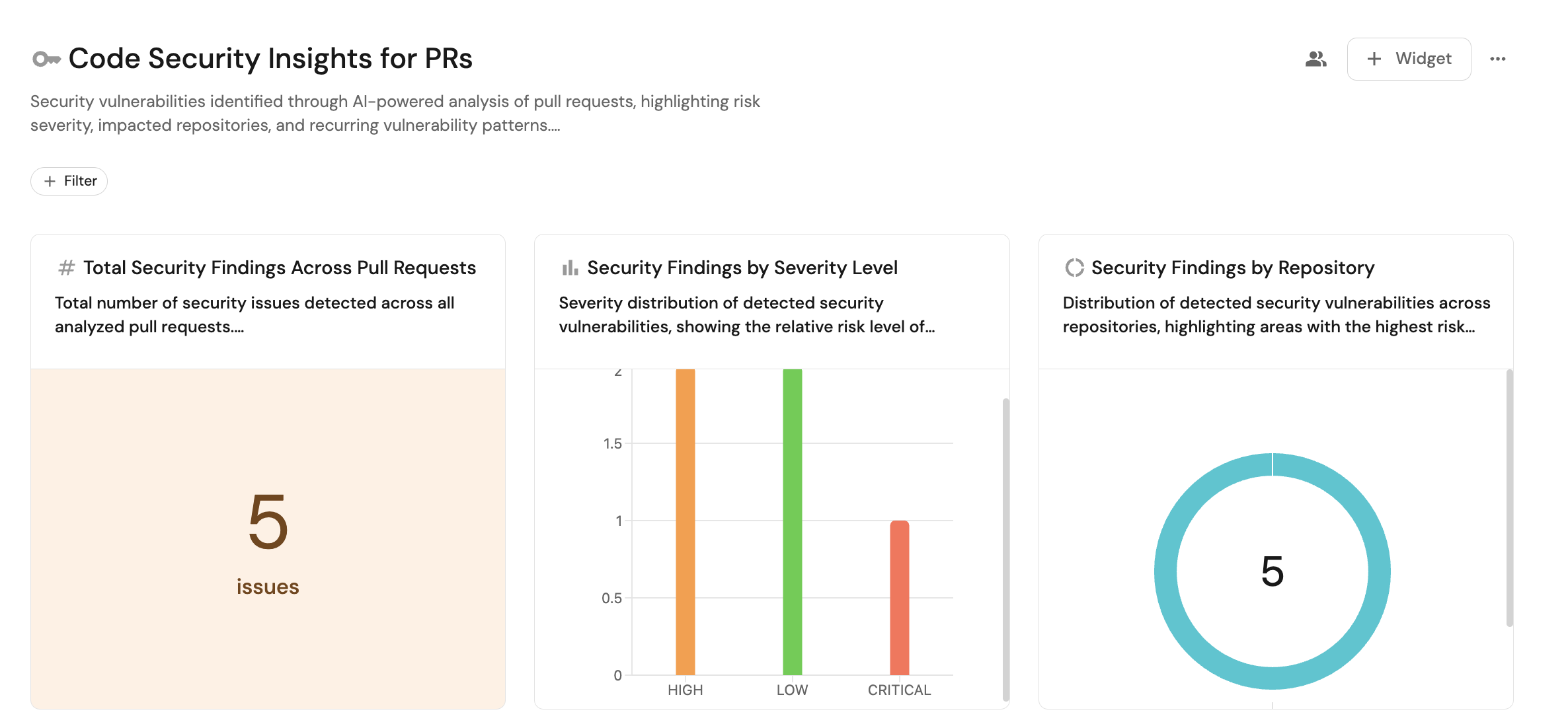
Create a dashboard that highlights severity, repository exposure, and trends over time.
- Go to your software catalog.
- Click
+button in the left sidebar. - Select New dashboard.
- Set the name to Code Security Insights for PRs.
- Set the description to
Security vulnerabilities identified through AI-powered analysis of pull requests, highlighting risk severity, impacted repositories, and recurring vulnerability patterns.. - Select an icon such as Shield.
- Click
Create.
Add widgets
Add the following widgets to your dashboard.
Total security findings across pull requests (click to expand)
- Click + Widget and select Number chart.
- Set Title to
Total Security Findings Across Pull Requests. - Set Description to
Total number of security issues detected across all analyzed pull requests.. - Set Blueprint to
Claude Code Security Review. - Set Chart type to Count entities.
- Click
Save.
Security findings by severity level (click to expand)
- Click + Widget and select Bar chart.
- Set Title to
Security Findings by Severity Level. - Set Description to
Severity distribution of detected security vulnerabilities, showing the relative risk level of identified issues.. - Set Blueprint to
Claude Code Security Review. - Set Breakdown property to
Severity. - Click
Save.
Security findings by repository (click to expand)
- Click + Widget and select Pie chart.
- Set Title to
Security Findings by Repository. - Set Description to
Distribution of detected security vulnerabilities across repositories, highlighting areas with the highest risk exposure.. - Set Blueprint to
Claude Code Security Review. - Set Breakdown property to
Repository. - Click
Save.
Security findings by vulnerability type (click to expand)
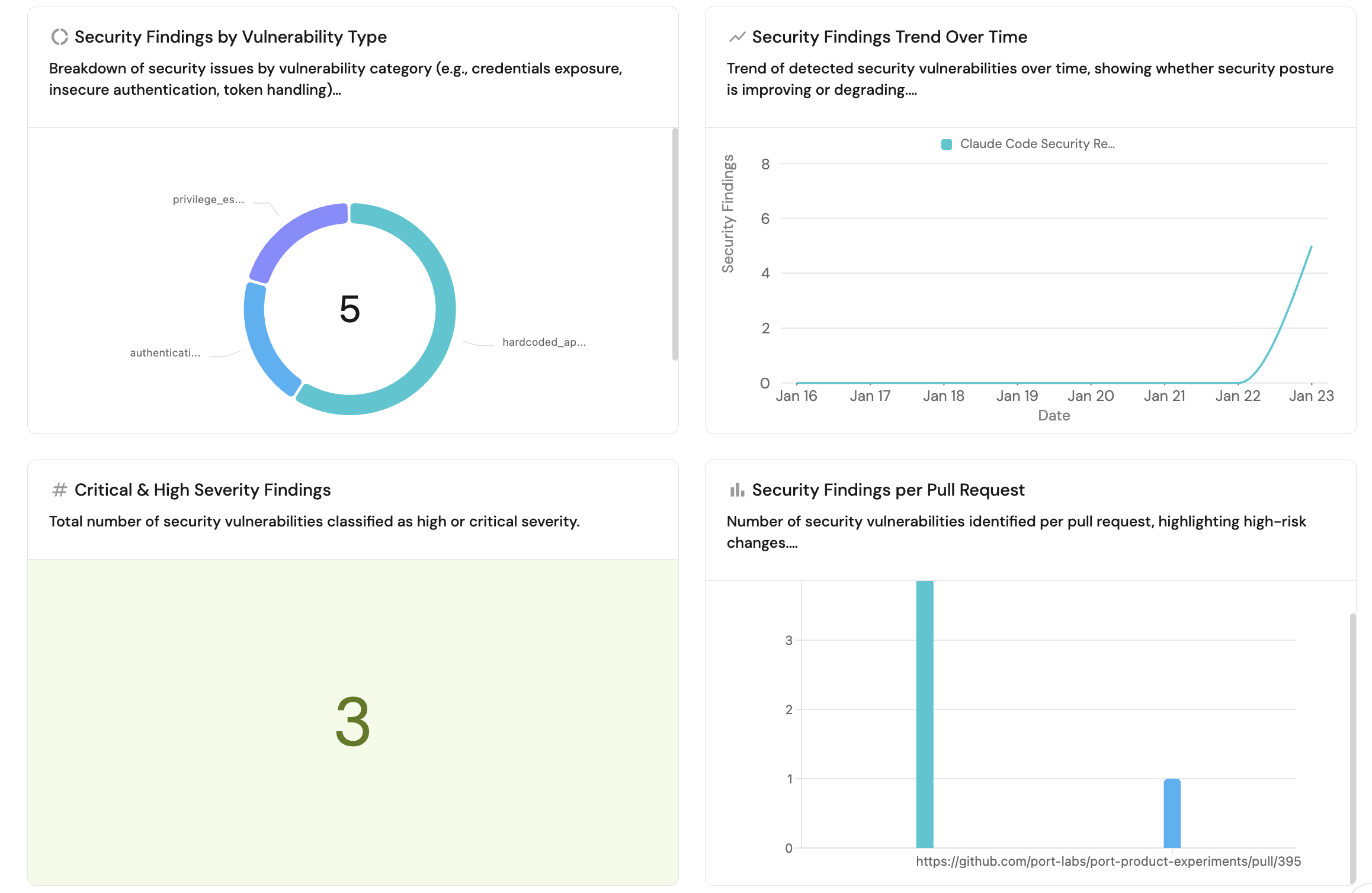
- Click + Widget and select Pie chart.
- Set Title to
Security Findings by Vulnerability Type. - Set Description to
Breakdown of security issues by vulnerability category (e.g., credentials exposure, insecure authentication, token handling).. - Set Blueprint to
Claude Code Security Review. - Set Breakdown property to
Category. - Click
Save.
Security findings trend over time (click to expand)
- Click + Widget and select Line chart.
- Set Title to
Security Findings Trend Over Time. - Set Description to
Trend of detected security vulnerabilities over time, showing whether security posture is improving or degrading.. - Set X axis:
- Title:
Date. - Time interval:
Week. - Time range:
In the past 30 days.
- Title:
- Set Y axis title:
Security Findings. - Click + Line and configure:
- Title:
Security findings count. - Chart type:
Count entities. - Blueprint:
Claude Code Security Review. - Function:
Count. - Measure time by:
Created At.
- Title:
- Click
Save.
Critical and high severity findings (click to expand)
-
Click + Widget and select Number chart.
-
Set Title to
Critical & High Severity Findings. -
Set Description to
Total number of security vulnerabilities classified as high or critical severity.. -
Set Blueprint to
Claude Code Security Review. -
Set Chart type to Count entities.
-
Under Dataset, use the following filter:
{"combinator": "and","rules": [{"value": ["HIGH","CRITICAL"],"property": "severity","operator": "in"}]} -
Click
Save.
Security findings per pull request (click to expand)
- Click + Widget and select Bar chart.
- Set Title to
Security Findings per Pull Request. - Set Description to
Number of security vulnerabilities identified per pull request, highlighting high-risk changes.. - Set Blueprint to
Claude Code Security Review. - Set Breakdown property to
PR Link. - Click Save.