Implement the incident blueprint pattern
This guide demonstrates the recommended pattern for managing incident response workflows in Port using a dedicated incident blueprint that is separate from origin entities like PagerDuty incidents or alerting system alerts.
This pattern is part of our Self-healing incidents solution implementation, make sure you read the pattern overview page before you dive in.
The workflow blueprint pattern
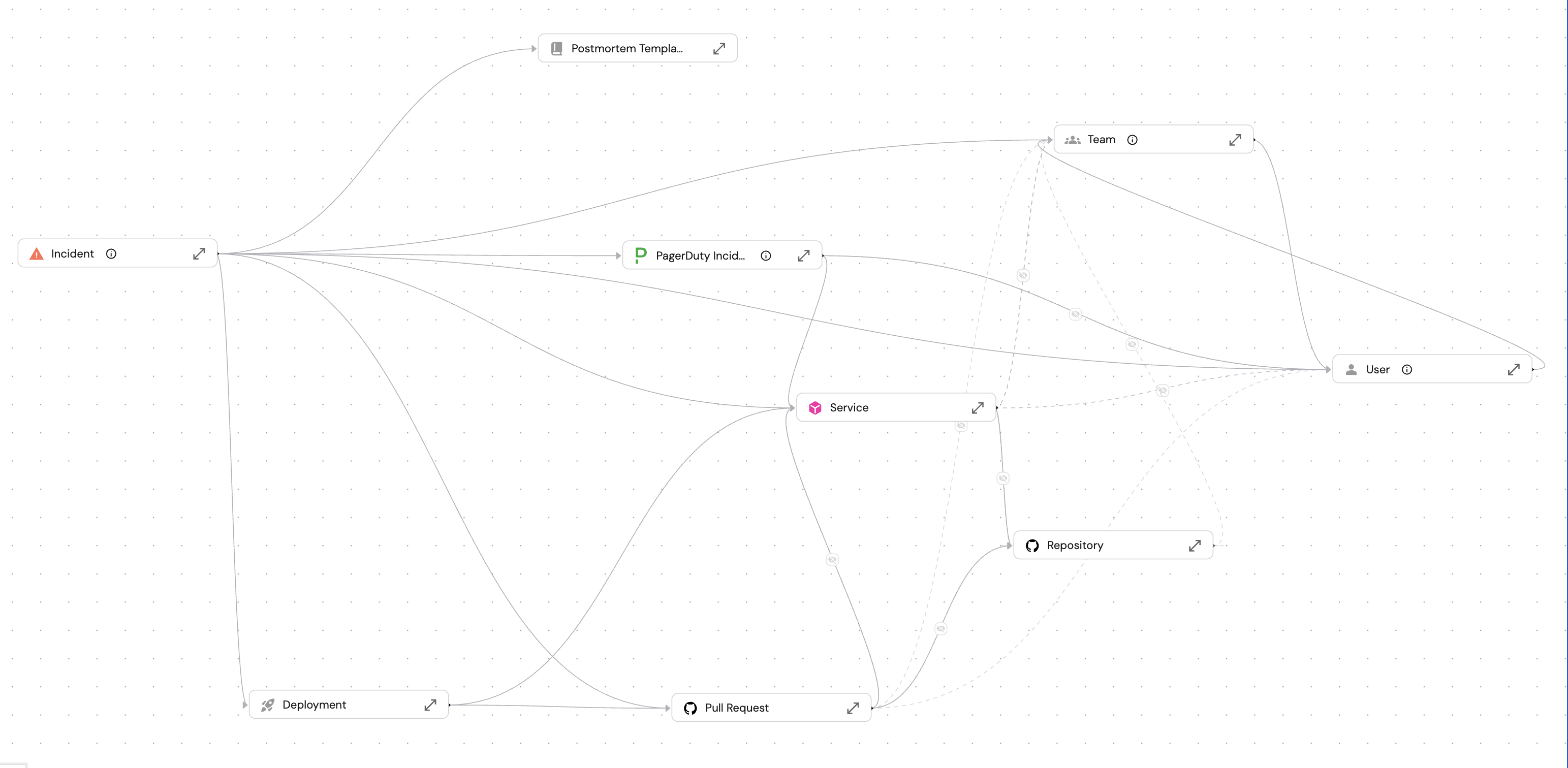
The image above shows how the incident blueprint connects to entities across your software catalog like PagerDuty incidents, the primary and affected services, the response team and incident commander, recent deployments for rollback analysis, and remediation PRs.
The workflow entity (incident) maintains a relation to the origin entity while tracking its own execution state, provides rich context lake and enables staged AI agent integration.
These relations matter because AI agents need context to make good decisions. When a triage agent suggests severity, it can check the service tier and on-call schedule. When an investigator agent analyzes root cause, it can examine recent deployments and service dependencies.
Also the incident doesn't store this data, it gets access to it through mirror properties, so everything stays in sync.
The six-stage workflow
The incident blueprint uses a scorecard to manage progression through the following six stages:
Alert → Triage & Response → Investigate → Remediate → Resolved → Completed with Postmortem
Each stage represents a distinct phase with specific requirements and AI integration points.
- Alert
- Triage & Response
- Investigate
- Remediate
- Resolved
- Completed with Postmortem
Purpose: Capture new incidents that need attention.
Incidents enter this stage when created from a PagerDuty alert or other monitoring source. They contain alert data and await triage.
Requirements: None (starting state).
AI integration: AI can analyze alert context and prepare initial categorization.
Purpose: Assess severity and mobilize response.
During this stage, AI analyzes the incident, suggests severity based on service tier and business impact, and drafts stakeholder communications. A human reviews and approves the triage before progressing.
Requirements to enter:
- Severity assigned.
- Owner (incident commander) assigned.
- Response team assigned.
- Business impact documented.
- Triage timestamp recorded.
AI integration: Triage Agent suggests severity, calculates business impact, identifies affected services, and drafts internal/external communications.
Purpose: Find root cause and plan remediation.
During this stage, AI examines recent deployments, service dependencies, and historical patterns to identify root cause. It generates a remediation plan for human review.
Requirements to enter:
- War room URL created.
- Primary service identified.
- Investigation started timestamp recorded.
AI integration: Investigator Agent performs root cause analysis, correlates with recent deployments, suggests rollback if applicable, and generates step-by-step remediation plan.
Purpose: Execute the fix and restore service.
After the remediation plan is approved, the team executes the fix. This may include rolling back a deployment, merging a hotfix PR, or applying configuration changes.
Requirements to enter:
- Root cause identified.
- Remediation plan documented.
- Remediation started timestamp recorded.
AI integration: AI can generate fix PRs, suggest configuration changes, and monitor system stability during remediation.
Purpose: Confirm customer impact has ended.
The incident is marked resolved when the fix is verified and customer impact has ended. MTTR is calculated automatically.
Requirements to enter:
- Resolution timestamp recorded.
- Status set to resolved.
AI integration: AI can verify system metrics have returned to normal and customer impact has ended.
Purpose: Document learnings and prevent recurrence.
The final stage generates a comprehensive postmortem document with timeline, root cause analysis, action items, and lessons learned.
Requirements to enter:
- Postmortem content completed.
- Postmortem completion timestamp recorded.
AI integration: RCA Agent generates postmortem using incident context, timeline data, and template structure. Human reviews and publishes.
Blueprint implementation
This section shows an example implementation of the incident blueprint. Your organization can adapt these properties and relations to fit your incident management process.
Blueprint JSON (click to expand)
{
  "identifier": "incident",
  "title": "Incident",
  "icon": "Alert",
  "schema": {
    "properties": {
      "severity": {
        "title": "Severity",
        "type": "string",
        "enum": ["sev1", "sev2", "sev3", "sev4"],
        "enumColors": {
          "sev1": "red",
          "sev2": "orange",
          "sev3": "yellow",
          "sev4": "lightGray"
        }
      },
      "status": {
        "title": "Status",
        "type": "string",
        "enum": ["active", "investigating", "mitigating", "resolved", "closed"],
        "enumColors": {
          "active": "red",
          "investigating": "orange",
          "mitigating": "blue",
          "resolved": "green",
          "closed": "lightGray"
        }
      },
      "description": {
        "title": "Description",
        "type": "string",
        "format": "markdown"
      },
      "alert_source": {
        "title": "Alert Source",
        "type": "string",
        "enum": ["pagerduty", "datadog", "prometheus", "manual"]
      },
      "business_impact": {
        "title": "Business Impact",
        "type": "string",
        "format": "markdown"
      },
      "impacted_customer_count": {
        "title": "Impacted Customer Count",
        "type": "number"
      },
      "estimated_revenue_impact": {
        "title": "Estimated Revenue Impact ($)",
        "type": "number"
      },
      "alerted_at": {
        "title": "Alerted At",
        "type": "string",
        "format": "date-time"
      },
      "triaged_at": {
        "title": "Triaged At",
        "type": "string",
        "format": "date-time"
      },
      "investigation_started_at": {
        "title": "Investigation Started At",
        "type": "string",
        "format": "date-time"
      },
      "remediation_started_at": {
        "title": "Remediation Started At",
        "type": "string",
        "format": "date-time"
      },
      "resolved_at": {
        "title": "Resolved At",
        "type": "string",
        "format": "date-time"
      },
      "postmortem_completed_at": {
        "title": "Postmortem Completed At",
        "type": "string",
        "format": "date-time"
      },
      "mttr_minutes": {
        "title": "MTTR (minutes)",
        "type": "number"
      },
      "ai_suggested_severity": {
        "title": "AI Suggested Severity",
        "type": "string",
        "enum": ["sev1", "sev2", "sev3", "sev4"]
      },
      "ai_suggested_root_cause": {
        "title": "AI Suggested Root Cause",
        "type": "string",
        "format": "markdown"
      },
      "ai_remediation_plan": {
        "title": "AI Remediation Plan",
        "type": "string",
        "format": "markdown"
      },
      "internal_comms_message": {
        "title": "Internal Comms Message",
        "type": "string",
        "format": "markdown"
      },
      "status_page_message": {
        "title": "Status Page Message",
        "type": "string",
        "format": "markdown"
      },
      "runbook_url": {
        "title": "Runbook URL",
        "type": "string",
        "format": "url"
      },
      "war_room_url": {
        "title": "War Room URL",
        "type": "string",
        "format": "url"
      },
      "postmortem_content": {
        "title": "Postmortem Content",
        "type": "string",
        "format": "markdown"
      },
      "ai_suggested_postmortem": {
        "title": "AI Suggested Postmortem",
        "type": "string",
        "format": "markdown"
      },
      "ai_suggested_owner": {
        "title": "AI Suggested Owner",
        "type": "string",
        "format": "user"
      },
      "ai_suggested_response_team": {
        "title": "AI Suggested Response Team",
        "type": "string",
        "format": "team"
      }
    }
  },
  "mirrorProperties": {
    "service_tier": { "path": "primary_service.tier" },
    "pagerduty_status": { "path": "pagerduty_incident.status" },
    "pagerduty_url": { "path": "pagerduty_incident.url" },
    "pr_status": { "path": "remediation_pr.status" },
    "pr_link": { "path": "remediation_pr.link" }
  },
  "relations": {
    "primary_service": { "target": "service", "required": false },
    "affected_services": { "target": "service", "required": false, "many": true },
    "owner": { "target": "_user", "required": false },
    "response_team": { "target": "_team", "required": false },
    "pagerduty_incident": { "target": "pagerdutyIncident", "required": false },
    "suggested_rollback_deployment": { "target": "deployment", "required": false },
    "remediation_pr": { "target": "githubPullRequest", "required": false },
    "related_incidents": { "target": "incident", "required": false, "many": true },
    "postmortem_template": { "target": "postmortem_template", "required": false }
  }
}
Properties explained
Properties explained (click to expand)
| Property | Type | Description |
|---|---|---|
severity | Enum | sev1, sev2, sev3, sev4 |
status | Enum | active, investigating, mitigating, resolved, closed |
description | Markdown | Incident details and symptoms |
alert_source | Enum | pagerduty, datadog, prometheus, manual |
business_impact | Markdown | AI-evaluated business impact |
impacted_customer_count | Number | Estimated affected customers |
estimated_revenue_impact | Number | Estimated dollar impact |
alerted_at | Datetime | When alert fired |
triaged_at | Datetime | When triage completed |
investigation_started_at | Datetime | When investigation began |
remediation_started_at | Datetime | When remediation began |
resolved_at | Datetime | When incident resolved |
postmortem_completed_at | Datetime | When postmortem completed |
mttr_minutes | Number | Mean time to resolution |
ai_suggested_severity | Enum | AI's suggested severity level |
ai_suggested_root_cause | Markdown | AI's analysis of root cause |
ai_remediation_plan | Markdown | AI-generated remediation steps |
war_room_url | URL | Slack/Zoom war room link |
postmortem_content | Markdown | Final postmortem document |
ai_suggested_postmortem | Markdown | AI-generated postmortem awaiting review |
ai_suggested_owner | User | AI's recommended incident commander |
ai_suggested_response_team | Team | AI's recommended response team |
Relations explained
Relations explained (click to expand)
| Relation | Target | Description |
|---|---|---|
primary_service | Service | Main affected service |
affected_services | Service (many) | All impacted services |
owner | User | Incident commander |
response_team | Team | Team handling incident |
pagerduty_incident | PagerDuty Incident | Source alert (origin entity) |
suggested_rollback_deployment | Deployment | Deployment to potentially rollback |
remediation_pr | GitHub PR | PR with permanent fix |
related_incidents | Incident (many) | Similar past incidents |
postmortem_template | Postmortem Template | Template for generating postmortem |
Mirror properties explained
Mirror properties explained (click to expand)
| Mirror | Source | Purpose |
|---|---|---|
service_tier | primary_service.tier | Assess criticality for severity |
pagerduty_status | pagerduty_incident.status | Track origin alert status |
pagerduty_url | pagerduty_incident.url | Link to PagerDuty incident |
pr_status | remediation_pr.status | Track fix PR status |
pr_link | remediation_pr.link | Quick access to fix PR |
Scorecard configuration
The scorecard evaluates incident properties and relations to determine the current stage. Rules at each level act as gates.
Scorecard JSON (click to expand)
{
  "identifier": "incident_stage",
  "title": "Incident Stage",
  "levels": [
    { "title": "Alert", "color": "red" },
    { "title": "Triage & Response", "color": "orange" },
    { "title": "Investigate", "color": "yellow" },
    { "title": "Remediate", "color": "blue" },
    { "title": "Resolved", "color": "green" },
    { "title": "Completed with Postmortem", "color": "lightGray" }
  ],
  "rules": [
    {
      "identifier": "has_severity",
      "title": "Has Severity",
      "level": "Triage & Response",
      "query": { "combinator": "and", "conditions": [{ "property": "severity", "operator": "isNotEmpty" }] }
    },
    {
      "identifier": "has_owner",
      "title": "Has Owner",
      "level": "Triage & Response",
      "query": { "combinator": "and", "conditions": [{ "property": "$relation.owner", "operator": "isNotEmpty" }] }
    },
    {
      "identifier": "has_response_team",
      "title": "Has Response Team",
      "level": "Triage & Response",
      "query": { "combinator": "and", "conditions": [{ "property": "$relation.response_team", "operator": "isNotEmpty" }] }
    },
    {
      "identifier": "has_business_impact",
      "title": "Has Business Impact",
      "level": "Triage & Response",
      "query": { "combinator": "and", "conditions": [{ "property": "business_impact", "operator": "isNotEmpty" }] }
    },
    {
      "identifier": "triaged",
      "title": "Triaged",
      "level": "Triage & Response",
      "query": { "combinator": "and", "conditions": [{ "property": "triaged_at", "operator": "isNotEmpty" }] }
    },
    {
      "identifier": "has_war_room",
      "title": "War Room Created",
      "level": "Investigate",
      "query": { "combinator": "and", "conditions": [{ "property": "war_room_url", "operator": "isNotEmpty" }] }
    },
    {
      "identifier": "has_primary_service",
      "title": "Primary Service Identified",
      "level": "Investigate",
      "query": { "combinator": "and", "conditions": [{ "property": "$relation.primary_service", "operator": "isNotEmpty" }] }
    },
    {
      "identifier": "investigation_started",
      "title": "Investigation Started",
      "level": "Investigate",
      "query": { "combinator": "and", "conditions": [{ "property": "investigation_started_at", "operator": "isNotEmpty" }] }
    },
    {
      "identifier": "has_root_cause",
      "title": "Root Cause Identified",
      "level": "Remediate",
      "query": { "combinator": "and", "conditions": [{ "property": "ai_suggested_root_cause", "operator": "isNotEmpty" }] }
    },
    {
      "identifier": "has_remediation_plan",
      "title": "Remediation Plan Documented",
      "level": "Remediate",
      "query": { "combinator": "and", "conditions": [{ "property": "ai_remediation_plan", "operator": "isNotEmpty" }] }
    },
    {
      "identifier": "remediation_started",
      "title": "Remediation Started",
      "level": "Remediate",
      "query": { "combinator": "and", "conditions": [{ "property": "remediation_started_at", "operator": "isNotEmpty" }] }
    },
    {
      "identifier": "resolved",
      "title": "Incident Resolved",
      "level": "Resolved",
      "query": { "combinator": "and", "conditions": [{ "property": "resolved_at", "operator": "isNotEmpty" }] }
    },
    {
      "identifier": "status_resolved",
      "title": "Status Set to Resolved",
      "level": "Resolved",
      "query": { "combinator": "and", "conditions": [{ "property": "status", "operator": "=", "value": "resolved" }] }
    },
    {
      "identifier": "postmortem_completed",
      "title": "Postmortem Completed",
      "level": "Completed with Postmortem",
      "query": { "combinator": "and", "conditions": [{ "property": "postmortem_completed_at", "operator": "isNotEmpty" }] }
    },
    {
      "identifier": "has_postmortem_content",
      "title": "Postmortem Content",
      "level": "Completed with Postmortem",
      "query": { "combinator": "and", "conditions": [{ "property": "postmortem_content", "operator": "isNotEmpty" }] }
    }
  ]
}
Rules by stage
- Alert → Triage
- Triage → Investigate
- Investigate → Remediate
- Remediate → Resolved
- Resolved → Postmortem
- Has severity (property not empty).
- Has owner (relation not empty).
- Has response team (relation not empty).
- Has business impact (property not empty).
- Triaged timestamp recorded (property not empty).
- All Triage requirements met.
- War room URL created (property not empty).
- Primary service identified (relation not empty).
- Investigation started timestamp recorded (property not empty).
- All Investigate requirements met.
- Root cause identified (
ai_suggested_root_causenot empty). - Remediation plan documented (
ai_remediation_plannot empty). - Remediation started timestamp recorded (property not empty).
- All Remediate requirements met.
- Resolution timestamp recorded (
resolved_atnot empty). - Status set to resolved (
status= "resolved").
- All Resolved requirements met.
- Postmortem content completed (
postmortem_contentnot empty). - Postmortem completion timestamp recorded (
postmortem_completed_atnot empty).
Self-service actions
Self-service actions (SSAs) enable stage transitions and AI agent triggers. Each action operates at a specific stage.
- AI triage incident
- Approve triage
- AI investigate incident
- Approve remediation plan
- Resolve incident
- Generate postmortem with AI
- Complete postmortem
Stage: Alert → Triage & Response
Triggers the Triage Agent to analyze the incident:
- Suggests severity (sev1-sev4) based on service tier and impact.
- Calculates business impact (customer count, revenue).
- Identifies affected services from dependencies.
- Drafts internal stakeholder communication.
- Drafts customer-facing status page message.
- Recommends incident commander and response team.
Stage: Triage & Response
Human approval gate for AI triage suggestions:
- Confirms or adjusts severity level.
- Assigns incident commander (owner).
- Assigns response team.
- Optionally modifies business impact or communications.
- Records
triaged_attimestamp.
This action ensures a human reviews AI-suggested severity and assignments before the response mobilizes. Incorrect severity can lead to under- or over-response.
Stage: Triage & Response → Investigate
Triggers the Investigator Agent to perform root cause analysis:
- Examines recent deployments (last 24 hours).
- Analyzes service dependencies and blast radius.
- Correlates metrics and error patterns.
- Identifies similar past incidents.
- Suggests rollback deployment if correlation found.
- Generates step-by-step remediation plan.
Stage: Investigate → Remediate
Human approval gate for AI remediation plan:
- Reviews root cause analysis.
- Confirms or modifies remediation steps.
- Optionally triggers rollback execution.
- Optionally creates fix PR.
- Records
remediation_started_attimestamp.
Stage: Remediate → Resolved
Marks the incident as resolved:
- Confirms customer impact has ended.
- Records
resolved_attimestamp. - Calculates MTTR automatically.
- Updates status to "resolved".
Stage: Resolved → Postmortem
Triggers the RCA Agent to generate postmortem:
- Builds timeline from incident timestamps.
- Summarizes root cause and contributing factors.
- Documents remediation steps taken.
- Generates action items with suggested owners.
- Identifies process improvements.
- Uses configured postmortem template structure.
Stage: Postmortem (final)
Finalizes the postmortem and closes the incident:
- Reviews and edits AI-generated postmortem.
- Confirms action items are tracked.
- Records
postmortem_completed_attimestamp. - Updates status to "closed".
AI agent integration
The incident workflow uses three specialized AI agents, each with focused responsibilities:
| Agent | Stage | Capabilities |
|---|---|---|
| Triage Agent | Alert → Triage | Severity assessment, business impact calculation, affected service identification, communication drafting, owner/team recommendation |
| Investigator Agent | Investigate | Root cause analysis, deployment correlation, rollback suggestion, remediation plan generation, similar incident detection |
| RCA Agent | Postmortem | Postmortem generation, timeline construction, action item creation, lessons learned extraction |
Each agent has access to Port's catalog through read-only tools, enabling queries across services, deployments, PRs, and historical incidents. Agents call update actions to store their findings, which humans then review and approve.
How to ingest data into this blueprint
You can populate incidents manually or set up catalog auto discovery. We highly recommend setting up catalog auto discovery so incidents are created whenever origin entities are ingested. This also sets up the relations to the relevant entities in your software catalog.
The example below shows how to automatically create an incident entity whenever a PagerDuty incident is ingested.
Add this resource to your PagerDuty integration mapping in the data sources page:
Incident mapping configuration (click to expand)
  - kind: incidents
    selector:
      query: "true"
    port:
      entity:
        mappings:
          identifier: '"inc-" + .incident.id'
          title: .incident.title
          blueprint: '"incident"'
          properties:
            severity: |
              if .incident.urgency == "high" then "sev1"
              elif .incident.urgency == "low" then "sev3"
              else "sev2"
              end
            status: .incident.status
            description: .incident.description
            alert_source: '"pagerduty"'
            alerted_at: .incident.created_at
          relations:
            pagerduty_incident: .incident.id
            primary_service: .incident.service.id
This mapping will create an incident entity whenever a PagerDuty incident is ingested and assigns the pagerduty_incident relation to the incident entity that corresponds to the PagerDuty incident.
Make it your own
Port's demo uses a six-stage workflow optimized for AI-assisted incident response. Adapt it to fit your process.
Stage names
Rename stages to match your terminology. "Triage & Response" becomes "Assessment," "Remediate" becomes "Mitigation," "Completed with Postmortem" becomes "Closed."
Progression rules
Change what gates each transition. Require manager approval for sev1 incidents. Add a "Validation" stage between Remediate and Resolved. Skip postmortem for sev4 incidents.
Relations
Connect to entities relevant to your workflow like runbook documents, Slack channels, or Jira follow-up tickets.
SLA thresholds
Define SLA breach calculations based on your commitments:
- Sev1: Response within 15 minutes, resolution within 1 hour.
- Sev2: Response within 30 minutes, resolution within 4 hours.
- Sev3: Response within 2 hours, resolution within 24 hours.
- Sev4: Response within 1 business day.
Postmortem templates
The incident blueprint includes a postmortem_template relation that points to a separate postmortem_template blueprint. This allows the RCA Agent to select the appropriate template structure based on incident type or severity.
Configure different postmortem templates based on incident type: Google SRE format, Atlassian format, Five Whys, or custom templates. The AI agent reads the template structure to generate consistent, well-organized postmortems that match your organization's standards.
Conclusion
The workflow blueprint pattern separates execution state from origin entities:
- Origin entity stays clean. Alert data lives in origin entity. Workflow state lives in Port.
- Relations enable context. Incidents connect to services, deployments, PRs, and on-call schedules to provide rich context lake.
- Scorecards drive progression. Rules enforce prerequisites without external system changes.
- AI agents integrate cleanly. Each stage has specific AI responsibilities with focused context.
- Teams can customize. Stages, rules, and SSAs adapt to your incident management process.
This pattern forms the foundation for self-healing incident workflows. With the incident blueprint in place, you can add AI-powered self-service actions that automate triage, investigation, and postmortem generation while maintaining human governance.
Next steps
- Explore the Self-Healing Incidents demo to see this pattern in action.