Ensure production readiness
This guide will walk you through configuring production readiness standards for your services.
You'll learn how to track metrics like on-call coverage and code ownership, and integrate them with your deployment process.
🎬 If you would like to follow along to a video that implements this guide, check out this one by @TeKanAid 🎬
Common use cases
- Platform engineers will be able to define clear policies for services, and automatically pass/fail releases accordingly.
- Developers will be able to easily see which policies are not met, and what they need to fix.
- R&D managers will have a bird's-eye view of service health and compliance.
Prerequisites
- This guide assumes you have a Port account and that you have finished the onboarding process. We will use the
serviceblueprint that was created during the onboarding process. - The Git Integration that is relevant for you needs to be installed.
- The PagerDuty integration needs to be installed.
Set up data model
Once both integrations are installed, they automatically enrich your Service blueprint:
- The GitHub integration creates a relation to
githubRepository, adds mirror properties (such asgithub_readme,github_codeowners, andgithub_url), calculation properties (likegithub_days_since_last_push), and aProduction Readinessscorecard. - The PagerDuty integration creates a relation to
pagerdutyServiceand adds mirror properties (such aspagerduty_oncall).
To track branch protection rules, you need to add two properties to the Service blueprint. These will be populated by the GitHub integration mapping configured below:
-
Go to the Data model page in Port.
-
Find the Service blueprint and click on it.
-
Click on the
{...}button in the top right corner, and choose Edit JSON. -
Add the following entries to the
propertiessection of theschemaobject:Branch protection properties (click to expand)
"required_approvals_for_pr": {"type": "number","title": "Required approvals for PR"},"require_code_owner_review": {"type": "boolean","title": "Require code owner review"} -
Click Save to update the blueprint.
Configure PagerDuty service mapping
To ensure your PagerDuty services are correctly mapped to your Port services, you'll need to configure the mapping in your PagerDuty integration. This will allow Port to automatically discover and relate PagerDuty services to your existing service entities.
-
Go to your connectors page and click on your PagerDuty integration.

-
Add the following mapping configuration to map PagerDuty services to your existing Port services and populate the
pager_duty_servicerelation:PagerDuty mapping configuration (click to expand)
- kind: servicesselector:query: "true"port:entity:mappings:identifier: .name | gsub("[^a-zA-Z0-9@_.:/=-]"; "-") | tostringtitle: .nameblueprint: '"service"'properties: {}relations:pager_duty_service: .id
Make sure the identifier mapping produces values that match your existing service entity identifiers. You may need to adjust the JQ expression to match your naming convention.
Configure GitHub branch protection mapping
To populate the branch protection properties on your services, add a mapping for the branch kind in your GitHub integration:
-
Go to your connectors page and click on your GitHub integration.
-
Add the following mapping configuration:
Branch protection mapping configuration (click to expand)
- kind: branchselector:query: "true"defaultBranchOnly: trueprotectionRules: trueport:entity:mappings:identifier: .__repositoryblueprint: '"service"'properties:required_approvals_for_pr: >-.__protection_rules.required_pull_request_reviews.required_approving_review_countrequire_code_owner_review: >-.__protection_rules.required_pull_request_reviews.require_code_owner_reviewsThis maps the default branch's protection rules directly onto your service entities, populating the
required_approvals_for_prandrequire_code_owner_reviewproperties you created earlier.
Update your existing service's scorecard
Now that the PagerDuty and Git integration data is available on your Service blueprint, let's add scorecard rules that use it.
Your Service blueprint already has a scorecard called Production Readiness with rules that check for things like a README, team assignment, and repository activity.
Let's add new rules to it that leverage the PagerDuty and Git integration data:
Silver- the repository has branch protection enabled (required PR approvals).Gold- code owner reviews are required, and an on-call is defined.
Here's how to add them:
-
Go to your Data model, choose the
Serviceblueprint💡 Port Concepts
Blueprint - A schema definition used to model any type of asset in your software catalog. Learn more, click onScorecards, then click the existingProduction readinessscorecard: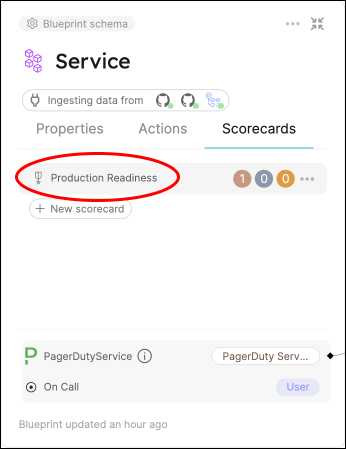
-
Add the following rules to the scorecard's
rulesarray, then clickSave:Rules to add (click to expand)
{"identifier": "branchProtection","description": "Checks if the repository has required approvals for pull requests","title": "Branch protection set","level": "Silver","query": {"combinator": "and","conditions": [{"operator": ">","property": "required_approvals_for_pr","value": 0}]}},{"identifier": "codeOwnerReview","description": "Checks if the repository requires approval from code owners","title": "Code owner review required","level": "Gold","query": {"combinator": "and","conditions": [{"operator": "=","property": "require_code_owner_review","value": true}]}},{"identifier": "hasOncall","description": "Checks if the service has an on-call defined in PagerDuty","title": "Has on-call","level": "Gold","query": {"combinator": "and","conditions": [{"operator": "isNotEmpty","property": "pagerduty_oncall"}]}} -
Now go to your Catalog and click on any of your services.
-
Click on the
Scorecardstab and you will see the score of the service, with details of which checks passed/failed: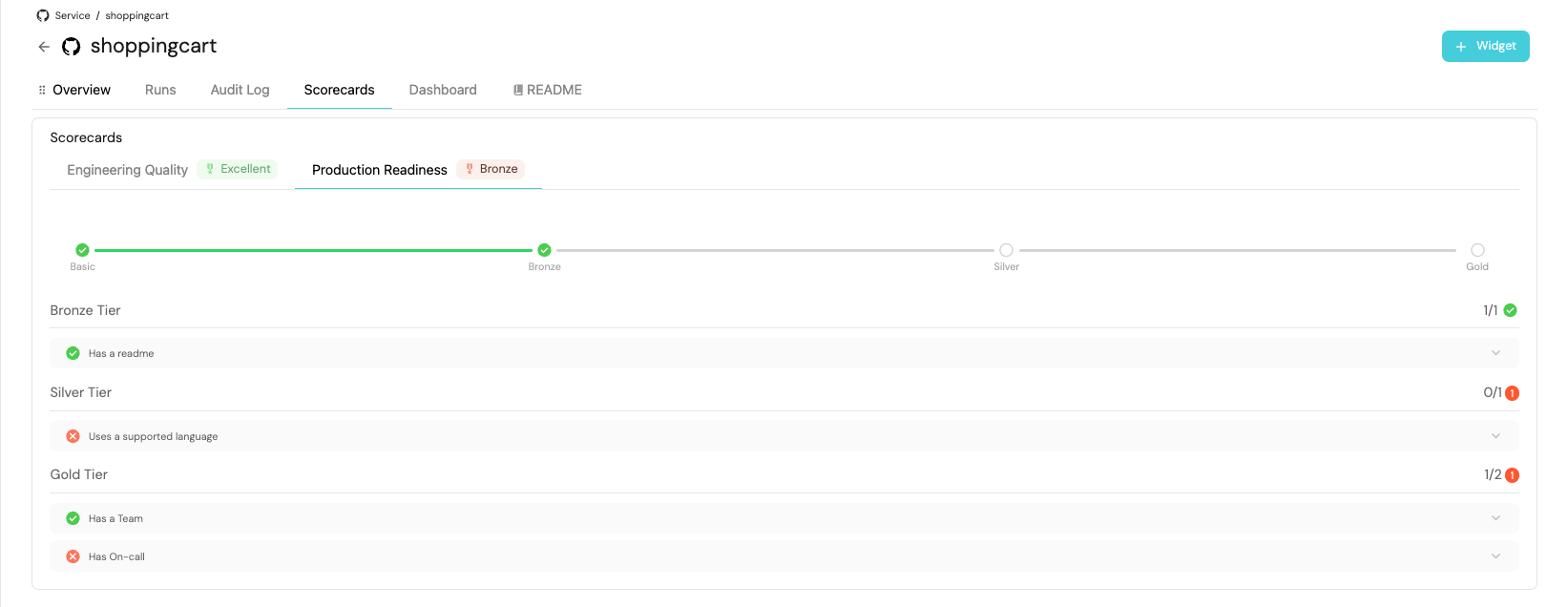
Visualization
By leveraging Port's dashboards, you can create custom views to track your production readiness metrics and monitor your services' compliance over time.
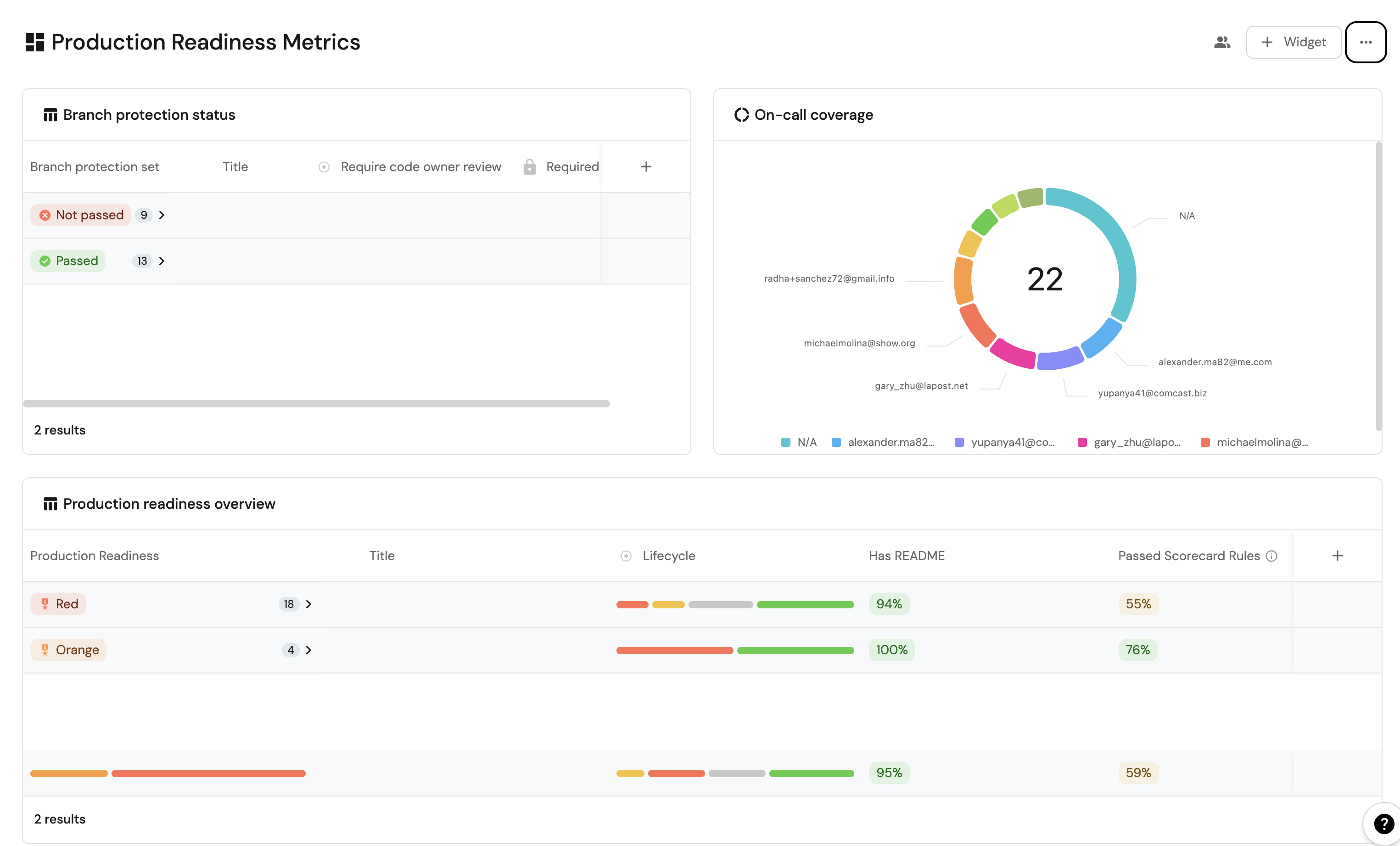
Dashboard setup
-
Go to your context lake.
-
Click on the
+button in the left sidebar. -
Select New dashboard.
-
Name the dashboard Production Readiness Metrics.
-
Choose an icon (optional).
-
Click on
Create.
Add widgets
In your new dashboard, create the following widgets:
Production readiness overview (click to expand)
-
Click
+ Widgetand select Table. -
Type
Production readiness overviewin the Title field. -
Choose an icon (optional).
-
Choose Service as the Blueprint.
-
Click on
Save. -
Click on the
...on the widget and selectCustomize table. -
Click on the
Group by any Columnicon and select Production Readiness. -
Click on
Manage propertiesand add the following:- Title
- Lifecycle
- Passed scorecard rule
- Has README
-
Click on the
Saveicon.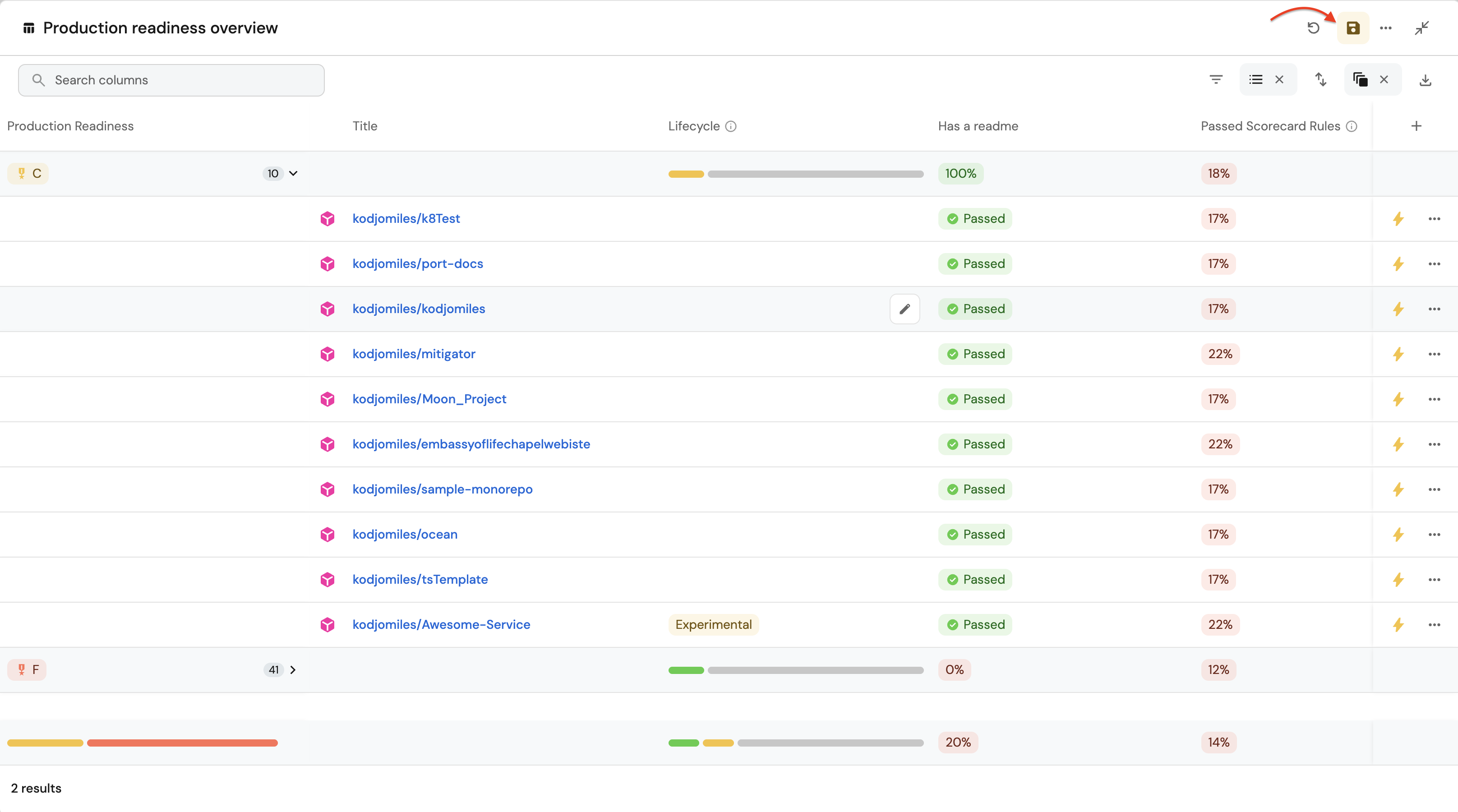
On-call coverage (click to expand)
-
Click
+ Widgetand select Pie Chart. -
Type
On-call coveragein the Title field. -
Choose an icon (optional).
-
Choose Service as the Blueprint.
-
Choose
Pagerduty On-callas the Breakdown by property. -
Click on
Save.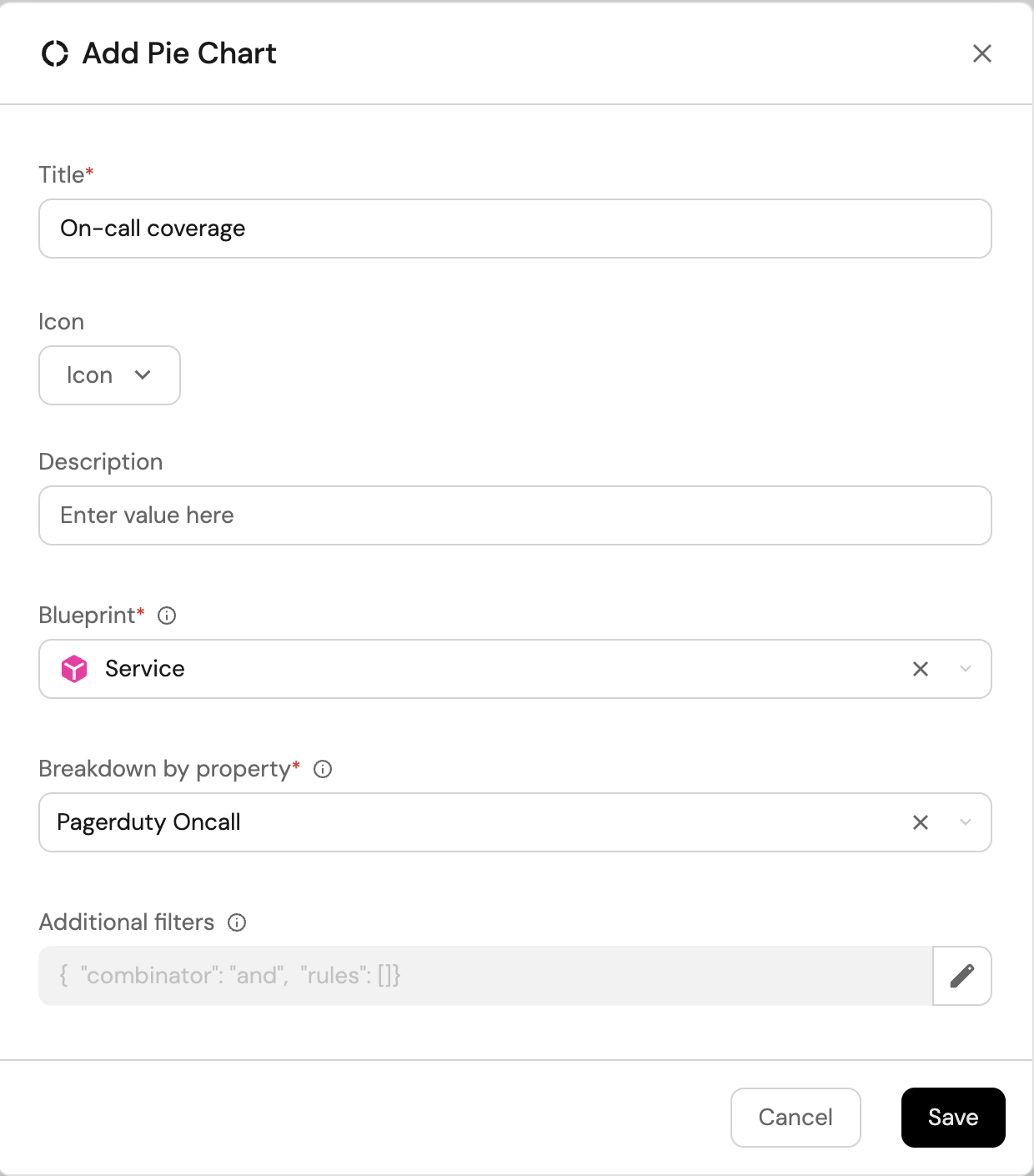
Branch protection status (click to expand)
-
Click
+ Widgetand select Table. -
Type
Branch protection statusin the Title field. -
Choose an icon (optional).
-
Choose Service as the Blueprint.
-
Click on
Save. -
Click on the
...on the widget and selectCustomize table. -
Click on the
Group by any Columnicon and select Branch Protection Status. -
Click on
Manage propertiesand add the following:- Title
- Required Approvals (required_approvals_for_pr)
- Code Owner Review Required (require_code_owner_review)
-
Click on the
Saveicon.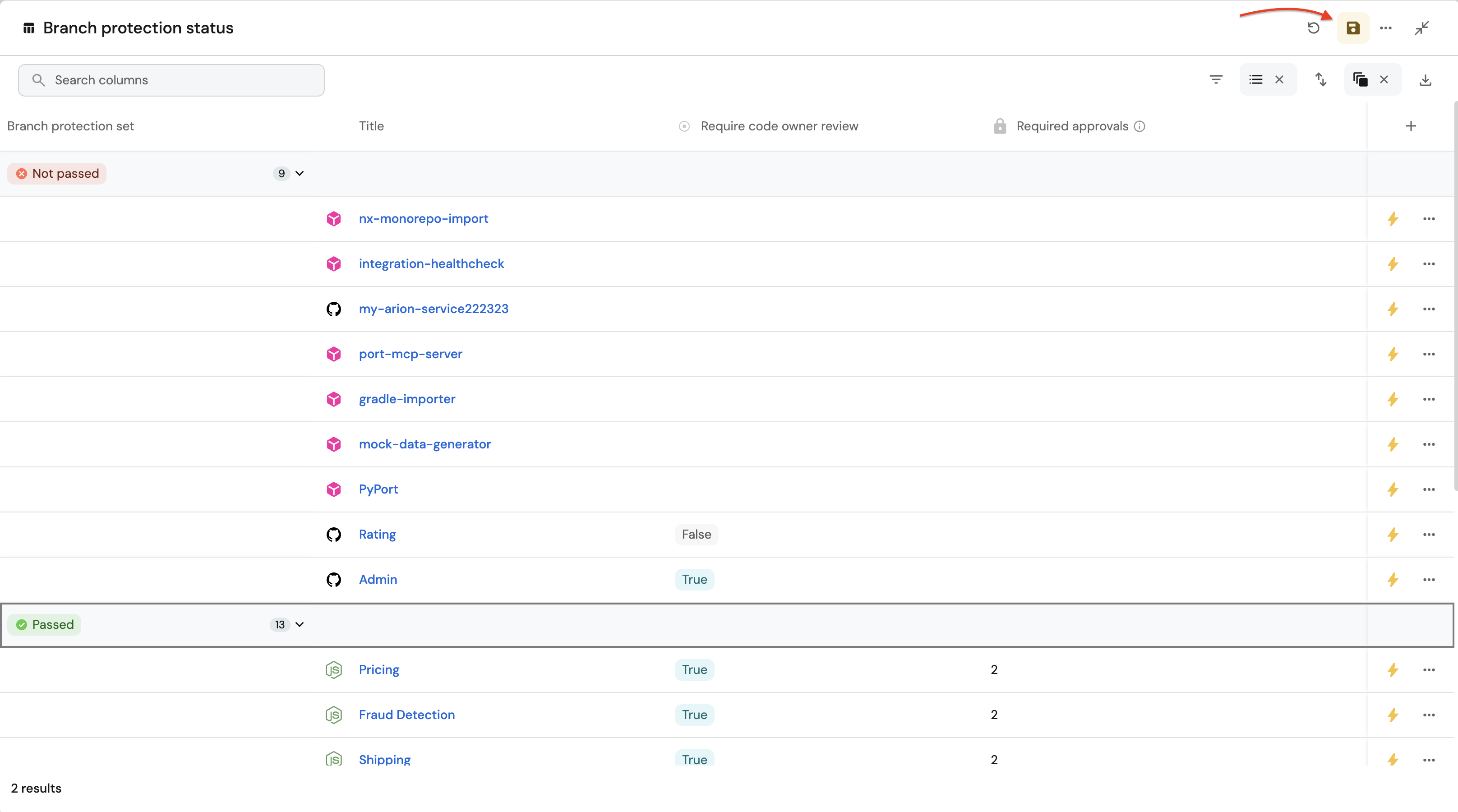
These widgets will give you a comprehensive view of your services' production readiness status, making it easy to identify areas that need attention.
Possible daily routine integrations
- Use Port's API to check for scorecard compliance from your CI and pass/fail it accordingly.
- Notify periodically via Slack about services that fail gold/silver/bronze validations.
- Send a weekly/monthly report for managers showing the number of services that do not meet specific standards.
Conclusion
Production readiness is something that needs to be monitored and handled constantly. In a microservice-heavy environment, things like codeowners and on-call management are critical.
With Port, standards are easy to set-up, prioritize and track. Using Port's API, you can also create/get/modify your scorecards from anywhere, allowing seamless integration with other platforms and services in your environment.
Related guides
- Route scorecard failures to Jira issues with AI - automatically convert failing production readiness rules into tracked, routed Jira work items.
- Auto-fix services when scorecards degrade - detect when production readiness scorecards degrade and delegate fixes to a coding agent.
- Implement the work item blueprint pattern - the ATR foundation that uses production readiness scorecards as routing gates.
- Port's OpsGenie integration - add on-call coverage data to your production readiness scorecard.
- Integrate scorecards with Slack - notify teams via Slack when services fail production readiness rules.