Auto-create Slack channel & GitHub issue for PagerDuty incidents
This guide demonstrates how to set up an automated incident management system that creates a dedicated Slack channel and GitHub issue whenever a PagerDuty incident is reported. Once implemented:
- A new Slack channel will be automatically created for each incident, providing a dedicated space for team communication.
- A GitHub issue will be automatically created to document the incident and track progress.
- The incident entity in Port will be updated with links to both the Slack channel and GitHub issue.
- Team members will receive immediate notifications and have a centralized place to collaborate.
Common use cases
- Real-time incident response: Automatically create communication channels when incidents are reported.
- Incident documentation: Ensure every incident is properly documented in your issue tracking system.
- Team collaboration: Provide dedicated spaces for teams to discuss and resolve incidents.
- Audit trail: Maintain a complete record of incident response activities.
- Manual incident channel creation: Let teams open a dedicated Slack channel from a service entity when they need a response room before or outside a PagerDuty incident.
- Automated workflows: Reduce manual steps in incident management processes.
Prerequisites
-
Install GitHub ocean.
-
Ingest GitHub issues using GitHub ocean (see GitHub ocean examples).
-
Install Port's PagerDuty integration for real-time incident ingestion.
-
Prepare your Port organization's
Client IDandClient Secret(find your credentials here). -
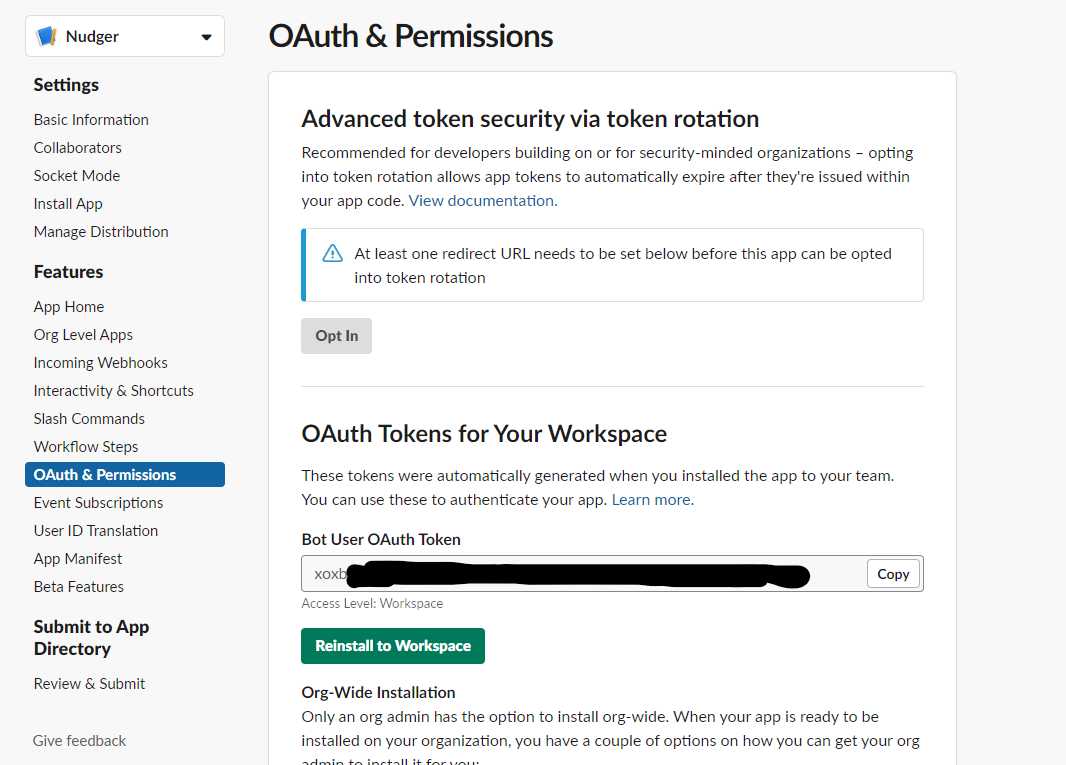
Configure a Slack app:
- Create a Slack app and install it in a workspace.
- Save the
Bot User OAuth Tokenfor later use. - Add the following permissions to the Slack app in OAuth & Permissions under
Bot Token Scopes:- Create channels:
channels:manage,groups:write,im:write,mpim:write - Send messages:
chat:write - Find users by email:
users:read.emailif you want to invite members automatically. - Invite users to channels:
channels:write.invites,groups:write.invites,mpim:write.invitesif you want to invite members automatically.
- Create channels:
Set up the data model
To support our automated incident management workflow, we need to modify the existing PagerDuty Incidents blueprint to include additional properties and relations.
Update PagerDuty incidents blueprint
-
Go to the data model page in Port.
-
Find the
pagerdutyIncidentblueprint. -
Click on
...and selectEdit JSON. -
Add the following snippet to the
propertiessection:Slack channel property (click to expand)
"slack_channel": {"type": "string","description": "The Slack Channel opened for troubleshooting this incident","title": "Slack Channel URL","icon": "Slack","format": "url"} -
Add the following snippet to the
relationssection:Service and issue relations (click to expand)
"service": {"title": "Service","description": "The service this incident is related to","target": "service","required": false,"many": false},"issue": {"target": "githubIssue","title": "GitHub Issue","many": false,"required": false,"description": "The issue created for documenting this incident"} -
Click Save to update the blueprint.
For simplicity, this guide assumes that the GitHub Service entity identifier matches the PagerDuty Service identifier (lowercased and split by -).
For example, a PagerDuty incident for the My Service PagerDuty service will be related to the my-service GitHub service.
Set up GitHub workflow
We will create a GitHub workflow that handles the incident response process. This workflow will create the Slack channel, send notifications, and create the GitHub issue.
Add GitHub repository secrets
-
Go to your GitHub repository settings.
-
Navigate to Secrets and variables → Actions.
-
Add the following secrets:
PORT_CLIENT_ID- Your Port client IDPORT_CLIENT_SECRET- Your Port client secretORG_ADMIN_TOKEN- Your GitHub personal access tokenBOT_USER_OAUTH_TOKEN- The Slack app bot token
If you've already completed the scaffold a new service guide, you should already have the first three secrets configured.
Create incident handler workflow
-
In your GitHub repository, create the file
.github/workflows/handle-incident.yaml.Dedicated Workflows RepositoryWe recommend creating a dedicated repository for the workflows that are used by Port actions.
-
Copy and paste the following workflow configuration:
Handle incident workflow (click to expand)
.github/workflows/handle-incident.yamlname: Handle Incidenton:workflow_dispatch:inputs:port_payload:description: "Port's payload, including details for who triggered the action and general context (blueprint, run ID, etc...)."required: true# These permissions are required for the GitHub issue creationpermissions:contents: readissues: writejobs:handle-new-incident:runs-on: ubuntu-latestenv:PD_INCIDENT_ID: ${{ fromJson(inputs.port_payload).event.diff.after.identifier }}PD_INCIDENT_URL: ${{ fromJson(inputs.port_payload).event.diff.after.properties.url }}PD_INCIDENT_TITLE: ${{ fromJson(inputs.port_payload).event.diff.after.title }}PORT_INCIDENT_URL: https://app.port.io/pagerdutyIncidentEntity?identifier=${{ fromJson(inputs.port_payload).event.diff.after.identifier }}steps:- uses: actions/checkout@v6- name: Log GitHub Issue Creationuses: port-labs/port-github-action@v1with:clientId: ${{ secrets.PORT_CLIENT_ID }}clientSecret: ${{ secrets.PORT_CLIENT_SECRET }}baseUrl: https://api.port.iooperation: PATCH_RUNrunId: ${{ fromJson(github.event.inputs.port_payload).run.id }}logMessage: "Creating a new GitHub issue for PagerDuty incident '${{ env.PD_INCIDENT_ID }}'..."- name: Get incident's related serviceid: get-incident-serviceuses: port-labs/port-github-action@v1with:clientId: ${{ secrets.PORT_CLIENT_ID }}clientSecret: ${{ secrets.PORT_CLIENT_SECRET }}baseUrl: https://api.port.iooperation: GETblueprint: pagerdutyServiceidentifier: ${{ fromJson(inputs.port_payload).event.diff.after.relations.pagerdutyService }}# The GitHub Service entity identifier is defined as PagerDuty title lowercased and split by '-'- name: Extract related serviceid: get-service-inforun: |service_title=$(echo '${{ steps.get-incident-service.outputs.entity }}' | jq -r '.title')echo "SERVICE_TITLE=$service_title" >> $GITHUB_OUTPUTecho "SERVICE_IDENTIFIER=$(echo $service_title | tr '[:upper:] ' '[:lower:]-')" >> $GITHUB_OUTPUT- name: Create GitHub issueuses: dacbd/create-issue-action@mainid: create-github-issuewith:token: ${{ secrets.ORG_ADMIN_TOKEN }}repo: ${{ steps.get-service-info.outputs.SERVICE_IDENTIFIER }}title: PagerDuty incident - ID ${{ env.PD_INCIDENT_ID }}labels: bug, incident, pagerdutybody: |PagerDuty incident issue reported.Port Incident Entity URL: ${{ env.PORT_INCIDENT_URL }}.PagerDuty incident URL: ${{ env.PD_INCIDENT_URL }}.- name: Report GitHub issue to Portuses: port-labs/port-github-action@v1with:clientId: ${{ secrets.PORT_CLIENT_ID }}clientSecret: ${{ secrets.PORT_CLIENT_SECRET }}identifier: ${{ steps.get-service-info.outputs.SERVICE_IDENTIFIER }}-${{ steps.create-github-issue.outputs.number }}blueprint: githubIssuerelations: |{"service": "${{ steps.get-service-info.outputs.SERVICE_IDENTIFIER }}"}- name: Log Executing Request to Open Channeluses: port-labs/port-github-action@v1with:clientId: ${{ secrets.PORT_CLIENT_ID }}clientSecret: ${{ secrets.PORT_CLIENT_SECRET }}baseUrl: https://api.port.iooperation: PATCH_RUNrunId: ${{ fromJson(github.event.inputs.port_payload).run.id }}logMessage: |GitHub issue created successfully - ${{ steps.create-github-issue.outputs.html_url }}Creating a new Slack channel for this incident...- name: Create Slack Channelid: create-slack-channelenv:CHANNEL_NAME: incident-${{ env.PD_INCIDENT_ID }}SLACK_TOKEN: ${{ secrets.BOT_USER_OAUTH_TOKEN }}run: |channel_name=$(echo "${{ env.CHANNEL_NAME }}" | tr '[:upper:]' '[:lower:]')response=$(curl -s -X POST "https://slack.com/api/conversations.create" \-H "Authorization: Bearer ${{ env.SLACK_TOKEN }}" \-H "Content-Type: application/json" \-d "{\"name\":\"$channel_name\"}")# Check if the channel was created successfullyok=$(echo $response | jq -r '.ok')if [ "$ok" == "true" ]; thenecho "Channel '$channel_name' created successfully."channel_id=$(echo $response | jq -r '.channel.id')echo "SLACK_CHANNEL_ID=$channel_id" >> $GITHUB_OUTPUTelseerror=$(echo $response | jq -r '.error')echo "Error creating channel: $error"echo "SLACK_ERROR=$error" >> $GITHUB_OUTPUTexit 1fi- name: Log failed Slack channel creationif: failure()uses: port-labs/port-github-action@v1with:clientId: ${{ secrets.PORT_CLIENT_ID }}clientSecret: ${{ secrets.PORT_CLIENT_SECRET }}baseUrl: https://api.port.iooperation: PATCH_RUNrunId: ${{ fromJson(github.event.inputs.port_payload).run.id }}logMessage: "Failed to create slack channel: ${{ steps.create-slack-channel.outputs.SLACK_ERROR }} ❌"- name: Log successful Slack channel creationif: success()uses: port-labs/port-github-action@v1env:SLACK_CHANNEL_URL: https://slack.com/app_redirect?channel=${{ steps.create-slack-channel.outputs.SLACK_CHANNEL_ID }}with:clientId: ${{ secrets.PORT_CLIENT_ID }}clientSecret: ${{ secrets.PORT_CLIENT_SECRET }}baseUrl: https://api.port.iooperation: PATCH_RUNrunId: ${{ fromJson(github.event.inputs.port_payload).run.id }}logMessage: |Channel created successfully - ${{ env.SLACK_CHANNEL_URL }} ✅- name: Send Slack Messageuses: archive/github-actions-slack@v2.9.0env:SVC_ENTITY_URL: https://app.port.io/serviceEntity?identifier=${{ steps.get-service-info.outputs.SERVICE_IDENTIFIER }}SVC_ENTITY_TITLE: ${{ steps.get-service-info.outputs.SERVICE_IDENTIFIER }}id: send-messagewith:slack-function: send-messageslack-bot-user-oauth-access-token: ${{ secrets.BOT_USER_OAUTH_TOKEN }}slack-channel: ${{ steps.create-slack-channel.outputs.SLACK_CHANNEL_ID }}slack-text: |:rotating_light: New Incident reported - ${{ env.PD_INCIDENT_TITLE }} :rotating_light:Urgency: `${{ fromJson(inputs.port_payload).event.diff.after.properties.urgency }}`Service: <${{ env.SVC_ENTITY_URL }}|${{ env.SVC_ENTITY_TITLE }}>Manage incident :point_right::skin-tone-4: <${{ env.PORT_INCIDENT_URL }}|here>!Please use this Slack channel to report any updates, ideas, or root-cause ideas related to this incident :thread:- name: Update incident entity with new informationuses: port-labs/port-github-action@v1env:SLACK_CHANNEL_URL: https://slack.com/app_redirect?channel=${{ steps.create-slack-channel.outputs.SLACK_CHANNEL_ID }}with:clientId: ${{ secrets.PORT_CLIENT_ID }}clientSecret: ${{ secrets.PORT_CLIENT_SECRET }}identifier: ${{ env.PD_INCIDENT_ID }}baseUrl: https://api.port.ioblueprint: pagerdutyIncidentproperties: |{"slack_channel": "${{ env.SLACK_CHANNEL_URL }}"}relations: |{"githubIssue": "${{ steps.get-service-info.outputs.SERVICE_IDENTIFIER }}-${{ steps.create-github-issue.outputs.number }}","service": "${{ steps.get-service-info.outputs.SERVICE_IDENTIFIER }}"}- name: Log Successful Actionif: success()uses: port-labs/port-github-action@v1with:clientId: ${{ secrets.PORT_CLIENT_ID }}clientSecret: ${{ secrets.PORT_CLIENT_SECRET }}baseUrl: https://api.port.iooperation: PATCH_RUNrunId: ${{ fromJson(github.event.inputs.port_payload).run.id }}logMessage: |Done handling the new incident 💪🏻Selecting a Port API URL by account regionThe
port_region,port.baseUrl,portBaseUrl,port_base_urlandOCEAN__PORT__BASE_URLparameters select which Port API instance to use:- EU (app.port.io) →
https://api.port.io - US (app.us.port.io) →
https://api.us.port.io
- EU (app.port.io) →
Set up manual Slack channel action
Use this optional action when responders need to create an incident channel manually from a service entity. The action creates a public or private Slack channel and can invite users based on the selected service's code_owners property or a manually selected user list.
Create Slack channel workflow
Create the file .github/workflows/open-slack-channel.yaml in the .github/workflows folder of your repository.
Open Slack channel workflow (click to expand)
name: Open Slack channel

on:
  workflow_dispatch:
    inputs:
      channel_name:
        description: Name of the public or private channel to create.
        required: true
        type: string
      is_private:
        description: Create a private channel instead of a public one.
        required: false
        type: boolean
      members:
        description: JSON array of user emails to invite to the channel.
        required: false
        type: string
      port_context:
        description: Details of the action and general context from Port.
        required: true

jobs:
  open-slack-channel:
    runs-on: ubuntu-latest
    steps:
      - name: Log channel creation request
        uses: port-labs/port-github-action@v1
        with:
          clientId: ${{ secrets.PORT_CLIENT_ID }}
          clientSecret: ${{ secrets.PORT_CLIENT_SECRET }}
          baseUrl: https://api.port.io
          operation: PATCH_RUN
          runId: ${{ fromJson(inputs.port_context).run_id }}
          logMessage: Creating a Slack channel.

      - name: Create Slack channel
        id: create_channel
        env:
          CHANNEL_NAME: ${{ inputs.channel_name }}
          IS_PRIVATE: ${{ inputs.is_private || 'false' }}
          SLACK_TOKEN: ${{ secrets.BOT_USER_OAUTH_TOKEN }}
        run: |
          channel_name=$(echo "$CHANNEL_NAME" | tr '[:upper:]' '[:lower:]')
          response=$(curl -s -X POST "https://slack.com/api/conversations.create" \
            -H "Authorization: Bearer $SLACK_TOKEN" \
            -H "Content-Type: application/json" \
            --data "{\"name\":\"$channel_name\",\"is_private\":$IS_PRIVATE}")

          echo "API response: $response"

          if [[ "$(echo "$response" | jq -r '.ok')" == "true" ]]; then
            channel_id=$(echo "$response" | jq -r '.channel.id')
            echo "channel_id=$channel_id" >> $GITHUB_OUTPUT
          else
            error=$(echo "$response" | jq -r '.error')
            echo "create_channel_error=${error//_/ }" >> $GITHUB_OUTPUT
            exit 1
          fi

      - name: Log failed channel creation
        if: failure()
        uses: port-labs/port-github-action@v1
        with:
          clientId: ${{ secrets.PORT_CLIENT_ID }}
          clientSecret: ${{ secrets.PORT_CLIENT_SECRET }}
          baseUrl: https://api.port.io
          operation: PATCH_RUN
          runId: ${{ fromJson(inputs.port_context).run_id }}
          logMessage: "Failed to create Slack channel: ${{ steps.create_channel.outputs.create_channel_error }}"

      - name: Log successful channel creation
        uses: port-labs/port-github-action@v1
        with:
          clientId: ${{ secrets.PORT_CLIENT_ID }}
          clientSecret: ${{ secrets.PORT_CLIENT_SECRET }}
          baseUrl: https://api.port.io
          operation: PATCH_RUN
          runId: ${{ fromJson(inputs.port_context).run_id }}
          logMessage: "Slack channel created successfully: https://slack.com/app_redirect?channel=${{ steps.create_channel.outputs.channel_id }}"

      - name: Check out repository
        uses: actions/checkout@v6

      - name: Add members to Slack channel
        if: ${{ inputs.members != '' && inputs.members != '[]' }}
        env:
          SLACK_TOKEN: ${{ secrets.BOT_USER_OAUTH_TOKEN }}
          CHANNEL_ID: ${{ steps.create_channel.outputs.channel_id }}
          CLIENT_ID: ${{ secrets.PORT_CLIENT_ID }}
          CLIENT_SECRET: ${{ secrets.PORT_CLIENT_SECRET }}
          RUN_ID: ${{ fromJson(inputs.port_context).run_id }}
          MEMBER_EMAILS: ${{ inputs.members }}
        run: |
          cd slack
          chmod +x add-members-to-channel.sh
          bash add-members-to-channel.sh "$SLACK_TOKEN" "$CHANNEL_ID" "$CLIENT_ID" "$CLIENT_SECRET" "$RUN_ID" "$MEMBER_EMAILS"
Create member invitation script
Create the file slack/add-members-to-channel.sh in your GitHub repository.
Add members script (click to expand)
#!/bin/bash

SLACK_TOKEN=$1
CHANNEL_ID=$2
clientId=$3
clientSecret=$4
run_id=$5
MEMBER_EMAILS_JSON=$6

PORT_TOKEN_RESPONSE=$(curl -s -X POST "https://api.port.io/v1/auth/access_token" \
  -H "accept: application/json" \
  -H "Content-Type: application/json" \
  -d "{
        \"clientId\": \"$clientId\",
        \"clientSecret\": \"$clientSecret\"
      }")

PORT_ACCESS_TOKEN=$(echo "$PORT_TOKEN_RESPONSE" | jq -r '.accessToken')

report_error() {
  local message=$1
  echo "$message"
  curl -s -X POST "https://api.port.io/v1/actions/runs/$run_id/logs" \
    -H "Content-Type: application/json" \
    -H "Authorization: Bearer $PORT_ACCESS_TOKEN" \
    -d "{\"message\": \"$message\"}"
}

if [ -z "$PORT_ACCESS_TOKEN" ] || [ "$PORT_ACCESS_TOKEN" == "null" ]; then
  echo "Failed to obtain Port access token."
  exit 1
fi

if [ -z "$MEMBER_EMAILS_JSON" ] || [ "$MEMBER_EMAILS_JSON" == "null" ] || [ "$MEMBER_EMAILS_JSON" == "[]" ]; then
  echo "No members were provided. Skipping invites."
  exit 0
fi

user_ids=""
readarray -t MEMBER_EMAILS < <(echo "$MEMBER_EMAILS_JSON" | jq -r '.[]?')

for email in "${MEMBER_EMAILS[@]}"; do
  user_response=$(curl -s -X GET "https://slack.com/api/users.lookupByEmail?email=$email" \
    -H "Authorization: Bearer $SLACK_TOKEN")

  if [[ "$(echo "$user_response" | jq -r '.ok')" == "true" ]]; then
    user_id=$(echo "$user_response" | jq -r '.user.id')
    user_ids+="${user_id},"
  else
    error_message="Failed to retrieve Slack user ID for $email: $(echo "$user_response" | jq -r '.error' | tr '_' ' ')"
    report_error "$error_message"
  fi
done

user_ids=${user_ids%,}

if [[ -n "$user_ids" ]]; then
  invite_response=$(curl -s -X POST "https://slack.com/api/conversations.invite" \
    -H "Content-Type: application/json" \
    -H "Authorization: Bearer $SLACK_TOKEN" \
    --data "{\"channel\":\"$CHANNEL_ID\",\"users\":\"$user_ids\"}")

  if [[ "$(echo "$invite_response" | jq -r '.ok')" == "false" ]]; then
    error_message="Failed to invite users to Slack channel: $(echo "$invite_response" | jq -r '.error' | tr '_' ' ')"
    report_error "$error_message"
  fi
else
  report_error "No Slack user IDs were found to invite."
fi
Set up self-service action
Follow the steps below to create a self-service action that triggers the Slack channel workflow.
-
Go to the Self-service page in Port.
-
Click on the + New Action button.
-
Click on the
{...} Edit JSONbutton. -
Copy and paste the following JSON configuration into the editor:
Open Slack channel action (click to expand)
Replace the variables<GITHUB_ORG>- your GitHub organization or user name.<GITHUB_REPO>- your GitHub repository name.<YOUR_GITHUB_OCEAN_INTEGRATION_ID>- your GitHub Ocean integration installation ID.
{"identifier": "open_slack_channel","title": "Open Slack channel","icon": "Slack","description": "Create a Slack channel and optionally add members to it","trigger": {"type": "self-service","operation": "DAY-2","userInputs": {"properties": {"channel_name": {"icon": "Slack","title": "Channel name","type": "string","default": {"jqQuery": "\"incident-\" + .entity.identifier"}},"is_private": {"description": "Create a private channel instead of a public one.","title": "Is private","type": "boolean","default": false,"icon": "Slack"},"members": {"items": {"type": "string","format": "user"},"title": "Members","icon": "Slack","type": "array","description": "Add members manually to the channel.","default": {"jqQuery": ".entity.properties.code_owners"}}},"required": ["channel_name"],"order": ["channel_name","members","is_private"]},"blueprintIdentifier": "service"},"invocationMethod": {"type": "INTEGRATION_ACTION","installationId": "<YOUR_GITHUB_OCEAN_INTEGRATION_ID>","integrationActionType": "dispatch_workflow","integrationActionExecutionProperties": {"org": "<GITHUB_ORG>","repo": "<GITHUB_REPO>","workflow": "open-slack-channel.yaml","workflowInputs": {"channel_name": "{{ .inputs.\"channel_name\" }}","is_private": "{{ .inputs.\"is_private\" }}","members": "{{ .inputs.\"members\" }}","port_context": {"entity": "{{ .entity }}","blueprint": "{{ .action.blueprint }}","run_id": "{{ .run.id }}"}},"reportWorkflowStatus": true}},"requiredApproval": false} -
Click Save to create the action.
Set up automation
Now we need to create an automation in Port that will trigger our GitHub workflow whenever a new PagerDuty incident is created.
Create the incident management automation
-
Navigate to your Automations page.
-
Click on the + Automation button.
-
Copy and paste the following automation configuration:
Incident management automation (click to expand)
This automation will be triggered when a new
pagerdutyIncidententity is created.Replace the variables<GITHUB-ORG>- your GitHub organization or user name.<GITHUB-REPO-NAME>- your GitHub repository name.<YOUR_GITHUB_OCEAN_INTEGRATION_ID>- your GitHub Ocean integration installation ID.
{"identifier": "handle_new_incident","title": "Handle new PagerDuty incident","icon": "pagerduty","description": "Create Slack channel for incident troubleshooting, and GitHub issue for documentation","trigger": {"type": "automation","event": {"type": "ENTITY_CREATED","blueprintIdentifier": "pagerdutyIncident"}},"invocationMethod": {"type": "INTEGRATION_ACTION","installationId": "<YOUR_GITHUB_OCEAN_INTEGRATION_ID>","integrationActionType": "dispatch_workflow","integrationActionExecutionProperties": {"org": "<GITHUB-ORG>","repo": "<GITHUB-REPO-NAME>","workflow": "handle-incident.yaml","workflowInputs": {"port_payload": "{{ . }}"},"reportWorkflowStatus": true}},"requiredApproval": false,"publish": true} -
Click Save to create the automation.
Let's test it!
Test automatic incident automation
-
Go to your PagerDuty account.
-
Create a new PagerDuty incident.
-
Navigate to the runs audit page.
-
Look for
Handle new PagerDuty incidentautomation run. -
Go back to your PagerDuty Incidents page.
-
Click on the incident entity you created.
-
Verify that the
Slack Channel URLproperty andGitHub Issuerelation are populated.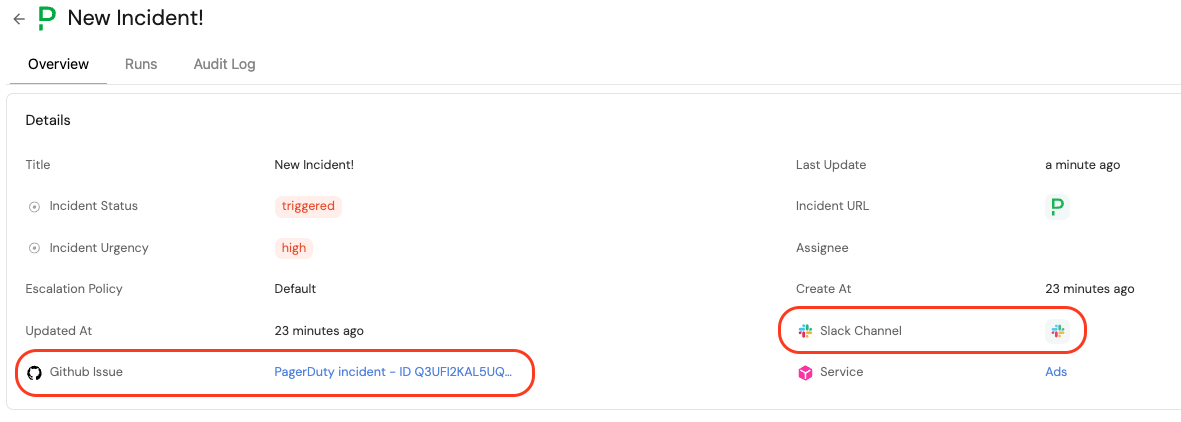
Test manual Slack channel action
-
Go to the Self-service page in Port.
-
Click on the Open Slack channel action.
-
Select a service entity.
-
Enter a channel name and optionally add members.
-
Toggle Is private if you want to create a private channel.
-
Click Execute.
-
Open Slack and verify that the channel was created.