Create a Jira issue from a monitoring alert
This guide demonstrates the pattern for automatically creating a Jira issue when a monitoring or security tool raises an alert in Port. The workflow triggers when an alert entity is updated and its priority rises, then calls the Jira API through a webhook node.
This guide uses Datadog as the worked example. The same pattern applies to any tool that syncs alerts into Port, you only swap the source blueprint. See adapt this for other tools at the end of the guide.
Common use cases
- Automatically create Jira issues from monitoring or security alerts.
- Track and follow up on incidents from monitoring systems.
- Give responders a governed, hands-off path from alert to actionable ticket.
Prerequisites
- Complete the onboarding process.
- Access to your Jira organization with permissions to create issues.
- Port's Datadog integration needs to be installed.
- A Jira API token with permissions to create new issues.
Set up data model
For this guide, we will use the data model provided by the Port Datadog integration.
If you haven't installed the Datadog integration yet, head over to the integration installation page to install it. This will automatically set up the relevant blueprints for you.
Set up the workflow
With the integration installed and Datadog alerts ingested into Port, we'll now set up a workflow that is triggered when a Datadog Alert priority changes to high or critical. Alert priorities in Datadog are indicated by integer values from 1 (critical) to 5 (low). This workflow will create a Jira issue using the details of the alert.
Follow the steps below to configure the workflow.
Add Port secret
To add the secret to Port:
-
Open the Credentials modal.
-
Click on the
Secretstab. -
Click on
+ Secretand add the following secret:-
JIRA_AUTH- Base64 encoded string of your Jira credentials. Generate this by running:echo -n "your-email@domain.com:your-api-token" | base64Replace
your-email@domain.comwith your Jira email andyour-api-tokenwith your Jira API token.One time generationThe base64 encoded string only needs to be generated once and will work for all webhook calls until you change your API token.
-
Build the workflow
To create the workflow:
-
Go to the Workflows page of your portal.
-
Click on the + Workflow button in the top-right corner.
-
In the Name field, enter
Create Jira issue from Datadog alert, then click Confirm. -
On the editor page, click the
{...}button to open the JSON editor. -
Copy and paste the workflow JSON below to replace the example workflow:
Create Jira issue from Datadog alert workflow (click to expand)
{"identifier": "create_jira_issue_from_datadog_alert","title": "Create Jira issue from Datadog alert","description": "Open a Jira issue when a Datadog alert changes from medium to higher priority.","nodes": [{"identifier": "trigger","title": "On Datadog alert priority change","config": {"type": "EVENT_TRIGGER","event": {"type": "ENTITY_UPDATED","blueprintIdentifier": "datadogMonitor"},"condition": {"type": "JQ","expressions": [".diff.before.properties.priority | tonumber >= 3",".diff.after.properties.priority | tonumber < 3"],"combinator": "and"}}},{"identifier": "create_jira_issue","title": "Create Jira issue","config": {"type": "WEBHOOK","url": "https://<JIRA_ORGANIZATION_URL>/rest/api/3/issue","method": "POST","synchronized": true,"headers": {"Authorization": "Basic {{ .secrets.JIRA_AUTH }}","Content-Type": "application/json"},"body": {"fields": {"project": {"key": "<JIRA_PROJECT_NAME>"},"summary": "Datadog Alert: {{ .outputs.trigger.diff.after.title }}","description": {"version": 1,"type": "doc","content": [{"type": "paragraph","content": [{"type": "text","text": "Priority","marks": [{"type": "strong"}]},{"type": "text","text": ": {{ .outputs.trigger.diff.after.properties.priority }}"}]},{"type": "paragraph","content": [{"type": "text","text": "Monitor Type","marks": [{"type": "strong"}]},{"type": "text","text": ": {{ .outputs.trigger.diff.after.properties.monitorType }}"}]},{"type": "paragraph","content": [{"type": "text","text": "Overall State","marks": [{"type": "strong"}]},{"type": "text","text": ": {{ .outputs.trigger.diff.after.properties.overallState }}"}]},{"type": "paragraph","content": [{"type": "text","text": "Thresholds","marks": [{"type": "strong"}]},{"type": "text","text": ": {{ .outputs.trigger.diff.after.properties.thresholds }}"}]},{"type": "paragraph","content": [{"type": "text","text": "Tags","marks": [{"type": "strong"}]},{"type": "text","text": ": {{ .outputs.trigger.diff.after.properties.tags }}"}]},{"type": "paragraph","content": [{"type": "text","text": "Created By","marks": [{"type": "strong"}]},{"type": "text","text": ": {{ .outputs.trigger.diff.after.properties.createdBy }}"}]},{"type": "paragraph","content": [{"type": "text","text": "Created At","marks": [{"type": "strong"}]},{"type": "text","text": ": {{ .outputs.trigger.diff.after.properties.createdAt }}"}]},{"type": "paragraph","content": [{"type": "text","text": "Updated At","marks": [{"type": "strong"}]},{"type": "text","text": ": {{ .outputs.trigger.diff.after.properties.updatedAt }}"}]}]},"issuetype": {"name": "Bug"},"labels": ["datadog"]}}}}],"connections": [{"sourceIdentifier": "trigger","targetIdentifier": "create_jira_issue"}]}Placeholder replacementReplace
<JIRA_ORGANIZATION_URL>in the webhook URL with your Jira organization URL (e.g.,example.atlassian.net).Replace
<JIRA_PROJECT_NAME>in the webhook body with your Jira project key. -
Click
Saveto save the workflow.
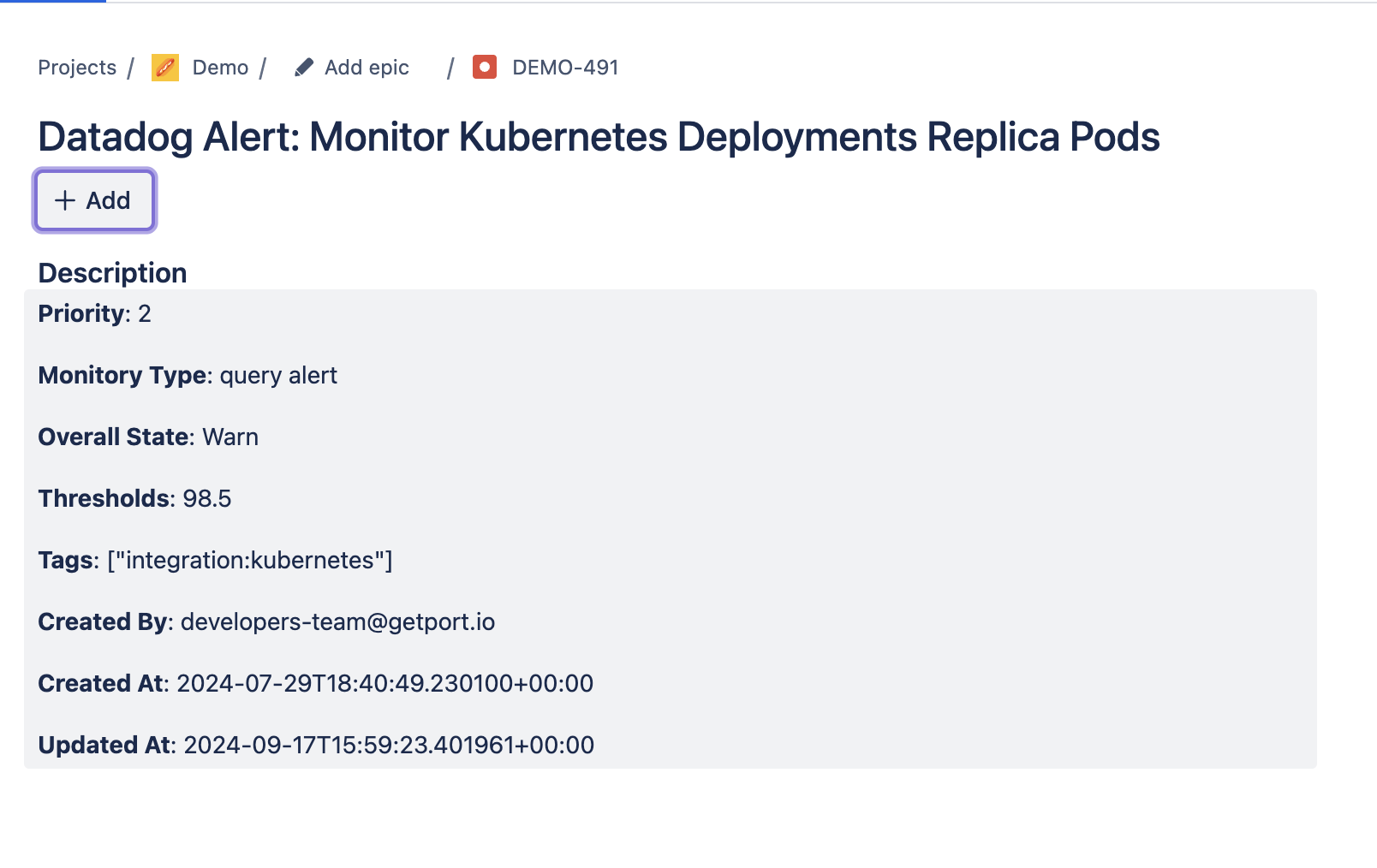
Now, every time a Datadog Alert priority is raised to high or critical (i.e., moves from 3, 4, or 5 to 1 or 2), a Jira issue like the one below will be created:
Adapt this for other tools
The pattern above works for any monitoring or security tool that syncs alerts or vulnerabilities into Port. Keep the workflow and Jira webhook the same, and change the source blueprint that triggers the workflow:
| Tool | Source blueprint | Tool-specific guide |
|---|---|---|
| Datadog | datadogAlert | This guide |
| Dependabot | githubDependabotAlert | Use this guide's workflow pattern with Dependabot alert fields. |
| New Relic | newRelicAlert | Create a Jira issue from a New Relic alert |
| Snyk | snykVulnerability | Use this guide's workflow pattern with Snyk vulnerability fields. |
For each tool, point the workflow's event trigger at the relevant source blueprint and map that blueprint's properties into the Jira issue payload.