Create GitHub pull requests from Port
This guide includes steps that require integration with GitHub:
- GitHub (Ocean) - uses the Ocean framework. We strongly recommend this integration for new and migrated setups.
- GitHub (Sunset) - uses a GitHub app that is in sunset and will be fully deprecated on September 15, 2026.
This guide demonstrates how to open a pull-request in a GitHub repository from within Port using either GitHub workflows or a Jenkins pipeline.
The workflow involves adding a resource block to a Terraform main.tf file and subsequently generating a PR for the modification on GitHub. In this specific instance, the added resource is a storage account in the Azure cloud.
Common use cases
- Automate infrastructure provisioning by creating pull requests for Terraform changes.
- Enable developers to request infrastructure resources through self-service actions.
- Maintain proper GitOps workflows with automated branch creation and PR generation.
- Streamline the process of adding new cloud resources to your infrastructure codebase.
Prerequisites
This guide assumes you have:
- You have a Port account and have completed the onboarding process.
- For the Jenkins alternative: Jenkins with the Generic Webhook Trigger plugin installed.
- GitHub (Ocean)
- GitHub (Sunset)
- Install GitHub Ocean.
- Port's GitHub app needs to be installed in your GitHub organization.
Implementation
Set up self-service action
-
Go to the Self-service page of your portal.
-
Click on the
+ New Actionbutton. -
Click on the
{...} Edit JSONbutton. -
Copy and paste the JSON configuration for your integration type into the editor:
- GitHub (Ocean)
- GitHub (Sunset)
Open GitHub PR action (Click to expand)
Replace the variables<GITHUB-ORG>- your GitHub organization or user name.<GITHUB-REPO-NAME>- the repository where the workflow file is stored.<YOUR_GITHUB_OCEAN_INTEGRATION_ID>- your GitHub Ocean integration ID.
{"identifier": "open_github_pr","title": "Open GitHub PR","icon": "Microservice","description": "This action opens a PR after modifying a file using a GitHub workflow","trigger": {"type": "self-service","operation": "DAY-2","userInputs": {"properties": {"storage_name": {"type": "string","title": "Storage Name"},"storage_location": {"type": "string","title": "Storage Location"}},"required": [],"order": ["storage_name","storage_location"]},"blueprintIdentifier": "service"},"invocationMethod": {"type": "INTEGRATION_ACTION","installationId": "<YOUR_GITHUB_OCEAN_INTEGRATION_ID>","integrationActionType": "dispatch_workflow","integrationActionExecutionProperties": {"org": "<GITHUB-ORG>","repo": "<GITHUB-REPO-NAME>","workflow": "create-github-pr.yml","workflowInputs": {"storage_name": "{{ .inputs.storage_name }}","storage_location": "{{ .inputs.storage_location }}","repo_url": "{{ .entity.properties.url }}","port_context": {"blueprint": "{{ .action.blueprint }}","entity": "{{ .entity }}","runId": "{{ .run.id }}","trigger": "{{ .trigger }}"}},"reportWorkflowStatus": true}},"requiredApproval": false}Open GitHub PR action (Click to expand)
Replace the variables<GITHUB-ORG>- your GitHub organization or user name.<GITHUB-REPO-NAME>- the repository where the workflow file is stored.
{"identifier": "open_github_pr","title": "Open GitHub PR","icon": "Microservice","description": "This action opens a PR after modifying a file using a GitHub workflow","trigger": {"type": "self-service","operation": "DAY-2","userInputs": {"properties": {"storage_name": {"type": "string","title": "Storage Name"},"storage_location": {"type": "string","title": "Storage Location"}},"required": [],"order": ["storage_name","storage_location"]},"blueprintIdentifier": "service"},"invocationMethod": {"type": "GITHUB","org": "<GITHUB-ORG>","repo": "<GITHUB-REPO-NAME>","workflow": "create-github-pr.yml","workflowInputs": {"storage_name": "{{ .inputs.storage_name }}","storage_location": "{{ .inputs.storage_location }}","repo_url": "{{ .entity.properties.url }}","port_context": {"blueprint": "{{ .action.blueprint }}","entity": "{{ .entity }}","runId": "{{ .run.id }}","trigger": "{{ .trigger }}"}},"reportWorkflowStatus": true},"requiredApproval": false} -
Ensure your service repositories have the Terraform template and
main.tffile (see Create Terraform templates in the Jenkins section for the template content). -
Create a workflow file under
.github/workflows/create-github-pr.ymlin your workflows repository with the following content:Create GitHub PR workflow (Click to expand)
create-github-pr.ymlname: Create GitHub PRon:workflow_dispatch:inputs:storage_name:required: truetype: stringstorage_location:required: truetype: stringrepo_url:required: truetype: stringport_context:required: truetype: stringjobs:create-pr:runs-on: ubuntu-lateststeps:- name: Inform startinguses: port-labs/port-github-action@v1with:clientId: ${{ secrets.PORT_CLIENT_ID }}clientSecret: ${{ secrets.PORT_CLIENT_SECRET }}operation: PATCH_RUNrunId: ${{ fromJson(inputs.port_context).runId }}logMessage: |Creating a GitHub PR for new terraform resource... ⛴️- name: Extract repo infoid: extractrun: |REPO_PATH=$(echo "${{ inputs.repo_url }}" | sed 's|https://github.com/||' | sed 's|git@github.com:||' | sed 's|.git||')echo "REPO_PATH=$REPO_PATH" >> $GITHUB_ENV- name: Checkout target repouses: actions/checkout@v6with:repository: ${{ env.REPO_PATH }}token: ${{ secrets.GH_TOKEN }}ref: main- name: Make changesrun: |sed "s/{{ storage_name }}/${{ inputs.storage_name }}/g; s/{{ storage_location }}/${{ inputs.storage_location }}/g" templates/create-azure-storage.tf >> main.tf- name: Create branch and pushrun: |git config user.name "github-actions[bot]"git config user.email "github-actions[bot]@users.noreply.github.com"git checkout -b "infra/new-resource-${{ inputs.storage_name }}"git add main.tfgit commit -m "Add a new resource block file"git push origin "infra/new-resource-${{ inputs.storage_name }}"- name: Create pull requestrun: |gh pr create --base main --head "infra/new-resource-${{ inputs.storage_name }}" \--title "New resource block ${{ inputs.storage_name }}" \--body "This pull request adds a new resource block to the project."env:GH_TOKEN: ${{ secrets.GH_TOKEN }}- name: Notify Portuses: port-labs/port-github-action@v1with:clientId: ${{ secrets.PORT_CLIENT_ID }}clientSecret: ${{ secrets.PORT_CLIENT_SECRET }}operation: PATCH_RUNrunId: ${{ fromJson(inputs.port_context).runId }}status: SUCCESSlogMessage: |Created GitHub PR for new terraform resource ${{ inputs.storage_name }} 🚀 -
Add the following secrets to your GitHub workflows repository:
PORT_CLIENT_ID,PORT_CLIENT_SECRET, andGH_TOKEN(a Classic Personal Access Token withreposcope). -
Click
Save.
Now you should see the Open GitHub PR action in the self-service page. 🎉
Alternative: Using Jenkins
If you prefer to use Jenkins instead of GitHub workflows, follow these steps to set up the Jenkins-based action.
-
Go to the Self-service page and create a new action with the following JSON:
Open GitHub PR with Jenkins action (Click to expand)
PlaceholdersYOUR_JENKINS_URL- The URL of your Jenkins server.JOB_TOKEN- The token of the Jenkins job.
{"identifier": "open_github_pr_with_jenkins","title": "Open GitHub PR with Jenkins","icon": "Microservice","description": "This action opens a PR after modifying a file using Jenkins","trigger": {"type": "self-service","operation": "DAY-2","userInputs": {"properties": {"storage_name": {"type": "string","title": "Storage Name"},"storage_location": {"type": "string","title": "Storage Location"}},"required": [],"order": ["storage_name","storage_location"]},"blueprintIdentifier": "service"},"invocationMethod": {"type": "JENKINS","url": "http://YOUR_JENKINS_URL/generic-webhook-trigger/invoke?token=<JOB_TOKEN>","agent": false,"body": {"{{ spreadValue() }}": "{{ .inputs }}","port_context": {"runId": "{{ .run.id }}","blueprint": "{{ .action.blueprint }}","entity": "{{ .entity }}"}}},"requiredApproval": false}Jenkins invocation typeLearn more about the Jenkins invocation type here.
Configure Jenkins pipeline
Now we want to write the Jenkins pipeline that our action will trigger.
Set up credentials and tokens
-
First, let's obtain the necessary token and secrets:
-
Go to your GitHub tokens page, create a personal access token with
repoandadmin:orgscope, and copy it (this token is needed to create a pull-request from our pipeline).
-
To get your Port credentials, go to your Port application, click on your profile picture
 , and select
 Credentials. Here you can view and copy yourCLIENT_IDandCLIENT_SECRET: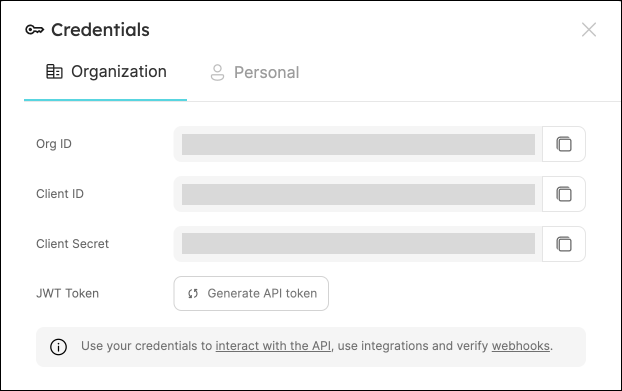
-
-
Create the following as Jenkins Credentials:
-
Create the Port Credentials using the
Username with passwordkind and the idport-credentials.-
PORT_CLIENT_ID- Port Client ID. -
PORT_CLIENT_SECRET- Port Client Secret.
-
-
WEBHOOK_TOKEN- The webhook token so that the job can only be triggered if that token is supplied. -
GITHUB_TOKEN- The personal access token obtained from the previous step.
-
Create Terraform templates
We will now create a simple .tf file that will serve as a template for our new resource:
-
In your GitHub repository, create a file named
create-azure-storage.tfunder/templates/(it's path should be/templates/create-azure-storage.tf). -
Copy the following snippet and paste it in the file's contents:
create-azure-storage.tf
create-azure-storage.tfresource "azurerm_storage_account" "storage_account" {name = "{{ storage_name }}"resource_group_name = "YourResourcesGroup" # replace this with one of your resource groups in your azure cloud accountlocation = "{{ storage_location }}"account_tier = "Standard"account_replication_type = "LRS"account_kind = "StorageV2"} -
Add the
main.tffile in the root of your repository.main.tf
main.tf# Configure the Azure providerterraform {required_providers {azurerm = {source = "hashicorp/azurerm"version = "~> 3.0.2"}}required_version = ">= 1.1.0"}provider "azurerm" {features {}}
Create the Jenkins pipeline
Now let's create the pipeline file:
-
Define variables for a pipeline: Define the STORAGE_NAME, STORAGE_LOCATION, REPO_URL and PORT_RUN_ID variables.
-
Token Setup: Define the token to match
JOB_TOKENas configured in your Port Action.
Our pipeline will consist of 3 steps for the selected service's repository:
-
Adding a resource block to the
main.tfusing the template and replacing its variables with the data from the action's input. -
Creating a pull request in the repository to add the new resource.
-
Reporting & logging the action result back to Port.
In your Jenkins pipeline, use the following snippet as its content:
Jenkins pipeline
import groovy.json.JsonSlurper

pipeline {
    agent any

    environment {
        GITHUB_TOKEN = credentials("GITHUB_TOKEN")

        NEW_BRANCH_PREFIX = 'infra/new-resource'
        NEW_BRANCH_NAME = "${NEW_BRANCH_PREFIX}-${STORAGE_NAME}"
        TEMPLATE_FILE = "templates/create-azure-storage.tf"

        PORT_ACCESS_TOKEN = ""
        REPO = ""
    }


    triggers {
        GenericTrigger(
            genericVariables: [
                [key: 'STORAGE_NAME', value: '$.payload.properties.storage_name'],
                [key: 'STORAGE_LOCATION', value: '$.payload.properties.storage_location'],
                [key: 'REPO_URL', value: '$.payload.entity.properties.url'],
                [key: 'PORT_RUN_ID', value: '$.context.runId']
            ],
            causeString: 'Triggered by Port',
            allowSeveralTriggersPerBuild: true,

            regexpFilterExpression: '',
            regexpFilterText: '',
            printContributedVariables: true,
            printPostContent: true
        )
    }


    stages {
        stage('Checkout') {
            steps {
                script {
                    def path = REPO_URL.substring(REPO_URL.indexOf("/") + 1);
                    def pathUrl = path.replace("/github.com/", "");

                    REPO = pathUrl
                }

                git branch: 'main', credentialsId: 'github', url: "git@github.com:${REPO}.git"
            }
        }

        stage('Make Changes') {
            steps {
                script {
                    sh """cat ${TEMPLATE_FILE} | sed "s/{{ storage_name }}/${STORAGE_NAME}/g; s/{{ storage_location }}/${STORAGE_LOCATION}/g" >> main.tf"""

                }
            }
        }
        stage('Create Branch and Commit') {
            steps {
                script {
                    sh "git checkout -b ${NEW_BRANCH_NAME}"
                    sh "git commit -am 'Add a new resource block file'"
                    sh "git push origin ${NEW_BRANCH_NAME}"
                }
            }
        }

        stage('Create pull request') {
            steps {
                script {
                    repo = REPO
                    branch_name = NEW_BRANCH_NAME
                    base_branch = 'main'
                    title = 'New resource block ' + STORAGE_NAME
                    body = 'This pull request adds a new resource block to the project.'

                    createPullRequestCurl(repo, branch_name, base_branch, title, body)
                }
            }
        }
        stage('Get access token') {
            steps {
                withCredentials([usernamePassword(
                    credentialsId: 'port-credentials',
                    usernameVariable: 'PORT_CLIENT_ID',
                    passwordVariable: 'PORT_CLIENT_SECRET')]) {
                    script {
                        // Execute the curl command and capture the output
                        def result = sh(returnStdout: true, script: """
                            accessTokenPayload=\$(curl -X POST \
                                -H "Content-Type: application/json" \
                                -d '{"clientId": "${PORT_CLIENT_ID}", "clientSecret": "${PORT_CLIENT_SECRET}"}' \
                                -s "https://api.port.io/v1/auth/access_token")
                            echo \$accessTokenPayload
                        """)

                        // Parse the JSON response using JsonSlurper
                        def jsonSlurper = new JsonSlurper()
                        def payloadJson = jsonSlurper.parseText(result.trim())

                        // Access the desired data from the payload
                        PORT_ACCESS_TOKEN = payloadJson.accessToken
                    }
                }
            }
        }
        stage('Notify Port') {
            steps {
                script {
                    def logs_report_response = sh(script: """
                        curl -X POST \
                            -H "Content-Type: application/json" \
                            -H "Authorization: Bearer ${PORT_ACCESS_TOKEN}" \
                            -d '{"message": "Created GitHub PR for new terraform resource ${STORAGE_NAME}"}"}' \
                            "https://api.port.io/v1/actions/runs/$PORT_RUN_ID/logs"
                    """, returnStdout: true)

                    println(logs_report_response)
                }
            }
        }
        stage('Update Run Status') {
            steps {
                script {
                    def status_report_response = sh(script: """
                        curl -X PATCH \
                        -H "Content-Type: application/json" \
                        -H "Authorization: Bearer ${PORT_ACCESS_TOKEN}" \
                        -d '{"status":"SUCCESS", "message": {"run_status": "Jenkins CI/CD Run completed successfully!"}}' \
                            "https://api.port.io/v1/actions/runs/${PORT_RUN_ID}"
                    """, returnStdout: true)

                    println(status_report_response)
                }
            }
        }
    }

    post {

        failure {
            // Update Port Run failed.
            script {
                def status_report_response = sh(script: """
                    curl -X PATCH \
                        -H "Content-Type: application/json" \
                        -H "Authorization: Bearer ${PORT_ACCESS_TOKEN}" \
                        -d '{"status":"FAILURE", "message": {"run_status": "Failed to create azure resource ${STORAGE_NAME}"}}' \
                            "https://api.port.io/v1/actions/runs/${PORT_RUN_ID}"
                """, returnStdout: true)

                println(status_report_response)
            }
        }

        // Clean after build
        always {
            cleanWs(cleanWhenNotBuilt: false,
                    deleteDirs: true,
                    disableDeferredWipeout: false,
                    notFailBuild: true,
                    patterns: [[pattern: '.gitignore', type: 'INCLUDE'],
                            [pattern: '.propsfile', type: 'EXCLUDE']])
        }
    }
}


def createPullRequestCurl(repo, headBranch, baseBranch, title, body) {
    curlCommand = "curl -X POST https://api.github.com/repos/$repo/pulls -H 'Authorization: Bearer ${GITHUB_TOKEN}' -d '{ \"head\": \"$headBranch\", \"base\": \"$baseBranch\", \"title\": \"$title\", \"body\": \"$body\", \"draft\": false }'"

    try {
        response = sh(script: curlCommand)

        if (response.contains('201 Created')) {
            println "Pull request created successfully"
        } else {
            println "Failed to create pull request"
            println response
        }
    } catch (Exception e) {
        println "Error occurred during CURL request: ${e.getMessage()}"
    }
}
All done! The action is ready to be executed 🚀
Let's test it!
Now let's test the action to ensure it works correctly:
-
Go to the Self-service page of your portal.
-
Click on the
Open GitHub PRaction (orOpen GitHub PR with Jenkinsif you used the Jenkins alternative). -
Enter a name for your Azure storage account and a location.
-
Select any service from the list and click
Execute. -
A small popup will appear - click on
View detailsto see the action run details. -
Verify that the backend returned
Successand the pull-request was created successfully in your GitHub repository. -
Check your GitHub repository to confirm the new pull request has been created with the Terraform changes. All done! You can now create PRs for your services directly from Port 💪🏽
You may create a Jenkins pipeline to trigger the resource deployment on merging the PR. Checkout this example pipeline.
More relevant guides and examples: