Change Deployment Replica Count
In this guide, we will create a self-service action in Port that executes a GitHub workflow to change the number of replica counts in a kubernetes deployment. The workflow involves updating the deployment manifest with the new replica count(s) and creating a Github pull request (PR) for it. The workflow can optionally merge the PR when enabled.
Available Github Integrations
This guide includes steps that require integration with GitHub:
- GitHub (Ocean) - uses the Ocean framework. We strongly recommend this integration for new and migrated setups.
- GitHub (Sunset) - uses a GitHub app that is in sunset and will be fully deprecated on September 15, 2026.
Prerequisites
- GitHub (Ocean)
- GitHub (Sunset)
- Install GitHub ocean.
- Install Port's GitHub app by clicking here.
- This guide assumes the presence of a
Serviceblueprint representing the repository where ArgoCD or Kubernetes workload lives. - A repository to contain your deployment manifest and action resources i.e. the github workflow file.
Below you can find the JSON for the Service blueprint required for the guide:
Service blueprint (click to expand)
{
  "identifier": "service",
  "title": "Service",
  "icon": "Github",
  "schema": {
    "properties": {
      "readme": {
        "title": "README",
        "type": "string",
        "format": "markdown",
        "icon": "Book"
      },
      "url": {
        "title": "URL",
        "format": "url",
        "type": "string",
        "icon": "Link"
      },
      "language": {
        "icon": "Git",
        "type": "string",
        "title": "Language",
        "enum": [
          "GO",
          "Python",
          "Node",
          "React"
        ],
        "enumColors": {
          "GO": "red",
          "Python": "green",
          "Node": "blue",
          "React": "yellow"
        }
      },
      "slack": {
        "icon": "Slack",
        "type": "string",
        "title": "Slack",
        "format": "url"
      },
      "code_owners": {
        "title": "Code owners",
        "description": "This service's code owners",
        "type": "string",
        "icon": "TwoUsers"
      },
      "type": {
        "title": "Type",
        "description": "This service's type",
        "type": "string",
        "enum": [
          "Backend",
          "Frontend",
          "Library"
        ],
        "enumColors": {
          "Backend": "purple",
          "Frontend": "pink",
          "Library": "green"
        },
        "icon": "DefaultProperty"
      },
      "lifecycle": {
        "title": "Lifecycle",
        "type": "string",
        "enum": [
          "Production",
          "Experimental",
          "Deprecated"
        ],
        "enumColors": {
          "Production": "green",
          "Experimental": "yellow",
          "Deprecated": "red"
        },
        "icon": "DefaultProperty"
      },
      "locked_in_prod": {
        "icon": "DefaultProperty",
        "title": "Locked in Prod",
        "type": "boolean",
        "default": false
      },
      "locked_reason_prod": {
        "icon": "DefaultProperty",
        "title": "Locked Reason Prod",
        "type": "string"
      }
    },
    "required": []
  },
  "mirrorProperties": {},
  "calculationProperties": {},
  "aggregationProperties": {},
  "relations": {}
}
Create Github workflow
Follow these steps to get started:
- Create the following GitHub Action secrets:
PORT_CLIENT_ID- Port Client ID learn morePORT_CLIENT_SECRET- Port Client Secret learn moreMY_GITHUB_TOKEN- a Classic Personal Access Token with thereposcope and the following permissions:pull_requests:write(to create PR) andcontents:write(to merge PR)
- Create a Port action in the self-service page on the
Serviceblueprint with the following JSON definition:
- GitHub (Ocean)
- GitHub (Sunset)
Port Action: Change Replica Count (click to expand)
Replace the placeholders
<YOUR_GITHUB_OCEAN_INTEGRATION_ID>- your GitHub Ocean integration installation ID.<GITHUB-ORG>- your GitHub organization or user name.<GITHUB-REPO-NAME>- your GitHub repository name.
{
  "identifier": "service_change_replica_count",
  "title": "Change Replica Count",
  "icon": "GithubActions",
  "trigger": {
    "type": "self-service",
    "operation": "DAY-2",
    "userInputs": {
      "properties": {
        "replica_count": {
          "icon": "DefaultProperty",
          "title": "Number of Replicas",
          "type": "number"
        },
        "auto_merge": {
          "title": "Auto Merge",
          "type": "boolean",
          "default": false,
          "description": "Whether the created PR should be merged or not"
        }
      },
      "required": [
        "replica_count"
      ],
      "order": [
        "replica_count",
        "auto_merge"
      ]
    },
    "blueprintIdentifier": "service"
  },
  "invocationMethod": {
    "type": "INTEGRATION_ACTION",
    "installationId": "<YOUR_GITHUB_OCEAN_INTEGRATION_ID>",
    "integrationActionType": "dispatch_workflow",
    "integrationActionExecutionProperties": {
      "org": "<GITHUB-ORG>",
      "repo": "<GITHUB-REPO-NAME>",
      "workflow": "change-replica-count.yaml",
      "workflowInputs": {
        "replica_count": "{{.inputs.\"replica_count\"}}",
        "auto_merge": "{{.inputs.\"auto_merge\"}}",
        "port_context": {
          "entity": "{{.entity.identifier}}",
          "blueprint": "{{.action.blueprint}}",
          "runId": "{{.run.id}}",
          "trigger": "{{.trigger}}"
        }
      },
      "reportWorkflowStatus": true
    }
  },
  "requiredApproval": false
}
Port Action: Change Replica Count (click to expand)
Replace the placeholders
<GITHUB-ORG>- your GitHub organization or user name.<GITHUB-REPO-NAME>- your GitHub repository name.
{
  "identifier": "service_change_replica_count",
  "title": "Change Replica Count",
  "icon": "GithubActions",
  "trigger": {
    "type": "self-service",
    "operation": "DAY-2",
    "userInputs": {
      "properties": {
        "replica_count": {
          "icon": "DefaultProperty",
          "title": "Number of Replicas",
          "type": "number"
        },
        "auto_merge": {
          "title": "Auto Merge",
          "type": "boolean",
          "default": false,
          "description": "Whether the created PR should be merged or not"
        }
      },
      "required": [
        "replica_count"
      ],
      "order": [
        "replica_count",
        "auto_merge"
      ]
    },
    "blueprintIdentifier": "service"
  },
  "invocationMethod": {
    "type": "GITHUB",
    "org": "<GITHUB-ORG>",
    "repo": "<GITHUB-REPO-NAME>",
    "workflow": "change-replica-count.yaml",
    "workflowInputs": {
      "replica_count": "{{.inputs.\"replica_count\"}}",
      "auto_merge": "{{.inputs.\"auto_merge\"}}",
      "port_context": {
        "entity": "{{.entity.identifier}}",
        "blueprint": "{{.action.blueprint}}",
        "runId": "{{.run.id}}",
        "trigger": "{{.trigger}}"
      }
    },
    "reportWorkflowStatus": true
  },
  "requiredApproval": false
}
- Create a workflow file under
.github/workflows/change-replica-count.ymlwith the following content:
GitHub workflow script
Variable replacement
<DEPLOYMENT-MANIFEST-PATH>- Path to the ArgoCD or K8s deployment manifest such asapp/deployment.yaml.<REPLICA-PROPERTY-PATH>- Path to where the deployment replica count is specified in the deployment manifest such asspec.replicas.
change-replica-count.yml
name: Change Replica Count

on:
  workflow_dispatch:
    inputs:
      replica_count:
        description: The new replica count for the deployment
        required: true
        type: string
      auto_merge:
        description: Whether the created PR should be merged automatically
        required: true
        type: boolean
      port_context:
        required: true
        description: >-
          Port's payload, including details for who triggered the action and
          general context (blueprint, run id, etc...)
jobs:
  change-replica-count:
    runs-on: ubuntu-latest
    steps:
      - name: Inform execution of request to change replica count
        uses: port-labs/port-github-action@v1
        with:
          clientId: ${{ secrets.PORT_CLIENT_ID }}
          clientSecret: ${{ secrets.PORT_CLIENT_SECRET }}
          baseUrl: https://api.port.io
          operation: PATCH_RUN
          runId: ${{fromJson(github.event.inputs.port_context).runId}}
          logMessage: "About to change replica count in deployment manifest..."

      - uses: actions/checkout@v6
      - name: Create PR
        id: create-pr
        uses: fjogeleit/yaml-update-action@main
        with:
          valueFile: '<DEPLOYMENT-MANIFEST-PATH>'  ## replace value
          propertyPath: '<REPLICA-PROPERTY-PATH>' ## replace value
          value: "!!int '${{ fromJson(github.event.inputs.replica_count) }}'"  ## using the yaml tag (!!int 'X') to convert the string to int
          commitChange: true
          token: ${{ secrets.MY_GITHUB_TOKEN }}
          targetBranch: main
          masterBranchName: main
          createPR: true
          branch: deployment/${{ fromJson(github.event.inputs.port_context).runId }}
          message: 'Update deployment replica to ${{ github.event.inputs.replica_count }}'

      - name: Inform Port about pull request creation status - Success
        if: steps.create-pr.outcome == 'success'
        uses: port-labs/port-github-action@v1
        with:
          clientId: ${{ secrets.PORT_CLIENT_ID }}
          clientSecret: ${{ secrets.PORT_CLIENT_SECRET }}
          baseUrl: https://api.port.io
          operation: PATCH_RUN
          runId: ${{ fromJson(github.event.inputs.port_context).runId }}
          logMessage: |
            'The creation of PR was successful: ${{fromJson(steps.create-pr.outputs.pull_request).html_url}}'
          link: '["${{fromJson(steps.create-pr.outputs.pull_request).html_url}}"]'

      - name: Inform Port about pull request creation status - Failure
        if: steps.create-pr.outcome != 'success'
        uses: port-labs/port-github-action@v1
        with:
          clientId: ${{ secrets.PORT_CLIENT_ID }}
          clientSecret: ${{ secrets.PORT_CLIENT_SECRET }}
          baseUrl: https://api.port.io
          operation: PATCH_RUN
          runId: ${{ fromJson(github.event.inputs.port_context).runId }}
          logMessage: |
            The creation of PR was not successful.

      - name: Merge Pull Request
        if: ${{ github.event.inputs.auto_merge == 'true' && steps.create-pr.outcome == 'success' }}
        env:
          GH_TOKEN: ${{ secrets.MY_GITHUB_TOKEN }}
          PR_URL: ${{ fromJson(steps.create-pr.outputs.pull_request).url }}
        run: |
          HTTP_STATUS=$(curl -s -o /dev/null -w "%{http_code}" \
            -X PUT \
            -H "Accept: application/vnd.github+json" \
            -H "Authorization: Bearer $GH_TOKEN" \
            "$PR_URL/merge")

          echo "HTTP Status: $HTTP_STATUS"

          if [ $HTTP_STATUS -eq 200 ]; then
            echo "Pull request merged successfully."
            echo "merge_status=successful" >> $GITHUB_ENV
          else
            echo "Failed to merge PR. HTTP Status: $HTTP_STATUS"
            echo "merge_status=unsuccessful" >> $GITHUB_ENV
          fi

      - name: Inform completion of replica update operation to Port
        if: ${{ github.event.inputs.auto_merge == 'true' }}
        uses: port-labs/port-github-action@v1
        with:
          clientId: ${{ secrets.PORT_CLIENT_ID }}
          clientSecret: ${{ secrets.PORT_CLIENT_SECRET }}
          baseUrl: https://api.port.io
          operation: PATCH_RUN
          runId: ${{fromJson(github.event.inputs.port_context).runId}}
          logMessage: 'Pull request merge was ${{ env.merge_status }}'
- Trigger the action from the self-service page of your Port application.
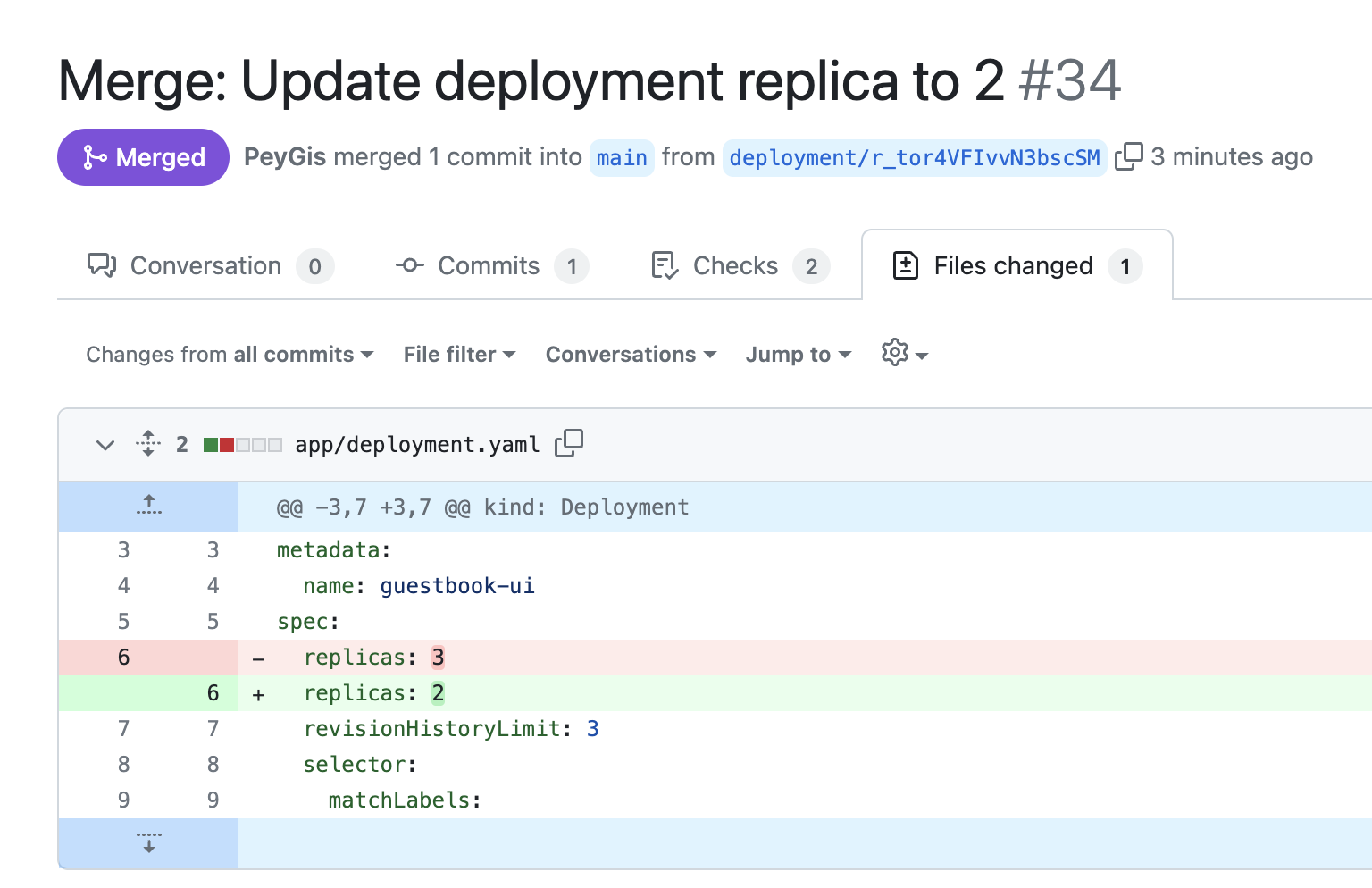
You should now be able to see a Github pull request created and merged for the deployment: