Centralize AI Coding Rules with Port
AI coding agents are most effective when they operate with clear, consistent rules. When teams manage those rules in scattered documents, repos, or tribal knowledge, organizations lose version control, auditability, and alignment across services.
This guide shows how to use Port as a centralized control plane for AI coding rules. You’ll learn how to define and organize rules at the company, team, and service level, version and audit changes, and automatically sync them into AGENTS.md files. This ensures Copilot, Cursor, and other IDE agents consistently follow the same standards—without manual updates or drift.
Common use cases
- Centralize AI rules so every team uses the same policy-as-code baseline (versioned rules you control).
- Scope guidance by ownership so company, team, and service rules inherit cleanly.
- Automate distribution so Copilot updates rules through a GitHub issue instead of manual edits.
Prerequisites
This guide assumes the following:
- You have a Port account and have completed the onboarding process.
- Port's GitHub integration is installed in your account.
- You have completed the setup in the Trigger GitHub Copilot from Port guide.
Set up data model
This guide builds on two existing blueprints: the GitHub Repository blueprint provided by the GitHub integration, and the system _team blueprint.
Ensure that your Repository blueprint is already linked to _team through an owning team relation.
Next, you’ll define a Company blueprint and a Cursor Rules blueprint, which together will serve as the foundation for organizing and distributing AI coding instructions.
Create the company blueprint
-
Go to the Builder page of your portal.
-
Click on
+ Blueprint. -
Click on the
{...}button in the top right corner, and chooseEdit JSON. -
Add this JSON schema:
Company blueprint (click to expand)
{"identifier": "company","title": "Company","icon": "Microservice","schema": {"properties": {},"required": []},"mirrorProperties": {},"calculationProperties": {},"aggregationProperties": {},"relations": {}} -
Click
Saveto create the blueprint.
Create the cursor rules blueprint
This blueprint represents a single AI coding rule per entity and allows you to associate each rule with a company, team, or service.
-
Go to the Builder page of your portal.
-
Click on
+ Blueprint. -
Click on the
{...}button in the top right corner, and chooseEdit JSON. -
Add this JSON schema:
Cursor rules blueprint (click to expand)
{"identifier": "cursor_rules","description": "Represents a single AI instruction or constraint for coding agents or IDEs","title": "Cursor Rules","icon": "Cursor","schema": {"properties": {"content": {"type": "string","title": "Content","description": "Detailed content of the rule","format": "markdown"},"priority": {"type": "number","title": "Priority","description": "Higher wins in conflicts","default": 2},"status": {"type": "string","title": "Status","enum": ["active","draft","deprecated"],"enumColors": {"active": "green","draft": "yellow","deprecated": "red"}},"version": {"type": "number","title": "Version","description": "Current (edited) version of the rule"},"scope": {"type": "string","title": "Scope","description": "Scope of the rule","enum": ["company","team","service"],"enumColors": {"company": "purple","team": "orange","service": "turquoise"}},"category": {"type": "string","title": "Category","enum": ["sre","security","coding_style","performance","architecture"],"enumColors": {"sre": "lightGray","security": "lightGray","coding_style": "lightGray","performance": "lightGray","architecture": "lightGray"}}},"required": []},"mirrorProperties": {},"calculationProperties": {},"aggregationProperties": {},"relations": {"applies_to_company": {"title": "Applies to Company","target": "company","required": false,"many": true},"applies_to_service": {"title": "Applies to Service","target": "githubRepo","required": false,"many": true},"applies_to_team": {"title": "Applies to Team","target": "_team","required": false,"many": true}}} -
Click
Saveto create the blueprint.
Update the repository blueprint
To enable company-wide AI rule inheritance, you will add a relation from the Repository blueprint to the Company blueprint.
-
Go to the builder page of your portal.
-
Find and select your existing repository blueprint (e.g.,
githubRepository). -
Click on
{...} Edit JSON. -
Add the following JSON to the
relationssection:Company relation (click to expand)
"company": {"title": "Company","target": "company","required": false,"many": false} -
Click
Saveto update the blueprint.
Define and organize rules
Define AI coding rules at the company, team, and service levels to enable clear inheritance. Each rule is modeled as a single entity and includes its content, scope, priority, and lifecycle status.
-
In your Port portal, go to the
Catalogand open the Cursor Rules page. -
Click
+ Cursor Rulesswitch to JSON mode, and add the following example entities:Example rule entities (click to expand)
[{"identifier": "secure_coding_baseline","title": "Secure Coding Baseline","icon": "Cursor","properties": {"content": " - Always validate and sanitize external input\n - Never log secrets, credentials, or tokens\n - Use parameterized queries for all database access","priority": 5,"status": "active","version": 1,"scope": "company","category": "security"},"relations": {"applies_to_company": ["port_us"],"applies_to_service": [],"applies_to_team": []}},{"identifier": "backend_api_design_guidelines","title": "Backend API Design Guidelines","icon": "Cursor","properties": {"content": " - APIs must be RESTful or explicitly documented otherwise\n - Use consistent error response formats\n - Version APIs explicitly","priority": 3,"status": "active","version": 1,"scope": "team","category": "architecture"},"relations": {"applies_to_team": ["builder_team"],"applies_to_company": [],"applies_to_service": []}},{"identifier": "auth_service_constraints","title": "Auth Service Constraints","icon": "Cursor","properties": {"content": " - Never weaken authentication flows\n - MFA must not be optional unless explicitly approved by the team\n - Token lifetimes must follow security policy defaults","priority": 3,"status": "active","version": 2,"scope": "service","category": "security"},"relations": {"applies_to_service": ["authentication_service","payment_service"],"applies_to_company": [],"applies_to_team": []}}]Prerequisite entitiesBefore creating rules, ensure that the relevant Company, Team, and Service entities already exist in your software catalog.
Rules can only be linked to entities that have been created beforehand.
Configure the agent
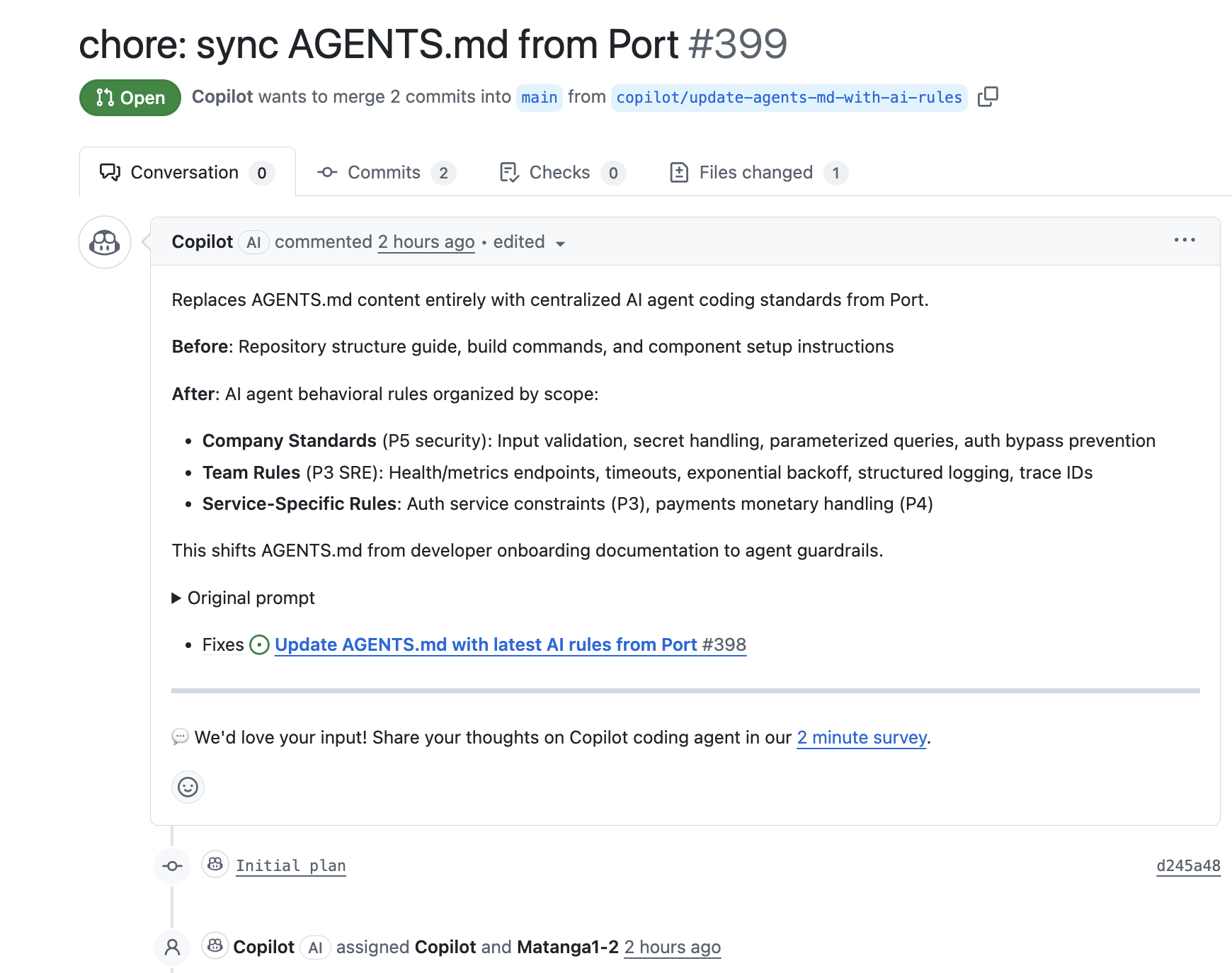
We will then create an agent that resolves inheritance (company → team → service), generates a deterministic AGENTS.md, and creates a GitHub issue for Copilot.
-
Go to the AI agents page of your portal.
-
Click on
+ AI Agent. -
Click on the
{...} Edit JSONbutton. -
Copy and paste the following JSON configuration:
AI rules sync manager configuration (click to expand)
{"identifier": "ai_rules_sync_manager","title": "AI Rules Sync Manager","icon": "Details","team": [],"properties": {"description": "AI agent to fetch all applicable rules, resolve inheritance, generate AGENTS.md","status": "active","prompt": "You are an AI agent responsible for generating and syncing AGENTS.md files for repositories based on centralized rules stored in Port.\n\nYou will receive a rule identifier as input.\n\nYour responsibilities are:\n\n1. Fetch the rule entity from the `cursor_rules` blueprint using its identifier.\n2. Determine which services are affected:\n - If the rule applies to a service → that service only\n - If the rule applies to a team → all services owned by that team\n - If the rule applies to the company → all services that belong to that company\n3. For EACH affected service, do the following independently:\n\n a. Fetch the service entity\n b. Fetch the owning team(s) of the service\n c. Fetch the company entity\n d. Fetch ALL active rules where:\n - applies_to_company = company AND the service belongs to that company\n - OR applies_to_team ∈ owning teams\n - OR applies_to_service = service\n e. Ignore rules with status != \"active\"\n\n4. Resolve rule precedence:\n - Service scope overrides Team scope\n - Team scope overrides Company scope\n - Higher priority overrides lower priority\n - If two rules conflict, keep the more specific one\n\n5. Generate a complete AGENTS.md file with this structure:\n\n---\n# AI Agent Rules\n\n## Company Standards\n<company rules>\n\n## Team Rules\n<team rules grouped by team>\n\n## Service-Specific Rules\n<service rules>\n\n---\n\n6. The generated AGENTS.md content must be deterministic and complete.\n Do not reference Port, IDs, or metadata in the file.\n\n7. For each service, create a GitHub issue using the day-2 `create_github_issue` action with:\n\n - title: \"Update AGENTS.md with latest AI rules from Port\"\n - labels: [\"ai-instructions\", \"port-sync\", \"auto_assign\"]\n - body using the following template:\n\n---\n## Task for Copilot\n\nUpdate or create the `AGENTS.md` file at the root of the repository.\nReplace its contents entirely with the Markdown provided below.\n\nCommit the change on a new branch and open a pull request with:\n- Title: \"chore: sync AGENTS.md from Port\"\n- Description: \"This PR updates AGENTS.md based on centralized rules in Port.\"\n\n## New AGENTS.md Content\nMARKDOWN START\n<generated AGENTS.md markdown>\nMARKDOWN END\n---\n\nDo not ask for clarification.\nAlways assume the generated Markdown is final.\n","execution_mode": "Automatic","tools": ["^(list|get|search|track|describe)_.*","^run_create_github_issue$"]},"relations": {}} -
Click
Createto save the agent.
Set up automation
This automation listens for changes to Cursor rules in Port and triggers the AI Rules Sync Manager agent. The agent then regenerates and syncs AGENTS.md for all affected repositories.
-
Go to the Automations page of your portal.
-
Click on
+ Automation. -
Copy and paste the following JSON configuration:
Cursor rules update trigger (click to expand)
{"identifier": "curso_rules_update_trigger","title": "Cursor Rules Update Trigger","description": "Triggers AI agent to regenerate AGENTS.md when Cursor rules change","icon": "AI","trigger": {"type": "automation","event": {"type": "ANY_ENTITY_CHANGE","blueprintIdentifier": "cursor_rules"},"condition": {"type": "JQ","expressions": [".diff.before.properties.content != .diff.after.properties.content",".diff.before.relations != .diff.after.relations"],"combinator": "or"}},"invocationMethod": {"type": "WEBHOOK","url": "https://api.port.io/v1/agent/ai_rules_sync_manager/invoke","synchronized": true,"method": "POST","headers": {"RUN_ID": "{{ .run.id }}","Content-Type": "application/json"},"body": {"prompt": "A Cursor rule has been updated in Port. Regenerate AGENTS.md files for all affected services based on the current active rules and their inheritance (company → team → service). Here is the rule identifier: {{ .event.context.entityIdentifier }}","labels": {"source": "Cursor Rules Manager","ruleIdentifier": "{{ .event.context.entityIdentifier }}","runId": "{{ .run.id }}"}}},"publish": true,"allowAnyoneToViewRuns": true} -
Click
Createto save the automation.
Test the workflow
-
Update a
cursor_rulesentity in Port and save it. -
Check the target repository for a new GitHub issue created by the agent.
-
Confirm the issue includes the generated
AGENTS.mdcontent and open the Copilot PR.