Define scorecards with AI
Use Port's MCP (Model Context Protocol) server to create and manage scorecards through natural language conversations with AI. This guide shows you how to define quality standards, configure compliance rules, and set up progressive maturity levels—all by describing what you need in plain English.
Instead of manually writing JSON schemas or configuring complex rule conditions, you can have conversations with your AI assistant to build scorecards iteratively, getting instant feedback and making adjustments on the fly.
Common use cases
- Compliance monitoring: Enable agents to query which services meet security or regulatory standards.
- Risk assessment: Let agents identify services with failing scorecard rules before deployments.
- Automated remediation: Trigger workflows based on scorecard level changes.
- Developer guidance: Help agents provide actionable feedback on how to improve scorecard scores.
Prerequisites
This guide assumes you have:
- Basic understanding of scorecards and scorecard rules.
- Port MCP server configured in your IDE.
Create scorecards with AI
The Port MCP server provides tools like list_scorecards and upsert_scorecard that enable AI agents to build your scorecards through natural language conversations. You can describe what you need, and the AI will generate the appropriate configuration and create it in Port.
Start with a simple description
Describe the scorecard you want to create in natural language. The AI will interpret your requirements and generate the appropriate schema.
Example conversation:
"Create a security maturity scorecard for the service blueprint with levels Basic, Bronze, Silver, and Gold. Add a rule at Bronze level that checks services have no critical vulnerabilities."
The AI will use the MCP upsert_scorecard tool to generate and create the scorecard:
- MCP server input
- Port output
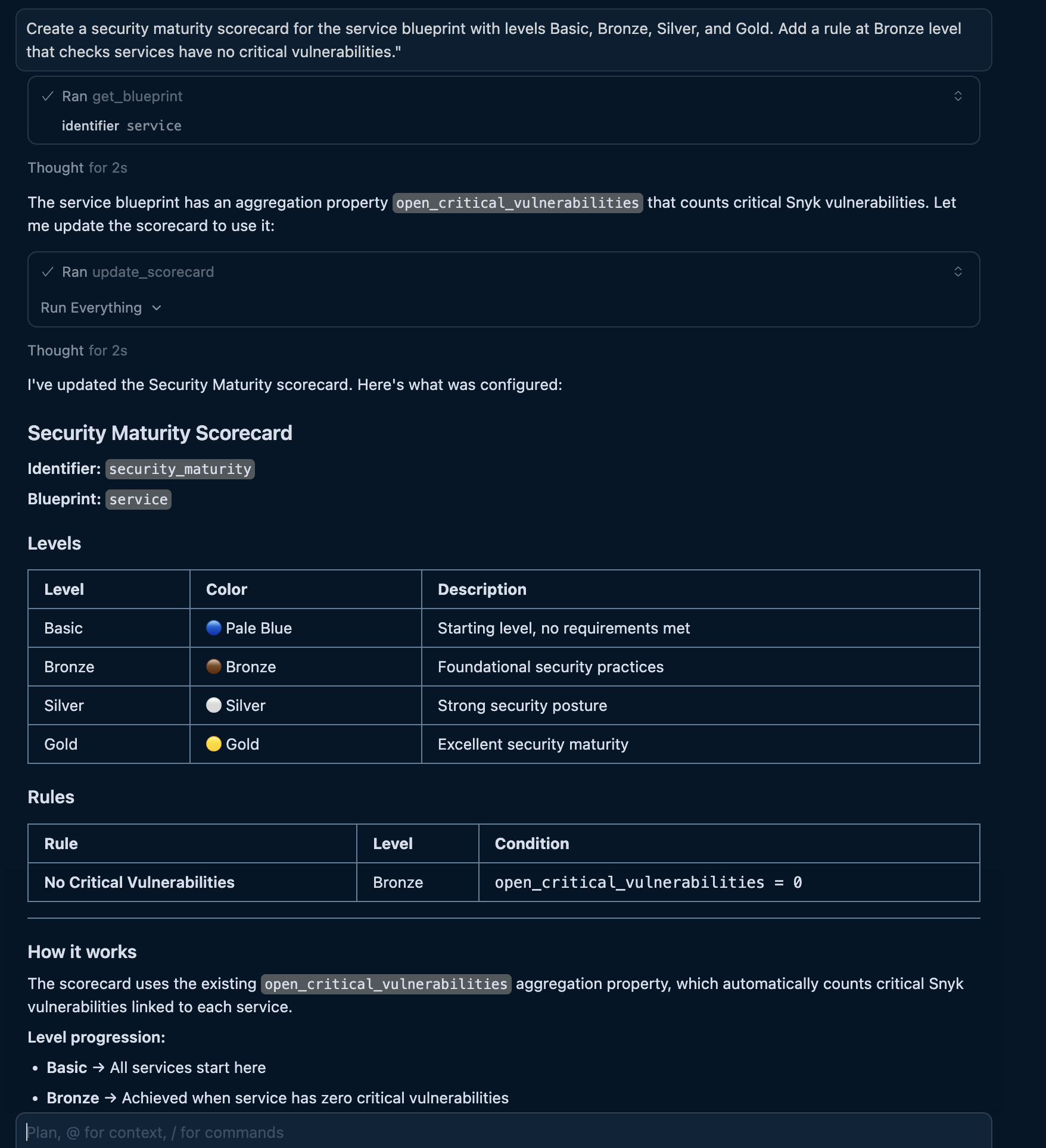
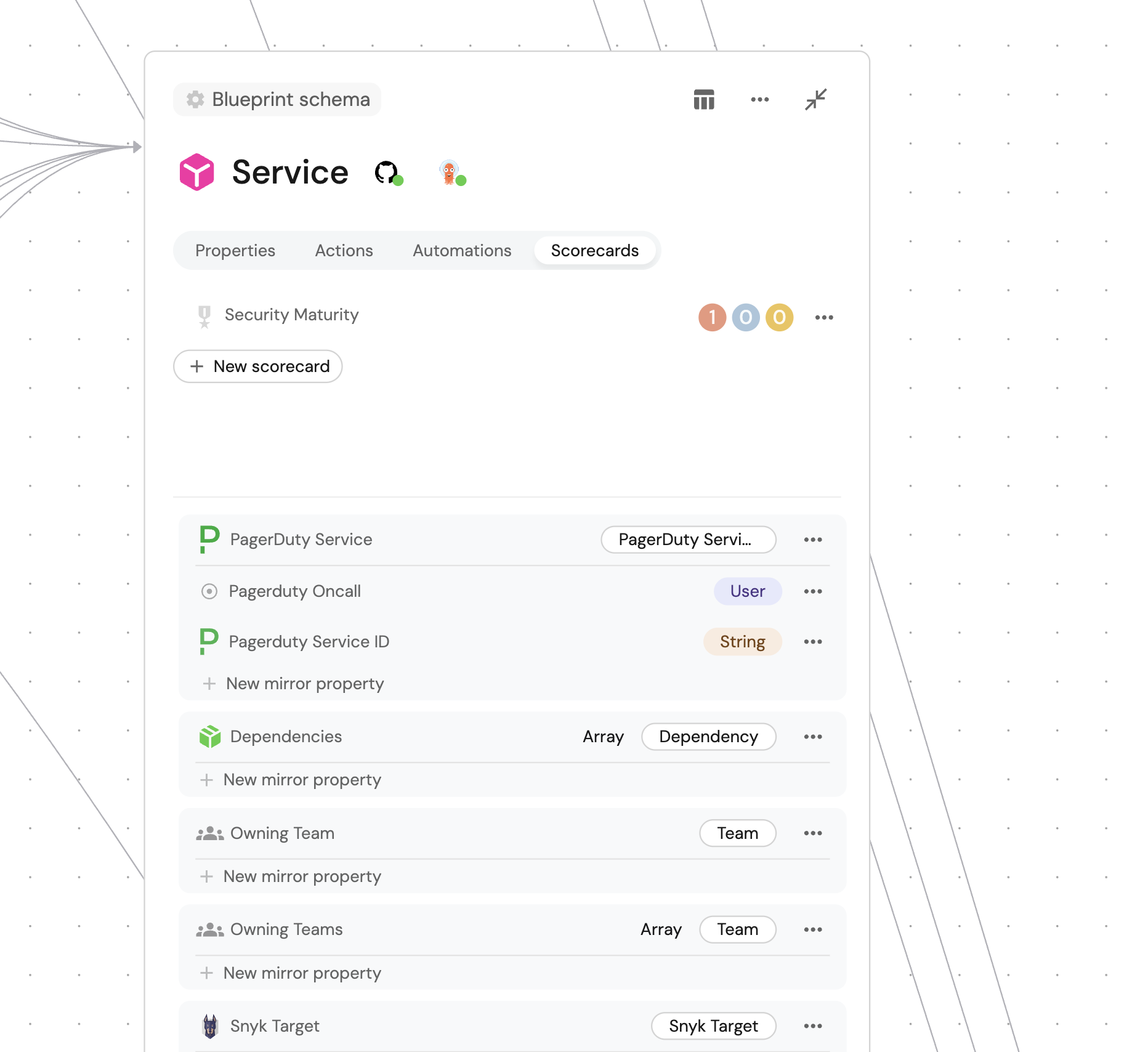
After creating a scorecard, you can refine it by asking follow-up questions like "Add a rule for high vulnerabilities at Silver level" or "Change the Gold level to require active fixes in the last 30 days".
Add rules incrementally
Build comprehensive scorecards by adding rules through conversation:
Example conversations:
- "Add a rule to the security scorecard that requires Snyk Code scanning at the Maturing level"
- "Add a Silver level rule that checks for no critical or high vulnerabilities"
- "Add a Gold level rule requiring at least one vulnerability fix in the last 30 days"
The AI will update the scorecard's rules array with the appropriate conditions.
Configure progressive levels
Describe maturity progression and AI will structure the levels appropriately:
Example conversation:
"Create a production readiness scorecard with five levels: Basic (starting point), Developing (has monitoring), Established (has alerts and runbooks), Mature (meets SLO targets), and Exemplary (has automated remediation)"
The AI will create levels with appropriate colors and rules that represent clear progression paths.
Query scorecard results
Once your scorecards are created, use natural language to query compliance status across your catalog.
Check entity compliance
Example conversation:
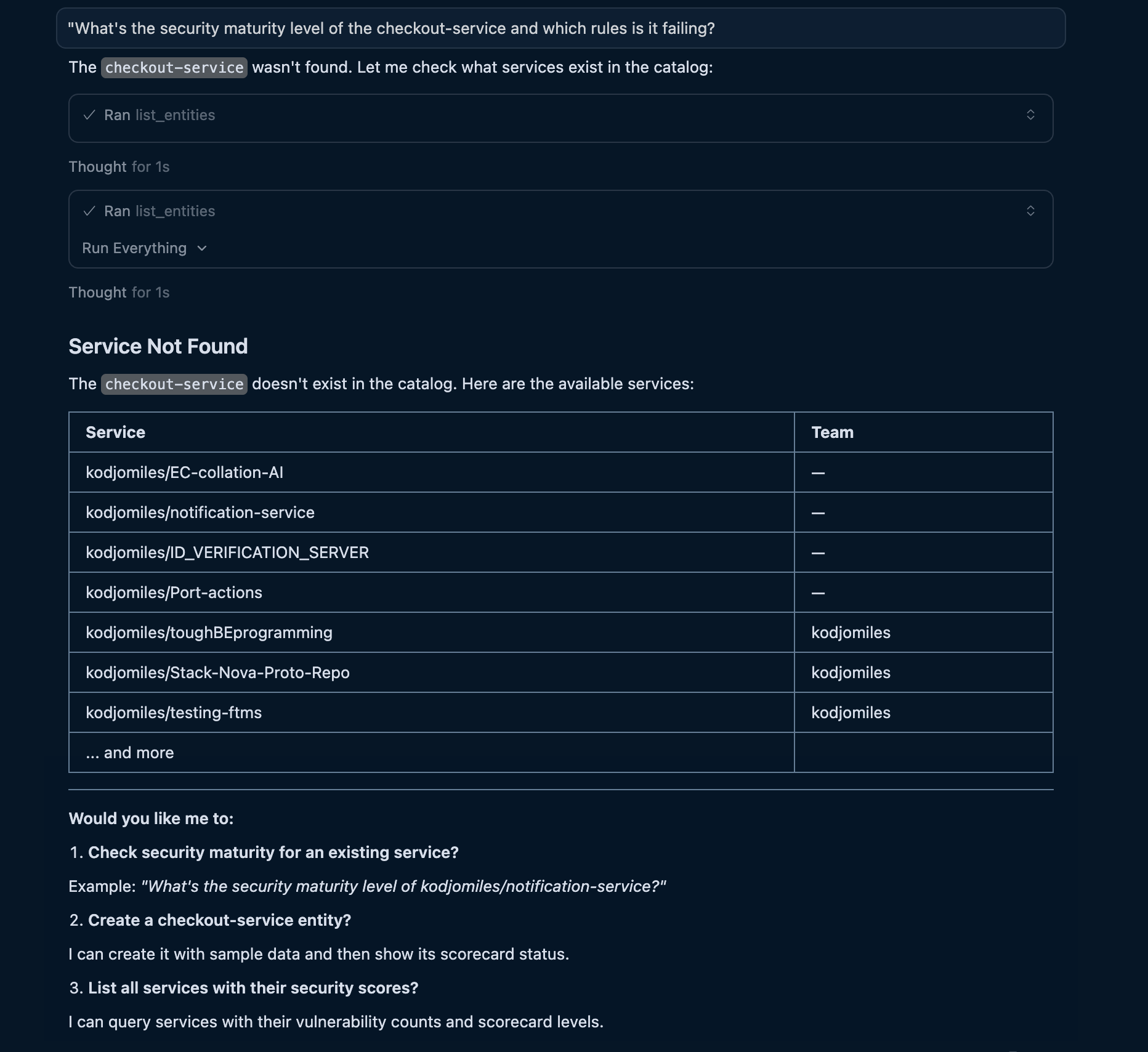
"What's the security maturity level of the checkout-service and which rules is it failing?"
Screenshot of the MCP server input and output (click to expand)
Find entities by compliance level
Query across your catalog to identify services at specific maturity levels:
Example conversations:
- "Which services have Gold security maturity?"
- "Show me all services failing the production readiness scorecard"
- "List services at Basic level that are owned by the platform team"
The AI uses list_entities with scorecard filters to find matching entities.
Use scorecards in AI decisions
AI agents can use scorecard data to make intelligent decisions about deployments and prioritization.
Pre-deployment compliance checks
Example conversation:
"Deploy the checkout-service to production if it passes the security maturity scorecard"
The AI will automatically check scorecard compliance before proceeding. If the service fails critical rules, it responds with what needs to be fixed first.
Prioritization recommendations
Example conversation:
"What should I work on to improve our team's security posture?"
The AI queries all services, identifies those at lower maturity levels, and provides a prioritized list based on failing rules and their severity.
Let's test it
After creating your scorecards, test them with an MCP-enabled AI assistant. In this example, we'll query the security maturity of a service.
Prompt
Ask your AI assistant:
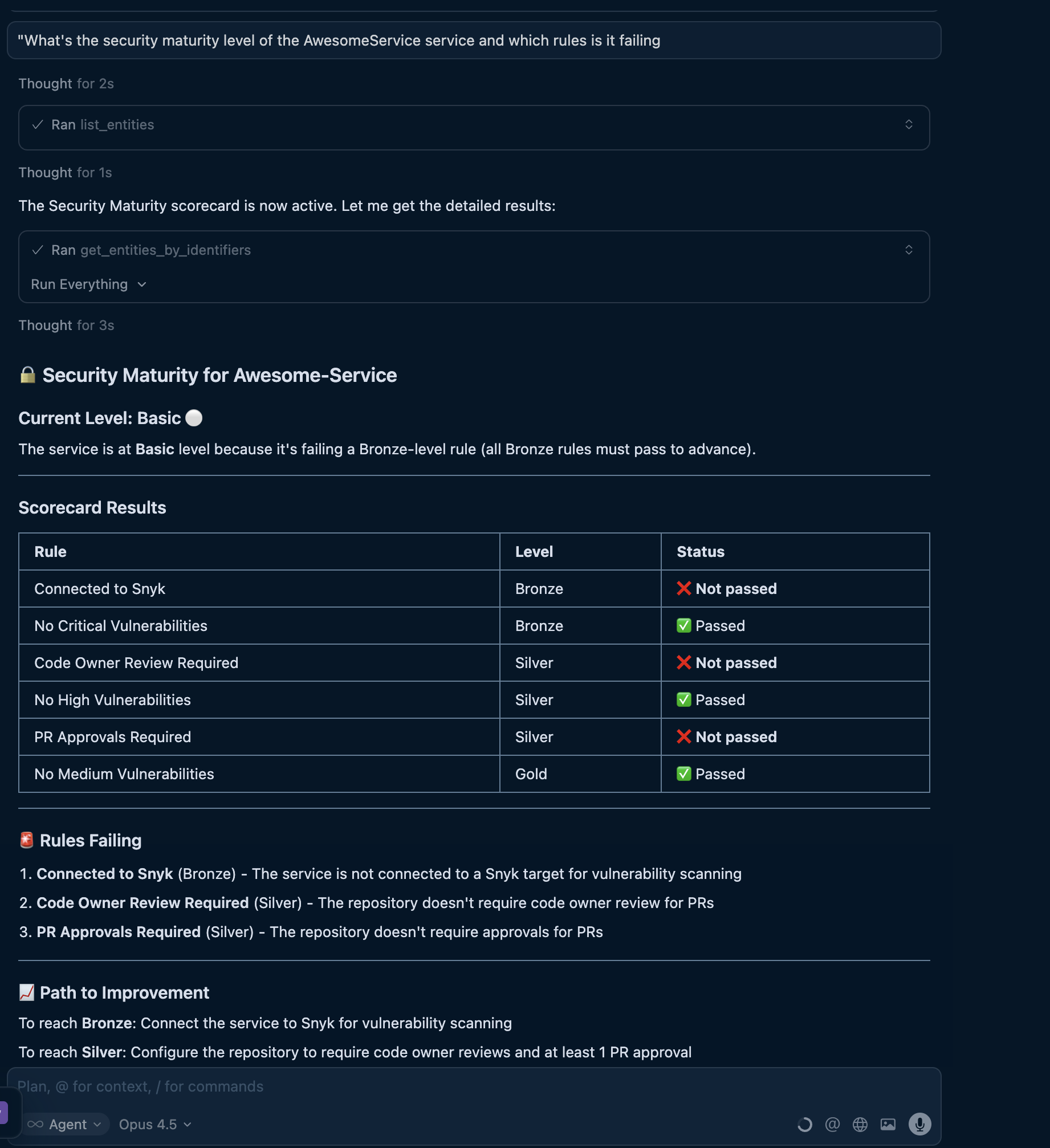
"What's the security maturity level of the awesome-service and which rules is it failing?"
What happens
The agent will:
- Find the service - Locate the entity via
list_entitieswith the service identifier. - Query scorecard results - Include
security-maturityin the entity request. - Analyze rule results - Identify which rules have
status: FAILURE. - Provide recommendations - Explain what needs to be fixed to improve the level.
Screenshot of the MCP server input and output (click to expand)
Best practices for AI-driven scorecard creation
When using AI to create scorecards, follow these practices to get the best results:
Be specific about rules
The more detail you provide about rules, the better the scorecard configuration:
- Good: "Create a security scorecard with a Bronze rule that checks open_critical_vulnerabilities equals 0, and a Silver rule that also checks open_high_vulnerabilities equals 0"
- Less effective: "Create a security scorecard"
Include rule descriptions
Ask AI to add descriptions that explain what each rule measures:
"Add a description to each rule explaining why it matters and how to fix failures"
This helps AI provide actionable feedback when services fail rules.
Use progressive levels
Design levels that represent achievable progression:
- Start with basic requirements at lower levels.
- Add more stringent checks at higher levels.
- Ensure each level builds on the previous one.
Use clear naming conventions
Use kebab-case identifiers that describe the domain:
- Good:
security-maturity,production-readiness,quality-standards - Less clear:
sc1,prod_ready,quality
Related documentation
- Scorecards overview - Introduction to scorecards and their use cases.
- Scorecard structure - Detailed guide on rules, levels, and conditions.
- Available MCP tools - Complete reference for all MCP tools.
- Manage scorecards - Creating and updating scorecards via UI and API.