Build an AI Agent Registry
This guide demonstrates how to build a centralized AI Agent Registry using Port, enabling your organization to discover, govern, and manage AI agents deployed across multiple cloud platforms in a single unified view.
Common use cases
-
Agent Discovery - Enable developers to find and reuse existing AI agents across the organization instead of building duplicates.
-
Multi-Cloud Visibility - View all AI agents from AWS Bedrock and Azure AI Foundry in one place.
-
Governance & Compliance - Track agent status, models used, and deployment regions for compliance requirements.
Prerequisites
-
A Port account with permissions to create blueprints and integrations.
-
Depending on which cloud providers you want to integrate:
- AWS
- Azure
- An AWS account with Bedrock agents or AgentCore runtimes deployed.
- AWS credentials (Access Key ID, Secret Access Key) with permissions to list Bedrock agents. Learn more
- For AgentCore, ensure
bedrock-agentcore:ListAgentRuntimespermission is available.
- An Azure account with AI Foundry agents deployed.
- Your Azure AI Foundry project endpoint URL and API key.
Set up data model
We'll create a blueprint to represent AI agents in your organization's catalog, tracking their platform, status, model, and region.
Create AI Agent blueprint
-
Go to the Builder page of your portal.
-
Click on
+ Blueprint. -
Click on the
{...} Edit JSONbutton. -
Copy and paste the following JSON configuration:
AI Agent blueprint (Click to expand)
{"identifier": "aiAgent","description": "AI agents deployed across cloud platforms","title": "External AI Agent","icon": "GPU","schema": {"properties": {"description": {"title": "Description","type": "string","description": "What this agent does"},"platform": {"title": "Platform","type": "string","enum": ["aws-bedrock", "aws-agentcore", "azure-foundry"],"enumColors": {"aws-bedrock": "orange","aws-agentcore": "orange","azure-foundry": "blue"},"description": "Cloud platform where the agent is deployed"},"status": {"title": "Status","type": "string","enum": ["CREATING", "PREPARING", "PREPARED", "NOT_PREPARED", "ACTIVE", "DELETING", "FAILED", "VERSIONING", "UPDATING"],"enumColors": {"CREATING": "yellow","PREPARING": "yellow","PREPARED": "green","NOT_PREPARED": "red","ACTIVE": "green","DELETING": "pink","FAILED": "red","VERSIONING": "yellow","UPDATING": "yellow"},"description": "Current deployment status"},"model": {"title": "Model","type": "string","description": "Foundation model used by the agent"},"region": {"title": "Region","type": "string","description": "Cloud region where agent is deployed"},"createdAt": {"title": "Created At","type": "string","format": "date-time","description": "When the agent was created"},"updatedAt": {"title": "Updated At","type": "string","format": "date-time","description": "When the agent was last updated"}},"required": ["platform"]},"mirrorProperties": {},"calculationProperties": {},"relations": {}} -
Click
Createto save the blueprint.
Connect your cloud providers
Now that we have our data model, let's configure integrations to automatically discover AI agents from your cloud platforms.
- AWS Bedrock & AgentCore
- Azure AI Foundry
Ingest AWS Bedrock and AgentCore agents
Port's AWS integration can discover Bedrock agents and AgentCore runtimes using the Cloud Control API.
-
If you haven't already, install the AWS integration.
-
Add the following resource configurations to your AWS integration to ingest Bedrock agents:
AWS Bedrock Agent mapping (Click to expand)
resources:- kind: AWS::Bedrock::Agentselector:query: "true"useGetResourceAPI: trueport:entity:mappings:identifier: .Properties.AgentIdtitle: .Properties.AgentNameblueprint: '"aiAgent"'properties:description: .Properties.Descriptionplatform: '"aws-bedrock"'status: .Properties.AgentStatusmodel: .Properties.FoundationModelregion: .__RegioncreatedAt: .Properties.CreatedAtupdatedAt: .Properties.UpdatedAt -
To also ingest AgentCore runtimes, add this configuration:
AWS AgentCore Runtime mapping (Click to expand)
resources:- kind: AWS::BedrockAgentCore::Runtimeselector:query: "true"useGetResourceAPI: trueport:entity:mappings:identifier: .Properties.AgentRuntimeIdtitle: .Properties.AgentRuntimeNameblueprint: '"aiAgent"'properties:description: .Properties.Descriptionplatform: '"aws-agentcore"'status: .Properties.AgentRuntimeStatusregion: .__RegioncreatedAt: .Properties.CreatedAtupdatedAt: .Properties.LastUpdatedAt -
Click
Resyncto start discovering your AWS agents.
Ingest Azure AI Foundry agents
Use Port's Ocean Custom Integration to pull agents from Azure AI Foundry's REST API. You can install it as Hosted by Port or self-hosted (Helm or Docker).
The steps below use Hosted by Port.
Find your Azure AI Foundry credentials
Before configuring the integration, you'll need your Base URL and API Key from Azure. Base URL: Your Base URL follows this pattern: To find these values: API Key: For more details, see Microsoft's documentation on Foundry endpoints.How to find your Base URL and API Key (Click to expand)
RESOURCE_NAME is the Azure AI Services resource linked to your project (visible in the Azure portal under your resource group).
https://portal.azure.com/#@.../resource/subscriptions/.../resourceGroups/<RG>/providers/Microsoft.CognitiveServices/accounts/<RESOURCE_NAME>/...
Configure the integration
-
Go to the Data sources page.
-
Click
+ Data sourceand selectCustom. -
Under Select your installation method, choose Hosted by Port.
-
Configure the integration settings:
Setting Value Base URL https://<RESOURCE_NAME>.services.ai.azure.com/api/projects/<PROJECT_NAME>Auth Type api_keyAPI Key Header api-keyAPI Key Your API key from the Azure AI Foundry portal Pagination Type cursor -
After installation, configure the mapping in the integration's data sources page:
Azure AI Foundry agent mapping (Click to expand)
resources:- kind: /agentsselector:query: "true"data_path: ".data"query_params:api-version: "v1"port:entity:mappings:identifier: .idtitle: .nameblueprint: '"aiAgent"'properties:description: .versions.latest.descriptionplatform: '"azure-foundry"'status: .versions.latest.statusmodel: .versions.latest.definition.modelregion: '"<YOUR_REGION>"' -
Click
Resyncto discover your Azure agents.
Let's test it
After configuring your integrations, trigger a resync to populate your catalog:
-
Go to the Data sources page.
-
Find your cloud provider integration and click
Resync. -
Navigate to the AI Agent catalog page.
-
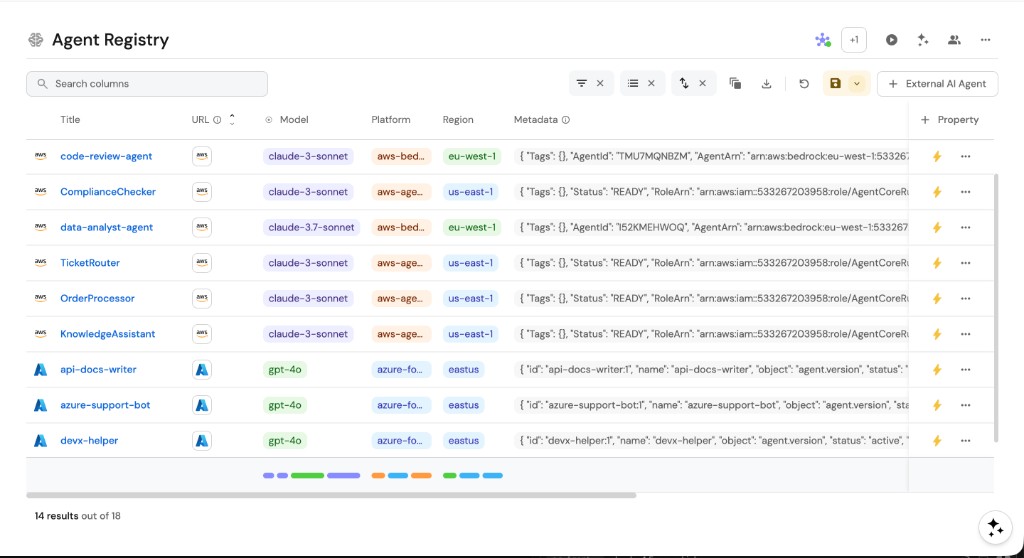
You should see your agents appearing from all connected cloud platforms.
Developers can now see all AI agents in one place, with key metadata like platform, status, model, and region visible at a glance.
Summary
You've built a centralized AI Agent Registry that:
- Discovers agents automatically from AWS Bedrock, AgentCore, and Azure AI Foundry.
- Provides a unified view of all agents across cloud platforms.
- Tracks key metadata including status, model, and region.
Next steps
- Connect your AI agents to Port's MCP Server for AI-powered workflows.
- Build an MCP Server Registry to manage MCP tools alongside your agents.
- Use Port's AI Assistant to query your agent catalog using natural language.
- Add a scorecard to track agent production readiness.