Automatically resolve tickets with Port
This guide demonstrates how to automatically resolve Jira tickets using coding agents orchestrated by Port or an n8n workflow enriched with Port context.
Both approaches preserve service ownership, repository, dependency, and documentation context when work moves from Jira to GitHub. They also maintain traceability by linking generated issues and pull requests back to the original ticket.
Common use cases
- Create pull requests for bug fixes automatically to reduce repetitive work.
- Generate GitHub issues from Jira tickets with Port context before assigning them to coding agents.
- Assign enriched GitHub issues to coding agents such as GitHub Copilot or Claude Code.
- Preserve organizational context from services, repositories, teams, dependencies, and documentation.
- Link Jira tickets to GitHub issues and pull requests for end-to-end traceability.
- Choose Port-native or external orchestration based on your automation environment.
Choose your approach
Choose coding agents when you want Port to orchestrate ticket resolution directly. Choose n8n when your team already operates n8n or prefers external orchestration.
- Coding agents
- n8n workflow
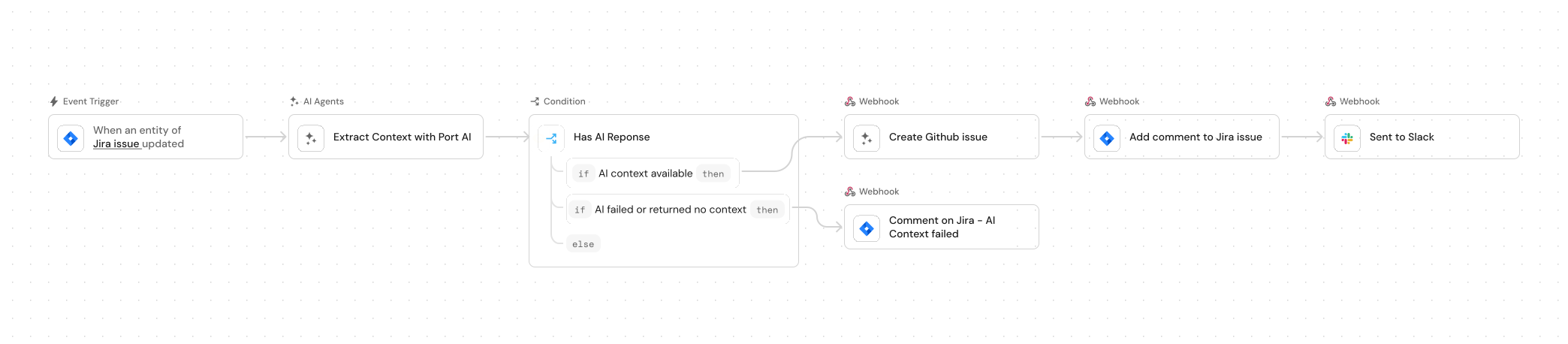
Use this approach to run ticket resolution with a Port workflow. A single workflow runs when a Jira ticket moves to In Progress: it enriches the ticket with Port context, creates a GitHub issue, triggers the coding agent, comments on Jira with the issue link, and sends a Slack notification.
Prerequisites
This guide assumes the following:
- You have a Port account and have completed the onboarding process.
- You have access to a Slack developer account with permissions to create apps.
- Port's Jira integration is installed in your account.
- GitHub Ocean integration is installed in your account.
- You have completed the setup in the Trigger GitHub Copilot from Port guide, so that Copilot is automatically assigned to GitHub issues created through this guide.
While this guide uses GitHub, Jira, and Copilot, you can adapt it for other Git providers (for example GitLab or Azure DevOps), other trackers (for example Linear), and other coding agents (for example Claude Code or Devin). The status name in the trigger must match the workflow your project uses.
Set up data model
We will configure the necessary blueprints to support our AI-enhanced coding workflow. This involves updating the Jira issue blueprint with necessary relations.
Update Jira issue blueprint
When you install Port's Jira integration, the Jira project and issue blueprints are created by default. However, we need to update the Jira issue blueprint to add the pull request relation and create a mirror property for the PR link.
-
Go to the Data model page in Port.
-
Find and select your existing Jira issue blueprint (e.g.
jiraIssue). -
Click on the
...button and then select theEdit blueprintoption. -
Add the following relation to the
relationssection:Pull request relation (click to expand)
"pull_request": {"target": "githubPullRequest","required": false,"many": false} -
Add the following mirror property to the
mirrorPropertiessection:Pull request link mirror property (click to expand)
"pull_request_link": {"title": "Pull Request Link","path": "pull_request.link"} -
Click
Saveto update the blueprint.
Update GitHub integration mapping
To track pull requests opened by Copilot that are meant to fix Jira issues, we need to update the GitHub integration mapping so that a pull request can be linked to the corresponding Jira issue using the Jira issue key in the PR title.
-
Go to the connectors page in Port.
-
Find and select your GitHub Ocean integration.
-
Go to the Mapping tab and click
{...} Edit YAML. -
Add the following resource to the end of the
resourceslist, after your existingpull-requestresource:Pull request mapping (click to expand)
- kind: pull-requestselector:query: ((.title // "") | test("[A-Z]+-[0-9]+")) and (.user.login == "Copilot")port:entity:mappings:identifier: (.title // "") | match("[A-Z]+-[0-9]+").stringblueprint: '"jiraIssue"'properties: {}relations:pull_request:combinator: '"or"'rules:- property: '"link"'operator: '"="'value: .html_url- property: '"link"'operator: '"="'value: .url -
Click
Saveto update the integration configuration.
Set up external tools
We need Jira API access so that the workflow or automations can add comments to Jira issues.
Set up Jira API access
-
Log in to your Jira instance.
-
Generate an API token:
- Go to Atlassian Account Settings.
- Click Create API token. Ensure the token has permission to update issues and add comments.
- Copy the generated token. You will use it to create the
JIRA_AUTHPort secret.
Set up Slack app
-
Create a Slack app and install it on a workspace.
-
Add the following permissions to the Slack app:
- Send messages (required).
chat:write.chat:write.public.
- Send messages (required).
-
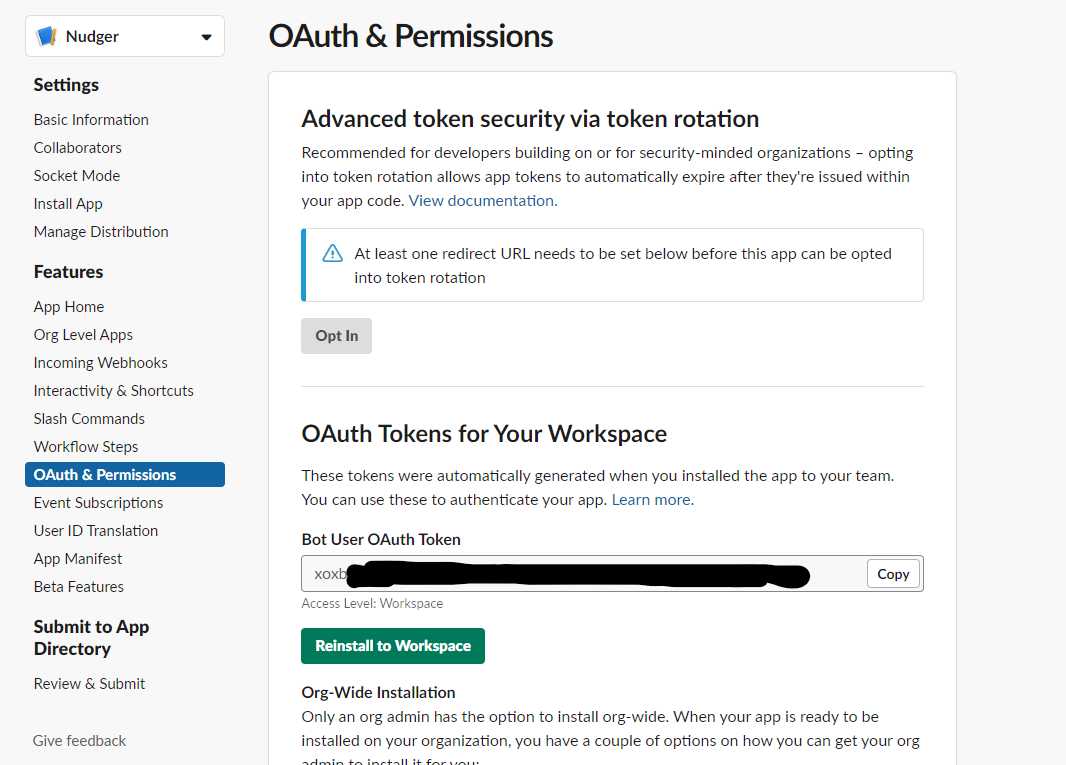
Navigate back to the OAuth & Permissions page. You will see an access token under OAuth Tokens for Your Workspace that you will use in the
SLACK_BOT_TOKENPort secret.
Add Port secrets
To add secrets to Port:
-
Click ... in the top right corner of your Port application.
-
Click Credentials.
-
Click the Secrets tab.
-
Click + Secret and add the following secrets:
-
GITHUB_TOKEN- A GitHub fine-grained personal access token with read and write permissions for Issues, Metadata, and Pull requests, and Actions (write) for workflow dispatch. -
GITHUB_ORG- Your GitHub organization or username. -
SLACK_BOT_TOKEN- Your Slack bot token from the OAuth & Permissions page. -
JIRA_AUTH- Base64 encoded Jira credentials in the formatemail:api_token. Generate the value by running:echo -n "your-email@domain.com:your-api-token" | base64Replace
your-email@domain.comwith your Jira email andyour-api-tokenwith the API token you created earlier.
-
Implementation in Port
The workflow runs when a Jira issue moves to In Progress with the required label. It calls Port AI for context, creates a GitHub issue, triggers the Copilot assignment workflow, and comments on the Jira issue with the GitHub link. Finally, a Slack message is sent to a channel with the ticket summary. No separate AI agent; the flow is deterministic and visible in the workflow editor.
Build the workflow
Use Port's workflow to run the full sequence: trigger on Jira update → enrich with AI context → create GitHub issue → trigger Copilot → comment on Jira → send Slack message. You can build it with the AI assistant or paste the JSON template.
-
Go to the workflows page in Port.
-
Click + Workflow.
-
Fill out the Create new workflow form. For Name, enter
Autonomous Ticket Resolution With AI, then click Confirm. -
Click the
{...}button to open the JSON editor and paste the workflow JSON below:Automatically resolve ticket workflow template (click to expand)
{"title": "Autonomous Ticket Resolution With AI","icon": "Jira","description": "Automatically generate GitHub issues from Jira tickets with rich organizational context when tickets move to In Progress, assign to GitHub Copilot, and link PRs back to Jira","allowAnyoneToViewRuns": true,"nodes": [{"identifier": "trigger","title": "On Jira Ticket Updated","icon": "Jira","description": "Listens for Jira issue updates and triggers the workflow when a ticket transitions from 'To Do' to 'In Progress', is product-approved, and has an assignee.","config": {"type": "EVENT_TRIGGER","event": {"type": "ENTITY_UPDATED","blueprintIdentifier": "jiraIssue"},"condition": {"type": "JQ","expressions": [".diff.before.properties.status == \"To Do\"",".diff.after.properties.status == \"In Progress\"","(.diff.after.properties.labels | index(\"product_approved\")) != null",".diff.after.relations.assignee != null"],"combinator": "and"},"published": true},"variables": {},"links": [],"verbose": true},{"identifier": "extract_context_with_ai","title": "Extract Context with Port AI","icon": "AI","description": "Invokes Port AI to enrich the Jira issue with contextual data from the Port catalog","config": {"type": "AI","userPrompt": "A Jira issue has moved to In Progress.\n\nIssue Details:\n- Key: {{ .outputs.trigger.diff.after.identifier }} \n- Title: {{ .outputs.trigger.diff.after.title }}\n- Type: {{ .outputs.trigger.diff.after.properties.issueType }}\n- Description: {{ .outputs.trigger.diff.after.properties.description }}\n\nRelated Jira Project:\n- Key: {{ .outputs.trigger.diff.after.relations.project }}\n\nYour task:\nQuery the Port catalog using MCP tools to find any related services or repositories connected to this Jira issue.\n\n- Always fetch ALL available properties for each entity\n- Do not limit properties unless explicitly required\n\nExtract ONLY context that actually exists and is directly related via Port relationships.\n\n### Core service context (if available)\n- Service description and tier based on the README\n- Owning team(s)\n- Deployment environments (e.g. prod)\n- Key dependencies (upstream/downstream services)\n\n### Relationship-heavy context (AGGREGATE, DO NOT LIST)\nFor the related service/repository, summarize:\n- PagerDuty incidents:\n - Total number of open incidents\n- Deployments:\n - Number of deployments\n - Environments deployed to\n - Most recent deployment timestamp (if available)\n- Security vulnerabilities:\n - Number of open vulnerabilities\n - Breakdown by severity (e.g. critical / high / medium)\n\nDo NOT include:\n- Raw logs\n- \"None found\" bullet lists\n\nOnly mention a category if at least one related entity exists.\n\nThen prepare:\n1. A GitHub issue title that starts with the Jira key in this exact format: {{ .outputs.trigger.diff.after.identifier }} - <what needs to be done>\n2. A GitHub issue body that:\n- Clearly summarizes the Jira issue in developer-friendly language\n- Adds concise business-relevant Port context (ownership, risk, stability, deploy state)\n- Uses aggregated facts, not exhaustive lists\n- Avoids assumptions or inferred data\n- Is fully self-contained\n\nReturn your response as a JSON object with this exact structure and nothing else:\n{\n \"title\": \"<GitHub issue title starting with the Jira key>\",\n \"body\": \"<GitHub issue body with context>\",\n \"labels\": [\"<Jira key>\", \"auto_assign\"]\n}\n\nIMPORTANT OUTPUT CONSTRAINT (HIGHEST PRIORITY)\n- If no relevant Port context exists, still return the same three keys. Use an empty string for body only when there is no extra catalog context, and keep title and labels populated from the Jira issue.\n- You must return ONLY a valid JSON object and nothing else.\n- The response must be parseable by JSON.parse() with no cleanup.\nReturn EXACTLY this shape, with the values filled in:\n{\"title\":\"<Jira key> - <what needs to be done>\",\"body\":\"<GitHub issue body>\",\"labels\":[\"<Jira key>\",\"auto_assign\"]}","systemPrompt": "You are a helpful assistant that extracts contextual information from the Port catalogue. You must return ONLY a valid JSON object and nothing else. If you violate this output format, downstream systems will fail.","tools": ["^(list|get|search|load|track|describe)_.*"],"outputSchema": {"type": "object","properties": {"body": {"type": "string"},"title": {"type": "string"},"labels": {"type": "array","items": {"type": "string"}}}}},"variables": {},"links": [],"verbose": false},{"identifier": "has_ai_context","title": "Has AI Response","icon": null,"description": "Checks whether the AI context extraction completed successfully and returned a non-empty response. Prevents downstream actions when AI invocation fails or returns no usable output.","config": {"type": "CONDITION","outlets": [{"identifier": "yes","title": "AI context available","expression": "(.outputs.extract_context_with_ai.response != null)"},{"identifier": "no","title": "AI failed or returned no context","expression": ".outputs.extract_context_with_ai.response == null"}]},"variables": {},"links": [],"verbose": false},{"identifier": "create_github_issue","title": "Create GitHub Issue","icon": "Github","description": "Creates a new GitHub issue using the Jira issue details and AI-generated context","config": {"type": "WEBHOOK","url": "https://api.github.com/repos/<GITHUB_ORG>/<GITHUB_REPO>/issues","agent": false,"synchronized": true,"method": "POST","headers": {"Accept": "application/vnd.github+json","Authorization": "Bearer {{ .secrets.GITHUB_TOKEN }}","X-GitHub-Api-Version": "2022-11-28"},"body": {"body": "{{ .outputs.extract_context_with_ai.response | fromjson | .body }}","title": "{{ .outputs.extract_context_with_ai.response | fromjson | .title }}","labels": "{{ .outputs.extract_context_with_ai.response | fromjson | .labels }}"},"onTimeout": "fail","onFailure": "terminate"},"variables": {},"links": [],"verbose": false},{"identifier": "comment_on_jira_ai_failure","title": "Comment on Jira – AI Context Failed","icon": "Jira","description": "Adds a comment to the Jira issue explaining that automated GitHub issue creation was skipped because AI context extraction failed, and suggests next steps.","config": {"type": "WEBHOOK","url": "https://<YOUR_JIRA_ORGANIZATION_URL>/rest/api/3/issue/{{ .outputs.trigger.diff.after.identifier }}/comment","agent": false,"synchronized": true,"method": "POST","headers": {"Accept": "application/json","Content-Type": "application/json","Authorization": "Basic {{ .secrets.JIRA_AUTH }}"},"body": {"body": {"type": "doc","content": [{"type": "paragraph","content": [{"text": "⚠️ Automated GitHub issue creation was skipped because context enrichment failed.","type": "text"}]},{"type": "paragraph","content": [{"text": "What this means:\n• The Jira ticket was detected correctly\n• The AI step did not return usable context\n• No GitHub issue was created to avoid low-quality or incomplete data","type": "text"}]},{"type": "paragraph","content": [{"text": "Next steps:\n• You can retry the automation\n• Or manually create a GitHub issue if work should proceed immediately","type": "text"}]}],"version": 1}},"onTimeout": "fail","onFailure": "terminate"},"variables": {},"links": [],"verbose": false},{"identifier": "trigger_copilot_assignment","title": "Trigger Copilot Assignment Workflow","icon": "Github","description": "Triggers a GitHub Actions workflow that assigns the newly created GitHub issue to GitHub Copilot, enabling AI-assisted implementation.","config": {"type": "WEBHOOK","url": "https://api.github.com/repos/<GITHUB_ORG>/<GITHUB_REPO>/actions/workflows/assign_to_copilot.yml/dispatches","agent": false,"synchronized": true,"method": "POST","headers": {"Accept": "application/vnd.github+json","Authorization": "Bearer {{ .secrets.GITHUB_TOKEN }}","X-GitHub-Api-Version": "2022-11-28"},"body": {"ref": "main","inputs": {"issue_number": "{{.outputs.create_github_issue.response.data.number | tostring}}","repository_name": "<GITHUB_REPO>","repository_owner": "<GITHUB_ORG>"}},"onTimeout": "fail","onFailure": "terminate"},"variables": {},"links": [],"verbose": false},{"identifier": "send_to_slack","title": "Send to Slack","icon": "Slack","description": "Sends a rich, informative Slack notification with workflow summary, automation steps, and quick action buttons","config": {"type": "WEBHOOK","url": "https://slack.com/api/chat.postMessage","agent": false,"synchronized": true,"method": "POST","headers": {"Content-Type": "application/json","Authorization": "Bearer {{ .secrets.SLACK_BOT_TOKEN }}"},"body": {"text": "✅ Autonomous Ticket Resolution Complete - {{ .outputs.trigger.diff.after.identifier }}","blocks": [{"text": {"text": "✅ Autonomous Ticket Resolution Complete","type": "plain_text","emoji": true},"type": "header"},{"text": {"text": "*{{ .outputs.trigger.diff.after.title }}*","type": "mrkdwn"},"type": "section"},{"type": "divider"},{"text": {"text": "📊 *Workflow Summary*","type": "mrkdwn"},"type": "section"},{"type": "section","fields": [{"text": "*Status:*\n🟢 In Progress","type": "mrkdwn"},{"text": "*Issue Type:*\n{{ .outputs.trigger.diff.after.properties.issueType }}","type": "mrkdwn"},{"text": "*Project:*\n<https://app.port.io/jiraProjectEntity?identifier={{ .outputs.trigger.diff.after.relations.project }}|{{ .outputs.trigger.diff.after.relations.project }}>","type": "mrkdwn"},{"text": "*Assignee:*\n{{ .outputs.trigger.diff.after.relations.assignee }}","type": "mrkdwn"}]},{"type": "divider"},{"text": {"text": "🚀 *AI-Powered Automation Steps*\n🔍 Context Enrichment from Port Catalog\n🔗 GitHub Issue Created (#{{.outputs.create_github_issue.response.data.number}})\n🤖 Assigned to GitHub Copilot\n🔗 Linked to Jira Ticket","type": "mrkdwn"},"type": "section"},{"type": "divider"},{"type": "actions","elements": [{"url": "https://app.port.io/jiraIssueEntity?identifier={{ .outputs.trigger.diff.after.identifier }}","text": {"text": "View Jira Ticket","type": "plain_text","emoji": true},"type": "button","style": "primary"},{"url": "{{ .outputs.create_github_issue.response.data.html_url }}","text": {"text": "View GitHub Issue","type": "plain_text","emoji": true},"type": "button"},{"url": "https://app.port.io/jiraIssueEntity?identifier={{ .outputs.trigger.diff.after.identifier }}&activeTab=2","text": {"text": "View PRD","type": "plain_text","emoji": true},"type": "button"}]},{"type": "context","elements": [{"text": "Powered by Port AI✨","type": "mrkdwn"}]}],"channel": "<SLACK_CHANNEL>"},"onTimeout": "fail","onFailure": "terminate"},"variables": {},"links": [],"verbose": false},{"identifier": "update_jira_with_github_link","title": "Add Comment to Jira Issue","icon": "Jira","description": "Adds a comment to the original Jira ticket containing a direct link to the created GitHub issue, ensuring traceability between Jira and GitHub.","config": {"type": "WEBHOOK","url": "https://<YOUR_JIRA_ORGANIZATION_URL>/rest/api/3/issue/{{ .outputs.trigger.diff.after.identifier }}/comment","agent": false,"synchronized": true,"method": "POST","headers": {"Accept": "application/json","Content-Type": "application/json","Authorization": "Basic {{ .secrets.JIRA_AUTH }}"},"body": {"body": {"type": "doc","content": [{"type": "paragraph","content": [{"text": "✅ GitHub issue created and assigned to Copilot: ","type": "text"},{"text": "{{ .outputs.create_github_issue.response.data.html_url }}","type": "text","marks": [{"type": "link","attrs": {"href": "{{ .outputs.create_github_issue.response.data.html_url }}"}}]}]}],"version": 1}},"onTimeout": "fail","onFailure": "terminate"},"variables": {},"links": [],"verbose": false}],"connections": [{"description": "Triggered when a Jira issue meets the workflow criteria and begins AI-based context enrichment.","sourceIdentifier": "trigger","targetIdentifier": "extract_context_with_ai"},{"description": "Routes the AI invocation result into a conditional gate to determine whether downstream actions should proceed.","sourceIdentifier": "extract_context_with_ai","targetIdentifier": "has_ai_context"},{"description": "Continues workflow execution only when AI context extraction succeeds","sourceIdentifier": "has_ai_context","targetIdentifier": "create_github_issue","sourceOutletIdentifier": "yes"},{"description": "Uses the newly created GitHub issue to trigger Copilot assignment.","sourceIdentifier": "create_github_issue","targetIdentifier": "trigger_copilot_assignment"},{"description": "Finalizes the workflow by linking the GitHub issue back to the originating Jira ticket.","sourceIdentifier": "trigger_copilot_assignment","targetIdentifier": "update_jira_with_github_link"},{"description": "Notifies Jira that AI context extraction failed and GitHub issue creation was intentionally skipped.","sourceIdentifier": "has_ai_context","targetIdentifier": "comment_on_jira_ai_failure","sourceOutletIdentifier": "no"},{"description": "Send Slack notification","sourceIdentifier": "update_jira_with_github_link","targetIdentifier": "send_to_slack"}]} -
Click Apply changes.
Configure the workflow
After publishing, replace placeholder values in the workflow nodes.
Specify Jira URL and auth
- Update the Comment on Jira - AI Context Failed (
comment_on_jira_ai_failure) and Add Comment to Jira Issue (update_jira_with_github_link) nodes.- Replace
<YOUR_JIRA_ORGANIZATION_URL>in the webhook URL with your Jira organization URL (e.g.example.atlassian.net). - Both nodes authenticate with the
JIRA_AUTHsecret from the Port secrets step. Keep this secret instead of the ones the Jira integration creates: their names depend on the installation ID, and OAuth installations store a bearer token that does not work with this URL.
- Replace
Specify Slack channel
- Update the Send to Slack (
send_to_slack) node.- Replace
<SLACK_CHANNEL>in the request body with your preferred Slack channel to receive notification about the automation run.
- Replace
Configure the GitHub integration
-
Update the Create GitHub Issue (
create_github_issue) node.- Replace
<GITHUB_ORG>with your GitHub organization or username. - Replace
<GITHUB_REPO>with your repository name.
- Replace
-
Update the Trigger Copilot Assignment Workflow (
trigger_copilot_assignment) node.- Replace
<GITHUB_ORG>and<GITHUB_REPO>in the webhook URL with the same values. - Update the
repository_nameandrepository_ownerinputs to match.
- Replace
Test the implementation
After you complete the workflow setup, use the steps below to verify that ticket resolution runs correctly.
Trigger a test Jira ticket update
-
Go to your Jira instance and find a test ticket.
-
Add the product_approved label and ensure the ticket has an assignee.
-
Move the ticket status from To Do to In Progress.
Verify GitHub issue creation
-
Go to your GitHub repository.
-
Verify that a new issue was created with the appropriate title (starting with the Jira key), description, and labels.
-
Check that the issue has the
auto_assignlabel.
Test pull request linking
-
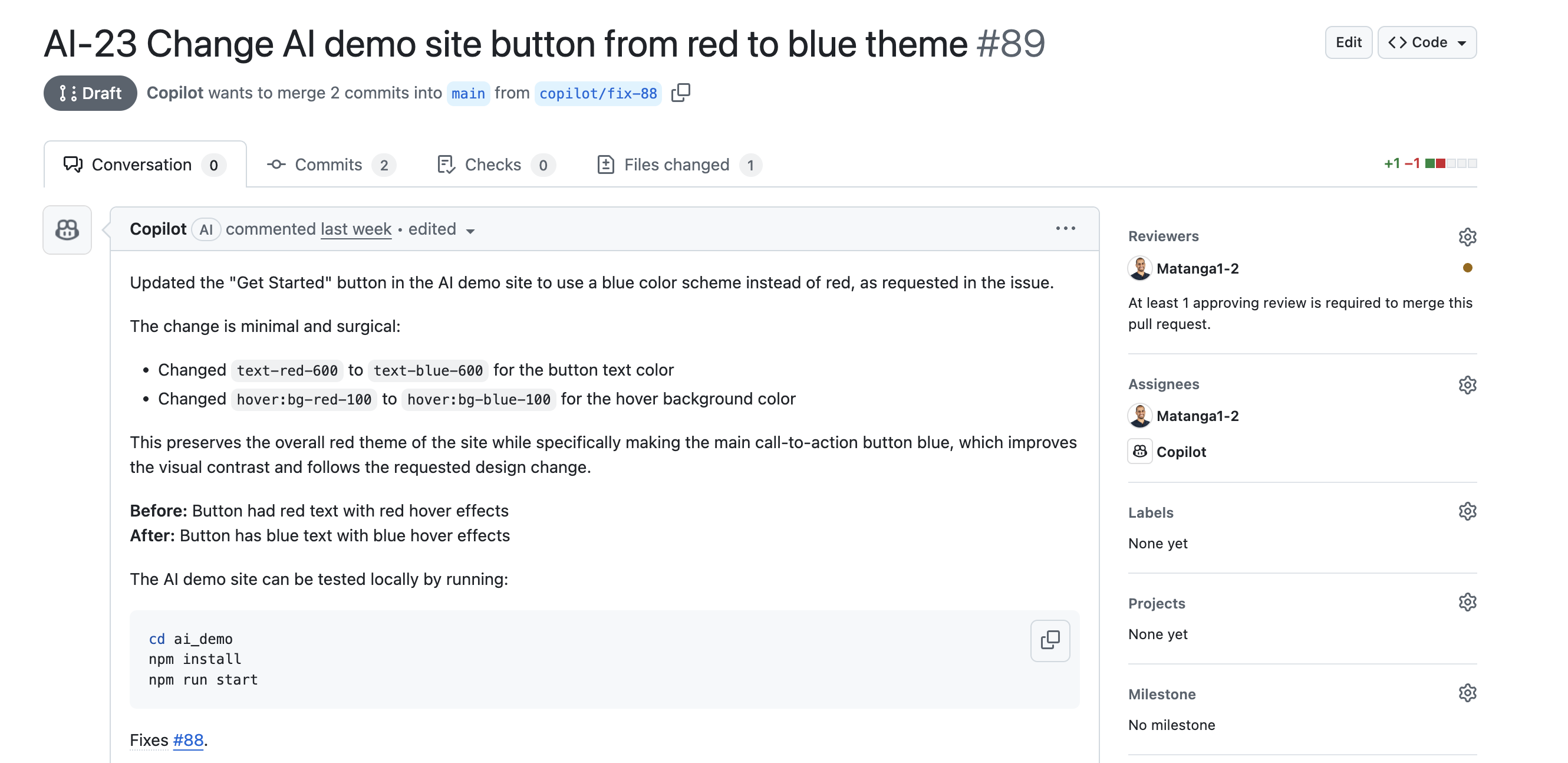
Verify that the GitHub issue is automatically assigned to Copilot.
-
Confirm that a pull request is created.
-
Check the Jira ticket for a comment containing a link to the GitHub issue.
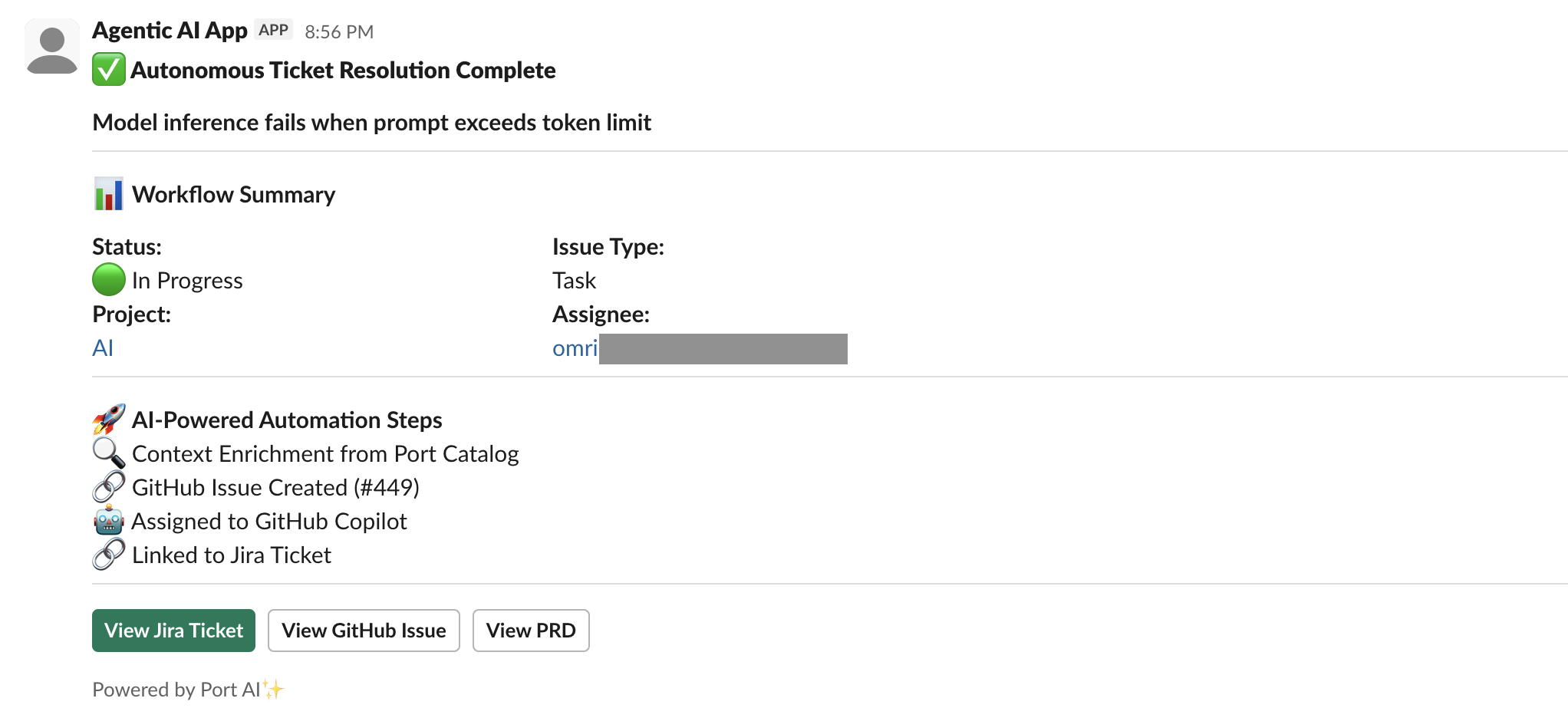
- Check the Slack channel for the sent notification.
More relevant guides
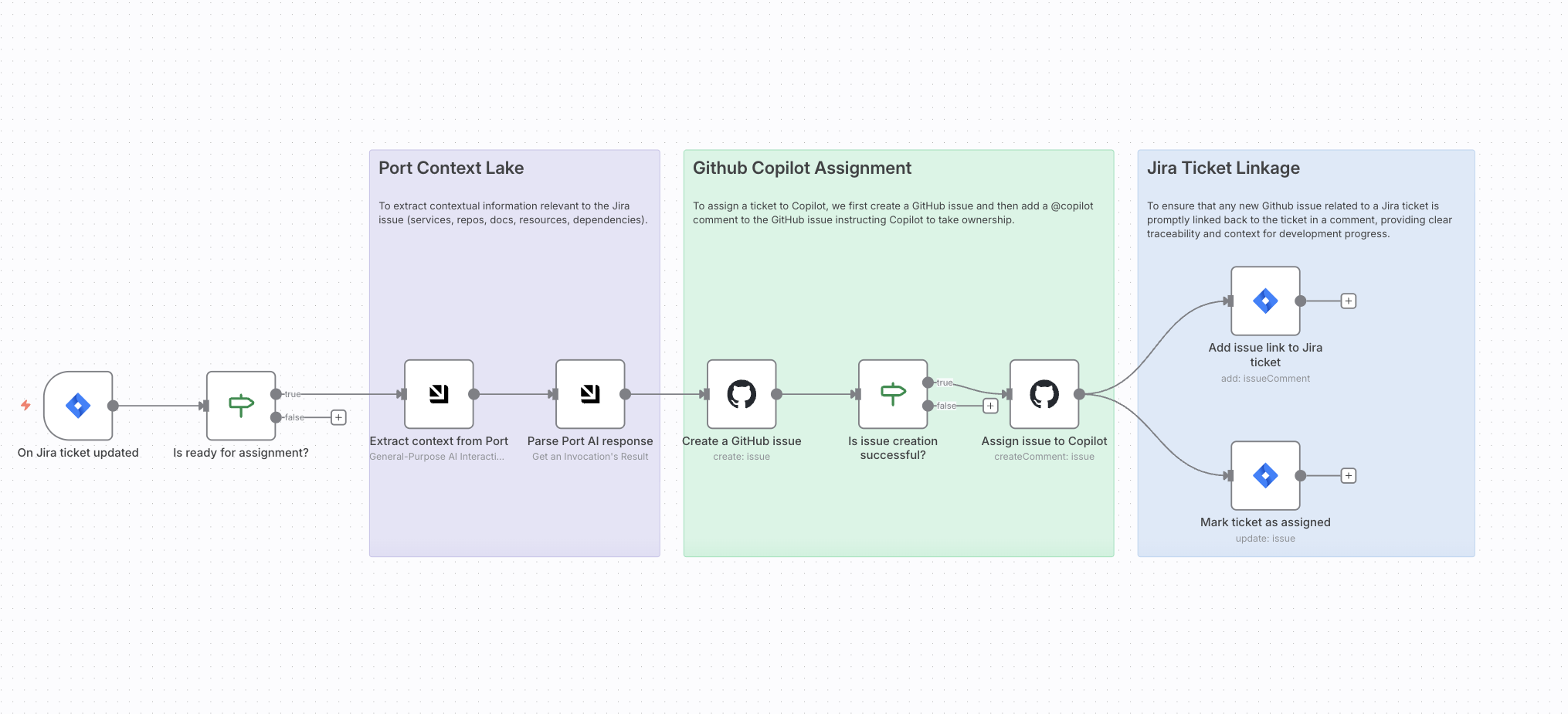
Use this approach when your team already operates n8n or prefers to orchestrate ticket resolution outside Port. The workflow uses Port as its context lake before assigning an enriched GitHub issue to a coding agent.
The coding-agents tab requires no n8n infrastructure and keeps orchestration in Port. The n8n option is best suited to teams with an existing n8n environment.
Prerequisites
This guide assumes the following:
-
You have a Port account and have completed the onboarding process.
-
GitHub Ocean integration is installed in your account.
-
Port's Jira integration is installed in your account.
-
You have a working n8n instance (Cloud or self-hosted) with Port's n8n custom node installed.
-
Your GitHub organization has GitHub Copilot enabled, so Copilot can be automatically assigned to any issues created through this guide.
While this guide uses GitHub and Jira, you can adapt it for other Git providers like GitLab or Azure DevOps, and other project management tools like Linear. Additionally, although this guide demonstrates using GitHub Copilot, you can also use other coding agents like Claude Code, or Gemini, etc., to achieve similar automation and integration.
Create n8n workflow
We will create an n8n workflow that uses Port as a context lake to enrich GitHub issues with organizational context from your context lake. The workflow will trigger when a Jira issue moves to "In Progress" with a specific label, query Port for relevant context, and create a GitHub issue with that context.
Import the workflow template
-
Go to your n8n instance.
-
Click on Workflows in the left sidebar.
-
Click on Import from File or Import from URL.
-
Copy and paste the following workflow JSON:
n8n workflow template (click to expand)
{"name": "Auto-resolve Jira tickets with GitHub Copilot using Port Context","nodes": [{"parameters": {"conditions": {"options": {"version": 2,"leftValue": "","caseSensitive": true,"typeValidation": "strict"},"combinator": "and","conditions": [{"id": "ded3f45f-fd63-493a-a5fc-225004d5d292","operator": {"type": "number","operation": "notEmpty","singleValue": true},"leftValue": "={{ $json.number }}","rightValue": ""}]},"options": {}},"id": "dc5b0535-793f-4ba7-b748-2798a3c4e22e","name": "Is issue creation successful?","type": "n8n-nodes-base.if","position": [2080,544],"typeVersion": 2.2},{"parameters": {"conditions": {"options": {"version": 2,"leftValue": "","caseSensitive": true,"typeValidation": "strict"},"combinator": "and","conditions": [{"id": "8800068e-ddaa-4979-a589-6442f424bb09","operator": {"type": "boolean","operation": "true","singleValue": true},"leftValue": "={{ $json.webhookEvent == \"jira:issue_updated\" && $json.issue.fields.status.name == \"In Progress\" && $json.issue.fields.labels.includes(\"product_approved\") && !$json.issue.fields.labels.includes(\"copilot_assigned\") }}","rightValue": ""}]},"options": {}},"id": "222058f6-cc6c-450a-8fbb-be3ed01c1f4a","name": "Is ready for assignment?","type": "n8n-nodes-base.if","position": [1184,560],"typeVersion": 2.2},{"parameters": {"owner": {"__rl": true,"value": "https://github.com/ORG","mode": "url"},"repository": {"__rl": true,"value": "aws-codeploy-demo","mode": "list"},"title": "={{ $json.result.message.parseJson().github_issue_title }}","body": "={{ $json.result.message.parseJson().github_issue_body }}","labels": [{"label": "n8n"},{"label": "ai-workflow"}],"assignees": []},"id": "03c29fb9-c747-4602-941e-a8f279cda515","name": "Create a GitHub issue","type": "n8n-nodes-base.github","position": [1872,544],"webhookId": "d7f1c627-82f6-4f61-a220-bbe24c943a51","typeVersion": 1.1,"credentials": {"githubApi": {"id": "3LaRYp1opDmuB6HX","name": "GitHub account"}}},{"parameters": {"operation": "createComment","owner": {"__rl": true,"value": "https://github.com/ORG","mode": "url"},"repository": {"__rl": true,"value": "aws-codeploy-demo","mode": "list"},"issueNumber": "={{ $('Create a GitHub issue').item.json.number }}","body": "@copilot please take ownership of this issue and begin working on a solution.\n\nUse the information in the issue body and title to propose and implement the necessary code changes.\n"},"id": "bd136228-82c3-4342-9a39-1461bf59b170","name": "Assign issue to Copilot","type": "n8n-nodes-base.github","position": [2288,544],"webhookId": "e4ba9b66-a68a-40d4-9c69-2dabb05d337b","typeVersion": 1.1,"credentials": {"githubApi": {"id": "3LaRYp1opDmuB6HX","name": "GitHub account"}}},{"parameters": {"resource": "issueComment","issueKey": "={{ $('On Jira ticket updated').item.json.issue.key }}","comment": "=We've created an issue at {{ $('Create a GitHub issue').item.json.html_url }} and assigned it to Copilot.","options": {}},"id": "ee576573-0a96-4713-b71e-cf6b48d1aabe","name": "Add issue link to Jira ticket","type": "n8n-nodes-base.jira","position": [2592,416],"typeVersion": 1,"credentials": {"jiraSoftwareCloudApi": {"id": "kFxflLsLkRHNY8gr","name": "Jira SW Cloud account"}}},{"parameters": {"operation": "update","issueKey": "={{ $('On Jira ticket updated').item.json.issue.key }}","updateFields": {"labels": "={{ $('On Jira ticket updated').item.json.issue.fields.labels.concat('copilot_assigned') }}"}},"id": "46c0c5c2-4670-4a68-8338-5ded401e7242","name": "Mark ticket as assigned","type": "n8n-nodes-base.jira","position": [2592,656],"typeVersion": 1,"credentials": {"jiraSoftwareCloudApi": {"id": "kFxflLsLkRHNY8gr","name": "Jira SW Cloud account"}}},{"parameters": {"events": ["jira:issue_updated"],"additionalFields": {}},"id": "155cb785-4a98-4d57-a8ed-fb45cd8a800e","name": "On Jira ticket updated","type": "n8n-nodes-base.jiraTrigger","position": [960,560],"webhookId": "559a3f87-cf37-4a25-b04a-13fc2dd72cf5","typeVersion": 1.1,"credentials": {"jiraSoftwareCloudApi": {"id": "kFxflLsLkRHNY8gr","name": "Jira SW Cloud account"}}},{"parameters": {"content": "## Auto-resolve Jira tickets with coding agents\n\nImprove issue resolution by assigning Jira tickets to coding agents with full operational context from Port, ensuring faster, accurate, and context-aware development\n\n### How it works\n1. Listen for Jira ticket updates and detect when an issue moves to \\\"In Progress\\\" with the label product_approved and without copilot_assigned.\n2. Query the Port catalog to extract only contextual information relevant to the Jira issue (services, repos, docs, resources, dependencies).\n3. Generate a concise GitHub issue title and a self-contained issue body that summarizes the Jira description and includes any found Port context.\n4. Create the GitHub issue in the target repository and post a comment that requests Copilot to take ownership.\n5. Write the GitHub link back to the Jira ticket and add the copilot_assigned label so the ticket is marked as handled.\n\n### Setup\n- [ ] Connect your Jira Cloud account and enable issue_updated events\n- [ ] Register for free on [Port.io](https://www.port.io)\n- [ ] Connect your Port.io account and add the API key\n- [ ] Connect your GitHub account and select the target repository\n- [ ] Ensure a Copilot bot or @copilot user has access to the repository\n- [ ] Confirm the workflow webhook or Jira trigger URL is active\n- [ ] Test by moving a product_approved ticket to In Progress","height": 672,"width": 512},"id": "4193fee9-a6b8-4fa3-a0cd-17397c54d64e","name": "Sticky Note","type": "n8n-nodes-base.stickyNote","position": [368,240],"typeVersion": 1},{"parameters": {"content": "## Port Context Lake\n\nTo extract contextual information relevant to the Jira issue (services, repos, docs, resources, dependencies).","height": 560,"width": 400,"color": 6},"id": "ff5792b7-5bcf-4837-9cc8-232f7dc69f7b","name": "Sticky Note1","type": "n8n-nodes-base.stickyNote","position": [1408,256],"typeVersion": 1},{"parameters": {"content": "## Github Copilot Assignment\n\nTo assign a ticket to Copilot, we first create a GitHub issue and then add a @copilot comment to the GitHub issue instructing Copilot to take ownership.","height": 560,"width": 592,"color": 4},"id": "c4d094bd-342f-4625-a881-484ea9b2ad45","name": "Sticky Note2","type": "n8n-nodes-base.stickyNote","position": [1840,256],"typeVersion": 1},{"parameters": {"content": "## Jira Ticket Linkage\n\nTo ensure that any new Github issue related to a Jira ticket is promptly linked back to the ticket in a comment, providing clear traceability and context for development progress.","height": 560,"width": 464,"color": 5},"id": "c0593d1b-48f9-4bfe-88db-6b2e2a0dbbf4","name": "Sticky Note3","type": "n8n-nodes-base.stickyNote","position": [2464,256],"typeVersion": 1},{"parameters": {"operation": "getInvocation","invocation_identifier": "={{ $json.invocationIdentifier }}"},"type": "@port-labs/n8n-nodes-portio-experimental.portApiAi","typeVersion": 1,"position": [1664,544],"id": "da319617-4f73-4988-8558-370cea868d60","name": "Parse Port AI response","credentials": {"portApi": {"id": "tRAwIiwSncqQh00a","name": "Port account"}}},{"parameters": {"operation": "generalInvoke","userPrompt": "=A Jira issue has moved to In Progress.\n\nIssue Details:\n- Key: {{ $('On Jira ticket updated').item.json.issue.key }}\n- Title: {{ $('On Jira ticket updated').item.json.issue.fields.summary }}\n- Type: {{ $('On Jira ticket updated').item.json.issue.fields.issuetype.name }}\n- Description: {{ $('On Jira ticket updated').item.json.issue.fields.description }}\n\nRelated Jira Project:\n- Key: {{ $('On Jira ticket updated').item.json.issue.fields.project.key }}\n- Name: {{ $('On Jira ticket updated').item.json.issue.fields.project.name }}\n\nRelated Service or Github Repo entity ID:\n{{ $('On Jira ticket updated').item.json.issue.fields.customfield_10308.value }}\n\nYour task:\nUse the Related Service/Repo ID and Issue ID to query the Port catalog.\n\nWhen querying Port entities via MCP (e.g. list_entities):\n- Always fetch ALL available properties for each entity\n- Do not limit properties unless explicitly required\n\nExtract ONLY context that actually exists and is directly related via Port relationships.\n\n### Core service context (if available)\n- Service description and tier based on the README\n- Owning team(s)\n- Deployment environments (e.g. prod, staging, dev)\n- Key dependencies (upstream/downstream services)\n\n### Relationship-heavy context (AGGREGATE, DO NOT LIST)\nFor the related service/repository, summarize:\n- PagerDuty incidents:\n - Total number of open incidents\n- Deployments:\n - Total number of deployments\n - Environments deployed to\n - Most recent deployment timestamp (if available)\n- Security vulnerabilities:\n - Total number of open vulnerabilities\n - Breakdown by severity (e.g. critical / high / medium)\n\nDo NOT include:\n- Raw logs\n- “None found” bullet lists\n\nOnly mention a category if at least one related entity exists.\n\nThen prepare:\n1. A GitHub issue title that starts with the Jira key.\n2. A GitHub issue body that:\n- Clearly summarizes the Jira issue in developer-friendly language\n- Adds concise business-relevant Port context (ownership, risk, stability, deploy state)\n- Uses aggregated facts, not exhaustive lists\n- Avoids assumptions or inferred data\n- Is fully self-contained\n- Ends exactly with: @github-copilot please begin working on this issue.\n\nIMPORTANT OUTPUT CONSTRAINT (HIGHEST PRIORITY)\n- If no relevant Port context exists, use empty strings (\"\") for fields where applicable.\n- You must return ONLY a valid JSON object and nothing else.\n\nOutput format:\nThe response must be parseable by JSON.parse() with no cleanup.\nReturn EXACTLY:\n{\"github_issue_title\":\"\",\"github_issue_body\":\"\"}\n","generalProvider": "port","generalModel": "gpt-5","systemPrompt": "You are a helpful assistant that extracts contextual information from the Port catalogue. You must return ONLY a valid JSON object and nothing else. If you violate this output format, downstream systems will fail.","executionMode": "Automatic"},"type": "@port-labs/n8n-nodes-portio-experimental.portApiAi","typeVersion": 1,"position": [1472,544],"id": "9f3068e9-cbbe-47a6-a617-35914ba2c366","name": "Extract context from Port","credentials": {"portApi": {"id": "tRAwIiwSncqQh00a","name": "Port account"}}}],"pinData": {},"connections": {"Create a GitHub issue": {"main": [[{"node": "Is issue creation successful?","type": "main","index": 0}]]},"On Jira ticket updated": {"main": [[{"node": "Is ready for assignment?","type": "main","index": 0}]]},"Assign issue to Copilot": {"main": [[{"node": "Add issue link to Jira ticket","type": "main","index": 0},{"node": "Mark ticket as assigned","type": "main","index": 0}]]},"Is ready for assignment?": {"main": [[{"node": "Extract context from Port","type": "main","index": 0}]]},"Is issue creation successful?": {"main": [[{"node": "Assign issue to Copilot","type": "main","index": 0}]]},"Parse Port AI response": {"main": [[{"node": "Create a GitHub issue","type": "main","index": 0}]]},"Extract context from Port": {"main": [[{"node": "Parse Port AI response","type": "main","index": 0}]]}},"active": false,"settings": {"executionOrder": "v1","availableInMCP": false},"versionId": "de493068-851e-422d-96f5-9891b3e6868e","meta": {"templateId": "11728","templateCredsSetupCompleted": true,"instanceId": "ece285d5f6d021267c1bf415cc6f43f61f89e93c51704a3846513e293fe52759"},"id": "DhwPhvyAJzzDoAiq","tags": []} -
Click Import to load the workflow into n8n.
Configure workflow credentials
Before the workflow can run, you need to configure credentials for Jira, GitHub, and Port.
Configure Jira credentials
-
In the On Jira issue updated node, click on the credentials dropdown.
-
Select Create New Credential or use an existing Jira credential.
-
Enter your Jira credentials:
- Jira URL - Your Jira instance URL (e.g.,
https://your-domain.atlassian.net). - Email - Your Jira account email.
- API Token - Your Jira API token (create an Atlassian API token).
- Jira URL - Your Jira instance URL (e.g.,
-
Click Save to store the credential.
Configure GitHub credentials
-
In the Create an issue node, click on the credentials dropdown.
-
Select Create New Credential or use an existing GitHub credential.
-
Enter your GitHub credentials:
- GitHub personal access token - A token with
reposcope (create a GitHub personal access token).
- GitHub personal access token - A token with
-
Click Save to store the credential.
Configure workflow parameters
After importing the workflow, you need to update several parameters to match your environment:
-
Update GitHub repository settings:
- In the Create an issue node, update the
ownerfield with your GitHub organization or username. - Update the
repositoryfield with your target repository name.
- In the Create an issue node, update the
-
Update Jira trigger conditions (optional):
- In the Is Ready for Assignment? node, you can modify the condition to match your workflow requirements. The default condition checks for the following.
- The issue status is In Progress.
- The issue has the
product_approvedlabel.
- You can change the label name or add additional conditions as needed.
- In the Is Ready for Assignment? node, you can modify the condition to match your workflow requirements. The default condition checks for the following.
-
Update Port AI prompt (optional):
- In the Extract issue context node, you can customize the
userPromptto adjust how Port queries your catalog and formats the GitHub issue. - The prompt uses Port's MCP tools (
^(list|search|track|describe)_.*) to query your context lake for relevant context.
- In the Extract issue context node, you can customize the
You can customize the workflow to match your specific needs:
- Change the Jira label trigger condition to use different labels or status transitions.
- Modify the Port query prompt to focus on specific blueprint types or properties.
- Add additional nodes to enrich the workflow with notifications, logging, or other integrations.
- Adjust the GitHub issue labels to match your repository's labeling conventions.
Set up Jira webhook trigger
The workflow uses a Jira webhook trigger to listen for issue updates. After importing the workflow, you need to configure the webhook in Jira.
-
Open the On Jira issue updated node in your n8n workflow and copy its webhook URL.
-
In Jira, go to Settings > System > Webhooks and click Create a webhook.
-
Enter a name, paste the URL, enable it, select Issue updated, and optionally add a JQL filter.
-
Click Create to save.
Understand how the workflow works
The n8n workflow orchestrates the following steps:
-
Jira trigger - The workflow listens for Jira issue updates via webhook.
-
Condition check - Verifies that the issue status is "In Progress" and has the required label (e.g., "product_approved") without the "copilot_assigned" label.
-
Port context extraction - Uses Port's n8n node to query your context lake for relevant context about services, repositories, teams, dependencies, and documentation related to the Jira issue.
-
Parse response - Retrieves the AI-generated GitHub issue title and body from Port.
-
Create GitHub issue - Creates a new GitHub issue with the enriched context from Port.
-
Assign to Copilot - Adds a comment to the GitHub issue instructing Copilot to take ownership.
-
Add issue link to Jira ticket - Adds a comment to the Jira ticket with the GitHub issue URL, providing clear traceability.
-
Mark ticket as assigned - Updates the Jira ticket to add the "copilot_assigned" label, preventing duplicate processing.
Test the workflow
-
Trigger a test Jira update: Add the configured label (e.g.,
product_approved) to a test ticket and move it from To Do to In Progress. -
Verify workflow execution: In n8n, check the workflow’s execution history. Ensure each node outputs as expected (webhook payload, condition pass, Port context, parsed JSON, GitHub issue creation).
-
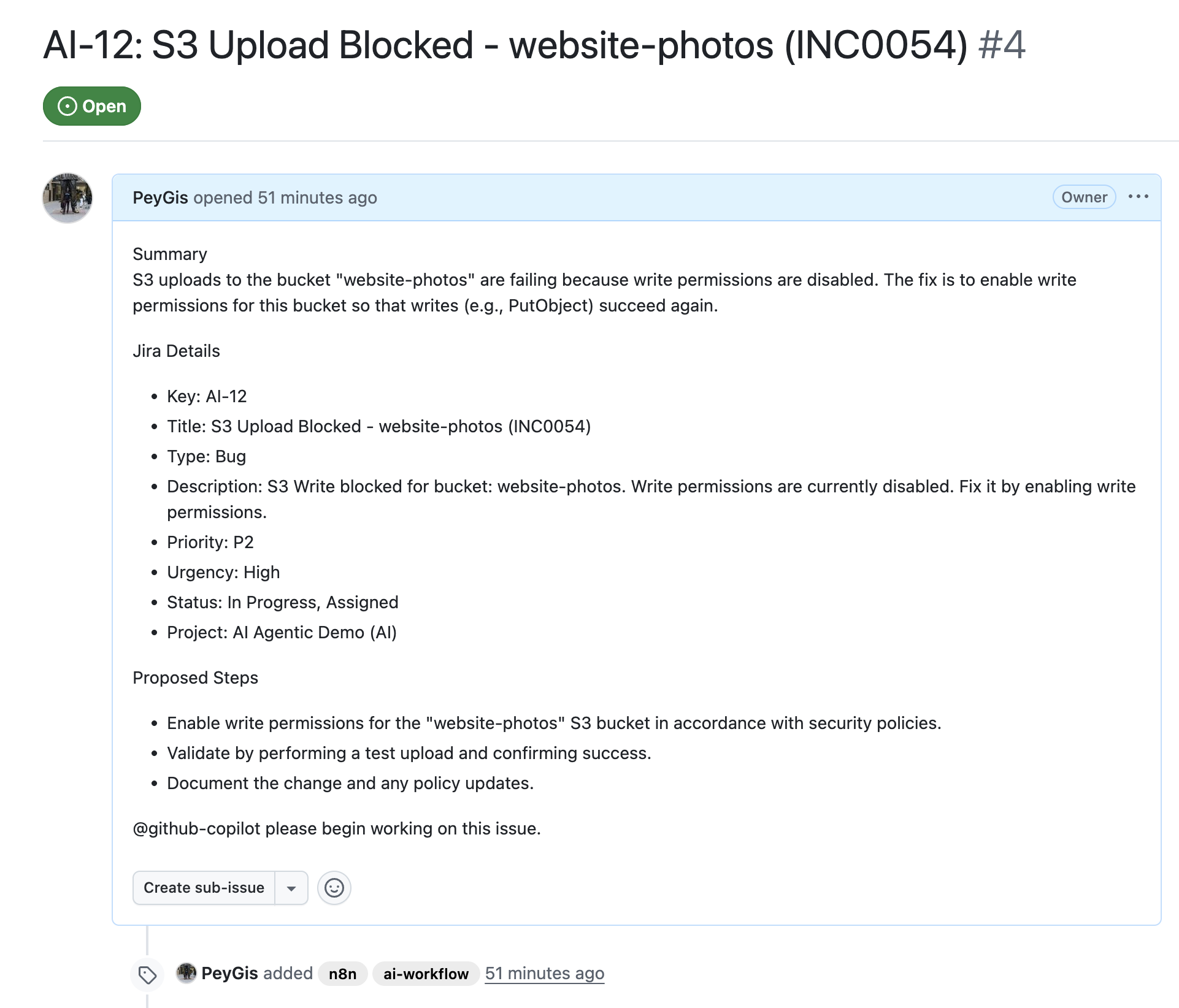
Verify GitHub issue: Confirm a new issue was created with the Jira key in the title, context in the description, correct labels, and a comment for Copilot.
More relevant guides
- Set up Port's n8n custom node - Learn how to install and configure Port's n8n node.
- Remediate vulnerability with n8n and Port - Another example of using Port as a context lake in n8n workflows.