Auto-discover service dependencies from your APM tools
Your APM already knows which services call which services in production. Filling a depends on relation by hand does not scale, and a coding agent inside one repository cannot see the rest of the system.
Let's auto-discover those dependencies into a calls relation on your catalog service entities. We ingest the graph from New Relic, Datadog, or Dynatrace, then use catalog auto discovery to match APM names to services you already track in Port.
Select your APM provider once. The provider tabs stay synchronized through the rest of the guide.
This map is who called whom in production, from APM telemetry. It is not a code-level graph of imports, functions, or files.
Common use cases
- Blast radius of a change. Ask which other services a pull request can affect, based on who calls whom in production.
- Design review across a large system. Give an architect or an agent the service-to-service picture that no single repository contains.
- Context for coding agents. Answer "which services consume this" from the catalog instead of searching every repository.
Prerequisites
This guide assumes the following:
- You have a Port account and have completed the onboarding process.
- You have a
serviceblueprint in your catalog (created during onboarding). If your identifier isMicroserviceor similar, use that identifier in the snippets below. - Catalog auto discovery is available in your organization (it uses Port AI).
Complete the prerequisite for your APM:
- New Relic
- Datadog
- Dynatrace
- Port's New Relic integration is installed.
- The default mapping already ingests
newRelicServiceentities.
- Port's Datadog integration is installed.
- The default mapping already ingests
datadogServiceentities.
- Port's Dynatrace integration is installed.
- The default mapping already ingests
dynatraceEntityentities of typeSERVICEandAPPLICATION.
How it works
- Ingest the APM graph. Each APM service becomes an entity with a
dependenciesrelation to the services it calls. - Add a
callsrelation on your catalogserviceblueprint (a self-relation from service to service). - Run auto discovery so Port AI matches APM names to catalog services and proposes
callsedges. You review and approve the suggestions.
APM identifiers are often GUIDs or vendor IDs, while catalog services use names such as payments. Auto discovery is the step that joins those two pictures. If your catalog identifiers already match APM service names, you can map calls with JQ instead.
Set up the catalog relation
Let's add a calls relation on the service blueprint. This is the relation auto discovery will populate.
-
Go to the Data model page in Port.
-
Find the Service blueprint and click on it.
-
Click the
...button, then choose Edit JSON. -
Add the following object to the existing
relationsobject. Do not remove relations you already have.Calls relation (click to expand)
"calls": {"title": "Calls","description": "Services this service calls in production, from APM telemetry","target": "service","required": false,"many": true} -
Click Save.
If you already added depends_on from the calculate blast radius with AI guide, skip this relation and use depends_on in the discovery prompt later. Do not create both unless you want two copies of the same graph.
Ingest the APM dependency graph
Add the APM-specific blueprint and mapping, then resync. After this step, Port holds the raw who-calls-whom graph from your APM.
- New Relic
- Datadog
- Dynatrace
Create the New Relic service dependency blueprint
This blueprint stores one entity per New Relic service. The dependencies relation lists the other New Relic services it calls (outbound CALLS relationships).
-
Go to the Data model page in Port.
-
Click + Blueprint.
-
Click Edit JSON.
-
Copy and paste the following JSON, then click Save.
New Relic service dependency blueprint (click to expand)
{"identifier": "newRelicServiceDependency","description": "This blueprint represents the services a New Relic service calls.","title": "New Relic Service Dependency","icon": "NewRelic","schema": {"properties": {},"required": []},"mirrorProperties": {},"calculationProperties": {},"aggregationProperties": {},"relations": {"dependencies": {"title": "Depends on","description": "Services this service calls","target": "newRelicService","required": false,"many": true}}}
Add the New Relic mapping
This kind is not part of the default New Relic mapping. entityQueryFilter is required. It chooses which services are included in the map. Only outbound CALLS to other SERVICE or APPLICATION entities in that filter are ingested.
-
Go to the Connectors page in Port.
-
Select your New Relic integration.
-
Add the following resource to the existing
resourceslist. Keep yournewRelicServicemapping.New Relic service dependency mapping (click to expand)
- kind: newRelicServiceDependencyselector:query: "true"entityQueryFilter: "type in ('SERVICE','APPLICATION')"port:entity:mappings:blueprint: '"newRelicServiceDependency"'identifier: .guidtitle: .namerelations:dependencies: .calls -
Click Save & Resync.
Live events do not refresh this kind. Run a resync whenever you need an up-to-date map.
Create the Datadog service dependency blueprint
This blueprint stores one entity per Datadog service. The dependencies relation lists the other Datadog services it calls.
-
Go to the Data model page in Port.
-
Click + Blueprint.
-
Click Edit JSON.
-
Copy and paste the following JSON, then click Save.
Datadog service dependency blueprint (click to expand)
{"identifier": "datadogServiceDependency","description": "This blueprint represents a dependency relationship between Datadog services, where one service calls another.","title": "Datadog Service Dependency","icon": "Datadog","schema": {"properties": {},"required": []},"mirrorProperties": {},"calculationProperties": {},"aggregationProperties": {},"relations": {"dependencies": {"title": "Depends on","description": "The services called by the source service","target": "datadogService","required": false,"many": true}}}
Add the Datadog mapping
Service dependencies are not collected out of the box. The environment selector should match the environment of the Datadog service map you care about (prod by default). startTime is how many hours of dependency data to look back.
-
Go to the Connectors page in Port.
-
Select your Datadog integration.
-
Add the following resource to the existing
resourceslist. Keep yourservicemapping.Datadog service dependency mapping (click to expand)
- kind: serviceDependencyselector:query: "true"environment: "prod"startTime: 1port:entity:mappings:identifier: .name | tostringtitle: .nameblueprint: '"datadogServiceDependency"'properties:sourceService: .namerelations:dependencies: "[.calls[] | tostring]" -
Click Save & Resync.
Add a dependencies relation to Dynatrace Entity
Dynatrace already ingests services as dynatraceEntity. Let's add a self-relation for outbound calls from Smartscape.
- Go to the Data model page in Port.
- Find the Dynatrace Entity blueprint and click on it.
- Click New relation.
- Fill out the form:
- Title:
Depends on. - Identifier:
dependencies. - Target blueprint:
Dynatrace Entity. - Limit: Many entities.
- Required: False.
- Title:
- Click Create.
Update the Dynatrace mapping
Include fromRelationships in entityFields, then map outbound service calls onto the new relation.
-
Go to the Connectors page in Port.
-
Select your Dynatrace integration.
-
Update the existing
entityresource so it matches the following. Keep your other kinds.Dynatrace entity mapping with dependencies (click to expand)
- kind: entityselector:query: "true"entityFields: firstSeenTms,lastSeenTms,tags,fromRelationshipsentityTypes:- APPLICATION- SERVICEport:entity:mappings:identifier: .entityIdtitle: .displayNameblueprint: '"dynatraceEntity"'properties:firstSeen: (.firstSeenTms // 0) / 1000 | todatelastSeen: (.lastSeenTms // 0) / 1000 | todatetype: .typetags: "[(.tags // [])[].stringRepresentation]"relations:dependencies: '[.fromRelationships.calls // [] | .[] | select(.type == "SERVICE") | .id]' -
Click Save & Resync.
Verify the APM graph
Before you run auto discovery, confirm the raw graph landed in Port.
- New Relic
- Datadog
- Dynatrace
- Open the Catalog page and select New Relic Service Dependency.
- Open a service that you know calls others in New Relic.
- Confirm the Depends on relation lists other
newRelicServiceentities.
If the relation is empty, check that entityQueryFilter is set correctly.
- Open the Catalog page and select Datadog Service Dependency.
- Open a service that appears on your Datadog service map.
- Confirm the Depends on relation lists other
datadogServiceentities.
If the relation is empty, check that environment is set correctly.
- Open the Catalog page and select Dynatrace Entity.
- Open a
SERVICEentity that you know calls others in Dynatrace. - Confirm the Depends on relation lists other service entities.
If the relation is empty, check taht fromRelationships is in entityFields.
Run auto discovery
Auto discovery reads the APM graph and proposes calls on your catalog service entities. You approve every suggestion, so a bad name match does not silently rewrite the catalog.
- Go to the Catalog page in Port.
- Open the catalog page for your Service blueprint.
- Click the

 button in the bottom right corner.
 - Paste the prompt for your APM:
- New Relic
- Datadog
- Dynatrace
Populate "calls" relations on existing service entities.
Map dependencies from New Relic: use newRelicService entities and
newRelicServiceDependency "dependencies" relations to identify which
catalog services communicate with each other.
Match by title or identifier. Prefer updating existing services.
Only suggest creating a service when no catalog match exists.
Populate "calls" relations on existing service entities.
Map dependencies from Datadog: use Datadog Service Dependency entities
and their "dependencies" relations to identify which catalog services
communicate with each other.
Match by title or identifier. Prefer updating existing services.
Only suggest creating a service when no catalog match exists.
Populate "calls" relations on existing service entities.
Map dependencies from Dynatrace: use Dynatrace Entity entities and
their "dependencies" relations to identify which catalog services
communicate with each other.
Match by title or identifier. Prefer updating existing services.
Only suggest creating a service when no catalog match exists.
- Select the related blueprints to analyze:
- New Relic
- Datadog
- Dynatrace
newRelicService.newRelicServiceDependency.
datadogService.datadogServiceDependency.
dynatraceEntity.
-
Click Discover.

-
Review the Update and Create lists. For a catalog that already has services, most suggestions should be Update rows that fill
calls. -
Approve suggestions you trust.
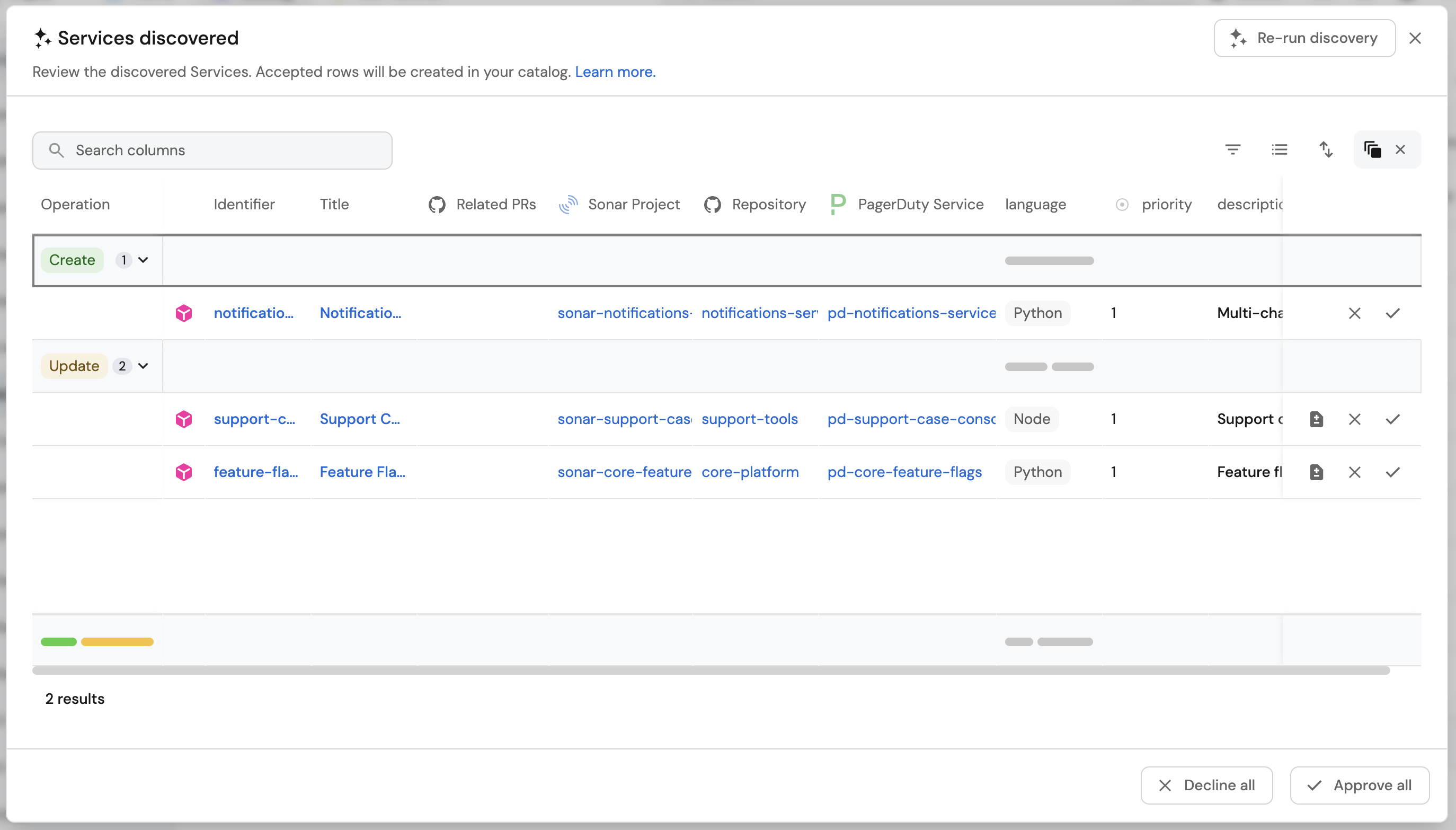
Each run analyzes the 500 most recently added entities from each related blueprint, and only the first 100 characters of each property. For a large catalog, approve a batch, then run discovery again.
What you should see
After you approve, a catalog service looks like this. The calls relation points at other service entities.
{
  "identifier": "payments",
  "title": "payments",
  "blueprint": "service",
  "relations": {
    "calls": [
      "billing",
      "checkout",
      "notifications"
    ]
  }
}
Open a few services you know well and compare calls with the APM service map. That is the fastest way to catch a bad match.
Troubleshooting
- APM dependency entities have empty
dependencies. For New Relic, confirmentityQueryFilteris set. For Datadog, confirmenvironmentmatches your service map. For Dynatrace, confirmfromRelationshipsis inentityFieldsand that you resynced. - Discovery creates new services instead of updating existing ones. Strengthen the prompt to match on title and identifier, and to prefer updates. Decline the extra creates.
- A related blueprint does not appear in the form. Add a relation from Service to that blueprint, then run discovery again.
- Suggestions look noisy. Auto discovery is a proposal step. Decline weak matches. Re-run after you have approved a clean batch so later runs see a better catalog.
Related guides
- Calculate blast radius with AI - score the impact of a change using the graph you just built.
- Catalog auto discovery - how discovery, review, and the 500-entity limit work.
- New Relic integration.
- Datadog integration.
- Dynatrace integration.