Approval workflows for service deployment
This guide demonstrates how to use Port workflows to deploy a service with GitLab pipelines and ServiceNow approvals when quality thresholds are violated.
Use case
- A developer starts a deployment from Port, which triggers a GitLab pipeline.
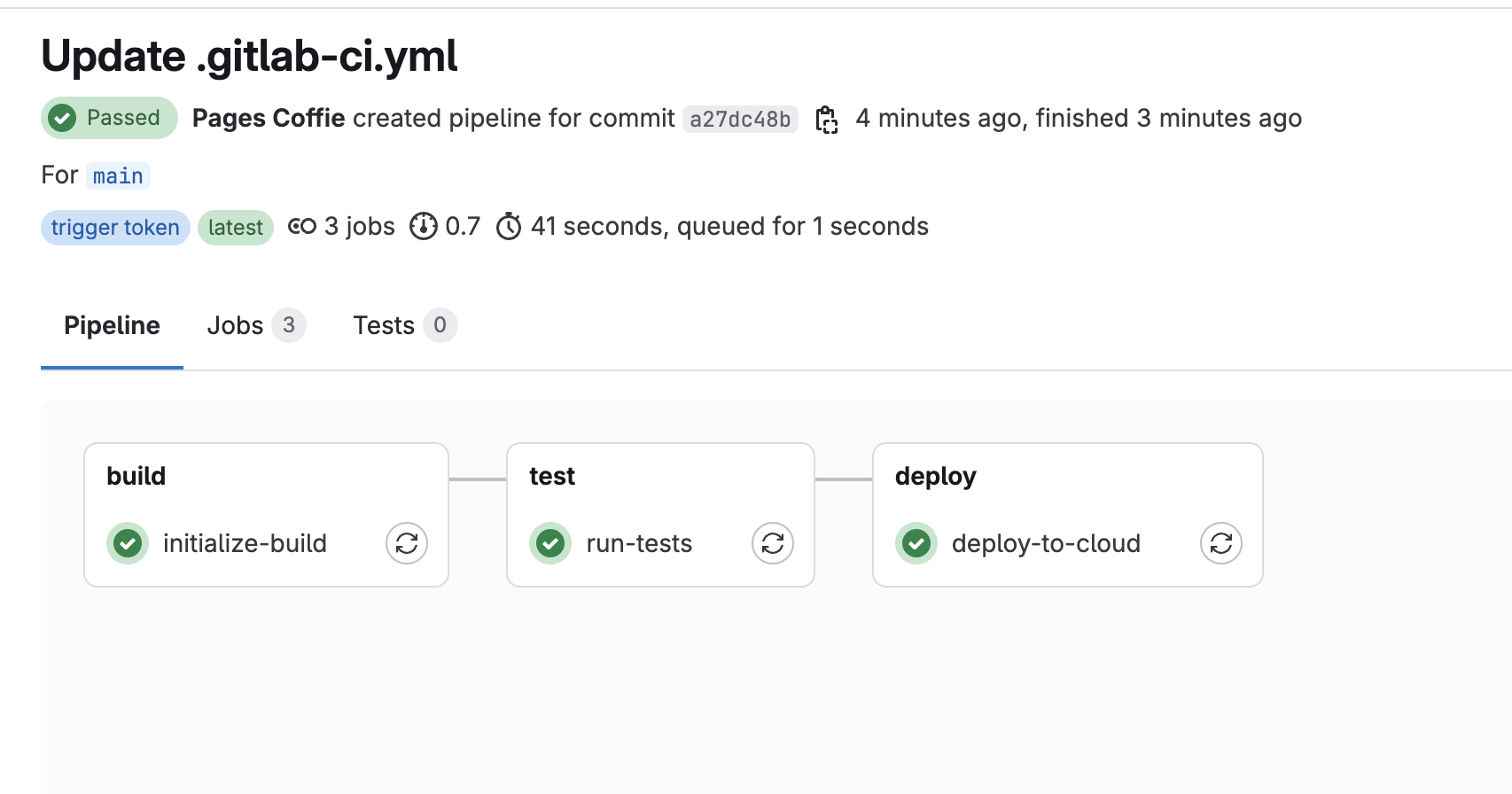
- Pipeline stages: build, test, and deploy.
- If code coverage in the test stage meets the threshold, deployment proceeds.
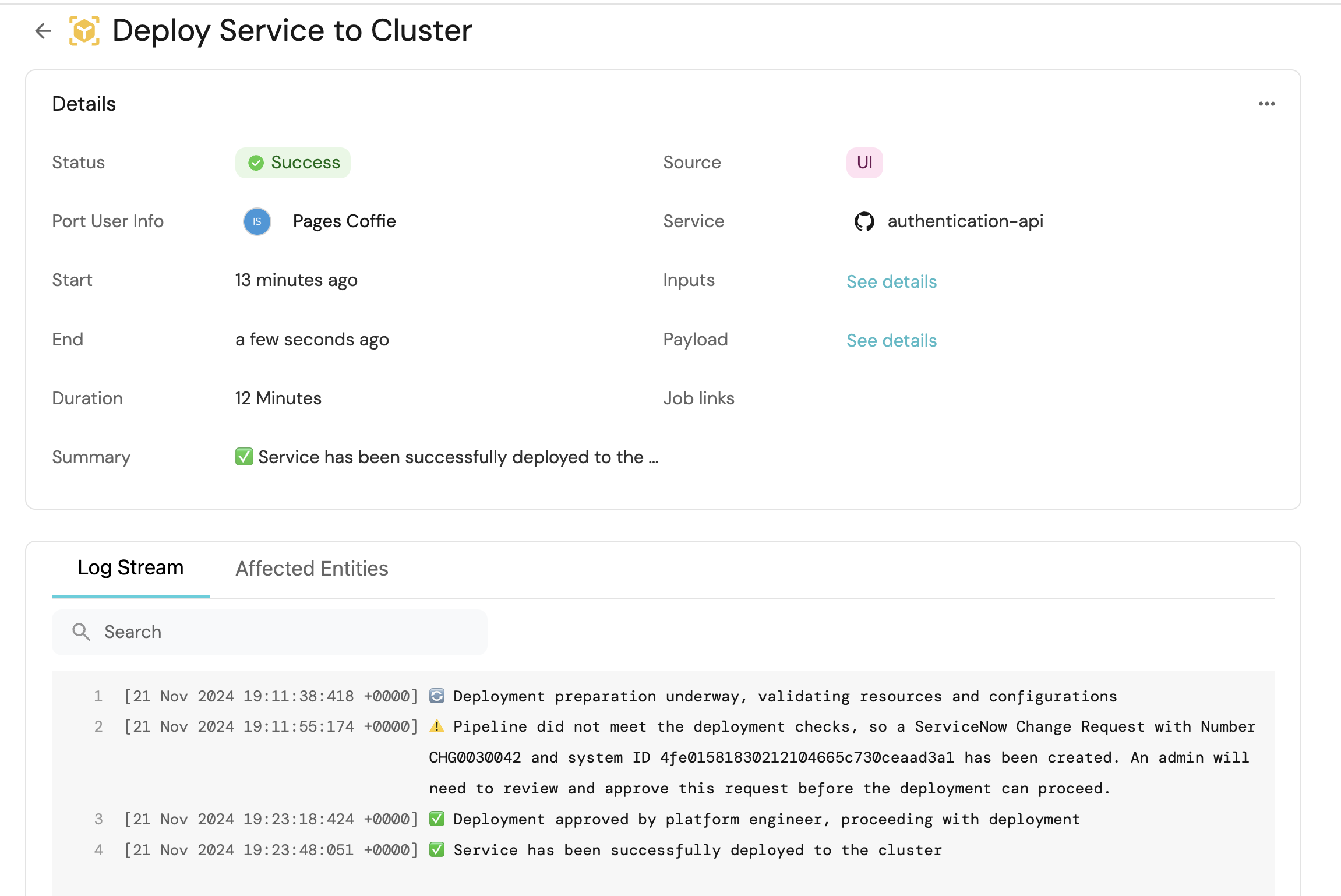
- If coverage fails, a ServiceNow change request (CR) is created and synced to Port.
- A platform engineer can approve or decline the CR in Port.
- CR decisions made in the ServiceNow UI also update Port and re-trigger the pipeline.
Prerequisites
This guide assumes the following:
- You have a Port account and have completed the onboarding process.
- A GitLab project with permission to create a pipeline trigger token.
- ServiceNow instance access with admin or developer-level permissions.
- GitLab CI/CD variables configured for:
-
PORT_CLIENT_ID- Your Port client ID. -
PORT_CLIENT_SECRET- Your Port client secret. -
PORT_API_URL- Your Port API base URL with no trailing slash:https://api.port.io(EU) orhttps://api.us.port.io(US). -
SERVICENOW_INSTANCE_URL- Your ServiceNow instance URL. For example,https://example-id.service-now.com. -
SERVICENOW_API_TOKEN- A base64 encoded string of your ServiceNow credentials generated with:echo -n 'your-instance-username:your-instance-password' | base64Use single quotes so shell characters in the password (such as
$) are not expanded.
-
Set up the data model
Define a blueprint in Port for the change request entity using the JSON below.
ServiceNow change request (click to expand)
{
  "identifier": "servicenowChangeRequest",
  "title": "Servicenow Change Request",
  "icon": "Servicenow",
  "schema": {
    "properties": {
      "number": {
        "title": "Change Number",
        "type": "string"
      },
      "description": {
        "title": "Description",
        "type": "string"
      },
      "isActive": {
        "title": "Is active",
        "type": "boolean"
      },
      "priority": {
        "title": "Priority",
        "type": "string"
      },
      "state": {
        "icon": "DefaultProperty",
        "title": "State",
        "type": "string"
      },
      "createdOn": {
        "title": "Created On",
        "type": "string",
        "format": "date-time"
      },
      "createdBy": {
        "title": "Created By",
        "type": "string"
      },
      "service": {
        "type": "string",
        "title": "Service"
      },
      "category": {
        "type": "string",
        "title": "Category"
      },
      "approval": {
        "title": "Approval",
        "icon": "DefaultProperty",
        "type": "string",
        "enum": [
          "approved",
          "not requested",
          "requested",
          "rejected"
        ],
        "enumColors": {
          "approved": "green",
          "not requested": "turquoise",
          "requested": "yellow",
          "rejected": "pink"
        }
      },
      "externalTags": {
        "type": "string",
        "title": "External Tags"
      }
    },
    "required": []
  },
  "mirrorProperties": {},
  "calculationProperties": {},
  "aggregationProperties": {},
  "relations": {}
}
Add a column named external_tags (or u_external_tag, depending on your instance) to your change_request table in ServiceNow so deployment requests can store the related Port workflow run identifier.
Follow the ServiceNow documentation to complete this step.
Set up Port secrets
If you have already installed Port's ServiceNow integration, these secrets should already exist in Port. To view your existing secrets:
- Open the Credentials modal.
- Click on the
Secretstab.
To add a secret to Port:
- Open the Credentials modal.
- Click on the Secrets tab.
- Click on + Secret and add:
SERVICENOW_API_TOKEN- The same base64 token used in GitLab.SERVICENOW_INSTANCE_URL- Your ServiceNow instance URL. For example,https://example-id.service-now.com.GITLAB_TRIGGER_TOKEN- The GitLab pipeline trigger token.
Set up the workflows
We will create three workflows:
- Deploy a service to a cluster (self-service trigger for developers).
- Approve and deploy a service (self-service trigger for platform engineers).
- Re-trigger the GitLab pipeline when a change request approval is updated in Port (event trigger for ServiceNow UI decisions).
GitLab is triggered with webhook nodes. Replace YOUR_GITLAB_PROJECT_ID in each workflow JSON with your GitLab project ID, and replace main with your default branch name if it differs (for example, master).
To create each workflow:
- Go to the Workflows page of your portal.
- Click on the + Workflow button in the top-right corner.
- In the Name field, enter the workflow name shown in each section below, then click Confirm.
- On the editor page, click the see workflow JSON button (the code icon) to open the JSON editor.
- Copy and paste the workflow JSON below to replace the example workflow, then click Save.
Deploy service to cluster
This workflow is run by a developer to start a deployment. It triggers the GitLab pipeline and passes the selected service, environment, and workflow run identifier.
Deploy service to cluster workflow (click to expand)
{
  "identifier": "deploy_service_to_cluster",
  "title": "Deploy Service to Cluster",
  "icon": "Deployment",
  "description": "Deploys a service to a cluster via GitLab",
  "nodes": [
    {
      "identifier": "trigger",
      "config": {
        "type": "SELF_SERVE_TRIGGER",
        "contexts": [
          {
            "on": "ENTITY",
            "userInput": "service"
          }
        ],
        "userInputs": {
          "properties": {
            "service": {
              "type": "string",
              "format": "entity",
              "blueprint": "service",
              "title": "Service",
              "icon": "Service"
            },
            "environment": {
              "type": "string",
              "title": "Environment",
              "icon": "Environment",
              "default": "Staging",
              "enum": ["Development", "Staging", "Production"],
              "enumColors": {
                "Development": "lightGray",
                "Staging": "lightGray",
                "Production": "lightGray"
              }
            }
          },
          "required": ["service", "environment"],
          "order": ["service", "environment"]
        }
      }
    },
    {
      "identifier": "trigger_pipeline",
      "title": "Trigger GitLab pipeline",
      "icon": "Gitlab",
      "config": {
        "type": "WEBHOOK",
        "url": "https://gitlab.com/api/v4/projects/YOUR_GITLAB_PROJECT_ID/ref/main/trigger/pipeline?token={{ .secrets[\"GITLAB_TRIGGER_TOKEN\"] }}",
        "method": "POST",
        "synchronized": true,
        "body": {
          "variables": {
            "environment": "{{ .outputs.trigger.environment }}",
            "entity": "{{ .outputs.trigger.service }}",
            "approval_status": "pending",
            "deploy_run_id": "{{ .workflowRun.identifier }}",
            "port_run_id": "{{ .workflowRun.identifier }}"
          }
        }
      }
    }
  ],
  "connections": [
    {
      "sourceIdentifier": "trigger",
      "targetIdentifier": "trigger_pipeline"
    }
  ]
}
Approve and deploy service
This workflow is run by a platform engineer on a servicenowChangeRequest entity. It patches the approval in ServiceNow and updates the matching entity in Port. The event workflow below then re-triggers GitLab with the decision.
Approve and deploy service workflow (click to expand)
{
  "identifier": "approve_and_deploy_service",
  "title": "Approve and Deploy Service",
  "icon": "Deployment",
  "description": "Approves or declines a ServiceNow change request and updates Port",
  "nodes": [
    {
      "identifier": "trigger",
      "config": {
        "type": "SELF_SERVE_TRIGGER",
        "contexts": [
          {
            "on": "ENTITY",
            "userInput": "change_request"
          }
        ],
        "userInputs": {
          "properties": {
            "change_request": {
              "type": "string",
              "format": "entity",
              "blueprint": "servicenowChangeRequest",
              "title": "Change request",
              "icon": "Servicenow"
            },
            "approval_status": {
              "icon": "DefaultProperty",
              "title": "Action",
              "type": "string",
              "default": "approved",
              "enum": ["approved", "declined"],
              "enumColors": {
                "approved": "green",
                "declined": "pink"
              }
            },
            "reason": {
              "type": "string",
              "title": "Reason"
            }
          },
          "required": ["change_request", "approval_status"],
          "order": ["change_request", "approval_status", "reason"]
        }
      }
    },
    {
      "identifier": "patch_servicenow",
      "title": "Patch change request in ServiceNow",
      "icon": "Servicenow",
      "config": {
        "type": "WEBHOOK",
        "url": "{{ .secrets.SERVICENOW_INSTANCE_URL }}/api/now/table/change_request/{{ .outputs.trigger.change_request }}",
        "method": "PATCH",
        "synchronized": true,
        "headers": {
          "Content-Type": "application/json",
          "Accept": "application/json",
          "Authorization": "Basic {{ .secrets.SERVICENOW_API_TOKEN }}"
        },
        "body": {
          "approval": "{{ if .outputs.trigger.approval_status == \"declined\" then \"rejected\" else .outputs.trigger.approval_status end }}"
        }
      }
    },
    {
      "identifier": "sync_change_request",
      "title": "Sync approval to Port",
      "config": {
        "type": "UPSERT_ENTITY",
        "blueprintIdentifier": "servicenowChangeRequest",
        "mapping": {
          "identifier": "{{ .outputs.trigger.change_request }}",
          "properties": {
            "approval": "{{ if .outputs.trigger.approval_status == \"declined\" then \"rejected\" else .outputs.trigger.approval_status end }}"
          }
        }
      }
    }
  ],
  "connections": [
    {
      "sourceIdentifier": "trigger",
      "targetIdentifier": "patch_servicenow"
    },
    {
      "sourceIdentifier": "patch_servicenow",
      "targetIdentifier": "sync_change_request"
    }
  ]
}
Re-trigger GitLab from change request updates
This event workflow runs when a change request entity in Port is updated to approved or rejected. That covers approvals made in Port (via the workflow above) and approvals made directly in the ServiceNow UI after a webhook sync.
Approve or deny GitLab pipeline workflow (click to expand)
{
  "identifier": "approve_snow_pipeline",
  "title": "Approve or Deny GitLab Pipeline from SNOW",
  "icon": "Gitlab",
  "description": "Re-trigger the GitLab pipeline when a ServiceNow change request is approved or rejected",
  "nodes": [
    {
      "identifier": "trigger",
      "config": {
        "type": "EVENT_TRIGGER",
        "event": {
          "type": "ENTITY_UPDATED",
          "blueprintIdentifier": "servicenowChangeRequest"
        },
        "condition": {
          "type": "JQ",
          "expressions": [
            ".diff.after.properties.approval == \"approved\" or .diff.after.properties.approval == \"rejected\"",
            ".diff.after.properties.approval != .diff.before.properties.approval"
          ],
          "combinator": "and"
        }
      }
    },
    {
      "identifier": "trigger_pipeline",
      "title": "Trigger GitLab pipeline",
      "icon": "Gitlab",
      "config": {
        "type": "WEBHOOK",
        "url": "https://gitlab.com/api/v4/projects/YOUR_GITLAB_PROJECT_ID/ref/main/trigger/pipeline?token={{ .secrets[\"GITLAB_TRIGGER_TOKEN\"] }}",
        "method": "POST",
        "synchronized": true,
        "body": {
          "variables": {
            "approval_status": "{{ if .outputs.trigger.diff.after.properties.approval == \"rejected\" then \"declined\" else .outputs.trigger.diff.after.properties.approval end }}",
            "system_id": "{{ .outputs.trigger.diff.after.identifier }}",
            "deploy_run_id": "{{ .outputs.trigger.diff.after.properties.externalTags }}",
            "entity": "{{ .outputs.trigger.diff.after.properties.service }}",
            "port_run_id": "{{ .workflowRun.identifier }}"
          }
        }
      }
    }
  ],
  "connections": [
    {
      "sourceIdentifier": "trigger",
      "targetIdentifier": "trigger_pipeline"
    }
  ]
}
Follow the ServiceNow installation documentation so approval changes made in ServiceNow sync back to Port and re-trigger this workflow.
Set up the GitLab pipeline
Add the following .gitlab-ci.yml to your GitLab project. The pipeline has three stages: build, test, and deploy.
When coverage is below the threshold, the pipeline creates a ServiceNow change request and upserts a matching entity in Port. When a later run receives approval_status=approved, it skips the checks and deploys.
GitLab pipeline (click to expand)
stages:
  - build
  - test
  - deploy

image: alpine:latest

variables:
  APPROVAL_STATUS: "pending"

initialize-build:
  stage: build
  except:
    - pushes
  before_script:
    - apk update
    - apk add --upgrade curl jq -q
  script:
    - |
      set -eu
      if [ -z "${PORT_API_URL:-}" ] || [ -z "${PORT_CLIENT_ID:-}" ] || [ -z "${PORT_CLIENT_SECRET:-}" ]; then
        echo "Missing required CI variables. Set PORT_API_URL, PORT_CLIENT_ID, and PORT_CLIENT_SECRET in GitLab CI/CD settings."
        echo "PORT_API_URL must be https://api.port.io or https://api.us.port.io (no trailing slash)."
        exit 1
      fi

      if [ "$PORT_API_URL" = '${PORT_API_URL}' ] || [ "$PORT_API_URL" = '$PORT_API_URL' ]; then
        echo "PORT_API_URL is the literal string '$PORT_API_URL'."
        echo "Set a real value in GitLab CI/CD variables (for example https://api.us.port.io)."
        exit 1
      fi

      authUrl="${PORT_API_URL}/v1/auth/access_token"
      echo "Getting access token from Port API"
      echo "Auth URL: $authUrl"
      tokenResponse=$(curl -sS -X POST \
        -H 'Content-Type: application/json' \
        -d "{\"clientId\": \"${PORT_CLIENT_ID}\", \"clientSecret\": \"${PORT_CLIENT_SECRET}\"}" \
        "$authUrl")

      accessToken=$(echo "$tokenResponse" | jq -r '.accessToken // empty')
      if [ -z "$accessToken" ] || [ "$accessToken" = "null" ]; then
        echo "Failed to get Port access token. Response: $tokenResponse"
        exit 1
      fi

      # Workflow trigger variables are exposed as GitLab CI variables.
      runId="${port_run_id:-}"
      deployActionRunId="${deploy_run_id:-}"
      APPROVAL_STATUS="${approval_status:-pending}"

      echo "ACCESS_TOKEN=$accessToken" >> data.env
      echo "DEPLOY_ACTION_RUN_ID=$deployActionRunId" >> data.env
      echo "TRIGGER_ACTION_RUN_ID=$runId" >> data.env
      echo "APPROVAL_STATUS=$APPROVAL_STATUS" >> data.env
      echo "SERVICE_ENTITY=${entity:-}" >> data.env

      if [ "$APPROVAL_STATUS" = "approved" ]; then
        echo "Deployment approved by platform engineer. Skipping initial checks and proceeding directly."
      elif [ "$APPROVAL_STATUS" = "declined" ]; then
        echo "Deployment declined by platform engineer."
        exit 1
      else
        echo "Initiating deployment sequence"
        # HERE IS WHERE YOU CAN ADD YOUR BUILD SCRIPTS
      fi
  artifacts:
    reports:
      dotenv: data.env

run-tests:
  stage: test
  dependencies:
    - initialize-build
  except:
    - pushes
  before_script:
    - apk update
    - apk add --upgrade curl jq -q
  script:
    - |
      set -eu

      if [ "${APPROVAL_STATUS:-pending}" = "approved" ]; then
        echo "Skipping tests and threshold checks..."
        echo "COVERAGE_MET=true" >> data.env
        exit 0
      fi

      echo "Running tests and checking thresholds..."
      # Simulate threshold check (e.g., code coverage)
      COVERAGE=65

      if [ "$COVERAGE" -lt 70 ]; then
        echo "Coverage is below the 70% threshold, initiating ServiceNow change request..."

        serviceEntity="${SERVICE_ENTITY:-${entity:-}}"
        echo "COVERAGE_MET=false" >> data.env

        if [ -z "${SERVICENOW_INSTANCE_URL:-}" ] || [ -z "${SERVICENOW_API_TOKEN:-}" ]; then
          echo "Missing SERVICENOW_INSTANCE_URL or SERVICENOW_API_TOKEN"
          exit 1
        fi

        echo "Creating a change request in ServiceNow"
        changeRequestResponse=$(curl -sS -X POST \
          -H "Authorization: Basic $SERVICENOW_API_TOKEN" \
          -H 'Content-Type: application/json' \
          -d "{\"short_description\": \"Automated change request from GitLab CI/CD\", \"business_service\": \"$serviceEntity\", \"priority\": \"1\", \"u_external_tag\": \"$DEPLOY_ACTION_RUN_ID\"}" \
          "$SERVICENOW_INSTANCE_URL/api/now/table/change_request")

        changeNumber=$(echo "$changeRequestResponse" | jq -r '.result.number // empty')
        if [ -n "$changeNumber" ] && [ "$changeNumber" != "null" ]; then
          changeSysId=$(echo "$changeRequestResponse" | jq -r '.result.sys_id')
          changeState=$(echo "$changeRequestResponse" | jq -r '.result.state')
          changeCreatedOn=$(echo "$changeRequestResponse" | jq -r '.result.sys_created_on')
          changeCreatedBy=$(echo "$changeRequestResponse" | jq -r '.result.sys_created_by')
          changeCategory=$(echo "$changeRequestResponse" | jq -r '.result.category')
          changePriority=$(echo "$changeRequestResponse" | jq -r '.result.priority')
          changeDescription=$(echo "$changeRequestResponse" | jq -r '.result.short_description')
          changeApproval=$(echo "$changeRequestResponse" | jq -r '.result.approval')
          changeTags=$(echo "$changeRequestResponse" | jq -r '.result.external_tags // .result.u_external_tag // empty')
          changeService=$(echo "$changeRequestResponse" | jq -r '.result.business_service.value // empty')

          echo "Change Request Created Successfully: Number: $changeNumber, Sys ID: $changeSysId, State: $changeState"

          if [ -z "$changeTags" ] || [ "$changeTags" = "null" ]; then
            changeTags="$DEPLOY_ACTION_RUN_ID"
          fi

          if [ -z "$changeService" ] || [ "$changeService" = "null" ]; then
            changeService="$serviceEntity"
          fi

          # Normalize ServiceNow datetime to ISO-8601 for Port
          changeCreatedOnIso=$(echo "$changeCreatedOn" | tr ' ' 'T')
          case "$changeCreatedOnIso" in
            *Z) ;;
            *) changeCreatedOnIso="${changeCreatedOnIso}Z" ;;
          esac

          portPayload=$(jq -n \
            --arg id "$changeSysId" \
            --arg title "$changeDescription" \
            --arg number "$changeNumber" \
            --arg createdBy "$changeCreatedBy" \
            --arg createdOn "$changeCreatedOnIso" \
            --arg state "$changeState" \
            --arg category "$changeCategory" \
            --arg priority "$changePriority" \
            --arg description "$changeDescription" \
            --arg approval "$changeApproval" \
            --arg tags "$changeTags" \
            --arg service "$changeService" \
            '{
              identifier: $id,
              title: $title,
              icon: "Servicenow",
              properties: {
                number: $number,
                createdBy: $createdBy,
                createdOn: $createdOn,
                state: $state,
                category: $category,
                priority: $priority,
                description: $description,
                approval: $approval,
                externalTags: $tags,
                service: $service
              },
              relations: {}
            }')

          upsertResponse=$(curl -sS -X POST \
            -H 'Content-Type: application/json' \
            -H "Authorization: Bearer $ACCESS_TOKEN" \
            -d "$portPayload" \
            "${PORT_API_URL}/v1/blueprints/servicenowChangeRequest/entities?upsert=true")

          echo "Upserted change request entity in Port: $upsertResponse"
        else
          echo "Failed to create ServiceNow Change Request: $changeRequestResponse"
          exit 1
        fi
      else
        echo "Coverage is sufficient (>= 70%), no need to create a ServiceNow change request."
        echo "COVERAGE_MET=true" >> data.env
      fi
  artifacts:
    reports:
      dotenv: data.env

deploy-to-cloud:
  stage: deploy
  dependencies:
    - run-tests
    - initialize-build
  except:
    - pushes
  script:
    - |
      set -eu
      if [ "${APPROVAL_STATUS:-}" = "approved" ] || [ "${COVERAGE_MET:-}" = "true" ]; then
        echo "Conditions met, deploying service to the cluster..."
        # HERE IS WHERE YOU CAN ADD YOUR DEPLOYMENT SCRIPT
        echo "Service has been successfully deployed to the cluster"
      else
        echo "Conditions not met, skipping deployment"
        exit 0
      fi
Let's test it
-
Go to the Self-service page in Port.
-
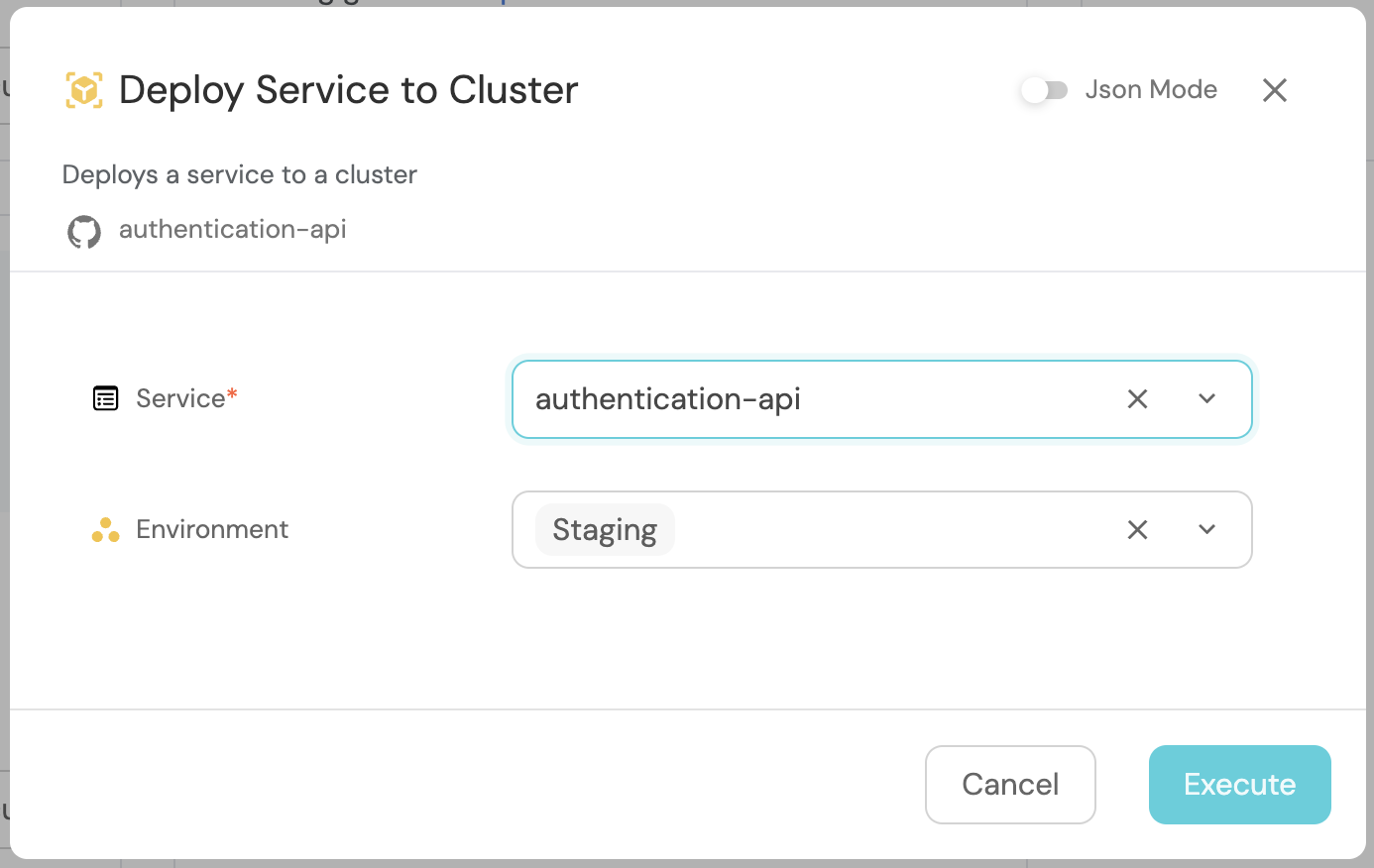
Run the Deploy Service to Cluster workflow.
-
Choose the service you want to deploy and select your environment.
-
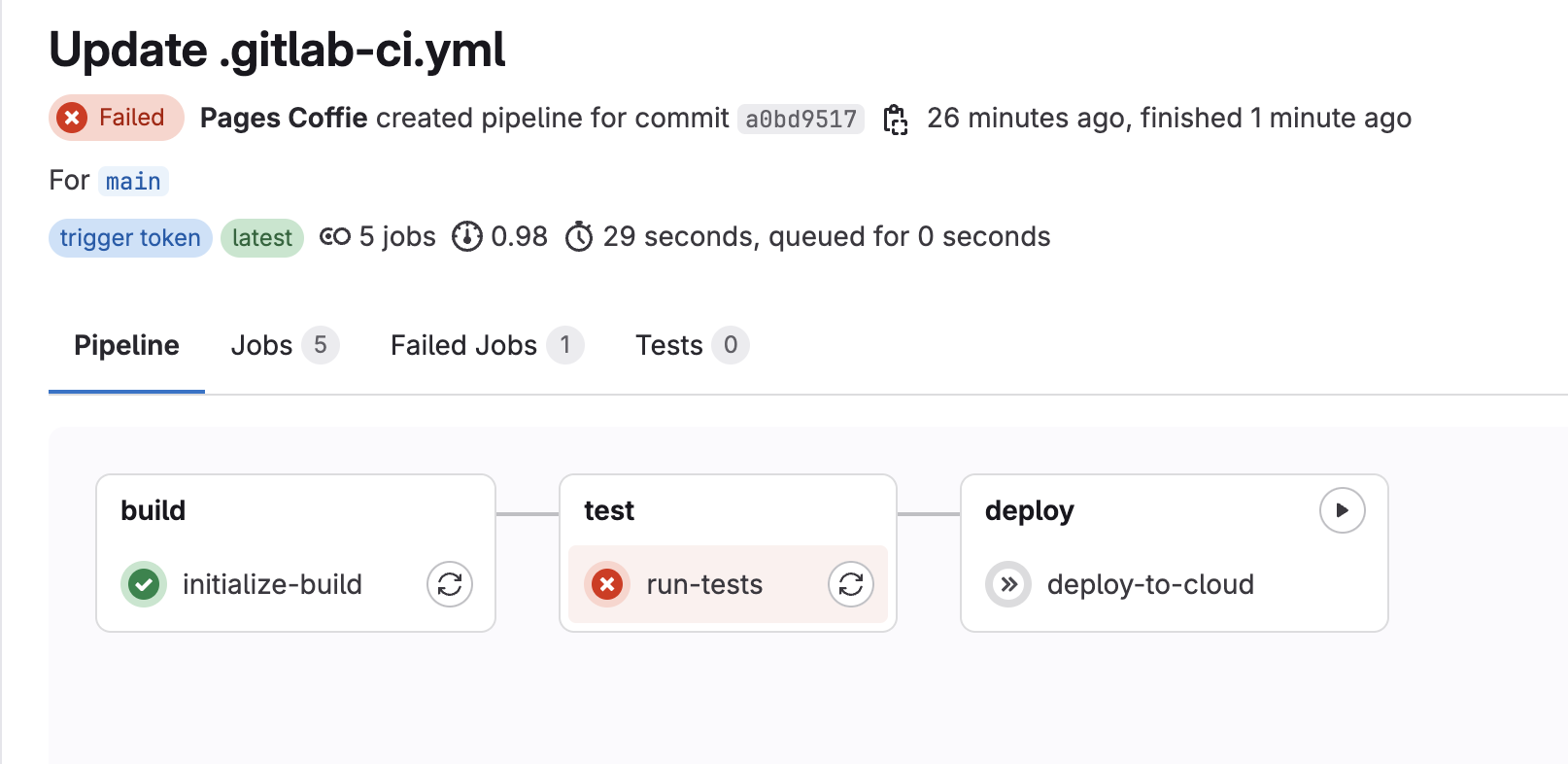
A GitLab pipeline is triggered and fails the coverage check in the test stage.
-
Confirm a
servicenowChangeRequestentity appears in Port.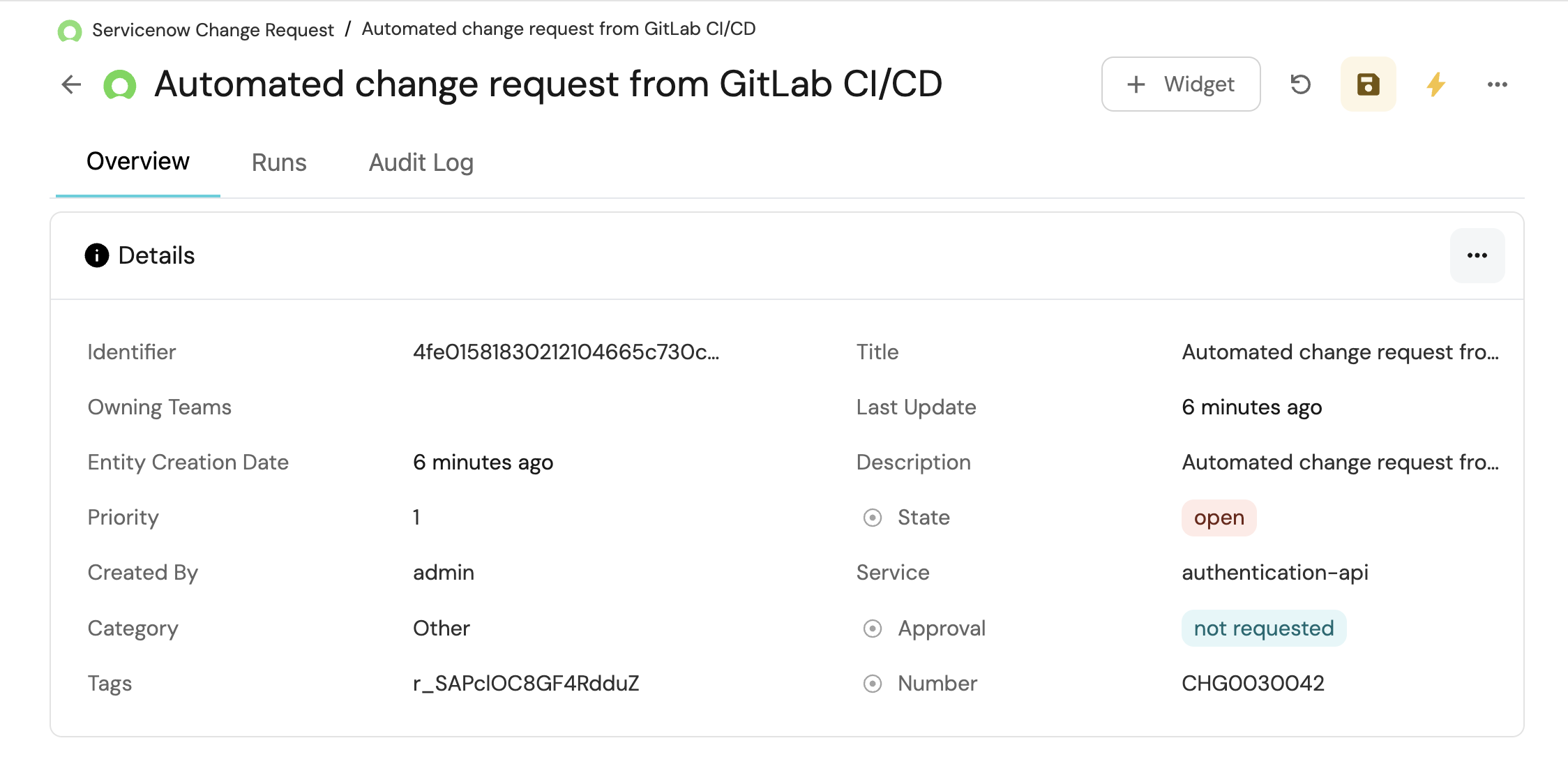
-
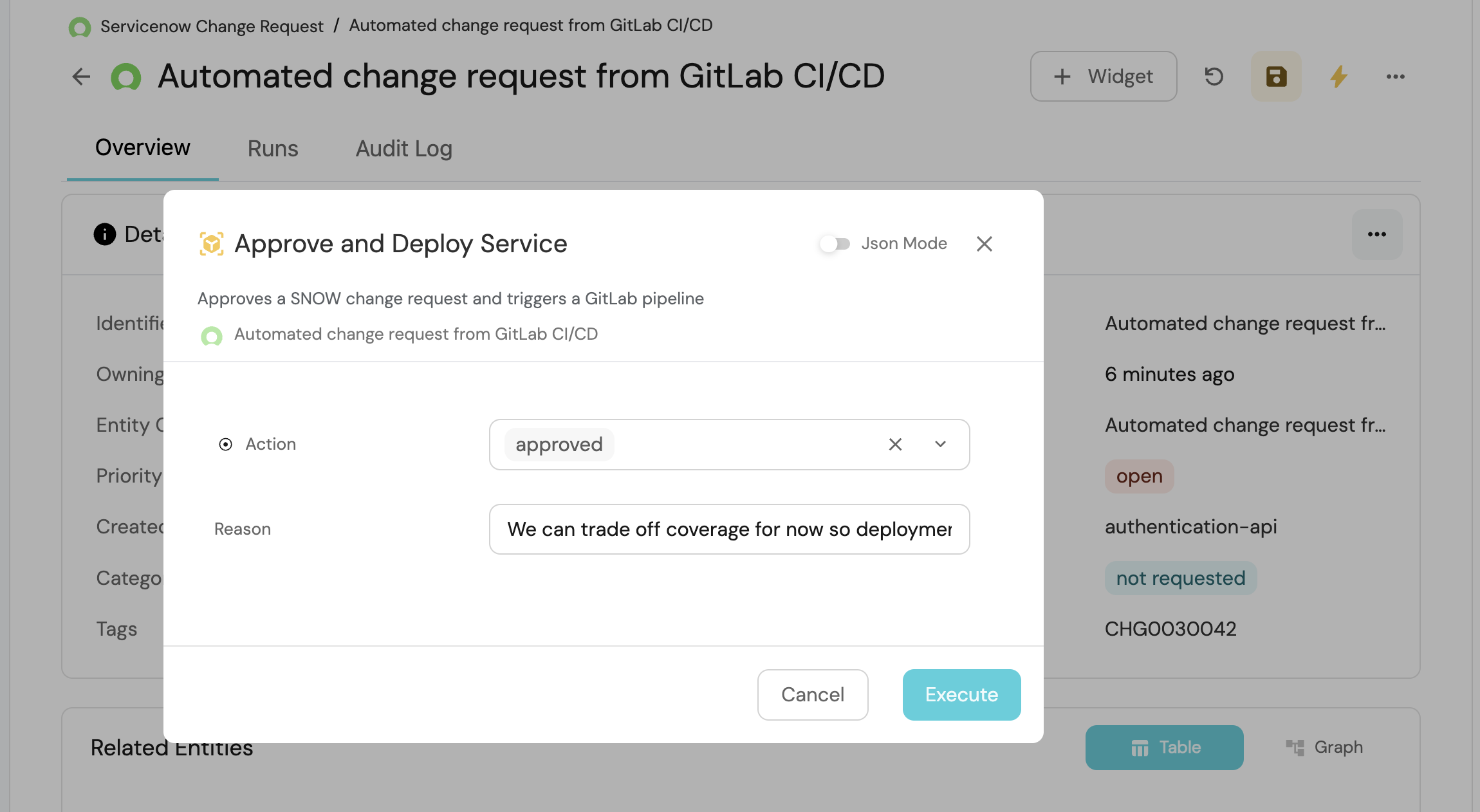
Run Approve and Deploy Service on that entity and choose approved or declined.
-
The event workflow re-triggers GitLab. On approval, the pipeline skips the threshold check and deploys.
Conclusion
With these workflows and the GitLab pipeline in place, you can govern deployments that require ServiceNow approval when quality checks fail, while still allowing automatic deploys when thresholds pass.