AI-powered work item preparation
Work items often arrive with minimal context, which slows down planning and creates inconsistent handoffs. If you are an engineering manager, product manager, or tech lead preparing work for development, AI-powered prep helps you enrich descriptions, suggest owners and priorities, and meet scorecard requirements for faster sprint planning.
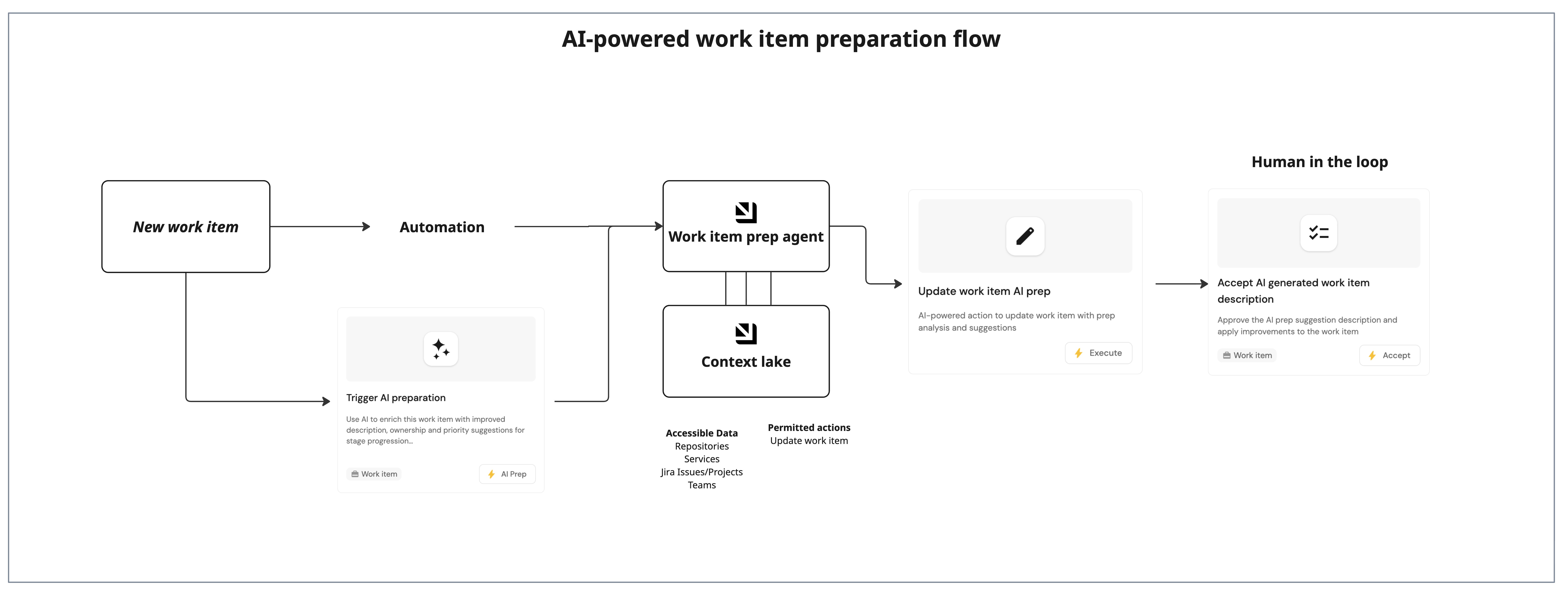
This guide demonstrates how to use Port's AI to prepare work items so you can add missing context, validate readiness, and streamline stage progression. You will update your data model, configure an AI agent, and trigger the prep flow from self-service actions with human in the loop support.
Common use cases
- Faster sprint planning – enrich work items with context so you can size and prioritize with less back-and-forth.
- Ownership clarity – suggest owners and teams based on service and Jira context to reduce routing delays.
- Scorecard readiness – highlight gaps against stage requirements so work is ready for development.
Prerequisites
This guide assumes the following:
- You have a Port account and have completed the onboarding process.
- You have implemented the work item blueprint pattern for autonomous ticket resolution.
Set up data model
You will update the Work Item blueprint to store AI prep output and status.
Add AI prep properties to the work item blueprint
-
Go to the builder page of your portal.
-
Find the
Work Itemblueprint. -
Click on
{...} Edit JSON. -
Add the following properties to the
propertiessection:AI prep properties (click to expand)
{"ai_prep_confidence_score": {"title": "AI Prep Confidence Score","description": "AI assessment confidence level (0-100) for readiness to proceed to next stage","type": "number"},"ai_suggested_description": {"title": "AI Suggested Description","description": "AI-generated suggestions for improving the work item description and context","type": "string","format": "markdown"},"ai_prep_status": {"icon": "DefaultProperty","title": "AI Prep Status","description": "Current stage of AI prep assessment","type": "string","default": "Not started","enum": ["Not started","In review","Awaiting approval","Approved"],"enumColors": {"Not started": "lightGray","In review": "yellow","Awaiting approval": "orange","Approved": "green"}},"ai_prep_notes": {"title": "AI Prep Notes","description": "Additional notes and recommendations from the AI prep agent","type": "string","format": "markdown"}} -
Click Save to update the blueprint.
Configure the AI agent
You will create an agent that evaluates work items, enriches descriptions, and writes back recommendations for stage progression.
-
Go to the AI agents page of your portal.
-
Click on
+ AI Agent. -
Click on the
{...} Edit JSONbutton. -
Use the following configuration:
Work item prep agent (click to expand)
Note that the following agent prompt is a recommended starting point and can be fully customized to fit your organization's requirements. Feel free to adjust the scope, language, formatting, or additional instructions as needed.
{"identifier": "work_item_prep_agent","title": "Work Item Prep Agent","icon": "AI","team": [],"properties": {"description": "An agent that evaluates work items and suggests improvements to help them meet scorecard requirements for stage progression (Draft → Triaged → Ready for dev)","status": "active","prompt": "Your task is to evaluate and improve work items to help them progress through stages (Draft → Prepped → Ready for dev). **Always enhance the work item description** with context from related entities.\n\n## Steps\n1. **Gather work item context:** Get the `work_item` entity by ID. Analyze properties, relations, and scorecard level.\n2. **Gather related entity context:** Retrieve linked entities and extract details:\n - Jira Ticket: description, status, assignee, labels\n - Service: README, tier, domain, lifecycle, dependencies\n - Repository: README, code structure\n - Team: members, responsibilities\n - Owner: user details\n - Pull Request: status, description, reviewers\n3. **Enhance description (ALWAYS):** Enrich description using:\n - Jira ticket description and details\n - Service README and architecture\n - Repository structure and codebase context\n - Related PR descriptions\n - Team knowledge and domain context\n Add technical context, requirements, implementation considerations, and relevant links. Make it comprehensive and actionable.\n4. **Evaluate scorecard requirements:**\n Draft → Prepped: Owner relation, priority, AI augmentation level, prepped at timestamp set.\n Prepped → Ready for dev: Plan approved (plan_approved = true), pull request relation set.\n5. **Identify gaps and suggest a solution:** \n - Missing owner: based on team or service owners\n - Missing priority: based on work_type, service tier, Jira priority\n - Missing AI level: based on work complexity\n - Missing plan approval: check if description is complete enough for approval\n6. **Score (0–100):** 0-40: Missing critical requirements; 41-70: Needs enrichment; 71-89: Minor improvements; 90-100: Ready\n7. **Assign status:** \"Awaiting approval\" - significant changes; \"Approved\" - ready; \"In review\" - analyzing\n\n### Response Rules\n1. ALWAYS call `update_work_item_ai_prep` action with properties: `work_item_id`, `ai_prep_confidence_score`, and `ai_prep_status`.\n2. **ALWAYS provide enriched `ai_suggested_description`** - enhance description even if original seems complete. This is a core function of the agent.\n3. In `ai_prep_notes`, provide specific recommendations: what relations need to be set (owner, team, service), what properties need values (priority, ai_augmentation_level), what context was added to the description and why, references to related entities, scorecard evaluations\n4. Be concise, data-grounded, specific about found vs. missing info\n","execution_mode": "Automatic","tools": ["^(list|get|search|track|describe|update)_.*","^run_update_work_item_ai_prep$"]},"relations": {}}How the agent uses toolsThe AI agent uses MCP (Model Context Protocol) enhanced capabilities to discover relevant blueprint entities through its tools. The
^(list|get|search|track|describe|update)_.*pattern lets the agent access and analyze related entities in your software catalog, which gives it richer context. You can allow the corresponding self-service action in the agent's Allowed Actions input (or include^run_update_work_item_ai_prep$in thetoolslist in Advanced mode (regex)) to instruct the agent to call this specific action and update the work item with the AI analysis. Therun_prefix marks which self-service actions the agent is allowed to execute. -
Click Create to save the agent.
Set up self-service actions
You will create three self-service actions that work together: one triggers AI prep (user-facing), one saves results (AI-facing tool), and one applies the approved suggestions.
Add trigger AI prep action
-
Go to the Self-service page of your portal.
-
Click on
+ Action. -
Click
{...} Edit JSON. -
Use the following configuration:
Trigger AI prep action (click to expand)
{"identifier": "trigger_ai_prep_work_item","title": "Trigger AI preparation","icon": "AI","description": "Use AI to enrich this work item with improved description, ownership and priority suggestions for stage progression","trigger": {"type": "self-service","operation": "DAY-2","userInputs": {"properties": {"instructions": {"type": "string","title": "Additional Instructions","description": "Additional instructions or focus areas for the AI agent","icon": "DefaultProperty","format": "multi-line"}},"required": [],"order": ["instructions"]},"actionCardButtonText": "AI Prep","executeActionButtonText": "Analyze with AI","condition": {"type": "SEARCH","rules": [{"property": "prepped_at","operator": "isEmpty"}],"combinator": "and"},"blueprintIdentifier": "work_item"},"invocationMethod": {"type": "WEBHOOK","url": "https://api.port.io/v1/agent/work_item_prep_agent/invoke","agent": false,"synchronized": true,"method": "POST","headers": {"RUN_ID": "{{ .run.id }}","Content-Type": "application/json"},"body": {"prompt": "Work Item Information:\n\nWork Item ID: {{.entity.identifier}}\nWork Item Title: {{.entity.title}}\nWork Item Description: {{.entity.properties.description}}\n\nCurrent Properties:\n- Priority: {{.entity.properties.priority}}\n- Work Type: {{.entity.properties.work_type}}\n- AI Augmentation Level: {{.entity.properties.ai_augmentation_level}}\n- Plan Approved: {{.entity.properties.plan_approved}}\n- Prep Status: {{.entity.properties.ai_prep_status}}\n\nRelated Entities (for context):\n- Jira Ticket: {{.entity.relations.jira_ticket}}\n- Service: {{.entity.relations.service}}\n- Team: {{.entity.relations.team}}\n- Owner: {{.entity.relations.owner}}\n- Repository: {{.entity.relations.repository}}\n- Pull Request: {{.entity.relations.pull_request}}\n\nAdditional instructions: {{.inputs.instructions}}","labels": {"source": "ai_prep_work_item_ssa","work_item_id": "{{.entity.identifier}}"}}},"allowAnyoneToViewRuns": true} -
Click Create to save the action.
Add update work item AI prep action
-
Go to the Self-service page of your portal.
-
Click on
+ Action. -
Click
{...} Edit JSON. -
Use the following configuration:
Update work item AI prep action (click to expand)
{"identifier": "update_work_item_ai_prep","title": "Update work item AI prep","icon": "Edit","description": "AI-powered action to update work item with prep analysis and suggestions","trigger": {"type": "self-service","operation": "DAY-2","userInputs": {"properties": {"work_item_id": {"icon": "DefaultProperty","title": "Work Item Identifier","type": "string","description": "The identifier of the work item to update"},"ai_suggested_description": {"type": "string","title": "AI Suggested Description","format": "markdown"},"ai_prep_confidence_score": {"type": "number","title": "AI Prep Confidence Score","description": "The estimated confidence score for work item readiness (0-100)","minimum": 0,"maximum": 100},"ai_prep_status": {"type": "string","title": "AI Prep Status","enum": ["Not started","In review","Awaiting approval","Approved"],"enumColors": {"Not started": "lightGray","In review": "yellow","Awaiting approval": "orange","Approved": "green"}},"ai_prep_notes": {"type": "string","title": "AI Prep Notes","description": "Additional notes and recommendations from the prep agent","format": "markdown"}},"required": ["ai_suggested_description","ai_prep_status","ai_prep_confidence_score","ai_prep_notes","work_item_id"],"order": ["work_item_id","ai_suggested_description","ai_prep_confidence_score","ai_prep_status","ai_prep_notes"],"titles": {}}},"invocationMethod": {"type": "UPSERT_ENTITY","blueprintIdentifier": "work_item","mapping": {"identifier": "{{ .inputs.work_item_id }}","properties": {"ai_suggested_description": "{{ .inputs.ai_suggested_description }}","ai_prep_confidence_score": "{{ .inputs.ai_prep_confidence_score }}","ai_prep_status": "{{ .inputs.ai_prep_status }}","ai_prep_notes": "{{ .inputs.ai_prep_notes }}"}}},"requiredApproval": false} -
Click Create to save the action.
Add approve AI prep suggestions action
-
Go to the Self-service page of your portal.
-
Click on
+ Action. -
Click
{...} Edit JSON. -
Use the following configuration:
Approve AI prep suggestions action (click to expand)
{"identifier": "approve_ai_prep_suggestions","title": "Approve AI prep suggestions","icon": "Checklist","description": "Approve the AI prep suggestion description and apply improvements to the work item","trigger": {"type": "self-service","operation": "DAY-2","userInputs": {"properties": {"apply_description": {"type": "boolean","title": "Apply Suggested Description","description": "Replace work item description with AI-suggested description","default": true}},"required": [],"order": ["apply_description"]},"actionCardButtonText": "Accept","executeActionButtonText": "Accept","condition": {"type": "SEARCH","combinator": "and","rules": [{"property": "ai_prep_status","operator": "=","value": "Awaiting approval"}]},"blueprintIdentifier": "work_item"},"invocationMethod": {"type": "UPSERT_ENTITY","blueprintIdentifier": "work_item","mapping": {"identifier": "{{ .entity.identifier }}","properties": {"description": "{{ if .inputs.apply_description }}{{ .entity.properties.ai_suggested_description }}{{ else }}{{ .entity.properties.description }}{{ end }}","ai_prep_status": "Approved","prepped_at": "{{ now | todateiso8601 }}"}}},"requiredApproval": false}conditional viewThe condition ensures this action only appears when
ai_prep_statusisAwaiting approval. -
Click Create to save the action.
Add entity page widget
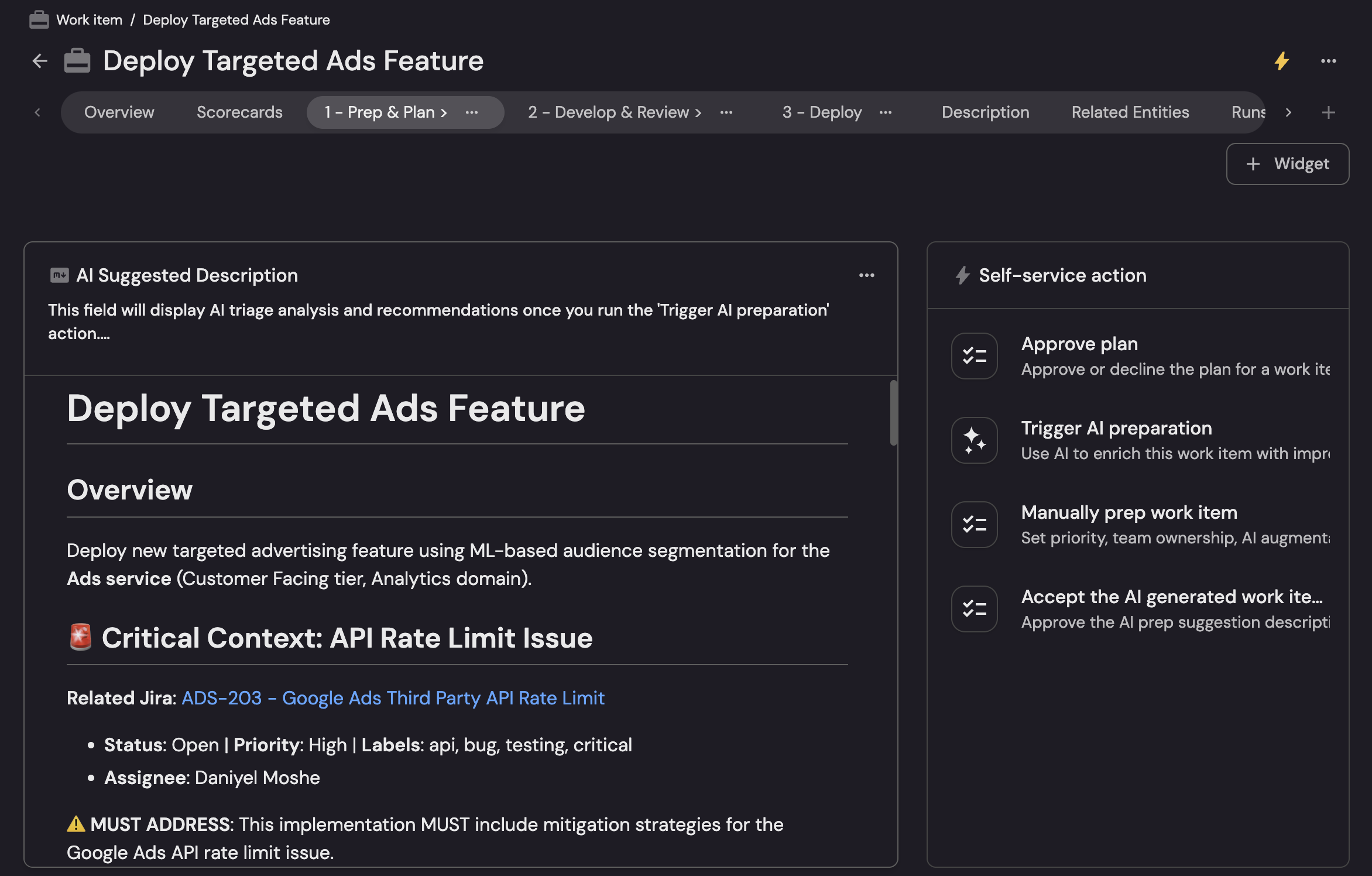
You will add a dedicated Prep & Plan tab to the work item entity page and display AI prep output there.
-
Go to the Catalog page in your portal.
-
Select the
Work Itementity page. -
Add a new tab named Prep & Plan.
-
Add an Action card for Trigger AI preparation and Approve AI prep suggestions.
-
Add Markdown widgets with the following configuration:
- Title: AI suggested description.
- Description: AI-generated description and context for this work item. Run Trigger AI preparation to generate.
- Data source: Property, then select the AI Suggested Description property.
- Title: AI prep notes.
- Description: AI recommendations, missing context, and scorecard readiness signals.
- Data source: Property, then select the AI Prep Notes property.
Test the workflow
-
Open a
Work Itemin Draft stage with a Jira ticket relation. -
Run Trigger AI preparation.
-
Confirm the agent updates AI prep properties and writes an enriched description.
-
Debug the run from the AI invocations page to review execution logs, tool calls, and failures.
-
Review the suggested description and run Approve AI prep suggestions.
-
Check the Prep & Plan tab for the latest AI prep output.
 try it out
You can try out this AI-powered work item preparation workflow in Port's demo portal.