Concepts and structure
This page demonstrates the concepts of scorecards and their structure in Port.
Concepts
Scorecards in Port help evaluate entities in your software catalog against defined standards and requirements.
Each scorecard consists of rules that define specific conditions an entity must meet, and levels that represent different stages of compliance or maturity.
When a scorecard is applied to an entity, Port evaluates each rule by checking whether the entity's properties satisfy the rule's conditions. Based on which rules pass or fail, the entity is assigned a level that reflects its current state.
Levels
Levels are the different stages that an entity can be in, according to the rules that it passes.
By default, the levels are: Basic, Bronze, Silver, Gold.
The levels can be customized according to your organization's standards and with the colors that you prefer.
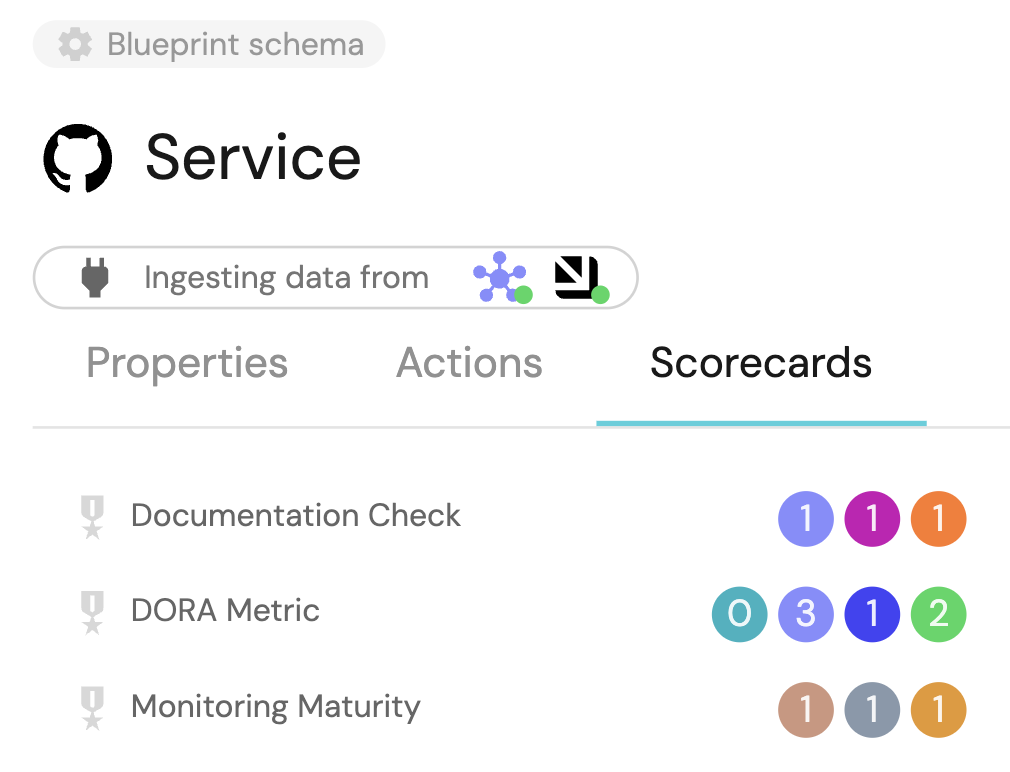
Below is an example of a few level types that can be defined:
The levels are defined in the order of importance, where the first level is the most basic level and the last level is the most advanced.
The basic level is the default level for all entities.
If the entity didn't pass any rule, it will be at the Basic level, and thus can't have a rule associated with it.
A level with no rules is skipped. Port does not place an entity on that level. The entity stays on the first level until every rule on a higher level passes, and it only moves up through levels whose rules all pass. Rules on Bronze alone leave the entity on Bronze. An empty level between two levels does not block the higher level when that higher level has rules of its own.
- Default
- Custom
- Traffic Light
{
  "identifier": "Ownership",
  "title": "Ownership",
  "levels": [
    {
      "color": "paleBlue",
      "title": "Basic"
    },
    {
      "color": "bronze",
      "title": "Bronze"
    },
    {
      "color": "silver",
      "title": "Silver"
    },
    {
      "color": "gold",
      "title": "Gold"
    }
  ],
  "rules": [
    {
      "identifier": "has-resp-team",
      "title": "Has responsible team",
      "description": "The service has a designated responsible team assigned, ensuring clear ownership and accountability for the service's development, maintenance, and support, promoting effective collaboration, timely issue resolution, and efficient decision-making.",
      "level": "Bronze",
      "query": {
        "combinator": "and",
        "conditions": [
          {
            "operator": "isNotEmpty",
            "property": "$team"
          }
        ]
      }
    }
  ]
}
{
  "identifier": "monitoringMaturity",
  "title": "Monitoring Maturity",
  "levels": [
    {
      "color": "paleBlue",
      "title": "low"
    },
    {
      "color": "bronze",
      "title": "medium"
    },
    {
      "color": "gold",
      "title": "high"
    }
  ],
  "rules": []
}
{
  "identifier": "ProductionReadiness",
  "title": "Production Readiness",
  "levels": [
    {
      "color": "red",
      "title": "Red"
    },
    {
      "color": "orange",
      "title": "Orange"
    },
    {
      "color": "yellow",
      "title": "Yellow"
    },
    {
      "color": "green",
      "title": "Green"
    }
  ],
  "rules": []
}
Total level calculation
A Scorecard is built from several rules, and each one of them has a level property. Each scorecard has a set of levels (as shown in the examples above).
An entity always starts at the first level of the scorecard (e.g. Basic in the default levels), and it can progress to higher levels by passing the rules of each level.
Once an entity passes all the rules for a certain level, its level changes accordingly, for example:
- An entity starts at level
Basic. - It has two rules with level
Bronze. - Once the entity passes those two rules, its level would be
Bronze. - It has four rules with level
Silver. - Once the entity passes those four rules (and the rules from
Bronzelevel), its level would beSilver.
In the example listed above, let's assume the entity passes just one of the two Bronze rules, but it passes all of
the Silver rules. The level of the scorecard will still be Basic, because not all Bronze rules have been
satisfied.
Rule elements
Rules enable you to generate checks inside a scorecard only for entities and properties.
A scorecard rule is a single evaluation consisting of multiple checks, each rule has a level which directly translates to how important it is for the check to pass (the more basic the check, the lower its level).
Conditions
Conditions are small boolean checks that help when determining the final status of a query according to the specified combinator:
| Field | Description |
|---|---|
operator | Operator to use when evaluating this condition. See available operators below. |
property | Property to evaluate. It can be a meta-property such as $identifier, or any other standard entity property such as slack_channel, including mirror properties and calculation properties. Use either property or relation, not both. |
relation | Relation to evaluate instead of a property. Use either property or relation, not both. |
value | Value to compare to (not required for isEmpty and isNotEmpty). For in and containsAny, this must be an array of strings. For between and notBetween, this is a date range object. |
not | Optional boolean. When true on an isEmpty or isNotEmpty condition, negates the result. |
Combinator
The combinator defines the logical operation applied between the conditions within a single rule's query:
and- all conditions must be satisfied for the rule to pass.or- at least one condition must be satisfied for the rule to pass.
If you only have a single condition in your query, the combinator has no effect. But keep in mind that it still needs to be included to adhere to the query structure.
- And
- Or
{
  "combinator": "and",
  "conditions": [
    {
      "operator": "isNotEmpty",
      "property": "on_call"
    },
    {
      "operator": "<",
      "property": "open_incidents",
      "value": 5
    }
  ]
}
{
  "combinator": "or",
  "conditions": [
    {
      "operator": "isNotEmpty",
      "property": "on_call"
    },
    {
      "operator": "<",
      "property": "open_incidents",
      "value": 5
    }
  ]
}
Available operators
Unless noted otherwise, each operator works with a property or a relation target.
| Operator | Supported types | Description |
|---|---|---|
= | String, Number, Boolean, Datetime | Checks if the entity value is equal to the specified value. For datetime properties, = also accepts a date range or preset (same value shape as between). |
!= | String, Number, Boolean | Checks if the entity value is not equal to the specified value. A null value matches. An empty string matches unless the specified value is "". |
<= | Number | Checks if the entity value is less than or equal to the specified value. |
>= | Number | Checks if the entity value is greater than or equal to the specified value. |
< | Number | Checks if the entity value is less than the specified value. |
> | Number | Checks if the entity value is greater than the specified value. |
contains | String, Number | Checks if the entity value contains the specified value. |
containsAny | Array | Checks if any of the strings in value exist in the entity array. value must be an array of strings. |
in | String, Array | Checks if the entity value is one of the strings in value. value must be an array of strings. |
doesNotContains | String, Number | Checks if the entity value does not contain the specified value. A null value or an empty string matches. |
endsWith | String, Number | Checks if the entity value ends with the specified value. |
doesNotEndsWith | String, Number | Checks if the entity value does not end with the specified value. A null value or an empty string matches. |
beginsWith | String, Number | Checks if the entity value begins with the specified value. |
doesNotBeginsWith | String, Number | Checks if the entity value does not begin with the specified value. A null value or an empty string matches. |
isEmpty | String, Number, Boolean, Array, Object | Checks if the value is null or an empty string, array, or object. An array that contains an empty string, such as [""], is not empty. Supports the optional not flag. |
isNotEmpty | String, Number, Boolean, Array, Object | Checks if the value is not null and not an empty string, array, or object. Supports the optional not flag. |
between | Datetime (property only) | Checks if the datetime value falls within the given range or preset. |
notBetween | Datetime (property only) | Checks if the datetime value falls outside the given range or preset. |
Scorecard conditions use a subset of the search operators. Operators such as notIn, relatedTo, isExpired, and propertySchema are not supported in scorecards.
Relation conditions
To evaluate a relation instead of a property, use relation with the same operators as above (except between and notBetween, which are property-only):
{
  "combinator": "and",
  "conditions": [
    {
      "operator": "isNotEmpty",
      "relation": "team"
    },
    {
      "operator": "in",
      "relation": "team",
      "value": ["platform", "sre"]
    }
  ]
}
Datetime ranges and presets
For between, notBetween, and datetime =, set value to either an explicit range or a preset:
{
  "operator": "between",
  "property": "$createdAt",
  "value": {
    "preset": "lastMonth"
  }
}
{
  "operator": "notBetween",
  "property": "$updatedAt",
  "value": {
    "from": "2024-01-01T00:00:00.000Z",
    "to": "2024-03-31T23:59:59.999Z"
  }
}
Supported scorecard presets:
today.tomorrow.yesterday.lastWeek.last2Weeks.lastMonth.last3Months.last6Months.last12Months.
Negate empty checks
On isEmpty and isNotEmpty conditions, set "not": true to invert the result:
{
  "operator": "isEmpty",
  "property": "on_call",
  "not": true
}
Advanced rule capabilities
Scorecard rules evaluate entity properties and relations against conditions. Note the following capabilities and limitations:
-
Static comparisons: Rules compare properties or relations against static values only. To compare two properties (for example, check if
deployDateis aftercommitDate), create a calculation property that computes the comparison result as a boolean, then check that property in your rule. -
Rule weighting: All rules at the same level contribute equally to level progression. There is no support for weighted rules. If certain checks are more important, consider placing them at higher levels or breaking them into separate scorecards.
-
File content inspection: Scorecard rules can only evaluate data stored in entity properties. To check file contents (e.g., verify a README contains specific sections), use an integration or automation to extract the relevant data into an entity property, then create a rule based on that property.
Filter elements
Filters allow you to apply scorecard checks only for entities that meet certain criteria.
Filters follow the same querying structure as rules.
Define your filter with a single combinator (and or or) and a flat conditions array of individual condition objects. You cannot nest and/or condition groups inside conditions. The Port API and Terraform provider reject nested condition groups in scorecard filters.
A scorecard filter is used to make sure only relevant entities are evaluated, only entities that the filter evaluates to true on will have the specified rule checked.
When an entity stops matching the filter, Port deletes that entity's rule results for this scorecard. Changing the filter deletes rule results for entities that no longer match, and creates rule results for entities that newly match.
| Field | Description |
|---|---|
combinator | Defines the logical operation applied between the conditions in the query. |
conditions | An array of boolean conditions to filter entities with. |
Blueprints structure
In the Data model page scorecards are represented by three blueprints:
Scorecard- Represents a collection of rules and levels for evaluating entities.Rule- Defines specific criteria for evaluation.Rule Result- Stores the evaluation results for each entity.
The properties below are default scorecard, scorecard rule and scorecard rule result properties. They cannot be deleted or modified.
Scorecard
A single scorecard defines a category to group different checks, validations and evaluations.
Below is the structure of the default scorecard blueprint:
| Name | Type | Description |
|---|---|---|
Identifier | String | The unique identifier of the scorecard (Maximum 100 characters). |
Blueprint | String (format: blueprints) | The target blueprint whose entities will be evaluated. |
Levels | Array of objects | An array of levels with titles and colors (e.g., Bronze, Silver, Gold). |
Filter | Object | Optional query to filter which entities should be evaluated. |
Rules tested | Number (aggregation) | Number of rule evaluations performed. |
Rules passed | Number (aggregation) | Number of successful rule evaluations. |
% of rules passed | Number (calculation) | Calculated percentage of passed rules. |
Scorecard Rule
The Rule blueprint contains the following properties:
| Name | Type | Description |
|---|---|---|
Identifier | String | The unique identifier of the rule (Maximum 100 characters). |
Level | String (enum) | The required level for this rule (must be one of the scorecard's defined levels). |
Query | Object | The evaluation criteria for entities. |
Rule description | String | Optional explanation of the rule's logic. |
Entities tested | Number (aggregation) | Number of entities evaluated by this rule. |
Entities passed | Number (aggregation) | Number of entities that passed this rule. |
% of entities passed | Number (calculation) | Calculated percentage of passed entities. |
Relations:
| Name | Target Blueprint | Required | Many | Description |
|---|---|---|---|---|
| Scorecard | Scorecard | true | false | The scorecard this rule belongs to |
Scorecard Rule Result
The Rule result blueprint contains the following properties:
| Name | Type | Description |
|---|---|---|
Result | String (enum) | Whether the entity passed the rule ("Passed" or "Not passed"). |
Entity | String | The identifier of the evaluated entity. |
Entity link | String (url) | Calculated URL to the evaluated entity. |
Result last change | Date-Time (mirror) | Last time the rule result changed. |
Scorecard | String (mirror) | Mirror property showing the parent scorecard title. |
Blueprint | String (mirror) | Mirror property showing the target blueprint. |
Level | String (mirror) | Mirror property from the related rule. |
Relations:
| Name | Identifier | Target blueprint | Required | Many | Description |
|---|---|---|---|---|---|
| Rule | rule | Rule | true | false | The rule that generated this result. In automations and JQ, reference it as .relations.rule. |
| Target entity | _<blueprint identifier> | The scorecard's target blueprint | false | false | Created when a scorecard is created. A scorecard on service adds _service. |
| Owning teams | $team | _team | false | true | The teams that own this rule result. |
When you create a scorecard, Port adds a relation on the rule result blueprint to that scorecard's target blueprint. The identifier is an underscore followed by the target blueprint identifier. A scorecard on service adds _service. A scorecard on _team adds __team. In automations and JQ, reference the evaluated entity as .relations._service. Owning teams stay on $team, separate from that relation.
Limitations
Core limitations
-
The scorecard blueprints are protected and their core structure cannot be modified:
- Default properties cannot be changed or deleted.
- Required relations cannot be modified.
- The blueprints themselves cannot be deleted.
-
You can extend the blueprints with:
- New properties.
- New non-required relations.
- Additional configurations that do not affect the core functionality.
-
Rule results are automatically generated and managed by Port:
- They cannot be created, deleted, or modified directly.
- You can update the custom properties you created for the rule results.
- Rule results are not searchable in the global search.
- They are updated automatically when rules are evaluated.
Scorecard entity identifiers are immutable
Identifiers for scorecard and scorecard rule entities are immutable.
If you need to change the identifier of a scorecard, follow this workflow:
- Copy the configuration of the existing scorecard.
- Create a new scorecard with the desired identifier.
- Delete the original scorecard.
If you need to change the identifier of a scorecard rule, edit the rule within the scorecard. Port deletes the existing rule, its rule results, and its history, then creates a new rule with the new identifier.
Validation rules
The system enforces several validation rules to maintain data integrity:
- Rule levels must match one of the levels defined in their parent scorecard.
- Scorecard blueprint built-in relations cannot be renamed or modified.
- Rule results maintain immutable core properties while allowing updates to custom properties.
Delayed rule results
When creating scorecards, adding new rules, or modifying existing rules for blueprints that affect a large number of entities, the rule results sync may take a long time to complete.
This delay occurs because Port needs to create or update rule result blueprint instances for each entity and rule combination. The more entities you have in the blueprint, the more rule results need to be created or updated, which increases the processing time.
Rule result entity limits
Port supports up to 5 million rule result entities.
To monitor how many rule result entities you have, you can:
- Use the following API path: Query the
_rule_resultblueprint identifier. - Create a number chart:
- Type:
count entities. - Function:
count. - Blueprint:
_rule_result.
- Type:
If you reach this limit, you can:
- Reduce the number of entities being evaluated by editing the scorecard entity and applying a filter to limit evaluation to specific entities (e.g., opened pull requests or active services), or by reducing the number of entities in the target blueprints.
- Review your scorecards to reduce the number of rules.
- Contact Port support for assistance.
Scorecard views
Scorecards are available in two contexts in Port's software catalog:
- Entity's scorecards - You can view an entity's scorecard evaluation at the
scorecardstab on the entity's specific page, which shows how the entity performs against the scorecard rules. - Scorecards dashboards - Each scorecard has its own entity page with a default dashboard and view that provides a comprehensive overview of the scorecard's performance across all entities.
Entity's scorecards
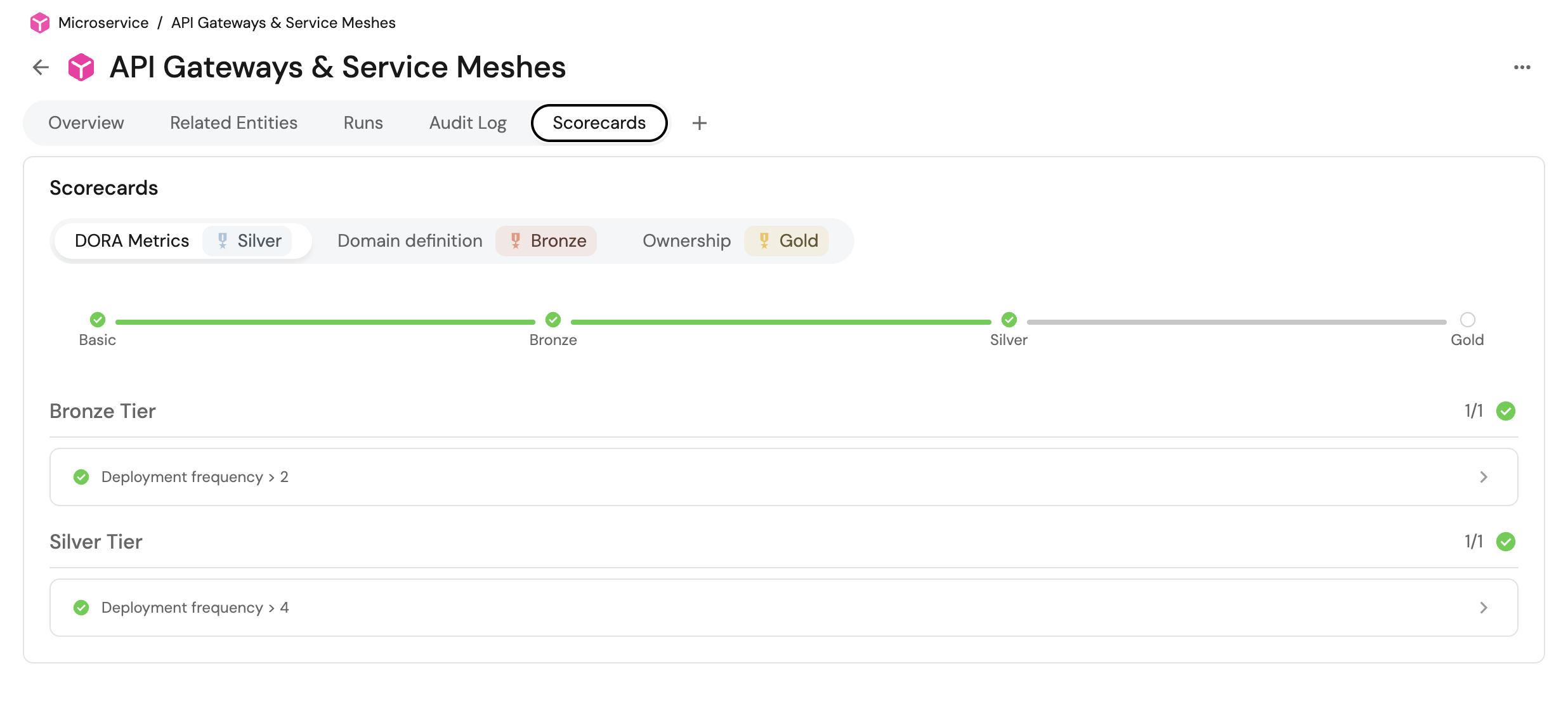
Each entity with a configured scorecard will have a scorecards tab in its entity page, detailing the different checks and their results:
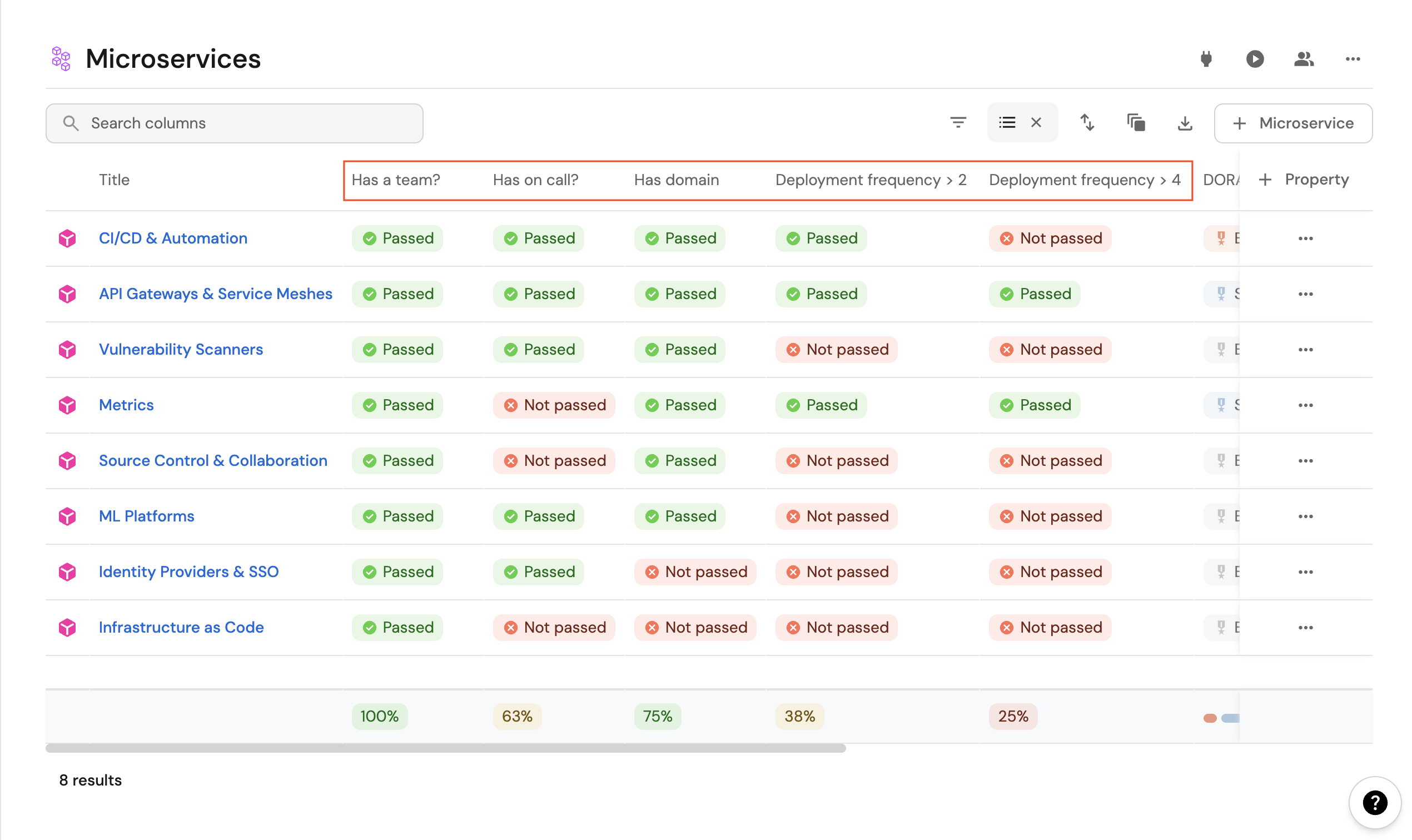
Additionally, the catalog page of each blueprint will automatically have a column for each scorecard rule.
For example, this Microservice blueprint has five rules configured, and we can see a column for each of them in the catalog:
Customizing views
You can use table operations (sort, edit, group-by, etc.) to create various helpful views of your scorecards.
For example, here are the scores of all Microservice in an organization grouped by team:
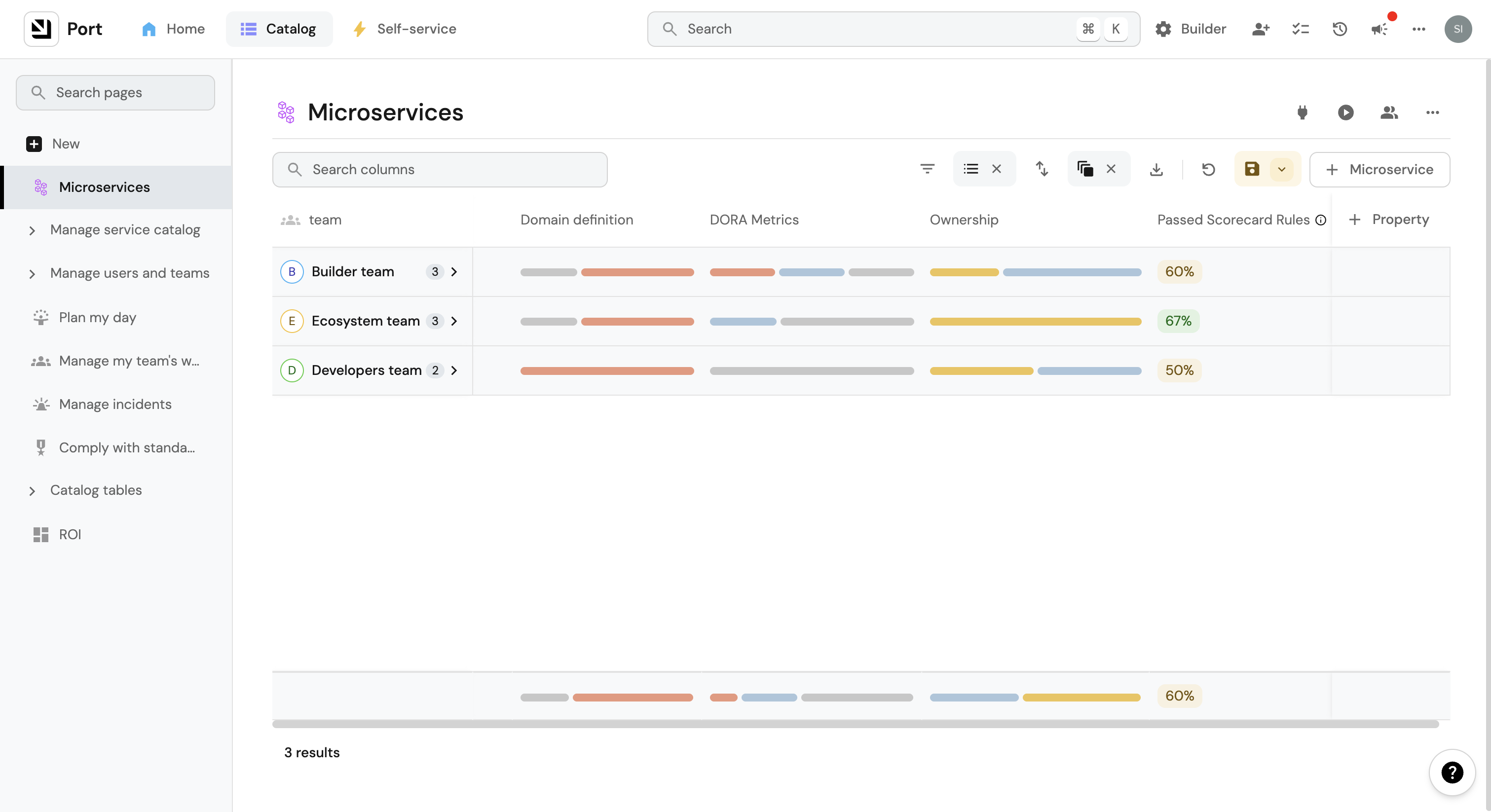
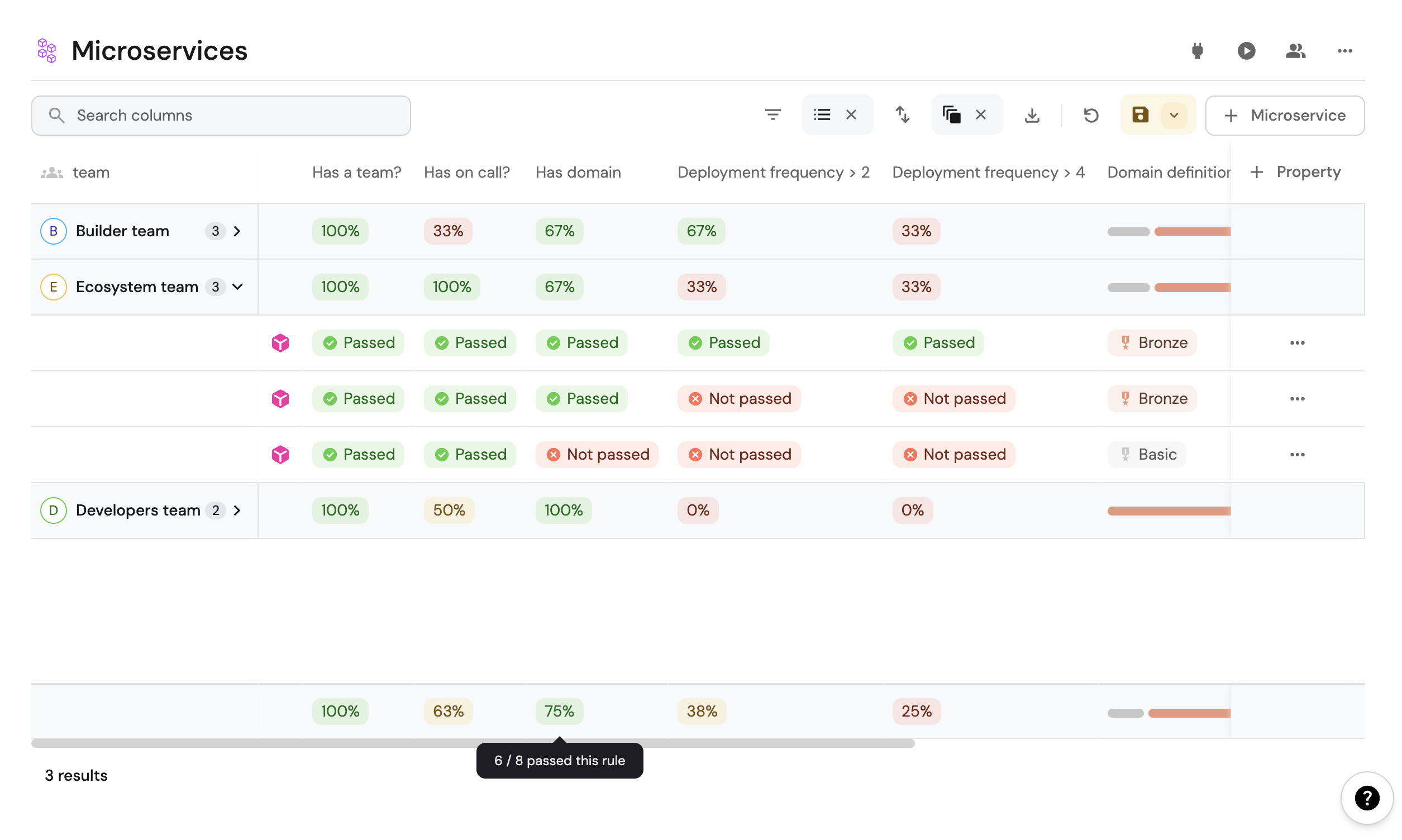
Note that every column (scorecard metric) in the table has an aggregation in the bottom, hover over it to see the compliance of this metric across all entities in the table.
Rule result summaries
Scorecard rules are automatically added as columns in the relevant catalog page, and each such column is summarized on the bottom.
For example, these microservices have some rules defined in their scorecards, and we can see that:
- 100% of
Ecosystem team'smicroservices have an on-call defined, but only 67% of them have domain configured. - The bottom of the table contains an aggregation of the results of each rule for all microservices (across all teams). Six out of eight microservices in total have a domain configured.
Scorecards dashboards
By default, admins have a Scorecard catalog folder in their software catalog that contains three dashboards:
- Scorecards - Displays your scorecards across all blueprints.
- Scorecards rules - Displays the different scorecard rules across all scorecards.
- Scorecards rule results - Displays the rule results for each scorecard rules.
Scorecard specific entity page
Each scorecard, rule, and rule result has its own entity page with a default dashboard. For scorecards, the dashboard provides a comprehensive overview of the scorecard's performance across all entities.
The scorecard entity page dashboard includes default widgets such as:
- % of rules passed - A numerical display showing the overall percentage of rules that have passed for the scorecard.
- Rules passed - A pie chart visualizing the breakdown of passed versus not passed rules.
- % of passed rules over time - A line chart tracking the historical trend of the percentage of rules passed over time.
- Rule results summary - A detailed table breaking down individual rule results, including level, rule name, entity, and result status.
You can customize the dashboard by adding additional widgets or modifying existing ones to display other aggregations, calculations, and visualizations based on your requirements.
Scorecard permission management
Admins can control who can view and manage scorecards.
Scorecard editing permissions can be granted via the scorecard blueprint permissions configuration. By setting permissions on the Scorecard blueprint, you control who can create, edit, and delete scorecards across your organization.
To edit a scorecard permissions:
-
Go to the Data model page in Port.
-
Click on the
...button in the top right corner of the blueprint. -
Choose
Edit blueprint. -
Go to the
Permissionstab and edit the scorecard permissions. -
Click
Save.
Permission examples:
Here are some common permission configurations:
- Security scorecards can be edited only by the security team.
- The Production Readiness scorecard can be edited by directors.
- If the scorecard category is
production, only SREs can edit it.
Permission behavior:
- If a user has the
registerpermission to thescorecardblueprint, they can create scorecards on any other blueprint. The rules defined in the scorecard will be created as a result, even if the user is not ascorecard ruleblueprint moderator. - A user with a
moderatorrole on a blueprint can create scorecards for that specific blueprint. They can add them using the+ New scorecardbutton in the blueprint’s scorecards tab in the Data model page in Port. - Non-admin users with edit, create, or delete permissions can perform those operations through the scorecard table or widget in the catalog page.
For more information on configuring permissions, refer to the RBAC documentation.
Next steps
Next, let’s look at how you can create and manage scorecards in Port, whether through the UI, API, or Terraform.