Scope building permissions across teams and users
As more teams and users build on the same platform, one admin can't stay the bottleneck for every change. Each team needs to own and run exactly the resources it needs, without access to anything else, and without routing every change through a single gatekeeper.
Port solves this with the same fine-grained RBAC that already governs your catalog. Workflows, scorecards, and the rest of your catalog are entities in Port, and access can be scoped to a team, to a specific user, or to anyone whose properties match a rule, not just team ownership.
This page explains how that scoping works, from static team or user grants to fully dynamic, context-aware policies, and how it extends across everything in Port: workflows, scorecards, the rest of your catalog, users and teams, and pages.
Common use cases
- Let the SRE team create, edit, and delete the workflows it owns, while Payments and Identity can only run them.
- Let the security team edit its own compliance scorecard without any access to the Service blueprint it grades.
- Gate who can run a workflow by whether their team owns the service it acts on, so a new team never needs a manual permissions update.
- Let each team build and own its own agentic ticket-triaging workflow, scoped to the tickets and agents it manages.
How does it work?
Scoping who can build is composed of a few layers, each one optional and each one stacking on the last:
- Permission concepts - every resource in Port, including workflows and scorecards, is a blueprint entity, so the same RBAC model applies:
- Team-based permissions - grant access to whichever team owns a resource, without listing individuals.
- Dynamic, context-aware policies - go beyond static ownership: match any property on the user against any property on the entity, evaluated at the moment of the request.
- Applying building permissions - put those concepts to work on the resources you build with:
- Workflows - workflows carry two separate permission layers: who can edit the definition, and who can run it.
- Scorecards - let a team own its own scorecard's rules without touching the blueprint the scorecard grades.
- Users and teams -
_userand_teamare core blueprints too, scoped the same way. - Pages - a related but separate model: admin-managed access by role, user, or team, no dynamic policies yet.
- Every other blueprint in your catalog - the same model already governs services, repositories, pull requests, and anything else ingested through your integrations.
- Verify before you trust it - simulate any permission change and view the platform as any user before you rely on it.
- Permissions are enforced from API, UI, and MCP - the same rule applies no matter where the request comes from.
- Roll out changes as code - as more teams build, a review step keeps permission changes from breaking the platform or drifting its standards.
Permission concepts
Port has always modeled your software as blueprints and entities: a blueprint defines a type, like Service, and every real service is an entity of that type. That's what makes the catalog searchable, ownable, and governable.
The same model now covers the tools you build with. A workflow is a type (the _workflow system blueprint), and a specific incident-response workflow is an entity a team can own. Scorecards work the same way, on the _scorecard system blueprint. Because these are entities like any other, the permission model described below applies to them without any extra concept to learn.
Team-based permissions
The simplest way to scope access is by team ownership. Every entity carries a $team meta-property, an array of the teams that own it. Set ownedByTeam: true on a permission scope, and only members of the owning team pass that check:
- Port AI/MCP
- UI
- API
Ask Port AI in the platform, or your coding agent over the Port MCP server. Both work the same way: describe what you need. For example:
"Let only the owning team update entities on the Service blueprint."
Either one configures the permission for you. Refine it with a follow-up like "Also let admins update it."
- Go to your Data model page and open the blueprint.
- Click Permissions.
- Go to the Advanced (owners) section and select the Update row, then toggle it on.
This grants update access only to whichever team owns the entity, on any blueprint you apply it to. Or, click Edit JSON and paste this directly:
{
  "entities": {
    "update": {
      "ownedByTeam": true
    }
  }
}
This grants update access only to whichever team owns the entity. Call PATCH on /v1/blueprints/{blueprint_identifier}/permissions with:
{
  "entities": {
    "update": {
      "ownedByTeam": true
    }
  }
}
This is what most RBAC systems offer, a straightforward form of data segregation: scope access by who owns the thing. It's the right default for most resources, and it's enough on its own for a lot of teams. See team ownership examples for the full reference.
Dynamic, context-aware policies
Team ownership answers "does this belong to my team?" It doesn't answer "should a senior engineer be able to touch production, regardless of who owns it?" or "should whoever is on-call right now get a wider scope than they normally have?" For that, a policy compares any property on the person making the request against any property on the entity, evaluated live:
- Port AI/MCP
- UI
- API
Ask Port AI in the platform, or your coding agent over the Port MCP server. Both work the same way: describe the rule you want. For example:
"Only let senior, staff, or principal engineers update production services on the Service blueprint."
Either one writes and applies the policy for you. This assumes the Service blueprint has an environment property and the User blueprint has a seniority property. If not, ask first, for example "Add an enum property environment to the Service blueprint with values development, staging, production, and an enum property seniority to the User blueprint with values senior, staff, principal," then set the permission.
- Go to your Data model page and open the blueprint.
- Click Permissions.
- Go to the Advanced (policies) section, click Add a policy, and select Update policy.
- Build the rule in the policy editor.
This rule lets only senior, staff, or principal engineers update Service entities where environment is production. Or, click Edit JSON and paste this directly:
{
  "entities": {
    "update": {
      "policy": {
        "combinator": "and",
        "rules": [
          { "property": "environment", "operator": "=", "value": "production" },
          {
            "property": { "context": "user", "property": "seniority" },
            "operator": "in",
            "value": ["senior", "staff", "principal"]
          }
        ]
      }
    }
  }
}
This rule lets only senior, staff, or principal engineers update Service entities where environment is production. Call PATCH on /v1/blueprints/{blueprint_identifier}/permissions with:
{
  "entities": {
    "update": {
      "policy": {
        "combinator": "and",
        "rules": [
          { "property": "environment", "operator": "=", "value": "production" },
          {
            "property": { "context": "user", "property": "seniority" },
            "operator": "in",
            "value": ["senior", "staff", "principal"]
          }
        ]
      }
    }
  }
}
Policies can also read the entity's own $team field directly, so a rule stays correct even if ownership changes later, and can be nested (an and group inside an or group) to combine more than one path to access. See search query structure and syntax for the full rule syntax, and set access controls for catalog data for more on configuring dynamic policies.
Applying building permissions
Team ownership and dynamic policies are the building blocks. Here's how they apply to workflows and scorecards, and everything else already in your catalog.
Workflows
A workflow carries two independent permission layers, and they answer different questions.
Who can edit the workflow's definition is governed by the _workflow blueprint's own entity permissions, the same read / update / unregister scopes as any other blueprint. A team that owns an incident-response workflow can be granted update by team ownership, while an on-call engineer can be granted a narrower, temporary update scoped to that one workflow and gated on an isOnCall property, entirely through a policy, with nothing to clean up when the shift ends:
- Port AI/MCP
- UI
- API
Ask Port AI in the platform, or your coding agent over the Port MCP server. Both work the same way: describe the rule you want. For example:
"Let the owning team edit the incident_response_deploy workflow, and also let whoever is on-call edit it while their isOnCall property is true."
Either one configures the policy for you. This assumes the User blueprint has an isOnCall property. If not, ask first, for example "Add a boolean property isOnCall to the User blueprint," then set the permission.
- Go to your Data model page and find the
_workflowblueprint. - Click Permissions.
- Go to the Advanced (policies) section, click Add a policy, and select Update policy.
- Build the rule in the policy editor.
This grants update access to the workflow's owning team on any workflow, or to whoever is on-call, scoped to the incident_response_deploy workflow only. Or, click Edit JSON and paste this directly:
{
  "entities": {
    "update": {
      "policy": {
        "combinator": "or",
        "rules": [
          {
            "property": "$team",
            "operator": "containsAny",
            "value": { "context": "userTeams", "property": "$identifier" }
          },
          {
            "combinator": "and",
            "rules": [
              { "property": "$identifier", "operator": "=", "value": "incident_response_deploy" },
              { "property": { "context": "user", "property": "isOnCall" }, "operator": "=", "value": "true" }
            ]
          }
        ]
      }
    }
  }
}
This grants update access to the workflow's owning team on any workflow, or to whoever is on-call, scoped to the incident_response_deploy workflow only. Call PATCH on /v1/blueprints/_workflow/permissions with:
{
  "entities": {
    "update": {
      "policy": {
        "combinator": "or",
        "rules": [
          {
            "property": "$team",
            "operator": "containsAny",
            "value": { "context": "userTeams", "property": "$identifier" }
          },
          {
            "combinator": "and",
            "rules": [
              { "property": "$identifier", "operator": "=", "value": "incident_response_deploy" },
              { "property": { "context": "user", "property": "isOnCall" }, "operator": "=", "value": "true" }
            ]
          }
        ]
      }
    }
  }
}
Who can run the workflow is a separate layer, set on the trigger node itself, and controls what shows up on a user's self-service page:
- Port AI/MCP
- UI
- API
Ask Port AI in the platform, or your coding agent over the Port MCP server. Both work the same way: describe what you want. For example:
"Let a user run the incident-response deploy workflow only if their team owns the selected service, or they're on-call."
Either one configures the trigger's dynamic permission for you.
- Open the workflow in the workflow builder and click its trigger node, the node that starts the workflow.
- In the trigger's config panel, find the
permissionsblock. - Edit it directly: use
roles,users, orteamsfor a static grant, or apolicyfor a dynamic rule. There's no separate visual builder here, this is JSON, the same as the rest of the trigger's config. - Click Save.
This example lets a user run the workflow if their team owns the selected service, or they're on-call:
{
  "config": {
    "type": "SELF_SERVE_TRIGGER",
    "userInputs": {
      "properties": {
        "service": { "type": "string", "format": "entity", "blueprint": "service" }
      }
    },
    "permissions": {
      "policy": {
        "combinator": "or",
        "rules": [
          {
            "property": { "context": "form", "property": "service.$team" },
            "operator": "containsAny",
            "value": { "context": "userTeams", "property": "$identifier" }
          },
          {
            "property": { "context": "user", "property": "isOnCall" },
            "operator": "=",
            "value": "true"
          }
        ]
      }
    }
  }
}
The same or logic works for who can run it. Say the workflow takes a service input, the affected service. A user can run it if their team owns the selected service, or if they're on-call right now. Permissions live in the trigger node's config, set when creating or updating the workflow via POST /workflows or PUT /workflows/:id:
{
  "config": {
    "type": "SELF_SERVE_TRIGGER",
    "userInputs": {
      "properties": {
        "service": { "type": "string", "format": "entity", "blueprint": "service" }
      }
    },
    "permissions": {
      "policy": {
        "combinator": "or",
        "rules": [
          {
            "property": { "context": "form", "property": "service.$team" },
            "operator": "containsAny",
            "value": { "context": "userTeams", "property": "$identifier" }
          },
          {
            "property": { "context": "user", "property": "isOnCall" },
            "operator": "=",
            "value": "true"
          }
        ]
      }
    }
  }
}
A team can run a workflow without any ability to edit it, and vice versa. See workflow catalog and ownership and dynamic permissions for the full reference on each layer.
Scorecards
Scorecards are entities of the _scorecard blueprint, so editing a scorecard never requires any permission on the blueprint it grades. A security team can own and edit its own compliance scorecard with zero access to the Service blueprint, a clean separation of duties between who grades a service and who builds it. Since individual scorecards don't yet carry their own team-ownership field the way workflows do, isolating one team's scorecard from another's is done with a policy keyed to the scorecard's identifier:
- Port AI/MCP
- UI
- API
Ask Port AI in the platform, or your coding agent over the Port MCP server. Both work the same way: describe the rule you want. For example:
"Let the platform team update any scorecard, and let the security team update only the security_compliance scorecard."
Either one configures the permission for you.
This grants the platform team update access on every scorecard, and the security team update access only on the security_compliance scorecard, two independent paths on the same scope, so it's easiest to set through Edit JSON:
- Go to your Data model page and find the
_scorecardblueprint. - Click Permissions, then Edit JSON.
- Paste the following, then save.
{
  "entities": {
    "update": {
      "teams": ["platform-team"],
      "policy": {
        "combinator": "and",
        "rules": [
          { "property": "$identifier", "operator": "=", "value": "security_compliance" },
          {
            "property": { "context": "userTeams", "property": "$identifier" },
            "operator": "contains",
            "value": "security-team"
          }
        ]
      }
    }
  }
}
This grants the platform team update access on every scorecard, and the security team update access only on the security_compliance scorecard. Call PATCH on /v1/blueprints/_scorecard/permissions with:
{
  "entities": {
    "update": {
      "teams": ["platform-team"],
      "policy": {
        "combinator": "and",
        "rules": [
          { "property": "$identifier", "operator": "=", "value": "security_compliance" },
          {
            "property": { "context": "userTeams", "property": "$identifier" },
            "operator": "contains",
            "value": "security-team"
          }
        ]
      }
    }
  }
}
The platform team keeps broad update rights (their own baseline scorecard, and oversight), while security's grant is scoped to exactly one scorecard. Neither path touches the blueprint being graded. See manage scorecards for creating scorecards and rules.
Users and teams
_user and _team are core Port blueprints. Port creates them automatically for every organization and keeps them synced with your actual users and teams, but they take the same team-based and dynamic policies as any other blueprint. This example lets a user update a Team entity only if they belong to that team and hold the manager role:
- Port AI/MCP
- UI
- API
Ask Port AI in the platform, or your coding agent over the Port MCP server. Both work the same way: describe the rule you want. For example:
"Let a user update a Team entity only if they belong to that team and their role property is manager."
Either one writes and applies the policy for you. This assumes the User blueprint has a role property. If not, ask first, for example "Add an enum property role to the User blueprint with values member, manager," then set the permission.
- Go to the Governance section's Users and teams page.
- Open the
_teamblueprint's permissions and go to the Advanced (policies) section, click Add a policy, and select Update policy. - Build the rule in the policy editor.
This lets a user update a Team entity only if they belong to that team and their role is manager. Or, click Edit JSON and paste this directly:
{
  "entities": {
    "update": {
      "policy": {
        "combinator": "and",
        "rules": [
          {
            "property": "$identifier",
            "operator": "in",
            "value": { "context": "userTeams", "property": "$identifier" }
          },
          {
            "property": { "context": "user", "property": "role" },
            "operator": "=",
            "value": "manager"
          }
        ]
      }
    }
  }
}
This lets a user update a Team entity only if they belong to that team and their role is manager. Call PATCH on /v1/blueprints/_team/permissions with:
{
  "entities": {
    "update": {
      "policy": {
        "combinator": "and",
        "rules": [
          {
            "property": "$identifier",
            "operator": "in",
            "value": { "context": "userTeams", "property": "$identifier" }
          },
          {
            "property": { "context": "user", "property": "role" },
            "operator": "=",
            "value": "manager"
          }
        ]
      }
    }
  }
}
The same policy pattern applies to the _user blueprint. See manage users & teams for day-to-day invites, roles, and team membership.
Pages
Pages aren't entities, so nothing here is a blueprint permission: no team ownership, and dynamic policies aren't supported yet. An admin grants read or update access to specific users, teams, or roles instead. Only Admins can change a page's permissions today, there's no delegating this one to a team.
- UI
- API
Click the Permissions icon in the page's top-right corner, choose the users or teams to grant view or edit access to, then click Done.
This grants the security team edit access to the page. Call PATCH on /v1/pages/{page_identifier}/permissions with:
{
  "update": {
    "teams": ["security-team"]
  }
}
See page permissions for the full reference, including Terraform and Pulumi.
Every other blueprint in your catalog
Every resource your integrations bring into the catalog, a Service, repository, pull request, Jira issue, or PagerDuty incident, is a blueprint too, and the team-based and dynamic policies described above already apply to it directly. If you already scope who can edit a Service or resolve a PagerDuty incident, you're already using this model. See permission examples for the full reference across resource types.
Verify before you trust it
A permission model only earns trust if you can see it working before you rely on it. The permission simulator, available on any blueprint's permissions dialog, answers a direct question: pick a user and an operation, and see exactly which entities they can reach and the specific rule that grants or denies it. See permission simulator for the full reference. View as goes further and lets you open the whole platform as any user, so you can confirm what they see on their self-service page, not just what a single permission check returns.
Permissions are enforced from API, UI, and MCP
The same permissions apply everywhere a request originates: the UI, the API, or MCP. An agent acting through Port gets the same scope a human user gets in the browser. The permission simulator and View as both confirm this before you rely on it.
Roll out changes as code
Port already lets you manage services, workflows, and every other resource as code, and promote them across environments with review before they reach production. See manage Port across environments for the two approaches: the Terraform provider (or Pulumi), or JSON definitions promoted through a dedicated Git repository. That foundation is what makes building at scale safe in the first place.
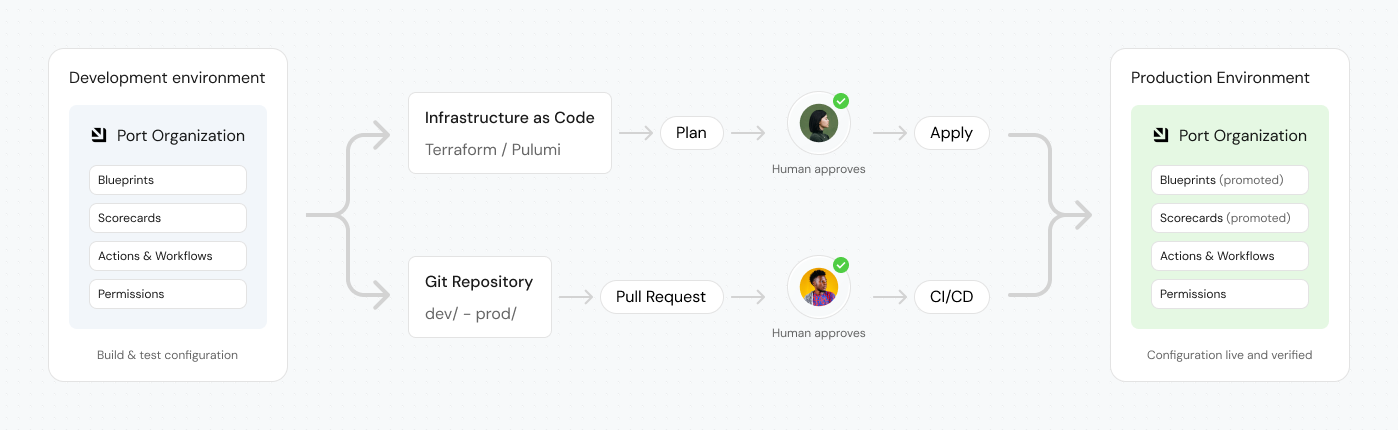
As more teams gain the ability to build, a review step lets each team move fast on the resources it owns, while still catching a change before it reaches everyone else, so the number of concurrent changes doesn't break the platform or drift its standards.
Where to go next
- Govern data access - the full permissions reference this page builds on.
- Manage ownership in Port - how team and user ownership works across the catalog.
- Workflow execute permissions - the full reference for workflow execute permissions.
- Manage a workflow - create a workflow and set who can build and run it, using the permissions described here.
- Manage Port across environments - promote configuration changes between environments with review, the same discipline this page recommends for permission changes.