Live events
Live events allow an integration to process source changes as they happen, usually through webhooks or a source-specific watch API. They update mapped catalog entities between scheduled resyncs, which reduces the delay before changes appear in Port.
Live events complement full and incremental syncs, but they do not replace full resync reconciliation. Support and setup vary by integration. If an integration does not support live events, Port keeps its data up to date through scheduled or manually triggered resyncs and, where available, incremental sync.
Live events keep running while a full resync is in progress and are not stopped when other sync types start. For how live events interact with full resync reconciliation and other sync types, see Sync interactions.
For self-hosted deployments that require better reliability, event durability, or horizontal scaling of live event processing, you can optionally set up Port's dedicated live events infrastructure.
Live events at scale
If you are using Port's hosted integrations, no action is required. The infrastructure described here is managed entirely by Port on the SaaS side.
Port's live events infrastructure allows integrations to receive and process real-time webhook events from third-party services. For self-hosted deployments, you can configure a scalable infrastructure using Redis Streams and a dedicated ingestion component (ocean-gateway) to improve reliability, durability, and horizontal scalability.
This section covers the components and configuration, deployment steps, and consumer scaling options for this infrastructure. Each integration's documentation remains the authoritative source for integration-specific setup (webhook registration, event types, and filters).
Who is this for?
This infrastructure is targeted at self-hosted (on-prem) customers who:
- Run high volumes of live events and need better reliability and event ingestion guarantees.
- Experience event loss on pod restarts or failure scenarios.
- Want to scale live event consumers horizontally.
Unsupported integrations
The live events at scale infrastructure does not support the following integrations:
- GitLab (deprecated).
- GitHub (Sunset).
- AWS Legacy (not AWS).
- Opsgenie.
- Octopus Deploy.
- Dynatrace.
- Azure.
- Okta.
If you run one of these integrations in a self-hosted deployment, use the standard live events setup documented on each integration's page instead.
How it works
Incoming webhook traffic is routed through your Ingress to ocean-gateway, which writes each event to a per-integration Redis Stream. Consumer pods read from that stream independently of ingestion, so events are never lost on a pod restart and consumers can be scaled horizontally.
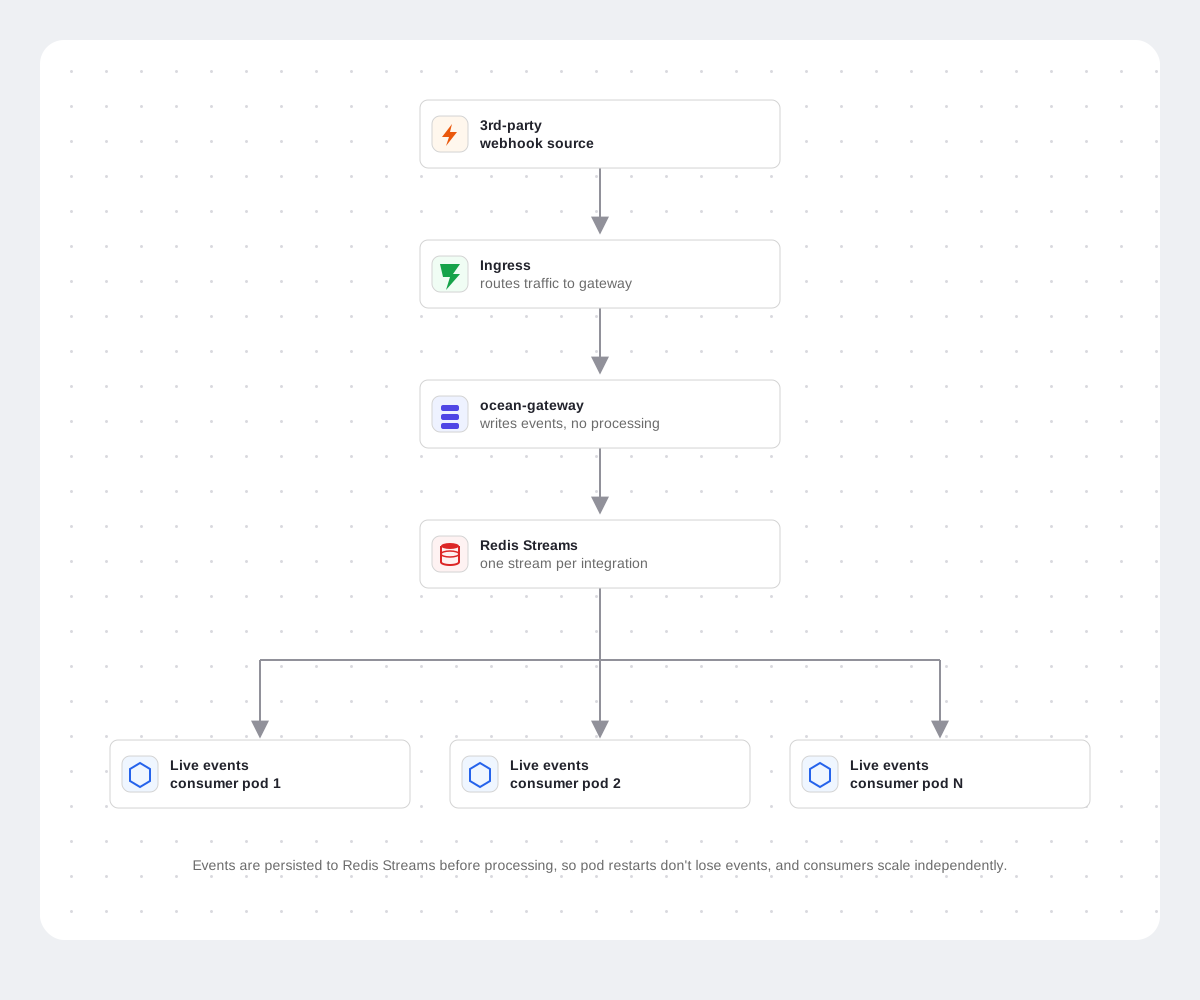
Components and configuration
This infrastructure is deployed via the ocean-gateway Helm chart, which can optionally bundle Redis or use a Redis instance you bring yourself. Once deployed, two values must be set for the whole flow to work: the live events base URL and your Ingress routing.
Ocean-gateway
The ocean-gateway service is a required component of the live events infrastructure. It handles all incoming webhook HTTP traffic and writes events to the appropriate Redis Stream, with no processing logic of its own.
- It is available as an open-source service in the ocean-gateway repository.
- It is included in the Ocean Helm chart for self-hosted deployments and must be deployed alongside your integration pods.
- Because it only ingests events into Redis Streams, it continues to accept and persist webhook traffic even when your live event consumer pods are unavailable, events wait in the stream and are processed once a consumer is back up.
Redis
- Minimum version: Redis 7.0 or later.
- Redis Streams support is required. It is available from Redis 5.0, but version 7.0 or later is required for full compatibility.
Live events are stored in Redis Streams. The ocean-gateway service is stateless - only Redis holds events after ingestion. Redis must use persistent storage so stream data survives a Redis pod crash or restart.
- If you use the bundled Redis (deployed via the
ocean-gatewayHelm chart), persistence is enabled by default via a PVC. Do not disable it unless you accept event loss on Redis restarts. - If you bring your own Redis, you are responsible for ensuring durability - for example, a managed Redis service with persistence, or your own Redis deployment with a volume and RDB/AOF enabled.
Live events base URL
Each integration must have a unique, stable base URL, set via the liveEvents.baseUrl Helm value, which the integration pod exposes internally as the OCEAN__BASE_URL environment variable. This value is used as the Redis Stream key, so it must be unique across all integrations sharing the same Redis instance.
The URL must follow this exact format:
https://live-events.your-domain.com/live-events/<unique-id>
Two integrations with the same OCEAN__BASE_URL on the same Redis instance will collide and corrupt each other's event stream. Use a different <unique-id> per integration, and avoid trailing slashes or variations between environments.
Ingress
Your Ingress must route incoming webhook traffic to ocean-gateway, not directly to the integration pod.
If you manage your Ingress outside of the Helm chart, configure the routing rule manually to point to the ocean-gateway service.
Split routing for webhook handshakes: some integrations perform a handshake during webhook setup using HTTP methods other than POST (such as GET or OPTIONS) to verify the endpoint before sending events. Since ocean-gateway handles only POST requests, handshake requests must be routed directly to the integration pod.
Integrations that require this split routing include Azure DevOps. See each integration's documentation for the exact configuration.
Deployment steps
- Bundled Redis (default)
- Bring your own Redis
Bundled Redis is enabled by default in the ocean-gateway Helm chart. Use this path if you don't already run Redis.
Step 1 - Deploy ocean-gateway
Set a strong password, and optionally your Ingress values. You will reuse this same password in Step 2:
helm upgrade --install ocean-gateway port-labs/ocean-gateway \
  --namespace ocean-gateway --create-namespace \
  --set redis.auth.password=<strong-password> \
  --set ingress.enabled=true \
  --set ingress.className=nginx \
  --set ingress.host=live-events.your-domain.com
Step 2 - Create a Redis credentials secret for the integration
ocean-gateway auto-wires its own Redis connection, but the integration needs a separate secret with both sets of keys. Use the same <strong-password> you set in Step 1:
kubectl create secret generic live-events-redis-credentials \
  --namespace <integration-namespace> \
  --from-literal=REDIS_LIVE_EVENTS_URL=ocean-gateway-redis-master.ocean-gateway.svc.cluster.local:6379 \
  --from-literal=REDIS_LIVE_EVENTS_PASSWORD=<strong-password> \
  --from-literal=REDIS_LIVE_EVENTS_ENABLE_TLS=false \
  --from-literal=OCEAN__LIVE_EVENTS__REDIS__URL=redis://ocean-gateway-redis-master.ocean-gateway.svc.cluster.local:6379 \
  --from-literal=OCEAN__LIVE_EVENTS__REDIS__PASSWORD=<strong-password> \
  --from-literal=OCEAN__LIVE_EVENTS__REDIS__ENABLE_TLS=false
Replace ocean-gateway with your release name and namespace if they differ.
Configure your Ingress
Route incoming webhook POST traffic to ocean-gateway, not directly to the integration pod:
https://live-events.your-domain.com/live-events/<liveEventsUUID>/integration/<webhookSuffix>
Some integrations (Azure DevOps, Okta) verify endpoints with GET or OPTIONS. ocean-gateway handles POST requests only, so route handshake requests directly to the integration pod. See Ingress.
Configure the integration for live events
Set the following in the integration's Helm values:
liveEvents:
  baseUrl: https://live-events.your-domain.com/live-events/<unique-id>
  isRedisStreamConsumerEnabled: true
  redis:
    credentialsSecretName: live-events-redis-credentials
Or with --set flags:
helm upgrade --install my-integration port-labs/port-ocean \
  --namespace port-ocean --create-namespace \
  --set liveEvents.baseUrl=https://live-events.your-domain.com/live-events/<unique-id> \
  --set liveEvents.isRedisStreamConsumerEnabled=true \
  --set liveEvents.redis.credentialsSecretName=live-events-redis-credentials
-
baseUrl(setsOCEAN__BASE_URL) - the integration's unique base URL, following the required format. See Live events base URL. -
isRedisStreamConsumerEnabled- without this,ocean-gatewaywill keep writing events to Redis, but the integration pod will not read them. -
redis.credentialsSecretName- the secret created above, so the integration connects to the same Redis instance asocean-gateway.Unique base URLliveEvents.baseUrlmust be unique per integration on the same Redis instance. See Live events base URL.
Verify
Confirm the deployment is healthy and events are flowing:
-
ocean-gatewaypods are ready. -
The integration consumer has
OCEAN__LIVE_EVENTS__IS_REDIS_STREAM_CONSUMER_ENABLED=true. -
A test webhook returns
202 Accepted. -
Events appear in Port without a growing Redis backlog.
kubectl get pods -n ocean-gatewaykubectl logs -n ocean-gateway deploy/ocean-gateway
Bring your own Redis if you already run Redis, or need full control over sizing, persistence, and TLS.
Step 1 - Provision Redis
Ensure a Redis 7.0+ instance is reachable from your cluster, with persistence enabled. See Redis. Record the host, port, password, and whether TLS is required.
Step 2 - Create a shared Redis credentials secret
kubectl create secret generic live-events-redis-credentials \
  --namespace ocean-gateway \
  --from-literal=REDIS_LIVE_EVENTS_URL=redis.example.svc.cluster.local:6379 \
  --from-literal=REDIS_LIVE_EVENTS_PASSWORD=<password> \
  --from-literal=REDIS_LIVE_EVENTS_ENABLE_TLS=false \
  --from-literal=OCEAN__LIVE_EVENTS__REDIS__URL=redis://redis.example.svc.cluster.local:6379 \
  --from-literal=OCEAN__LIVE_EVENTS__REDIS__PASSWORD=<password> \
  --from-literal=OCEAN__LIVE_EVENTS__REDIS__ENABLE_TLS=false
With TLS (for example, a managed Redis service), use rediss:// in OCEAN__LIVE_EVENTS__REDIS__URL and set both _ENABLE_TLS keys to true.
Copy the secret to the integration namespace if it differs from the ocean-gateway namespace.
Step 3 - Deploy ocean-gateway with your external Redis
Disable the bundled Redis and connect to your instance, using either a shared secret or inline values.
Option 1 - Shared secret (recommended):
helm upgrade --install ocean-gateway port-labs/ocean-gateway \
  --namespace ocean-gateway --create-namespace \
  --set redis.enabled=false \
  --set redis.existingSecret=live-events-redis-credentials \
  --set ingress.enabled=true \
  --set ingress.className=nginx \
  --set ingress.host=live-events.your-domain.com
Option 2 - Inline URL and password:
helm upgrade --install ocean-gateway port-labs/ocean-gateway \
  --namespace ocean-gateway --create-namespace \
  --set redis.enabled=false \
  --set redis.url=redis.example.svc.cluster.local:6379 \
  --set redis.password=<password> \
  --set ingress.enabled=true \
  --set ingress.className=nginx \
  --set ingress.host=live-events.your-domain.com
With TLS, also add --set redis.tls.enabled=true.
Configure your Ingress
Route incoming webhook POST traffic to ocean-gateway, not directly to the integration pod:
https://live-events.your-domain.com/live-events/<liveEventsUUID>/integration/<webhookSuffix>
Some integrations (Azure DevOps, Okta) verify endpoints with GET or OPTIONS. ocean-gateway handles POST requests only, so route handshake requests directly to the integration pod. See Ingress.
Configure the integration for live events
Set the following in the integration's Helm values:
liveEvents:
  baseUrl: https://live-events.your-domain.com/live-events/<unique-id>
  isRedisStreamConsumerEnabled: true
  redis:
    credentialsSecretName: live-events-redis-credentials
Or with --set flags:
helm upgrade --install my-integration port-labs/port-ocean \
  --namespace port-ocean --create-namespace \
  --set liveEvents.baseUrl=https://live-events.your-domain.com/live-events/<unique-id> \
  --set liveEvents.isRedisStreamConsumerEnabled=true \
  --set liveEvents.redis.credentialsSecretName=live-events-redis-credentials
-
baseUrl(setsOCEAN__BASE_URL) - the integration's unique base URL, following the required format. See Live events base URL. -
isRedisStreamConsumerEnabled- without this,ocean-gatewaywill keep writing events to Redis, but the integration pod will not read them. -
redis.credentialsSecretName- the secret created above, so the integration connects to the same Redis instance asocean-gateway.Unique base URLliveEvents.baseUrlmust be unique per integration on the same Redis instance. See Live events base URL.
Verify
Confirm the deployment is healthy and events are flowing:
-
ocean-gatewaypods are ready. -
The integration consumer has
OCEAN__LIVE_EVENTS__IS_REDIS_STREAM_CONSUMER_ENABLED=true. -
A test webhook returns
202 Accepted. -
Events appear in Port without a growing Redis backlog.
kubectl get pods -n ocean-gatewaykubectl logs -n ocean-gateway deploy/ocean-gateway
Scaling live events consumers (optional)
With this infrastructure, live event consumer pods can be deployed independently from the main integration pod. This is useful when:
- You need to scale event processing horizontally under high event volumes.
- You want to isolate live event processing from integration resync logic.
To scale up consumers, set the replica count in your Helm chart values:
liveEvents:
  worker:
    enabled: true
    replicaCount: 3
Each additional replica joins the same Redis consumer group and starts processing events in parallel. No other configuration changes are needed.
For high-throughput environments, consider also enabling scalable mode for the integration itself to decouple the resync process from live event processing. This option is available in each integration's self-hosted installation section.
Delivery and recovery
Each consumer pod reads events from the Redis Stream as part of a consumer group, so every event is delivered to a single consumer. Once the consumer finishes handling an event, it acknowledges it in Redis, including when processing failed after all of its retries.
If a consumer pod stops while it is processing an event, the event stays pending in Redis. A background maintenance worker, running in every consumer pod, reclaims events that have been pending for too long and requeues them for another consumer. An event that is requeued too many times is discarded. The worker also removes idle consumers that have no pending events from the consumer group.
Ocean detects Redis Cluster automatically, so no extra configuration is needed for clustered Redis.
Consumer settings reference
The following environment variables configure the integration's live events consumer. Only the connection settings are required, as shown in the deployment steps. The other settings have defaults that fit most deployments.
Live events consumer settings (click to expand)
| Variable | Description | Default |
|---|---|---|
OCEAN__LIVE_EVENTS__IS_REDIS_STREAM_CONSUMER_ENABLED | Whether to consume live events from the Redis Stream instead of receiving them directly. | false |
OCEAN__LIVE_EVENTS__REDIS__URL | The Redis URL. Use the rediss:// scheme for TLS. | redis://localhost:6379 |
OCEAN__LIVE_EVENTS__REDIS__USERNAME | The Redis username, if your Redis uses ACL users. | - |
OCEAN__LIVE_EVENTS__REDIS__PASSWORD | The Redis password. | - |
OCEAN__LIVE_EVENTS__REDIS__ENABLE_TLS | Whether to connect using TLS. Must be true when the URL uses rediss://, and false otherwise. | false |
OCEAN__LIVE_EVENTS__REDIS__CA | A base64-encoded PEM CA certificate bundle used to verify the Redis server. | - |
OCEAN__LIVE_EVENTS__REDIS__CERT | A base64-encoded PEM client certificate for mutual TLS. Requires PRIVATE_KEY. | - |
OCEAN__LIVE_EVENTS__REDIS__PRIVATE_KEY | A base64-encoded PEM client private key for mutual TLS. Requires CERT. | - |
OCEAN__LIVE_EVENTS__REDIS__READ_COUNT | The maximum number of events read from the stream in each request. | 10 |
OCEAN__LIVE_EVENTS__REDIS__BLOCK_MS | How long, in milliseconds, each read waits for new events. | 1000 |
OCEAN__LIVE_EVENTS__REDIS__STREAM_TTL_SECONDS | The time-to-live of the stream, set when the consumer creates it. | 2592000 (30 days) |
OCEAN__LIVE_EVENTS__REDIS__STREAM_MAINTENANCE_WORKER_ENABLED | Whether to run the maintenance worker that requeues stuck events. | true |
OCEAN__LIVE_EVENTS__REDIS__PEL_STUCK_TIMEOUT_SECONDS | How long an event must be pending before the maintenance worker requeues it. | 600 |
OCEAN__LIVE_EVENTS__REDIS__PEL_MAX_REQUEUE_COUNT | The maximum number of times an event is requeued before it is discarded. | 3 |
OCEAN__LIVE_EVENTS__REDIS__STREAM_MAINTENANCE_SCAN_INTERVAL_SECONDS | The time between maintenance worker scans. | 30 |
OCEAN__LIVE_EVENTS__REDIS__STREAM_MAINTENANCE_CONSUMER_CLEANUP_ENABLED | Whether to remove idle consumers from the consumer group. | true |
OCEAN__LIVE_EVENTS__REDIS__STREAM_MAINTENANCE_CONSUMER_CLEANUP_IDLE_SECONDS | How long a consumer must be idle before it is removed. | 86400 (24 hours) |
OCEAN__LIVE_EVENTS__REDIS__CONNECTION_STARTUP_MAX_RETRIES | The number of connection attempts to Redis at startup, with exponential backoff. | 5 |
OCEAN__LIVE_EVENTS__REDIS__CONNECTION_ERROR_BACKOFF_SECONDS | The time to wait before reconnecting after a Redis connection error. | 5 |