Backstage


Port's Backstage integration allows you to ingest Backstage entities into your context lake so that agents, workflows, and your team members can access and act on them.

Prerequisites
Create a Backstage token
Port will authenticate to Backstage via static tokens. Configure a token for Port using the following Backstage configuration:
backend:
  auth:
    externalAccess:
      - type: static
        options:
          token: YOUR-TOKEN
          subject: port-ocean-access
Replace YOUR-TOKEN with your Backstage token.
To create a token, Backstage recommends to use the following command:
node -p 'require("crypto").randomBytes(24).toString("base64")'
Setup
Choose one of the following installation methods: Not sure which method is right for your use case? Check the available installation methods.
The prerequisites required for installation are listed below.
-
Go to the Backstage Connectors page in Port.
-
Under
Select your installation method, chooseHosted by Port. -
Configure the
Installation parametersandAdvanced configurationas you wish (see below for details).
Installation parameters
Each integration requires specific parameters (such as an API token, a URL, etc.), as seen in Port's UI when installing it. Hover over the ⓘ icon next to each parameter to see more details about it.
Advanced configuration
- During the installation process each integration may have additional settings under the
Advanced configurationsection in Port's UI. Additionally, each integration has one or more settings that can be configured after installation. To do so, click on the integration's name in the Connectors page and navigate to theSettingtab. Hover over the ⓘ icon next to each setting to see more details about it.
Port secrets
Some integration settings require sensitive pieces of data, such as tokens. For these settings, Port secrets will be used, ensuring that your sensitive data is encrypted and secure.
When filling in such a setting, its value will be obscured (shown as ••••••••).
For each such setting, Port will automatically create a secret in your organization.
To see all secrets in your organization, follow these steps.
Port source IP addresses
When using this installation method, Port will make outbound calls to your 3rd-party applications from static IP addresses. You may need to add these addresses to your allowlist, in order to allow Port to interact with the integrated service:
- Europe (EU):
54.73.167.226,63.33.143.237,54.76.185.219 - United States (US):
3.234.37.33,54.225.172.136,3.225.234.99
-
Go to the Backstage Connectors page in your portal.
-
Select the
Self-hostedmethod. -
A
helmcommand will be displayed, with default values already filled out (e.g. your Port client ID, client secret, etc). Copy the command, replace the placeholders with your values, then run it in your terminal to install the integration.
Live event support
Currently, live events are not supported for this integration.
Resyncs will be performed periodically (with a configurable interval), or manually triggered by you via Port's UI.
Therefore, real-time events (including GitOps) will not be ingested into Port immediately.
Live events support for this integration is WIP and will be supported in the near future.
The resync interval can be configured using the scheduledResyncInterval parameter. See the optional parameters section below for more details.
Required parameters:
port.clientId- Your Port client id, used to identify your account.port.clientSecret- Your Port client secret, used to identify your account.port.baseUrl- Your Port API URL -https://api.port.iofor EU,https://api.us.port.iofor US.integration.identifier- The integration's identifier, used to reference the integration when using Port's API.integration.type- The integration type, used to denote the integrated tool/platform.integration.eventListener.type- The method used to listen to events from the 3rd party tool (POLLINGorKAFKA).integration.secrets.backstageToken- The Backstage token used to authenticate Port to Backstage.integration.config.backstageUrl- The URL of the Backstage instance, including the port of the Backend API (usually 7007).
Optional parameters (click to expand)
initializePortResources- Default:true. Whentrue, the integration will create default blueprints and configuration mapping.sendRawDataExamples- Default:true. Enable sending raw data examples from the third party API to Port for testing and managing the integration mapping.
- GitHub
- Jenkins
- Azure DevOps
- GitLab
- Go to the Backstage Connectors page in your portal.
- Under Select your installation method, choose your desired CI/CD platform.
- Copy the workflow and replace the placeholders with your values.
Below are the available parameters and their descriptions.
| Parameter | Description | Required? | Secret?Store this value as a GitHub Actions secret |
|---|---|---|---|
port_client_id | Your Port client ID (How to get the credentials). | ✓ | ✓ |
port_client_secret | Your Port client secret (How to get the credentials). | ✓ | ✓ |
port_base_url | Your Port API URL (https://api.port.io for EU, https://api.us.port.io for US). | ✓ | ✗ |
backstage_token | The Backstage token used to authenticate Port to Backstage. | ✓ | ✓ |
backstage_url | The URL of the Backstage instance, including the port of the Backend API (usually 7007). | ✓ | ✓ |
initialize_port_resources | Default true. When set to true, the integration will create default blueprints and the Port app config mapping. | ✗ | ✗ |
integration_identifier | The identifier of the integration that will be installed. | ✗ | ✗ |
send_raw_data_examples | Enable sending raw data examples from the third-party API to Port for testing and managing the integration mapping. Default is true. | ✗ | ✗ |
Your Jenkins agent must be able to run Docker commands.
Below are the available parameters and their descriptions.
| Parameter | Description | Required? | Secret?Store this value as a Jenkins credential (Secret Text) |
|---|---|---|---|
OCEAN__ | Your Port client ID (How to get the credentials). | ✓ | ✓ |
OCEAN__ | Your Port client secret (How to get the credentials). | ✓ | ✓ |
OCEAN__ | Your Port API URL (https://api.port.io for EU, https://api.us.port.io for US). | ✓ | ✗ |
OCEAN__ | The Backstage token used to authenticate Port to Backstage. | ✓ | ✓ |
OCEAN__ | The URL of the Backstage instance, including the port of the Backend API (usually 7007). | ✓ | ✓ |
OCEAN__ | Default true. When set to true, the integration will create default blueprints and the Port app config mapping. | ✗ | ✗ |
OCEAN__ | The identifier of the integration that will be installed. | ✗ | ✗ |
OCEAN__ | Enable sending raw data examples from the third-party API to Port for testing and managing the integration mapping. Default is true. | ✗ | ✗ |
Here is an example for a Jenkinsfile pipeline file:Jenkins pipeline (click to expand)
Prerequisites
- Your Azure Devops agent should be able to run docker commands. Learn more about agents here.
- You must have permissions to create and manage Azure DevOps variable groups for storing credentials.
Set up your credentials
- Create a Variable Group: Name it port-ocean-credentials.
- Store the required variables (see the table below).
- Authorize Your Pipeline:
-
Go to "Library" -> "Variable groups."
-
Find port-ocean-credentials and click on it.
-
Select "Pipeline Permissions" and add your pipeline to the authorized list.
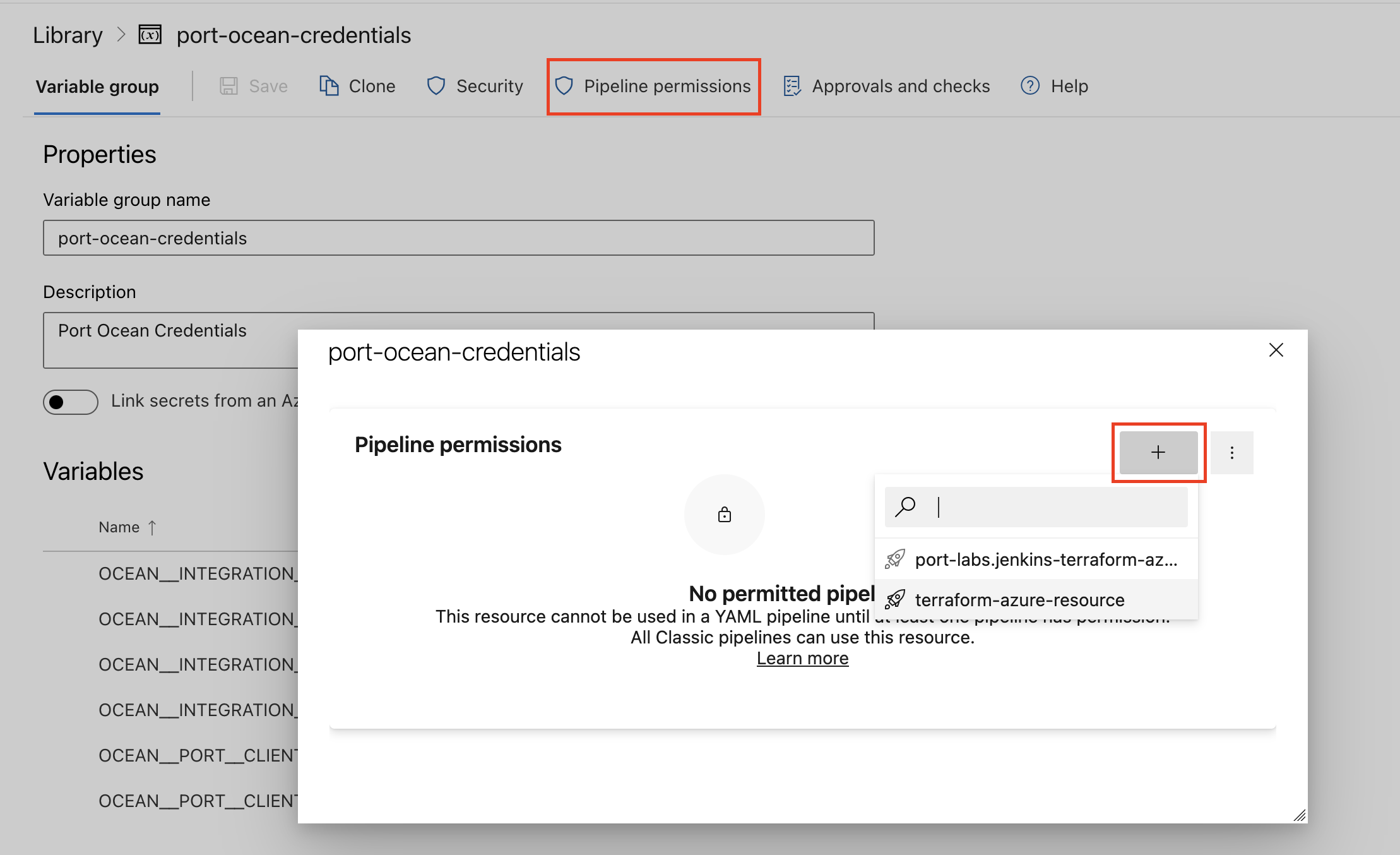
-
Below are the available parameters and their descriptions.
| Parameter | Description | Required? | Secret?Store this value as an Azure DevOps pipeline variable |
|---|---|---|---|
OCEAN__ | Your Port client ID (How to get the credentials). | ✓ | ✓ |
OCEAN__ | Your Port client secret (How to get the credentials). | ✓ | ✓ |
OCEAN__ | Your Port API URL (https://api.port.io for EU, https://api.us.port.io for US). | ✓ | ✗ |
OCEAN__ | The Backstage token used to authenticate Port to Backstage. | ✓ | ✓ |
OCEAN__ | The URL of the Backstage instance, including the port of the Backend API (usually 7007). | ✓ | ✓ |
OCEAN__ | Default true. When set to true, the integration will create default blueprints and the Port app config mapping. | ✗ | ✗ |
OCEAN__ | The identifier of the integration that will be installed. | ✗ | ✗ |
OCEAN__ | Enable sending raw data examples from the third-party API to Port for testing and managing the integration mapping. Default is true. | ✗ | ✗ |
Here is an example for a azure-pipeline.yml pipeline file:Azure pipeline (click to expand)
- Go to the Backstage Connectors page in your portal.
- Under Select your installation method, choose your desired CI/CD platform.
- Copy the workflow and replace the placeholders with your values.
Below are the available parameters and their descriptions.
| Parameter | Description | Required? | Secret?Store this value as a GitLab CI/CD variable |
|---|---|---|---|
OCEAN__ | Your Port client ID (How to get the credentials). | ✓ | ✓ |
OCEAN__ | Your Port client secret (How to get the credentials). | ✓ | ✓ |
OCEAN__ | Your Port API URL (https://api.port.io for EU, https://api.us.port.io for US). | ✓ | ✗ |
OCEAN__ | The Backstage token used to authenticate Port to Backstage. | ✓ | ✓ |
OCEAN__ | The URL of the Backstage instance, including the port of the Backend API (usually 7007). | ✓ | ✓ |
OCEAN__ | Default true. When set to true, the integration will create default blueprints and the Port app config mapping. | ✗ | ✗ |
OCEAN__ | The identifier of the integration that will be installed. | ✗ | ✗ |
OCEAN__ | Enable sending raw data examples from the third-party API to Port for testing and managing the integration mapping. Default is true. | ✗ | ✗ |
Configuration
Port integrations use a YAML mapping block to ingest data from the third-party api into Port.
The mapping makes use of the JQ JSON processor to select, modify, concatenate, transform and perform other operations on existing fields and values from the integration API.
Default mapping configuration
This is the default mapping configuration for this integration:
Default mapping configuration (click to expand)
resources:
- kind: component
  selector:
    query: 'true'
  port:
    entity:
      mappings:
        identifier: .metadata.identifier
        title: .metadata.title // .metadata.name
        blueprint: '"component"'
        properties:
          type: .spec.type
          lifecycle: .spec.lifecycle
          language: .spec.language
          description: .metadata.description
          labels: .metadata.labels
          annotations: .metadata.annotations
          links: .metadata.links
          tags: .metadata.tags
        relations:
          owningUser: .relations[] | select(.type == "ownedBy" and (.targetRef | startswith("user:"))) | .targetRef
          owningGroup: .relations[] | select(.type == "ownedBy" and (.targetRef | startswith("group:"))) | .targetRef
          system: '"system:" + (.metadata.namespace // "default") + "/" + .spec.system'
          subcomponentOf: .relations[] | select(.type == "subcomponentOf" and (.targetRef | startswith("component:"))) | .targetRef
          providesApis: .relations[] | select(.type == "providesApi" and (.targetRef | startswith("api:"))) | .targetRef
          consumesApis: .relations[] | select(.type == "consumesApi" and (.targetRef | startswith("api:"))) | .targetRef
          dependsOnComponent: .relations[] | select(.type == "dependsOn" and (.targetRef | startswith("component:"))) | .targetRef
          dependsOnResource: .relations[] | select(.type == "dependsOn" and (.targetRef | startswith("resource:"))) | .targetRef
- kind: API
  selector:
    query: 'true'
  port:
    entity:
      mappings:
        identifier: .metadata.identifier
        title: .metadata.title // .metadata.name
        blueprint: '"api"'
        properties:
          type: .spec.type
          lifecycle: .spec.lifecycle
          definition: .spec.definition | tostring
          definitionOpenAPI: if .spec.type == "open-api" then .spec.definition else null end
          definitionAsyncAPI: if .spec.type == "async-api" then .spec.definition else null end
          definitionGRPC: if .spec.type == "grpc" then .spec.definition else null end
          definitionGraphQL: if .spec.type == "graphql" then .spec.definition else null end
          description: .metadata.description
          labels: .metadata.labels
          annotations: .metadata.annotations
          links: .metadata.links
          tags: .metadata.tags
        relations:
          owningUser: .relations[] | select(.type == "ownedBy" and (.targetRef | startswith("user:"))) | .targetRef
          owningGroup: .relations[] | select(.type == "ownedBy" and (.targetRef | startswith("group:"))) | .targetRef
          system: '"system:" + (.metadata.namespace // "default") + "/" + .spec.system'
- kind: group
  selector:
    query: 'true'
  port:
    entity:
      mappings:
        identifier: .metadata.identifier
        title: .metadata.title // .metadata.name
        blueprint: '"group"'
        properties:
          description: .metadata.description
          type: .metadata.type
          email: .metadata.email
          labels: .metadata.labels
          annotations: .metadata.annotations
          links: .metadata.links
          tags: .metadata.tags
        relations:
          parent: .relations[] | select(.type == "childOf" and (.targetRef | startswith("group:"))) | .targetRef
          members: .relations[] | select(.type == "hasMember" and (.targetRef | startswith("user:"))) | .targetRef
- kind: user
  selector:
    query: 'true'
  port:
    entity:
      mappings:
        identifier: .metadata.identifier
        title: .metadata.title // .metadata.name
        blueprint: '"user"'
        properties:
          email: .metadata.email
          description: .metadata.description
          labels: .metadata.labels
          annotations: .metadata.annotations
          links: .metadata.links
          tags: .metadata.tags
- kind: resource
  selector:
    query: 'true'
  port:
    entity:
      mappings:
        identifier: .metadata.identifier
        title: .metadata.title // .metadata.name
        blueprint: '"resource"'
        properties:
          type: .spec.type
          description: .metadata.description
          labels: .metadata.labels
          annotations: .metadata.annotations
          links: .metadata.links
          tags: .metadata.tags
        relations:
          owningUser: .relations[] | select(.type == "ownedBy" and (.targetRef | startswith("user:"))) | .targetRef
          owningGroup: .relations[] | select(.type == "ownedBy" and (.targetRef | startswith("group:"))) | .targetRef
          system: '"system:" + (.metadata.namespace // "default") + "/" + .spec.system'
          dependsOnResource: .relations[] | select(.type == "dependsOn" and (.targetRef | startswith("resource:"))) | .targetRef
          dependsOnComponent: .relations[] | select(.type == "dependsOn" and (.targetRef | startswith("component:"))) | .targetRef
- kind: system
  selector:
    query: 'true'
  port:
    entity:
      mappings:
        identifier: .metadata.identifier
        title: .metadata.title // .metadata.name
        blueprint: '"system"'
        properties:
          description: .metadata.description
          labels: .metadata.labels
          annotations: .metadata.annotations
          links: .metadata.links
          tags: .metadata.tags
        relations:
          owningUser: .relations[] | select(.type == "ownedBy" and (.targetRef | startswith("user:"))) | .targetRef
          owningGroup: .relations[] | select(.type == "ownedBy" and (.targetRef | startswith("group:"))) | .targetRef
          domain: .relations[] | select(.type == "partOf" and (.targetRef | startswith("domain:"))) | .targetRef
- kind: domain
  selector:
    query: 'true'
  port:
    entity:
      mappings:
        identifier: .metadata.identifier
        title: .metadata.title // .metadata.name
        blueprint: '"domain"'
        properties:
          description: .metadata.description
          labels: .metadata.labels
          annotations: .metadata.annotations
          links: .metadata.links
          tags: .metadata.tags
        relations:
          owningUser: .relations[] | select(.type == "ownedBy" and (.targetRef | startswith("user:"))) | .targetRef
          owningGroup: .relations[] | select(.type == "ownedBy" and (.targetRef | startswith("group:"))) | .targetRef
Monitoring and sync status
To learn more about how to monitor and check the sync status of your integration, see the relevant documentation.
Mapping & selectors per resource
To view and test the integration's mapping against examples of the third-party API responses, use the jq playground in your connectors page. Find the integration in the list of connectors and click on it to open the playground.
Additional examples of blueprints and the relevant integration configurations:
{
  "identifier": "component",
  "title": "Component",
  "icon": "Cloud",
  "schema": {
    "properties": {
      "type": {
        "title": "Type",
        "type": "string"
      },
      "lifecycle": {
        "title": "Lifecycle",
        "type": "string"
      },
      "language": {
        "type": "string",
        "title": "Language"
      },
      "description": {
        "type": "string",
        "format": "markdown",
        "title": "Description"
      },
      "labels": {
        "type": "object",
        "title": "Labels"
      },
      "annotations": {
        "type": "object",
        "title": "Annotations"
      },
      "links": {
        "type": "array",
        "items": {
          "format": "url",
          "type": "string"
        },
        "title": "Links"
      },
      "tags": {
        "type": "array",
        "title": "Tags"
      }
    },
    "required": []
  },
  "calculationProperties": {}
}
createMissingRelatedEntities: true
deleteDependentEntities: true
resources:
  - kind: component
    selector:
      query: "true"
    port:
      entity:
        mappings:
          identifier: .metadata.identifier
          title: .metadata.title // .metadata.name
          blueprint: '"component"'
          properties:
            type: .spec.type
            lifecycle: .spec.lifecycle
            language: .spec.language
            description: .metadata.description
            labels: .metadata.labels
            annotations: .metadata.annotations
            links: .metadata.links
            tags: .metadata.tags
Limitations
Currently, the integration does not support custom entity kinds.