Custom GitHub App
This page documents the legacy custom GitHub App creation method, which is deprecated.
Use GitHub Ocean instead, which offers:
- Better performance and reliability.
- OAuth-based setup for custom GitHub Apps.
- Enhanced features and capabilities.
- Active support and updates.
GitHub Ocean uses custom GitHub Apps under the hood, providing all the benefits of custom apps through a modern, supported integration.
Overview
Port's Custom GitHub App feature allowed you to create and manage your own GitHub applications using the legacy API. This approach is now deprecated in favor of GitHub Ocean.
For new integrations, use GitHub Ocean:
- Install GitHub Ocean - The recommended approach for all new GitHub integrations.
- GitHub Ocean supports custom GitHub Apps via OAuth or manual setup, providing the same functionality with better performance and support.
Prerequisites
- A registered organization in Port.
- Your Port user role is set to
Admin. - Access to Port's API credentials.
- Admin permissions in your GitHub organization.
Benefits of custom GitHub apps
- Workspace Isolation: Each team can have their own GitHub App with specific repository access.
- Enhanced Security: Better permission boundaries between different teams and projects.
- Multi-Organization Support: Same GitHub organizations can be integrated with multiple Port organizations.
- Self-Hosted Support: Works with both cloud and self-hosted GitHub Enterprise instances.
- Custom Configuration: Create tailored integration setups for specific use cases.
Create a custom app
The form and API endpoint documented below are deprecated and should not be used for new integrations.
Use GitHub Ocean instead, which provides OAuth-based setup for custom GitHub Apps.
Legacy API method (deprecated)
This API endpoint is deprecated. Use GitHub Ocean instead.
The legacy method involved:
-
Making a GET request to the GitHub App creation URL endpoint:
https://api.port.io/v1/integration/github-app-creation-url -
Including the following query parameters:
isSelfHostedEnterprise=false(set totruefor GitHub Enterprise).githubOrgName=YOUR_ORG_NAME(replace with your GitHub organization name).selfHostedEnterpriseUrl=YOUR_GH_ENTERPRISE_URL(replace with your self hosted github enterprise url).
-
Adding your Port authentication token in the Authorization header:
Authorization: Bearer YOUR_TOKEN -
The response would contain a
urland amanifestobject. -
Creating an HTML form with a button that triggers a POST request to the
urlprovided by Port's API. The request should include the GitHub Appmanifestas the payload.
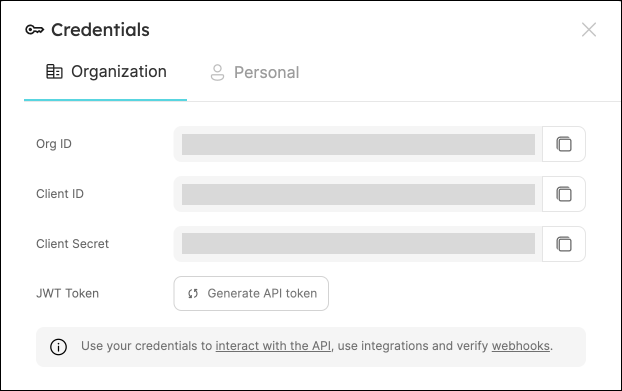
You willl need your Port API credentials for this process:
To get your Port credentials, open the Credentials modal. Here you can view and copy your CLIENT_ID and CLIENT_SECRET:
Technical Details
GitHub App Manifest
The GitHub App manifest is a JSON configuration file that defines:
- App name and description.
- Webhook URL and events.
- Required permissions.
- Callback URLs.
- Other configuration parameters.
Port generates this manifest automatically based on best practices, ensuring the app has the correct permissions for integration with Port.
Required Permissions
Custom GitHub Apps must be configured with the following minimum permissions:
Repository Permissions
- Actions: Read and Write (for executing self-service action using GitHub workflow).
- Checks: Read and Write (for validating
Port.yml). - Contents: Readonly (for reading port configuration files and repository files).
- Metadata: Readonly.
- Issues: Readonly.
- Pull Request: Read and Write.
- Dependabot alerts: Readonly.
- Administration: Readonly (for syncing github teams).
Organization Permissions
- Members: Readonly (for syncing github teams).
Repository Events
- Issues.
- Pull Request.
- Push.
- Workflow Run.
- Team.
- Dependabot alerts.
Credential Storage
After creating a GitHub App, Port securely stores:
- App ID.
- Github org name.
- Private key.
- Webhook secret.
These credentials are stored in Port's secure credential store and are never exposed in plaintext.
API Endpoints
Port provides the following API endpoints for Custom GitHub App creation:
| Endpoint | Method | Description |
|---|---|---|
/v1/integration/github-app-creation-url | GET | Gets the GitHub App creation URL and manifest |
Query parameters:
isSelfHostedEnterprise(boolean): Whether the GitHub instance is Self-Hosted Enterprise.githubOrgName(string, optional): Name of the GitHub organization.selfHostedEnterpriseUrl(string, optional): GitHub Enterprise host URL.
Using with Self-Hosted GitHub Enterprise
For self-hosted GitHub Enterprise instances, use GitHub Ocean instead, which provides proper support for self-hosted GitHub Enterprise.
The legacy method required:
- Selecting the "Enterprise" option in the deprecated form.
- Providing your GitHub Enterprise host URL (e.g.,
github.company.com). - Ensuring your GitHub Enterprise instance could reach Port's self hosted github app webhook endpoints.
When using a custom GitHub App with self-hosted GitHub Enterprise, the mapping configuration must be included as part of the repository using the port-app-config.yml file, and cannot be configured via Port's UI/API.
For more details on configuration options, refer to the GitHub Ocean documentation.
Limitations
- Custom GitHub Apps must have all the required permissions to function properly.
- You cannot modify the permissions after creation (you would need to create a new app).
- For secure credential management, Port does not expose the raw credential values after initial creation.
- You can't identify the Github app is custom from the UI
- You can't delete the Github app from the UI, you need to delete it directly from your Github organization (https://github.com/organizations/{{GITHUB_ORG_NAME}}/settings/installations)
FAQ
Troubleshooting
If you're using the legacy custom GitHub App method, consider migrating to GitHub Ocean for better support and reliability.
If you encounter issues with your custom GitHub app, try the following:
-
Webhook Connection Issues
- Verify the webhook URL is correctly configured in the GitHub App settings.
- Check that your GitHub instance can reach Port's webhook endpoints.
- Review webhook delivery logs in GitHub for any failed delivery attempts.
-
Permission Problems
- Ensure the app has been granted all the necessary permissions.
- Check that the app is installed on the repositories you want to monitor.
- Verify that the correct repository events are selected.
-
Authentication Errors
- Ensure your Port token is valid and has not expired.
- Verify that the app has not been uninstalled or modified in GitHub.
For additional assistance, contact Port support. For new integrations, use GitHub Ocean instead.