Coralogix

Port's Coralogix integration syncs APM services, SLOs, alert definitions, and cases into your context lake.
 ServiceServices are discovered from span metrics. The APM service catalog has no public list API.SLOAlert definitionCase
Prerequisites
Create an API key
- In Coralogix, create a personal or team API key.
- Grant the key the permissions below. The Read-Only User role includes all of them.
| Kind | Permission |
|---|---|
| Service | METRICS.DATA-API#HIGH:READDATA |
| SLO | SLO:READCONFIG |
| Alert definition | ALERTS:READCONFIG |
| Case | CASES:READ |
Choose the API URL
Use either the API URL for your region, such as https://api.eu2.coralogix.com, or the team URL you open in the browser, such as https://myteam.app.eu2.coralogix.com. The integration derives the API host from the team URL.
Region hosts are listed in the Coralogix domain documentation.
Setup
Choose one of the following installation methods. Not sure which method is right for your use case? Check the available installation methods.
The prerequisites required for installation are listed below.
-
Go to the Coralogix Connectors page in Port.
-
Under
Select your installation method, chooseHosted by Port. -
Configure the
Installation parametersandAdvanced configurationas you wish (see below for details).
Installation parameters
Each integration requires specific parameters (such as an API token, a URL, etc.), as seen in Port's UI when installing it. Hover over the ⓘ icon next to each parameter to see more details about it.
Advanced configuration
- During the installation process each integration may have additional settings under the
Advanced configurationsection in Port's UI. Additionally, each integration has one or more settings that can be configured after installation. To do so, click on the integration's name in the Connectors page and navigate to theSettingtab. Hover over the ⓘ icon next to each setting to see more details about it.
Port secrets
Some integration settings require sensitive pieces of data, such as tokens. For these settings, Port secrets will be used, ensuring that your sensitive data is encrypted and secure.
When filling in such a setting, its value will be obscured (shown as ••••••••).
For each such setting, Port will automatically create a secret in your organization.
To see all secrets in your organization, follow these steps.
Port source IP addresses
When using this installation method, Port will make outbound calls to your 3rd-party applications from static IP addresses. You may need to add these addresses to your allowlist, in order to allow Port to interact with the integrated service:
- Europe (EU):
54.73.167.226,63.33.143.237,54.76.185.219 - United States (US):
3.234.37.33,54.225.172.136,3.225.234.99
-
Go to the Coralogix Connectors page in your portal.
-
Select the
Self-hostedmethod. -
A
helmcommand will be displayed, with default values already filled out (e.g. your Port client ID, client secret, etc). Copy the command, replace the placeholders with your values, then run it in your terminal to install the integration.
Live event support
Currently, live events are not supported for this integration.
Resyncs will be performed periodically (with a configurable interval), or manually triggered by you via Port's UI.
Therefore, real-time events (including GitOps) will not be ingested into Port immediately.
Live events support for this integration is WIP and will be supported in the near future.
The resync interval can be configured using the scheduledResyncInterval parameter. See the optional parameters section below for more details.
Scalable mode for large integrations
If you are deploying the integration at scale and want to decouple the resync process from the live events process (recommended for large or high-throughput environments), you can enable scalable mode by adding the following flags to your Helm install command:
  --set workload.kind="CronJob"  \
  --set workload.cron.resyncTimeoutMinutes=60  \
  --set scheduledResyncInterval="'*/60 * * * *'"  \
  --set liveEvents.worker.enabled=true
Required parameters:
port.clientId- Your Port client ID.port.clientSecret- Your Port client secret.port.baseUrl- Your Port API URL:https://api.port.iofor EU,https://api.us.port.iofor US.integration.identifier- Identifier for this integration installation.integration.type- The integration type.integration.eventListener.type- The event listener type.integration.secrets.coralogixApiKey- Coralogix personal or team API key. See API keys.integration.config.coralogixApiUrl- Your Coralogix API URL, such ashttps://api.eu2.coralogix.com, or the team URL you open in the browser, such ashttps://myteam.app.eu2.coralogix.com. The integration derives the region from it.
Optional parameters (click to expand)
scheduledResyncInterval- The number of minutes between each resync.initializePortResources- Whentrue, the integration creates the default blueprints and mapping. Defaults totrue.
- GitHub
- Jenkins
- Azure DevOps
- GitLab
- Go to the Coralogix Connectors page in your portal.
- Under Select your installation method, choose your desired CI/CD platform.
- Copy the workflow and replace the placeholders with your values.
Below are the available parameters and their descriptions.
| Parameter | Description | Required? | Secret?Store this value as a GitHub Actions secret |
|---|---|---|---|
port_client_id | Your Port client ID (How to get the credentials). | ✓ | ✓ |
port_client_secret | Your Port client secret (How to get the credentials). | ✓ | ✓ |
port_base_url | Your Port API URL (https://api.port.io for EU, https://api.us.port.io for US). | ✓ | ✗ |
coralogix_api_key | Coralogix personal or team API key. | ✓ | ✓ |
coralogix_api_url | Coralogix API URL or team URL. The region is derived from it. | ✓ | ✓ |
initialize_port_resources | Default true. When set to true, the integration will create default blueprints and the Port app config mapping. | ✗ | ✗ |
integration_identifier | The identifier of the integration that will be installed. | ✗ | ✗ |
send_raw_data_examples | Enable sending raw data examples from the third-party API to Port for testing and managing the integration mapping. Default is true. | ✗ | ✗ |
Your Jenkins agent must be able to run Docker commands.
Below are the available parameters and their descriptions.
| Parameter | Description | Required? | Secret?Store this value as a Jenkins credential (Secret Text) |
|---|---|---|---|
OCEAN__ | Your Port client ID (How to get the credentials). | ✓ | ✓ |
OCEAN__ | Your Port client secret (How to get the credentials). | ✓ | ✓ |
OCEAN__ | Your Port API URL (https://api.port.io for EU, https://api.us.port.io for US). | ✓ | ✗ |
OCEAN__ | Coralogix personal or team API key. | ✓ | ✓ |
OCEAN__ | Coralogix API URL or team URL. The region is derived from it. | ✓ | ✓ |
OCEAN__ | Default true. When set to true, the integration will create default blueprints and the Port app config mapping. | ✗ | ✗ |
OCEAN__ | The identifier of the integration that will be installed. | ✗ | ✗ |
OCEAN__ | Enable sending raw data examples from the third-party API to Port for testing and managing the integration mapping. Default is true. | ✗ | ✗ |
Here is an example for a Jenkinsfile pipeline file:Jenkins pipeline (click to expand)
Prerequisites
- Your Azure Devops agent should be able to run docker commands. Learn more about agents here.
- You must have permissions to create and manage Azure DevOps variable groups for storing credentials.
Set up your credentials
- Create a Variable Group: Name it port-ocean-credentials.
- Store the required variables (see the table below).
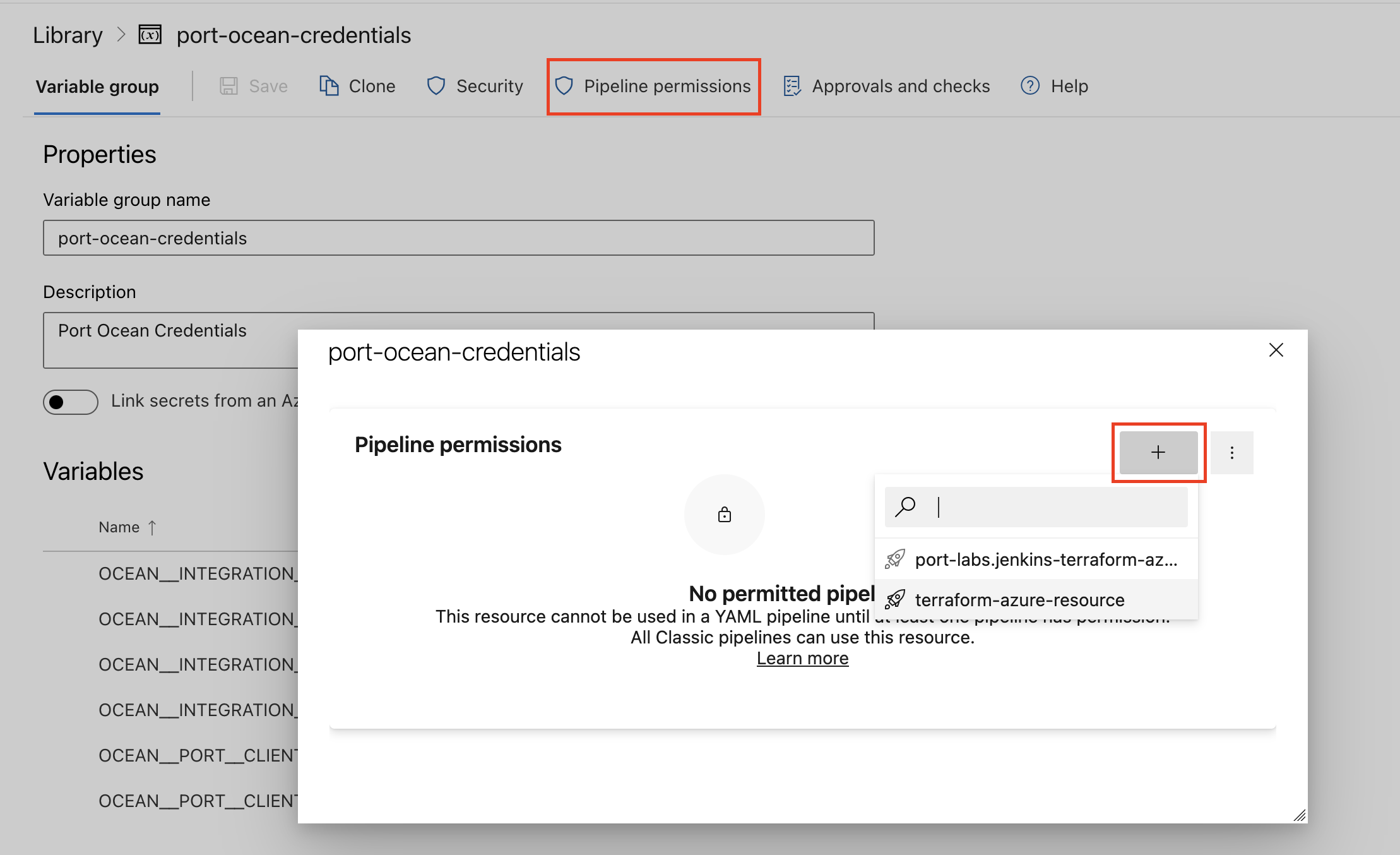
- Authorize Your Pipeline:
-
Go to "Library" -> "Variable groups."
-
Find port-ocean-credentials and click on it.
-
Select "Pipeline Permissions" and add your pipeline to the authorized list.
-
Below are the available parameters and their descriptions.
| Parameter | Description | Required? | Secret?Store this value as an Azure DevOps pipeline variable |
|---|---|---|---|
OCEAN__ | Your Port client ID (How to get the credentials). | ✓ | ✓ |
OCEAN__ | Your Port client secret (How to get the credentials). | ✓ | ✓ |
OCEAN__ | Your Port API URL (https://api.port.io for EU, https://api.us.port.io for US). | ✓ | ✗ |
OCEAN__ | Coralogix personal or team API key. | ✓ | ✓ |
OCEAN__ | Coralogix API URL or team URL. The region is derived from it. | ✓ | ✓ |
OCEAN__ | Default true. When set to true, the integration will create default blueprints and the Port app config mapping. | ✗ | ✗ |
OCEAN__ | The identifier of the integration that will be installed. | ✗ | ✗ |
OCEAN__ | Enable sending raw data examples from the third-party API to Port for testing and managing the integration mapping. Default is true. | ✗ | ✗ |
Here is an example for a azure-pipeline.yml pipeline file:Azure pipeline (click to expand)
- Go to the Coralogix Connectors page in your portal.
- Under Select your installation method, choose your desired CI/CD platform.
- Copy the workflow and replace the placeholders with your values.
Below are the available parameters and their descriptions.
| Parameter | Description | Required? | Secret?Store this value as a GitLab CI/CD variable |
|---|---|---|---|
OCEAN__ | Your Port client ID (How to get the credentials). | ✓ | ✓ |
OCEAN__ | Your Port client secret (How to get the credentials). | ✓ | ✓ |
OCEAN__ | Your Port API URL (https://api.port.io for EU, https://api.us.port.io for US). | ✓ | ✗ |
OCEAN__ | Coralogix personal or team API key. | ✓ | ✓ |
OCEAN__ | Coralogix API URL or team URL. The region is derived from it. | ✓ | ✓ |
OCEAN__ | Default true. When set to true, the integration will create default blueprints and the Port app config mapping. | ✗ | ✗ |
OCEAN__ | The identifier of the integration that will be installed. | ✗ | ✗ |
OCEAN__ | Enable sending raw data examples from the third-party API to Port for testing and managing the integration mapping. Default is true. | ✗ | ✗ |
Configuration
Port integrations use a YAML mapping block to ingest data from the third-party API into Port.
The mapping makes use of the JQ JSON processor to select, modify, concatenate, transform and perform other operations on existing fields and values from the integration API.
Default mapping configuration
This is the default mapping configuration for this integration:
Default mapping configuration (click to expand)
deleteDependentEntities: true
createMissingRelatedEntities: false
resources:
  - kind: service
    selector:
      query: 'true'
      lookback: 30d
      window: 1h
      metricsSource: auto
    port:
      entity:
        mappings:
          identifier: .serviceName
          title: .serviceName
          blueprint: '"coralogixService"'
          properties:
            environments: .environments
            clusters: .clusters
            namespaces: .namespaces
            requestsPerSecond: .requestsPerSecond
            errorRatePct: .errorRatePct
            p95LatencyMs: .p95LatencyMs
            metricsWindow: .window
            metricsSource: .metricsSource
            link: .__teamUrl
  - kind: slo
    selector:
      query: 'true'
      includeStatus: true
    port:
      entity:
        mappings:
          identifier: .id
          title: .name
          blueprint: '"coralogixSlo"'
          properties:
            description: .description
            targetPct: .targetThresholdPercentage
            timeFrame: '{"SLO_TIME_FRAME_1_DAY": "1 day", "SLO_TIME_FRAME_7_DAYS": "7 days", "SLO_TIME_FRAME_14_DAYS": "14 days", "SLO_TIME_FRAME_21_DAYS": "21 days", "SLO_TIME_FRAME_28_DAYS": "28 days", "SLO_TIME_FRAME_30_DAYS": "30 days"}[.sloTimeFrame]'
            sliType: 'if .apmSli then "apm" elif .windowBasedMetricSli then "window" else "request" end'
            compliancePct: 'if .__status.lowestCompliance != null then .__status.lowestCompliance * 100 else null end'
            remainingErrorBudgetPct: 'if .__status.lowestRemainingErrorBudget != null then .__status.lowestRemainingErrorBudget * 100 else null end'
            completeWindow: .__status.effectiveWindowCompleteData
            labels: .labels
            creator: .creator
            createdAt: .createTime
            link: .__teamUrl + "/slo/" + .id + "/overview"
          relations:
            service: .labels.service // .apmSli.services[0]
  - kind: alert-definition
    selector:
      query: 'true'
    port:
      entity:
        mappings:
          identifier: .id
          title: .alertDefProperties.name
          blueprint: '"coralogixAlertDefinition"'
          properties:
            description: .alertDefProperties.description
            type: '.alertDefProperties.type | sub("ALERT_DEF_TYPE_"; "") | sub("_OR_UNSPECIFIED$"; "")'
            priority: '.alertDefProperties.priority | sub("ALERT_DEF_PRIORITY_"; "") | sub("_OR_UNSPECIFIED$"; "")'
            enabled: .alertDefProperties.enabled
            status: '(.status // "ALERT_DEF_STATUS_UNSPECIFIED") | sub("ALERT_DEF_STATUS_"; "")'
            groupByKeys: .alertDefProperties.groupByKeys
            hasNotificationTarget: '((.alertDefProperties.notificationGroup.webhooks // []) + (.alertDefProperties.notificationGroup.destinations // []) | length) > 0'
            labels: .alertDefProperties.entityLabels
            lastTriggeredAt: .lastTriggeredTime
            link: .__teamUrl + "/alerts/" + .id
          relations:
            service: .alertDefProperties.entityLabels.service
  - kind: case
    selector:
      query: 'true'
      daysBack: 30
    port:
      entity:
        mappings:
          identifier: .id
          title: .readableId + " " + .title
          blueprint: '"coralogixCase"'
          properties:
            readableId: .readableId
            status: .status | sub("CASE_STATUS_"; "")
            priority: .priority | sub("CASE_PRIORITY_"; "")
            priorityOverridden: '(.priorityDetails.user // .priorityDetails.override) != null'
            category: .category | sub("CASE_CATEGORY_"; "")
            assignee: .assignee.email
            createdAt: .createTime
            acknowledgedAt: .acknowledgeTime
            resolvedAt: .resolutionDetails.resolveTime
            resolutionReason: .resolutionDetails.reason
            labels: '(.labels // []) | map({(.key): .value}) | add'
            link: .__teamUrl + "/cases?id=" + .readableId
          relations:
            alertDefinitions: '[.caseIndicators.alertIndicators[]?.alertId] | unique'
            service: '[.impactedEntities[]?.apmService.name // empty][0] // ((.groupings // []) | map(select(.key == "service_name")) | .[0].value)'
Monitoring and sync status
To learn more about how to monitor and check the sync status of your integration, see the relevant documentation.
Mapping and selectors per resource
Use the explorer below to view the blueprint, the default mapping, a sample payload, and the resulting Port entity for each resource.
{
  "identifier": "coralogixService",
  "title": "Coralogix Service",
  "icon": "Coralogix",
  "schema": {
    "properties": {
      "environments": {
        "type": "array",
        "title": "Environments",
        "items": {
          "type": "string"
        }
      },
      "clusters": {
        "type": "array",
        "title": "Clusters",
        "items": {
          "type": "string"
        }
      },
      "namespaces": {
        "type": "array",
        "title": "Namespaces",
        "items": {
          "type": "string"
        }
      },
      "requestsPerSecond": {
        "type": "number",
        "title": "Requests per second"
      },
      "errorRatePct": {
        "type": "number",
        "title": "Error rate (%)"
      },
      "p95LatencyMs": {
        "type": "number",
        "title": "P95 latency (ms)"
      },
      "metricsWindow": {
        "type": "string",
        "title": "Metrics window"
      },
      "metricsSource": {
        "type": "string",
        "title": "Span metric"
      },
      "link": {
        "type": "string",
        "format": "url",
        "title": "Coralogix link"
      }
    },
    "required": []
  },
  "relations": {}
}
- kind: service
  selector:
    query: 'true'
    lookback: 30d
    window: 1h
    metricsSource: auto
  port:
    entity:
      mappings:
        identifier: .serviceName
        title: .serviceName
        blueprint: '"coralogixService"'
        properties:
          environments: .environments
          clusters: .clusters
          namespaces: .namespaces
          requestsPerSecond: .requestsPerSecond
          errorRatePct: .errorRatePct
          p95LatencyMs: .p95LatencyMs
          metricsWindow: .window
          metricsSource: .metricsSource
          link: .__teamUrl
{
  "serviceName": "payment-service",
  "environments": [
    "docker-desktop"
  ],
  "clusters": [
    "docker-desktop"
  ],
  "namespaces": [
    "default"
  ],
  "requestsPerSecond": 0.62,
  "errorRatePct": 5.4,
  "p95LatencyMs": 195.3,
  "window": "1h",
  "metricsSource": "calls_total",
  "__teamUrl": "https://getport.app.eu2.coralogix.com"
}
{
  "identifier": "payment-service",
  "title": "payment-service",
  "blueprint": "coralogixService",
  "icon": "Coralogix",
  "team": [],
  "properties": {
    "environments": ["docker-desktop"],
    "clusters": ["docker-desktop"],
    "namespaces": ["default"],
    "requestsPerSecond": 0.62,
    "errorRatePct": 5.4,
    "p95LatencyMs": 195.3,
    "metricsWindow": "1h",
    "metricsSource": "calls_total",
    "link": "https://getport.app.eu2.coralogix.com"
  },
  "relations": {}
}
Below are the supported selectors for this resource. Use them under the selector key in your integration mapping configuration to control which resources are returned from the API.
| Selector | Type | Description |
|---|---|---|
lookback | string | Services that emitted any span in this range are synced, for example 1d, 7d, or 30d. Default: "30d". |
window | string | PromQL range for request rate, error rate, and P95 latency, for example 15m, 1h, or 1d. Services idle in this window are synced with zero requests. Default: "1h". |
metricsSource | string | Which span metrics to read. auto detects a source. span_metrics uses calls_total. compact_span_metrics uses compact_calls_total. otel_spanmetrics_connector uses traces_span_metrics_calls_total. Default: "auto". |
labelFilter | string | Comma-separated PromQL matchers added to every query, without braces. For example, k8s_cluster_name="prod". Default: "". |
Sync behavior
Services
Services come from span metrics through the Metrics API. The APM service catalog has no public list API.
A service is included when it emitted any span during lookback. Request rate, error rate, and P95 latency are measured on entry spans (server and consumer) over window. A service that is idle in that window is still synced, with zero requests.
metricsSource: auto checks, in order, Coralogix span metrics (calls_total), compact span metrics (compact_calls_total), and the OpenTelemetry spanmetrics connector (traces_span_metrics_calls_total). Compact span metrics only carry the cluster, so environments and namespaces stay empty for that source.
Incremental sync
Cases also sync on the incremental interval. That run lists cases created since the last cursor, and it does not look further back than daysBack. It updates those cases and leaves the rest of the catalog until the next full resync. A case created before the cursor, then acknowledged or resolved, is updated on the next full resync. Services, SLOs, and alert definitions are included in the full resync only.
To view and test the mapping against live API responses, use the jq playground in your connectors page.