Claude AI metrics

Port's Claude integration allows you to ingest Claude AI (Enterprise) and Claude Platform usage, cost, skill adoption, and Claude Code analytics metrics into your software catalog.

Deployment modes
The integration runs in one of two deployment modes, controlled by the isClaudeEnterprise configuration option. Each mode targets a different set of Claude API endpoints and requires an API key with a different scope.
| Mode | isClaudeEnterprise | Resources synced | Required API key scope |
|---|---|---|---|
| Claude AI (Enterprise) | true (default) | claude-ai-user-activity, claude-ai-user-usage, claude-ai-user-cost, claude-ai-skill-usage | read:analytics |
| Claude Platform | false | claude-platform-usage-record, claude-platform-cost-record, claude-platform-code-analytics | api:admin |
Use Claude AI (Enterprise) mode to track per-user engagement, token usage, cost, and skill adoption for everyday Claude usage such as the web app and Claude Code. Use Claude Platform mode to track aggregated usage and cost for Claude Platform API consumption, typically used by developers.
When initializePortResources is enabled, the integration creates the default blueprints for both Claude AI and Claude Platform, regardless of the selected mode. Only the resources for the active mode are populated with data.
Prerequisites
- An Anthropic API key for the deployment mode you want to use:
- Claude AI (Enterprise) mode requires an analytics API key with the
read:analyticsscope, minted by a Primary Owner fromclaude.ai/analytics/api-keys. - Claude Platform mode requires an Admin API key with the
api:adminscope and access to the usage and cost reports.
- Claude AI (Enterprise) mode requires an analytics API key with the
- Your Port user role is set to
Admin.
Setup
Choose one of the installation methods below. If you are not sure which option to use, review the installation methods overview.
The prerequisites required for installation are listed below.
-
Go to the Claude AI Connectors page in Port.
-
Under
Select your installation method, chooseHosted by Port. -
Configure the
Installation parametersandAdvanced configurationas you wish (see below for details).
Installation parameters
Each integration requires specific parameters (such as an API token, a URL, etc.), as seen in Port's UI when installing it. Hover over the ⓘ icon next to each parameter to see more details about it.
Advanced configuration
- During the installation process each integration may have additional settings under the
Advanced configurationsection in Port's UI. Additionally, each integration has one or more settings that can be configured after installation. To do so, click on the integration's name in the Connectors page and navigate to theSettingtab. Hover over the ⓘ icon next to each setting to see more details about it.
Port secrets
Some integration settings require sensitive pieces of data, such as tokens. For these settings, Port secrets will be used, ensuring that your sensitive data is encrypted and secure.
When filling in such a setting, its value will be obscured (shown as ••••••••).
For each such setting, Port will automatically create a secret in your organization.
To see all secrets in your organization, follow these steps.
Port source IP addresses
When using this installation method, Port will make outbound calls to your 3rd-party applications from static IP addresses. You may need to add these addresses to your allowlist, in order to allow Port to interact with the integrated service:
- Europe (EU):
54.73.167.226,63.33.143.237,54.76.185.219 - United States (US):
3.234.37.33,54.225.172.136,3.225.234.99
-
Go to the Claude AI Connectors page in your portal.
-
Select the
Self-hostedmethod. -
A
helmcommand will be displayed, with default values already filled out (e.g. your Port client ID, client secret, etc). Copy the command, replace the placeholders with your values, then run it in your terminal to install the integration.
Live event support
Currently, live events are not supported for this integration.
Resyncs will be performed periodically (with a configurable interval), or manually triggered by you via Port's UI.
Therefore, real-time events (including GitOps) will not be ingested into Port immediately.
Live events support for this integration is WIP and will be supported in the near future.
The resync interval can be configured using the scheduledResyncInterval parameter. See the optional parameters section below for more details.
Required parameters:
port.clientId- Your Port client ID.port.clientSecret- Your Port client secret.port.baseUrl- Your Port API URL (https://api.port.iofor EU,https://api.us.port.iofor US).integration.identifier- A unique identifier for your integration.integration.type- The integration to be installed.integration.eventListener.type- The event listener type. Read more about event listeners.integration.secrets.anthropicApiKey- Anthropic API key used to query Claude API endpoints.
Optional parameters (click to expand)
integration.config.isClaudeEnterprise- Selects the deployment mode. Whentrue(the default), the integration syncs the Claude AI (Enterprise) per-user analytics endpoints. Whenfalse, it syncs the Claude Platform usage and cost reports. See deployment modes.integration.config.anthropicApiHost- Anthropic API host. Defaults tohttps://api.anthropic.com.integration.config.anthropicVersion- Anthropic API version. Defaults to2023-06-01.scheduledResyncInterval- The number of minutes between each resync. When not set, the integration will resync for each event listener resync event.initializePortResources- Whentrue, the integration will create default blueprints and the Port App config mapping.sendRawDataExamples- Whentrue, sends raw data examples from the third-party API to Port for testing and managing the integration mapping.
- GitHub
- Jenkins
- Azure DevOps
- GitLab
- Go to the Claude AI Connectors page in your portal.
- Under Select your installation method, choose your desired CI/CD platform.
- Copy the workflow and replace the placeholders with your values.
Below are the available parameters and their descriptions.
| Parameter | Description | Required? | Secret?Store this value as a GitHub Actions secret |
|---|---|---|---|
port_client_id | Your Port client ID (How to get the credentials). | ✓ | ✓ |
port_client_secret | Your Port client secret (How to get the credentials). | ✓ | ✓ |
port_base_url | Your Port API URL (https://api.port.io for EU, https://api.us.port.io for US). | ✓ | ✗ |
anthropic_api_key | Anthropic API key used to query the usage, cost, and analytics endpoints. | ✓ | ✓ |
is_claude_enterprise | Selects the deployment mode. Set to true (default) to sync Claude AI (Enterprise) analytics, or false to sync Claude Platform usage and cost reports. | ✗ | ✗ |
anthropic_api_host | Anthropic API host. Defaults to https://api.anthropic.com. | ✗ | ✗ |
anthropic_version | Anthropic API version. Defaults to 2023-06-01. | ✗ | ✗ |
initialize_port_resources | Default true. When set to true, the integration will create default blueprints and the Port app config mapping. | ✗ | ✗ |
integration_identifier | The identifier of the integration that will be installed. | ✗ | ✗ |
send_raw_data_examples | Enable sending raw data examples from the third-party API to Port for testing and managing the integration mapping. Default is true. | ✗ | ✗ |
Your Jenkins agent must be able to run Docker commands.
Below are the available parameters and their descriptions.
| Parameter | Description | Required? | Secret?Store this value as a Jenkins credential (Secret Text) |
|---|---|---|---|
OCEAN__ | Your Port client ID (How to get the credentials). | ✓ | ✓ |
OCEAN__ | Your Port client secret (How to get the credentials). | ✓ | ✓ |
OCEAN__ | Your Port API URL (https://api.port.io for EU, https://api.us.port.io for US). | ✓ | ✗ |
OCEAN__ | Anthropic API key used to query the usage, cost, and analytics endpoints. | ✓ | ✓ |
OCEAN__ | Selects the deployment mode. Set to true (default) to sync Claude AI (Enterprise) analytics, or false to sync Claude Platform usage and cost reports. | ✗ | ✗ |
OCEAN__ | Anthropic API host. Defaults to https://api.anthropic.com. | ✗ | ✗ |
OCEAN__ | Anthropic API version. Defaults to 2023-06-01. | ✗ | ✗ |
OCEAN__ | Default true. When set to true, the integration will create default blueprints and the Port app config mapping. | ✗ | ✗ |
OCEAN__ | The identifier of the integration that will be installed. | ✗ | ✗ |
OCEAN__ | Enable sending raw data examples from the third-party API to Port for testing and managing the integration mapping. Default is true. | ✗ | ✗ |
Here is an example for a Jenkinsfile pipeline file:Jenkins pipeline (click to expand)
Prerequisites
- Your Azure Devops agent should be able to run docker commands. Learn more about agents here.
- You must have permissions to create and manage Azure DevOps variable groups for storing credentials.
Set up your credentials
- Create a Variable Group: Name it port-ocean-credentials.
- Store the required variables (see the table below).
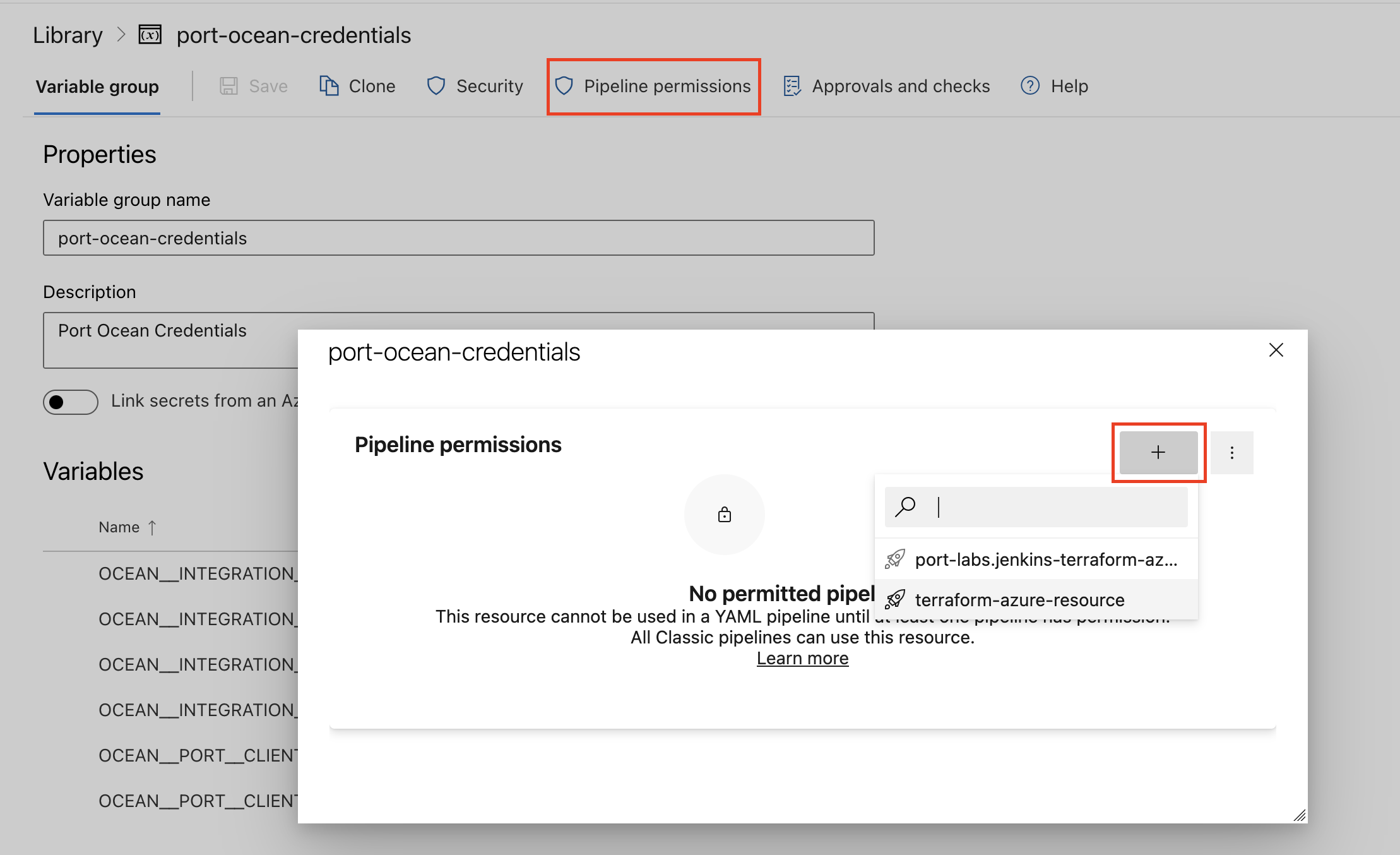
- Authorize Your Pipeline:
-
Go to "Library" -> "Variable groups."
-
Find port-ocean-credentials and click on it.
-
Select "Pipeline Permissions" and add your pipeline to the authorized list.
-
Below are the available parameters and their descriptions.
| Parameter | Description | Required? | Secret?Store this value as an Azure DevOps pipeline variable |
|---|---|---|---|
OCEAN__ | Your Port client ID (How to get the credentials). | ✓ | ✓ |
OCEAN__ | Your Port client secret (How to get the credentials). | ✓ | ✓ |
OCEAN__ | Your Port API URL (https://api.port.io for EU, https://api.us.port.io for US). | ✓ | ✗ |
OCEAN__ | Anthropic API key used to query the usage, cost, and analytics endpoints. | ✓ | ✓ |
OCEAN__ | Selects the deployment mode. Set to true (default) to sync Claude AI (Enterprise) analytics, or false to sync Claude Platform usage and cost reports. | ✗ | ✗ |
OCEAN__ | Anthropic API host. Defaults to https://api.anthropic.com. | ✗ | ✗ |
OCEAN__ | Anthropic API version. Defaults to 2023-06-01. | ✗ | ✗ |
OCEAN__ | Default true. When set to true, the integration will create default blueprints and the Port app config mapping. | ✗ | ✗ |
OCEAN__ | The identifier of the integration that will be installed. | ✗ | ✗ |
OCEAN__ | Enable sending raw data examples from the third-party API to Port for testing and managing the integration mapping. Default is true. | ✗ | ✗ |
Here is an example for a azure-pipeline.yml pipeline file:Azure pipeline (click to expand)
- Go to the Claude AI Connectors page in your portal.
- Under Select your installation method, choose your desired CI/CD platform.
- Copy the workflow and replace the placeholders with your values.
Below are the available parameters and their descriptions.
| Parameter | Description | Required? | Secret?Store this value as a GitLab CI/CD variable |
|---|---|---|---|
OCEAN__ | Your Port client ID (How to get the credentials). | ✓ | ✓ |
OCEAN__ | Your Port client secret (How to get the credentials). | ✓ | ✓ |
OCEAN__ | Your Port API URL (https://api.port.io for EU, https://api.us.port.io for US). | ✓ | ✗ |
OCEAN__ | Anthropic API key used to query the usage, cost, and analytics endpoints. | ✓ | ✓ |
OCEAN__ | Selects the deployment mode. Set to true (default) to sync Claude AI (Enterprise) analytics, or false to sync Claude Platform usage and cost reports. | ✗ | ✗ |
OCEAN__ | Anthropic API host. Defaults to https://api.anthropic.com. | ✗ | ✗ |
OCEAN__ | Anthropic API version. Defaults to 2023-06-01. | ✗ | ✗ |
OCEAN__ | Default true. When set to true, the integration will create default blueprints and the Port app config mapping. | ✗ | ✗ |
OCEAN__ | The identifier of the integration that will be installed. | ✗ | ✗ |
OCEAN__ | Enable sending raw data examples from the third-party API to Port for testing and managing the integration mapping. Default is true. | ✗ | ✗ |
Configuration
Port integrations use a YAML mapping block to ingest data from the third-party API into Port.
The mapping uses the JQ JSON processor to transform fields and shape incoming Claude data into Port entities.
Default mapping configuration
This is the default mapping configuration for this integration. It maps the Claude AI (Enterprise) resources, which are synced in the default deployment mode:
Default mapping configuration (click to expand)
resources:
  - kind: claude-ai-user-activity
    selector:
      query: 'true'
      timeFrame: 30
    port:
      entity:
        mappings:
          identifier: .user.id + "-" + .__date
          title: (.user.email_address // .user.id) + " - " + .__date
          blueprint: '"claude_ai_user_activity"'
          properties:
            record_date: .__date + "T00:00:00Z"
            user_id: .user.id
            email: .user.email_address
            chat_conversation_count: (.chat_metrics.distinct_conversation_count // 0)
            chat_message_count: (.chat_metrics.message_count // 0)
            chat_thinking_message_count: (.chat_metrics.thinking_message_count // 0)
            chat_skills_used_count: (.chat_metrics.distinct_skills_used_count // 0)
            chat_connectors_used_count: (.chat_metrics.connectors_used_count // 0)
            code_session_count: (.claude_code_metrics.core_metrics.distinct_session_count // 0)
            code_commit_count: (.claude_code_metrics.core_metrics.commit_count // 0)
            code_pull_request_count: (.claude_code_metrics.core_metrics.pull_request_count // 0)
            lines_added: (.claude_code_metrics.core_metrics.lines_of_code.added_count // 0)
            lines_removed: (.claude_code_metrics.core_metrics.lines_of_code.removed_count // 0)
            edit_tool_accepted: (.claude_code_metrics.tool_actions.edit_tool.accepted_count // 0)
            edit_tool_rejected: (.claude_code_metrics.tool_actions.edit_tool.rejected_count // 0)
            write_tool_accepted: (.claude_code_metrics.tool_actions.write_tool.accepted_count // 0)
            write_tool_rejected: (.claude_code_metrics.tool_actions.write_tool.rejected_count // 0)
            multi_edit_tool_accepted: (.claude_code_metrics.tool_actions.multi_edit_tool.accepted_count // 0)
            multi_edit_tool_rejected: (.claude_code_metrics.tool_actions.multi_edit_tool.rejected_count // 0)
            notebook_edit_tool_accepted: (.claude_code_metrics.tool_actions.notebook_edit_tool.accepted_count // 0)
            notebook_edit_tool_rejected: (.claude_code_metrics.tool_actions.notebook_edit_tool.rejected_count // 0)
            web_search_count: (.web_search_count // 0)
            chat_projects_used_count: (.chat_metrics.distinct_projects_used_count // 0)
            chat_projects_created_count: (.chat_metrics.distinct_projects_created_count // 0)
            chat_artifacts_created_count: (.chat_metrics.distinct_artifacts_created_count // 0)
            chat_files_uploaded_count: (.chat_metrics.distinct_files_uploaded_count // 0)
            chat_shared_conversations_viewed_count: (.chat_metrics.shared_conversations_viewed_count // 0)
            office_session_count: >-
              ([.office_metrics.excel.distinct_session_count,
              .office_metrics.powerpoint.distinct_session_count,
              .office_metrics.word.distinct_session_count,
              .office_metrics.outlook.distinct_session_count] | map(. // 0) | add)
            office_message_count: >-
              ([.office_metrics.excel.message_count,
              .office_metrics.powerpoint.message_count,
              .office_metrics.word.message_count,
              .office_metrics.outlook.message_count] | map(. // 0) | add)
            cowork_session_count: (.cowork_metrics.distinct_session_count // 0)
            cowork_message_count: (.cowork_metrics.message_count // 0)
            design_session_count: (.design_metrics.distinct_session_count // 0)
            design_message_count: (.design_metrics.message_count // 0)
  - kind: claude-ai-user-usage
    selector:
      query: 'true'
      startingAt: '2026-01-01T00:00:00Z'
    port:
      entity:
        mappings:
          identifier: >-
            .actor.user_id + "-" + .__starting_at[:10] + "-" + (.product // "all")
            + "-" + (.model // "all")
          title: (.actor.name // .actor.email // .actor.user_id) + " - " + .__starting_at[:10]
          blueprint: '"claude_ai_user_usage"'
          properties:
            record_date: .__starting_at
            range_end: .__ending_at
            user_id: .actor.user_id
            user_name: .actor.name
            email: .actor.email
            deleted: (.actor.deleted // false)
            product: .product
            model: .model
            context_window: .context_window
            inference_geo: .inference_geo
            speed: .speed
            uncached_input_tokens: (.uncached_input_tokens // 0)
            cache_creation_1h_tokens: (.cache_creation.ephemeral_1h_input_tokens // 0)
            cache_creation_5m_tokens: (.cache_creation.ephemeral_5m_input_tokens // 0)
            cache_read_input_tokens: (.cache_read_input_tokens // 0)
            output_tokens: (.output_tokens // 0)
            total_tokens: (.total_tokens // 0)
            web_search_requests: (.server_tool_use.web_search_requests // 0)
            requests: (.requests // 0)
  - kind: claude-ai-user-cost
    selector:
      query: 'true'
      startingAt: '2026-01-01T00:00:00Z'
    port:
      entity:
        mappings:
          identifier: >-
            .actor.user_id + "-" + .__starting_at[:10] + "-" + (.product // "all")
            + "-" + (.model // "all")
          title: (.actor.name // .actor.email // .actor.user_id) + " - " + .__starting_at[:10]
          blueprint: '"claude_ai_user_cost"'
          properties:
            record_date: .__starting_at
            range_end: .__ending_at
            user_id: .actor.user_id
            user_name: .actor.name
            email: .actor.email
            deleted: (.actor.deleted // false)
            product: .product
            model: .model
            currency: (.currency // "USD")
            amount: ((.amount // "0") | tonumber) / 100
            list_amount: ((.list_amount // "0") | tonumber) / 100
            requests: (.requests // 0)
  - kind: claude-ai-skill-usage
    selector:
      query: 'true'
      timeFrame: 30
    port:
      entity:
        mappings:
          identifier: >-
            ((.skill_name // "unknown") + "-" + .__date
            | gsub("[^A-Za-z0-9@_.+:\\\\/='-]"; "_"))
          title: ((.skill_display_name // .skill_name // "unknown") + " - " + .__date)
          blueprint: '"claude_ai_skill_usage"'
          properties:
            record_date: .__date + "T00:00:00Z"
            skill_name: (.skill_name // "unknown")
            skill_display_name: .skill_display_name
            distinct_user_count: .distinct_user_count
            enable_count: .enable_count
            invocation_count: .invocation_count
            share_status: .share_status
            currency: (.currency // "USD")
            estimated_overage_spend: (if .estimated_overage_spend then (.estimated_overage_spend | tonumber)  / 100 else null end)
            attributed_list_price: (if .attributed_list_price then (.attributed_list_price | tonumber)  / 100 else null end)
            chat_conversation_skill_used_count: .chat_metrics.distinct_conversation_skill_used_count
            code_session_skill_used_count: .claude_code_metrics.distinct_session_skill_used_count
            cowork_session_skill_used_count: .cowork_metrics.distinct_session_skill_used_count
            excel_session_skill_used_count: .office_metrics.excel.distinct_session_skill_used_count
            powerpoint_session_skill_used_count: .office_metrics.powerpoint.distinct_session_skill_used_count
            word_session_skill_used_count: .office_metrics.word.distinct_session_skill_used_count
            outlook_session_skill_used_count: .office_metrics.outlook.distinct_session_skill_used_count
Advanced selector configuration
The available selectors depend on the active deployment mode. query applies to all resource kinds in both modes and defaults to 'true'.
- Claude AI (Enterprise)
- Claude Platform
claude-ai-user-activity
This resource returns data for one specific day per call. The endpoint only returns data that is at least three days old, so the date window always ends roughly three days ago. To control the start of the window, provide one of timeFrame or startingDate (mutually exclusive). When you set neither, the integration defaults to a 30-day lookback.
| Field | Format | Description |
|---|---|---|
timeFrame | number | Number of days to look back, ending around three days ago. Must be greater than 0. Mutually exclusive with startingDate. Defaults to 30 when neither field is set. |
startingDate | YYYY-MM-DD | Iterates from this date once per day up to around three days ago, clamped to 2026-01-01 (the earliest available data). Use for historical backfills. Mutually exclusive with timeFrame. |
Using timeFrame (recommended for ongoing syncs):
selector:
  query: 'true'
  timeFrame: 30 # look back 30 days, one API call per day
Using startingDate (for a historical backfill):
selector:
  query: 'true'
  startingDate: '2026-01-01' # iterate from this date, one API call per day
claude-ai-skill-usage
This resource returns org-level skill usage for one specific day per call. The endpoint only returns data once it is available, typically with a 1-2 day lag, and is no earlier than 2026-01-01. To control the start of the window, provide one of timeFrame or startingDate (mutually exclusive). When you set neither, the integration defaults to a 30-day lookback.
| Field | Format | Description |
|---|---|---|
timeFrame | number | Number of days to look back, ending around two days ago. Must be greater than 0. Mutually exclusive with startingDate. Defaults to 30 when neither field is set. |
startingDate | YYYY-MM-DD | Iterates from this date once per day up to around two days ago, clamped to 2026-01-01 (the earliest available data). Use for historical backfills. Mutually exclusive with timeFrame. |
groupBy | array | Optional. Break skill usage out by one dimension at a time. Allowed values: user_id, product, rbac_group_id. Leave empty for org-level totals. product is one of chat, claude_code, cowork, or office_agent. See Breaking down analytics on user and team level. |
Using timeFrame (recommended for ongoing syncs):
selector:
  query: 'true'
  timeFrame: 30 # look back 30 days, one API call per day
Using startingDate (for a historical backfill):
selector:
  query: 'true'
  startingDate: '2026-01-01' # iterate from this date, one API call per day
claude-ai-user-usage and claude-ai-user-cost
These resources return per-user data across a date range and share the same selector fields.
| Field | Type | Description |
|---|---|---|
startingAt | string | RFC 3339 UTC start of the range (inclusive), e.g. 2026-01-01T00:00:00Z. Automatically clamped to the last 31 days and no earlier than 2026-01-01. Defaults to 2026-01-01T00:00:00Z. |
endingAt | string | RFC 3339 UTC end of the range (exclusive). Defaults to now. The range spans at most 31 days. |
excludeDeletedUsers | boolean | When true, rows for deleted users are omitted. Defaults to false. |
products | array | Filter to specific seat-based product surfaces. Allowed values: chat, claude_code, cowork, office_agent, claude_in_chrome, claude_design. |
models | array | Filter to specific model names. |
groupBy | array | Break each user's row out by the given dimensions. Allowed values: product, model, context_window, inference_geo, speed. |
contextWindows | array | Filter to specific context-window pricing tiers. Allowed values: 0-200k, 200k-1M. |
inferenceGeos | array | Filter to specific inference regions. Allowed values: global, us, not_available. |
speeds | array | Filter to fast or standard inference mode. Allowed values: fast, standard. |
selector:
  query: 'true'
  startingAt: '2026-01-01T00:00:00Z'
  endingAt: '2026-01-31T00:00:00Z'
  excludeDeletedUsers: false
  products: [chat, claude_code]
  groupBy: [product, model]
The Claude Platform selectors behave as follows:
startingDateis required forclaude-platform-usage-recordandclaude-platform-cost-record. Forclaude-platform-code-analytics, eitherstartingDateortimeFramemust be provided (mutually exclusive).bucketWidthcontrols time granularity for usage and cost resources.groupByis available forclaude-platform-usage-recordand lets you break down usage by dimensions.
claude-platform-usage-record
selector:
  query: 'true'
  startingDate: '2026-01-01T00:00:00Z'
  bucketWidth: 1d # supported: 1m | 1h | 1d
  groupBy: [workspace_id]
startingDatemust use ISO-8601 UTC format (YYYY-MM-DDTHH:MM:SSZ).bucketWidthsupports1m,1h, and1dfor usage records.groupBysupports dimensions such asapi_key_id,workspace_id,context_window,speed,inference_geo,account_id,service_account_id,model, andservice_tier.
claude-platform-cost-record
selector:
  query: 'true'
  startingDate: '2026-01-01T00:00:00Z'
  bucketWidth: 1d
startingDatemust use ISO-8601 UTC format (YYYY-MM-DDTHH:MM:SSZ).bucketWidthsupports1donly for cost records in this integration.
claude-platform-code-analytics
The API returns data for one specific day per call. To control the date window, provide exactly one of the following fields:
| Field | Format | Description |
|---|---|---|
timeFrame | number | Number of days to look back from today. The integration calls the API once per day for each of the last N days. Recommended for ongoing syncs. |
startingDate | YYYY-MM-DD | Iterates from this date to today, calling the API once per day. Use for historical backfills. A warning is logged and no data is fetched if the date is in the future. |
timeFrame and startingDate cannot both be set on claude-platform-code-analytics. Providing neither or both will cause a validation error.
Using timeFrame (recommended for ongoing syncs):
selector:
  query: 'true'
  timeFrame: 30 # fetch the last 30 days, one API call per day
Using startingDate (for a historical backfill):
selector:
  query: 'true'
  startingDate: '2026-01-01' # iterate from this date to today
Mapping & examples per resource
To view and test the integration mapping against sample API responses, use the jq playground in your connectors page.
- Claude AI (Enterprise)
- Claude Platform
{
  "identifier": "claude_ai_user_activity",
  "description": "Per-user Claude (chat) and Claude Code engagement metrics for a single day",
  "title": "Claude AI User Activity",
  "icon": "Claude",
  "schema": {
    "properties": {
      "record_date": {
        "type": "string",
        "format": "date-time",
        "title": "Record Date (UTC)"
      },
      "user_id": {
        "type": "string",
        "title": "User ID"
      },
      "email": {
        "type": "string",
        "format": "user",
        "title": "Email"
      },
      "chat_conversation_count": {
        "type": "number",
        "title": "Chat Conversations"
      },
      "chat_message_count": {
        "type": "number",
        "title": "Chat Messages"
      },
      "chat_thinking_message_count": {
        "type": "number",
        "title": "Chat Thinking Messages"
      },
      "chat_skills_used_count": {
        "type": "number",
        "title": "Chat Skills Used"
      },
      "chat_connectors_used_count": {
        "type": "number",
        "title": "Chat Connectors Used"
      },
      "code_session_count": {
        "type": "number",
        "title": "Claude Code Sessions"
      },
      "code_commit_count": {
        "type": "number",
        "title": "Claude Code Commits"
      },
      "code_pull_request_count": {
        "type": "number",
        "title": "Claude Code Pull Requests"
      },
      "lines_added": {
        "type": "number",
        "title": "Lines Added"
      },
      "lines_removed": {
        "type": "number",
        "title": "Lines Removed"
      },
      "edit_tool_accepted": {
        "type": "number",
        "title": "Edit Tool Accepted"
      },
      "edit_tool_rejected": {
        "type": "number",
        "title": "Edit Tool Rejected"
      },
      "write_tool_accepted": {
        "type": "number",
        "title": "Write Tool Accepted"
      },
      "write_tool_rejected": {
        "type": "number",
        "title": "Write Tool Rejected"
      },
      "web_search_count": {
        "type": "number",
        "title": "Web Search Count"
      },
      "chat_projects_used_count": {
        "type": "number",
        "title": "Chat Projects Used"
      },
      "chat_projects_created_count": {
        "type": "number",
        "title": "Chat Projects Created"
      },
      "chat_artifacts_created_count": {
        "type": "number",
        "title": "Chat Artifacts Created"
      },
      "chat_files_uploaded_count": {
        "type": "number",
        "title": "Chat Files Uploaded"
      },
      "chat_shared_conversations_viewed_count": {
        "type": "number",
        "title": "Chat Shared Conversations Viewed"
      },
      "multi_edit_tool_accepted": {
        "type": "number",
        "title": "Multi-Edit Tool Accepted"
      },
      "multi_edit_tool_rejected": {
        "type": "number",
        "title": "Multi-Edit Tool Rejected"
      },
      "notebook_edit_tool_accepted": {
        "type": "number",
        "title": "Notebook Edit Tool Accepted"
      },
      "notebook_edit_tool_rejected": {
        "type": "number",
        "title": "Notebook Edit Tool Rejected"
      },
      "office_session_count": {
        "type": "number",
        "title": "Office Sessions (Excel/PPT/Word/Outlook)"
      },
      "office_message_count": {
        "type": "number",
        "title": "Office Messages"
      },
      "cowork_session_count": {
        "type": "number",
        "title": "Cowork Sessions"
      },
      "cowork_message_count": {
        "type": "number",
        "title": "Cowork Messages"
      },
      "design_session_count": {
        "type": "number",
        "title": "Design Sessions"
      },
      "design_message_count": {
        "type": "number",
        "title": "Design Messages"
      }
    },
    "required": [
      "record_date"
    ]
  },
  "mirrorProperties": {},
  "calculationProperties": {
    "total_lines_changed": {
      "title": "Total Lines Changed",
      "calculation": ".properties.lines_added + .properties.lines_removed",
      "type": "number"
    },
    "edit_acceptance_rate": {
      "title": "Edit Acceptance Rate",
      "calculation": "if (.properties.edit_tool_accepted + .properties.edit_tool_rejected) > 0 then (.properties.edit_tool_accepted / (.properties.edit_tool_accepted + .properties.edit_tool_rejected)) * 100 else 0 end",
      "type": "number"
    }
  },
  "aggregationProperties": {},
  "relations": {}
}
- kind: claude-ai-user-activity
  selector:
    query: 'true'
    timeFrame: 30
  port:
    entity:
      mappings:
        identifier: .user.id + "-" + .__date
        title: (.user.email_address // .user.id) + " - " + .__date
        blueprint: '"claude_ai_user_activity"'
        properties:
          record_date: .__date + "T00:00:00Z"
          user_id: .user.id
          email: .user.email_address
          chat_conversation_count: (.chat_metrics.distinct_conversation_count // 0)
          chat_message_count: (.chat_metrics.message_count // 0)
          chat_thinking_message_count: (.chat_metrics.thinking_message_count // 0)
          chat_skills_used_count: (.chat_metrics.distinct_skills_used_count // 0)
          chat_connectors_used_count: (.chat_metrics.connectors_used_count // 0)
          code_session_count: (.claude_code_metrics.core_metrics.distinct_session_count // 0)
          code_commit_count: (.claude_code_metrics.core_metrics.commit_count // 0)
          code_pull_request_count: (.claude_code_metrics.core_metrics.pull_request_count // 0)
          lines_added: (.claude_code_metrics.core_metrics.lines_of_code.added_count // 0)
          lines_removed: (.claude_code_metrics.core_metrics.lines_of_code.removed_count // 0)
          edit_tool_accepted: (.claude_code_metrics.tool_actions.edit_tool.accepted_count // 0)
          edit_tool_rejected: (.claude_code_metrics.tool_actions.edit_tool.rejected_count // 0)
          write_tool_accepted: (.claude_code_metrics.tool_actions.write_tool.accepted_count // 0)
          write_tool_rejected: (.claude_code_metrics.tool_actions.write_tool.rejected_count // 0)
          multi_edit_tool_accepted: (.claude_code_metrics.tool_actions.multi_edit_tool.accepted_count // 0)
          multi_edit_tool_rejected: (.claude_code_metrics.tool_actions.multi_edit_tool.rejected_count // 0)
          notebook_edit_tool_accepted: (.claude_code_metrics.tool_actions.notebook_edit_tool.accepted_count // 0)
          notebook_edit_tool_rejected: (.claude_code_metrics.tool_actions.notebook_edit_tool.rejected_count // 0)
          web_search_count: (.web_search_count // 0)
          chat_projects_used_count: (.chat_metrics.distinct_projects_used_count // 0)
          chat_projects_created_count: (.chat_metrics.distinct_projects_created_count // 0)
          chat_artifacts_created_count: (.chat_metrics.distinct_artifacts_created_count // 0)
          chat_files_uploaded_count: (.chat_metrics.distinct_files_uploaded_count // 0)
          chat_shared_conversations_viewed_count: (.chat_metrics.shared_conversations_viewed_count // 0)
          office_session_count: >-
            ([.office_metrics.excel.distinct_session_count,
            .office_metrics.powerpoint.distinct_session_count,
            .office_metrics.word.distinct_session_count,
            .office_metrics.outlook.distinct_session_count] | map(. // 0) | add)
          office_message_count: >-
            ([.office_metrics.excel.message_count,
            .office_metrics.powerpoint.message_count,
            .office_metrics.word.message_count,
            .office_metrics.outlook.message_count] | map(. // 0) | add)
          cowork_session_count: (.cowork_metrics.distinct_session_count // 0)
          cowork_message_count: (.cowork_metrics.message_count // 0)
          design_session_count: (.design_metrics.distinct_session_count // 0)
          design_message_count: (.design_metrics.message_count // 0)
{
  "user": {
    "id": "user_01VxtsnMPZAsxdeoXJB9BFp1",
    "email_address": "dev@domain.io"
  },
  "distinct_user_count": null,
  "chat_metrics": {
    "distinct_conversation_count": 2,
    "message_count": 4,
    "thinking_message_count": 0,
    "distinct_projects_used_count": 0,
    "distinct_projects_created_count": 0,
    "distinct_artifacts_created_count": 0,
    "distinct_skills_used_count": 0,
    "connectors_used_count": 0,
    "distinct_files_uploaded_count": 0,
    "shared_conversations_viewed_count": 0,
    "distinct_shared_artifacts_viewed_count": 0
  },
  "claude_code_metrics": {
    "core_metrics": {
      "distinct_session_count": 0,
      "commit_count": 0,
      "pull_request_count": 0,
      "lines_of_code": {
        "added_count": 0,
        "removed_count": 0
      }
    },
    "tool_actions": {
      "edit_tool": {
        "accepted_count": 0,
        "rejected_count": 0
      },
      "multi_edit_tool": {
        "accepted_count": 0,
        "rejected_count": 0
      },
      "write_tool": {
        "accepted_count": 0,
        "rejected_count": 0
      },
      "notebook_edit_tool": {
        "accepted_count": 0,
        "rejected_count": 0
      }
    }
  },
  "office_metrics": {
    "excel": {
      "distinct_session_count": 0,
      "message_count": 0,
      "skills_used_count": 0,
      "distinct_skills_used_count": 0,
      "connectors_used_count": 0,
      "distinct_connectors_used_count": 0
    },
    "powerpoint": {
      "distinct_session_count": 0,
      "message_count": 0,
      "skills_used_count": 0,
      "distinct_skills_used_count": 0,
      "connectors_used_count": 0,
      "distinct_connectors_used_count": 0
    },
    "word": {
      "distinct_session_count": 0,
      "message_count": 0,
      "skills_used_count": 0,
      "distinct_skills_used_count": 0,
      "connectors_used_count": 0,
      "distinct_connectors_used_count": 0
    },
    "outlook": {
      "distinct_session_count": 0,
      "message_count": 0,
      "skills_used_count": 0,
      "distinct_skills_used_count": 0,
      "connectors_used_count": 0,
      "distinct_connectors_used_count": 0
    }
  },
  "cowork_metrics": {
    "distinct_session_count": 0,
    "action_count": 0,
    "file_edit_count": null,
    "edit_tool_count": null,
    "multi_edit_tool_count": null,
    "write_tool_count": null,
    "notebook_edit_tool_count": null,
    "sessions_with_file_edits_count": null,
    "dispatch_turn_count": 0,
    "message_count": 0,
    "skills_used_count": 0,
    "distinct_skills_used_count": 0,
    "connectors_used_count": 0,
    "distinct_connectors_used_count": 0
  },
  "design_metrics": {
    "distinct_session_count": 0,
    "distinct_projects_used_count": 0,
    "distinct_projects_created_count": 0,
    "message_count": 0
  },
  "web_search_count": 0,
  "__date": "2026-05-14"
}
{
  "identifier": "claude_platform_usage_record",
  "description": "Daily Claude Platform API usage metrics",
  "title": "Claude Platform Usage Record",
  "icon": "Claude",
  "schema": {
    "properties": {
      "record_date": {
        "type": "string",
        "format": "date-time",
        "title": "Record Date (UTC)"
      },
      "uncached_input_tokens": {
        "type": "number",
        "title": "Uncached Input Tokens"
      },
      "output_tokens": {
        "type": "number",
        "title": "Output Tokens"
      },
      "cache_read_input_tokens": {
        "type": "number",
        "title": "Cache Read Input Tokens"
      },
      "cache_creation_5m_tokens": {
        "type": "number",
        "title": "Cache Creation (5min) Tokens"
      },
      "cache_creation_1h_tokens": {
        "type": "number",
        "title": "Cache Creation (1hr) Tokens"
      },
      "web_search_requests": {
        "type": "number",
        "title": "Web Search Requests"
      }
    },
    "required": [
      "record_date"
    ]
  },
  "mirrorProperties": {},
  "calculationProperties": {
    "total_input_tokens": {
      "title": "Total Input Tokens",
      "description": "Sum of uncached input and cache read tokens",
      "calculation": ".properties.uncached_input_tokens + .properties.cache_read_input_tokens",
      "type": "number"
    },
    "total_tokens": {
      "title": "Total Tokens",
      "description": "Sum of all input and output tokens",
      "calculation": ".properties.uncached_input_tokens + .properties.cache_read_input_tokens + .properties.output_tokens",
      "type": "number"
    }
  },
  "aggregationProperties": {},
  "relations": {}
}
- kind: claude-platform-usage-record
  selector:
    query: .results | length > 0
    startingDate: '2026-01-01T00:00:00Z'
    bucketWidth: 1d
    groupBy: []
  port:
    entity:
      mappings:
        identifier: .starting_at[:10] + "-usage"
        title: '"Claude Usage - " + .starting_at[:10]'
        blueprint: '"claude_platform_usage_record"'
        properties:
          record_date: .starting_at
          uncached_input_tokens: (.results[0].uncached_input_tokens // 0)
          output_tokens: (.results[0].output_tokens // 0)
          cache_read_input_tokens: (.results[0].cache_read_input_tokens // 0)
          cache_creation_5m_tokens: (.results[0].cache_creation.ephemeral_5m_input_tokens // 0)
          cache_creation_1h_tokens: (.results[0].cache_creation.ephemeral_1h_input_tokens // 0)
          web_search_requests: (.results[0].server_tool_use.web_search_requests // 0)
{
  "starting_at": "2026-01-04T00:00:00Z",
  "ending_at": "2026-01-05T00:00:00Z",
  "results": [
    {
      "uncached_input_tokens": 10158,
      "cache_creation": {
        "ephemeral_1h_input_tokens": 0,
        "ephemeral_5m_input_tokens": 183637
      },
      "cache_read_input_tokens": 1207221,
      "output_tokens": 16925,
      "server_tool_use": {
        "web_search_requests": 0
      },
      "api_key_id": null,
      "workspace_id": null,
      "account_id": null,
      "service_account_id": null,
      "model": null,
      "service_tier": null,
      "context_window": null,
      "inference_geo": null
    }
  ]
}
Breaking down analytics on user and team level
The default claude-ai-skill-usage mapping stores org-level totals (one row per skill per day). You can break the same metrics out by user, team, or product by setting groupBy to one of user_id, rbac_group_id, or product. Use one dimension at a time.
To ingest user- or team-level rows, add two properties to the existing claude_ai_skill_usage blueprint, then update the kind mapping. Grouped identifiers include the user or team, so they do not overwrite org-level records.
Add blueprint properties
-
Go to your data model page.
-
Find and expand the Claude AI Skill Usage (
claude_ai_skill_usage) blueprint. -
Click the
...button, then Edit Blueprint. -
Add the following properties to the blueprint
schema.propertiesobject, then click Save."user_id": {"type": "string","title": "User ID"},"rbac_group_id": {"type": "string","title": "RBAC Group ID"},"rbac_group_name": {"type": "string","title": "RBAC Group Name"}
Update the mapping
- Go to your connectors page.
- Select your Claude AI integration, then open the Mapping tab.
- Update the
claude-ai-skill-usagekind: setgroupByto one of the three dimensions. Then click Save & Resync.
- User
- Team
Set groupBy to user_id and map the user_id property:
- kind: claude-ai-skill-usage
  selector:
    query: 'true'
    timeFrame: 30
    groupBy:
      - user_id
  port:
    entity:
      mappings:
        identifier: >-
          ((.skill_name // "unknown") + "-" + .__date + (if .user_id then "-" + .user_id else "" end) | gsub("[^A-Za-z0-9@_.+:\\\\/='-]"; "_"))
        title: >-
          ((.skill_display_name // .skill_name // "unknown") + " - " + .__date + (if .user_id then " - " + .user_id else "" end))
        blueprint: '"claude_ai_skill_usage"'
        properties:
          record_date: .__date + "T00:00:00Z"
          skill_name: (.skill_name // "unknown")
          skill_display_name: .skill_display_name
          user_id: .user_id
          distinct_user_count: .distinct_user_count
          enable_count: .enable_count
          invocation_count: .invocation_count
          share_status: .share_status
          currency: (.currency // "USD")
          estimated_overage_spend: (if .estimated_overage_spend then (.estimated_overage_spend | tonumber)  / 100 else null end)
          attributed_list_price: (if .attributed_list_price then (.attributed_list_price | tonumber)  / 100 else null end)
          chat_conversation_skill_used_count: .chat_metrics.distinct_conversation_skill_used_count
          code_session_skill_used_count: .claude_code_metrics.distinct_session_skill_used_count
          cowork_session_skill_used_count: .cowork_metrics.distinct_session_skill_used_count
          excel_session_skill_used_count: .office_metrics.excel.distinct_session_skill_used_count
          powerpoint_session_skill_used_count: .office_metrics.powerpoint.distinct_session_skill_used_count
          word_session_skill_used_count: .office_metrics.word.distinct_session_skill_used_count
          outlook_session_skill_used_count: .office_metrics.outlook.distinct_session_skill_used_count
Set groupBy to rbac_group_id and map the rbac_group_id and rbac_group_name properties:
- kind: claude-ai-skill-usage
  selector:
    query: 'true'
    timeFrame: 30
    groupBy:
      - rbac_group_id
  port:
    entity:
      mappings:
        identifier: >-
          ((.skill_name // "unknown") + "-" + .__date + (if .rbac_group_id then "-" + .rbac_group_id else "" end) | gsub("[^A-Za-z0-9@_.+:\\\\/='-]"; "_"))
        title: >-
          ((.skill_display_name // .skill_name // "unknown") + " - " + .__date + (if .rbac_group_name then " - " + .rbac_group_name elif .rbac_group_id then " - " + .rbac_group_id else "" end))
        blueprint: '"claude_ai_skill_usage"'
        properties:
          record_date: .__date + "T00:00:00Z"
          skill_name: (.skill_name // "unknown")
          skill_display_name: .skill_display_name
          rbac_group_id: .rbac_group_id
          rbac_group_name: .rbac_group_name
          distinct_user_count: .distinct_user_count
          enable_count: .enable_count
          invocation_count: .invocation_count
          share_status: .share_status
          currency: (.currency // "USD")
          estimated_overage_spend: (if .estimated_overage_spend then (.estimated_overage_spend | tonumber)  / 100 else null end)
          attributed_list_price: (if .attributed_list_price then (.attributed_list_price | tonumber)  / 100 else null end)
          chat_conversation_skill_used_count: .chat_metrics.distinct_conversation_skill_used_count
          code_session_skill_used_count: .claude_code_metrics.distinct_session_skill_used_count
          cowork_session_skill_used_count: .cowork_metrics.distinct_session_skill_used_count
          excel_session_skill_used_count: .office_metrics.excel.distinct_session_skill_used_count
          powerpoint_session_skill_used_count: .office_metrics.powerpoint.distinct_session_skill_used_count
          word_session_skill_used_count: .office_metrics.word.distinct_session_skill_used_count
          outlook_session_skill_used_count: .office_metrics.outlook.distinct_session_skill_used_count
When grouping by rbac_group_id, a user is attributed to every group they held during that UTC day. Grouped rows are not an exclusive partition and can sum above org-level totals.
Monitoring and sync status
To learn more about how to monitor and check the sync status of your integration, see the relevant documentation.
Migration guide
If you currently ingest Claude metrics through a custom Ocean integration, migrate to the dedicated Claude AI integration:
- Create the new Claude AI connector from your connectors page.
- Copy your existing Claude API credentials into the new integration setup.
- Move your custom blueprint and mapping configuration into the dedicated integration.
- Run a sync and validate that records are ingested for all enabled resources.
- Disable the legacy custom Ocean Claude integration after validation.
Related pages
- Skills usage analytics: high-level guide to analyzing skill adoption across Cursor and Claude.
- Visualize Claude metrics: dashboards for Claude usage and cost.