Kubernetes

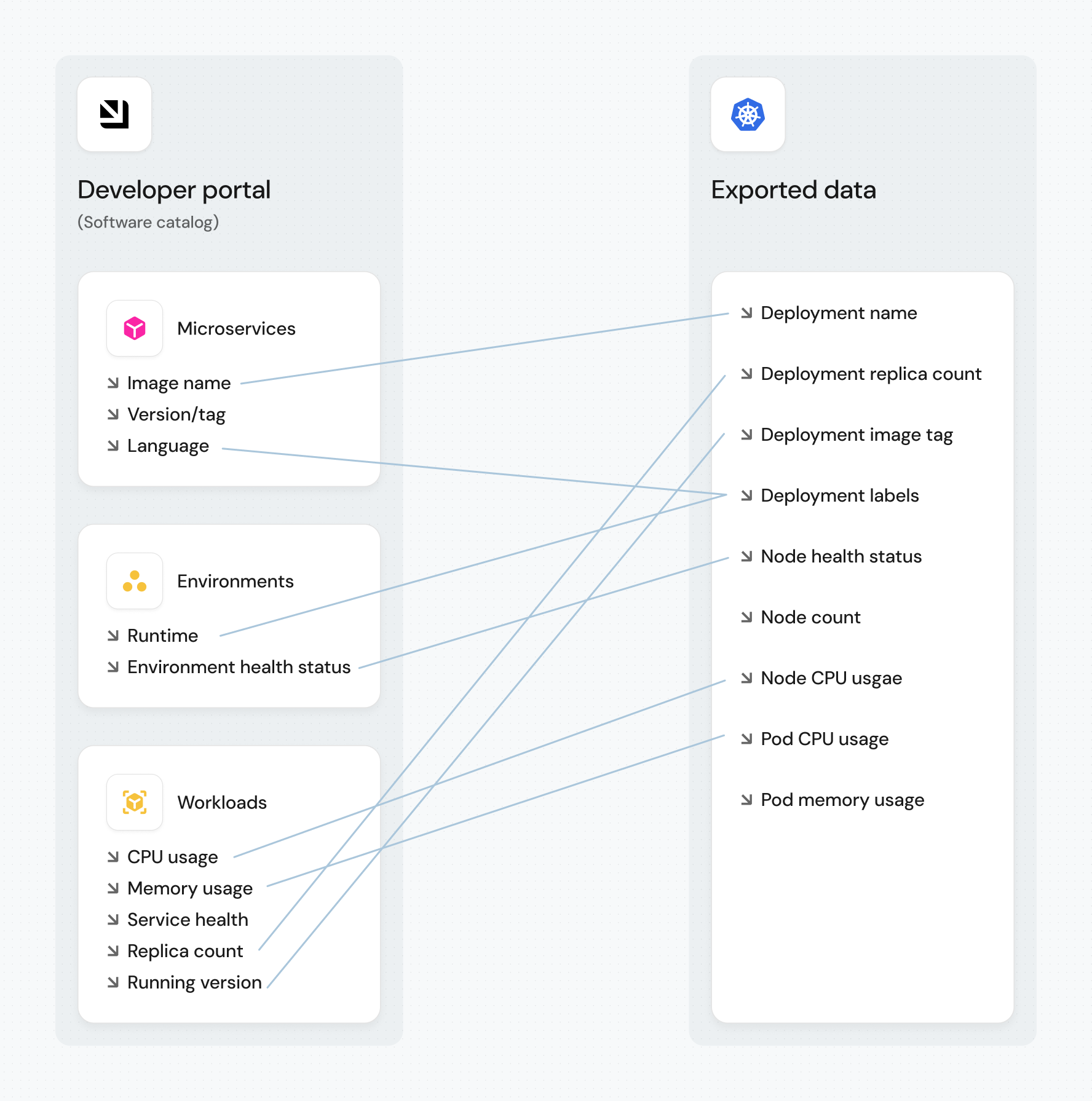
Port's Kubernetes integration allows you to model Kubernetes resources in your software catalog and ingest data into them.

Core support
Port's Kubernetes exporter is open source, view the source code here.
Common use cases
- Visualize and organize your Kubernetes resources and their metadata in Port's software catalog.
- Get real-time visibility into your cluster by automatically syncing resource changes (create, update, delete) to Port.
- Create a complete map of your K8s cluster using relations between resources.
- Ingest resources from common CRDs such as ArgoCD, Istio, and more.
Prerequisites
- Helm must be installed.
- You have your Port credentials (Client ID and Client Secret).
Setup
The prerequisites required for installation are listed below.
Configuration
Port integrations use a YAML mapping block to ingest data from the third-party api into Port.
The mapping makes use of the JQ JSON processor to select, modify, concatenate, transform and perform other operations on existing fields and values from the integration API.
By default, the mapping configuration defined in your Helm values is synced to Port only during the initial installation. After that, Port's UI is the source of truth. To edit the mapping, click on the integration in your data sources page and click Save & Resync to apply changes. If you prefer to manage your mapping declaratively via Helm or GitOps, see Manage K8s mapping config.
Default mapping configuration
This is the default mapping configuration for this integration:
Default mapping configuration (click to expand)
deleteDependentEntities: true
createMissingRelatedEntities: true
enableMergeEntity: true
resources:
- kind: v1/namespaces
  selector:
    query: .metadata.name | contains("kube-system")
  port:
    entity:
      mappings:
      - identifier: env.CLUSTER_NAME
        title: env.CLUSTER_NAME
        blueprint: '"k8s_cluster"'
- kind: v1/namespaces
  selector:
    query: .metadata.name | startswith("kube") | not
  port:
    entity:
      mappings:
      - identifier: .metadata.name + "-" + env.CLUSTER_NAME
        title: .metadata.name
        blueprint: '"k8s_namespace"'
        properties:
          creationTimestamp: .metadata.creationTimestamp
          labels: .metadata.labels
        relations:
          Cluster: env.CLUSTER_NAME
- kind: v1/nodes
  selector:
    query: 'true'
  port:
    entity:
      mappings:
      - identifier: (.metadata.name) | (split(".")|join("_")) + "-" + env.CLUSTER_NAME
        title: .metadata.name + "-" + env.CLUSTER_NAME
        blueprint: '"k8s_node"'
        properties:
          creationTimestamp: .metadata.creationTimestamp
          totalCPU: .status.allocatable.cpu
          totalMemory: .status.allocatable.memory
          labels: .metadata.labels
          kubeletVersion: .status.nodeInfo.kubeletVersion | split("-") | .[0]
          ready: .status.conditions[] | select(.type == "Ready") | .status
        relations:
          Cluster: env.CLUSTER_NAME
- kind: apps/v1/deployments
  selector:
    query: .metadata.namespace | startswith("kube") | not
  port:
    entity:
      mappings:
      - identifier: .metadata.name + "-Deployment-" + .metadata.namespace + "-" + env.CLUSTER_NAME
        title: .metadata.name
        blueprint: '"k8s_workload"'
        properties:
          kind: '"Deployment"'
          creationTimestamp: .metadata.creationTimestamp
          replicas: .spec.replicas
          hasPrivileged: .spec.template.spec.containers | [.[].securityContext.privileged] | any
          hasLatest: .spec.template.spec.containers[].image | contains(":latest")
          hasLimits: .spec.template.spec.containers | all(has("resources") and (.resources.limits.memory and .resources.limits.cpu))
          strategyConfig: .spec.strategy // {}
          strategy: .spec.strategy.type
          availableReplicas: .status.availableReplicas
          labels: .metadata.labels
          containers: (.spec.template.spec.containers | map({name, image, resources}))
          isHealthy: if .spec.replicas == .status.availableReplicas then "Healthy" else "Unhealthy" end
        relations:
          Namespace: .metadata.namespace + "-" + env.CLUSTER_NAME
- kind: apps/v1/daemonsets
  selector:
    query: .metadata.namespace | startswith("kube") | not
  port:
    entity:
      mappings:
      - identifier: .metadata.name + "-DaemonSet-" + .metadata.namespace + "-" + env.CLUSTER_NAME
        title: .metadata.name
        blueprint: '"k8s_workload"'
        properties:
          kind: '"DaemonSet"'
          creationTimestamp: .metadata.creationTimestamp
          replicas: .spec.replicas
          strategyConfig: .spec.strategy // {}
          availableReplicas: .status.availableReplicas
          hasPrivileged: .spec.template.spec.containers | [.[].securityContext.privileged] | any
          labels: .metadata.labels
          hasLatest: .spec.template.spec.containers[].image | contains(":latest")
          hasLimits: .spec.template.spec.containers | all(has("resources") and (.resources.limits.memory and .resources.limits.cpu))
          containers: (.spec.template.spec.containers | map({name, image, resources}))
          isHealthy: if .spec.replicas == .status.availableReplicas then "Healthy" else "Unhealthy" end
        relations:
          Namespace: .metadata.namespace + "-" + env.CLUSTER_NAME
- kind: apps/v1/statefulsets
  selector:
    query: .metadata.namespace | startswith("kube") | not
  port:
    entity:
      mappings:
      - identifier: .metadata.name + "-StatefulSet-" + .metadata.namespace + "-" + env.CLUSTER_NAME
        title: .metadata.name
        blueprint: '"k8s_workload"'
        properties:
          kind: '"StatefulSet"'
          labels: .metadata.labels
          creationTimestamp: .metadata.creationTimestamp
          strategyConfig: .spec.strategy // {}
          replicas: .spec.replicas
          availableReplicas: .status.availableReplicas
          hasLatest: .spec.template.spec.containers[].image | contains(":latest")
          hasPrivileged: .spec.template.spec.containers | [.[].securityContext.privileged] | any
          hasLimits: .spec.template.spec.containers | all(has("resources") and (.resources.limits.memory and .resources.limits.cpu))
          containers: (.spec.template.spec.containers | map({name, image, resources}))
          isHealthy: if .spec.replicas == .status.availableReplicas then "Healthy" else "Unhealthy" end
        relations:
          Namespace: .metadata.namespace + "-" + env.CLUSTER_NAME
- kind: apps/v1/replicasets
  selector:
    query: .metadata.namespace | startswith("kube") | not
  port:
    entity:
      mappings:
      - identifier: .metadata.name + "-ReplicaSet-" + .metadata.namespace + "-" + env.CLUSTER_NAME
        title: .metadata.name
        blueprint: '"k8s_replicaSet"'
        properties:
          creationTimestamp: .metadata.creationTimestamp
          replicas: .spec.replicas
          hasPrivileged: .spec.template.spec.containers | [.[].securityContext.privileged] | any
          hasLatest: .spec.template.spec.containers[].image | contains(":latest")
          hasLimits: .spec.template.spec.containers | all(has("resources") and (.resources.limits.memory and .resources.limits.cpu))
          strategy: .spec.strategy.type
          availableReplicas: .status.availableReplicas
          labels: .metadata.labels
          containers: (.spec.template.spec.containers | map({name, image, resources}))
          isHealthy: if .spec.replicas == .status.availableReplicas then "Healthy" else "Unhealthy" end
        relations:
          replicaSetManager: .metadata.ownerReferences[0].name + "-" + .metadata.ownerReferences[0].kind + "-" + .metadata.namespace + "-" + env.CLUSTER_NAME // []
          workload:
            combinator: '"and"'
            rules:
            - operator: '"="'
              property: '"workload_identifier"'
              value: .metadata.ownerReferences[0].name + "-" + .metadata.ownerReferences[0].kind + "-" + .metadata.namespace + "-" + env.CLUSTER_NAME // []
- kind: v1/pods
  selector:
    query: (.metadata.ownerReferences[0].kind == "ReplicaSet") and (.metadata.namespace | startswith("kube") | not)
  port:
    entity:
      mappings:
      - identifier: .metadata.name + "-" + .metadata.namespace + "-" + env.CLUSTER_NAME
        title: .metadata.name
        blueprint: '"k8s_pod"'
        properties:
          startTime: .status.startTime
          phase: .status.phase
          labels: .metadata.labels
        relations:
          replicaSet: .metadata.ownerReferences[0].name + "-" + "ReplicaSet" + "-" + .metadata.namespace + "-" + env.CLUSTER_NAME
          Node: (.spec.nodeName) | (split(".")|join("_")) + "-" + env.CLUSTER_NAME
- kind: v1/pods
  selector:
    query: (.metadata.ownerReferences[0].kind != "ReplicaSet") and (.metadata.namespace | startswith("kube") | not)
  port:
    entity:
      mappings:
      - identifier: .metadata.name + "-" + .metadata.namespace + "-" + env.CLUSTER_NAME
        title: .metadata.name
        blueprint: '"k8s_pod"'
        properties:
          startTime: .status.startTime
          phase: .status.phase
          labels: .metadata.labels
        relations:
          k8s_workload: .metadata.ownerReferences[0].name + "-" + .metadata.ownerReferences[0].kind + "-" + .metadata.namespace + "-" + env.CLUSTER_NAME
          Node: (.spec.nodeName) | (split(".")|join("_")) + "-" + env.CLUSTER_NAME
          workload:
            combinator: '"and"'
            rules:
            - operator: '"="'
              property: '"workload_identifier"'
              value: .metadata.ownerReferences[0].name + "-" + .metadata.ownerReferences[0].kind + "-" + .metadata.namespace + "-" + env.CLUSTER_NAME
Mapping & selectors per resource
Use the explorer below to view sample payloads and the resulting Port entities for each resource type. For additional resources and advanced configurations, see the examples page.
Monitoring and sync status
To learn more about how to monitor and check the sync status of your integration, see the relevant documentation.
Capabilities
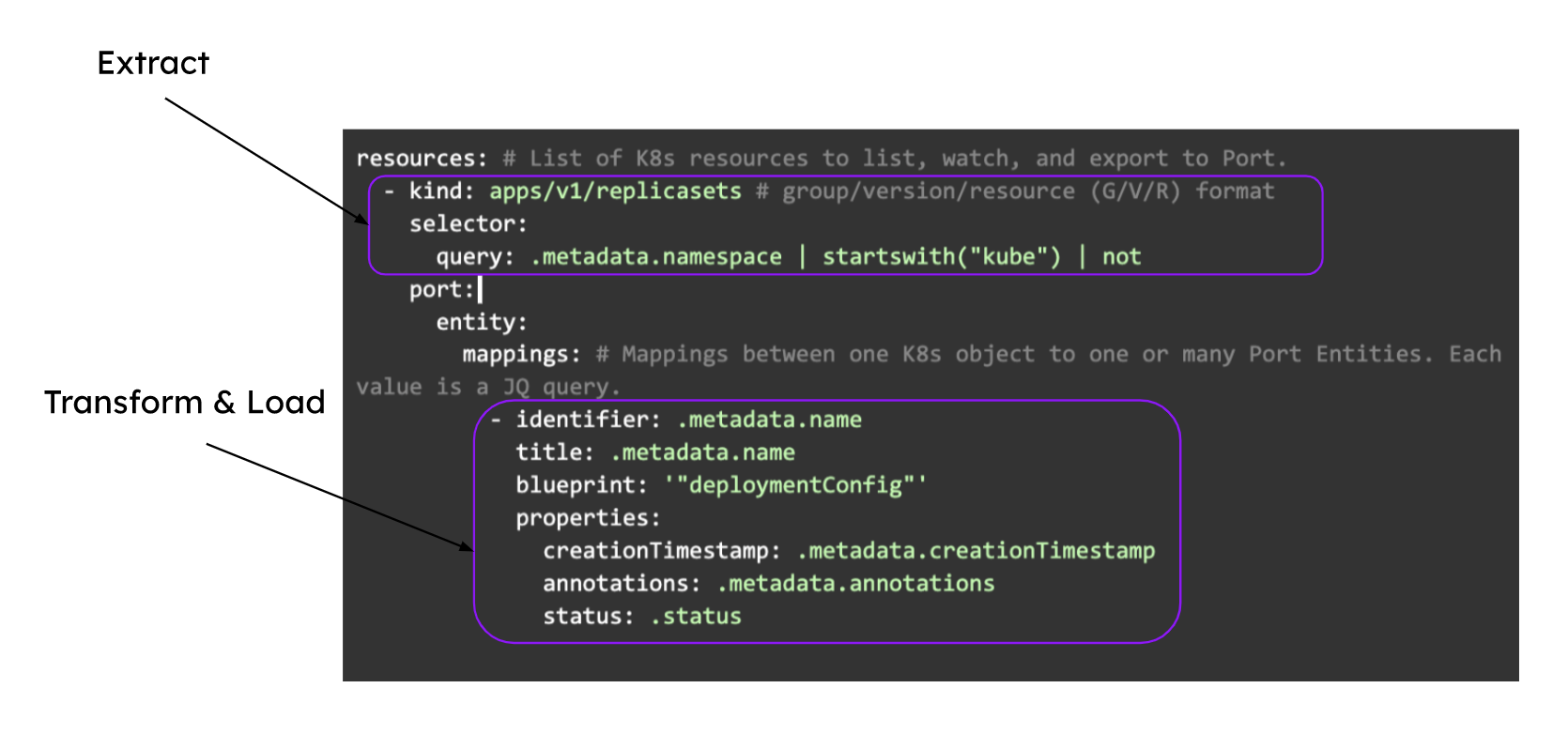
Extract, Transform, Load (ETL)
Port's Kubernetes exporter performs ETL on data from K8s into your desired software catalog data model:
How it works
The exporter is deployed using a Helm chart installed on the cluster. Once it is set up, it continues to sync changes, meaning that all changes, deletions or additions are accurately and automatically reflected in Port.
The helm chart uses a YAML configuration stored in the integration within your Portal. This configuration describes the ETL process responsible for loading data into the developer portal. The approach reflects a golden middle between an overly opinionated K8s visualization that might not work for everyone and a too-broad approach that could introduce unneeded complexity into the developer portal.
Here is an example snippet from the integration configuration which demonstrates the ETL process for getting ReplicaSet data from the cluster and into the software catalog:
Examples
To view and test the integration's mapping against examples of the third-party API responses, use the jq playground in your data sources page. Find the integration in the list of data sources and click on it to open the playground.
Examples of blueprints and the relevant integration configurations can be found on the Kubernetes basic examples page.
This section includes sample response data from Kubernetes. In addition, it includes the entity created from the resync event based on the Ocean configuration provided in the previous section.
Templates
Port provides several pre-built templates to help you quickly get started with common Kubernetes use cases. These templates include pre-configured blueprints, mapping configurations, and setup instructions.
Check out the templates page to find the template that best fits your needs.
Relevant Guides
For relevant guides and examples, see the guides section.
Advanced
Refer to the advanced page for advanced use cases and outputs.