PagerDuty

Port's PagerDuty integration allows you to model PagerDuty resources in your software catalog and ingest data into them.

Core support
The resources listed above are just a subset of what the PagerDuty integration supports. You can ingest additional PagerDuty resources if they have a GET List <resource name> endpoint in the PagerDuty API documentation. This means, resources such as teams, audit records, business services, extensions, incident workflows, status dashboards, vendor etc can be ingested into Port.
Setup
Choose one of the following installation methods: Not sure which method is right for your use case? Check the available installation methods.
The prerequisites required for installation are listed below.
- Go to the PagerDuty Connectors page in your portal.
- Under
Select your installation method, chooseHosted by Port. - Click
Connectto authorize Port via OAuth and install the integration.
Before clickingConnect, you can customize settings underAdvanced configuration(see below for details).
Advanced configuration
- During the installation process each integration may have additional settings under the
Advanced configurationsection in Port's UI. Additionally, each integration has one or more settings that can be configured after installation. To do so, click on the integration's name in the Connectors page and navigate to theSettingtab. Hover over the ⓘ icon next to each setting to see more details about it.
Port source IP addresses
When using this installation method, Port will make outbound calls to your 3rd-party applications from static IP addresses. You may need to add these addresses to your allowlist, in order to allow Port to interact with the integrated service:
- Europe (EU):
54.73.167.226,63.33.143.237,54.76.185.219 - United States (US):
3.234.37.33,54.225.172.136,3.225.234.99
Answers to common questions about OAuth integrations can be found here:
OAuth integrations FAQ
The access level of the user who authorizes the connection determines the data Port can fetch:
- With admin-level access, Port can fetch all project data.
- With restricted access, Port can fetch only the data available to that user.
Token-Based Installation requires users to manually generate and provide tokens, offering control over permissions but increasing the risk of setup errors. OAuth2 Installation automates the process, simplifying setup and reducing errors while aligning access levels with the user's permissions.
There is no limit to the number of OAuth connections you can create for integrations or organizations.
The provider displays the exact permissions when you connect it. Port requests read and write access so the resulting secrets can also support self-service actions, such as creating Jira tickets.
OAuth tokens are refreshed automatically by Port, including before manual syncs. If you encounter an HTTP 401 unauthorized error, try running a manual resync or wait for the next scheduled sync, and the issue will resolve itself. If the error persists, please contact our support team.
- Deleting an OAuth2-based installation will not revoke access to the third-party service.
- Port will delete the OAuth secret, which prevents it from utilizing the connection for future syncs.
- If you reinstall the integration, you will need to reconnect OAuth.
- Actions relying on the deleted secret (e.g., creating a Jira ticket) will fail until the secret is recreated or the integration is reinstalled.
Yes — after you authorize the integration in the Port UI, import it with terraform import and set installation_type = "SaasOAuth2". Terraform cannot create OAuth installs. You can manage mappings (config) and optional appSpec toggles; OAuth credentials (integrationSpec) stay Port-managed. See Manage integrations.
-
Go to the PagerDuty Connectors page in Port.
-
Under
Select your installation method, chooseHosted by Port. -
Toggle on
Use Custom Settingsand Configure theInstallation parametersandAdvanced configurationas you wish (see below for details).
Installation parameters
Each integration requires specific parameters (such as an API token, a URL, etc.), as seen in Port's UI when installing it. Hover over the ⓘ icon next to each parameter to see more details about it.
Advanced configuration
- During the installation process each integration may have additional settings under the
Advanced configurationsection in Port's UI. Additionally, each integration has one or more settings that can be configured after installation. To do so, click on the integration's name in the Connectors page and navigate to theSettingtab. Hover over the ⓘ icon next to each setting to see more details about it.
Port secrets
Some integration settings require sensitive pieces of data, such as tokens. For these settings, Port secrets will be used, ensuring that your sensitive data is encrypted and secure.
When filling in such a setting, its value will be obscured (shown as ••••••••).
For each such setting, Port will automatically create a secret in your organization.
To see all secrets in your organization, follow these steps.
Port source IP addresses
When using this installation method, Port will make outbound calls to your 3rd-party applications from static IP addresses. You may need to add these addresses to your allowlist, in order to allow Port to interact with the integrated service:
- Europe (EU):
54.73.167.226,63.33.143.237,54.76.185.219 - United States (US):
3.234.37.33,54.225.172.136,3.225.234.99
-
Go to the PagerDuty Connectors page in your portal.
-
Select the
Self-hostedmethod. -
A
helmcommand will be displayed, with default values already filled out (e.g. your Port client ID, client secret, etc). Copy the command, replace the placeholders with your values, then run it in your terminal to install the integration.
Required parameters:
port.clientId- Your Port client ID.port.clientSecret- Your Port client secret.port.baseUrl- Your Port API URL (https://api.port.iofor EU,https://api.us.port.iofor US).integration.identifier- A unique identifier for your integration.integration.type- The integration type.integration.eventListener.type- The event listener type.integration.secrets.token- PagerDuty API token. Docs.integration.config.apiUrl- PagerDuty API URL. If not specified, defaults tohttps://api.pagerduty.com.integration.config.appHost- The host of the Port Ocean app. Used to set up the integration endpoint as the target for webhooks created in PagerDuty.
Optional parameters (click to expand)
scheduledResyncInterval- The number of minutes between each resync.initializePortResources- Whentrue, the integration will create default blueprints and the port App config mapping. Default istrue.sendRawDataExamples- Whentrue, sends raw data examples from the third-party API to Port for testing and managing the integration mapping. Default istrue.
If you're running high volumes of live events in a self-hosted deployment and want better reliability, event durability, or horizontal scalability, you can optionally set up Port's dedicated live events infrastructure. See live events at scale for details.
Recommended resource sizes
To ensure optimal performance and avoid out-of-memory (OOM) errors, we recommend the following resources for this integration:
- CPU Limit:
800m - CPU Request:
200m - Memory Limit:
2Gi - Memory Request:
2Gi
Set resource values
helm install my-integration port-labs/port-ocean \
# ... other parameters
--set resources.limits.cpu=800m \
--set resources.limits.memory=2Gi \
--set resources.requests.cpu=200m \
--set resources.requests.memory=2Gi
- GitHub
- Jenkins
- Azure DevOps
- GitLab
- Go to the PagerDuty Connectors page in your portal.
- Under Select your installation method, choose your desired CI/CD platform.
- Copy the workflow and replace the placeholders with your values.
Below are the available parameters and their descriptions.
| Parameter | Description | Required? | Secret?Store this value as a GitHub Actions secret |
|---|---|---|---|
port_client_id | Your Port client ID (How to get the credentials). | ✓ | ✓ |
port_client_secret | Your Port client secret (How to get the credentials). | ✓ | ✓ |
port_base_url | Your Port API URL (https://api.port.io for EU, https://api.us.port.io for US). | ✓ | ✗ |
token | The PagerDuty token. | ✓ | ✓ |
api_url | The PagerDuty API URL. | ✓ | ✓ |
initialize_port_resources | Default true. When set to true, the integration will create default blueprints and the Port app config mapping. | ✗ | ✗ |
integration_identifier | The identifier of the integration that will be installed. | ✗ | ✗ |
send_raw_data_examples | Enable sending raw data examples from the third-party API to Port for testing and managing the integration mapping. Default is true. | ✗ | ✗ |
Your Jenkins agent must be able to run Docker commands.
Below are the available parameters and their descriptions.
| Parameter | Description | Required? | Secret?Store this value as a Jenkins credential (Secret Text) |
|---|---|---|---|
OCEAN__ | Your Port client ID (How to get the credentials). | ✓ | ✓ |
OCEAN__ | Your Port client secret (How to get the credentials). | ✓ | ✓ |
OCEAN__ | Your Port API URL (https://api.port.io for EU, https://api.us.port.io for US). | ✓ | ✗ |
OCEAN__ | The PagerDuty token. | ✓ | ✓ |
OCEAN__ | The PagerDuty API URL. | ✓ | ✓ |
OCEAN__ | Default true. When set to true, the integration will create default blueprints and the Port app config mapping. | ✗ | ✗ |
OCEAN__ | The identifier of the integration that will be installed. | ✗ | ✗ |
OCEAN__ | Enable sending raw data examples from the third-party API to Port for testing and managing the integration mapping. Default is true. | ✗ | ✗ |
Here is an example for a Jenkinsfile pipeline file:Jenkins pipeline (click to expand)
Prerequisites
- Your Azure Devops agent should be able to run docker commands. Learn more about agents here.
- You must have permissions to create and manage Azure DevOps variable groups for storing credentials.
Set up your credentials
- Create a Variable Group: Name it port-ocean-credentials.
- Store the required variables (see the table below).
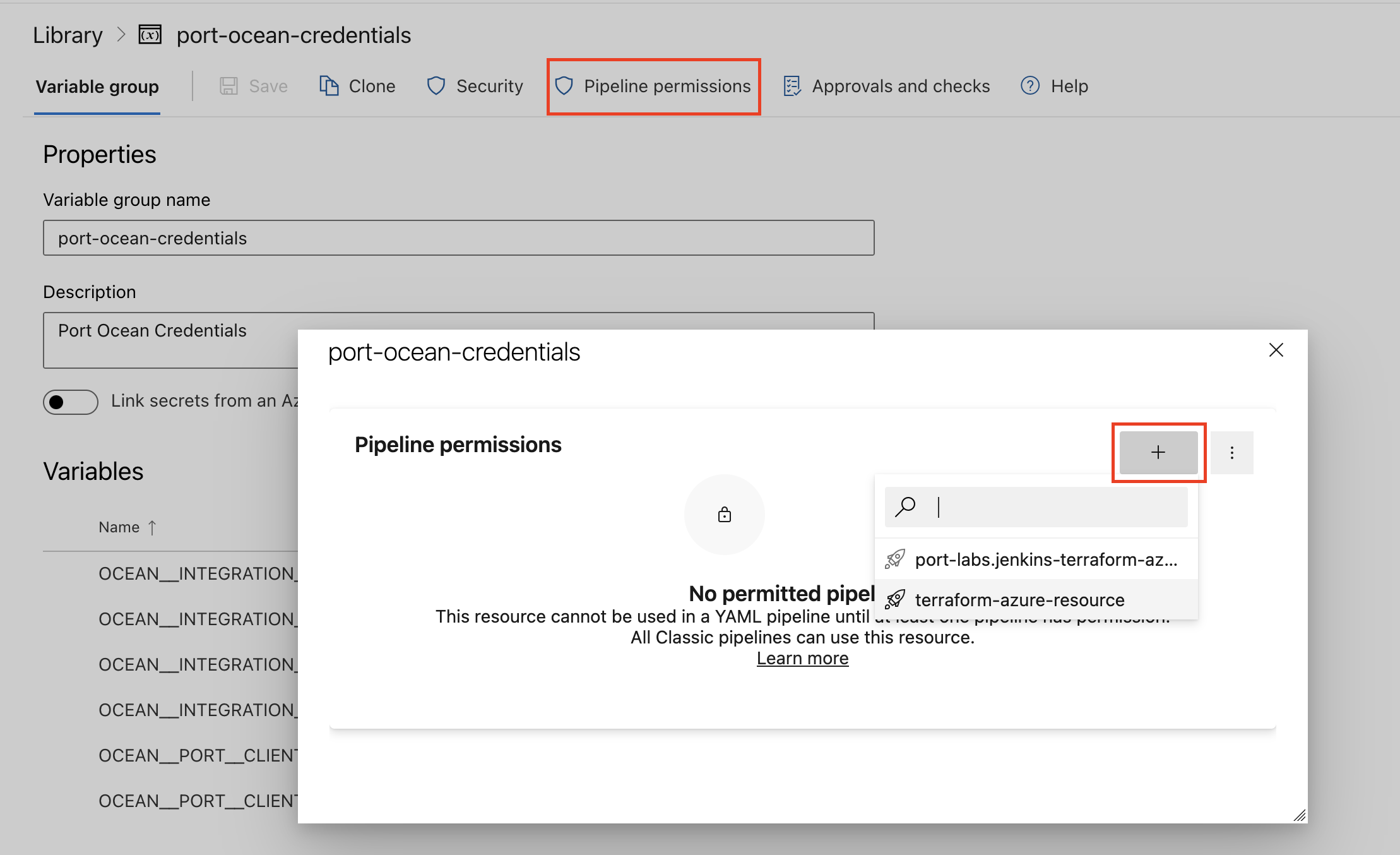
- Authorize Your Pipeline:
-
Go to "Library" -> "Variable groups."
-
Find port-ocean-credentials and click on it.
-
Select "Pipeline Permissions" and add your pipeline to the authorized list.
-
Below are the available parameters and their descriptions.
| Parameter | Description | Required? | Secret?Store this value as an Azure DevOps pipeline variable |
|---|---|---|---|
OCEAN__ | Your Port client ID (How to get the credentials). | ✓ | ✓ |
OCEAN__ | Your Port client secret (How to get the credentials). | ✓ | ✓ |
OCEAN__ | Your Port API URL (https://api.port.io for EU, https://api.us.port.io for US). | ✓ | ✗ |
OCEAN__ | The PagerDuty token. | ✓ | ✓ |
OCEAN__ | The PagerDuty API URL. | ✓ | ✓ |
OCEAN__ | Default true. When set to true, the integration will create default blueprints and the Port app config mapping. | ✗ | ✗ |
OCEAN__ | The identifier of the integration that will be installed. | ✗ | ✗ |
OCEAN__ | Enable sending raw data examples from the third-party API to Port for testing and managing the integration mapping. Default is true. | ✗ | ✗ |
Here is an example for a azure-pipeline.yml pipeline file:Azure pipeline (click to expand)
- Go to the PagerDuty Connectors page in your portal.
- Under Select your installation method, choose your desired CI/CD platform.
- Copy the workflow and replace the placeholders with your values.
Below are the available parameters and their descriptions.
| Parameter | Description | Required? | Secret?Store this value as a GitLab CI/CD variable |
|---|---|---|---|
OCEAN__ | Your Port client ID (How to get the credentials). | ✓ | ✓ |
OCEAN__ | Your Port client secret (How to get the credentials). | ✓ | ✓ |
OCEAN__ | Your Port API URL (https://api.port.io for EU, https://api.us.port.io for US). | ✓ | ✗ |
OCEAN__ | The PagerDuty token. | ✓ | ✓ |
OCEAN__ | The PagerDuty API URL. | ✓ | ✓ |
OCEAN__ | Default true. When set to true, the integration will create default blueprints and the Port app config mapping. | ✗ | ✗ |
OCEAN__ | The identifier of the integration that will be installed. | ✗ | ✗ |
OCEAN__ | Enable sending raw data examples from the third-party API to Port for testing and managing the integration mapping. Default is true. | ✗ | ✗ |
Configuration
Port integrations use a YAML mapping block to ingest data from the third-party api into Port.
The mapping makes use of the JQ JSON processor to select, modify, concatenate, transform and perform other operations on existing fields and values from the integration API.
Default mapping configuration
This is the default mapping configuration for this integration:
Default mapping configuration (click to expand)
deleteDependentEntities: true
createMissingRelatedEntities: true
enableMergeEntity: true
resources:
- kind: services
  selector:
    query: 'true'
  port:
    entity:
      mappings:
        identifier: .id
        title: .name
        blueprint: '"pagerdutyService"'
        properties:
          status: .status
          url: .html_url
          oncall: .__oncall_user | sort_by(.escalation_level) | .[0].user.email
          secondaryOncall: .__oncall_user | sort_by(.escalation_level) | .[1].user.email
          escalationLevels: .__oncall_user | map(.escalation_level) | unique | length
          meanSecondsToResolve: .__analytics.mean_seconds_to_resolve
          meanSecondsToFirstAck: .__analytics.mean_seconds_to_first_ack
          meanSecondsToEngage: .__analytics.mean_seconds_to_engage
- kind: incidents
  selector:
    query: 'true'
    apiQueryParams:
      include:
      - assignees
      - first_trigger_log_entries
      statuses:
      - resolved
  port:
    entity:
      mappings:
        identifier: .id | tostring
        title: .title
        blueprint: '"pagerdutyIncident"'
        properties:
          status: .status
          url: .html_url
          urgency: .urgency
          escalation_policy: .escalation_policy.summary
          created_at: .created_at
          updated_at: .updated_at
          priority: if .priority != null then .priority.summary else null end
          description: .description
          triggered_by: .first_trigger_log_entry.agent.summary
        relations:
          pagerdutyService: .service.id
          service:
            combinator: '"and"'
            rules:
            - property: '"pagerdutyServiceId"'
              operator: '"="'
              value: .service.id
- kind: incidents
  selector:
    query: 'true'
    apiQueryParams:
      include:
      - assignees
      - first_trigger_log_entries
      statuses:
      - triggered
      - acknowledged
  port:
    entity:
      mappings:
        identifier: .id | tostring
        title: .title
        blueprint: '"pagerdutyIncident"'
        properties:
          status: .status
          url: .html_url
          urgency: .urgency
          escalation_policy: .escalation_policy.summary
          created_at: .created_at
          updated_at: .updated_at
          priority: if .priority != null then .priority.summary else null end
          description: .description
          resolvedAt: .resolved_at
          recoveryTime: |-
            (.created_at as $createdAt | .resolved_at as $resolvedAt | if $resolvedAt == null then null else  ( ($resolvedAt | strptime("%Y-%m-%dT%H:%M:%SZ") | mktime) -
              ($createdAt | strptime("%Y-%m-%dT%H:%M:%SZ") | mktime) ) / 60 | floor end)
          triggered_by: .first_trigger_log_entry.agent.summary
        relations:
          pagerdutyService: .service.id
          incident_port_assignee:
            combinator: '"and"'
            rules:
            - property: '"pagerduty_user_id"'
              operator: '"in"'
              value: .assignments | map(.assignee.id)
          incident_pagerduty_assignee: .assignments | map(.assignee.id)
- kind: schedules
  selector:
    query: 'true'
  port:
    entity:
      mappings:
        identifier: .id
        title: .name
        blueprint: '"pagerdutySchedule"'
        properties:
          url: .html_url
          timezone: .time_zone
          description: .description
          users: '[.users[] | select(has("__email")) | .__email]'
- kind: oncalls
  selector:
    query: 'true'
    apiQueryParams:
      include:
      - users
  port:
    entity:
      mappings:
        identifier: .user.id + "-" + .schedule.id + "-" + .start
        title: .user.name
        blueprint: '"pagerdutyOncall"'
        properties:
          startDate: .start
          endDate: .end
          url: .schedule.html_url
        relations:
          pagerdutySchedule: .schedule.id
          pagerdutyEscalationPolicy: .escalation_policy.id
          pagerduty_user: .user.id
          port_user:
            combinator: '"and"'
            rules:
            - property: '"$identifier"'
              operator: '"="'
              value: .user.email
- kind: escalation_policies
  selector:
    query: 'true'
    attachOncallUsers: true
  port:
    entity:
      mappings:
        identifier: .id
        title: .name
        blueprint: '"pagerdutyEscalationPolicy"'
        properties:
          url: .html_url
          summary: .summary
          primaryOncall: .__oncall_users | sort_by(.escalation_level) | .[0].user.email
          escalationRules: .escalation_rules
- kind: users
  selector:
    query: 'true'
  port:
    entity:
      mappings:
        identifier: .id
        title: .name
        blueprint: '"pagerdutyUser"'
        properties:
          url: .html_url
          time_zone: .time_zone
          email: .email
          description: .description
          role: .role
          job_title: .job_title
          teams: .teams
          contact_methods: .contact_methods
- kind: incidents
  selector:
    query: 'true'
    apiQueryParams:
      include:
      - assignees
      - first_trigger_log_entries
      statuses:
      - resolved
  port:
    entity:
      mappings:
        identifier: .id | tostring
        blueprint: '"pagerdutyIncident"'
        relations:
          original_alert: .first_trigger_log_entry.channel.details.id
          extrakey: if .kind == "Incident" then .children.edges[].node.identifier else null end
          additionalField: .some.new.field.value
- kind: incidents
  selector:
    query: 'true'
    apiQueryParams:
      include:
      - assignees
      - first_trigger_log_entries
      statuses:
      - triggered
      - acknowledged
      inducer:
      - assignees
      - first_trigger_log_entries
  port:
    entity:
      mappings:
        identifier: .id | tostring
        blueprint: '"pagerdutyIncident"'
        relations:
          original_alert: .first_trigger_log_entry.channel.details.id
          extrakey: if .kind == "Incident" then .children.edges[].node.identifier else null end
Mapping & selectors per resource
Use the explorer below to view sample payloads and the resulting Port entities for each resource type.
- kind: services
  selector:
    query: 'true'
  port:
    entity:
      mappings:
        identifier: .id
        title: .name
        blueprint: '"pagerdutyService"'
        properties:
          status: .status
          url: .html_url
          oncall: .__oncall_user | sort_by(.escalation_level) | .[0].user.email
          secondaryOncall: .__oncall_user | sort_by(.escalation_level) | .[1].user.email
          escalationLevels: .__oncall_user | map(.escalation_level) | unique | length
          meanSecondsToResolve: .__analytics.mean_seconds_to_resolve
          meanSecondsToFirstAck: .__analytics.mean_seconds_to_first_ack
          meanSecondsToEngage: .__analytics.mean_seconds_to_engage
{
  "id": "PGAAJBE",
  "name": "My Test Service",
  "description": "For testing",
  "created_at": "2023-08-03T16:53:48+03:00",
  "updated_at": "2023-08-03T16:53:48+03:00",
  "status": "active",
  "teams": [],
  "alert_creation": "create_alerts_and_incidents",
  "addons": [],
  "scheduled_actions": [],
  "support_hours": "None",
  "last_incident_timestamp": "None",
  "escalation_policy": {
    "id": "P7LVMYP",
    "type": "escalation_policy_reference",
    "summary": "Test Escalation Policy",
    "self": "https://api.pagerduty.com/escalation_policies/P7LVMYP",
    "html_url": "https://getport-io.pagerduty.com/escalation_policies/P7LVMYP"
  },
  "incident_urgency_rule": {
    "type": "constant",
    "urgency": "high"
  },
  "acknowledgement_timeout": "None",
  "auto_resolve_timeout": "None",
  "integrations": [],
  "type": "service",
  "summary": "My Test Service",
  "self": "https://api.pagerduty.com/services/PGAAJBE",
  "html_url": "https://getport-io.pagerduty.com/service-directory/PGAAJBE",
  "__oncall_user": [
    {
      "escalation_policy": {
        "id": "P7LVMYP",
        "type": "escalation_policy_reference",
        "summary": "Test Escalation Policy",
        "self": "https://api.pagerduty.com/escalation_policies/P7LVMYP",
        "html_url": "https://getport-io.pagerduty.com/escalation_policies/P7LVMYP"
      },
      "escalation_level": 1,
      "schedule": {
        "id": "PWAXLIH",
        "type": "schedule_reference",
        "summary": "Port Test Service - Weekly Rotation",
        "self": "https://api.pagerduty.com/schedules/PWAXLIH",
        "html_url": "https://getport-io.pagerduty.com/schedules/PWAXLIH"
      },
      "user": {
        "name": "demo",
        "email": "devops-port@pager-demo.com",
        "time_zone": "Asia/Jerusalem",
        "color": "teal",
        "avatar_url": "https://secure.gravatar.com/avatar/5cc831a4e778f54460efc4cd20d13acd.png?d=mm&r=PG",
        "billed": true,
        "role": "admin",
        "description": "None",
        "invitation_sent": true,
        "job_title": "None",
        "teams": [],
        "contact_methods": [
          {
            "id": "POKPUFD",
            "type": "email_contact_method_reference",
            "summary": "Default",
            "self": "https://api.pagerduty.com/users/PYIEKLY/contact_methods/POKPUFD",
            "html_url": "None"
          }
        ],
        "notification_rules": [
          {
            "id": "P9NWEKF",
            "type": "assignment_notification_rule_reference",
            "summary": "0 minutes: channel POKPUFD",
            "self": "https://api.pagerduty.com/users/PYIEKLY/notification_rules/P9NWEKF",
            "html_url": "None"
          },
          {
            "id": "PPJHFA5",
            "type": "assignment_notification_rule_reference",
            "summary": "0 minutes: channel POKPUFD",
            "self": "https://api.pagerduty.com/users/PYIEKLY/notification_rules/PPJHFA5",
            "html_url": "None"
          }
        ],
        "id": "PYIEKLY",
        "type": "user",
        "summary": "demo",
        "self": "https://api.pagerduty.com/users/PYIEKLY",
        "html_url": "https://getport-io.pagerduty.com/users/PYIEKLY"
      },
      "start": "2023-10-17T15:57:50Z",
      "end": "2024-02-13T22:16:48Z"
    }
  ]
}
Below are the supported selectors for this resource. Use them under the selector key in your integration mapping configuration to control which resources are returned from the API.
| Selector | Type | Description |
|---|---|---|
exportEnvVariables | array | Environment variable names whose values should be included in lakehouse ingest payloads for DSP processing. |
apiQueryParams | object | API query parameters to include when fetching services. |
serviceAnalytics | boolean | If set to true, will ingest service analytics data to Port Default: true. |
analyticsMonthsPeriod | integer | Number of months to consider for the service analytics date range. Default: 3. |
includeCustomFields | boolean | If set to true, will fetch and attach custom field values for each service Default: false. |
apiQueryParams parameters
| Parameter | Type | Description |
|---|---|---|
include | array | Additional details to include in the response. Allowed values: escalation_policies, teams, integrations, auto_pause_notifications_parameters. |
sort_by | string | Sort services by name. Allowed values: name, name:asc, name:desc. |
team_ids | array | Filter services by team IDs. |
time_zone | string | Time zone to use for the response. Defaults to the account's time zone. e.g. 'America/New_York', 'Europe/London', 'UTC'. |
Set up live events
This integration supports live events, allowing real-time updates to your software catalog without waiting for the next scheduled sync.
Note that different events are supported depending on the resource type.
service.createdservice.deletedservice.updatedincident.acknowledgedincident.annotatedincident.delegatedincident.escalatedincident.priority_updatedincident.reassignedincident.reopenedincident.resolvedincident.status_update_publishedincident.responder.addedincident.responder.repliedincident.triggeredincident.unacknowledged- Hosted by Port
- Self-hosted
Live events base URL
For integrations installed using the Hosted by Port method, you can obtain the live events base URL from the Get an integration API. The response includes liveEventsUuid and liveEventsIngestHostname in the appSpec section.
Call the endpoint with your integration's identifier:
curl -X GET \
  'https://api.port.io/v1/integration/<INTEGRATION_IDENTIFIER>' \
  -H 'Authorization: Bearer <PORT_ACCESS_TOKEN>'
The port_region, port.baseUrl, portBaseUrl, port_base_url and OCEAN__PORT__BASE_URL parameters select which Port API instance to use:
- EU (app.port.io) →
https://api.port.io - US (app.us.port.io) →
https://api.us.port.io
In the response, look for the following fields under spec.appSpec:
{
  "spec": {
    "appSpec": {
      "liveEventsUuid": "abcdefghijk",
      "liveEventsIngestHostname": "ingest.ocean.getport.io"
    }
  }
}
Combine them to build the live events base URL:
https://<liveEventsIngestHostname>/live-events/<liveEventsUuid>
For example, with the values above, the live events base URL is:
https://ingest.ocean.getport.io/live-events/abcdefghijk
This is the same URL configured for the integration.
BaseUrl & webhook configuration
To enable real-time updates of the data in your software catalog, you need to define the liveEvents.baseUrl parameter.
This parameter should be set to the URL of your PagerDuty integration instance, which needs to have the option to setup webhooks via HTTP requests/receive HTTP requests, so ensure the network is configured accordingly.
- If PagerDuty and the integration are in the same cluster/network: Use an internal URL (e.g., a Kubernetes service DNS name).
For Kubernetes deployments, create a service to expose the integration pod and use the service URL asliveEvents.baseUrl. If both the source system and integration are in the same cluster, an internal ClusterIP service is sufficient. - If PagerDuty is external to the integration's network: The integration must be exposed via an ingress, load balancer, or public URL that PagerDuty can reach.
If you're running high volumes of live events in a self-hosted deployment and want better reliability, event durability, or horizontal scalability, you can optionally set up Port's dedicated live events infrastructure. See live events at scale for details.
If liveEvents.baseUrl is not provided, the integration will continue to function correctly. In such a configuration, to retrieve the latest information from the target system, the scheduledResyncInterval parameter has to be set, or a manual resync will need to be triggered through Port's UI.
To test webhooks or live event delivery to your local environment, expose your local pod or service to the internet using ngrok (e.g. ngrok http http://localhost:8000)
Monitoring and sync status
To learn more about how to monitor and check the sync status of your integration, see the relevant documentation.
Capabilities
Ingesting service analytics
To enrich your PagerDuty service entities with analytics data, follow the steps below:
-
Update the service blueprint to include analytics properties. You can add any property that is returned from the PagerDuty aggregated service analytics API
Updated service blueprint (click to expand)
{"identifier":"pagerdutyService","description":"This blueprint represents a PagerDuty service in our software catalog","title":"PagerDuty Service","icon":"pagerduty","schema":{"properties":{"status":{"title":"Status","type":"string"},"url":{"title":"URL","type":"string","format":"url"},"oncall":{"title":"On Call","type":"array","items":{"type":"string","format":"user"}},"meanSecondsToResolve":{"title":"Mean Seconds to Resolve","type":"number"},"meanSecondsToFirstAck":{"title":"Mean Seconds to First Acknowledge","type":"number"},"meanSecondsToEngage":{"title":"Mean Seconds to Engage","type":"number"},"totalIncidentCount":{"title":"Total Incident Count","type":"number"},"totalIncidentsAcknowledged":{"title":"Total Incidents Acknowledged","type":"number"},"totalIncidentsAutoResolved":{"title":"Total Incidents Auto Resolved","type":"number"},"totalIncidentsManualEscalated":{"title":"Total Incident Manual Escalated","type":"number"}},"required":[]},"mirrorProperties":{},"calculationProperties":{},"relations":{}} -
Add
serviceAnalyticsproperty to the integrationselectorkey. When set totrue, the integration will fetch data from the PagerDuty aggregated service analytics API and ingest it to Port. By default, this property is set totrue.Also, by default, the integration aggregates the analytics over a period of 3 months. Use the
analyticsMonthsPeriodfilter to override this date range. The accepted values are positive number between 1 to 12. In the provided example below, we aggregate the analytics over the past 6 months.resources:- kind: servicesselector:query: "true"serviceAnalytics: "true"analyticsMonthsPeriod: 6port:entity:mappings:identifier: .idtitle: .nameblueprint: '"pagerdutyService"'properties:status: .statusurl: .html_urloncall: .__oncall_user | sort_by(.escalation_level) | .[0].user.emailsecondaryOncall: .__oncall_user | sort_by(.escalation_level) | .[1].user.email -
Establish a mapping between the analytics properties and the service analytics data response. Following a convention, the aggregated result of the PagerDuty service analytics API is saved to the
__analyticskey and merged with the response of the service API. Consequently, users can access specific metrics such as the mean seconds to resolve by referencing__analytics.mean_seconds_to_resolve.resources:- kind: servicesselector:query: "true"serviceAnalytics: "true"analyticsMonthsPeriod: 6port:entity:mappings:identifier: .idtitle: .nameblueprint: '"pagerdutyService"'properties:status: .statusurl: .html_urloncall: .__oncall_user | sort_by(.escalation_level) | .[0].user.emailsecondaryOncall: .__oncall_user | sort_by(.escalation_level) | .[1].user.emailmeanSecondsToResolve: .__analytics.mean_seconds_to_resolve -
Below is the complete integration configuration for enriching the service blueprint with analytics data.
Service analytics integration configuration (click to expand)
resources:- kind: servicesselector:query: "true"serviceAnalytics: "true"analyticsMonthsPeriod: 6port:entity:mappings:identifier: .idtitle: .nameblueprint: '"pagerdutyService"'properties:status: .statusurl: .html_urloncall: .__oncall_user | sort_by(.escalation_level) | .[0].user.emailsecondaryOncall: .__oncall_user | sort_by(.escalation_level) | .[1].user.emailmeanSecondsToResolve: .__analytics.mean_seconds_to_resolvemeanSecondsToFirstAck: .__analytics.mean_seconds_to_first_ackmeanSecondsToEngage: .__analytics.mean_seconds_to_engagetotalIncidentCount: .__analytics.total_incident_counttotalIncidentsAcknowledged: .__analytics.total_incidents_acknowledgedtotalIncidentsAutoResolved: .__analytics.total_incidents_auto_resolvedtotalIncidentsManualEscalated: .__analytics.total_incidents_manual_escalated
Ingesting incident analytics
To enrich your PagerDuty incident entities with analytics data, follow the steps below:
-
Update the incident blueprint to include an
analyticsproperty.Updated incident blueprint (click to expand)
{"identifier": "pagerdutyIncident","description": "This blueprint represents a PagerDuty incident in our software catalog","title": "PagerDuty Incident","icon": "pagerduty","schema": {"properties": {"status": {"type": "string","title": "Incident Status","enum": ["triggered","annotated","acknowledged","reassigned","escalated","reopened","resolved"],"enumColors": {"triggered": "red","annotated": "blue","acknowledged": "yellow","reassigned": "blue","escalated": "yellow","reopened": "red","resolved": "green"}},"url": {"type": "string","format": "url","title": "Incident URL"},"urgency": {"title": "Incident Urgency","type": "string","enum": ["high","low"],"enumColors": {"high": "red","low": "green"}},"priority": {"type": "string","title": "Priority","enum": ["P1","P2","P3","P4","P5"],"enumColors": {"P1": "red","P2": "yellow","P3": "blue","P4": "lightGray","P5": "darkGray"}},"description": {"type": "string","title": "Description"},"assignees": {"title": "Assignees","type": "array","items": {"type": "string","format": "user"}},"escalation_policy": {"type": "string","title": "Escalation Policy"},"created_at": {"title": "Create At","type": "string","format": "date-time"},"updated_at": {"title": "Updated At","type": "string","format": "date-time"},"analytics": {"title": "Analytics","type": "object"}},"required": []},"mirrorProperties": {},"calculationProperties": {},"relations": {"pagerdutyService": {"title": "PagerDuty Service","target": "pagerdutyService","required": false,"many": true}}} -
Add
incidentAnalyticsproperty to the integrationselectorkey. When set totrue, the integration will fetch data from the PagerDuty Analytics API and ingest it to Port. By default, this property is set tofalse.resources:- kind: incidentsselector:query: "true"incidentAnalytics: "true"port:entity:mappings:identifier: .id | tostringtitle: .titleblueprint: '"pagerdutyIncident"'properties:status: .statusurl: .self -
Establish a mapping between the
analyticsblueprint property and the analytics data response.resources:- kind: incidentsselector:query: 'true'include: ['assignees']port:entity:mappings:identifier: .id | tostringtitle: .titleblueprint: '"pagerdutyIncident"'properties:status: .statusurl: .selfurgency: .urgencyassignees: .assignments | map(.assignee.email)escalation_policy: .escalation_policy.summarycreated_at: .created_atupdated_at: .updated_atpriority: if .priority != null then .priority.summary else null enddescription: .descriptionanalytics: .__analyticsrelations:pagerdutyService: .service.id -
Below is the complete integration configuration for enriching the incident blueprint with analytics data.
Incident analytics integration configuration (click to expand)
resources:- kind: incidentsselector:query: 'true'include: ['assignees']port:entity:mappings:identifier: .id | tostringtitle: .titleblueprint: '"pagerdutyIncident"'properties:status: .statusurl: .selfurgency: .urgencyassignees: .assignments | map(.assignee.email)escalation_policy: .escalation_policy.summarycreated_at: .created_atupdated_at: .updated_atpriority: if .priority != null then .priority.summary else null enddescription: .descriptionanalytics: .__analyticsrelations:pagerdutyService: .service.id
Ingesting service custom fields
To enrich your PagerDuty service entities with custom fields data, follow the steps below:
-
Update the service blueprint to include properties for the custom fields you want to ingest. When enabled, the integration fetches the custom field values for each service and stores them under the
__custom_fieldskey. Each custom field in the array has the following structure:{"id": "FIELD_ID","name": "my_custom_field","display_name": "My Custom Field","data_type": "string","field_type": "single_value","type": "field_value","value": {"value": "field value here"}}You can extract specific custom field values into individual blueprint properties using jq.
For example, if you have custom fields namedteamandenvironmentin PagerDuty:Updated service blueprint (click to expand)
{"identifier":"pagerdutyService","description":"This blueprint represents a PagerDuty service in our software catalog","title":"PagerDuty Service","icon":"pagerduty","schema":{"properties":{"status":{"title":"Status","type":"string"},"url":{"title":"URL","type":"string","format":"url"},"oncall":{"title":"On Call","type":"array","items":{"type":"string","format":"user"}},"team":{"title":"Team","type":"string"},"environment":{"title":"Environment","type":"string"}},"required":[]},"mirrorProperties":{},"calculationProperties":{},"relations":{}} -
Add
includeCustomFieldsto theselectorkey and map specific custom field values using jq. When set totrue, the integration fetches custom field values for each service. By default, this property is set tofalse. Use jq expressions to extract specific fields by theirname, for example:(.__custom_fields[] | select(.name == "team")).value.resources:- kind: servicesselector:query: "true"includeCustomFields: "true"port:entity:mappings:identifier: .idtitle: .nameblueprint: '"pagerdutyService"'properties:status: .statusurl: .html_urloncall: .__oncall_user | sort_by(.escalation_level) | .[0].user.emailsecondaryOncall: .__oncall_user | sort_by(.escalation_level) | .[1].user.emailteam: (.__custom_fields[] | select(.name == "team")).valueenvironment: (.__custom_fields[] | select(.name == "environment")).value
Ingesting incident custom fields
To enrich your PagerDuty incident entities with custom fields data, follow the steps below:
-
Update the incident blueprint to include properties for the custom fields you want to ingest. The
__custom_fieldsarray has the same structure as described in the service custom fields section above. For example, if you have custom fields namedseverityandaffected_regionin PagerDuty:Updated incident blueprint (click to expand)
{"identifier": "pagerdutyIncident","description": "This blueprint represents a PagerDuty incident in our software catalog","title": "PagerDuty Incident","icon": "pagerduty","schema": {"properties": {"status": {"type": "string","title": "Incident Status","enum": ["triggered","annotated","acknowledged","reassigned","escalated","reopened","resolved"],"enumColors": {"triggered": "red","annotated": "blue","acknowledged": "yellow","reassigned": "blue","escalated": "yellow","reopened": "red","resolved": "green"}},"url": {"type": "string","format": "url","title": "Incident URL"},"urgency": {"title": "Incident Urgency","type": "string","enum": ["high","low"],"enumColors": {"high": "red","low": "green"}},"priority": {"type": "string","title": "Priority","enum": ["P1","P2","P3","P4","P5"],"enumColors": {"P1": "red","P2": "yellow","P3": "blue","P4": "lightGray","P5": "darkGray"}},"description": {"type": "string","title": "Description"},"assignees": {"title": "Assignees","type": "array","items": {"type": "string","format": "user"}},"escalation_policy": {"type": "string","title": "Escalation Policy"},"created_at": {"title": "Create At","type": "string","format": "date-time"},"updated_at": {"title": "Updated At","type": "string","format": "date-time"},"severity":{"title": "Severity","type": "string"},"affectedRegion":{"title": "Affected Region","type": "string"}},"required": []},"mirrorProperties": {},"calculationProperties": {},"relations": {"pagerdutyService": {"title": "PagerDuty Service","target": "pagerdutyService","required": false,"many": true}}} -
Add
includeCustomFieldsto theselectorkey and map specific custom field values using jq. When set totrue, the integration fetches custom field values from the PagerDuty custom fields API for each incident. By default, this property is set tofalse. Extract specific fields the same way as in the service example above.resources:- kind: incidentsselector:query: 'true'include: ['assignees']includeCustomFields: 'true'port:entity:mappings:identifier: .id | tostringtitle: .titleblueprint: '"pagerdutyIncident"'properties:status: .statusurl: .selfurgency: .urgencyassignees: .assignments | map(.assignee.email)escalation_policy: .escalation_policy.summarycreated_at: .created_atupdated_at: .updated_atpriority: if .priority != null then .priority.summary else null enddescription: .descriptionseverity: (.__custom_fields[] | select(.name == "severity")).valueaffectedRegion: (.__custom_fields[] | select(.name == "affected_region")).valuerelations:pagerdutyService: .service.id
Examples
To view and test the integration's mapping against examples of the third-party API responses, use the jq playground in your connectors page. Find the integration in the list of connectors and click on it to open the playground.
Additional examples of blueprints and the relevant integration configurations can be found on the pagerduty examples page
Relevant guides
For relevant guides and examples, see the guides section.
Limitations
- The PagerDuty API uses offset-based pagination, which has a limitation of retrieving a maximum of 10,000 resources. This may affect the integration's ability to sync data if you have more than 10,000 of a specific resource type (e.g., users, services, etc.). Refer to PagerDuty's official documentation on pagination for further details.
Support
For any questions or issues, contact us at support.port.io or via our Community Slack channel.